
RGB Monitor Light Bar, Eye-Care Dual Light Reading Screen Lamp
4.1Editor score
Dual mode lighting
USB-C powered
Space-saving clip
Protecting your eyes during long hours of screen time is essential for maintaining productivity and health. A light behind monitor for eye care provides balanced illumination that reduces glare and minimizes digital eye strain effectively.
We evaluated ten top-rated monitor light bars based on optical design, eye care certifications, and user comfort features. Each product was analyzed for glare reduction, color accuracy, and ease of installation across various desk setups.
Each pick highlights key strengths and ideal use cases to help you choose the right lighting solution. Keep in mind that product availability and specific features may change over time.
4.1Editor score

4.7Editor score

4.6Editor score
As an Amazon Associate we earn from qualifying purchases.
The following table provides a detailed side-by-side comparison of all ten products to help you evaluate their key specifications and features efficiently.


The BenQ ScreenBar Halo 2 stands out as the top choice for professionals seeking premium eye care lighting. It combines advanced optical design with smart features that enhance both comfort and convenience during extended screen sessions.
We may earn a commission when you buy through this link, at no additional cost to you.
Its Asym-Light technology ensures light only reaches your desk, eliminating screen reflections and direct eye exposure. The wireless controller allows seamless adjustments to brightness and color temperature, while the motion sensor turns the light on and off with your monitor.
Although the price is higher than budget options, the build quality and feature set justify the investment. Users appreciate the ability to customize lighting for different times of day without interrupting their workflow.
If you prioritize eye comfort and precision lighting for work or design tasks, the Halo 2 is the ideal solution. It delivers consistent performance and reduces eye strain significantly over long periods of computer use.
The asymmetrical optical design directs light only to your workspace, preventing reflections on your screen that cause visual fatigue.
The motion sensor detects your presence and adjusts lighting automatically, ensuring you always have the right level of illumination without manual tweaks.
We may earn a commission when you buy through this link, at no additional cost to you.
The SAMPHON RGB Monitor Light Bar offers an affordable entry point into eye care lighting without sacrificing essential features. It combines a front task light with a vibrant RGB backlight for atmosphere control.
We may earn a commission when you buy through this link, at no additional cost to you.
The front light eliminates screen glare and illuminates your desk evenly, while the RGB backlight provides mood lighting for gaming or relaxation. Dual buttons allow independent control, and the USB-C connection ensures wide compatibility.
While the build is less premium than high-end models, it provides solid value for casual users and gamers. The retractable clip works with various monitor thicknesses, ensuring a stable fit without damaging screens.
Ideal for budget-conscious buyers who want both task lighting and ambiance, this light bar delivers practical eye care at a fraction of the cost. It is perfect for home offices or gaming setups needing quick installation.
Separate controls for front and back lights let you switch between focused work lighting and immersive mood settings instantly.
Powered via USB-C, this lamp works with laptops, adapters, or power banks, offering flexible placement options for any desk.
We may earn a commission when you buy through this link, at no additional cost to you.
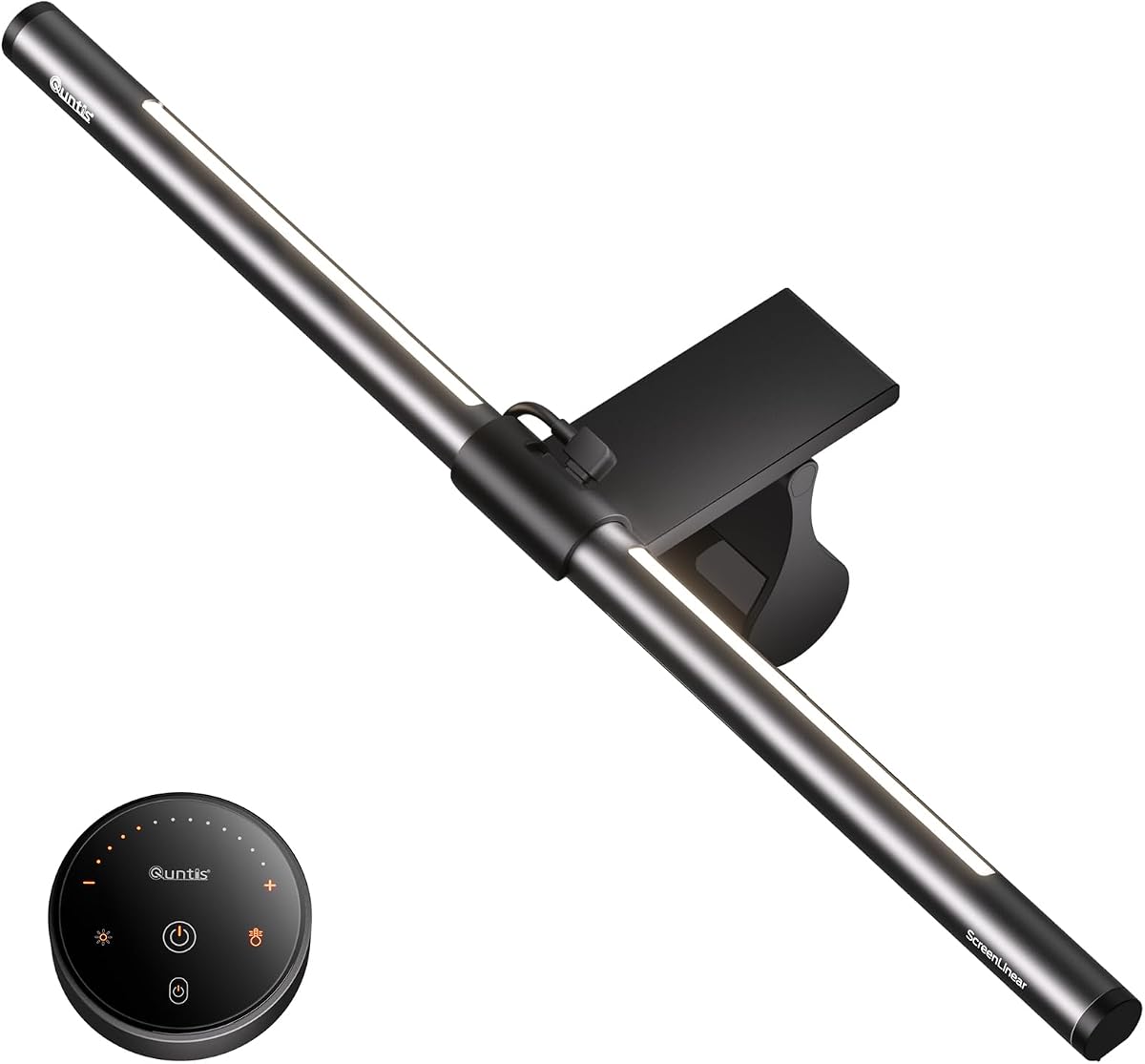
The Quntis ScreenLinear is designed for users who demand high accuracy and automatic adjustments to maintain eye health. It stands out for its auto-dimming capability and superior color rendering index.
We may earn a commission when you buy through this link, at no additional cost to you.
The built-in ambient light sensor monitors brightness and adjusts output to prevent visual fatigue. Its asymmetrical optical design eliminates glare on the screen, while the high CRI ensures true-to-life colors for professional work.
While it lacks the RGB features of gaming-oriented models, its focus on eye protection is unmatched. The weighted clip mounts securely without tools, saving desk space and keeping your setup organized.
If you work long hours or handle color-critical tasks, the ScreenLinear provides the stability and precision needed. It effectively reduces eye strain through balanced illumination and intelligent lighting adjustments.
The ambient sensor continuously monitors your environment to provide optimal light levels, preventing strain from overly bright or dim settings.
With a Ra98 color rendering index, this lamp ensures vibrant and realistic colors, making it essential for designers and photographers.
We may earn a commission when you buy through this link, at no additional cost to you.
The YEELIGHT Monitor Light Bar prioritizes eye safety with RG0 certification, the highest standard for blue light protection. Its premium metal construction and sleek design make it a reliable choice for daily use.
We may earn a commission when you buy through this link, at no additional cost to you.
Features include stepless dimming and three fixed color temperature modes for quick adaptation to different tasks. The low-profile design avoids obstructing webcams, which is ideal for remote work and video calls.
While it lacks advanced automation, the touch controls are responsive and intuitive. The USB power and cable length provide flexible setup options without requiring extra outlets.
Best suited for users concerned about blue light exposure, this bar delivers safe and comfortable illumination. It is a solid option for those seeking durable hardware with strong eye care credentials.
The RG0 rating ensures the light is safe for extended use, minimizing potential damage to vision over time.
The full-metal body offers better heat dissipation and durability compared to plastic alternatives, ensuring long-term reliability.
We may earn a commission when you buy through this link, at no additional cost to you.
This 15.7-inch ultrawide light bar is designed to cover expansive desks and large monitors with uniform brightness. It targets dark spots that standard bars miss, making it ideal for multitaskers.
We may earn a commission when you buy through this link, at no additional cost to you.
The patented asymmetric lighting ensures reflections are minimized while illuminating your keyboard and documents clearly. Stepless dimming and three color temperatures let you tailor the light for any task.
The mechanical switch allows quick brightness adjustments, and the memory function restores your preferred settings after powering off. The counterweight clip fits most monitor thicknesses securely.
Users with large setups will appreciate the consistent coverage across the entire workspace. It provides a cost-effective solution for reducing eye strain on wide surfaces without compromising on brightness.
The extended design eliminates shadows on ultrawide monitors, ensuring every corner of your desk receives adequate task lighting.
With stepless dimming and multiple color temperatures, you can fine-tune the light to match your exact workflow needs.
We may earn a commission when you buy through this link, at no additional cost to you.
The LYMAX Monitor Light Bar offers a practical wireless remote for easy adjustments without reaching for the lamp. Its gravity damper design provides a stable mount that works on most monitor thicknesses.
We may earn a commission when you buy through this link, at no additional cost to you.
The remote allows control over color temperatures and brightness, enabling quick changes during work or study. The anti-slip silicone pads protect your screen from scratches and ensure a secure fit.
While it uses a battery for the remote, the long lifespan and compact size minimize hassle. The USB-C port ensures efficient power delivery and wide device compatibility.
Ideal for users who value control flexibility, this light bar combines convenience with eye-friendly features. It is a strong contender for home offices where remote operation is preferred.
The small wireless remote lets you adjust lighting settings from your chair, saving time and effort during daily tasks.
The gravity damper bracket ensures the lamp stays securely in place without damaging your monitor, adapting to various sizes.
We may earn a commission when you buy through this link, at no additional cost to you.
This compact light bar combines portability with essential eye care features, making it easy to install on any monitor. The anti-blue light design and flicker-free performance protect eyes during long sessions.
We may earn a commission when you buy through this link, at no additional cost to you.
The three color temperatures can be adjusted via touch buttons, and the memory function remembers your last settings for consistent use. The metallic finish adds a touch of style to your setup.
Its wide clip accommodates monitors of different thicknesses, ensuring stability without tools. While not feature-rich, it delivers reliable lighting for everyday tasks.
For users seeking a simple and effective lighting solution, this bar offers good value. It is particularly suitable for shared desks or environments where portability is key.
Intuitive touch buttons allow quick adjustments to brightness and color temperature without needing complex remotes.
The anti-blue light and flicker-free design reduce potential eye strain, ensuring comfortable viewing over extended periods.
We may earn a commission when you buy through this link, at no additional cost to you.
This architectural lamp offers flexible swing arms and a clamp base, making it adaptable for drafting and specialized tasks. It provides 25 lighting combinations to suit diverse needs.
We may earn a commission when you buy through this link, at no additional cost to you.
The wireless remote allows easy control over modes and brightness levels. The energy-efficient LED technology ensures even illumination without glare, promoting a comfortable working environment.
Although it differs from traditional monitor bars, its adjustability makes it ideal for angled tasks. The clamp mounts securely, freeing up desk space while directing light precisely.
For users with unique lighting needs beyond standard screens, this lamp delivers versatility. It bridges the gap between task lighting and computer-focused eye care.
Adjustable swing arms let you position light exactly where needed, perfect for drafting or reading angled documents.
With 25 combinations of color and brightness, you can tailor lighting for reading, working, or relaxing at any time.
We may earn a commission when you buy through this link, at no additional cost to you.
This dual-light model combines task illumination with an immersive RGB backlight for an enhanced gaming experience. It features a Ra95 CRI to ensure accurate colors and reduces eye strain effectively.
We may earn a commission when you buy through this link, at no additional cost to you.
The asymmetric optical design directs light only to your workspace, avoiding screen reflections. The smart memory function restores your last settings instantly, ensuring consistency.
The triangular counterweight clamp provides stability, fitting a wide range of monitors. RGB modes allow you to sync ambiance with your mood or game environment.
Ideal for gamers who want to reduce contrast-induced eye fatigue, this bar delivers both function and flair. It is a versatile addition to any immersive home setup.
The RGB backlight softens the contrast between screen and environment, reducing fatigue during extended gaming sessions.
With Ra95 CRI, colors appear vibrant and realistic, ensuring your design or creative work remains precise.
We may earn a commission when you buy through this link, at no additional cost to you.
The Quntis Glow integrates both front and back light sources to minimize screen contrast and enhance comfort. Its patented sliding clip adapts effortlessly to curved or thin monitors.
We may earn a commission when you buy through this link, at no additional cost to you.
Stepless dimming and high CRI ensure precise color and brightness adjustments. The smart memory function restores preferences after power interruptions, maintaining consistent lighting conditions.
The remote offers intuitive touch control, and the softening light cover reduces glare. It is designed for users seeking maximum comfort during work and leisure.
This model is ideal for professionals and gamers who need both task lighting and ambient balance. It delivers reliable eye care through advanced design and user-friendly controls.
Combining front task light with backlight reduces contrast between screen and environment for lower eye strain.
The sliding weighted clip ensures a secure fit for various monitor types, including ultra-thin and curved screens.
We may earn a commission when you buy through this link, at no additional cost to you.
Selecting the right light behind monitor for eye care involves evaluating several technical and practical factors to ensure optimal comfort and usability.
Look for asymmetrical optical designs that direct light only to your desk while avoiding reflections on your screen. This feature is critical for minimizing glare, which can cause headaches and eye fatigue during extended use.
A good light bar should illuminate your workspace without shining directly into your eyes, ensuring a comfortable visual experience.
High CRI values above 90 indicate accurate color reproduction, essential for design work or color-sensitive tasks. A superior CRI ensures objects and content appear true to life, reducing the need for screen adjustments.
Prioritize models with Ra95 or higher if you work with detailed visuals to maintain color accuracy and reduce eye strain.
Choose lighting that is certified flicker-free and free from harmful blue light hazards. These features stabilize light output and filter out wavelengths that can disrupt sleep and strain eyes.
Look for RG0 or IEC certifications to confirm that the light meets safety standards for long-term use without damaging vision.
A stable mounting system such as a weighted or counterweight clip ensures the light stays in place without damaging your monitor. It should accommodate various thicknesses and curved screens securely.
Ensure the clip design is flexible and durable to avoid wobbling or slipping during daily use.
Stepless dimming and adjustable color temperature allow you to customize lighting for different tasks and times of day. Options like touch controls or wireless remotes enhance convenience.
Models with auto-dimming sensors can adapt brightness automatically, reducing the need for manual adjustments and enhancing comfort.
Metal bodies often offer better durability and heat dissipation compared to plastic alternatives. This ensures longevity and consistent performance over time.
Check for features like memory functions that restore your last settings automatically for seamless daily use.
Ensure the light bar is compatible with your monitor type and thickness. USB or USB-C powered options provide flexibility and reduce the need for additional outlets.
Look for longer cables if your monitor setup requires greater distance from the power source to keep your desk organized.
Identify whether you need task lighting, gaming ambiance, or both. Dual-light models offer flexibility by combining bright task lights with RGB or ambient backlights.
Choose a model that aligns with your primary activities to get the most value from your purchase.
To install, attach the clip securely to the top center of your monitor. Adjust the angle so light points directly to your desk without reflecting on the screen.
Regularly clean the light surface with a soft cloth to remove dust and maintain brightness. Avoid using harsh chemicals or excessive water that could damage the electronics.
Adjust brightness and color temperature based on ambient light conditions and time of day. Use memory features to save preferred settings for quick access each day.
It is a specialized lamp mounted on top of your monitor that provides task lighting while reducing glare. It helps minimize eye strain by balancing illumination around your screen.
Yes, asymmetrical optical designs direct light downward to your desk, avoiding reflections on the screen. This helps maintain clear visibility without distracting highlights.
Most models feature flexible clips that accommodate curved and flat screens. Check the specified compatibility range to ensure proper fit on your display.
Auto-dimming sensors adjust brightness based on ambient light, preventing overly bright or dim settings. This automatic adaptation reduces visual fatigue during long work hours.
Yes, longer or ultrawide-specific bars provide even coverage across larger screens. They eliminate dark spots and ensure consistent lighting for multitasking.
Many models include blue light filtering technology certified to harmful standards. This helps protect vision by minimizing high-energy light during screen sessions.
Most use USB or USB-C connections powered by computers or adapters. This eliminates the need for wall outlets and simplifies cable management.
RGB features are ideal for ambiance or gaming but can be disabled for focus. Dual-light models let you separate task and mood lighting as needed.
These ten options offer diverse features ranging from premium automation to budget-friendly dual lighting. The BenQ ScreenBar Halo 2 leads with wireless control and glare-free optics for professionals.
Prioritize models with high CRI and flicker-free certification to ensure true colors and eye safety. Flexible mounting and stepless dimming add practical value for daily use.
Product availability and features may vary, so review current listings before purchasing to confirm specifications and compatibility with your monitor.