
USB to HDMI Adapter for Monitor Windows 11/10 / 8
3.8Editor score
Supports 1920 x 1080 resolution
Hot-plugging capability included
Long warranty period offered
This guide compares the best Flash Drive to HDMI Adapter options for 2026, evaluating compatibility, resolution support, and ease of setup for diverse devices.
Finding the right adapter to connect your device to a display is essential for modern computing. A Flash Drive to HDMI Adapter offers a convenient way to extend your screen without needing built-in ports. This guide helps you choose the most reliable option for your specific needs.
We have carefully reviewed ten top-rated products to bring you a comprehensive comparison. Each item was evaluated based on compatibility, video quality, and user feedback. Our goal is to simplify your decision-making process by highlighting the strengths and weaknesses of each adapter.
Every selection in this list provides unique features suited for different workflows. From budget-friendly choices to high-performance models, there is something for everyone. Please note that availability and pricing can change frequently, so verify details before purchasing to ensure the best value.
3.8Editor score

4.1Editor score

4.5Editor score
This table provides a side-by-side overview of the ten adapters featured in this guide. It highlights key specifications and features to help you quickly identify the model that best fits your technical requirements and usage scenarios.


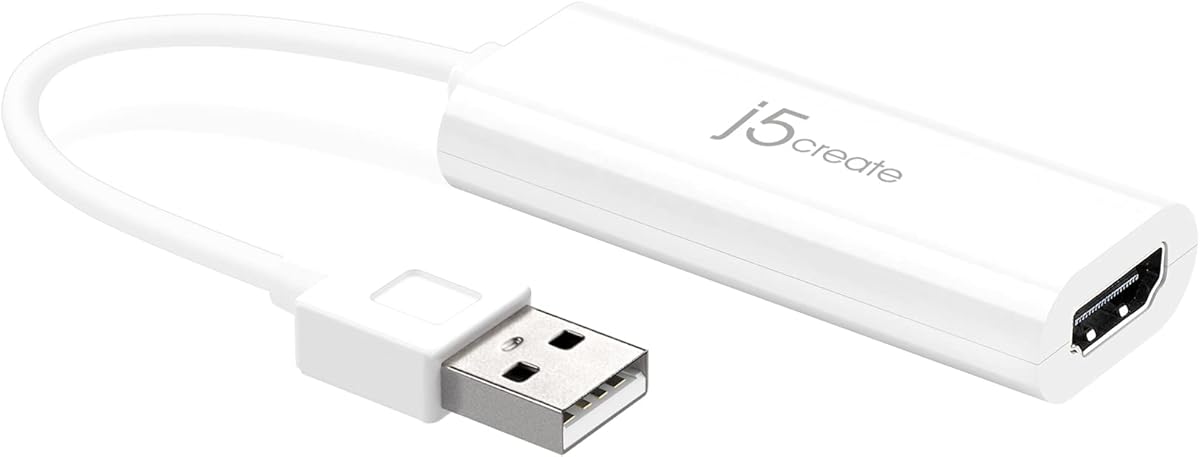
The Reborn USB to HDMI Adapter stands out as a reliable solution for users needing quick screen extension. With a rating of 4.1 stars, it balances performance and cost effectively. Its ability to deliver 1080P at 60Hz makes it suitable for presentations and multimedia.
We may earn a commission when you buy through this link, at no additional cost to you.
This adapter excels in compatibility, supporting both Windows and macOS environments. The driver installation process is straightforward, ensuring users can get started without much hassle. Its sturdy construction ensures it can withstand frequent travel and daily use in various settings.
While it requires a driver install, this is common for USB adapters. It cannot be used in BIOS mode, which limits some advanced use cases. However, for standard office work and media viewing, these limitations are minimal and generally acceptable for most users.
Ideal for professionals needing a portable secondary display, this adapter offers excellent value. It is a great choice for anyone looking to expand their workspace without investing in complex hardware upgrades. We recommend it for its balance of features and affordability.
Delivers crisp 1080P visuals at 60Hz for smooth playback and clear text rendering during presentations.
Works seamlessly with both Windows and macOS systems, making it versatile for diverse office environments.
We may earn a commission when you buy through this link, at no additional cost to you.
This StarTech adapter is designed specifically for Windows environments, offering robust performance for desktop extensions. With a 4.5-star rating, it is highly regarded for its stability and build quality. It supports resolutions up to 1920×1200, ensuring clear visuals.
We may earn a commission when you buy through this link, at no additional cost to you.
The adapter is lightweight and portable, making it ideal for travelers who need extra screen real estate on the go. It is powered directly through the USB port, eliminating the need for a separate power supply. This convenience enhances its utility in various settings.
Users should note that it requires administrator rights for driver installation, which might be restrictive on locked-down corporate machines. It does not support macOS or Linux, limiting its versatility compared to universal adapters. However, for Windows users, it delivers reliable results.
Best suited for IT professionals or office workers using Windows systems, this adapter provides a stable connection for extended work sessions. Its TAA compliance makes it a viable option for government procurement. We recommend it for its consistent performance and durability.
Tailored for Windows X86/X64/ARM platforms ensuring seamless integration and reliable driver support for all devices.
Compact and lightweight form factor allows for easy transport in a laptop bag or pocket.
We may earn a commission when you buy through this link, at no additional cost to you.
For those seeking an economical solution, this USB to HDMI Adapter offers essential functionality at a low cost. It supports 1920 x 1080 resolution and allows users to plug and play after driver installation. A 36-month warranty adds significant value to this budget-friendly choice.
We may earn a commission when you buy through this link, at no additional cost to you.
The adapter works with both Windows and Mac systems, providing flexibility for various users. Hot-plugging support means you can connect or disconnect it without restarting your computer. This feature is particularly useful for temporary setups or quick demonstrations.
While it has a lower rating compared to premium models, it performs adequately for basic tasks. The driver installation might require some patience, but the long-term warranty helps offset potential issues. It is a practical choice for those on a strict budget.
We recommend this adapter for students or casual users who need a simple way to connect to a TV or monitor. Its affordability and warranty make it a safe bet for entry-level needs. Ensure your system meets the requirements before purchasing.
Provides essential HDMI connectivity without breaking the bank, making it ideal for cost-conscious buyers.
Comes with a three-year unconditional return policy, offering peace of mind for long-term use.
We may earn a commission when you buy through this link, at no additional cost to you.
The WAVLINK adapter is a powerhouse for users needing extensive screen real estate, supporting up to six monitors. It works with Windows, macOS, and ChromeOS, making it versatile for mixed environments. DisplayLink certification ensures reliable performance across different systems.
We may earn a commission when you buy through this link, at no additional cost to you.
Its support for both USB-A and USB-C inputs means it can adapt to older and newer laptops alike. This flexibility is crucial as hardware evolves. The compact size ensures it does not clutter your desk while providing significant functionality.
Installation requires the DisplayLink driver, which is standard for these types of adapters. Users should ensure their system can handle the software load when running multiple screens. Despite this, the stability and range make it a top contender for power users.
Ideal for traders, designers, or anyone managing complex workflows, this adapter simplifies multi-monitor setups. It offers a professional grade solution that scales well with your needs. We recommend it for those who prioritize productivity and screen flexibility.
Enables connection of up to six monitors to one device, dramatically increasing workspace efficiency.
Compatible with Windows, macOS, ChromeOS, and Android, fitting into almost any operating environment.
We may earn a commission when you buy through this link, at no additional cost to you.
This dual HDMI adapter offers exceptional value for professionals needing two external screens from one USB port. It supports 4K resolution on one port while driving 1080p on the other. With a 4.5-star rating, it is a trusted choice for IT professionals.
We may earn a commission when you buy through this link, at no additional cost to you.
Designed specifically for Windows, it integrates smoothly with X86/X64/ARM platforms. The three-year warranty and free lifetime technical support provide long-term security. Its robust build ensures it can handle frequent plug and play cycles without wear.
Administrative rights are needed to install drivers, which may be a hurdle in restricted environments. The focus on Windows limits its broader appeal, but for those systems, it is a premium solution. The high-definition output makes it suitable for multimedia tasks.
We recommend this adapter for traders, developers, or analysts who need dual high-resolution screens. It reduces cable clutter while maximizing screen space. If you need reliable dual output on Windows, this model is an excellent investment.
Connect two monitors simultaneously, streamlining workflows for complex data analysis or coding.
Supports 4K resolution for crystal clear visuals on modern high-definition displays.
We may earn a commission when you buy through this link, at no additional cost to you.
This adapter is DisplayLink certified, guaranteeing compatibility with most USB-A laptops and desktops. It supports 1080p resolution and offers 5.1ch audio through HDMI. With a 4.4-star rating, it is favored for its reliable setup and performance.
We may earn a commission when you buy through this link, at no additional cost to you.
The driver installation is automatic on Windows and Chrome, simplifying the initial setup. Users do not need to manage complex configurations, which is a huge plus for non-technical users. It is also bus-powered, so no extra outlet is needed.
While it carries a higher price tag, the certified performance justifies the cost for businesses. The compact design makes it easy to transport. However, it focuses on a single display, which might not be enough for power users needing multiple screens.
Ideal for corporate environments, this adapter ensures consistent performance across different hardware. We recommend it for those who prioritize reliability and ease of use over budget. It is a solid choice for daily office work and presentations.
DisplayLink certification ensures broad compatibility and minimal driver issues across various systems.
Features automatic driver installation for Windows and Chrome, reducing setup time significantly.
We may earn a commission when you buy through this link, at no additional cost to you.
Designed for modern smartphones and tablets, this adapter allows users to mirror 4K content to TVs easily. It includes a pass-through charging port, so you can charge your device while watching content. A 4.2-star rating reflects its ease of use.
We may earn a commission when you buy through this link, at no additional cost to you.
The plug and play feature means no drivers are needed for supported devices like iPhone 15 or MacBook. It supports various video apps, making it ideal for home theater use. The aluminum alloy casing ensures durability and heat dissipation.
Some apps like Netflix have DRM restrictions, so content may not play on all services. This is a limitation of the protocol rather than the adapter itself. Despite this, it remains a top choice for sharing media from mobile devices.
We recommend this adapter for travelers and families who want to share phone content on a big screen. Its charging capability adds convenience, ensuring your device stays powered during long sessions. It is a practical tool for media consumption.
Seamlessly connects iPhone and Android devices to TVs for high-quality video streaming and presentations.
Includes a USB-C port to charge your device while in use, preventing battery drain.
We may earn a commission when you buy through this link, at no additional cost to you.
This adapter converts a USB-A port into a high-definition HDMI output for simple display extension. It supports 1080P resolution at 60Hz, ensuring smooth video playback. With a 4.3-star rating, users appreciate its straightforward functionality.
We may earn a commission when you buy through this link, at no additional cost to you.
The driver installation is guided by on-screen prompts, making it accessible for non-tech users. Importantly, the driver runs locally, which enhances privacy by avoiding internet data access. It works well with Windows and macOS systems for various setups.
It is not compatible with older Windows versions or Android/Linux systems. This limits its use in legacy environments. However, for modern machines, it provides a reliable way to add a second screen for multitasking or watching movies.
We recommend this adapter for home office users who need an easy plug-and-play solution. Its focus on privacy and simplicity makes it a safe choice. If you need a dependable way to extend your display without hassle, this is a good fit.
The driver runs locally on your machine, ensuring no external data access for enhanced privacy.
Delivers lag-free video sync at 60Hz for movies and presentations on large screens.
We may earn a commission when you buy through this link, at no additional cost to you.
This compact adapter is perfect for users with USB-C laptops needing a quick video output. It supports 4K resolution at 60Hz, ensuring crisp images for work or entertainment. With a 4.4-star rating, it is a favorite for travelers and digital nomads.
We may earn a commission when you buy through this link, at no additional cost to you.
The adapter uses advanced IC chips to convert digital signals efficiently. Its compact design allows it to fit easily in a pocket. The connector is plated to resist corrosion, ensuring a long lifespan even with frequent use.
It requires the USB-C device to support DP Alt mode, which most modern laptops do. There is no driver installation needed, making it truly plug and play. However, older devices without this feature will not work with it.
We recommend this adapter for MacBook and XPS users who want high resolution without bulk. It simplifies connections for business presentations and home viewing. If you have a modern USB-C device, this adapter offers premium performance.
Tiny footprint allows for easy transport in a bag while maintaining full 4K performance.
Molded strain relief and plated connectors protect against wear and tear for long-term reliability.
We may earn a commission when you buy through this link, at no additional cost to you.
This adapter is designed for users who need to frequently connect and disconnect monitors without rebooting. It supports hot-swappable USB, which is crucial for dynamic work environments. With a 4.5-star rating, it is highly trusted by professionals in trading or support.
We may earn a commission when you buy through this link, at no additional cost to you.
The ability to add or remove monitors on the fly increases flexibility. It is great for managing large spreadsheets across two screens without window overlapping. The setup is simple once the driver is installed on your machine.
The initial driver installation is required but not complex. It focuses on practical productivity tools rather than high-end graphics performance. It may not be suitable for gaming but is perfect for business applications that require multiple screens.
We recommend this adapter for customer support or financial analysts who need to switch displays often. It simplifies workflow management and reduces downtime. If you need a reliable way to toggle monitors, this is a strong choice.
Allows you to connect or disconnect monitors without restarting your system for seamless workflow.
Optimized for multitasking and managing multiple windows efficiently in professional settings.
We may earn a commission when you buy through this link, at no additional cost to you.
Selecting the right adapter involves considering several technical factors to ensure compatibility with your devices. This section outlines the key elements you should review before making a purchase.
Check if the adapter supports your specific OS. Some are limited to Windows, while others work with macOS or Linux. Ensure drivers are available for your version to avoid issues.
Always verify system requirements before buying to ensure the adapter will work correctly with your setup.
Higher resolutions like 4K offer better clarity but may require more bandwidth. Ensure the adapter supports the refresh rate your monitor needs for smooth motion.
Choose an adapter that matches your display's capabilities to avoid blurry or flickering images.
Some adapters need specific drivers to function, which can be a hurdle if you lack admin rights. Others are plug-and-play, simplifying setup significantly.
If you cannot install drivers, opt for a plug-and-play model to avoid setup barriers.
Verify whether the adapter uses USB-A, USB-C, or Thunderbolt. Ensure your computer has the matching port or an appropriate dongle.
Select an adapter with the correct connector type for your laptop to ensure physical compatibility.
Some adapters are bus-powered, drawing power from the USB port, while others need an external supply. Bus-powered options are more portable.
If you travel often, choose a bus-powered adapter to reduce cable clutter.
Look for adapters made with durable materials like aluminum or braided cables. These will withstand frequent travel and plugging.
Investing in a sturdier build can extend the lifespan of your device.
Manufacturers often offer warranties ranging from one year to several. Check for technical support options in case of failures.
A longer warranty provides better protection for your investment.
Consider if you need a single display or multiple monitors. Some adapters support multi-screen setups while others only allow one.
Choose a model that fits your specific workflow requirements.
Start by checking your computer's ports to ensure compatibility. Connect the USB end to your computer and the HDMI end to your monitor or TV.
If the adapter requires drivers, download and install them before plugging in. Follow the on-screen instructions to complete the setup process.
Handle the adapter gently when plugging or unplugging to avoid port damage. Store it in a protective case when not in use to prevent wear.
Not all adapters require drivers. Some are plug-and-play, but many need specific software to function correctly. Always check the product details for driver requirements before purchasing to avoid setup issues.
Yes, most USB to HDMI adapters work with projectors that have HDMI inputs. Ensure the projector supports the resolution output by the adapter for the best results.
Compatibility depends on the specific adapter model. Some support older macOS versions, but newer ones may be optimized for recent systems. Check the supported OS list in the product description.
This often happens due to missing drivers or incorrect resolution settings. Ensure drivers are installed and adjust your display settings to match the adapter's output resolution.
Yes, using multiple USB ports and adapters allows for multiple screens. Ensure your computer has enough USB bandwidth to support all connected displays simultaneously.
Basic adapters use very little system resources. However, high-resolution outputs might use more CPU or GPU power, especially on older machines.
This guide reviewed ten top adapters to help you find the right fit for your needs. From budget options to premium dual-output models, there is a choice for every scenario.
Prioritize compatibility and resolution support when making your final decision. Ensure the adapter matches your computer's ports and display requirements for a smooth experience.
Always check current availability and pricing before purchasing. Prices can fluctuate, so verifying details ensures you get the best value for your investment.