
Laptop Monitor Light Bar with Clip
4.6Editor score
Easy clip-on installation
No screen glare design
USB powered memory function
Working long hours at a desk can strain your eyes if lighting is poor. A laptop monitor light bar offers a sleek solution to illuminate your workspace without screen glare. These devices attach directly to your screen to provide focused light where you need it most.
We evaluated ten leading models to find the most effective lighting solutions for various setups. Our comparison considers optical design, brightness control, and ease of installation. Each product was reviewed for its ability to reduce eye fatigue during extended work or gaming sessions.
Every pick in this list highlights specific strengths for different user needs and budgets. You will find options ranging from simple clip-on lights to advanced bars with ambient sensors. Please note that product availability and pricing may change over time so check current listings.
4.6Editor score

4.6Editor score

4.7Editor score
As an Amazon Associate we earn from qualifying purchases.
This side-by-side comparison breaks down the key features of ten popular laptop monitor light bars to help you make an informed decision for your workspace.

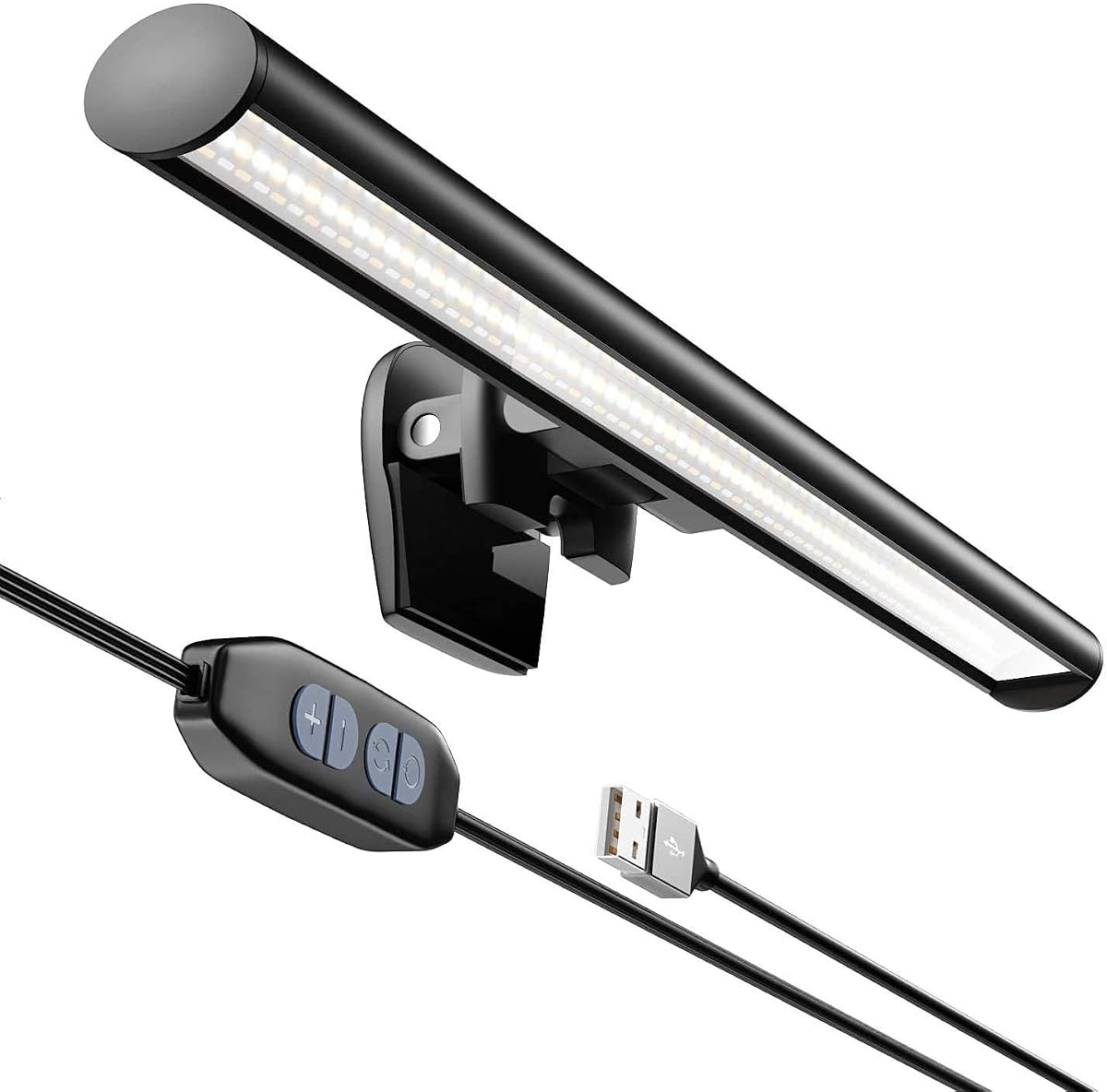





This lamp stands out for its intelligent auto-dimming feature that adapts to your environment. It has a strong user rating of 4.6 stars based on real customer experiences. The combination of eye care certifications and high-quality light output makes it a top contender.
We may earn a commission when you buy through this link, at no additional cost to you.
The built-in ambient light sensor maintains consistent brightness without manual tweaks. It uses 78 high-quality LED beads for uniform illumination and minimal shadows. Its high CRI ensures colors look true which is vital for creative work.
While it costs more than basic options the added features justify the investment for many users. The stepless dimming allows fine-tuned control which might be tricky for some to master quickly. However the benefits for eye health outweigh this minor learning curve.
Ideal for designers and office workers who spend long hours in front of screens. If you want a set-and-forget lighting solution that protects your vision this is the best choice available today.
The sensor monitors room brightness and adjusts light output automatically to prevent eye strain.
With an ultra-high CRI of 98 colors appear vivid and realistic for professional tasks.
We may earn a commission when you buy through this link, at no additional cost to you.
This model delivers essential features at an accessible price point for students and home workers. It holds a 4.6 star rating which reflects strong satisfaction among budget-conscious buyers. The design focuses on simplicity and functionality without unnecessary complications.
We may earn a commission when you buy through this link, at no additional cost to you.
The clip-on installation takes seconds and requires no tools or screws to secure it. Its asymmetrical optical design directs light to the desk while avoiding screen reflections. You can choose from three color temperatures and ten brightness levels for comfort.
While the construction feels less robust than expensive models it serves its purpose well. The memory function is a nice touch that saves your preferred settings between uses. For those seeking value and eye protection this unit is a reliable starting point.
Best for anyone needing a quick and affordable way to improve desk lighting. If you do not need advanced sensors or metal builds this offers exactly what you need at a low cost.
The simple clip mechanism attaches securely to most monitors without any hardware.
Light is directed only onto the workspace preventing reflections on your screen.
We may earn a commission when you buy through this link, at no additional cost to you.
This premium bar is engineered for users with large or curved monitors needing wide coverage. It leads the category with a 4.7 star rating due to its robust design and features. The dual light system provides both desk illumination and ambient backlighting.
We may earn a commission when you buy through this link, at no additional cost to you.
The unique clamp accommodates monitors ranging from ultra-thin to thick bezels securely. You get stepless dimming and fifteen RGB backlight modes to customize your atmosphere. Its high brightness ensures even lighting across large workspaces without dark corners.
The larger footprint might overwhelm very small desks but it suits expansive setups perfectly. While it consumes more power the visual benefits and versatility are significant for enthusiasts. This is the ultimate choice for serious gamers and professionals.
If you own a wide curved display this light bar offers unmatched compatibility and performance. It transforms your setup into a professional workstation with advanced lighting capabilities.
Designed to contour to monitors with curvature from 800R to 3000R.
Choose from fifteen colors to match your mood or gaming theme.
We may earn a commission when you buy through this link, at no additional cost to you.
This lamp combines style with function featuring a matte black frame that suits modern desks. It offers decent eye care features with a 4.3 star rating from satisfied users. The design prioritizes aesthetics without sacrificing essential lighting performance.
We may earn a commission when you buy through this link, at no additional cost to you.
Its unique structure ensures the lamp does not block your laptop camera during calls. The 54 LED beads provide a soft and even light source for comfortable viewing. Three color temperature options help you adjust from focus to relaxation easily.
Some users might find the brightness slightly lower than higher-end competitors for tasks. The clip fit works well on many monitors but may vary with unusual shapes. Still the stylish look and warranty provide good value for daily office use.
Perfect for users who want a clean look that matches their laptop or monitor. If style and camera access are priorities this model delivers a solid everyday solution.
The slim profile ensures your webcam remains visible for video communication.
Built to withstand daily wear and tear with a long-lasting light source.
We may earn a commission when you buy through this link, at no additional cost to you.
This light bar is ideal for travelers who need reliable lighting on the go. It scores a 4.5 rating for its ability to adapt to different environments comfortably. The flicker-free design makes it safe for extended study or work sessions.
We may earn a commission when you buy through this link, at no additional cost to you.
Its slim and lightweight construction allows you to pack it without taking up much room. You can adjust the angle to suit your needs at home or in a hotel. USB power ensures compatibility with almost any laptop or power bank.
While durable the thin build means the clip requires careful handling during travel. It might not be as bright as stationary lamps but it covers the basics well. This is a practical choice for those moving between locations often.
Ideal for students or professionals who work in different places daily. If you need a reliable light that fits in a bag this is a smart portable solution.
The LED design reduces fatigue caused by rapid light fluctuations during use.
Adjust the angle freely to direct light exactly where you need it.
We may earn a commission when you buy through this link, at no additional cost to you.
This model uses an extra-wide bar to cover larger desks and reduce dark spots effectively. It holds a 4.2 star rating and is popular for its broad lighting footprint. The high brightness level helps eliminate shadows during work and gaming.
We may earn a commission when you buy through this link, at no additional cost to you.
The 11.8 inch width delivers uniform light across a generous workspace area. You can adjust brightness and color seamlessly to match your mood or activity. The counterweight clip holds it steady on most monitor thicknesses without wobbling.
The mechanical switch on the side might be less intuitive than touch controls for some. It also requires enough USB power to reach full brightness which varies by port. These minor issues do not hinder its strong performance on wide surfaces.
Best for users with wide desks who want to light up the whole area evenly. If you struggle with dark corners this bar offers a practical and effective solution.
The wide bar ensures consistent brightness across the desk surface.
Delivers up to 800 lux of central brightness for effective illumination.
We may earn a commission when you buy through this link, at no additional cost to you.
This lamp offers unique dual control modes that provide flexibility in adjusting settings. It has a 4.5 star rating for its balanced performance across multiple features. The design ensures zero screen glare while maintaining high brightness levels.
We may earn a commission when you buy through this link, at no additional cost to you.
The asymmetric optical structure casts light only on the desktop and keyboard area. It fits curved screens well thanks to its universal mounting design and sturdy clip. Brightness and color temperature adjustments are smooth and responsive for daily needs.
Some users might find the button on the side slightly awkward to reach quickly. The USB cable length is sufficient but could be longer for large desk setups. These drawbacks are small compared to the strong lighting performance offered.
Ideal for those who need versatile control options without complex touch interfaces. If you want a dependable light that works on curved screens this is a great choice.
Toggle settings easily with physical controls that respond quickly.
The tidy design matches modern workstations without cluttering the look.
We may earn a commission when you buy through this link, at no additional cost to you.
This lamp is designed to focus light specifically on your keyboard and desk area. It holds a 4.5 star rating for its targeted lighting which helps reduce eye strain. The housing is lightweight and simple to handle for everyday use.
We may earn a commission when you buy through this link, at no additional cost to you.
The reflector design improves lighting efficiency and avoids dazzling light hitting your eyes. A 4-key controller lets you adjust brightness and color modes without complex menus. This setup is great for work environments where focused light is priority.
While the reach is limited to the immediate workspace it is perfect for compact desks. The basic build feels functional but less premium than high-end metal alternatives. Still it offers solid performance for its specific intended purpose and use.
Best for office workers who need clear light on their input devices. If you want a simple portable light to reduce fatigue this model works well.
Illuminates the typing area to reduce eye fatigue during work.
Four physical keys make adjusting settings quick and easy.
We may earn a commission when you buy through this link, at no additional cost to you.
This bar stands out with a full-metal body that ensures durability and heat management. It has a 4.4 star rating from users who appreciate its build quality and eye care features. The RG0 certification guarantees top-tier blue light safety for your eyes.
We may earn a commission when you buy through this link, at no additional cost to you.
The touch control interface allows smooth stepless dimming for precise lighting control. Its ultra-high CRI of 95 ensures true-to-life color rendering for detailed tasks. The low-profile design keeps the webcam clear for seamless video communication.
The metal construction may retain some warmth during long sessions but remains safe. It is slightly pricier than plastic models but offers better longevity and stability. This balance of quality and performance makes it a strong contender for most desks.
Best for users who value durability and precise color accuracy. If you want a premium touch experience with reliable eye safety this model fits well.
Meets the highest standard for blue light safety to protect vision.
Ra95 CRI ensures colors appear natural and vibrant for work.
We may earn a commission when you buy through this link, at no additional cost to you.
This model features a unique dual light design with rear ambient lights for comfort. It holds a 4.5 star rating for its innovative approach to reducing eye strain effectively. The rear lights help reduce pressure in dark surroundings for better viewing.
We may earn a commission when you buy through this link, at no additional cost to you.
With a CRI of 95 it restores true natural light colors for accurate work. The memory function saves your last settings so you do not reset them often. The Type C power line ensures a modern and secure connection to your devices.
The rear lights are subtle and may not be bright enough for all preferences. Setup might take a bit longer than basic clip-on models due to the design. However the comfort benefits make it worthwhile for long session work.
Best for those seeking advanced eye care features like ambient backlighting. If you want to reduce fatigue with a unique design this is a smart pick.
Reduces pressure on eyes by lighting the dark surroundings softly.
Remembers your brightness and color settings for quick restart.
We may earn a commission when you buy through this link, at no additional cost to you.
Selecting the right light bar requires understanding your specific workspace needs and preferences.
The core feature of any monitor light bar is its optical design. Look for asymmetrical lighting that directs light onto your desk instead of the screen. This prevents reflections and glare which are major causes of eye strain. Proper optical engineering ensures your screen remains clear while you work.
Always choose a model that explicitly mentions glare reduction technology.
A secure mount is essential for safety and convenience. Most bars use a clip-on design that fits most standard monitor thicknesses. Check the clip range to ensure it fits your device especially if you have a curved or thick monitor. Adjustable clamps offer better stability for diverse setups.
Ensure the mount is sturdy enough to hold the weight without sliding.
Almost all laptop monitor light bars rely on USB power for convenience. This means you can plug them directly into your computer or a power bank. Some models use USB-C while others use traditional USB-A connectors. Verify which type your system has to avoid needing extra adapters.
USB power offers flexibility but requires available ports on your devices.
Adjustable color temperature allows you to switch between warm and cool light. Warm light is better for relaxing while cool light helps with focus. Look for models with multiple preset modes or stepless dimming. This flexibility ensures you can adapt to different times of day.
Choose a model with at least three temperature options for best versatility.
Brightness control helps you adapt to ambient light conditions. Models with multiple levels or stepless dimming allow precise adjustments. High brightness is needed for tasks but lower settings suit evening use. A dimmer switch is crucial for eye comfort during long sessions.
Check the lumen or lux output to ensure sufficient illumination.
Materials like metal offer durability and heat dissipation compared to plastic. High-quality LEDs should have a long lifespan and consistent output. A solid build ensures the bar remains stable and functional over time. Investing in durable materials saves money in the long run.
Opt for sturdy materials if you plan to use it daily.
Extra features like memory functions or ambient sensors add convenience. Memory functions recall your last settings automatically. Ambient sensors adjust brightness based on room light. These smart features reduce manual tweaking and improve user experience significantly.
Consider if these extras fit your budget and workflow needs.
Certifications like RG0 or IEC standards indicate safety for long-term use. These ensure the light is flicker-free and minimizes blue light hazards. Eye care should be a top priority for frequent users. Always check product details for verified safety standards.
Certified products provide peace of mind for your health.
To start, attach the light bar to the top of your monitor using the clip. Ensure it is centered and secure before plugging in the USB cable. This prevents accidental drops or imbalance during use.
Adjust the brightness and color temperature using the control buttons or touch panel. If your model has memory, it will remember your preferred settings for next time. This saves you time and ensures consistent lighting daily.
Regularly clean the LED surface with a soft cloth to maintain light output. Keep the USB port free of dust and moisture to avoid connection issues. Proper care extends the lifespan and keeps your workspace efficient.
Most models are designed with a low profile that avoids obstructing the webcam. Look for camera-friendly designs to ensure your video calls remain clear. This is especially important for remote workers who need to stay visible.
Many modern light bars have flexible or adjustable clips to fit curved screens. Check the product specifications for curvature compatibility to ensure a secure fit. Some premium models are specifically engineered for wide curved displays.
Most light bars work with any standard USB port including those on your computer or a wall adapter. Some units may need a higher wattage for maximum brightness. Check the manual to confirm voltage requirements for optimal performance.
Yes, models with certified eye care features are safe for children's use. Look for flicker-free lights and blue light protection to reduce eye strain. Supervision is always recommended when young children use electronic devices.
Use a dry or slightly damp soft cloth to wipe the surface gently. Avoid using harsh chemicals or abrasive materials that might scratch the LEDs. Ensure the device is unplugged before cleaning to prevent electrical issues.
Yes, portable models are lightweight and designed for travel. Many can run off power banks so you do not need a laptop. This makes them ideal for working in hotels or co-working spaces on the go.
We reviewed ten top laptop monitor light bars to help you find the perfect lighting solution. The Quntis Computer Monitor Lamp stands out with its smart auto-dimming features. Budget buyers will love the value of the clip-on model for daily use.
Your choice depends on your workspace size and specific needs. Consider factors like curved screen support and eye care certifications before buying. Matching the light bar to your setup ensures the best experience possible.
Check current availability and pricing before making your final decision. Lighting technology evolves quickly so new models may offer fresh features soon. Investing in the right bar will improve your focus and comfort over time.