
ewnol Dockable Case for Nintendo Switch 2
4.4Editor score
Ultra-affordable complete bundle
Includes screen protectors and caps
Slim ergonomic grip design
Discover the top dockable Switch 2 cases for 2026. We compare protection, grip, design, and compatibility to help you find the perfect case for your console.
Finding the right dockable Switch 2 case means balancing protection with seamless TV mode access. A good case should shield your console from drops while keeping ports and the kickstand fully usable without removal.
We compared ten real products based on build quality, docking compatibility, ergonomics, and extra features like stands or card slots. Each option offers unique benefits for handheld, tabletop, or docked gaming sessions.
Each pick highlights specific strengths such as military-grade protection, quick-release Joy-Con mechanisms, or budget-friendly bundles. Note that availability and pricing may change, so check current details before buying your next accessory.
4.4Editor score

4.6Editor score

5.0Editor score
This side-by-side comparison shows how each dockable Switch 2 case balances protection, design, and functionality. Use this table to quickly find the model that fits your gaming style and budget requirements today.



This SUPCASE offers top-tier protection with a seamless dock-compatible design. It holds a 4.6 rating for its reliable hinge and shockproof build. Gamers love its firm grip and anti-yellowing materials.
We may earn a commission when you buy through this link, at no additional cost to you.
The standout feature is the hinge mechanism that lets you remove Joy-Con without taking off the case. The raised bezel guards the screen from scratches. Its balanced weight preserves the console's natural feel while adding professional-grade protection.
One trade-off is the lack of kickstand support, which might limit tabletop use. Also, the higher price may not suit every budget. However, these are acceptable for users prioritizing protection and easy docking.
Anyone seeking durable protection without docking hassles should choose this model. It balances security and convenience better than most rivals. We recommend it as the top choice for serious Switch 2 players.
The case is designed specifically for uninterrupted docking so you never remove it to play on TV.
The foldable hinge lets you assemble or remove Joy-Con quickly without tools or extra effort.
We may earn a commission when you buy through this link, at no additional cost to you.
This dockable case features a unique pop-up button for Joy-Con release. It has a 4.3 rating for solving multi-player needs without full case removal. The carbon fiber grip offers a premium look and anti-slip feel.
We may earn a commission when you buy through this link, at no additional cost to you.
Key strengths include the kickstand cutout and dock compatibility allowing full mode access. The high-impact shell absorbs falls and resists scratches. The carbon fiber texture prevents fingerprints while adding a stylish stripe pattern.
A minor trade-off is that the release button needs careful alignment and the color may attract dust. Still, these are acceptable for the ease of swapping controllers mid-game. The price point remains very competitive.
Players who switch modes often will find this case highly convenient. The pop-up button saves time and reduces wear. We suggest it for those wanting fast access without sacrificing protection.
Press the hidden button to release Joy-Con in one second without prying or full removal.
Carbon fiber texture prevents slips and fingerprints while giving the console a premium mechanical look.
We may earn a commission when you buy through this link, at no additional cost to you.
This SUPCASE includes a foldable aluminum stand perfect for tabletop play. With a 4.5 rating, it balances protection with hands-free convenience. The dockable design ensures you never remove it when playing on TV.
We may earn a commission when you buy through this link, at no additional cost to you.
The aluminum stand adjusts from thirty to ninety degrees and folds flush when not in use. Its hinge covers keep Joy-Con connected securely. Raised edges protect the screen from contact during docking or travel.
While heavier at one hundred forty-five grams it offers superior stability and protection. The stand may stick out a bit when folded. Still, these are small trade-offs for the added versatility in portable sessions.
Tabletop gamers will appreciate the built-in stand option. It replaces flimsy plastic alternatives with a sturdy metal frame. We recommend this model for those who want hands-free gaming without extra accessories.
The hollow aluminum stand supports any angle from thirty to ninety degrees for perfect viewing comfort.
Hinge covers keep controllers firmly connected during play while allowing quick release when needed.
We may earn a commission when you buy through this link, at no additional cost to you.
Belkin delivers a focus on comfort with this ergonomic grip. It holds a 4.1 rating for its comfortable feel during long sessions. The textured surface ensures a non-slip hold even during intense gameplay.
We may earn a commission when you buy through this link, at no additional cost to you.
Its key strengths include full dock compatibility and kickstand access. The quick-release mechanism lets you share Joy-Con easily. Made from seventy-five percent recycled materials, it supports sustainability without sacrificing durability or performance.
Trade-offs include fewer protective layers and limited color options. However, these are acceptable for those prioritizing comfort and eco-friendly choices. The grip design reduces hand fatigue significantly over time.
Anyone seeking comfort above all will love this case. It is a reliable accessory for handheld play. We suggest it for users wanting a comfortable grip and sustainable materials in one package.
The textured grip supports long sessions without fatigue ensuring secure handling whether docked or handheld.
Made with at least seventy-five percent recycled plastic this case balances performance with environmental responsibility.
We may earn a commission when you buy through this link, at no additional cost to you.
This FASTSNAIL case includes a power bank perfect for travel gaming. It has a 4.2 rating for its ability to extend playtime significantly. The front cover stores cards and the magnetic system attaches the bank securely.
We may earn a commission when you buy through this link, at no additional cost to you.
Strengths include the ten thousand mAh capacity and card slots for travel. The ergonomic grip reduces hand fatigue. Its magnetic ring ensures the bank stays attached for gaming anywhere without needing wall outlets.
Note that you must remove the cover and bank to dock which adds steps. Also, it requires a cable to charge not wireless. Still these are acceptable for users needing portable power on the go.
Travelers or marathon gamers will find the power bank invaluable. It eliminates worry about battery drain mid-session. We recommend this for anyone playing away from a power source often.
The ten thousand mAh battery supports extended sessions so you can game anywhere without outlet access.
Twelve built-in slots keep game cards organized and prevent them from falling out during travel.
We may earn a commission when you buy through this link, at no additional cost to you.
PlayVital offers a split design with covers for both console and Joy-Con. It holds a 4.4 rating for its convenient bundle. The case is slim and dockable while including thumb caps and an extra stand.
We may earn a commission when you buy through this link, at no additional cost to you.
The split structure allows fast installation and removal. The extra stand replaces the kickstand for tabletop mode. Full access cutouts ensure buttons and ports stay accessible during use without removing the shell.
The main trade-off is removing the built-in kickstand for the extra one. Also not compatible with charging grips. However these are acceptable for the convenience of full accessory coverage in one purchase.
Anyone wanting a complete bundle will find this valuable. It adds extra accessories without much cost. We suggest it for users wanting a full-body shell and extra stands at a good value.
Includes Joy-Con grip covers thumb caps and a foldable stand for a complete setup in one purchase.
The hard PC material resists drops and scratches while keeping the console lightweight and portable.
We may earn a commission when you buy through this link, at no additional cost to you.
This FYOUNG bundle covers console and screen with accessories. It holds a 4.4 rating for offering everything you need in one box. The design is ultra-slim and separable fitting easily in most bags.
We may earn a commission when you buy through this link, at no additional cost to you.
Strengths include two tempered glass screen protectors and thumb grips. The hard PC shell resists bumps and falls. Precise engineering ensures ports and buttons remain fully accessible without removal.
Trade-offs include slight color variations and risk of losing small parts. Still, these are acceptable for a value bundle. The included screen protection ensures display clarity and scratch resistance from day one.
New Switch 2 buyers will love this all-in-one kit. It removes need to buy protectors separately. We recommend it for those seeking essential protection and accessories in one simple purchase.
Includes case screen protectors and thumb grips guarding your console against drops and daily wear.
Ultra-slim profile allows your protected console to fit into most carrying cases easily.
We may earn a commission when you buy through this link, at no additional cost to you.
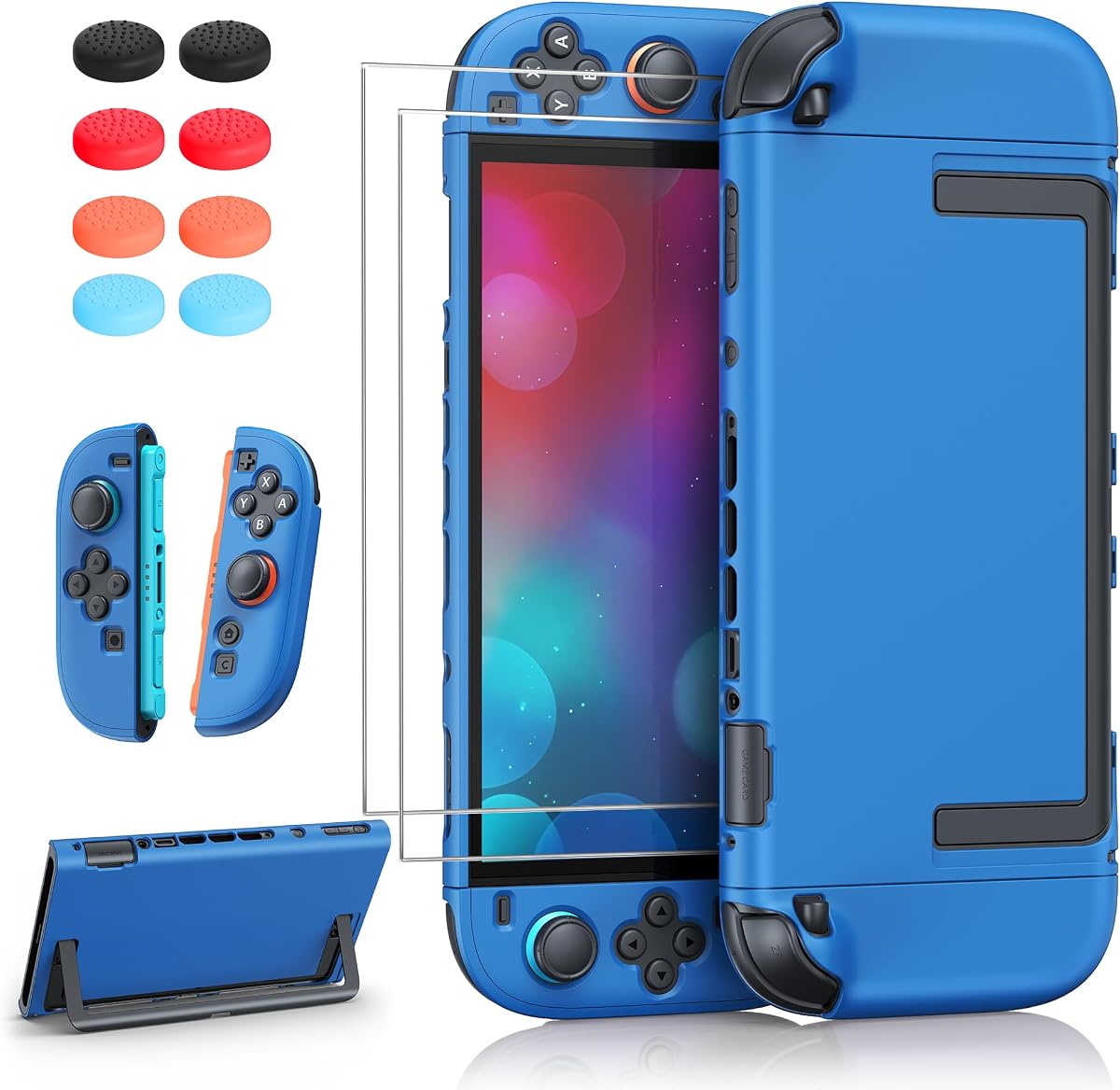
This ewnol case delivers essential protection at a low price. It has a 4.4 rating for its complete bundle. The design supports docking and stand use while offering ergonomic comfort.
We may earn a commission when you buy through this link, at no additional cost to you.
Strengths include included screen protectors and caps for full coverage. The U-shaped opening allows stand access. Ports and buttons remain fully accessible. The slim profile keeps the console portable.
Note that it may feel tight when docking but this is by design. Materials are standard not premium. Still, these are acceptable for the low cost and included accessories that add value.
Budget-conscious buyers should choose this model. It offers essential protection without extras. We recommend it for those seeking full coverage and included accessories at a great price.
Package includes case screen protectors and joystick caps for full coverage protection from day one.
Precise dockable design allows direct insertion into dock without case removal for ease of use.
We may earn a commission when you buy through this link, at no additional cost to you.
PlayVital offers a cute design with matching button toppers. It holds a 4.6 rating for its clean coordinated look. The case supports TV mode and game card swapping without removal.
We may earn a commission when you buy through this link, at no additional cost to you.
Strengths include the solid color theme and silicone button pads. The split structure makes holding comfortable. The PC shell resists scratches while the silicone pads reduce wear for long sessions.
Trade-offs include limited color options and no extra stand. However, these are acceptable for the aesthetic appeal. The unified design theme makes cleaning and reassembly simple and intuitive for daily use.
Players wanting style will love this case. It elevates the console's look with coordinated details. We suggest it for those prioritizing aesthetics alongside basic protection and convenience.
Matching silicone toppers and unified design give your console a clean coordinated look without generic dullness.
Three-piece split structure makes handheld play seamless with raised arc grips for secure support.
We may earn a commission when you buy through this link, at no additional cost to you.
Mumba delivers the Fortress with full front and rear coverage. It holds a perfect five-star rating for build quality. The detachable front cover lets you dock without removing the rear shell.
We may earn a commission when you buy through this link, at no additional cost to you.
Strengths include the aluminum alloy stand with adjustable angles. Six game card slots keep your library organized. The one-piece Joy-Con lock prevents accidental detachment while allowing quick release via foldable hinge.
Trade-offs include a higher price and heavier weight. Still, these are acceptable for the level of protection and features. Military-grade standards and durable materials justify the investment for power users.
Those wanting maximum protection should choose this model. It is a premium accessory that covers every angle. We recommend it for serious gamers prioritizing durability and travel convenience above all else.
The durable front cover shields screen and buttons protecting your console fully from drops and dust.
Detaching the front cover allows docking without removing the case ensuring full protection while charging.
We may earn a commission when you buy through this link, at no additional cost to you.
Choosing a dockable Switch 2 case requires balancing protection, ergonomics, and docking features. This guide explains the key factors to consider before you buy a case for your console.
Docking compatibility is critical because many cases block ports or stand access. Look for cases explicitly designed to fit the dock without removal. Precision cutouts and slim profiles ensure smooth transitions between handheld and TV mode.
Always check product details to confirm the case supports docking without requiring extra steps.
Ergonomics matter for long gaming sessions. A good case should improve hand fit with textured surfaces or raised grips. This reduces fatigue and prevents slippage during intense gameplay.
Prioritize designs with non-slip textures and comfortable curves for better control.
Protection depends on materials like PC hard shells or TPU frames. Military-grade cases offer extra defense against drops and scratches. Raised bezels add safety for the screen during travel or docking.
Choose multi-layer or shock-absorbing designs if you play frequently or travel often.
Quick Joy-Con release mechanisms save time when sharing controllers. Look for hinges or buttons that allow detachment without removing the whole case. Some designs use magnetic or latch systems for efficiency.
Test the mechanism if possible to ensure it feels secure yet accessible.
Tabletop play requires a stable stand. Cases with built-in metal stands provide better angles than plastic ones. Ensure the stand folds flat when not in use to maintain portability and reduce bulk.
Check if the stand works alongside the docked mode if you plan to use both.
Many bundles include extras like screen protectors, card slots, or thumb caps. These add value but may increase weight or complexity. Weigh the convenience against your specific needs before buying.
Focus on essentials first and add separate accessories only if needed later.
Durability depends on materials like polycarbonate or aluminum. Anti-yellowing or scratch-resistant coatings maintain the case's look over time. Eco-friendly recycled plastics are also available for environmentally conscious buyers.
Select materials that resist wear and maintain color for long-term use.
Prices range from budget to premium. Higher costs often mean better build or more features. Determine your budget and compare features to ensure you get the best value for your money.
Balance cost against protection and convenience features you will actually use daily.
Install the case carefully by aligning ports and buttons. For split designs, attach the console and Joy-Con parts separately to avoid scratches. Ensure all edges snap securely into place before using the console.
Clean the case with a soft dry cloth to remove dust and fingerprints. Avoid harsh chemicals that may damage anti-slip coatings or printed designs. Keep the case away from direct sunlight to prevent discoloration.
Remove the case occasionally to inspect for dirt buildup in ports or seams. If your case includes removable parts, take them off to clean properly. Store the case in a protective bag when not in use.
Most dockable cases work with official docks. Third-party docks vary in fit and may not align with cutouts. Check product details for compatibility notes before purchasing a third-party option.
Wireless charging is not generally supported due to the case material. Most models require direct cable connection for power. Always follow product instructions for charging requirements.
Use the designated hinge or button to release Joy-Con gently. Avoid pulling directly to prevent damage. Follow manufacturer tips to flip or detach controllers without stress.
Dockable cases usually have cutouts allowing stand access. Some include an external stand. Verify kickstand compatibility before buying to ensure tabletop play remains functional.
Installation is generally simple with snap-on designs. Split cases may take a few seconds longer. Follow the user manual or product video for best results during setup.
Detach the case carefully and use compressed air or a soft brush. Clean ports and seams regularly to maintain performance. Avoid using liquid cleaners on the internal surfaces.
Most cases support separate tempered glass protectors. Ensure the case does not interfere with screen protector edges. Choose protectors designed for the console model for best fit.
Warranties vary by brand and design. Some brands offer two-year coverage. Check the product page for official warranty terms and support contact details.
We reviewed ten dockable Switch 2 cases offering protection, docking, and ergonomic features. Top picks include SUPCASE for overall balance, ewnol for budget bundles, and Mumba for premium durability.
Prioritize docking compatibility and ergonomic grip when selecting a case. Ensure the model supports your play modes without needing constant removal. Check reviews for build quality before buying.
Prices and availability may change so verify current details on the product page. Choose the case that best matches your needs and style for the best long-term use.