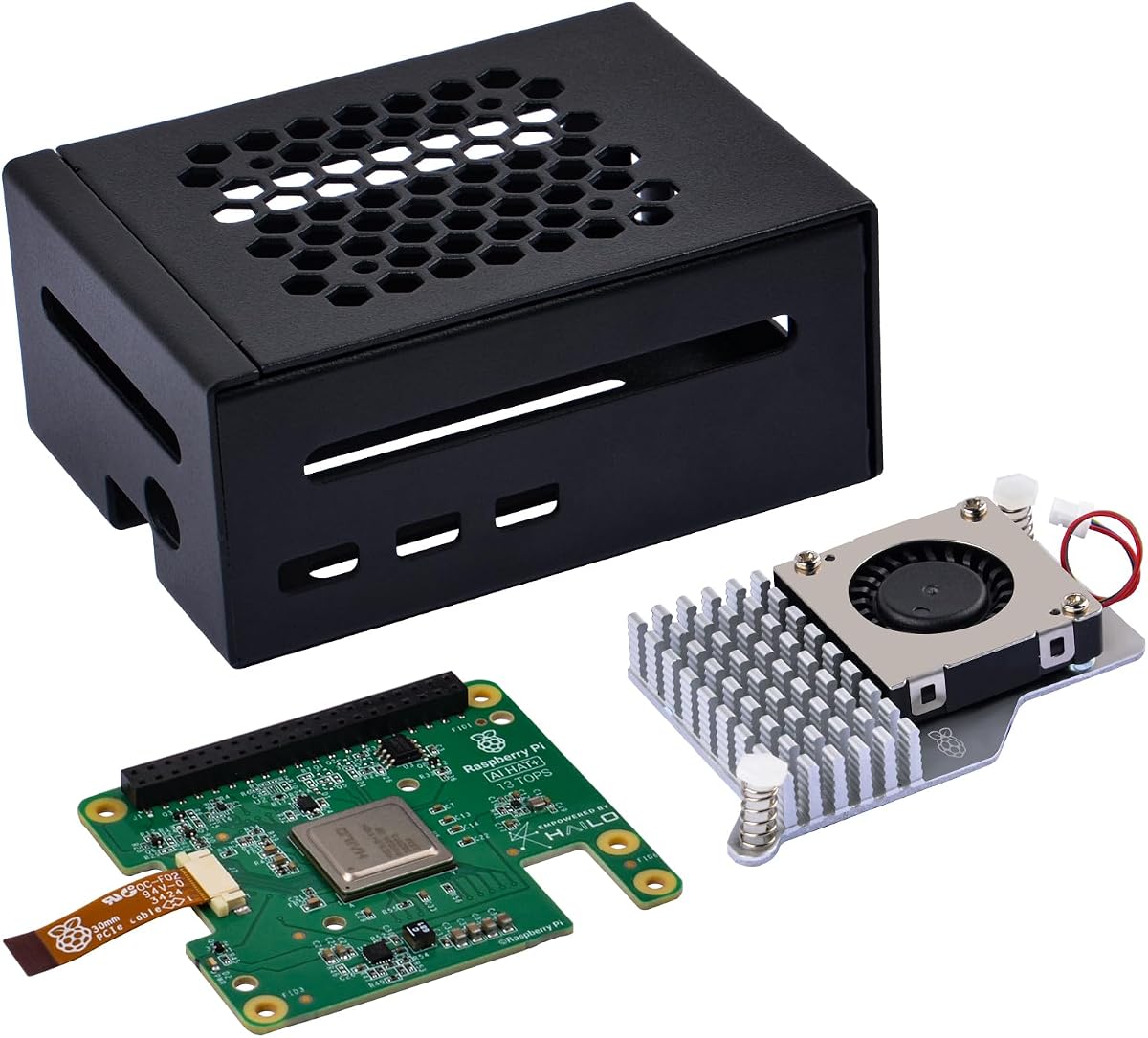
GeeekPi AI HAT+ Kit
4.5Editor score
13 TOPS accelerator
Metal case included
Active cooler included
This guide compares the top AI Raspberry Pi Kits for October 2026, evaluating performance, sensors, and learning resources for makers and developers.
Artificial intelligence has become accessible to hobbyists and developers through specialized hardware kits designed for single-board computers. These AI Raspberry Pi Kits bundle essential components like cameras, sensors, and accelerators to streamline the process of building intelligent projects. Whether you are interested in computer vision or voice recognition, having the right hardware simplifies experimentation and learning.
We have evaluated a wide range of kits based on their included components, compatibility with popular operating systems, and the quality of educational resources provided. Our analysis focuses on how well each kit supports modern AI tasks such as running large language models locally or performing real-time object detection. We also consider ease of setup and the versatility of the sensors included.
Each product in this list offers a unique approach to integrating AI capabilities with the Raspberry Pi platform. You will find options ranging from simple learning boards to complete robot kits with advanced processing units. Please note that product availability and pricing may change over time, so always check the latest details before making a purchase decision.
4.5Editor score

4.6Editor score

5.0Editor score
The following table provides a side-by-side comparison of the top ten AI Raspberry Pi Kits available in the market. We highlight key specifications such as supported processors, included sensors, and specific AI capabilities to help you identify the best match for your project needs.
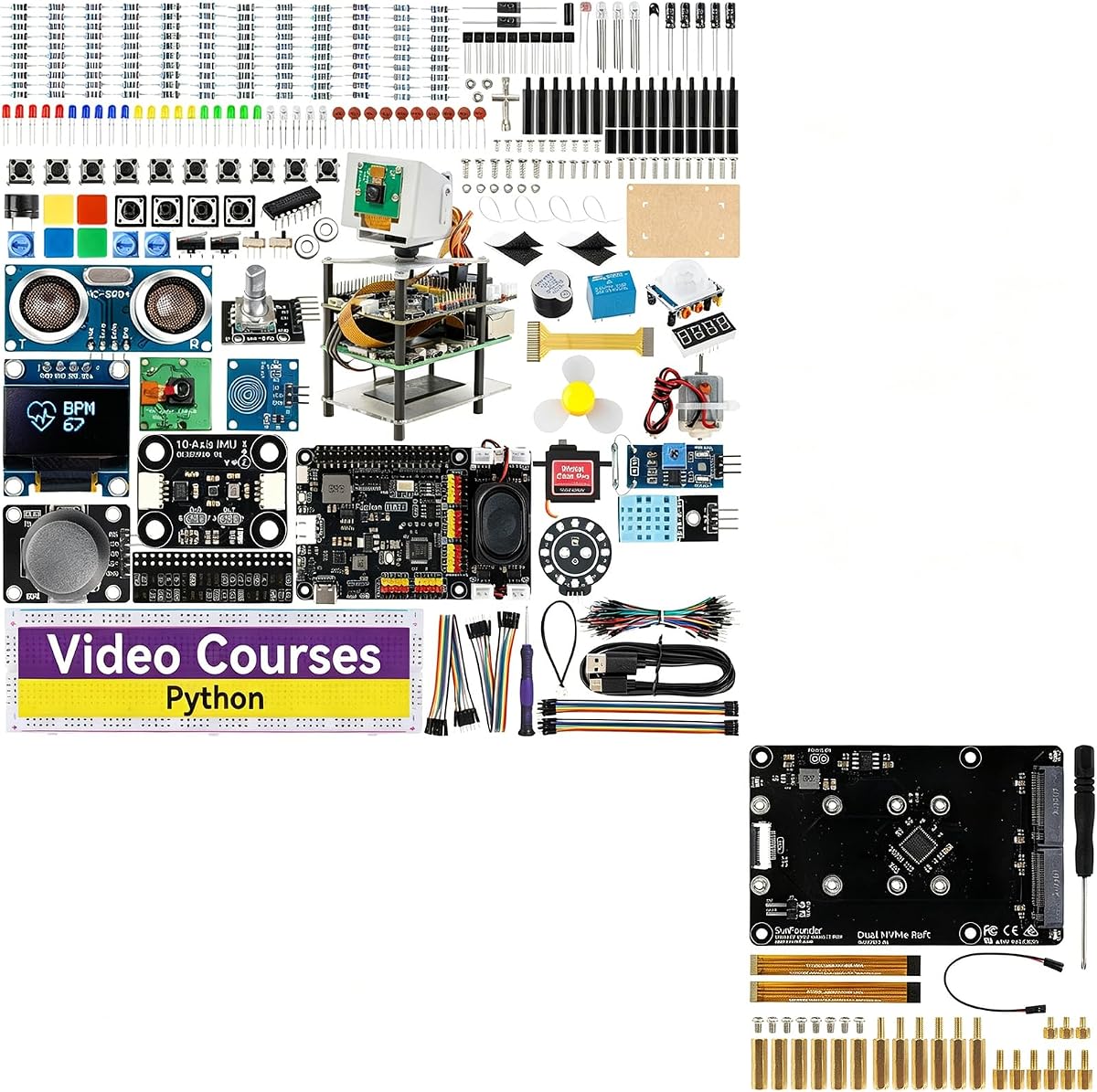


The SunFounder AI Fusion Lab Kit stands out as the top choice for those serious about mastering artificial intelligence concepts on a Raspberry Pi. It boasts an impressive rating of 4.6 stars and offers a comprehensive environment for learning. The kit is designed to turn your Pi into a full-fledged AI lab by integrating multiple Large Language Models and vision tools.
We may earn a commission when you buy through this link, at no additional cost to you.
Its key strength lies in the breadth of hardware and software it supports. You can experiment with models like ChatGPT and Gemini while also diving deep into computer vision using YOLO and OpenCV. The inclusion of a Pan-Tilt HAT and a 10-axis sensor module allows you to build dynamic projects that can move and sense their environment in real-time.
While the kit is incredibly powerful, it requires a bit of patience to set up and learn. The learning materials are extensive, which is a pro, but it might feel overwhelming for absolute beginners with no coding experience. However, the structured video lessons by Paul McWhorter guide you through the complexities step by step, making the trade-off worthwhile for long-term skills.
If you are an aspiring AI engineer or a dedicated hobbyist wanting to build complex projects, this kit is the best investment. It provides the necessary tools to progress from basic programming to advanced AI applications. The support network ensures you are never stuck, making it a reliable choice for serious learners.
The Pan-Tilt HAT allows your camera to actively track objects and colors, bringing robotics and AI vision together in a tangible way.
Video lessons are created with educator Paul McWhorter, ensuring high-quality instruction that bridges the gap between theory and practice.
We may earn a commission when you buy through this link, at no additional cost to you.
The Vilros Raspberry Pi 5 AI Kit is perfect for users who demand maximum performance from their edge computing projects. With a perfect 5.0 rating, it delivers a complete hardware experience that includes the Pi 5 board and a powerful Hailo-8 accelerator capable of up to 26 TOPS. This makes it an ideal choice for running heavy neural networks locally.
We may earn a commission when you buy through this link, at no additional cost to you.
Its standout feature is the raw processing power combined with a complete ecosystem of accessories. You receive an active cooler to maintain performance, a storage bag for parts, and a preloaded SD card. The integration of the Hailo accelerator into the camera software is seamless, allowing you to start running object detection and segmentation tasks immediately.
The main trade-off is the cost, which is higher than many other kits on this list. However, you are paying for a full system that eliminates the need to buy separate accessories or deal with compatibility issues later. If budget is less of a concern than performance, this kit offers the most robust setup available.
This kit is best suited for developers and professionals who need to deploy AI applications in production environments or require high throughput for complex tasks. It provides a reliable and powerful foundation that can handle demanding workloads efficiently without overheating or slowing down.
The Hailo-8 accelerator provides up to 26 TOPS of performance, enabling real-time AI applications that would otherwise be impossible on a standard Pi.
Everything from the power supply to the case is included, ensuring you have all the necessary components to get started without extra orders.
We may earn a commission when you buy through this link, at no additional cost to you.
The GeeekPi AI HAT+ Kit offers an excellent entry point into the world of AI acceleration for Raspberry Pi 5 users. It holds a strong rating of 4.5 stars and provides a focused solution that combines the necessary HAT with protective casing and cooling. It is designed to make it easy to turn your Pi into a specialized AI machine without excessive cost.
We may earn a commission when you buy through this link, at no additional cost to you.
The key benefit of this kit is the combination of the Hailo accelerator with a metal case and active cooler. This setup ensures that your hardware stays protected and runs at optimal temperatures even during intensive AI tasks. The 13 TOPS variant is sufficient for many common applications like object detection and pose estimation.
One limitation is that the Raspberry Pi 5 board itself is not included in the package. You will need to source the board separately to use the HAT. However, if you already own a Pi or are planning to buy one anyway, this bundle is a very smart choice for upgrading your existing setup with AI capabilities.
If you are looking for the most efficient way to add neural network processing to your project, this kit is the best budget option. It strikes a great balance between performance and price, giving you access to the Hailo ecosystem without the premium price tag of more expensive bundles.
The HAT automatically detects the on-board NPU when running up-to-date OS images, simplifying the software setup process significantly.
The metal case protects the board from dust and scratches while allowing access to all essential ports including HDMI and USB.
We may earn a commission when you buy through this link, at no additional cost to you.
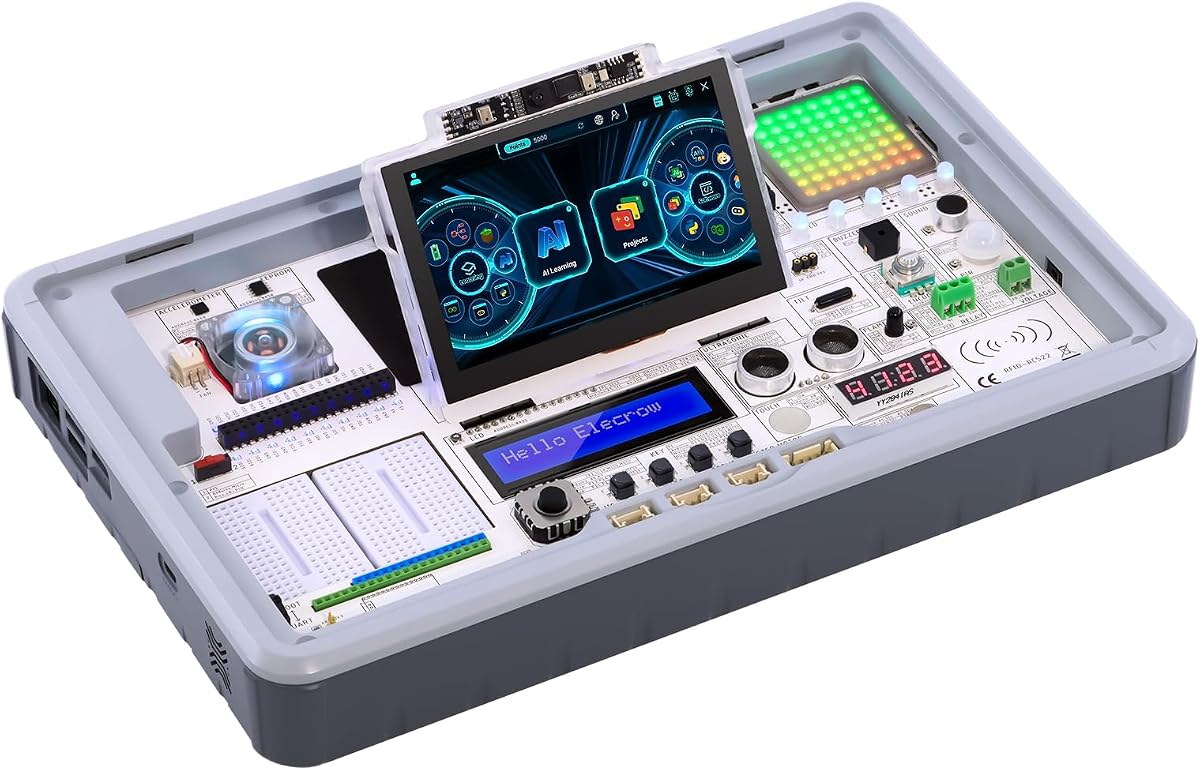
The ELECROW CrowPi3 Basic Kit is designed as a dedicated learning station for those who want to explore coding and AI without wiring complex circuits. It carries a rating of 4.3 stars and offers a tidy package with a touchscreen and a wide array of sensors pre-integrated. This makes it incredibly easy to start writing code immediately after setup.
We may earn a commission when you buy through this link, at no additional cost to you.
Its primary advantage is the inclusion of 41 different sensors and modules in one package. You can experiment with various inputs without buying separate components or spending hours wiring them up. The 200 lessons provided cover everything from identifying components to running code, making it very accessible for students and beginners.
A notable downside is that the Raspberry Pi 5 is not included in this basic version. You must purchase the board separately to power the unit. Additionally, while the lessons are plentiful, they focus heavily on the kit's specific layout, which might not translate as easily to custom breadboard projects later on.
This kit is ideal for classrooms or home learning environments where the goal is to understand sensors and basic AI concepts. The visual interface and structured lessons make it a fantastic tool for teaching the fundamentals of electronics and programming in a fun way.
The 4.3-inch capacitive touch display allows for interactive projects where you can control and view data directly on the unit.
It supports four mainstream development boards including Arduino Nano and micro:bit, allowing for broader educational applications across different platforms.
We may earn a commission when you buy through this link, at no additional cost to you.
The SunFounder AI Fusion Lab Kit combined with the Dual NVMe Raft offers a unique solution for users who need fast storage alongside AI capabilities. While there is no historical rating yet, this kit combines the powerful AI learning features of the Fusion Lab with high-speed SSD support. It is perfect for running local models that require significant storage space.
We may earn a commission when you buy through this link, at no additional cost to you.
The standout feature here is the Dual NVMe Raft which adds two M.2 slots to your Pi 5. This allows you to set up RAID arrays or use fast SSDs for storing datasets and running OpenMediaVault. The fusion of this storage capability with the Fusion HAT+ and its AI features creates a powerful home server or AI workstation.
One consideration is that this is a newer product, so community feedback and long-term reliability are still being established. The complexity of setting up RAID and NVMe storage also requires a higher level of technical knowledge compared to standard SD card setups. However, the benefits for storage speed and capacity are significant.
If you are building a home lab, a media center, or a developer workstation, this kit provides the best blend of AI and storage in one package. It allows you to run complex models and store large datasets locally with the speed and reliability that SSDs provide.
The NVMe Raft supports PCIe Gen 2.0 with speeds up to 500MB/s, drastically improving data transfer rates compared to SD cards.
It supports OpenMediaVault and RAID configurations, making it suitable for NAS builders and developers needing robust data management.
We may earn a commission when you buy through this link, at no additional cost to you.
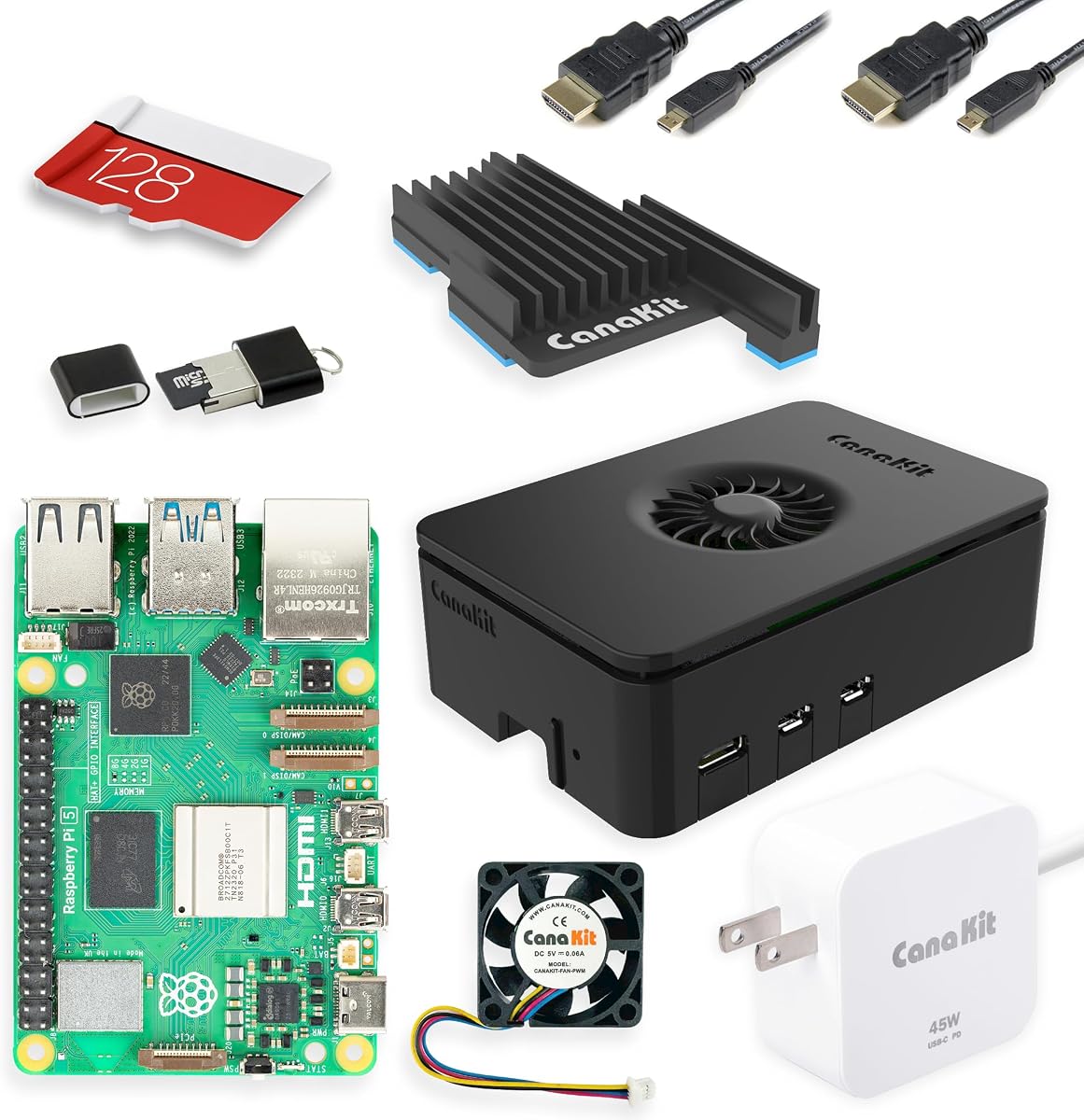
The CanaKit Raspberry Pi 5 Starter Kit PRO is a reliable foundation for any project, including those that will eventually use AI. With a rating of 4.7 stars, it provides a high-quality board and accessories that ensure stable operation. While it lacks specific AI accelerators, it is a great base for those planning to add hardware later.
We may earn a commission when you buy through this link, at no additional cost to you.
The strength of this kit lies in its robust cooling and power supply. The Turbine case includes a low noise bearing fan and a heat sink to keep the Pi 5 running cool. The 45W power supply ensures that even when you attach multiple peripherals, your system will receive enough power to operate without throttling.
One downside is that it does not include any AI-specific components like cameras or accelerators out of the box. You will need to buy these separately to start AI work. However, the simplicity and reliability of this kit make it a very safe choice for users who want a sturdy platform to build upon.
This kit is best for beginners who want to start with the basics of the Pi before diving into complex AI tasks. It ensures your hardware is protected and powered correctly, giving you a solid base to expand upon as your skills grow.
The included fan and heat sink maintain optimal temperatures which is crucial for sustained performance during intensive tasks.
The 45W power supply supports USB accessories and SSDs without draining power needed for the board itself.
We may earn a commission when you buy through this link, at no additional cost to you.
The GeeekPi AI HAT+ Build-in Hailo kit offers a compact and efficient way to add AI capabilities to your Raspberry Pi 5. It shares the same powerful hardware as the previous entry but is often sold as a more focused bundle. It is rated 4.5 stars for its build quality and performance in handling vision tasks.
We may earn a commission when you buy through this link, at no additional cost to you.
Its key feature is the 13 TOPS NPU which is capable of running various neural networks efficiently. The metal case provides excellent protection and the active cooler ensures the board does not overheat. This makes it a great choice for projects where space and power efficiency are key concerns.
The trade-off is that it does not include an SD card, so you will need to source storage separately. Additionally, 13 TOPS may be limiting for very large models compared to the 26 TOPS variant. However, for most common vision and detection tasks, this performance is more than sufficient.
This kit is ideal for makers who want a sleek and efficient AI setup without cluttering their project with too many components. It provides the essential power needed to run AI projects reliably in a package that is easy to integrate into other builds.
The NPU automatically integrates with camera apps to handle image processing without requiring complex manual configuration.
The metal case shields the board from physical damage while maintaining access to all necessary ports for connectivity.
We may earn a commission when you buy through this link, at no additional cost to you.
The Seeed Studio Pi 5 Essentials Kit is designed to give you a genuine Raspberry Pi experience with all official components. It holds a rating of 4.6 stars and includes everything you need to start building right out of the box. The official case and power supply ensure compatibility and reliability from day one.
We may earn a commission when you buy through this link, at no additional cost to you.
The main benefit is the official cooling solution which maintains stable performance during AI projects or Docker containers. The preloaded 128GB card saves time on setup, allowing you to get to coding quickly. It is backed by a 1-year warranty and professional support, adding a layer of security to your purchase.
On the downside, it does not include any AI accelerators or cameras for vision tasks. It is a general-purpose kit that you may need to upgrade later if you want specific AI features. However, for most edge computing and workstation needs, this kit is a solid and reliable choice.
This kit is best for users who value official hardware and a seamless setup process. It provides a stable and well-cooled environment for running applications and learning how to use the Pi 5 effectively without compatibility issues.
The integrated active cooling fan helps maintain stable performance during demanding applications like AI and Docker.
Seeed Studio offers a 1-year warranty and technical support ensuring a worry-free building experience.
We may earn a commission when you buy through this link, at no additional cost to you.
The SunFounder AI Robot Kit is a fun and engaging option for those interested in robotics combined with AI. It has a rating of 4.3 stars and features 12 servos that allow the robot to perform realistic movements like walking and wagging its tail. It is powered by the Pi Zero 2 W and includes a powerful array of sensors.
We may earn a commission when you buy through this link, at no additional cost to you.
Its standout feature is the integration of ChatGPT-4o which enables natural conversations and voice commands. The robot can see and interact with its environment using ultrasonic and camera sensors. This makes it a highly interactive toy that can solve math problems via the camera and respond to gestures.
The limitation here is the processing power of the Pi Zero 2 W compared to the full Pi 5. While it runs impressive AI features, it may not be suitable for heavy training tasks. However, for a functional robot that responds to voice and vision, the capabilities are well within expectations for this class of device.
This kit is perfect for users who want to build a robot that can move and interact in a human-like way. It bridges the gap between simple robotics and advanced AI applications making it a great choice for hobbyists interested in smart machines.
Ultrasonic, touch, and sound sensors enable the robot to detect obstacles and respond to interactions with high engagement.
ChatGPT-4o allows for natural conversations and complex queries making the robot smarter and more responsive to commands.
We may earn a commission when you buy through this link, at no additional cost to you.
The ELECROW CrowPi 3 is a comprehensive development station designed to support a wide range of learning and prototyping needs. It has a rating of 4.1 stars and includes 41 sensors and a high-sensitivity microphone to support voice and vision projects. It aims to be a complete solution for both beginners and professional engineers.
We may earn a commission when you buy through this link, at no additional cost to you.
Its key strength is the flexibility to work with multiple development boards including Arduino Nano and micro:bit. This allows users to learn across different platforms without needing to buy new hardware. The 200+ course resources cover everything from Python programming to IoT projects ensuring a thorough educational experience.
One drawback is that the Pi 5 board is not included in the base package. You will need to purchase it separately. Additionally, the lower rating compared to other kits suggests some users have experienced issues with the interface or component quality. However, the sheer number of features is impressive.
This kit is best for educators and makers who want a platform that can grow with their skills. It offers a flexible and feature-rich environment for exploring AI and electronics making it a strong candidate for schools and serious hobbyists.
The 4.3-inch capacitive touch display provides an intuitive interface for interacting with projects without needing external peripherals.
Compatibility with multiple boards allows for a diverse learning experience and broad application across different maker communities.
We may earn a commission when you buy through this link, at no additional cost to you.
Selecting the right AI kit depends on your specific project goals, budget, and current hardware. Here are the main factors you should consider before making a decision.
Modern AI tasks often require more power than a standard CPU can provide. Look for kits that include hardware accelerators like the Hailo-8 which offer tens of TOPS for neural network inference. If you plan to run large language models or complex computer vision tasks, prioritize kits with these dedicated chips over standard Pi boards.
Choosing a kit with built-in acceleration ensures your projects run smoothly without lag.
AI projects often rely on input from the physical world. Check if the kit includes essential components like cameras for vision, microphones for voice, or sensors for motion and environment detection. A kit that bundles these sensors saves you the trouble and cost of buying them separately later.
Ensure the sensors are high quality and well documented for easier integration.
Good hardware is only half the battle; you need clear documentation and learning materials to use it effectively. Kits that offer video tutorials, sample code, and structured lessons can significantly reduce the time it takes to get started. Look for resources that cover both basic setup and advanced AI implementation.
Access to a community or support team can also be a deciding factor for beginners.
Many kits focus on accessories and leave out the actual Raspberry Pi board. Be sure to check if the kit includes the board or if you need to buy it separately. This affects the total cost and can be confusing if not clearly stated on the product page.
A complete kit with the board included simplifies the purchasing process.
AI workloads can generate significant heat and require stable power. Ensure the kit includes a robust power supply and a cooling solution like a fan or heatsink. Overheating can throttle performance and shorten the lifespan of your components so reliable cooling is essential for consistent operation.
Verify the power supply has enough wattage for your specific setup.
As you progress in your projects you may need more storage or expandability. Consider kits that offer NVMe slots or easy ways to add additional hardware. Being able to expand your storage or connect to a network efficiently will make your kit more future-proof and versatile.
Look for boards that support modern storage protocols for better speed.
A protective case is important for safeguarding your investment especially if you plan to use the kit in a portable or public setting. Kits that include a case often have better cable management and port access. A metal case can also help dissipate heat more effectively than plastic ones.
A good case keeps your components safe from dust and physical damage.
Having access to a supportive community or responsive technical team can be invaluable when you get stuck. Check if the manufacturer has active forums or provides prompt responses to support tickets. A strong community means you can find shared projects and solutions to common problems more easily.
Good support ensures you can keep moving forward with your projects.
To get started with your AI kit, begin by installing the latest operating system if it is not preloaded. Connect all the included sensors and cameras to the correct GPIO pins or ports as instructed in the manual. Verify that your board is powered by a stable source and the cooling system is active before running heavy tasks.
Once your hardware is set up, focus on running the provided sample code to ensure everything is functioning correctly. Start with simple projects like object detection or basic voice commands before moving to more complex models. This helps you understand how the hardware interacts with the software effectively.
Regular maintenance involves keeping the components clean and ensuring the cooling fan is free of dust. Avoid exposing your kit to extreme temperatures or humidity which can damage the electronics. If you are not using the kit for a long period, store it in a safe place to prevent static discharge or physical damage.
Not all kits include the board. Some bundles like the Vilros AI Kit include the Pi 5 while others like the SunFounder Fusion Lab require you to buy it separately. Always check the product specifications before purchasing to confirm what is included.
Yes you can run lightweight versions of language models on a Raspberry Pi using frameworks like Ollama or TensorFlow. However for best performance you should look for kits that include AI accelerators like the Hailo-8 which speed up inference significantly.
TOPS stands for Trillions of Operations Per Second. It is a metric used to measure the speed of AI accelerators. Higher TOPS ratings generally mean the chip can process more data faster which is beneficial for complex AI tasks.
Kits like the SunFounder AI Fusion Lab or ELECROW CrowPi3 are better for beginners because they offer structured lessons and come with many pre-connected sensors. These resources help you learn how to code without getting bogged down by hardware wiring issues.
Yes absolutely. Many of these kits are perfect for home automation projects. You can use the sensors and cameras to monitor your home and control lights or appliances. The Pi 5 provides enough power to run local servers like Home Assistant effectively.
Python is the most common language used for AI projects on Raspberry Pi. It has extensive libraries like OpenCV and TensorFlow that are well supported. Most kits provide examples and tutorials specifically written in Python to help you get started quickly.
Yes cooling is very necessary. AI workloads can push the processor to high usage for long periods which generates heat. Without a fan or heatsink the Pi may throttle its speed or shut down to prevent damage so cooling is critical.
In summary the SunFounder AI Fusion Lab Kit and the Vilros Raspberry Pi 5 AI Kit stand out as the top choices depending on whether you prioritize learning or raw performance. The SunFounder kit offers a comprehensive educational path while the Vilros kit provides high-speed processing for demanding tasks.
When choosing a kit prioritize the components that align with your project goals. If you are focused on learning and sensors a bundle with many modules and lessons will be more valuable. If you need speed for running models look for kits with dedicated AI accelerators.
Remember that product availability and pricing can change over time. Always check the latest details and current offers on the product pages before making a purchase to ensure you get the best value for your investment.