
GOLDENMATE 2000VA Lithium
4.4Editor score
Lithium Iron Phosphate Battery
1600W Output Capacity
Ten Year Lifespan
This guide compares the top battery backup for Workstation PC options available today, reviewing features, ratings, and reliability to help you choose the
Protecting your workstation from power outages is essential for maintaining productivity and safeguarding critical data. A reliable battery backup ensures your systems stay online during unexpected fluctuations or blackouts. Choosing the right uninterruptible power supply requires understanding capacity, waveform types, and outlet configurations tailored to your specific needs.
We have evaluated ten leading models based on performance metrics, user feedback, and technical specifications. Our analysis focuses on output capacity, battery longevity, software integration, and surge protection capabilities. This comparison helps you identify which unit offers the best balance of reliability and value for professional computing environments.
Each recommendation highlights key strengths, potential trade-offs, and ideal use cases for different workstation setups. You will find detailed breakdowns of features like voltage regulation, connectivity options, and warranty coverage. Please note that pricing and availability may change, so verify current details before making a final purchase decision.
4.4Editor score

4.5Editor score

4.7Editor score
This side-by-side comparison highlights the core specifications of every selected model to help you quickly identify the best fit for your workstation power requirements.


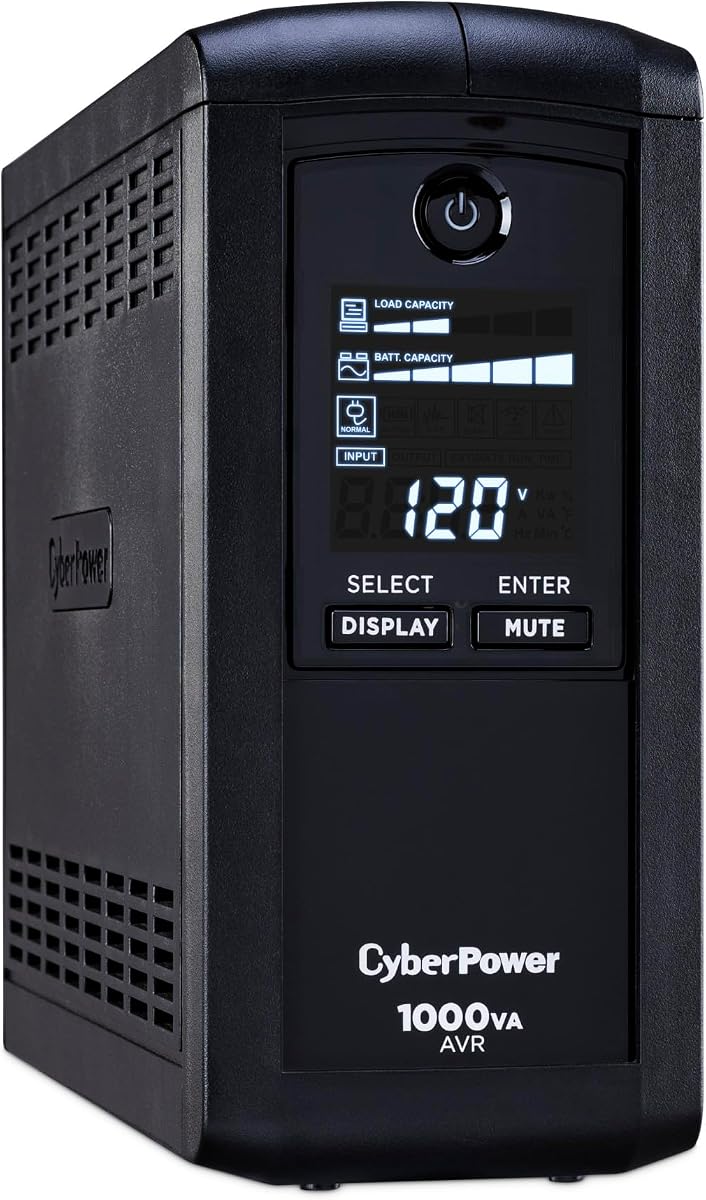


The CyberPower CP1500PFCLCD stands out as the top choice for workstation protection due to its pure sine wave output. With a 4.5 star rating from thousands of users, it delivers reliable power during outages while safeguarding active PFC power supplies commonly found in modern workstations.
We may earn a commission when you buy through this link, at no additional cost to you.
Its 1500VA capacity ensures enough power to keep critical systems running long enough for safe shutdowns. The color LCD panel provides real-time voltage and load data, making troubleshooting easy. USB ports add convenience for charging phones without draining the main battery.
While it carries a higher price point, the included software and connected equipment guarantee justify the investment. The unit is robust but may require a dedicated spot on your desk due to its size. Most users find the extra bulk acceptable given the performance benefits.
Professionals needing guaranteed uptime for critical workloads will appreciate this model. It balances power capacity with intelligent monitoring features effectively. For any workstation setup where data integrity matters, this UPS is a highly recommended foundation.
This output type ensures compatibility with active power factor correction supplies found in premium computer systems.
The color screen alerts you to potential issues before they cause hardware damage or system crashes.
We may earn a commission when you buy through this link, at no additional cost to you.
The GOLDENMATE 2000VA offers incredible value with its long-life lithium iron phosphate battery. Rated at 4.4 stars, this model provides 1600W of power, which is significantly higher than many competitors at similar price points. It is designed to replace traditional lead-acid units entirely.
We may earn a commission when you buy through this link, at no additional cost to you.
Unlike standard UPS units that need battery replacements every few years, this lithium pack lasts over a decade. The pure sine wave output protects sensitive electronics while the AVR system manages voltage fluctuations efficiently. USB ports allow quick charging of mobile devices during outages.
The unit is heavier than lead-acid models due to the transformer requirements for the lithium system. Some users may need to ensure their outlet voltage is compatible before installation. Despite these minor considerations, the long-term cost savings are substantial.
This option is ideal for users seeking a set-and-forget solution with minimal maintenance. If you want maximum power output without recurring battery costs, this model delivers. It represents a modern approach to backup power that prioritizes longevity and efficiency.
The LiFePO4 chemistry supports over three thousand charge cycles, reducing total cost of ownership significantly.
With 1600W capacity, it can handle high-performance workstations and peripheral devices simultaneously.
We may earn a commission when you buy through this link, at no additional cost to you.
The CyberPower BRG1500AVRLCD2 leads the category with a 4.7 star rating and a five-year warranty including the battery. It uses simulated sine wave technology suitable for most workstations while offering superior build quality and support. This model is designed for serious users who need reliability.
We may earn a commission when you buy through this link, at no additional cost to you.
Its color LCD panel gives clear visibility into power conditions and battery health. The unit includes USB ports for mobile device charging and supports optional remote management cards for network oversight. PowerPanel software enables safe shutdowns to prevent data loss.
The warranty period is longer than standard three-year offerings, reflecting confidence in durability. While the remote management card costs extra, the base unit handles essential monitoring tasks well. The higher initial cost is offset by extended coverage and reduced downtime risk.
For enterprise or high-value workstations where uptime is critical, this is the top premium choice. It combines robust protection with flexible management options. If budget allows, this unit provides peace of mind through its comprehensive warranty and proven track record.
The five-year warranty covers the battery and equipment, offering long-term protection against unexpected failures.
Optional management cards allow integration into larger monitoring systems for remote administration capabilities.
We may earn a commission when you buy through this link, at no additional cost to you.
The CP1500AVRLCD3 offers a balanced solution with a high 1500VA rating and a color display for easy monitoring. With a 4.5 rating, it is trusted for protecting workstations and networking gear. The output is simulated sine wave which suits standard power supplies well.
We may earn a commission when you buy through this link, at no additional cost to you.
It features 12 outlets split between backup and surge-only ports for flexible device management. The color screen alerts users to power issues before they become critical. USB ports provide added value for keeping phones charged during emergencies.
While the battery life is standard, the AVR technology helps extend it by correcting minor voltage fluctuations automatically. The connected equipment guarantee offers additional financial protection. This model is a reliable workhorse for general office environments.
It is best for users who need ample outlets and visual feedback without complex requirements. The interface is intuitive and the build quality is solid. Consider this if you prioritize outlet capacity and monitoring features in your workstation setup.
The color LCD simplifies identifying battery health and load levels at a glance.
Twelve outlets allow simultaneous protection for computers and secondary peripherals.
We may earn a commission when you buy through this link, at no additional cost to you.
The EC850LCD emphasizes energy efficiency with ECO mode outlets that shut off power to peripherals when the main computer sleeps. Rated at 4.4 stars, it provides solid protection for moderate workstation loads. The LCD displays essential info like runtime and battery status clearly.
We may earn a commission when you buy through this link, at no additional cost to you.
It includes 12 outlets with three ECO controlled ones to reduce standby power usage. The design is compact enough for smaller desks while maintaining robust surge protection. A three-year warranty and connected equipment guarantee add trust to the purchase.
While the 850VA capacity limits use for very high power systems, it suits most standard setups. The ECO feature lowers electricity costs over time. Users appreciate the straightforward operation and minimal maintenance needs.
This model is great for environmentally conscious users who want efficient backup power. It works well for typical office workstations with moderate power needs. If energy savings are a priority, this unit delivers practical benefits.
ECO outlets automatically cut power to unused peripherals to minimize electricity waste.
The LCD provides immediate feedback on battery health and estimated runtime.
We may earn a commission when you buy through this link, at no additional cost to you.
The CP1000PFCLCD is a compact option featuring pure sine wave output for sensitive electronics. With a 4.2 rating, it provides adequate power for standard workstation use. The color LCD makes it easy to monitor status without confusion.
We may earn a commission when you buy through this link, at no additional cost to you.
It offers 10 outlets and USB ports for versatile connectivity. The AVR system helps extend battery life by correcting voltage fluctuations. Its smaller size fits easily on crowded workspaces without compromising protection quality.
The lower wattage means it may not support high-power GPUs or heavy multi-monitor setups. However, it remains reliable for most daily tasks. The connected equipment guarantee offers additional security for your hardware investment.
Ideal for users with space constraints or moderate power needs, this model is a solid choice. It balances essential features with a manageable footprint. Consider this if purity of output waveform is important for your specific workstation hardware.
The compact chassis allows placement on tight desks without sacrificing functionality.
Pure sine wave ensures clean power compatible with modern switching power supplies.
We may earn a commission when you buy through this link, at no additional cost to you.
The AVRG900LCD earns a 4.6 rating for its robust performance and unique data line protection. It safeguards not just AC power but also phone lines from surges. This makes it excellent for workstations with modems or legacy telecom equipment.
We may earn a commission when you buy through this link, at no additional cost to you.
It has 12 outlets including surge-only ones for flexible connections. The Intelligent LCD panel provides clear metrics on load and battery status. AVR ensures stable power delivery without switching to battery unnecessarily.
While the 900VA rating is moderate, the data protection feature adds unique value. It is a great choice for office environments where connectivity lines are also vulnerable. The software support helps automate shutdowns during extended outages.
Buyers valuing network protection alongside power backup should consider this unit. It fills a niche that many others overlook. If your workstation setup involves external communication lines, this model offers added security.
Surge protection extends to telephone lines to prevent damage to connected communication equipment.
Real-time LCD updates keep you informed of power conditions and battery readiness.
We may earn a commission when you buy through this link, at no additional cost to you.
The CP1000AVRLCD provides reliable protection with a 4.5 rating and clear LCD readouts. It monitors load and battery status in real time to help plan safe shutdowns. AVR corrects power fluctuations to protect connected equipment.
We may earn a commission when you buy through this link, at no additional cost to you.
It features 9 outlets which is slightly fewer than others but still functional. The simulated sine wave is appropriate for most standard workstations. The software suite enables automated actions during power failures.
This model balances cost with essential features well. It handles typical office workloads without issue. The connected equipment guarantee offers peace of mind for valuable hardware.
It is a solid pick for users needing straightforward protection without extra complexity. The LCD interface makes management easy for non-technical users. Consider it for general workstation backup needs.
The Intelligent LCD keeps track of runtime and load capacity continuously.
Voltage regulation reduces strain on the battery during minor power disturbances.
We may earn a commission when you buy through this link, at no additional cost to you.
The ST900U features a slim profile design ideal for tight workspaces. With a 4.5 rating, it provides basic but effective protection for home offices and small workstations. The outlets are widely spaced to fit larger power adapters.
We may earn a commission when you buy through this link, at no additional cost to you.
It focuses on efficiency to reduce energy consumption when on standby. The simulated sine wave handles standard equipment reliably. It includes software for safe shutdowns and connects easily to PCs.
Its low wattage means it is best for light-duty systems rather than high-end gaming rigs. The slim form factor is a major advantage for small desks. It is an excellent choice for entry-level backup needs.
Choose this if space is your primary constraint and power needs are modest. It delivers essential protection without taking up much room. For home office setups, it is a cost-effective solution.
The low profile design helps the unit slide under desks easily.
Power-efficient design reduces energy waste during normal operation.
We may earn a commission when you buy through this link, at no additional cost to you.
The CP850AVRLCD is an entry-level option with a 4.5 rating and straightforward functionality. It provides essential battery backup for small workstations or budget-conscious users. The LCD displays key metrics for informed decisions.
We may earn a commission when you buy through this link, at no additional cost to you.
Its 850VA capacity supports basic computers and monitors well. The AVR system extends battery life by stabilizing input voltage. It includes enough outlets for a typical workstation setup.
Runtime will be shorter compared to larger units, so it is meant for quick shutdowns. For simple office work, it serves its purpose reliably. The warranty and guarantee offer basic assurance.
Ideal for users needing basic protection without extra features, this model is cost-effective. It works well for light-duty environments. Consider it if budget is a key factor in your selection.
Affordable pricing makes backup power accessible for smaller budgets.
No complex setup is required to start protecting your equipment immediately.
We may earn a commission when you buy through this link, at no additional cost to you.
Selecting the right battery backup involves evaluating several technical factors to ensure compatibility with your workstation hardware.
Capacity determines how much power the unit can deliver during an outage. Match the wattage rating to your total system power consumption plus peripherals. Always choose a unit with higher capacity than your load to ensure adequate runtime.
Pure sine wave output is required for active power factor corrected power supplies. Simulated sine wave may not work correctly with some modern computers. Check your PSU specs to choose the correct waveform.
Traditional lead-acid batteries need replacement every three years. Lithium options last longer but cost more upfront. Consider long-term maintenance costs when selecting battery technology.
Count the number of devices you need to protect. Ensure enough outlets are battery-backed for critical gear. Some models offer ECO outlets to save power on non-critical devices.
Good software automates safe shutdowns during power failures. Network management cards allow remote monitoring for server environments. Check for included software licenses when purchasing.
A longer warranty indicates manufacturer confidence in product quality. Look for connected equipment guarantees to protect your hardware investment. Review customer support options before buying.
Measure your available space before purchasing. Taller units may fit under desks better. Consider weight if portability is required for mobile workstations.
Surge protection covers voltage spikes beyond battery backup. Some models include data line protection for phone or coax connections. Verify the joule rating for surge capacity.
Plug your critical devices into battery backup outlets and connect peripherals to surge-only outlets if available. This ensures your workstation stays powered during outages while protecting less critical items.
Perform regular self-tests using the unit menu to check battery health. Replace batteries immediately if the unit signals low capacity to avoid unexpected failures.
Keep the unit in a cool environment to extend battery life. Avoid placing it in direct sunlight or near heat sources that could degrade the components faster.
Runtime depends on total load capacity and battery health. A standard unit might provide 5 to 15 minutes for a typical workstation. Higher capacity models last longer but vary by wattage draw.
Yes if your computer uses an active power factor corrected PSU. Pure sine wave ensures stable power delivery. Many modern workstations require this waveform for safe operation.
Only if it has a high surge draw if you can put it on surge-only outlets. Printers often spike voltage which may trigger the battery during startup. Keep them on surge outlets if possible.
Typically every three to five years depending on usage cycles. Units with LCDs may alert you when capacity drops. Regular testing helps determine the exact replacement time.
Yes most units include surge protection built in. They divert excess voltage to ground to prevent damage. Check the joule rating to confirm protection strength.
Check compatibility with generator output first. Some units may not recognize generator waveforms and stay on battery. Verify your generator meets input requirements for safety.
The top picks offer distinct advantages ranging from pure sine wave protection to long-life lithium batteries. Each model was selected based on performance and reliability scores from real users.
Prioritize capacity and waveform compatibility over price when selecting a unit. Ensuring your workstation can stay online safely is the primary goal.
Always check current pricing and stock availability before ordering to confirm the best deal for your needs today.