
Replacement Firestick Voice Remote Control Fit for Fire Smart TVs Stick
4.4Editor score
Compatible with Fire Stick Lite and 4K
Includes voice control functionality
Easy pairing process setup
This guide compares the top Fire Stick Replacement Remote options available in October 2026, helping you find the perfect voice remote for your Amazon Fire TV
Finding a reliable Fire Stick Replacement Remote is essential when your original controller stops working or gets lost. These devices offer voice control and shortcut buttons to streamline your streaming experience across various Amazon Fire TV models and smart TVs.
We evaluated ten top-rated replacements based on compatibility, voice functionality, build quality, and user feedback. Our analysis covers third-party options and official Amazon remotes to ensure you get the best value and performance for your specific setup needs.
Each pick below highlights key features, pros, and cons to help you decide quickly. Remember that product availability and pricing can change frequently, so verify details on the retailer site before finalizing your purchase to ensure compatibility with your device.
4.4Editor score
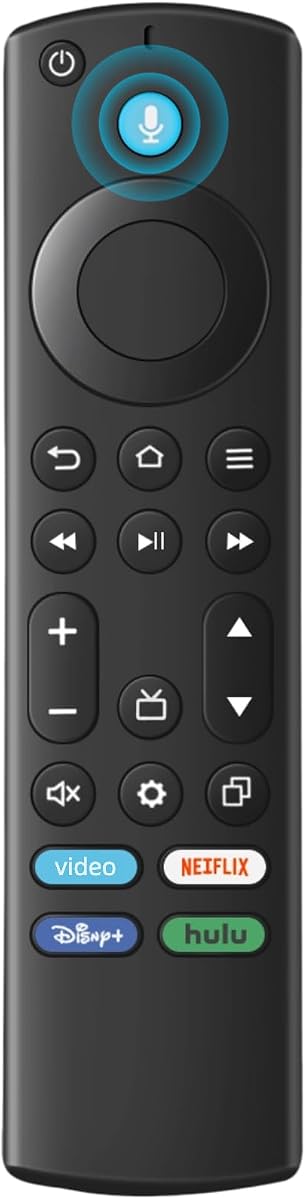
4.2Editor score
4.5Editor score
The following table provides a side-by-side comparison of all ten selected Fire Stick Replacement Remote options. Review the specifications and compatibility notes to determine which model aligns best with your existing Amazon Fire TV hardware and streaming habits.


This replacement voice remote is designed for users seeking a reliable substitute for their lost or broken Amazon Fire TV controller. It holds a solid rating and supports voice commands to help you find content quickly across various Fire Stick generations and smart TV models.
We may earn a commission when you buy through this link, at no additional cost to you.
Key strengths include its broad compatibility with devices like the Fire Stick 4K Max and Fire TV Cube. The voice function allows hands-free searching, which is particularly useful for navigating large media libraries. It also supports smart TVs from brands like Toshiba and Insignia that feature built-in Fire TV interfaces.
While the remote performs well, users should note that batteries are not included and must be purchased separately. Additionally, pairing methods can differ depending on the specific device model, so consulting the included manual is essential for initial setup.
Ideal for budget-conscious shoppers needing a functional upgrade, this remote offers excellent value. It balances cost with essential features like voice control and shortcut access, making it a strong choice for most standard Fire TV setups.
The built-in microphone lets you speak commands to find shows or launch apps without typing, saving time and effort during daily use.
It works with a wide range of Fire Stick models including 4K Max and Cube, ensuring it fits most modern streaming hardware configurations.
We may earn a commission when you buy through this link, at no additional cost to you.
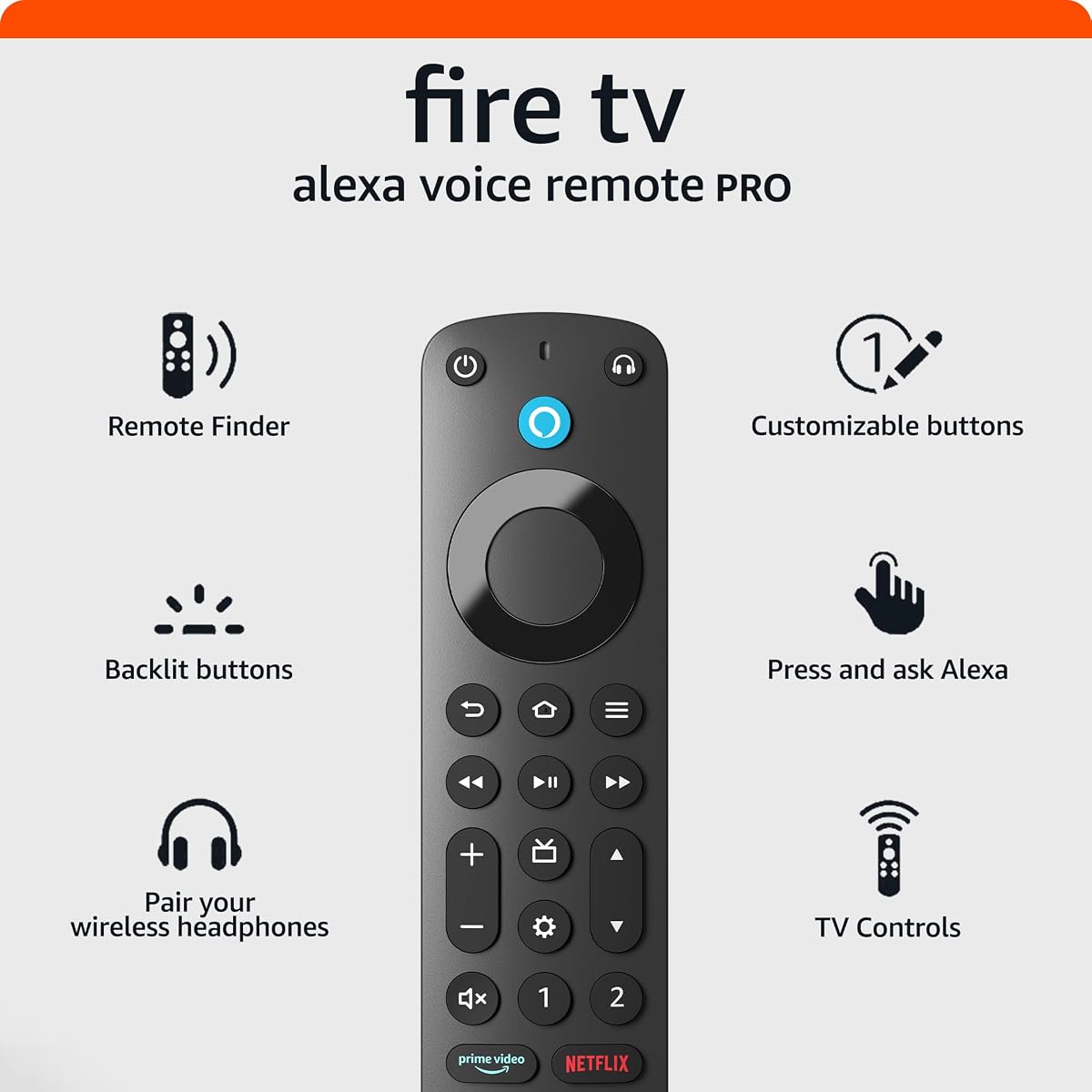
The Amazon Fire TV Alexa Voice Remote Pro stands out as a premium option for users who want advanced features beyond basic navigation. With a high rating, it offers unique tools like a remote finder and backlit buttons that enhance usability in low-light environments.
We may earn a commission when you buy through this link, at no additional cost to you.
Its standout features include motion-activated backlighting that illuminates buttons when you pick it up, perfect for night watching. The remote finder function helps locate lost remotes by emitting a ring sound when commanded via Alexa. Customizable buttons allow you to set direct shortcuts to favorite apps.
Despite its advantages, the price is higher than third-party alternatives. It also lacks compatibility with older Fire TV generations, so verify your device model before buying. These trade-offs are acceptable given the convenience of the extra features it provides.
This remote is best suited for users who value convenience and modern design. If you often lose your remote or watch in the dark, the Pro model justifies the cost with its thoughtful additions and superior build quality.
Buttons light up automatically when you hold the remote, making it easy to find controls in a dark room without fumbling or turning on lights.
Use Alexa to make the remote ring, helping you quickly locate it if it has been misplaced under cushions or behind furniture.
We may earn a commission when you buy through this link, at no additional cost to you.
This replacement remote offers a cost-effective solution for Fire TV users needing a quick substitute. It carries a strong rating and supports essential features like voice search and shortcut buttons to streamline access to streaming services and smart TV functions.
We may earn a commission when you buy through this link, at no additional cost to you.
It supports a wide range of models including Fire Stick 4K Max and Fire TV Cube. The remote includes four shortcut buttons that can be programmed for instant access to favorite apps. Voice activation allows hands-free control, enhancing the overall viewing experience.
Users should note that voice activation requires following specific manual instructions to pair correctly. Additionally, it is not compatible with Roku devices or certain older TV models, so checking the compatibility list is crucial before purchasing.
Perfect for those seeking value without sacrificing core features, this remote delivers reliable performance. It is an excellent choice for households with multiple Fire devices looking to standardize remote usage across different setups.
Program buttons to launch your favorite apps instantly, reducing the time spent navigating through menus to start your show.
The voice function lets you search for content or control playback using spoken commands, making navigation faster and easier.
We may earn a commission when you buy through this link, at no additional cost to you.
This remote is engineered for durability and performance, designed to replace lost or malfunctioning controllers. It supports a broad range of Fire Stick models including the 4K Max and Select versions, ensuring versatility for most users.
We may earn a commission when you buy through this link, at no additional cost to you.
It features a high click rating indicating robust construction for long-term use. The remote includes four shortcut buttons for quick app access and supports voice commands for seamless navigation. It works seamlessly with compatible smart TVs like Omni and Toshiba.
While durable, it is not compatible with first-generation Fire TV devices. Additionally, users need to purchase batteries separately and follow pairing instructions to enable voice functions properly. These are minor inconveniences given the overall reliability.
This option is ideal for users prioritizing build quality and range. If you need a reliable remote that withstands heavy use and offers standard voice features, it provides a solid balance of performance and affordability.
Built to withstand over 20,000 clicks, this remote ensures longevity while offering control from up to 40 feet away.
Four dedicated buttons allow you to jump straight to favorite streaming services without navigating through the home menu.
We may earn a commission when you buy through this link, at no additional cost to you.
This replacement remote focuses on ease of use with an automatic sync feature that simplifies setup. It supports various Fire Stick models including Lite and 4K, making it versatile for different household configurations and smart TV brands.
We may earn a commission when you buy through this link, at no additional cost to you.
Key features include instant access shortcuts that launch popular apps with one press. Voice control allows for hands-free searching and volume adjustment. It works seamlessly with 4-Series smart TVs and other supported Fire TV devices.
Compatibility is limited to newer generations, excluding 1st and 2nd Gen sticks. Users must also purchase batteries separately. These factors are minor trade-offs considering the intuitive design and reliable performance it offers.
Best for users seeking simplicity and quick pairing, this remote is a straightforward solution. It reduces setup time and delivers essential features needed for a smooth streaming experience across supported devices.
The remote automatically syncs with your device without complex configuration, getting you watching faster.
Pre-programmed shortcut buttons provide instant access to popular apps, saving you time navigating menus.
We may earn a commission when you buy through this link, at no additional cost to you.
This remote is designed to cover a wide array of Fire Series devices, ensuring compatibility with most modern setups. It supports Fire TV Stick and Cube models across multiple generations, making it a versatile option for many households.
We may earn a commission when you buy through this link, at no additional cost to you.
Features include voice control for finding and launching content effortlessly. The LED indicator provides clear feedback during pairing, reducing setup confusion. It includes standard navigation controls for smooth playback management and scene jumping.
It is not compatible with older 1st and 2nd Gen Smart TVs, so checking your device model is essential. Batteries are required but not included. These limitations are standard for the category and do not detract from its overall utility.
Ideal for users with diverse Fire devices, this remote offers broad coverage and reliable performance. It is a practical choice for those needing a universal replacement that handles voice commands and navigation effectively.
Control content and smart home devices with voice commands, making operation more intuitive and hands-free.
The LED indicator helps confirm successful pairing quickly, reducing setup time and frustration.
We may earn a commission when you buy through this link, at no additional cost to you.
This official Amazon remote provides reliable performance with built-in TV controls for power and volume. It includes batteries and is optimized for use with compatible Fire TV devices like Fire Stick HD and 4K Max models.
We may earn a commission when you buy through this link, at no additional cost to you.
It features preset app buttons for quick access and a guide button for channel listings. Control over compatible soundbars and receivers adds convenience for home theater setups. Voice commands work seamlessly for search and launch tasks.
Compatibility is restricted to newer devices excluding 1st and 2nd Gen sticks. While priced higher than third-party options, the official status ensures consistent updates and support. This makes it a safe choice for guaranteed functionality.
Perfect for users wanting official support and included accessories, this remote offers peace of mind. It balances standard features with the reliability of a manufacturer-approved accessory for your streaming setup.
Dedicated power and volume buttons let you manage your TV and soundbar directly from one remote.
Quick access buttons launch your favorite services instantly, reducing the steps needed to start watching.
We may earn a commission when you buy through this link, at no additional cost to you.
This replacement remote is a budget-friendly choice that supports a variety of Fire TV models including Lite and 4K. It offers solid voice functionality and standard navigation controls to enhance your streaming workflow without a high cost.
We may earn a commission when you buy through this link, at no additional cost to you.
Key strengths include compatibility with 2nd and 3rd Gen TV models. Voice commands allow for easy content search and playback control. The LED indicator helps confirm pairing status, reducing setup frustration for users.
Compatibility is limited to newer generations and excludes 1st Gen Smart TVs. Batteries must be purchased separately. These minor drawbacks are outweighed by the value it provides for general daily use.
Best for cost-conscious buyers needing a reliable backup, this remote delivers essential features effectively. It ensures you stay connected to your streaming ecosystem without significant investment or hassle.
Find shows and movies quickly using voice commands, simplifying navigation across large libraries.
The LED indicator flashes to show pairing status, helping you confirm connection success easily.
We may earn a commission when you buy through this link, at no additional cost to you.
This remote is designed to replace existing controllers with enhanced voice features and app shortcuts. It supports Fire Cube and Stick models including 4K Max, making it suitable for high-definition streaming needs.
We may earn a commission when you buy through this link, at no additional cost to you.
Features include four preset app buttons for instant access and voice commands for search. It works with Hisense and Insignia smart TVs that support Fire integration. Navigation controls help jump quickly to favorite scenes.
Users must ensure old remote batteries are removed before pairing to avoid conflicts. It is not compatible with older generation Smart TVs. These requirements are standard for successful setup and do not hinder usability.
Ideal for users seeking specific TV model compatibility, this remote offers a tailored experience. It provides essential voice and shortcut features for efficient control across supported devices and brands.
Four preset buttons launch apps instantly, saving you time navigating through menus.
Use standard controls to jump quickly to favorite scenes, enhancing your movie watching experience.
We may earn a commission when you buy through this link, at no additional cost to you.
This replacement remote offers solid value for users needing a functional substitute for their Fire Stick controller. It supports a wide range of devices including Fire Stick Lite and 4K Max, ensuring versatility across multiple setups.
We may earn a commission when you buy through this link, at no additional cost to you.
It includes voice functionality for hands-free searching and four shortcut buttons for quick app access. The remote is compatible with Omni and Toshiba smart TVs featuring Fire TV integration. Setup is straightforward with LED pairing guidance.
It does not support older 1st and 2nd Gen models. Batteries must be purchased separately. These limitations are minor and do not impact performance for most current hardware users.
Perfect for budget-focused buyers needing reliable voice features, this remote provides excellent value. It ensures you maintain full control over your streaming devices without compromising on essential functionality or quality.
Find content using voice commands without typing, speeding up your content discovery process.
Four dedicated buttons give you instant access to popular services, reducing navigation time.
We may earn a commission when you buy through this link, at no additional cost to you.
Choosing the right Fire Stick Replacement Remote involves evaluating compatibility, features, and price to ensure seamless integration with your setup. Use this guide to understand key factors that influence performance and usability.
Ensure the remote supports your specific Fire Stick or Cube model including generation and type. Check the product listing for compatibility with 4K Max Lite or older versions to avoid return issues and guarantee functionality.
Always verify your device model number before purchasing to confirm it matches the remote supported list.
Voice control allows hands-free search and navigation which is a major convenience feature. Confirm that the remote includes a microphone and supports commands for content search volume and smart home control.
Prioritize remotes with clear voice recognition to minimize errors during usage.
Consider the layout of buttons including dedicated shortcuts and navigation keys. Remotes with customizable buttons or backlit keys offer better usability especially in dark environments or for quick app access.
Look for layouts that match your current remote to maintain muscle memory and ease of use.
Assess the construction materials to ensure the remote can withstand daily use without breaking. Reviews often mention durability so check for long-term performance feedback regarding button wear and casing strength.
Choose models with reinforced buttons and sturdy casings for extended lifespan.
Most remotes use AAA batteries so check if they are included or need to be purchased separately. Consider power options if you prefer rechargeable units although this is less common in standard replacements.
Ensure the battery compartment is easy to access for frequent changes.
A straightforward pairing process reduces setup frustration especially for non-technical users. Look for remotes that offer automatic pairing or clear LED indicators to guide the connection process.
Select models with simple instructions to ensure quick setup.
Integrated TV controls for power and volume allow managing multiple devices from one remote. This feature is essential if you want to avoid switching between remotes for TV and streaming functions.
Prioritize models with dedicated volume and power buttons.
Compare prices to find a remote that offers good value without sacrificing essential features. Check for any satisfaction guarantees or customer support policies that add security to your purchase.
Opt for options that include a guarantee to protect your investment.
To begin using your new Fire Stick Replacement Remote, insert two AAA batteries ensuring the correct polarity. Then disconnect your Fire Stick power for ten seconds before reconnecting it to the TV to initiate pairing mode.
Once the device boots up press and hold the Home button for ten to fifteen seconds until the LED indicator flashes. Wait until the light stops blinking indicating a successful connection so you can start navigating.
For long-term care keep the remote in a cool dry place and avoid dropping it. Clean buttons with a dry cloth periodically and replace batteries promptly when the signal weakens to maintain consistent performance.
To pair your remote insert fresh batteries and hold the Home button for ten to fifteen seconds. The LED light will flash rapidly indicating it is in pairing mode. Wait for the connection to establish before using buttons.
Check that the remote is successfully paired and batteries are inserted correctly. Ensure your device supports voice commands and the microphone button is not stuck. Re-pair the remote if issues persist.
No compatibility varies by generation. Most remotes support 3rd Gen and newer devices but not 1st or 2nd Gen models. Always verify the compatibility list before purchasing.
Yes many replacement remotes are designed to work with Fire TV Cube 2nd and 3rd Gen models. Ensure the product listing explicitly mentions Cube compatibility to avoid fit issues.
Many modern replacement remotes include TV control buttons for power and volume. Check the product specs to confirm it supports integrated TV controls for your specific brand.
Most third-party replacement remotes do not include batteries so you will need to purchase two AAA batteries separately. Some official Amazon remotes may include them.
To reset remove the batteries from the remote and press any button for thirty seconds. Reinsert batteries and reconnect the Fire Stick power to initiate re-pairing.
This guide highlights ten top Fire Stick Replacement Remote options ranging from budget third-party choices to premium official models. Each selection offers voice control and essential navigation features to keep your streaming setup functional.
When selecting prioritize compatibility with your specific device model and desired features like backlighting or shortcuts. Official remotes offer guaranteed support while third-party options provide cost savings for essential functionality.
Prices and availability can change so always verify the details on the retailer site before buying. Choosing the right remote ensures smooth operation and enhances your overall entertainment experience.