
Upgraded Watt Power Meter Plug
4.6Editor score
7 Display Modes
Adjustable Backlight
Overload Protection
Find the best Energy Consumption Monitors for PC to track usage and save bills. This guide compares top models with smart features, accuracy, and ease of use.
Monitoring your computer's energy use helps reduce bills and protect the planet. Choosing the right monitor ensures accurate readings and smart insights for your setup.
We compared ten top models based on accuracy, features, and user reviews. Each pick offers unique benefits for tracking power draw and managing home energy.
Every review highlights standout specs, pros, cons, and ideal buyers. Note that prices and stock change often, so check current listings before you buy.
4.6Editor score

4.6Editor score

4.3Editor score
This side-by-side table shows key specs for each model. Compare voltage ranges, data memory, display types, and special features to find your perfect match.


The Emporia Vue 3 leads our list as the best overall energy monitor. It delivers precise real-time data with UL certification for safe use.
We may earn a commission when you buy through this link, at no additional cost to you.
Its sixteen branch sensors let you track specific loads like PCs without guesswork. The app shows live spending and actionable alerts for savings.
You need 2.4GHz WiFi and some panel access for install. Data retention is three hours for one-second stats in the app.
Homeowners who want precise PC and total home energy insights will love this. It balances accuracy, features, and safety perfectly.
Connects easily to automate energy based on solar usage or peak demand.
UL Listed components prevent hazards like overheating for peace of mind.
We may earn a commission when you buy through this link, at no additional cost to you.
This plug-in meter offers top value for tracking a single PC setup. It monitors watts, kWh, volts, and costs with a bright display.
We may earn a commission when you buy through this link, at no additional cost to you.
Seven display modes let you view parameters like power factor and cumulative time. The adjustable backlight helps read data at night.
It does not connect to the internet or show remote stats. You must plug it directly between the PC and the wall outlet.
Renters or those needing quick cost checks will find it perfect. It is simple, safe, and easy on your wallet.
Just plug in to see real usage without complex install or apps.
Overload protection warns you if power exceeds safe limits instantly.
We may earn a commission when you buy through this link, at no additional cost to you.
The Meross monitor excels for privacy and solar-aware PC power tracking. It stores five years of data locally with no cloud lock-in.
We may earn a commission when you buy through this link, at no additional cost to you.
Its ETL certification and Home Assistant integration allow deep automation. You can auto-charge EVs or run PCs on solar surplus.
The app is functional but basic compared to others. It still delivers solid cost charts and thresholds without monthly fees.
Tech enthusiasts who want full data ownership will love this. It pays off for long-term monitoring and smart home users.
Detects solar surplus to run high-load devices for free power.
All usage stats stay local with no cloud delays or concerns.
We may earn a commission when you buy through this link, at no additional cost to you.
SEM-Meter shines for shared apartments where you split PC costs. It tracks circuits per room and calculates bills by time-of-use tariffs.
We may earn a commission when you buy through this link, at no additional cost to you.
You can run it offline via MQTT without their cloud. The sensors handle single and three-phase systems well for most panels.
Install needs panel access and flexible sensors for busbar-only setups. You may need extra tools to reach hidden circuit breakers.
Landlords and roommates needing fair energy bills will prefer this. It makes multi-tenant tracking transparent and automated.
Track usage by room or device to split electric costs accurately.
Run locally with your own MQTT server for full privacy.
We may earn a commission when you buy through this link, at no additional cost to you.
This outlet meter handles 90-250V with Class 1.0 accuracy. Its compact shape leaves the lower outlet free when plugged in.
We may earn a commission when you buy through this link, at no additional cost to you.
You get 90 days of data memory via battery backup. A clear backlit display shows watts, volts, amps, and costs easily.
It lacks WiFi or app control for remote stats. You must plug it directly into the wall outlet for use.
Travelers or those with varied voltage gear will find it handy. It is reliable, space-saving, and accurate.
Compact plug design keeps the second outlet accessible for other devices.
Stores data for months even if unplugged or power fails.
We may earn a commission when you buy through this link, at no additional cost to you.
The HBN plug offers nine data modes including VA, PF, and kWh. Its 160-degree viewing angle makes readings clear from any spot.
We may earn a commission when you buy through this link, at no additional cost to you.
Data persists even if power cuts out. The backlight dims after 15 seconds to save energy unless you keep pressing.
It does not connect to apps for remote monitoring. You view usage directly on the display while it is plugged in.
Users wanting more readout options in a plug will like this. It is clear, reliable, and feature-rich for its price.
Cycle through nine parameters to see exact electrical health.
Rated for 125VAC 15A with clean simple interface.
We may earn a commission when you buy through this link, at no additional cost to you.
KETOTEK lets you switch parameters with single button presses. It calculates costs and alarms when you exceed settings by cost or kWh.
We may earn a commission when you buy through this link, at no additional cost to you.
The display angles well so you do not bend to read. It stores settings and data even after unplugging.
It lacks cloud sync or remote views. You need to view it directly on the plug near the PC.
This is great for users who want quick cost checks. Its alarms help you avoid overages fast.
One-click M, Plus, Minus buttons get you to key data.
Alarms alert you when bills hit your set limits.
We may earn a commission when you buy through this link, at no additional cost to you.
This 2-pack lets you monitor both a PC and a monitor. It shows eight modes including unit price and total cost.
We may earn a commission when you buy through this link, at no additional cost to you.
ABS material makes it fireproof and durable. You reset all data by holding one button without tools.
It works only locally on the plug. There is no app to check stats away from home.
Households needing two cheap monitors for PCs and TVs will love it. It is simple, safe, and doubles the value.
High-quality ABS keeps the plug safe and durable.
Reset buttons clear data in seconds with no extra tools.
We may earn a commission when you buy through this link, at no additional cost to you.
The classic Kill A Watt has tracked loads for years. It shows kWh and costs with four easy settings.
We may earn a commission when you buy through this link, at no additional cost to you.
The large LCD counts consumption clearly. It is designed for 115V appliances like most desktop PCs.
It lacks WiFi or modern apps. You see usage only on the plug screen.
This is perfect for basic PC cost checks. It is reliable, trusted, and easy to understand.
A long-time favorite for simple plug-and-use monitoring.
Big LCD shows kWh and costs for daily or yearly checks.
We may earn a commission when you buy through this link, at no additional cost to you.
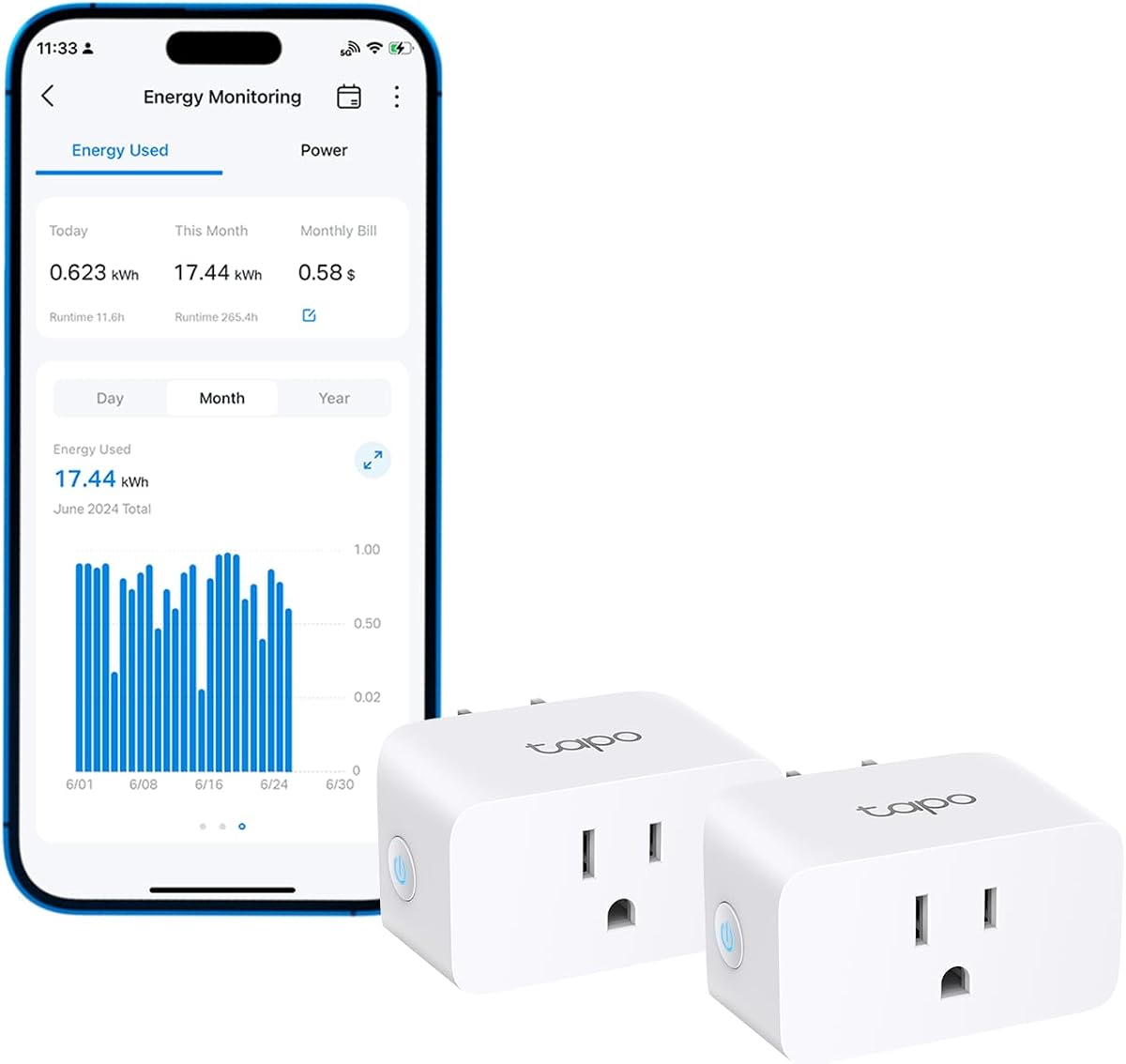
Tapo adds smart plug control to energy monitoring. It tracks stats in the app and allows voice control via Alexa.
We may earn a commission when you buy through this link, at no additional cost to you.
Set schedules to run your PC during off-peak hours. Auto shut-off prevents overload for safety.
It measures only the single plugged device. There is no panel monitoring for whole-home data.
This is great for remote PC on/off plus stats. You save money with smart scheduling.
Turn your PC on or off from anywhere with the app.
Shuts off devices that exceed power limits for safety.
We may earn a commission when you buy through this link, at no additional cost to you.
Choosing the right energy monitor depends on how you want to measure usage. Consider installation type, smart features, and your budget before buying.
Plug-in monitors are easiest. Just insert them between your PC and wall. Whole-home monitors need panel access and clamp sensors.
If you want full home data including the PC, choose a panel model. For single PCs, a plug is enough.
Smart monitors connect to apps and voice assistants. They allow remote control and scheduling for off-peak power use.
Choose a smart model if you want to automate your PC power and see stats on your phone.
Look for at least 1% accuracy for reliable PC usage data. Whole-home systems often use 200A sensors with 16 branch circuits.
More sensors let you track your PC separately from other heavy loads like heaters or dryers.
Some models store days of data locally. Others upload to the cloud with long-term archives.
If privacy matters, pick a local-only model. For analysis, choose one with export options and months of history.
Plug monitors cost under $20 and are good for basic checks. Whole-home systems cost over $100 but track the whole panel.
Decide if you need just PC usage or full home control before buying a premium system.
Choose models with UL, ETL, or CE marks. These show the device meets electrical safety standards.
Certified gear prevents risks like overheating or short circuits when monitoring power continuously.
Plug monitors have LCD screens. Choose ones with backlight and wide angles so you can see readings at night.
Panel monitors rely on apps. Ensure the app shows clear charts and alerts for your PC's power usage.
Check if the monitor works with your voltage and phase. Many support 120V but some handle 240V or three-phase.
Verify it fits your outlet and network type. Some need 2.4GHz WiFi while others use Ethernet.
Plug the monitor between your PC and the wall. For panel units, install sensors on circuit breakers with care.
Set your electricity cost in the app so it shows savings. Create alarms for high usage times to cut power.
Keep the device clean and dry. Avoid overloading the plug with more than 1800W. Check cables often for wear.
Yes, most monitors work with any PC using standard outlets or breakers. Plug types match US 120V sockets. Whole-home panels handle 240V and other phases.
You can with plug-in monitors or branch sensors. Whole-home systems isolate circuits so your PC draw shows separately.
Certified models with UL or ETL marks are safe. They have overload protection and fire-resistant housing for constant use.
Top units are within 1 to 2 percent. Accuracy depends on voltage stability and sensor quality.
No. Some work offline and show stats on a screen. Others need WiFi for apps and remote control.
You enter your rate per kWh. The device multiplies used energy by that rate to show cost over time.
The Emporia Vue 3 leads for whole-home power with accurate PC tracking. For single PC checks, the Upgraded Watt Power Meter Plug offers great value.
Prioritize safety certifications and smart features if you want automation. Check that it supports your PC's power needs and your network.
Prices and stock change daily. Visit the Amazon links to see current offers before you finalize your choice.