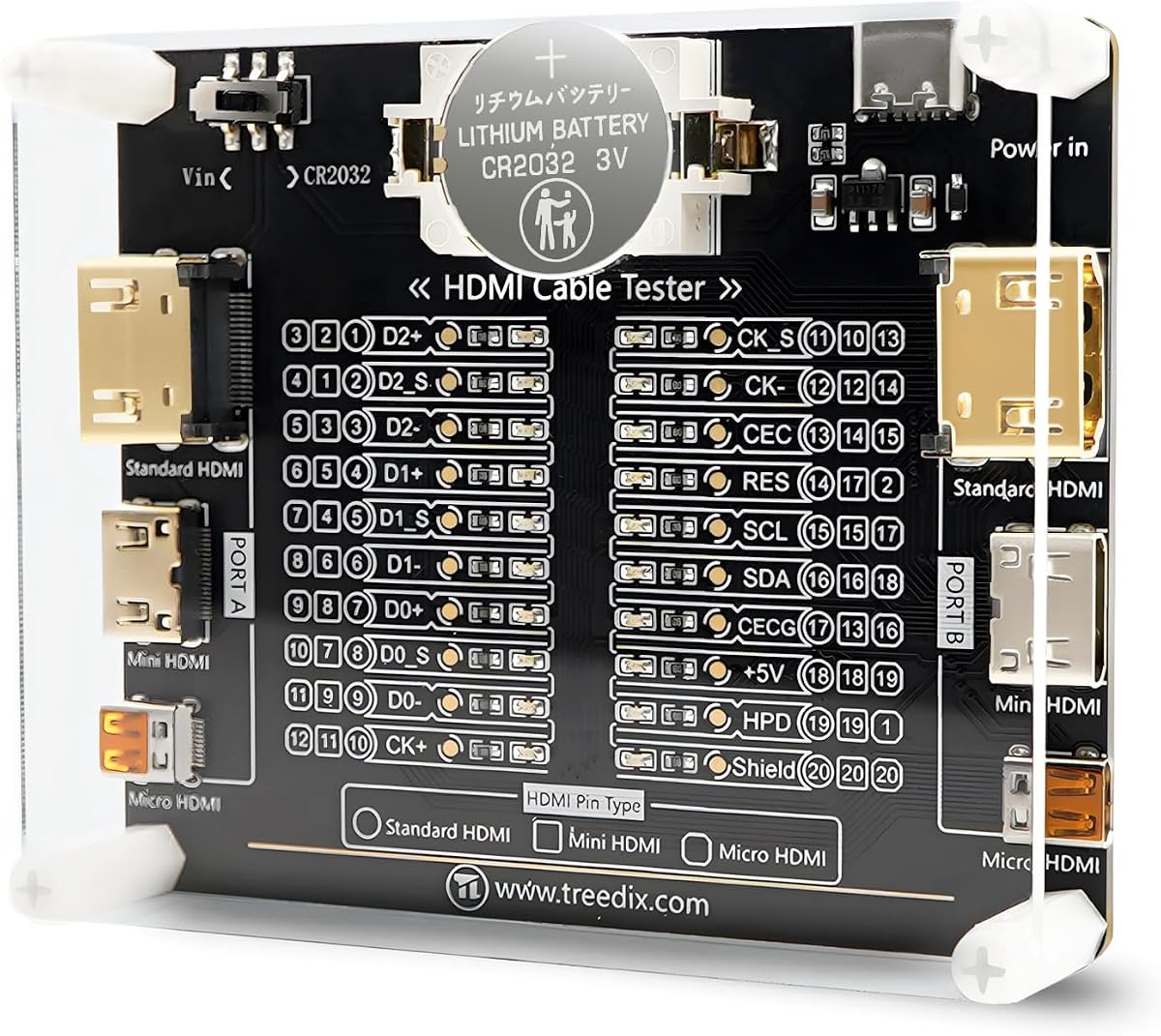
Treedix Cable Tester Board
4.6Editor score
Supports HDMI versions 1.0 to 2.1
Clear LED indicator for each pin
Compact acrylic housing for protection
This guide compares the top 10 HDMI Signal Tester models for 2026, evaluating features like 4K support, cable diagnostics, and portability to help you choose.
Finding the right HDMI Signal Tester is crucial for technicians and enthusiasts who need reliable diagnostics. These tools verify signal integrity, check cable continuity, and ensure compatibility across various devices. A good tester saves time and prevents costly equipment failures by pinpointing issues quickly.
We evaluated ten leading models based on resolution support, ease of use, and diagnostic depth. Our analysis covers everything from basic cable checkers to advanced analyzers capable of handling 8K signals. Each product was scrutinized for its ability to handle real-world installation challenges effectively.
Each pick in this list highlights specific strengths for different user needs and budgets. While prices may fluctuate, the core features remain consistent guides of of when you buy. We recommend checking current availability to ensure you get the best value for your specific testing requirements today.
4.6Editor score

4.5Editor score

The following table provides a side-by-side comparison of all ten models featured in this guide. It highlights key specifications such as supported resolutions, connectivity options, and unique features to help you distinguish between basic checkers and professional analyzers.


The STEREN Handheld HDMI Tester stands out as the top pick for technicians who need a self-contained diagnostic tool. With a 4.5 star rating, it offers a built-in HD LCD screen that allows you to verify video and audio signals without needing a monitor. This makes it invaluable for field work where equipment is limited.
We may earn a commission when you buy through this link, at no additional cost to you.
Its standout features include a tempered glass display that resists scratches and shattering, ensuring durability in demanding environments. The unit includes three HDMI ports, enabling complex connectivity tests and pass-through functionality. Additionally, the integrated battery provides several hours of continuous use, which is essential for long installation days.
While the device is robust, it comes at a higher price point compared to simpler cable testers. The screen size might also be challenging to read in very bright outdoor conditions without shade. However, these trade-offs are acceptable given the comprehensive testing capabilities and the elimination of external display requirements.
This tester is ideal for professional installers and IT specialists who require reliable, on-the-spot verification of set-top boxes and sources. If you need a rugged device that confirms both audio and video integrity independently, this model is highly recommended for your toolkit.
The built-in screen allows technicians to verify signals without relying on the end-user display or extra equipment.
With a hybrid dual layer of silicone rubber and plastic, this unit is built to survive drops and harsh conditions.
We may earn a commission when you buy through this link, at no additional cost to you.
The Treedix Cable Tester Board is an excellent entry-level option for those needing simple continuity checks without breaking the bank. It achieves a high rating by offering clear LED feedback for each of the twenty pins in an HDMI connector. This transparency helps users quickly identify shorts or open circuits.
We may earn a commission when you buy through this link, at no additional cost to you.
Its design supports a wide range of HDMI versions, including the newest 2.1 standard, ensuring future compatibility. The unit comes with an acrylic housing that protects the internal components from damage during transport. It is versatile enough to work with various interface types like Type A, C, and D.
One limitation is that it does not have an internal battery, requiring an external power source to function. This can be inconvenient for purely mobile tasks where finding a power outlet might be difficult. However, for workshop environments or quick checks, this is rarely a significant hurdle.
Choose this board if you need a cost-effective solution for verifying cable integrity in a fixed location or home setup. It is perfect for hobbyists or technicians who already have power access and want a reliable way to validate cable pinouts.
Twenty individual LEDs correspond to each pin, making it easy to see exactly which connection is failing.
Accommodates HDMI versions from 1.0 all the way to 2.1, covering both legacy and modern devices.
We may earn a commission when you buy through this link, at no additional cost to you.
The JTECH Digital 8K Generator is a powerhouse for professionals working with cutting-edge display technology. As an analyzer and generator, it supports 8K signals at 60Hz, making it one of the few tools capable of validating next-generation setups. Its feature set is unmatched in the portable category.
We may earn a commission when you buy through this link, at no additional cost to you.
Key strengths include support for 40Gbps bandwidth and HDR, ensuring that high-bitrate content passes through cables correctly. The unit offers 64 resolutions and 33 built-in patterns, providing deep insight into signal integrity. It also verifies HDCP 2.3 encryption, which is critical for high-definition content security.
The price is steep, reflecting its advanced capabilities, and the interface may be too technical for casual users. However, for installers dealing with enterprise AV or high-end home theater systems, the investment pays off in troubleshooting efficiency. The included technical support adds further value to the purchase.
This tool is best suited for experts who need to certify 8K systems or troubleshoot complex bandwidth issues. If you require precise control over signal generation and deep analysis, this generator is the industry standard for portable testing.
Handles 8K at 60Hz and 40Gbps, ensuring compatibility with the latest high-definition standards.
Includes 33 test patterns and 64 resolutions to stress test cables and displays thoroughly.
We may earn a commission when you buy through this link, at no additional cost to you.
The Monoprice HDMI Signal Generator and Display Analyzer serves as a versatile tool for generating specific video signals. It supports high-quality outputs like 4K at 60Hz with 4:4:4 color, which is vital for precise visual fidelity. The device functions as both a generator and an emulator, offering flexibility in testing scenarios.
We may earn a commission when you buy through this link, at no additional cost to you.
Its DIP switches allow for easy configuration of resolution and HDCP content without complex menus. This simplicity ensures that technicians can quickly set up tests for different standards like 1.4 or 2.2. The device supports four different test patterns, aiding in diagnosing specific signal issues efficiently.
A key consideration is that it lacks a built-in display, meaning you must connect it to a monitor to see results. This adds a dependency on external equipment during testing. Despite this, its ability to handle advanced color formats makes it a strong choice for specific technical needs.
This unit is recommended for users who need to test specific color formats or HDCP compliance without a full analyzer. It balances cost and capability well, making it suitable for technicians who already have access to display monitors.
Supports 4K at 60Hz with 4:4:4 color depth, ideal for high-fidelity video testing.
DIP switches make it easy to switch between different resolutions and HDCP standards quickly.
We may earn a commission when you buy through this link, at no additional cost to you.
The Parts Express HDMI Cable Signal Tester is designed for quick and effective diagnosis of common cable issues. It can detect problems like color shift or sparkle that often plague low-quality cables. This makes it a valuable addition for anyone troubleshooting display problems without needing complex tools.
We may earn a commission when you buy through this link, at no additional cost to you.
The device displays the status of each HDMI signal component, giving you a clear view of what is working and what is not. It is compact and portable, allowing you to carry it in a tool bag easily. You can place it at either the source or the display end of the system for flexibility.
While it is effective for basic checks, it does not offer the deep analysis of a full analyzer. Users looking for protocol-level debugging might find it lacking. However, for identifying physical cable faults, it strikes a great balance between utility and simplicity.
This tester is ideal for general home theater enthusiasts or IT support staff who need to rule out cable issues quickly. If you need to verify that a cable is passing a signal correctly without expensive gear, this is a reliable option.
Can diagnose specific visual issues like color shifts or sparkles that indicate signal degradation.
Can be located at either the source or display end, making it versatile for different setups.
We may earn a commission when you buy through this link, at no additional cost to you.
The HDMI Portable Network Checker offers a unique dual-function design that handles both HDMI and Ethernet cabling. This versatility makes it a great value for technicians who install multiple types of connections. It scans up to 19 wires to determine if there are any shorts or open circuits.
We may earn a commission when you buy through this link, at no additional cost to you.
The set includes a main unit and a remote unit that stores conveniently on the side. This allows for testing cables that are already installed in walls or long runs. You can power the main unit with a battery or a USB charger, making it flexible for mobile work.
While it is not a high-end analyzer, its ability to handle both cable types in one device is a significant convenience. It is best suited for general network and home theater setups rather than professional broadcast environments. The price is also very competitive for a dual-purpose tool.
Choose this if you frequently deal with both HDMI and network cables and want a single device for basic continuity checks. It is an efficient tool for saving space in your toolkit while covering the most common cabling needs.
Efficiently tests both HDMI and RJ45 network cables, reducing the need for multiple tools.
The remote unit can be detached to test long cables that are pre-installed in walls.
We may earn a commission when you buy through this link, at no additional cost to you.
The 2K/4K HDMI Signal Generator, Analyzer and Cable Tester is built for verifying cable performance and compliance. It supports 18Gbps bandwidth, which is essential for ensuring cables can handle modern 4K signals. It also provides source video and timing analysis to ensure synchronization.
We may earn a commission when you buy through this link, at no additional cost to you.
Features like EDID management and HDCP compliance checks add depth to its functionality. The unit can scale from 4K down to 1080p, making it adaptable for various display capabilities. This flexibility is useful when testing older displays alongside new content sources.
While it is effective for verifying bandwidth and signal timing, it is more complex than simple continuity testers. The price reflects its advanced capabilities, making it a better fit for professionals than casual users. Portability is also limited compared to smaller handheld units.
This device is ideal for installers who need to certify cable runs for high-bandwidth 4K installations. If you need to ensure your cabling meets specific speed standards before deploying a system, this analyzer is a solid choice.
Supports 18Gbps to confirm cables can handle high-speed 4K data transfer reliably.
Provides timing analysis to ensure video and audio signals are synchronized correctly.
We may earn a commission when you buy through this link, at no additional cost to you.
The HDMI Cable Tester Portable High Definition Network Cable Tester Checker focuses on energy efficiency and basic diagnostics. It features an auto shut-down function that activates after ten minutes of inactivity, saving battery life during work. This feature is particularly helpful for portable tools used intermittently.
We may earn a commission when you buy through this link, at no additional cost to you.
It offers two testing modes, a fast scan for quick checks and a full display for comprehensive analysis. This range allows users to choose the level of detail they need for a specific task. It supports HDMI versions from 1.1 to 2.0, covering most standard cables.
The user interface is straightforward, relying on LED indicators to show connection status. While it does not offer advanced protocol analysis, it is sufficient for most home and office needs. The compact design makes it easy to keep in a tool kit for quick reference.
Select this tester if you need a simple device that manages its own power consumption effectively. It is a practical option for general checks where quick feedback and battery longevity are priorities.
Auto shut-down after ten minutes helps preserve battery life during intermittent usage.
Choose between fast scan for speed or full display mode for detailed diagnostics.
We may earn a commission when you buy through this link, at no additional cost to you.
The Jonard Tools HDMI-100 Tester is distinguished by its ability to test long cable runs up to 500 meters. This capability makes it ideal for large installations where cables are run through conduits or long distances. The remote unit can be detached, allowing you to test at the far end.
We may earn a commission when you buy through this link, at no additional cost to you.
It evaluates shorts and incorrect wire pairings for each pair, providing precise diagnostic data. The scan mode allows you to see each individual connection as it is tested, which helps in identifying specific faults. It supports both standard HDMI and Mini HDMI cables for broad utility.
While it is robust, it relies on a 9V battery which may not be as convenient as rechargeable options. The device is also heavier than some other handheld units. However, the ability to handle long distances makes it a unique tool for specific industrial or commercial use cases.
This tester is recommended for professionals working on large-scale AV installations where cable length is a major factor. If you need to verify continuity over long distances without re-running cables, this model offers the reach you need.
Capable of testing cable runs up to 500 meters, ideal for large venue installations.
The remote unit can be separated from the main unit for testing at the far end.
We may earn a commission when you buy through this link, at no additional cost to you.
The UT681 HDMI Tester is designed with portability in mind, supporting both Micro and Mini HDMI interfaces. This makes it an excellent choice for testing cables used with mobile devices and smaller electronics. It scans up to 19 wires quickly to identify faults like shorts or cross connections.
We may earn a commission when you buy through this link, at no additional cost to you.
Its dual-mode test function allows for scanning in boot state or full display mode. The LED indicator zones clearly show abnormal points, simplifying the troubleshooting process. The device is lightweight, weighing around 175 grams, which adds to its convenience for field work.
Power consumption is optimized with automatic shut-off features when idle. However, it lacks the advanced capabilities of larger generators. Despite this, its high rating reflects user satisfaction with its simplicity and effectiveness for specific cable types.
Choose this tester if you frequently work with smaller HDMI connectors or need a lightweight tool for travel. It is a reliable compact option for verifying cable quality in environments where space is a constraint.
Accommodates Micro and Mini HDMI connectors, expanding its utility beyond standard cables.
Weighs only 175 grams, making it easy to carry and operate without fatigue.
We may earn a commission when you buy through this link, at no additional cost to you.
Selecting the right HDMI Signal Tester depends on your specific technical needs, budget, and the types of cables you work with. This section outlines the critical factors to consider before making a purchase.
When choosing an HDMI Signal Tester, verify that it supports the resolution and bandwidth requirements of your projects. For modern 4K and 8K installations, you need a tool that can handle 18Gbps or 40Gbps signals. Basic testers may only support 1080p, which limits their usefulness for new setups.
Ensure the tester explicitly lists support for high-definition standards like 4K at 60Hz to avoid compatibility issues.
Different testers offer varying levels of diagnostic depth, from simple continuity checks to protocol analysis. If you need to identify specific signal faults like HDCP errors or timing issues, look for a device with detailed feedback modes. Basic LED indicators are sufficient for simple cable checks.
Prioritize tools that offer multiple testing modes to adapt to different levels of troubleshooting complexity.
Power source is an important consideration for portable testing. Some devices use standard batteries like 9V, while others offer rechargeable lithium batteries. A built-in battery provides more freedom for field work, whereas external power might be fine for a workshop setting.
Choose a device with a power source that matches your typical work environment to avoid running out of power mid-job.
Ensure the tester supports all the connector types you encounter in your work. While most support standard HDMI Type A, some models also include Mini and Micro HDMI ports. This is crucial if you work with portable electronics or compact devices.
Check that the tool includes adapters or ports for Mini and Micro interfaces if you need to test small cables.
Tools used in the field must withstand drops and rough handling. Look for models with ruggedized housing or tempered glass displays. A durable device will save money in the long run by resisting damage during transportation or use.
Select a tester with shock-proof materials to ensure it survives the demands of a job site.
Prices range from affordable board testers to high-end generators. Determine your budget based on the complexity of the tasks you face. Often, a slightly more expensive device that lasts longer offers better value than a cheap one that fails after few uses.
Balance the cost against the features to find a model that offers the best return on investment.
Some models come with extra features like EDID management, audio verification, or cable length testing. These capabilities can be highly useful for advanced installations. Identify which extra features are necessary for your workflow to avoid paying for unneeded capabilities.
Look for specific features like audio verification if you need to troubleshoot sound issues separately from video.
Reliable customer support and warranty coverage are essential for professional equipment. Manufacturers that offer lifetime technical support can assist you with complex issues. A good warranty protects your investment against defects.
Prefer brands that provide clear warranty terms and accessible support channels for any technical questions.
To begin using your HDMI Signal Tester, connect the cable securely into the designated input and output ports. Ensure both ends of the cable are plugged in firmly to establish a stable connection before powering on the device.
Once powered, observe the indicator lights or display screen to interpret the test results. If LEDs light up in sequence, it usually indicates a valid connection. Any flashing or missing lights typically point to a fault in the cable or connection.
To maintain your tester, keep it stored in a protective case when not in use. Avoid exposing the device to excessive heat or moisture, and clean the ports gently to prevent dust buildup that could affect connectivity tests.
An HDMI generator sends signals to test displays or cables, acting as a source. A cable tester checks the physical integrity of a cable. Some advanced units combine both functions to provide comprehensive testing capabilities for technicians.
Some advanced testers can verify HDCP compliance and encryption status. Basic continuity testers cannot check for HDCP issues. For high-definition content protection checks, ensure the device supports HDCP analysis in its specifications.
Yes, specialized testers support 8K signals and high bandwidth requirements like 40Gbps. Look for models explicitly mentioning 8K or HDMI 2.1 support to ensure they can handle the latest standards.
Faulty cables often show incomplete LED sequences or missing lights on the tester. If specific pins do not light up or if there is signal distortion on a display, the cable likely has internal damage or poor wiring.
Most portable testers work with a wide range of lengths. For very long cables over 500 meters, you may need specific equipment capable of signal amplification or long-range testing protocols to maintain accuracy.
Yes, many handheld models have built-in screens that allow you to verify signals without a TV. This is useful for field technicians who need to test set-top boxes or sources independently.
In summary, the best HDMI Signal Tester for you depends on whether you need basic continuity checks or advanced signal generation. The STEREN Handheld unit offers a great balance for professionals, while the Treedix board is perfect for budget-conscious users.
Prioritize features like resolution support and power options based on your specific environment. A device that matches your workflow will save you time and prevent costly troubleshooting delays during installations.
Always check current prices and availability before purchasing as stock may change. Investing in the right tool ensures you can handle any HDMI cable challenge with confidence and precision.