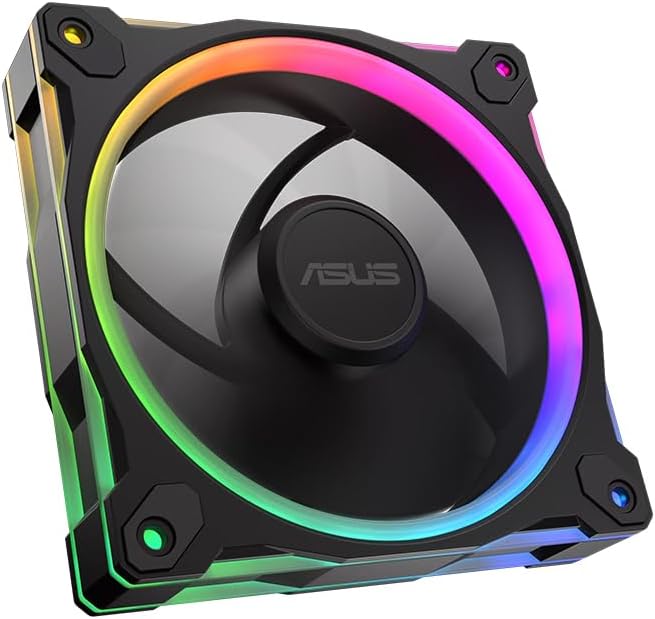
ASUS Prime MR120 ARGB Reverse Fan Black
4.6Editor score
20 Addressable RGB LEDs
Quiet 23dB Operation
28mm Thick Frame
This guide compares the top ASUS Case Fans for cooling performance noise levels and RGB aesthetics to help you choose the right fans for your PC build.
Choosing the right cooling solution is vital for maintaining peak system performance. High quality case fans ensure your components stay cool during intense gaming sessions or heavy productivity workloads.
We evaluated ten top rated models based on airflow static pressure noise levels and build quality. Our analysis focuses on real world performance metrics and user feedback to highlight the most reliable options available.
Each pick highlights specific strengths such as silent operation or exceptional airflow. Prices and availability change frequently so check the links for the latest deals and stock status before buying.
4.6Editor score

4.7Editor score

5.0Editor score
The following table provides a side by side overview of all ten models including their key specifications and unique features to help you compare at a glance.


The ASUS TUF Gaming TR120 ARGB Triple Pack stands out as the top choice for users seeking robust cooling combined with stylish aesthetics. Its high rating reflects consistent performance across various system configurations.
We may earn a commission when you buy through this link, at no additional cost to you.
The extra thick 28mm frame significantly boosts airflow and static pressure compared to standard thinner fans. The dual layer LED matrix provides vibrant illumination that enhances any build while the PWM control ensures quiet operation under load.
While the price is higher than single fan options the value of getting three high quality units is undeniable. The build quality is rugged and matches the TUF branding promise of durability for long term use.
This pack is ideal for gamers and enthusiasts who need to cool multiple radiators or case vents simultaneously. We recommend it for those prioritizing cooling efficiency and visual impact in their PC build.
The 28mm frame design allows for a thicker impeller that moves more air efficiently even through restrictive filters or radiators.
With 16 individually addressable LEDs per fan the lighting effect is deep and rich without needing external controllers.
We may earn a commission when you buy through this link, at no additional cost to you.
This triple pack offers an excellent balance of performance and price for general users. The high rating indicates strong customer satisfaction regarding both cooling and noise levels.
We may earn a commission when you buy through this link, at no additional cost to you.
The fans operate quietly at up to 21dB making them suitable for office PCs or quiet gaming setups. The 20 ARGB LEDs provide ample light customization via motherboard software.
While it lacks the extreme static pressure of the TUF line it handles standard case airflow needs effortlessly. The frame thickness ensures decent performance without sacrificing silence.
Buy this if you want to fill a whole case with matching RGB fans without overspending. It is a reliable choice for standard builds where extreme cooling is not the primary goal.
Low noise operation ensures that your PC remains a background element rather than a distraction during work or play.
Lighting on both sides of the frame creates a seamless look regardless of how the fans are mounted in the chassis.
We may earn a commission when you buy through this link, at no additional cost to you.
The ProArt PF120 represents the pinnacle of build quality in this list. Its perfect rating stems from meticulous engineering aimed at professionals and audiophiles.
We may earn a commission when you buy through this link, at no additional cost to you.
The LCP composite blades resist warping at high speeds while the CNC milled brass housing ensures precision and longevity. The 3 phase motor delivers smooth robust performance with minimal vibration.
This fan is not for those seeking RGB flash but for those who value silence and mechanical perfection. It is a significant investment per unit but unmatched in reliability.
Choose this for workstations or high end builds where every decibel matters. It pairs well with high end CPUs that require consistent low noise cooling.
Strict tolerances in the brass housing mean the fan runs true and does not wobble even at high RPMs.
LCP blades and brass bearings are designed to last through thousands of hours of operation without degradation.
We may earn a commission when you buy through this link, at no additional cost to you.
This fan offers the reverse blade feature at a very accessible price point. It allows for cleaner cable management on motherboards with bottom mounted PCIe slots.
We may earn a commission when you buy through this link, at no additional cost to you.
The double sided lighting ensures the fan looks good regardless of airflow direction. Quiet operation up to 23dB makes it a safe choice for budget builds.
While it lacks the premium features of higher end models it gets the job done efficiently. The frame thickness is a nice touch for the price.
It is perfect for builders who want specific aesthetics without paying a premium. Buy this to fill a specific intake spot where cables would otherwise block the fan.
The reverse blade design allows the fan to intake air without the motor hub blocking cables or motherboard components.
Twenty addressable LEDs provide enough points of light to create a vivid ring effect around the fan frame.
We may earn a commission when you buy through this link, at no additional cost to you.
This single pack version of the reverse blade fan brings the TUF durability to a specific intake requirement. It is ideal for cases that need air pulled directly through cables.
We may earn a commission when you buy through this link, at no additional cost to you.
With 76.3 CFM airflow and high static pressure it pushes air effectively through dense filters. The flexible side pattern on the frame allows for a unique look.
It is slightly quieter than the full TUF but still maintains the robust build quality. The price reflects the single unit nature which is expected for specific needs.
Choose this for bottom intake slots on ATX cases where standard fans would hide motherboard connectors. It ensures your GPU and CPU stay cool without sacrificing airflow.
The optimized blade shape moves a large volume of air efficiently even at moderate speeds.
A unique side pattern adds character to the build while maintaining the rugged TUF aesthetic.
We may earn a commission when you buy through this link, at no additional cost to you.
This white edition offers a clean look for light themed builds without compromising on TUF quality. The high rating indicates users love the finish and silence.
We may earn a commission when you buy through this link, at no additional cost to you.
The dynamic plain bearing allows for up to 250000 hours of operation which is exceptional longevity. Anti vibration pads further reduce noise by dampening contact with the case.
While it lacks the reverse blade feature it excels in standard mounting positions. The double layer LED array ensures the white plastic looks great when lit.
It is a fantastic choice for white builds where aesthetics matter as much as cooling. Buy this to maintain a cohesive look throughout your system.
The bearing design is rated for hundreds of thousands of hours ensuring the fan lasts through many system upgrades.
Rubber pads isolate the motor from the chassis frame to reduce rattling at higher speeds.
We may earn a commission when you buy through this link, at no additional cost to you.
This white triple pack combines the cooling power of the TUF TR120 with a pristine aesthetic. It is perfect for users who want a full white rig with high performance cooling.
We may earn a commission when you buy through this link, at no additional cost to you.
The extra thick frame ensures strong airflow for the white housing. The RGB LEDs provide bright and vivid lighting that contrasts well with the white plastic.
While the price is higher than black versions the visual consistency is worth it for many. It simplifies the building process by providing a matching set immediately.
Buy this if you are building a white PC and need top tier cooling. It ensures every component looks consistent while keeping temperatures low.
A consistent three fan set makes cable management and planning much easier than mixing colors.
Syncing lights across multiple devices creates a unified visual experience throughout your entire setup.
We may earn a commission when you buy through this link, at no additional cost to you.
The PF120 is designed for users who prioritize raw performance and professional reliability over flashy lights. It fits well in creative workstations and servers.
We may earn a commission when you buy through this link, at no additional cost to you.
The daisy chain design simplifies cable management by allowing multiple fans to connect through one hub. The LCP blades remain stable even at high speeds up to 3000 RPM.
Noise levels can be higher when pushed to max speed so use PWM to manage this. It is a robust choice for heavy computing tasks.
Choose this for silent workstation builds where lighting is not needed. It provides the raw cooling capacity required for intense rendering tasks.
Daisy chain connectors reduce clutter by letting you daisy chain multiple units with a single cable.
The blades are engineered to resist bending and wobbling even at top rotational speeds.
We may earn a commission when you buy through this link, at no additional cost to you.
This fan is a top pick for white reverse intake builds. The 4.8 rating shows it is loved for its look and quiet performance.
We may earn a commission when you buy through this link, at no additional cost to you.
The double sided lighting ensures the white frame shines brightly regardless of how it is installed. It operates quietly making it ideal for office environments.
The airflow is moderate but sufficient for standard case ventilation. The price is reasonable for a single unit with these aesthetics.
Buy this if you need a white reverse blade fan for a specific slot. It completes a white build cleanly without visible cables.
The lighting design complements the white frame perfectly to create a clean and bright look.
The noise level is kept low enough that it is rarely noticed during regular computer use.
We may earn a commission when you buy through this link, at no additional cost to you.
This is a strong alternative if you need daisy chain simplicity over ASUS specific software. It offers competitive cooling and a clean connection design.
We may earn a commission when you buy through this link, at no additional cost to you.
The AirGuide vanes focus airflow to specific components like radiators. This helps target cooling where it is needed most rather than just moving air randomly.
The triple pack is priced competitively and delivers solid airflow. While it has fewer LEDs per fan they are bright and effective.
Buy this if you prefer a simpler connection setup. It works well in cases where standard motherboard RGB control is preferred over Aura Sync.
AirGuide vanes shape the air stream to reduce turbulence and increase efficiency.
The daisy chain connector reduces cable clutter and makes installation faster than screwing in individual wires.
We may earn a commission when you buy through this link, at no additional cost to you.
Selecting the right fans involves balancing airflow noise and aesthetics to match your specific PC build requirements.
Airflow is measured in CFM and determines how much air the fan moves through open space. Static pressure is the force the fan can exert to push air through obstructions like radiators or filters. For intake and exhaust in a free flowing case prioritize high CFM. For radiators or filters prioritize high static pressure to ensure air actually passes through the obstruction.
Match the fan type to its placement. Use high airflow fans for general case ventilation and high pressure fans for dense heat exchangers to keep components cool efficiently.
Noise is measured in decibels (dB) and can significantly impact your comfort. Look for fans with a noise rating under 25dB for silent builds. Factors like blade design and bearing type play a big role in generating less vibration and sound during operation.
Choose fans with rubber vibration dampening pads or quiet bearings if you work from home. A silent system is often more pleasant for daily use than a loud high performance one.
ASUS fans offer various lighting options from standard RGB to addressable ARGB. Addressable LEDs allow for more detailed effects and better integration with software like Aura Sync. Consider if you want the lighting on one side or both sides for a seamless look.
If you have a clear case side panel invest in fans with dual sided lighting. This ensures the aesthetic remains consistent even if the fan is rotated or mounted in different orientations.
Standard fans often have thinner frames while premium models like the MR120 use a 28mm thick frame. The extra thickness allows for a larger impeller which can move more air at lower RPMs. This results in quieter performance for the same cooling output.
Check your case fan slot depth before buying. A thicker frame provides better cooling efficiency but may not fit in cases designed for standard 25mm fans.
Reverse blade fans are designed for specific mounting positions where the motor hub would otherwise block components. They allow for cleaner intake setups on the bottom of a case or behind a motherboard. This helps to cable management and unobstructed airflow paths.
Use a reverse blade fan only where standard orientation would cause issues. They are specialized tools for improving aesthetics and cable routing rather than general ventilation.
Most modern fans use PWM connectors for speed control and ARGB connectors for lighting. Some models offer daisy chain connectors to link multiple fans into a single plug. This reduces the number of cables needed for motherboard headers.
Look for fans with daisy chaining if you plan to install three or more units. It simplifies the build process and keeps the inside of your PC cleaner and easier to manage.
Materials like LCP blades and brass housings indicate higher build quality and durability. These materials resist warping and vibration better than standard plastic. Check the warranty period as a sign of manufacturer confidence in the product.
Invest in fans with longer warranties and better materials for critical cooling. They will last longer and perform more consistently over time compared to budget options.
ASUS offers fans in black and white to match different system themes. Ensuring all your fans match the rest of your components creates a cohesive and professional look. Mixing colors can look messy if not planned carefully.
Decide on a theme early and stick to it. Choosing a full white or full black pack simplifies the decision and ensures consistency across your entire build.
Install fans with the arrow pointing in the direction of airflow. This ensures the system intake and exhaust work together to push heat out of the case.
Connect the PWM cable to a system fan header on your motherboard to allow automatic speed control. Connect the ARGB cable to a compatible RGB header to manage lighting effects.
Clean the blades periodically to remove dust build up. Dust can increase noise and reduce cooling efficiency over time so use compressed air to keep the blades clear.
Yes ASUS fans use standard 120mm mounting points and connectors that fit most cases. However specific RGB control like Aura Sync requires an ASUS motherboard or controller for full features. Other boards may support basic lighting.
A reverse blade fan allows air to be drawn in without the central motor hub blocking cables or slots. This is useful for bottom intake on cases where GPUs or PCIe cables would otherwise interfere with the fan.
Most ASUS fans operate between 20 and 25 dB which is considered quiet for PC cooling. At max speed they may produce more noise but this is usually only during heavy workloads like gaming.
If using daisy chain fans you can connect multiple units with one cable reducing the need for a hub. For standard fans a PWM fan hub is recommended if your motherboard does not have enough headers.
Most ASUS fans come with a two year limited warranty covering defects. This provides peace of mind for long term reliability and support if the fan fails prematurely.
The ASUS TUF Gaming TF120 ARGB White or the MR120 ARGB Reverse White are excellent choices. They offer high quality cooling with a finish that matches white components perfectly without showing dust easily.
We covered the top ten models including the TUF TR120 for cooling and the Prime MR120 for reverse designs. Each pick offers unique strengths for different build needs and budgets.
Prioritize airflow and noise levels based on your specific case and cooling requirements. High static pressure fans are essential for radiators while standard fans work for general intake.
Check current prices and availability before buying as they fluctuate regularly. These links provide the best current value for reliable performance and aesthetics.