
Digital Calendar 10.1 Inch Touchscreen
4.4Editor score
No subscription fees
Meal planning included
Compact 10.1 inch screen
Finding the right digital chore chart can transform how your household manages daily tasks and schedules. These smart devices combine calendars with interactive task lists to keep everyone aligned without paper clutter.
We evaluated ten leading models based on screen quality, syncing capabilities, and ease of use for families. Our analysis focuses on features that drive actual adoption and long-term organization habits.
Each pick highlights specific strengths like budget pricing or premium photo features. Please note that pricing and availability can fluctuate frequently on major online retail platforms today.
4.4Editor score

4.4Editor score

4.4Editor score
As an Amazon Associate we earn from qualifying purchases.
Here is a side-by-side look at the key specifications for every model we reviewed to help you decide quickly.
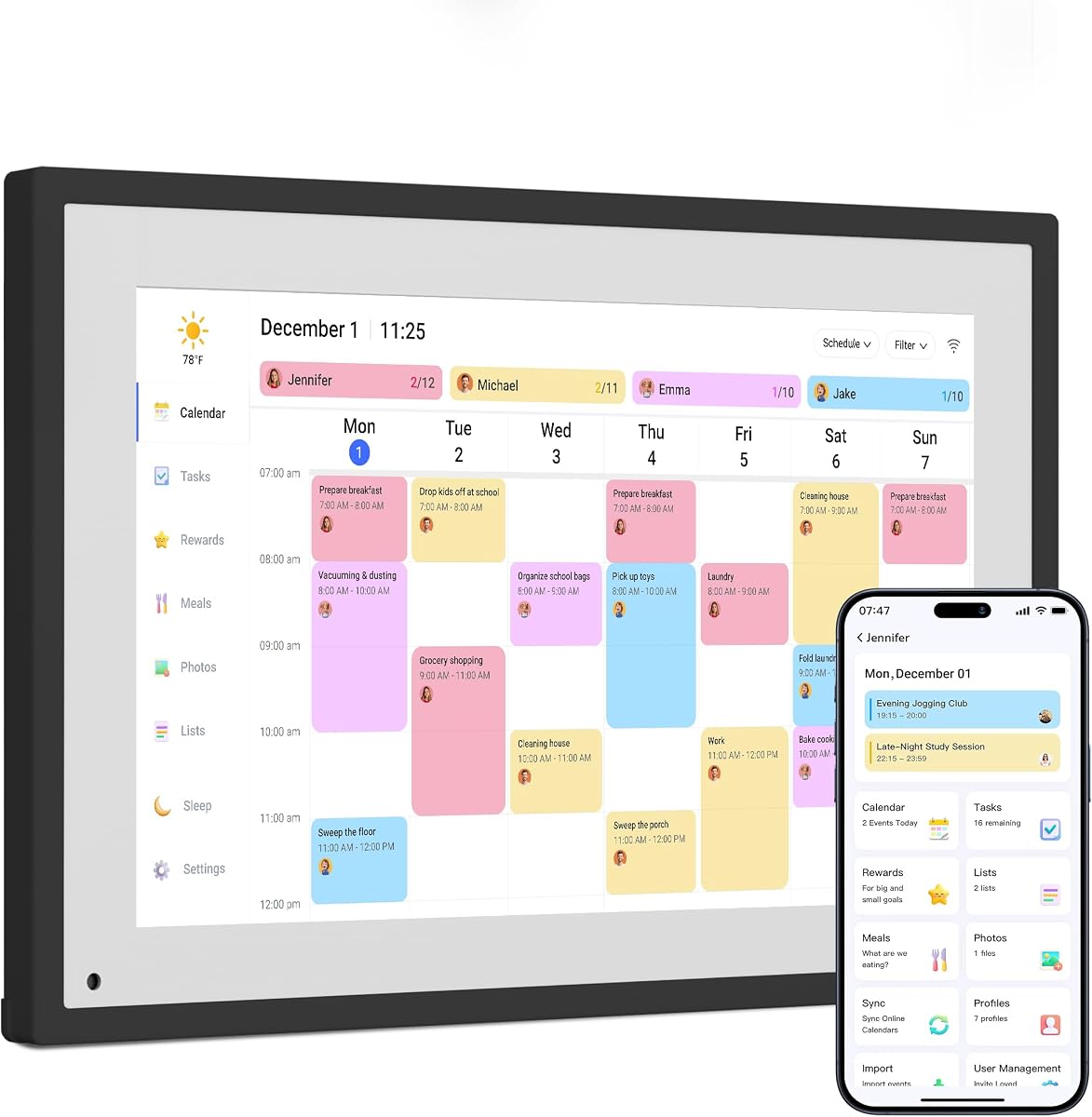



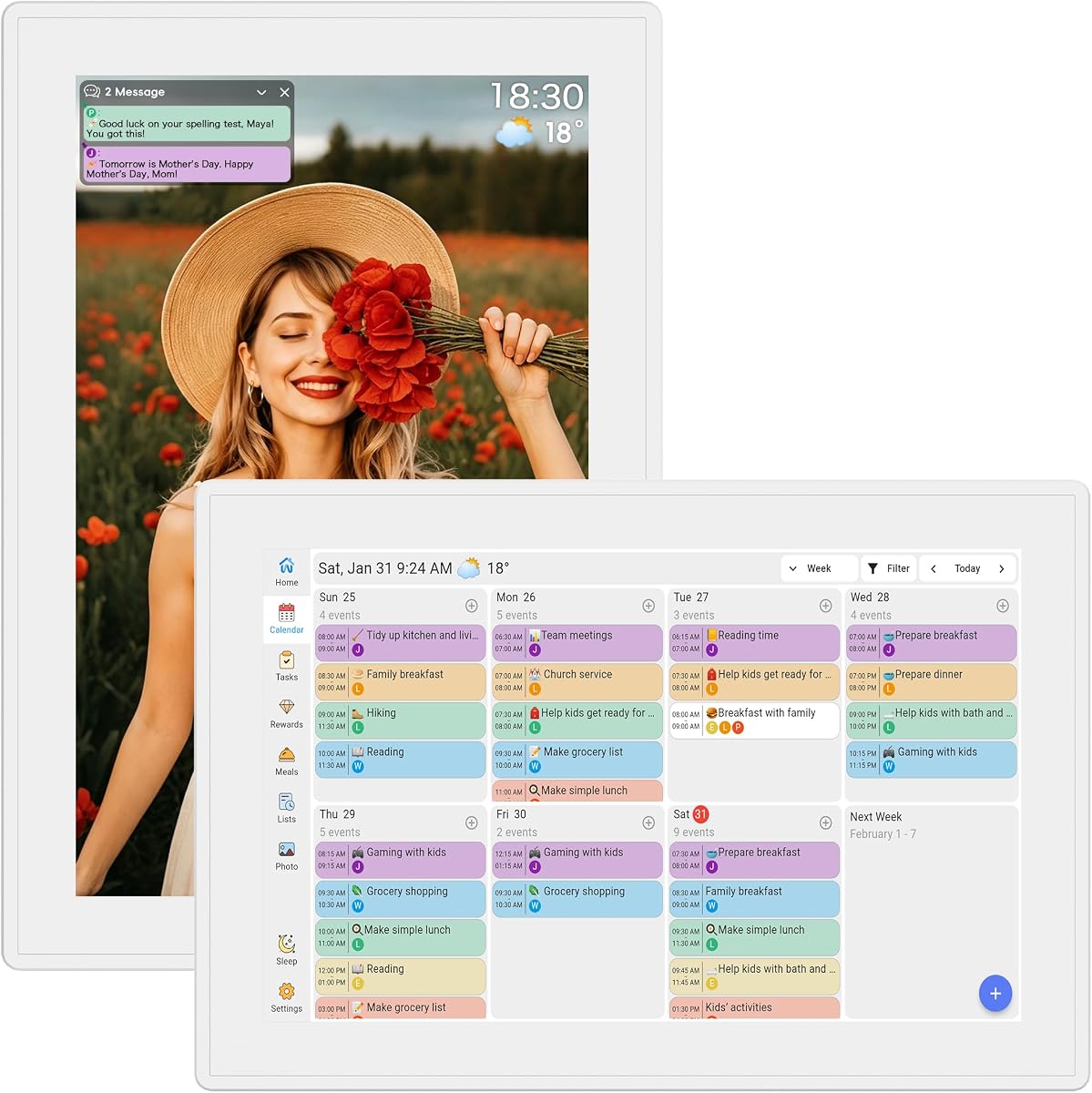
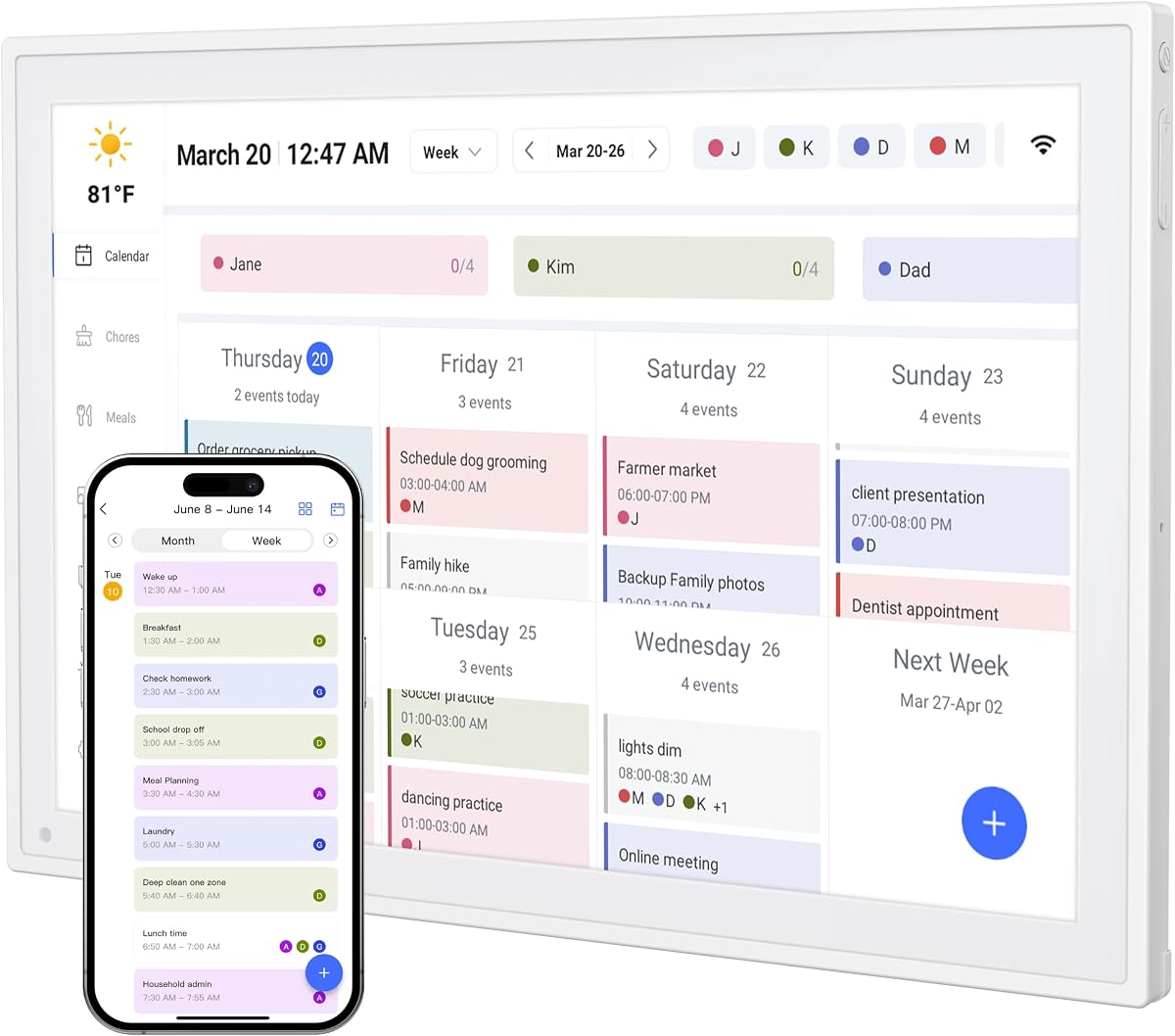
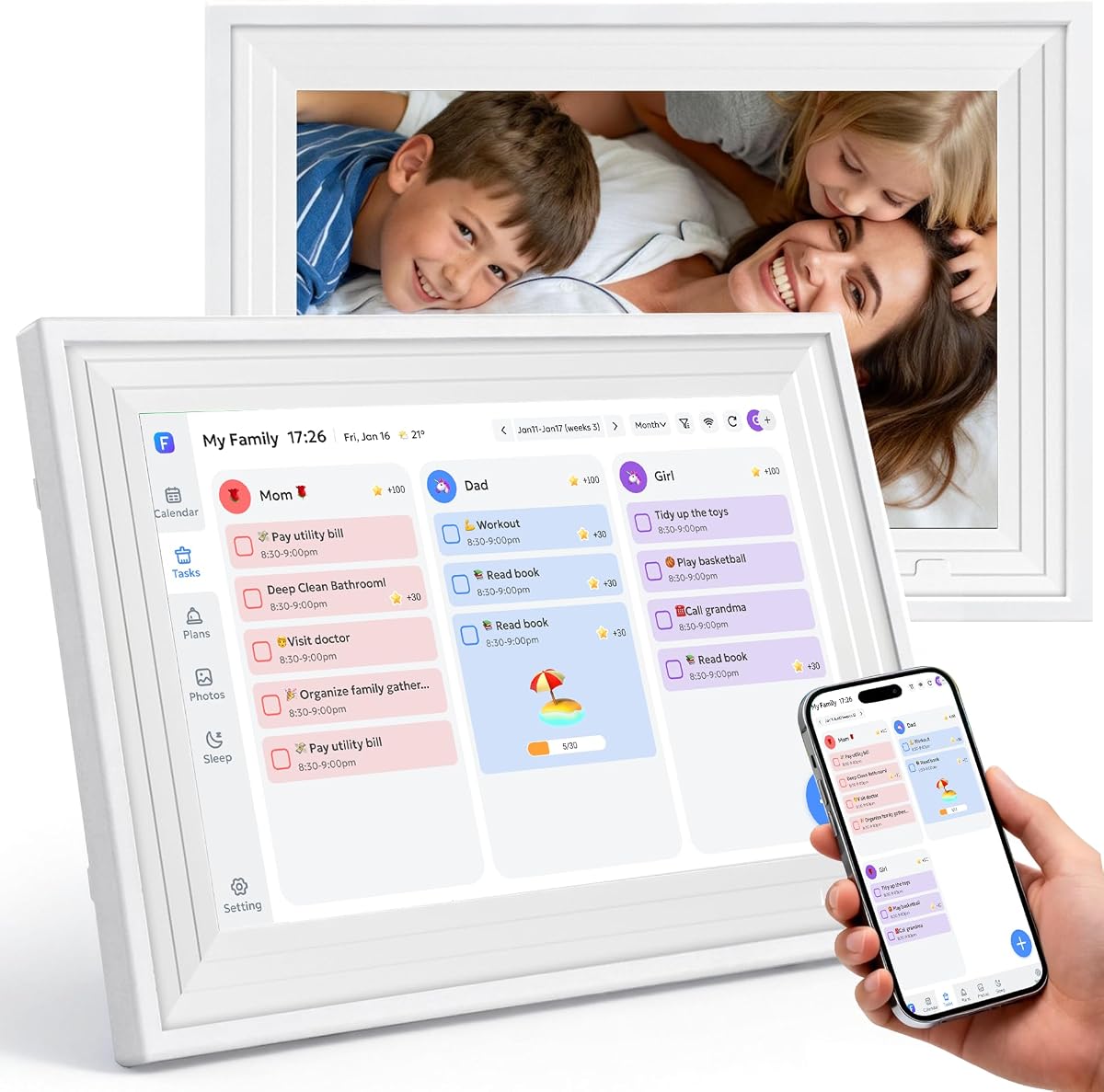
This 15.6 inch touch screen stands out as the top choice for families needing a central command center. It scores highly for combining scheduling with interactive task management in one sleek device.
We may earn a commission when you buy through this link, at no additional cost to you.
The real-time sync with major calendar platforms ensures everyone stays updated instantly. The built-in reward system turns chores into a fun game, encouraging kids to take responsibility without constant reminders.
While batteries are not included and Wi-Fi is required, these are standard expectations for smart home devices. The large screen makes it easy to see details from across the room.
If you want a comprehensive solution that grows with your family, this model is the clear winner. It balances features, usability, and long-term value better than most alternatives on the market.
This device transforms your wall into a hub for all household activities from meetings to meals.
Kids can check off tasks to earn points, fostering independence and positive habits over time.
We may earn a commission when you buy through this link, at no additional cost to you.
For households watching their budget, this 10.1 inch model delivers essential smart features without monthly costs. It is an excellent entry point for digital organization and chore tracking.
We may earn a commission when you buy through this link, at no additional cost to you.
The sync capabilities work smoothly with standard calendar apps, keeping schedules updated. The weekly meal manager helps reduce daily decision fatigue by visualizing menus and grocery lists.
It lacks some of the premium features of larger units but covers all the basics effectively. The responsive screen ensures navigation is simple for both adults and children.
Choose this if you need a reliable daily planner without ongoing expenses. It provides the core utility of a smart calendar at a very accessible price point.
All features unlock immediately with purchase so you never pay extra to access core tools.
Plan menus in advance to streamline shopping and reduce last minute dinner stress significantly.
We may earn a commission when you buy through this link, at no additional cost to you.
The Skylight Calendar brings a polished premium experience to family organization. Its high-quality display and refined interface make it a standout choice for modern homes.
We may earn a commission when you buy through this link, at no additional cost to you.
Features like Disney Mode add a unique touch that engages children through animations and avatars. The sync functionality is seamless, ensuring everyone stays informed without friction.
While some advanced features come with a subscription, the core planning tools remain free. The design is elegant enough to serve as decor when not actively in use.
Invest in this if you value aesthetics and brand reputation alongside functionality. It offers a refined user experience that justifies the higher cost for many buyers.
Engage your kids with beloved characters and animations that make daily routines more enjoyable.
The white finish and slim profile blend beautifully with various interior decor styles.
We may earn a commission when you buy through this link, at no additional cost to you.
This Dragon Touch model doubles as a beautiful digital picture frame when not managing schedules. Its 10.1 inch touchscreen offers crystal-clear visibility for all your family notes.
We may earn a commission when you buy through this link, at no additional cost to you.
Color coding for different members simplifies tracking who needs to do what each day. The frame mode adds warmth to your home with rotating family photos on demand.
The wall mounting limitation means it sits best on a desk or shelf. However, the elegant design ensures it looks great even in a stationary position.
Pick this if you want a device that serves dual purposes seamlessly. It balances functionality with style to enhance your living space without clutter.
Switch between organizational tasks and displaying cherished memories with a simple tap on screen.
The high resolution screen ensures text and images are sharp and easy to read.
We may earn a commission when you buy through this link, at no additional cost to you.
The 15.6 inch display shines when real-time collaboration is needed for large families. It syncs instantly with platforms like Google and Outlook to reduce confusion.
We may earn a commission when you buy through this link, at no additional cost to you.
AI photo restoration enhances old images as they cycle through the frame mode. Multiple members can edit schedules at once without conflicts or lost data.
The flexible mounting options allow it to fit in various spaces like offices or kitchens. Ensure you have enough wall space for the larger footprint before purchasing.
Opt for this if you have a complex schedule that needs constant updates. It keeps everyone on the same page efficiently and accurately.
Let family members update their own tasks instantly without needing parental approval first.
Old photos are automatically enhanced to look clear and vibrant on the screen.
We may earn a commission when you buy through this link, at no additional cost to you.
This model offers a highly interactive touchscreen that makes planning simple and fast. It auto-syncs with mobile apps to keep your schedule accessible anywhere.
We may earn a commission when you buy through this link, at no additional cost to you.
The dinner planner specifically helps answer what is for dinner questions quickly. Setup is user-friendly and allows quick linking to Google and iOS calendars.
Magic Import and advanced tools are paid features, but core planning remains free. The responsive touch makes marking tasks complete satisfying for children.
Choose this if you value a smooth interface and dinner planning tools. It is a solid option for families focused on daily routines and tasks.
Eliminate meal indecision by listing weekly dinners clearly for everyone to see.
Link your smartphone calendar to the frame for updates on the go seamlessly.
We may earn a commission when you buy through this link, at no additional cost to you.
This calendar turns chores into a rewarding game for children to enjoy daily. The shared chore chart empowers kids to take charge of responsibilities independently.
We may earn a commission when you buy through this link, at no additional cost to you.
Meal planning and to-do lists help map out weekly needs efficiently. It syncs with multiple apps to ensure no appointment or task slips through the cracks.
The compact design fits well on any kitchen counter without taking up too much space. It is a thoughtful gift for parents who need help managing busy schedules.
Select this if you want a fun way to build habits for your kids. It makes household organization engaging and accessible for everyone.
Turn mundane tasks into a game where kids check off items for instant gratification.
Go paperless and keep your home free from loose notes and sticky reminders.
We may earn a commission when you buy through this link, at no additional cost to you.
The 15.6 inch Full HD screen offers immense space for complex schedules and photos. It is ideal for households with many members needing clear visibility.
We may earn a commission when you buy through this link, at no additional cost to you.
64GB of storage lets you store thousands of photos and short videos directly. The adaptive brightness ensures visibility day and night without causing eye strain.
You will need a secure wall mount to support the weight of the device. The AiMOR app makes sharing memories with family easy and fast.
Pick this for maximum visibility and storage capacity for your media. It is perfect for families who want a central visual hub at home.
Enjoy a large canvas that lets you see the whole month at a glance.
Keep your favorite memories saved locally without worrying about cloud limits.
We may earn a commission when you buy through this link, at no additional cost to you.
This model stands out with real-time weather forecasts tailored to your location. It is a perfect companion for planning outdoor activities and daily routines.
We may earn a commission when you buy through this link, at no additional cost to you.
The activity planner helps track classes and extracurriculars effortlessly. Sleep mode saves energy while ensuring the device is ready when you wake up.
It supports both wall mounting and desktop display for versatile placement. The no subscription model keeps ongoing costs to zero after purchase.
Choose this if you rely on weather updates for your daily planning. It offers practical tools that make life smoother and more organized.
Stay informed about local conditions to dress appropriately and plan accordingly.
Keep track of school and hobby schedules in one shared digital space.
We may earn a commission when you buy through this link, at no additional cost to you.
This device features a silent vibration motor that wakes you without noise. It is perfect for early morning reminders without disturbing your partner.
We may earn a commission when you buy through this link, at no additional cost to you.
The recipe keeper helps organize ingredients and meals in one place. Multi-device sync ensures your schedule is consistent across all your electronics.
No subscription fees mean you keep all core features forever. The adjustable stand allows it to be used in both portrait and landscape modes.
Opt for this if you need quiet alerts and recipe organization. It is a practical tool for managing routines without waking the house.
Get alerted early in the morning without loud alarms waking everyone else.
Save favorite family recipes so you never lose track of ingredients.
We may earn a commission when you buy through this link, at no additional cost to you.
Selecting the right digital chore chart involves considering screen size syncing capabilities and ease of use for every family member.
Screen size determines how easily family members can read details from across the room. Larger screens like 15 inch models are ideal for central kitchen spots while 10 inch ones fit desks better.
Choose a size that matches your space and viewing distance for optimal comfort.
Real-time syncing with major platforms like Google and Outlook ensures everyone stays updated instantly. This prevents missed appointments and overlapping schedules.
Verify that the device supports all the calendar apps your family uses daily.
Interactive charts that allow kids to check off tasks independently encourage responsibility. Look for reward systems that motivate children to maintain good habits.
Ensure the interface is simple enough for younger children to navigate alone.
Some devices charge monthly fees to access premium features like advanced photo tools. Others offer all features for a one-time purchase.
Check the pricing model to avoid unexpected recurring costs over time.
Many calendars double as photo frames when idle. Consider storage capacity and whether they support AI enhancement for better image quality.
Select a model that matches your need to display cherished memories.
Wall mounting provides a central fixed location while desktop stands offer flexibility. Ensure the device comes with the necessary hardware.
Decide on placement before buying to ensure compatibility with your home layout.
Ease of setup affects adoption rates. A simple plug-and-play experience helps everyone start using it immediately.
Look for intuitive interfaces that reduce the learning curve for all ages.
Prices range widely from budget friendly options to premium devices. Determine what core features you need before deciding on a price point.
Balance cost with long-term value and feature longevity.
Start by connecting the device to your Wi-Fi network and installing the companion app. Link your primary calendar accounts to sync existing events instantly.
Assign colors to each family member to distinguish their schedules and tasks. Encourage kids to check off completed chores to build positive routines.
Clean the touchscreen gently with a soft cloth to maintain clarity. Adjust brightness settings to suit ambient lighting conditions throughout the day.
Yes, most modern digital chore charts support real-time editing for multiple users. Changes sync instantly across devices ensuring everyone sees the latest updates.
No, many models provide core planning and photo features with a one-time purchase. Some premium features may require a subscription but basics usually do not.
Devices typically retain local data offline but syncing pauses until connection returns. You can still view schedules and complete tasks locally without internet.
Yes, the interfaces are designed to be intuitive and safe for kids. Parental controls often allow monitoring and task assignment to ensure proper use.
Most units allow photo uploads via a companion app on your phone. Simply select images to send and they will cycle through the frame automatically.
Yes, you can disable planning features and use them purely as photo displays. This allows flexibility for different rooms or purposes at home.
Some models integrate with voice assistants but compatibility varies by brand. Check product specifications if voice control is a priority for you.
We found that the 15.6 inch Wall Touch Screen offers the best overall balance of features for most families. It combines large display real-time sync and interactive rewards effectively.
If you want a budget-friendly option consider the 10.1 Inch Touchscreen which delivers core tools without extra costs. Focus on sync ease of use and screen clarity for your needs.
Remember that prices fluctuate so check current deals before making your final decision. Investing in a smart planner now can save time and stress for your whole household.