
4K AI-Powered Conference Webcam with Microphones Speakers
4.1Editor score
120 degree wide angle coverage
AI auto framing for group meetings
Physical lens cover for privacy
This guide compares the top auto tracking conference camera systems for 2026, evaluating AI framing, audio quality, and connectivity for hybrid workspaces.
Modern workspaces demand seamless communication tools that bridge the gap between remote and in person attendees. An auto tracking conference camera ensures every participant remains visible without manual adjustments during dynamic discussions.
We evaluated ten leading systems based on video resolution, AI tracking accuracy, audio clarity, and ease of integration. Our analysis focuses on models suitable for small to large meeting rooms across various industries.
Each pick highlights unique strengths like optical zoom capabilities or plug and play setup. Note that specific model availability and pricing fluctuate frequently so verify current details before purchasing your ideal solution.
4.1Editor score

4.8Editor score

4.6Editor score
This side-by-side comparison highlights the core specifications and unique capabilities of each top ranked system to help you find the perfect match for your specific meeting environment.




This system stands out as the premier choice for professional environments needing reliable video and audio. Its 4K resolution delivers crisp visuals while advanced AI tracking ensures speakers remain centered.
We may earn a commission when you buy through this link, at no additional cost to you.
The combination of a PTZ camera and wireless Bluetooth speakerphone creates a complete solution. Users appreciate the 3x optical zoom and 93 degree wide angle for capturing full room dynamics effectively.
While the price is higher than basic webcams, the integrated audio eliminates extra hardware costs. Some users note the speakerphone needs its own power source which adds minor setup steps.
Ideal for medium sized conference rooms or churches requiring high quality streaming. It balances professional features with ease of use making it a top recommendation for 2026.
The algorithm distinguishes between faces and bodies ensuring smooth transitions even when multiple people move simultaneously during collaborative sessions.
Support for both HDMI and USB3.0 allows flexible integration with PCs smart TVs or broadcast setups without complex configuration.
We may earn a commission when you buy through this link, at no additional cost to you.
Designed for small meeting spaces this webcam offers essential features without breaking the bank. The 4K resolution provides sharp visuals suitable for standard video calls and internal meetings.
We may earn a commission when you buy through this link, at no additional cost to you.
Its 120 degree field of view ensures all participants fit in frame without squeezing. The included physical lens cover adds a layer of security important for shared office environments.
Audio quality relies on dual noise canceling microphones which work well for close proximity but may struggle in larger rooms. Tracking is functional but less refined than premium models.
Best suited for startups or home offices needing reliable video conferencing on a budget. It delivers core functionality effectively while keeping costs low for growing teams.
The 120 degree lens captures entire groups reducing the need for manual camera adjustments during team huddles.
A physical lens cover ensures privacy when the camera is idle protecting sensitive discussions from unintended visual access.
We may earn a commission when you buy through this link, at no additional cost to you.
This system prioritizes smooth motion with its 60fps capability at Full HD resolution. It is particularly useful for presentations where movement needs to be captured without blur or lag.
We may earn a commission when you buy through this link, at no additional cost to you.
The Bluetooth speakerphone supports full duplex audio allowing natural back and forth conversation without cut offs. Its 114 degree angle covers most standard conference tables effectively.
While 1080p is less sharp than 4K it remains professional for most business use. The battery life on the speakerphone is sufficient for typical meetings but may require charging for all day events.
A great choice for training sessions or dynamic presentations requiring fluid visuals. The all in one design simplifies setup while delivering reliable performance for daily corporate use.
The 60fps output ensures presenters moving across the room appear fluid and natural on remote screens.
Integrated echo cancellation allows simultaneous speaking and listening for more natural conversational flow.
We may earn a commission when you buy through this link, at no additional cost to you.
Unique gesture controls allow presenters to adjust zoom or tracking without touching devices. This hands free interaction adds a modern touch to meetings requiring high engagement levels.
We may earn a commission when you buy through this link, at no additional cost to you.
The 120 degree wide angle covers large spaces well. While digital zoom is less sharp than optical it provides flexibility for focusing on specific details when needed during sessions.
Users may need time to master the hand signals for optimal use. The system is robust but the digital zoom limitation is a trade off for the interactive features offered.
Excellent for interactive workshops or classrooms where physical touch is minimized. The innovative controls make it a standout for tech forward environments seeking dynamic presentation tools.
Simple hand signals like OK or V activate tracking modes reducing physical contact during public presentations.
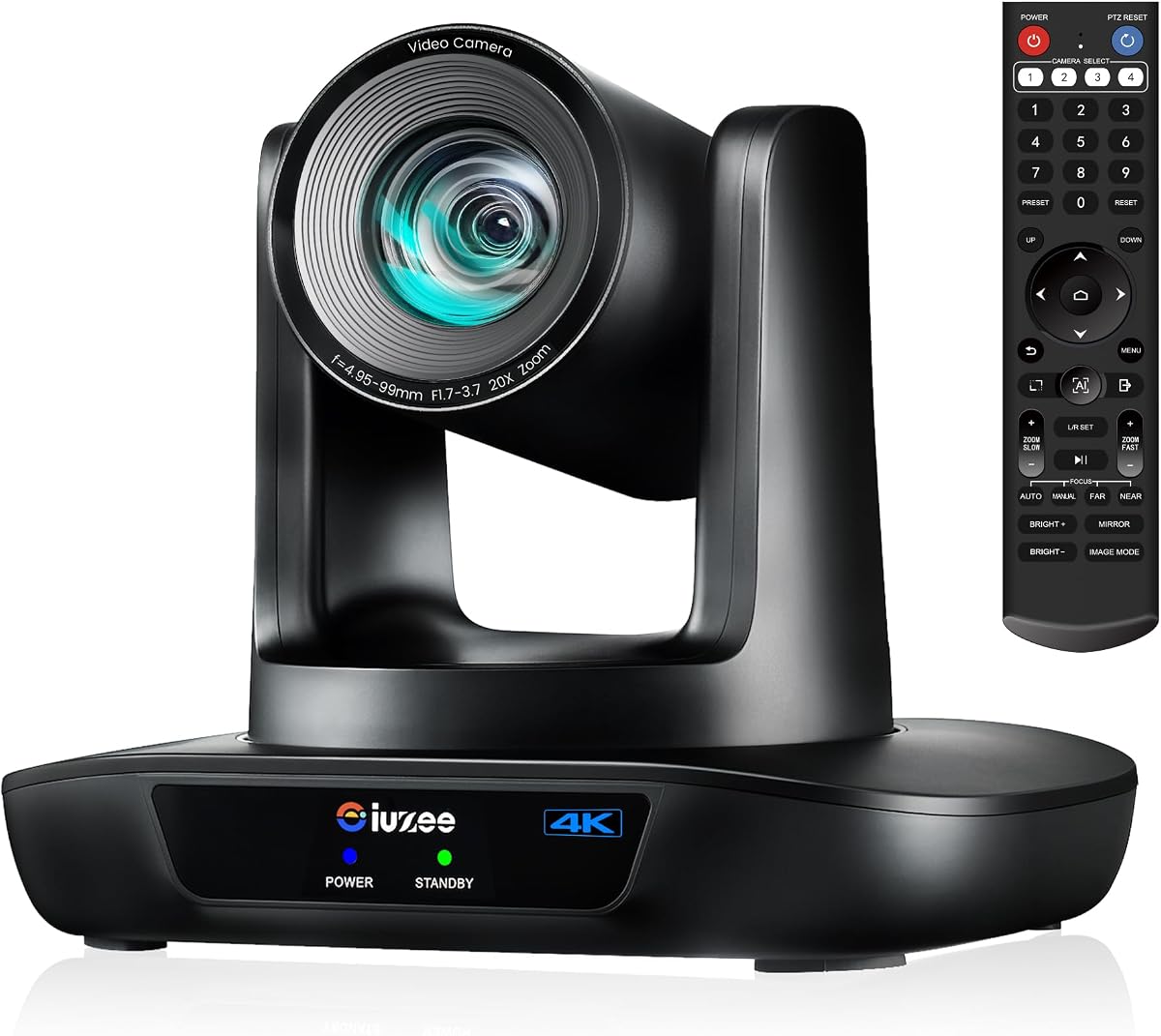
The included remote allows precise adjustments to camera settings ensuring optimal framing for every meeting.
We may earn a commission when you buy through this link, at no additional cost to you.
The massive 20x optical zoom allows clear views of speakers from the back of large venues. This capability is essential for churches or auditoriums where distance is a key factor.
We may earn a commission when you buy through this link, at no additional cost to you.
PoE support simplifies cabling by delivering power and data over a single network line. The Bluetooth speakerphone ensures audio is captured clearly even when participants are seated far apart.
While powerful the unit requires robust network infrastructure for PoE and significant mounting space. Users must ensure their environment supports high zoom lenses without obstruction or blur.
Perfect for large auditoriums or remote learning setups requiring detailed closeups. It balances long reach zoom with intelligent tracking to keep distant subjects perfectly framed at all times.
20x optical zoom captures detailed shots of distant speakers without losing image clarity.
PoE support reduces clutter by combining power and data transmission into one Ethernet cable.
We may earn a commission when you buy through this link, at no additional cost to you.
Designed for broadcast applications this camera excels at streaming to platforms like YouTube or OBS. It offers HDMI USB and LAN outputs for simultaneous high definition video feeds.
We may earn a commission when you buy through this link, at no additional cost to you.
The 20x optical zoom ensures clear detail even for distant subjects. PoE support allows easy installation in permanent setups where network cables are already in place for data transfer.
Since it lacks a built-in microphone separate audio equipment is required for complete conferences. Users should expect a learning curve for configuring web browser settings and streaming protocols.
Ideal for churches or educational institutions focused on live streaming services. It delivers professional grade video outputs suitable for complex production environments requiring reliable performance.
Supports H.264 H.265 encoding ensuring smooth transmission even over variable bandwidth networks.
Access via web browser allows remote adjustments to settings and presets without needing physical access to device.
We may earn a commission when you buy through this link, at no additional cost to you.
This model brings professional broadcast capabilities to standard conference settings. Its official NDI license ensures seamless integration with software like OBS and vMix for complex streaming workflows.
We may earn a commission when you buy through this link, at no additional cost to you.
The SDI output supports long cable runs without signal degradation making it ideal for large event setups. AI tracking handles both faces and bodies effectively keeping presenters centered naturally.
High cost and hardware requirements limit it to professional production teams. However for organizations needing top tier reliability and integration this camera offers unmatched value and performance.
Best for high level productions requiring multi-camera setups or live streaming. It combines premium features like SDI and NDI with reliable tracking for superior professional output.
Official NDI support allows simple network-based video transmission within production studios without heavy cables.
SDI connectors enable reliable signal transmission over long distances for complex broadcast environments.
We may earn a commission when you buy through this link, at no additional cost to you.
A balanced option offering powerful 20x zoom alongside high resolution 4K video. It supports multiple interfaces including HDMI USB and LAN making it adaptable to various infrastructure needs.
We may earn a commission when you buy through this link, at no additional cost to you.
AI tracking ensures presenters stay framed smoothly during meetings. The ability to control via remote or software gives users flexibility depending on their specific workflow preferences.
Network setup might be complex for non technical users seeking simple plug-and-play solutions. Additionally audio is not built-in meaning speakers must source external microphones for calls.
Ideal for educational institutions needing long reach zoom for classrooms. It provides a stable platform for streaming and conferencing without sacrificing visual clarity or control options.
Support for multiple interfaces allows seamless integration with existing network infrastructures or direct PC connections.
20x optical zoom brings distant subjects into clear focus for detailed presentations or classroom instruction.
We may earn a commission when you buy through this link, at no additional cost to you.
This all-in-one system integrates microphones and speakers into a single device. The auto framing technology keeps everyone centered which reduces manual adjustments significantly.
We may earn a commission when you buy through this link, at no additional cost to you.
The 120 degree wide angle and 5x zoom provide flexibility in framing. Built-in speakers simplify the setup process by removing the need for external audio equipment.
While convenient speaker output is designed for standard rooms and may lack power for large halls. Users relying on manual camera control might find the automated limits slightly restrictive.
Perfect for small to medium conference rooms wanting minimal hardware. Its compact design and integrated audio make it an easy upgrade for improving meeting clarity.
Integrating camera and audio into one unit reduces cable clutter and simplifies installation significantly.
Real-time participant detection ensures everyone remains visible without manual remote usage.
We may earn a commission when you buy through this link, at no additional cost to you.
A compact webcam designed for personal workstations or individual offices. It combines camera microphone and speaker into one plug-and-play unit perfect for daily video calls.
We may earn a commission when you buy through this link, at no additional cost to you.
The adjustable field of view allows switching between wide and narrow settings. While digital zoom is convenient it reduces quality compared to optical zoom found in larger systems.
Ideal for remote workers needing a simple reliable solution without complex setup. Privacy cover adds security for shared offices and the USB connection ensures broad software compatibility.
Best for small home offices or desk setups. It delivers essential features effectively ensuring clear communication for individuals without needing large dedicated conference hardware.
Three FOV modes let users choose between wide group shots or narrow closeups depending on meeting needs.
Physical privacy cover provides visual security and protects the lens from dust or debris.
We may earn a commission when you buy through this link, at no additional cost to you.
Selecting the right auto tracking conference camera involves evaluating several technical aspects to ensure seamless communication across your organization.
Resolution determines how clear your meetings appear on remote screens. Higher resolutions like 4K provide sharper details essential for reading documents or facial expressions during discussions.
Look for cameras that support at least 1080p to maintain professional standards. 4K is recommended for high stakes presentations where image clarity impacts communication outcomes.
AI tracking ensures presenters remain visible without manual adjustments. Advanced systems use facial and body recognition to follow speakers smoothly even when multiple people move in the frame.
Consider models with proven tracking algorithms to avoid jittery movements. Reliable tracking keeps the focus on content rather than camera movements.
Zoom types vary between optical and digital. Optical zoom maintains image quality while digital zoom may degrade clarity when magnifying distant subjects.
Select optical zoom if you need to capture details from afar. For small rooms digital zoom might suffice but optical is preferred for professional use cases.
Clear audio is as important as video for effective meetings. Some systems include built-in speakerphones while others require separate devices to capture voice clearly.
Check if the camera supports dual or multi-mic arrays with noise cancellation. Integrated audio simplifies setup but external mics may offer superior sound clarity.
Flexible connectivity ensures compatibility with existing infrastructure. USB HDMI and LAN options allow integration with PCs smart TVs or network switches.
Verify your current setup supports required ports. PoE support is beneficial for network powered installations reducing cable clutter significantly.
The field of view determines how much of the room is visible. Wider angles capture larger groups but might compress faces at extreme edges.
Balance angle size with room dimensions. 120 degrees works for medium rooms while narrower views suit focused executive meetings.
Plug-and-play capability reduces installation time and technical support needs. Systems requiring minimal drivers or complex configurations save valuable office resources.
Prioritize models compatible with major platforms like Zoom and Teams. Simple setup ensures quick deployment without prolonged downtime.
Reliable hardware with solid warranties protects your investment. Responsive customer support helps resolve issues quickly ensuring uninterrupted communication.
Check for physical build quality and software update policies. Long-term support ensures your system stays compatible with future software upgrades.
Begin by connecting the camera to your PC or network switch using the recommended cables. Ensure your software settings match the camera output resolution for optimal quality.
Position the lens at eye level to create natural eye contact with remote participants. Adjust tracking settings to suit movement patterns typical in your meetings.
Regularly update firmware and clean the lens surface gently to maintain image clarity. Proper storage and handling extend the lifespan of your conference system significantly.
Optical zoom uses lens elements to magnify images without losing quality making it ideal for capturing distant subjects clearly. Digital zoom crops the image which reduces resolution and clarity when enlarged.
Most modern cameras are designed to work seamlessly with Zoom and Teams. However always verify compatibility certifications like Zoom Certified to guarantee full feature access and stability.
Blur often results from insufficient lighting or slow internet speeds. Ensure proper room lighting and check your network bandwidth for streaming HD video effectively without lag.
Many models support live streaming via HDMI or USB connections. Check for RTMP support or NDI compatibility if you plan to broadcast on platforms like YouTube or Twitch.
Use strong passwords and network security protocols to prevent unauthorized access. Physical lens covers also provide privacy by blocking the view when the camera is idle.
PoE stands for Power over Ethernet which allows the camera to receive power and data through a single network cable. This simplifies installation by reducing the need for separate power adapters.
The top picks highlight diverse solutions ranging from budget friendly webcams to professional broadcast ready systems. Each option offers unique strengths depending on room size and organizational needs.
Prioritize resolution and audio quality to ensure your meetings are effective and professional. Investing in reliable hardware pays off through seamless communication and better collaboration.
Remember that prices fluctuate frequently so verify current availability before purchasing. With the right system your remote interactions will remain smooth and productive throughout 2026.