
Creality Laser Engraver Enclosure 2.0
4.4Editor score
Universal machine compatibility
Dual window design
Foldable assembly structure
Laser engraving offers incredible creative potential but often produces smoke and noise that can disturb your workspace. An effective enclosure protects your eyes and improves air quality while keeping your environment tidy. Selecting the right model ensures safety without compromising your ability to monitor projects closely.
We evaluated ten top-rated enclosures based on compatibility, ventilation power, and build quality. Each option was assessed for ease of assembly and whether it fits common desktop laser machines. Our analysis highlights key features that distinguish premium models from basic protective covers in today's market.
Every product listing includes detailed specifications and real user feedback to help you decide. We focus on practical benefits like noise reduction and smoke extraction rather than marketing fluff. Keep in mind that availability and shipping terms may vary by region and time.
4.4Editor score
4.2Editor score

4.4Editor score
As an Amazon Associate we earn from qualifying purchases.
The following table provides a side-by-side comparison of all ten enclosures. It highlights key specifications and unique selling points to help you quickly identify which model aligns with your specific machine dimensions and safety requirements.


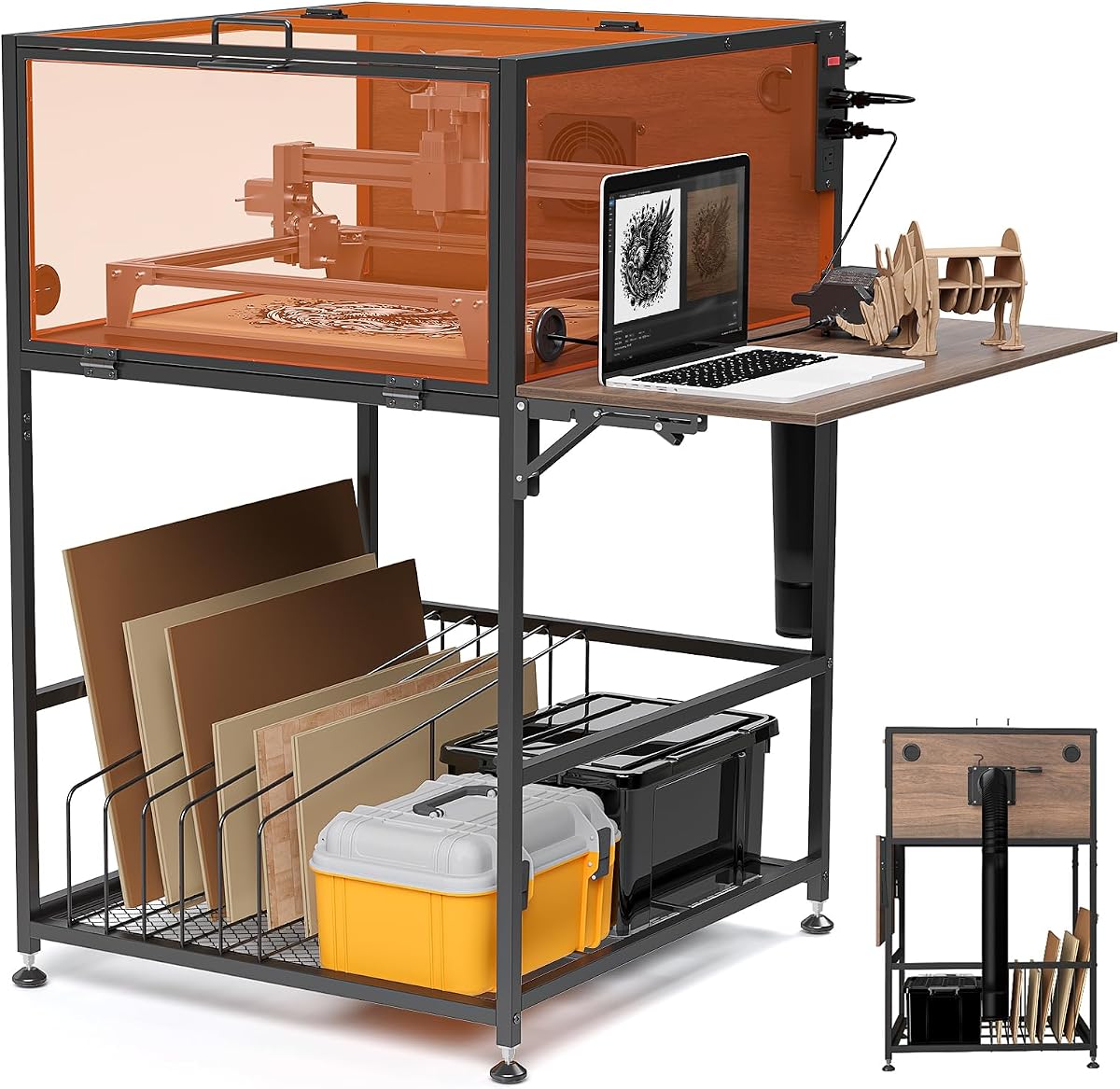
This Crafit enclosure combines safety with practical features for home studios. It holds a solid 4.2 rating from users who appreciate its comprehensive design. The cabinet includes a ventilation system and light filtering panels to make workspace safer and more comfortable.
We may earn a commission when you buy through this link, at no additional cost to you.
The 20W ventilation fan effectively removes smoke and particles during engraving sessions. Side panels filter blue light while still allowing clear visibility of your work. The storage rack keeps materials organized and the power strip lets you control all devices at once.
Setup involves several steps due to the sturdy frame and multiple panels. The foldable side takes effort to secure properly but adds significant utility. Users note it is not a substitute for professional safety gear but works well for hobbyists.
Buyers looking for a complete workspace solution will value its integrated design. It suits small to medium desktop machines that need smoke control and organization. Consider the dimensions to ensure it fits your specific machine footprint before purchasing.
The 20W fan and light filtering panels work together to maintain clear air and reduce eye strain during long sessions.
Built-in dividers and foldable panels maximize space efficiency by storing blanks and supporting laptops within the enclosure structure.
We may earn a commission when you buy through this link, at no additional cost to you.
This Creality tent offers excellent value for those seeking basic protection without high costs. It features a spacious interior compatible with most machines. Users highlight its strong ventilation and simple assembly as key reasons for satisfaction.
We may earn a commission when you buy through this link, at no additional cost to you.
The dual window design allows observation while filtering harmful blue light. A 4000 RPM fan extracts smoke and odors effectively keeping air fresh. The fabric material is flame retardant and the steel pipe frame ensures stability during operation.
Fabric covers may show wear after extended heavy use compared to rigid cabinets. Assembly requires attaching poles and zipping seams which takes moderate time. It is best suited for hobbyists rather than high volume professional environments.
This model is ideal for beginners or those with limited budgets. It provides essential smoke control and eye protection for common desktop engravers. Check machine dimensions to confirm fit before placing an order online.
Affordable pricing makes this accessible to new users while still offering essential flame retardant and smoke extraction features.
Dual windows maintain clear visibility and the high RPM fan ensures adequate airflow to keep the workspace clean during use.
We may earn a commission when you buy through this link, at no additional cost to you.
This enclosure stands out with its integrated LED light and sealed bottom design. It holds a 4.4 rating from users who appreciate the extra lighting and dust control. The upgraded materials provide stability and reliable performance during operation.
We may earn a commission when you buy through this link, at no additional cost to you.
The LED strip offers consistent brightness to monitor engraving clearly. Sealed bottoms prevent smoke escape while the three layer pipe reduces odor residue. Aluminum mold Oxford cloth and metal rods ensure the structure stays firm over time.
Setting up the support rods requires care to ensure stability. Users note the fabric is durable but may not feel as solid as hard cabinets. It remains a strong choice for those wanting premium features at a reasonable price.
Consider this model if you need lighting and dust control in one unit. It suits common desktop machines like xtool and Ortur models. Verify dimensions to confirm fit with your specific engraver setup before buying.
The built-in LED strip eliminates the need for external lighting making it easier to see your work area clearly.
Sealed bottom and multi layer pipe work together to trap dust and reduce lingering odors effectively during use.
We may earn a commission when you buy through this link, at no additional cost to you.
This enclosure features rigid green acrylic panels and a sturdy aluminum frame. It is designed for specific desktop laser engravers with limited width. Users note its stability and ease of access through the front hinged door.
We may earn a commission when you buy through this link, at no additional cost to you.
The green acrylic panels help reduce smoke diffusion and material splashing. The aluminum frame provides a stable structure for desktop crafting. Cable holes and magnetic stops simplify operation during engraving sessions.
Its narrow width may limit use with wider machines. No built-in ventilation means you must connect external systems for smoke control. It suits users prioritizing rigid structure over integrated air management features.
Buyers needing a solid protective box for small machines will value this option. Check dimensions carefully since it fits specific models only. Ensure you have a plan for smoke extraction before installation.
Acrylic panels and aluminum frame provide a robust physical barrier that resists deformation and damage.
Hinged door and magnetic stop allow quick entry to your work area without fully dismantling the enclosure.
We may earn a commission when you buy through this link, at no additional cost to you.
This Creality cover emphasizes noise cancellation and smoke control for home studios. It includes a ventilation system and blue light filtering windows. Users highlight its lightweight design and ease of storage as major benefits.
We may earn a commission when you buy through this link, at no additional cost to you.
The ventilation system expels smoke to keep internal air clean. Transparent design allows observation while protecting eyes from blue light. It is durable and easy to carry for those moving setups frequently.
Some users note limited color options compared to premium rigid units. Assembly involves attaching poles and panels which takes moderate time. It remains a practical solution for standard desktop engraving tasks.
Ideal for hobbyists needing noise reduction and smoke control. Verify machine dimensions to ensure compatibility before ordering. Check if the color matches your workspace preferences before purchase.
Closed design isolates machine noise creating a quieter environment during engraving operations.
Foldable design allows you to store it easily when not in use saving valuable workspace.
We may earn a commission when you buy through this link, at no additional cost to you.
This enclosure offers larger dimensions ideal for bigger machines and rotary rollers. It features transparent windows for clear viewing and premium fire retardant materials. Users praise its sturdy construction and effective smoke isolation during long projects.
We may earn a commission when you buy through this link, at no additional cost to you.
Built-in smoke fans circulate air to keep the enclosure cool. The fire retardant materials isolate fumes and odors effectively. It provides a secure environment protecting the machine from dust and debris.
Its larger footprint may not suit very small tables. It costs more than smaller tents but adds capacity for larger workpieces. Ensure your space can accommodate the wider dimensions before buying.
Buyers with larger machines need ample space will find this suitable. Check if your model fits within the stated dimensions. Verify that ventilation options match your smoke extraction needs.
Larger dimensions allow compatibility with rotary rollers and bigger workpieces expanding your creative options.
Fire retardant materials and sturdy construction ensure a safe environment for both machine and user.
We may earn a commission when you buy through this link, at no additional cost to you.
This upgraded cover improves stability with metal support rods and higher fan speed. It holds a 4.5 rating from users who value its strong ventilation and robust frame. Dual view windows help monitor engraving progress easily.
We may earn a commission when you buy through this link, at no additional cost to you.
The 4000 RPM fan extracts smoke effectively to keep air fresh. Metal rods make the enclosure more stable than previous versions. The square design improves observation and fits many common engraver models well.
Some users report the fan may be louder than expected. Setup requires attaching rods carefully to ensure proper stability. It remains a strong option for those needing reliable ventilation.
Ideal for hobbyists wanting upgraded stability without a full cabinet. Confirm dimensions fit your machine before ordering. Consider noise tolerance before purchasing if using in shared spaces.
Metal support rods add structural rigidity making the cover more reliable for continuous use.
Higher RPM fan ensures quick smoke extraction to maintain clean air during operation.
We may earn a commission when you buy through this link, at no additional cost to you.
This model emphasizes compatibility with a wide range of engravers. It includes built-in ventilation and fireproof materials for safety. Users appreciate its transparent design and reliable performance across different brands.
We may earn a commission when you buy through this link, at no additional cost to you.
The ventilation system expels smoke to keep internal air clean. Transparent design allows observation while protecting eyes from blue light. It isolates noise and odors making it suitable for indoor use.
Users must ensure pipes connect tightly to prevent air leaks. Proper placement of the fan is crucial for effectiveness. It is a solid choice for users needing reliable smoke control.
Buyers with mixed or changing machines will value its universal fit. Verify dimensions against your machine before ordering. Check installation instructions to ensure proper pipe sealing.
Design compatibility with most engraving models making it versatile for users with multiple machines.
Transparent design allows clear viewing of engraving progress while maintaining eye safety standards.
We may earn a commission when you buy through this link, at no additional cost to you.
This cover highlights high heat resistance up to 1000C for safety. It includes a powerful exhaust system and big viewing window. Users note its ease of installation and effectiveness at isolating smoke and odors.
We may earn a commission when you buy through this link, at no additional cost to you.
Flame retardant material protects against burning effectively during use. The exhaust fan helps expel smoke keeping internal air clean. Transparent windows allow observation while protecting eyes from harmful light.
Some users note it may not support rotary roller setups easily. Assembly is tool-free but requires attention to seal seams correctly. It remains a strong choice for basic engraving tasks.
Ideal for safety-conscious hobbyists needing reliable heat resistance. Verify dimensions for your machine before ordering. Check if rotary support is needed before purchasing.
High flame retardant material withstands extreme temperatures reducing fire risks during operation.
Built-in fan and pipe expel smoke quickly to maintain air quality.
We may earn a commission when you buy through this link, at no additional cost to you.
This enclosure features a fastener strip for organized storage and high speed ventilation. It holds a 4.1 rating from users who value its size and portability. Flexible exhaust ports allow adaptable placement options for various rooms.
We may earn a commission when you buy through this link, at no additional cost to you.
The 4000 RPM fan eradicates smoke and dust effectively. Optimized storage function includes strips to hang tools securely. Foldable design saves space when not in use.
Setup requires securing fasteners tightly to ensure proper stability. Users note it is lightweight and portable for small studios. It suits both hobbyists and professionals needing extra storage.
Buyers valuing extra storage will find this fastener strip useful. Confirm machine dimensions before purchasing. Ensure exhaust ports align with your ducting requirements for best performance.
Fastener strips provide handy storage for tools keeping essentials within reach during work.
Flexible exhaust ports on both sides allow placement based on your room layout needs.
We may earn a commission when you buy through this link, at no additional cost to you.
Choosing the right enclosure depends on your machine size safety needs and available workspace.
Ensure the enclosure fits your laser engraver comfortably. Measure your machine width depth and height before buying. Many products list specific compatible models or dimensions in their descriptions. Choose one that allows enough clearance for operation and ventilation pipes.
Always verify dimensions match your engraver to avoid returns or fitting issues.
Look for built-in fans or exhaust ports that match your smoke extraction needs. Higher RPM fans remove smoke and odors more effectively. Check if the design includes flexible pipes for ducting smoke outside. Proper ventilation keeps air clean and reduces health risks.
Select an enclosure with adequate fan power and flexible ducting options for best results.
Choose materials that are flame retardant and heat resistant to prevent fire hazards. Fabric covers may be lightweight but rigid panels offer more protection. Consider your usage frequency when deciding between fabric and acrylic options. Durable construction ensures long term reliability and safety.
Prioritize flame retardant and durable materials to ensure safety and longevity.
Transparent panels should filter blue light to protect your eyes during operation. Look for dual window designs that provide wide views without glare. Some enclosures include tinted acrylic or specialized PVC for better light control. Clear visibility helps monitor projects without risking eye damage.
Ensure your chosen model includes light filtering windows for safe observation.
Consider how easy it is to assemble and disassemble if you move frequently. Foldable designs save space but may require setup time each session. Rigid cabinets offer stability but are harder to move. Balance ease of use with your workshop layout needs.
Choose based on how often you need to move or store the unit.
Enclosures with sealed designs help isolate machine noise from your living space. Fabric tents with tight seams reduce fan and motor noise better than open frames. If you work in shared areas prioritize models emphasizing noise insulation. Quiet operation improves comfort during long engraving sessions.
Look for sealed designs if noise isolation is a priority for your workspace.
Some models include racks or strips to hold engraving blanks and tools. Organized storage saves time and keeps your area tidy. Check if foldable panels offer extra support for laptops or air assist kits. Integrated organization helps maintain a efficient workflow during projects.
Consider enclosures with built-in storage to keep tools and materials organized.
Compare features against price to find the best value for your needs. Budget options may lack integrated fans but still provide smoke containment. Higher priced models offer rigid panels or lighting. Determine which features are essential for your workflow.
Balance essential safety features with your budget to find the best value.
Always connect the exhaust fan to an external vent to ensure smoke is safely directed away from your workspace. Run the fan before and after engraving to clear residual particles from the enclosure.
Clean interior surfaces regularly with a soft damp cloth to remove dust and residue. Avoid harsh chemicals on fabric or acrylic panels to prevent scratching or damage over time.
Check all zip seals and connection points before each use to ensure the enclosure remains airtight. Replace worn seals or poles promptly to maintain effective smoke containment and safety standards.
Most modern enclosures are designed to be universal but you should check compatibility lists. Verify dimensions against your specific machine to ensure a proper fit. Some models include adjustable features to accommodate different footprints or shapes.
You can use the enclosure without external venting but smoke and odors may still escape inside. Internal fans circulate air but do not remove smoke entirely. External ducting is recommended for better air quality and safety.
Many enclosures are built for hobbyists and may not meet professional laser safety certifications. Check manufacturer disclaimers regarding professional or industrial usage. For commercial environments consider units tested to industry safety standards.
Use a soft damp cloth to wipe down fabric panels and let them dry completely before reuse. Avoid harsh detergents that can degrade flame retardant coatings. Regular dusting helps maintain clarity and extends material life.
Sealed designs help isolate machine noise and fan sounds from your workspace. Fabric and rigid covers both provide some sound dampening depending on construction. For best results choose models emphasizing noise reduction in their features.
Most models require no special tools since poles zip or clip together by hand. Some rigid acrylic versions need basic screwdrivers or included wrenches for assembly. Always follow the manufacturer instructions for proper setup.
Some enclosures with taller internal height accommodate rotary rollers but check product dimensions. Measure available vertical clearance before installing rotating accessories. Models designed for rotary use often specify this capability clearly.
Inspect seams and poles monthly to ensure they remain secure and undamaged. Check fan performance regularly to confirm adequate ventilation flow. Promptly repair any tears or structural issues to maintain safety.
This guide reviewed ten top enclosure options highlighting safety ventilation and fit for various users. Models from Crafit Creality and longer offer distinct advantages depending on your priorities.
Prioritize dimensions ventilation power and eye protection features when making your final decision. Ensure the chosen unit matches your workspace and engraver size for best results.
Always check current stock and compatibility details on the product page before buying. Prices and availability may change so confirm fit before placing your order online.