
CENMATE Aluminum 4 Bay
4.3Editor score
Aluminum alloy cooling design
Supports up to 80TB
USB A and C ports
This guide compares the top ten Direct Attached Storage enclosures for speed capacity and compatibility helping you choose the best DAS for your workflow needs
Direct Attached Storage offers a reliable way to expand your computer storage without network complexity. These enclosures connect directly via USB providing fast access to multiple drives for backups and media storage needs efficiently.
We evaluated ten top DAS models based on transfer speeds bay count and build quality. Our analysis covers features like RAID support hot swapping and cooling to help you find the right fit for your setup.
Each pick highlights key strengths and ideal use cases for professionals and home users. Note that pricing fluctuates based on availability and retailer so check current listings before making your final purchase decision today.
4.3Editor score

4.2Editor score

5.0Editor score
The following table provides a side by side comparison of all ten Direct Attached Storage enclosures evaluated in this guide. Review the key specifications and features to determine which model aligns best with your specific storage requirements.


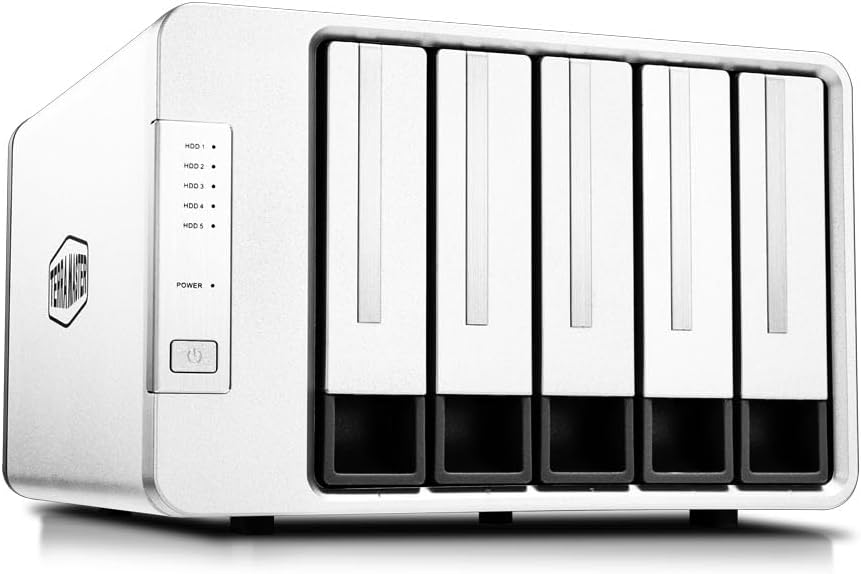


The TERRAMASTER D4-320 stands out as the top pick for Direct Attached Storage due to its impressive speed and silent operation. With a rating of 4.2 stars users appreciate the reliability and performance it delivers for demanding data tasks.
We may earn a commission when you buy through this link, at no additional cost to you.
Its USB 3.2 Gen2 interface ensures transfer speeds up to 10Gbps making it ideal for video editors or professionals needing quick access to large files. The intelligent fan control keeps noise levels exceptionally low even during heavy use.
While it lacks hardware RAID which might be a downside for users needing redundancy the flexibility to use drives individually is a plus for many. The hot swap feature adds significant convenience for frequent drive changes.
This enclosure is perfect for users who prioritize speed and quiet performance over complex redundancy features. If you need a reliable DAS for high throughput tasks this model is highly recommended.
The USB 3.2 Gen2 protocol enables read speeds reaching 1016 MB/s with multiple drives ensuring efficient workflows.
Noise levels drop below 21 dB in standby mode thanks to sound absorbing panels and efficient thermal management.
We may earn a commission when you buy through this link, at no additional cost to you.
The QNAP TR-004 is an excellent choice for users already invested in the QNAP ecosystem or those needing hardware RAID without a full NAS. It earns a 4.2 rating for its solid build and versatile connectivity options.
We may earn a commission when you buy through this link, at no additional cost to you.
Its hardware RAID capabilities allow for configurations like RAID 0 1 and 5 offering data redundancy or speed boosts. The USB Type-C port ensures fast data transfer and broad compatibility across modern systems.
Compatibility is a key consideration here as it only works with specific QNAP models running the latest OS. Users should verify their system compatibility before purchasing to avoid any integration issues.
Ideal for QNAP owners or those needing hardware RAID in a compact DAS form factor this unit balances performance and redundancy effectively. It is a strong option for expanding storage capacity seamlessly.
Supports RAID 0 1 5 and JBOD to let users tailor data protection and performance to their specific needs.
Can expand the capacity of compatible QNAP NAS devices serving as an external storage pool or volume.
We may earn a commission when you buy through this link, at no additional cost to you.
The TERRAMASTER D8 Hybrid offers a unique solution for users needing both massive capacity and high-speed access. With a mix of SATA and NVMe slots it caters to workflows requiring tiered storage strategies efficiently.
We may earn a commission when you buy through this link, at no additional cost to you.
Users can store hot data on fast NVMe SSDs while keeping cold data on high-capacity HDDs. This setup optimizes performance and cost efficiency making it ideal for creative professionals managing large media libraries.
Despite its innovative design the rating reflects some users concerns about software complexity and management. However the power on recovery feature ensures stability during unexpected outages enhancing reliability.
This enclosure is best for power users who want to mix drive types for optimal workflow efficiency. It delivers versatility unmatched by standard DAS enclosures but requires more planning to set up properly.
Manages hot data on SSDs and cold data on HDDs to optimize speed and cost simultaneously.
Automatically reboots after abnormal power loss ensuring minimal downtime without manual intervention.
We may earn a commission when you buy through this link, at no additional cost to you.
The CENMATE Aluminum 4 Bay delivers exceptional value for budget conscious users needing reliable storage expansion. With a rating of 4.3 it is praised for its sturdy build and straightforward plug and play functionality.
We may earn a commission when you buy through this link, at no additional cost to you.
Its aluminum alloy construction helps dissipate heat effectively maintaining drive health during extended use. The USB 3.0 interface provides decent speeds for general file transfers and backups without breaking the bank.
While the fan noise is noticeable it is an acceptable trade-off for the cooling efficiency provided. The tool free design makes drive swaps quick and easy for anyone managing multiple drives regularly.
This is the best budget-friendly DAS for home users or small businesses needing basic storage expansion. It offers solid performance and reliability at a price point that undercuts many competitors significantly.
Aluminum material combined with a fan ensures drives stay cool without expensive cooling mechanisms.
Works immediately with Windows Mac and Linux without requiring any driver installations.
We may earn a commission when you buy through this link, at no additional cost to you.
The SABRENT DS-SC5B is designed for reliability with a dedicated controller for each drive bay. This architecture ensures that a failure in one drive does not affect the others providing robust independent access.
We may earn a commission when you buy through this link, at no additional cost to you.
Its 10Gbps USB-C connection delivers fast transfer speeds suitable for modern workflows. The PWM fan control keeps noise low during idle times ramping up only when drives heat up significantly.
Users can daisy chain this dock to connect multiple devices through a single port enhancing desk organization. The internal power supply eliminates the need for bulky external bricks keeping the setup clean.
This dock is ideal for users managing multiple large drives who need stability and speed. It is a premium choice for professionals requiring reliable access to extensive storage libraries.
Each bay has its own controller reducing risk of total system failure if one drive encounters issues.
Daisy chain port allows connecting peripherals or other docks reducing cable clutter significantly.
We may earn a commission when you buy through this link, at no additional cost to you.
The TERRAMASTER D8 Hybrid 2 achieves a perfect 5.0 rating reflecting exceptional user satisfaction with its performance and reliability. It represents the pinnacle of DAS technology combining speed and capacity seamlessly.
We may earn a commission when you buy through this link, at no additional cost to you.
Its support for NVMe SSDs alongside traditional HDDs delivers read speeds up to 1020 MB/s. This ensures fast file transfers and smooth editing workflows for creative professionals handling large video files.
The proprietary TPM power management technology optimizes energy efficiency and wake-up times. Users can switch between power save and active modes easily enhancing overall productivity and drive longevity.
This is the best premium option for users needing maximum performance and capacity in one unit. If budget allows it offers unparalleled speed and flexibility for demanding professional environments.
Optimizes power usage and drive wake times for faster responses and energy savings.
Transfers large files like 5GB movies in seconds thanks to high throughput design.
We may earn a commission when you buy through this link, at no additional cost to you.
The TERRAMASTER D5-310 distinguishes itself with a physical RAID knob for easy mode switching. This feature simplifies configuration significantly compared to software-based alternatives or complex menu systems.
We may earn a commission when you buy through this link, at no additional cost to you.
It supports robust RAID modes including RAID 5 and 10 with a hot spare disk feature for added security. The included TPC Backupper software adds value by providing scheduled backup options out of the box.
While transfer speeds are decent at 5Gbps the hardware RAID functionality is the main draw. Users seeking simple RAID without the cost of a full NAS will find this approach effective and reliable.
This enclosure is best for users who want hardware RAID control without software overhead. Its simplicity and strong compatibility make it a practical choice for multi-platform environments.
Dedicated knob allows switching between RAID modes like 0 1 5 and 10 instantly.
Hot spare disk automatically replaces failed drives in RAID configurations minimizing data loss risk.
We may earn a commission when you buy through this link, at no additional cost to you.
The WAVLINK 4-Bay is unique for its HDMI video output which supports high-resolution displays. This adds versatility for users wanting to connect storage and display through a single docking station.
We may earn a commission when you buy through this link, at no additional cost to you.
Its USB 3.2 Type-C port ensures blazing fast data transfers up to 10Gbps. This speed is perfect for streaming large video files or backing up huge media libraries efficiently.
The aluminum build aids cooling while dual fans activate based on temperature to protect drives. However note that 2.5 drives require additional mounting brackets not included in the package.
This model is best for workstations needing both storage and connectivity in one unit. The video output adds utility for media editing setups requiring multiple screens and fast access.
HDMI port supports up to 4K resolution enabling direct connection to monitors or TVs.
Built-in fans automatically activate at specific temperatures to maintain optimal drive health.
We may earn a commission when you buy through this link, at no additional cost to you.
The ORICO 5 Bay features a magnetic cover design that eliminates the need for screws or tools. This allows for quick and tool-free installation making drive management effortless for daily users.
We may earn a commission when you buy through this link, at no additional cost to you.
It supports up to 110TB of total capacity ensuring ample space for media backups and archives. The double-ball bearing fan provides reliable cooling to maintain drive stability during long operations.
Users should note that on Linux systems only one drive may be readable at a time. Despite this limitation it remains a solid option for home users needing easy and safe storage expansion.
Ideal for home users and small offices this enclosure offers convenience and safety features. Its magnetic design and multi-protection features make it a practical and reliable storage solution.
Magnetic chips on the cover allow instant removal and replacement without tools needed.
Includes anti-over-voltage and overheat protections to ensure safe data transmission.
We may earn a commission when you buy through this link, at no additional cost to you.
The QNAP TR-002 provides a compact solution for users needing basic storage expansion or NAS backup. It supports hardware RAID configurations offering data protection in a small footprint.
We may earn a commission when you buy through this link, at no additional cost to you.
Its USB Type-C interface ensures fast connectivity and compatibility with modern systems. The lockable drive bays add physical security to protect valuable data from unauthorized access.
While it supports only two drives it is ideal for light backups or expanding existing QNAP systems. This makes it a versatile tool for maintaining flexibility without overcomplicating the setup.
This unit is best for users needing a simple reliable add-on to their existing setup. It balances performance and portability effectively for home or small office use.
Designed to expand QNAP NAS capacity or serve as independent storage seamlessly.
Lockable drive bays ensure physical security for your installed hard drives.
We may earn a commission when you buy through this link, at no additional cost to you.
Selecting the right Direct Attached Storage involves balancing speed capacity and features to fit your workflow needs effectively.
Transfer speed is critical for productivity especially when dealing with large video files or databases. Look for USB 3.2 Gen2 or USB-C ports which support up to 10Gbps speeds for faster data access compared to older USB 3.0 models.
Prioritize models with high bandwidth capabilities to minimize wait times during file transfers and backups.
The number of drive bays determines how much storage you can add to your setup. Ensure the enclosure supports the total capacity of the drives you plan to install ranging from 80TB to 150TB or more.
Choose a bay count that allows room for future expansion without requiring immediate hardware replacement.
Some DAS units offer hardware RAID for data redundancy or speed while others support individual drive mounting. RAID provides protection against drive failure but may reduce total usable space depending on configuration.
Decide if you need data redundancy or prefer simple individual drive access for flexibility in management.
Efficient cooling systems protect drives from overheating during long transfers or continuous use. Models with intelligent fans or aluminum housings often operate quieter which is essential for home office environments.
Check noise specifications to ensure the unit fits comfortably in your workspace without excessive disturbance.
Hot swap support allows replacing drives without powering down the system which is convenient for frequent data changes. This feature enhances workflow efficiency by reducing downtime during maintenance or upgrades.
Opt for enclosures with hot swap trays if you plan to change drives regularly for testing or backup rotation.
Build quality impacts longevity and protection against physical damage or heat. Aluminum enclosures offer better heat dissipation and structural integrity compared to plastic alternatives.
Look for solid construction and reliable warranty terms to ensure the device lasts through intensive usage.
Compatibility with your operating system ensures the drive is recognized without complex driver installations. Most modern units work with Windows macOS and Linux but verifying this prevents potential setup issues.
Confirm system support in product descriptions to avoid unexpected connectivity hurdles with your devices.
Price varies widely based on features like RAID support speed and build materials. Balance the cost against your specific needs rather than paying for unnecessary advanced capabilities.
Evaluate total value by considering warranty features included software and performance in relation to the price.
Connect the enclosure to a powered USB 3.0 or USB-C port on your computer using the provided cable. Ensure the power adapter is plugged in if the unit requires external power for stability.
Install any necessary software for RAID configuration or backup tools if your enclosure supports advanced features. Follow the manufacturer instructions to initialize drives and format them for your operating system.
Maintain the unit by keeping it clean from dust and ensuring it has adequate airflow. Regularly check for firmware updates to improve compatibility and performance over time.
Direct Attached Storage connects directly to a computer via USB while Network Attached Storage connects over a network. DAS is typically faster and simpler for single user access whereas NAS allows multiple users to share files remotely.
Most modern DAS units are plug and play and work without additional drivers on Windows macOS and Linux. However checking the product specifications ensures compatibility with your specific operating system version.
Yes many enclosures support mixing SSDs and HDDs provided they use the same interface like SATA. Some hybrid models offer separate slots for NVMe SSDs and SATA HDDs for optimized workflows.
Some DAS models come with included backup software to schedule automatic backups. Others work with third party tools allowing you to set up automated routines based on your needs.
RAID is optional and depends on your data security needs. It protects against drive failure but reduces usable space and complexity. Simple individual drive use is sufficient for non critical data.
High quality DAS units have recovery features to minimize data loss during unexpected power outages. Some models reboot automatically restoring system to state when power is restored.
Choosing the right Direct Attached Storage enhances workflow efficiency and data organization significantly. The TERRAMASTER D4-320 leads as the top pick for speed and quiet performance meeting diverse professional needs.
Prioritize transfer speeds and cooling features to ensure consistent performance during heavy use. Consider RAID and capacity options based on your specific data storage and redundancy requirements today.
Remember to check current pricing and availability as these details can change. Selecting the model that fits your budget and workflow ensures long-term satisfaction with your storage setup.