
Logitech G X56 H.O.T.A.S
4.0Editor score
Military grade precision sensors included
Over one hundred controls programmable
RGB lighting matches gaming setup
This guide compares the top joysticks for Windows 11 to help you find the perfect controller for flight sims, gaming, and immersive control.
Finding the right joystick for Windows 11 can transform your gaming experience from simple input to immersive simulation. Whether you are piloting aircraft in Microsoft Flight Simulator or engaging in space combat, the right hardware matters deeply for precision and comfort during extended sessions.
We evaluated ten distinct models based on build quality, compatibility, button layout, and sensor technology. Our comparison focuses on how well each device integrates with modern Windows environments and whether it offers the tactile feedback necessary for serious simulators and casual gamers alike.
Each pick in this list highlights specific strengths and weaknesses to help you decide quickly. While prices fluctuate over time due to market conditions, the core features and performance characteristics remain consistent. Always verify current listings before purchasing to ensure the best value for your specific setup needs.
4.0Editor score

4.4Editor score

3.6Editor score
This side by side comparison highlights the core specifications and features of each joystick to help you visualize differences in size, button count, and technology at a glance before diving into detailed reviews.






The PXN 2113PRO offers a solid entry point for those new to flight simulation on Windows 11. With a rating reflecting mixed feedback, it delivers essential controls without breaking the bank. The vibration function adds a layer of immersion that rivals more expensive models when configured correctly.
We may earn a commission when you buy through this link, at no additional cost to you.
Its twelve programmable buttons and eight-way hat switch allow for detailed mapping in games like World of Tanks and Microsoft Flight Simulator. The ergonomic design ensures comfort during long sessions, while the suction cups keep the base steady on smooth surfaces. Setup is straightforward, requiring only a USB connection.
However, users should note that vibration intensity drops if power is low, requiring driver adjustments to maintain feedback. It is strictly a PC device, so console gamers must look elsewhere. The build quality is functional but lacks the refined feel of higher-end alternatives, which might matter to serious enthusiasts.
This joystick is ideal for students or casual sim pilots seeking an affordable tool to start their journey. While it may not offer the precision of luxury gear, it provides enough functionality to enjoy flying and combat simulations effectively without a major investment.
The device connects via USB and works immediately without complex driver steps, allowing quick access to gameplay.
Users can adjust strength settings in the official software to ensure consistent tactile feedback during missions.
We may earn a commission when you buy through this link, at no additional cost to you.
The Thrustmaster T-Flight Hotas One stands out for its modular design, allowing users to separate the stick and throttle for different setups. Its high rating reflects satisfaction with its ergonomic build and seamless compatibility across Windows and Xbox consoles. It is a strong choice for pilots needing versatility.
We may earn a commission when you buy through this link, at no additional cost to you.
The adjustable resistance on the stick provides a realistic feel during maneuvers, while the multiple programmable buttons cover most essential flight actions. The detachable throttle lets you place it on a lap or desk, adapting to various desk space constraints. Plug and play functionality ensures instant recognition by the system.
Despite its strengths, it lacks force feedback, which might disappoint users seeking tactile resistance during high-G turns. The throttle mechanism is functional but feels less robust than dedicated units. Some complex sims may require more inputs than this unit offers out of the box.
This Hotas is perfect for intermediate users who want a balance of comfort and flexibility without spending heavily. It suits those transitioning from gamepads to dedicated controllers, offering enough precision for combat and civilian sims while remaining affordable for most budgets.
Separating the throttle from the stick allows for comfortable lap play or dual desk setups for better immersion.
It works on Xbox Series and PC, making it a versatile choice for hybrid gaming setups without extra purchases.
We may earn a commission when you buy through this link, at no additional cost to you.
The V-one Wired USB controller bridges the gap between PC and mobile gaming, offering support for Android, PS3, and Windows 11. Its solid rating highlights its versatility, making it a practical choice for gamers who switch between devices frequently. The dual mode support simplifies connection across ecosystems.
We may earn a commission when you buy through this link, at no additional cost to you.
With Xinput and Dinput modes, it adapts to various game requirements, while the vibration feedback adds a tactile layer to action titles. The plug and play feature works well on modern Windows systems, though XP users might need drivers. Its design focuses on simplicity rather than complex customization.
However, it lacks the specialized buttons needed for flight simulators, limiting its use to general gaming. It does not support Xbox One or PS4, which narrows its console appeal. The build is functional but feels lighter than high-end controllers, which might wear out faster with heavy use.
This controller is best for casual gamers or those needing a backup device for portable setups. It delivers reliable performance for standard titles without requiring technical setup, though serious sim enthusiasts should look to dedicated flight sticks for more control and customization options.
With OTG support, it connects to Android phones and tablets, expanding mobile gaming options significantly.
Windows systems recognize it instantly without extra software, ensuring immediate access to supported games.
We may earn a commission when you buy through this link, at no additional cost to you.
The Thrustmaster USB Joystick serves as a straightforward option for those needing basic flight control without complexity. Its rating suggests mixed results, but the inclusion of a dedicated Point of View button enhances camera control significantly. It is designed for simplicity and ease of use.
We may earn a commission when you buy through this link, at no additional cost to you.
With three axes and four buttons plus a trigger, it covers essential movements for casual pilots. The ergonomic handle with an enlarged rest ensures comfort during gameplay. It is purely a Windows device, which limits cross platform utility. Setup requires no configuration, just a USB plug.
However, the limited button count restricts its utility in advanced simulations that require many inputs. The build feels basic compared to modern hotas systems. Users seeking customization or precision will find it lacking. It is strictly a starter tool rather than a pro device.
This joystick is suitable for beginners exploring flight games on a budget. While it lacks the depth of higher models, it provides enough functionality to learn the basics. It is a good stepping stone before upgrading to more advanced hardware.
The dedicated point of view button allows instant camera switching, improving immersion in flight and combat games.
It works immediately with Windows systems without driver issues, simplifying the setup process for new users.
We may earn a commission when you buy through this link, at no additional cost to you.
The Microsoft Sidewinder Precision 2 remains a respected name in joystick history, offering a classic design focused on precision. Its solid rating reflects reliability and the unique rotating handle that aids in rudder control. It is a strong choice for traditional flight simulation enthusiasts.
We may earn a commission when you buy through this link, at no additional cost to you.
With sixteen programmable functions and an 146-degree action throttle, it allows detailed customization for specific games. The rotating handle provides precise rudder control without twisting the wrist. It uses USB for plug and play ease, and supports saving commands into profiles for different titles.
However, it is an older model, meaning software support might not be as robust as newer devices. The weight feels substantial, which some users might find tiring over long periods. Modern VR or advanced sim setups may require drivers that are harder to find today.
This joystick is ideal for pilots who value mechanical precision and classic build quality. It serves well for older flight games or users who prefer a traditional stick. While it lacks modern bells and whistles, its core performance remains competitive for basic to intermediate simulations.
The rotating handle mechanism mimics real rudder pedals, improving realism in flight simulations without extra hardware.
Users can download and save commands into profiles, allowing quick switching between different game setups easily.
We may earn a commission when you buy through this link, at no additional cost to you.
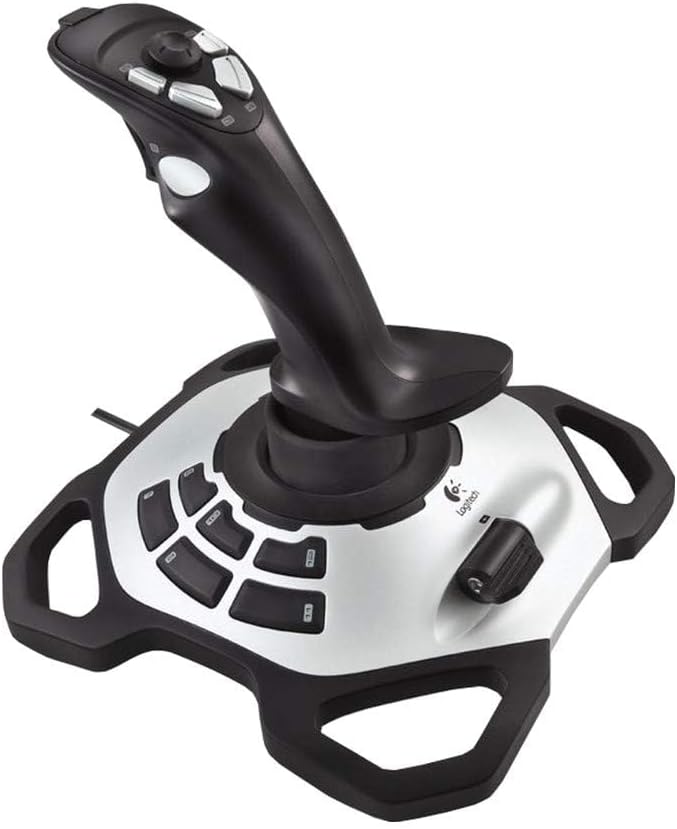
The Logitech Extreme 3D Pro delivers a balanced flight experience with its sturdy build and intuitive design. Its rating indicates strong satisfaction among users who value reliability and comfort. It is a classic choice for those seeking a complete stick and throttle combo without extreme complexity.
We may earn a commission when you buy through this link, at no additional cost to you.
The precision flightstick design includes a throttle lever that feels smooth during operation. The ergonomic handle reduces hand fatigue during extended play. It supports many titles out of the box, making it versatile for various genres. Plug and play compatibility ensures it works immediately on modern systems.
However, the throttle is fixed to the base, reducing flexibility compared to detachable models. Button customization options are limited, which might frustrate power users wanting deep mapping. The price point sits in the middle range, offering good value but not the cheapest option available.
This joystick is perfect for intermediate gamers who want a dependable setup for flight and space sims. It offers enough features to satisfy most users without overwhelming them with unnecessary controls. It remains a trusted option for both beginners and seasoned pilots.
The handle shape and grip surface are designed to reduce strain during long sessions, improving comfort significantly.
Logitech's reputation ensures durable construction that withstands regular use without degradation over time.
We may earn a commission when you buy through this link, at no additional cost to you.
The VOYEE PC Controller is a budget friendly option primarily designed for Xbox 360 and Windows gaming. Its high rating reflects satisfaction with its ergonomic build and responsive triggers. It is best suited for action games rather than flight simulations due to its gamepad shape.
We may earn a commission when you buy through this link, at no additional cost to you.
With enhanced left and right trigger buttons, it provides better control during gaming. The rumble feedback adds immersion to compatible titles. Its long cable allows for comfortable sitting positions away from the PC. The contours fit hands well, reducing fatigue during extended play.
However, it lacks the vertical orientation and axis controls needed for true flight simulation. It is strictly for games supporting Xbox 360 modes, limiting its use in simulators. The build is adequate but not as robust as dedicated flight hardware.
This controller is ideal for casual gamers needing a reliable wired option for standard titles. It offers great value for its price, though flight sim enthusiasts will need a different device. It serves well as a secondary controller for non-flight activities.
The upgraded trigger buttons offer better sensitivity and response, enhancing precision in shooter and racing games.
The ergonomic design ensures hands stay comfortable during long gaming sessions without excessive strain.
We may earn a commission when you buy through this link, at no additional cost to you.
The Thrustmaster SimTask FarmStick is designed specifically for Farming Simulator 25, offering a specialized tool for agricultural players. Its high rating highlights its precision and ease of use within that niche. It is a perfect choice for farmers looking to enhance their virtual machinery control.
We may earn a commission when you buy through this link, at no additional cost to you.
With Hall Effect sensors, it prevents drift and ensures long term reliability during operation. The thirty three programmable inputs allow management of complex machinery without keyboard reliance. The ambidextrous design accommodates left and right handed users equally. Plug and play ensures instant access to gameplay.
However, its focus on farming limits use in flight or combat simulations. It requires a racing wheel for full functionality, increasing total setup cost. It lacks the flight axes needed for traditional piloting. It is strictly a utility tool for one specific genre.
This stick is ideal for serious farming simulator enthusiasts who want dedicated controls. It offers precision and customization tailored to tractors and loaders. While not versatile for other games, it excels in its intended purpose.
Magnetic sensors eliminate mechanical wear and drift, ensuring consistent accuracy over years of heavy use.
Buttons and switches are mapped to common farming tasks, reducing the need to reach for a keyboard.
We may earn a commission when you buy through this link, at no additional cost to you.
The Logitech G X56 H.O.T.A.S represents the pinnacle of consumer flight control, offering extensive customization and precision. Its rating reflects a balance of high performance and complexity. It is designed for pilots who demand exact control over every aspect of their simulation.
We may earn a commission when you buy through this link, at no additional cost to you.
With over 189 programmable controls, it covers every possible function a user might need. The adjustable stick force via the four-spring system allows fine-tuning of resistance. RGB lighting adds visual flair and helps identify buttons in dark rooms. It is specifically optimized for VR navigation.
However, its high price and large size require a dedicated setup. Users must invest time to configure the software properly. The complexity might overwhelm beginners who only need basic functionality. It is an investment that only serious enthusiasts will fully utilize.
This system is perfect for professionals or hobbyists building a home cockpit. It offers unmatched customization for advanced simulations. While not for everyone, it stands as the top choice for those willing to invest in high-end gear.
Advanced sensors ensure every movement is captured with high fidelity, matching real flight control standards.
Controls are placed ergonomically to allow navigation without looking away, enhancing virtual reality immersion.
We may earn a commission when you buy through this link, at no additional cost to you.
The Thrustmaster T.16000M FCS is widely recognized as a top choice for flight simulation. Its rating reflects high satisfaction with its precision and durability. It stands out for its H.E.A.R.T technology, which ensures accuracy over time without degradation.
We may earn a commission when you buy through this link, at no additional cost to you.
With sixteen action buttons and four independent axes, it offers excellent control flexibility. The ambidextrous design allows left handed users to configure the stick easily. The tactile buttons are well spaced, reducing accidental presses during intense maneuvers. It includes a dedicated target software for mapping profiles.
However, it is PC focused, requiring separate accessories for Xbox use. The price sits in the mid-range, making it accessible but not budget friendly. Users need to ensure their PC has enough USB ports for peripherals. It is not compatible with all console ecosystems natively.
This joystick is ideal for serious flight pilots seeking precision and reliability. It balances advanced features with ease of use. Whether for combat or civilian sims, it delivers consistent performance that justifies its reputation and cost.
Magnetic Hall Effect sensors eliminate mechanical contact, preventing drift and ensuring long-term precision.
Components can be swapped for left or right handed use, making it comfortable for all users.
We may earn a commission when you buy through this link, at no additional cost to you.
Selecting the right joystick involves evaluating compatibility, features, and build quality to match your specific gaming needs.
Ensure the joystick supports Windows 11 to avoid driver issues. Many devices also support Xbox or Android, which adds versatility if you use multiple platforms. Always verify the manufacturer's listed OS requirements before purchasing to guarantee a smooth setup process.
Check the product specifications for Windows 11 compatibility explicitly to prevent connection problems.
More axes allow for finer control in complex simulations like flight or space games. Button count determines how many actions you can map without reaching for a keyboard. High-end models offer over a hundred buttons, while basic ones may have fewer than ten.
Match the button and axis count to the complexity of the games you play most often.
Materials like metal hinges or reinforced plastics ensure the device lasts through intensive use. Look for features like Hall Effect sensors that prevent wear and drift over time. A sturdy base prevents the joystick from slipping during forceful maneuvers.
Choose models with reinforced components if you plan to play for long hours regularly.
Vibration adds immersion by simulating turbulence or impact during gameplay. Force feedback provides resistance during turns, enhancing realism. Not all models include these features, so prioritize them if you seek a tactile experience.
Prioritize vibration feedback if immersion is a key factor in your gaming experience.
An ergonomic design reduces hand strain during extended sessions. Handles should fit naturally in your palm without excessive gripping. Look for adjustable resistance to match your grip strength and comfort levels.
Test the grip shape if possible to ensure it supports long periods of use comfortably.
Robust software allows you to map buttons and axes to specific actions for different games. It should save profiles to switch between titles quickly. Check if the software is regularly updated for new releases.
Ensure the manufacturer provides active software support for long-term usability.
Budget models offer basic functionality without frills, while premium units provide advanced sensors and customization. Determine how much you need based on your usage frequency. Investing more often yields better longevity and precision for serious gamers.
Balance the cost against the features you actually need to avoid overpaying.
A dedicated throttle unit provides better control for speed management. Some models include it as part of the stick, while others sell it separately. Detachable throttles offer flexibility for different setups and space constraints.
Decide if a separate or integrated throttle suits your desk space and play style best.
Connect the joystick to a USB port before launching your game to ensure the system recognizes it. Most modern drivers install automatically, but you can use manufacturer software to map buttons and axes. Calibrate the stick in Windows settings to correct any drift or alignment issues.
Store the device in a dry place away from direct sunlight to preserve plastic and electronic components. Clean buttons and grips with a soft cloth to remove dust or residue. Avoid pulling cables forcefully to prevent internal wire damage over time.
Regularly update firmware and drivers through the manufacturer's website for compatibility with new games. Check for software patches that improve button mapping or sensor performance. This routine maintenance ensures your joystick remains responsive and accurate.
Not every joystick supports Windows 11. Some older models require drivers that may not be updated for the new OS. Check the product listing for explicit Windows 11 support before buying to avoid compatibility issues.
Most modern flight sticks are plug and play, meaning Windows installs drivers automatically. However, advanced features often require downloading specific software from the manufacturer to fully utilize mapping and calibration tools.
Generally, PC joysticks do not work on Xbox consoles unless they are specifically designed for both platforms. Look for products labeled as Xbox and PC compatible to ensure cross platform functionality.
Hall Effect technology uses magnetic sensors to measure stick position instead of mechanical contacts. This prevents wear and drift, ensuring consistent precision over years of use compared to standard resistive sensors.
Check if the device is recognized in Windows settings first. Ensure you are in the correct mode if the joystick supports multiple inputs. Sometimes recalibrating or reinstalling drivers fixes recognition issues in specific titles.
At least ten buttons are recommended for essential controls. High-end models offer over fifty to map complex actions. The exact number depends on the simulation's depth and your preference for keyboard usage.
Throttles can be integrated or detachable. Detachable units offer flexibility to move or separate them. Integrated throttles save space and are easier to setup for beginners.
Vibration is not necessary but enhances immersion by simulating engine hum or turbulence. If realism is a priority, choose models with feedback. Otherwise, standard control suffices for casual play.
Choosing the best joystick for Windows 11 depends on balancing features like sensor precision and button count with budget constraints. The top models reviewed here offer reliable performance whether you prefer a simple setup or a full cockpit experience.
Prioritize compatibility and ergonomics to ensure the device fits your gaming habits comfortably. Advanced features like Hall Effect sensors or programmable software add value for serious pilots seeking realism.
Always check current product listings for the latest updates before purchasing. Prices and stock fluctuate often, so verifying details ensures you get the best deal for your needs.