
Anker 2.4G Wireless Ergonomic Mouse, Right Hand Vertical Mouse USB Receiver
4.2Editor score
Scientifically designed neutral handshake grip
Adjustable DPI resolution levels
Power-saving mode after inactivity
This guide compares the top ergonomic mice for wrist pain to help you find a vertical design that reduces strain and improves posture during long computer
Finding the right mouse can transform your daily computer experience by significantly reducing wrist strain and promoting a healthier posture throughout your workday.
We evaluated ten top-rated ergonomic mice based on comfort design, connectivity options, battery life, and user feedback to identify the most effective solutions for wrist pain.
Each selection highlights unique features and ergonomic benefits so you can choose a device that fits your hand size and workflow while noting that availability may vary.
4.2Editor score

4.4Editor score

4.4Editor score
The following comparison table breaks down the key specifications and design features of each model to help you quickly identify the best fit for your needs.




The Logitech Lift stands out as a top choice for users seeking a refined ergonomic solution that balances comfort with premium build quality and sustainability.
We may earn a commission when you buy through this link, at no additional cost to you.
Its vertical design promotes a natural handshake position which reduces strain on the wrist and forearm while the textured grip and thumb rest enhance daily usability.
While the device is optimized for smaller hands the long battery life and dual connectivity options make it a reliable companion for professional environments.
If you prioritize ergonomics backed by certification and want a mouse that feels as good as it performs the Lift is a highly recommended investment.
This model uses certified recycled plastic reducing environmental impact without compromising the tactile feel or durability users expect from a daily driver.
Users can switch between Bluetooth and the Logi Bolt USB receiver ensuring stable connections across various devices including Mac and Windows machines.
We may earn a commission when you buy through this link, at no additional cost to you.
For users looking for an accessible entry into ergonomic computing the Anker wireless mouse offers a scientifically designed vertical shape that promotes a healthy wrist position.
We may earn a commission when you buy through this link, at no additional cost to you.
Its optical tracking technology ensures smooth performance on various surfaces while the dedicated browser buttons enhance productivity for those who navigate the web frequently.
Although it lacks silent clicks the power-saving features and durable build make it a practical choice for home offices or casual work environments.
This model proves that you do not need to spend a fortune to find a device that effectively reduces strain and improves posture.
The inclusion of next and previous buttons streamlines web navigation allowing users to browse documents and pages without unnecessary hand movement.
With an eighteen month warranty and energy efficient power management this mouse provides reliable service for users managing tighter budgets.
We may earn a commission when you buy through this link, at no additional cost to you.
The TECKNET vertical mouse is designed for professionals who switch between multiple devices and require a quiet operating environment for focused work.
We may earn a commission when you buy through this link, at no additional cost to you.
Its high DPI settings offer precise tracking suitable for detailed tasks while the silent click mechanism ensures that your work does not disturb others nearby.
While the need to manage batteries is a minor trade-off the ability to connect seamlessly via Bluetooth or USB receiver adds significant versatility to the workflow.
This model is an excellent choice for users who value flexibility and quiet performance in their daily computing setup.
The silent click technology specifically targets the main buttons allowing for peaceful operation in libraries or shared office spaces.
Seamless switching between Bluetooth and USB modes ensures that you can maintain productivity across different platforms without interruption.
We may earn a commission when you buy through this link, at no additional cost to you.
The UGREEN ergonomic mouse provides a comfortable vertical angle that is particularly well suited for users with larger hands seeking to minimize wrist rotation.
We may earn a commission when you buy through this link, at no additional cost to you.
Its quiet click buttons and PTFE glide feet ensure smooth operation and reduced noise which is essential for maintaining a calm and focused workspace environment.
While it relies on a single AA battery for power the ability to connect via Bluetooth or USB offers the flexibility needed for modern hybrid work setups.
This mouse offers a solid balance of ergonomic design and functional features for those needing extra space and comfort.
The durable Teflon glide pads reduce friction ensuring that the cursor moves effortlessly across different desk surfaces without resistance.
Full compatibility with Android Linux and other systems makes this a versatile tool for diverse technological environments.
We may earn a commission when you buy through this link, at no additional cost to you.
The ProtoArc EM11 NL is specifically engineered for individuals with smaller hands who need a rechargeable ergonomic solution that aligns with natural grip positions.
We may earn a commission when you buy through this link, at no additional cost to you.
Its built in battery allows for convenient charging without the need to replace disposable batteries making it an eco friendly choice for daily use.
While there is a learning curve to the vertical shape the reduction in wrist strain and the ability to switch between devices quickly are significant benefits.
This mouse is an ideal pick for those who want a compact rechargeable device that supports a healthy wrist posture without extra cost.
Designed specifically for hands under seven point five inches this mouse ensures a snug fit that maximizes comfort for smaller users.
The included Type-C cable allows for easy recharging eliminating the hassle of hunting for spare batteries or frequent replacements.
We may earn a commission when you buy through this link, at no additional cost to you.
The Lekvey ergonomic mouse offers a robust rechargeable design that provides over one hundred and fifty hours of continuous use on a single charge.
We may earn a commission when you buy through this link, at no additional cost to you.
Users can easily adjust sensitivity with three DPI levels while the page navigation buttons help streamline tasks for frequent web browsers and researchers.
Although it uses a USB receiver rather than Bluetooth the long battery life and comprehensive warranty make it a reliable option for long term use.
This model is particularly suitable for those who prioritize battery longevity and do not require wireless switching capabilities.
The high capacity battery reduces waste by eliminating the need for disposable cells ensuring a more sustainable computing experience.
With three DPI settings the mouse adapts to different tasks ranging from precise document editing to general web browsing.
We may earn a commission when you buy through this link, at no additional cost to you.
The TECKNET Premium model combines advanced Bluetooth 5.0 connectivity with a high capacity rechargeable battery to deliver a reliable and efficient user experience.
We may earn a commission when you buy through this link, at no additional cost to you.
Its whisper quiet clicks are designed to reduce noise by ninety nine percent making it perfect for shared spaces or environments where focus is critical.
While it takes time to adapt to the vertical shape the durable construction and high precision tracking justify the initial learning curve for productivity seekers.
This mouse is an excellent choice for professionals who need robust connectivity options and a quiet operation in their workflow.
Support for Bluetooth 5.0 ensures faster pairing and rock solid connections that minimize lag during critical tasks.
The silent click mechanism helps maintain a peaceful atmosphere allowing users to work or study without creating distractions.
We may earn a commission when you buy through this link, at no additional cost to you.
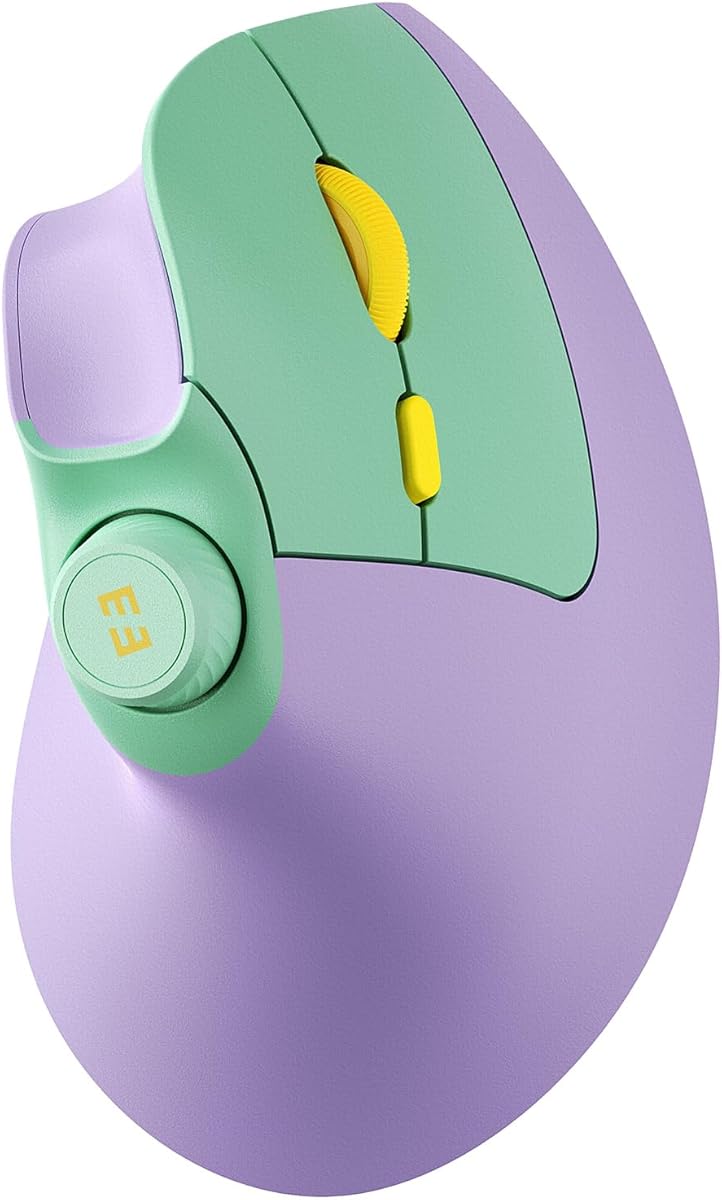
The seenda MOU-302 distinguishes itself with a built-in volume knob allowing users to control audio directly from the mouse without switching windows.
We may earn a commission when you buy through this link, at no additional cost to you.
Its rechargeable battery and multi-device connectivity options provide flexibility for hybrid workers who switch between laptops desktops and tablets frequently.
While the volume knob is a unique feature that not every user needs it adds significant value for streamers remote workers and music lovers.
This model is a great pick for those who want a compact ergonomic mouse that offers convenient media control and silent operation.
The volume knob allows for quick adjustments during video calls or music playback enhancing workflow efficiency.
A built-in battery eliminates the need for constant battery replacements ensuring a more sustainable and cost-effective device life.
We may earn a commission when you buy through this link, at no additional cost to you.
The Logitech MX Vertical represents a premium solution designed by ergonomists to reduce muscular activity while maintaining high performance standards.
We may earn a commission when you buy through this link, at no additional cost to you.
Its high precision sensor allows for less hand movement reducing fatigue while the cursor speed switch offers instant DPI adjustments for detailed tasks.
Although it comes at a higher price point the ergonomic benefits and proven design make it a worthwhile investment for those suffering from wrist pain.
This device is ideal for professionals seeking a top-tier ergonomic experience backed by scientific design and robust build quality.
Designed with leading ergonomists this mouse reduces pressure on the wrist and improves posture effectively during long work sessions.
The 4000 DPI sensor and cursor speed switch ensure that accuracy remains high even when moving across large screens.
We may earn a commission when you buy through this link, at no additional cost to you.
The TECKNET 2.4G wireless mouse combines a sixty degree vertical angle with a rechargeable battery to offer a practical and cost-effective ergonomic solution.
We may earn a commission when you buy through this link, at no additional cost to you.
Its silent buttons and programmable features help streamline workflows while the stable wireless connection ensures reliable performance for everyday tasks.
While it relies on a USB receiver this feature simplifies connectivity and ensures a consistent signal without needing to manage Bluetooth settings.
This model is a strong recommendation for those seeking a balance of ergonomic support and affordability without compromising on essential features.
Six programmable buttons allow users to customize shortcuts reducing repetitive clicks and improving workflow efficiency.
Silent click technology ensures that the mouse operates quietly maintaining focus in office or home environments.
We may earn a commission when you buy through this link, at no additional cost to you.
Selecting the right ergonomic mouse involves evaluating several key factors to ensure that the device meets your specific comfort and performance needs.
The angle of the vertical mouse is crucial as it determines how well the device aligns with your natural handshake position to reduce wrist rotation.
Look for models with angles between fifty and sixty degrees as these tend to offer the most effective reduction in muscle strain for most users.
A mouse that fits your hand properly ensures that you do not need to stretch or curl your fingers which can lead to additional discomfort over time.
Measure your hand length and compare it to the manufacturer's recommendations to ensure that the grip is snug without being too tight or too loose.
Decide whether you need Bluetooth or a USB receiver as this choice affects which devices you can connect to and how much space you need on your desk.
Bluetooth offers more flexibility and saves USB ports while a receiver may provide a more stable connection in areas with high wireless interference.
Battery life impacts how often you need to replace batteries or recharge the device which can affect your workflow and convenience during work hours.
Rechargeable models reduce waste and cost over time but disposable batteries might offer longer run times in certain use cases.
A high DPI sensor allows for more precise cursor control which is important for detailed tasks such as design work or data entry.
Ensure that the mouse offers adjustable DPI levels so you can switch between high precision for detailed work and higher speed for general navigation.
Silent clicks are a valuable feature for those working in shared spaces or libraries where noise can be a distraction to others.
Check if both the left and right buttons are silent as some models only silence one side of the mouse which may not be ideal for all users.
Additional programmable buttons can enhance productivity by allowing you to assign shortcuts to common tasks reducing the number of clicks required.
Verify that the software required for customization is compatible with your operating system as some advanced features may be limited on certain platforms.
A durable build ensures that the mouse will withstand daily use and provide a good return on investment over time without wearing out quickly.
Look for reputable brands that offer warranties and have positive reviews regarding the longevity of their devices and customer support responsiveness.
When using a vertical mouse for the first time allow yourself a few days to adapt to the new shape and grip style to prevent discomfort.
Keep your wrist straight and your elbow close to your body while using the mouse to maintain proper posture and reduce strain on your arm.
Regularly clean the surface of the mouse and the tracking area to ensure that the sensor continues to operate smoothly and accurately over time.
Vertical mice help with wrist pain by encouraging a natural handshake position that reduces the rotation of the forearm and relieves pressure on the wrist.
You should measure your hand length from the wrist to the tip of the middle finger and compare it with the manufacturer's suggested hand size range.
Wireless mice provide more flexibility and reduce desk clutter but wired mice may offer slightly better latency for very sensitive tasks.
Most users adapt to a vertical mouse within one to two weeks of consistent use as the muscles adjust to the new posture and grip.
Yes many vertical mice have high DPI settings suitable for gaming but the learning curve may affect performance in fast-paced competitive games.
Bluetooth connects wirelessly without a receiver saving USB ports while a USB receiver provides a dedicated connection that may be more stable in some settings.
The ten models reviewed here offer a wide range of ergonomic features and price points to suit different needs and preferences for users seeking wrist relief.
Prioritize your hand size and the type of connectivity you require to ensure that the mouse integrates smoothly into your daily workflow.
Remember to check current availability and specifications as devices are updated regularly to provide the best comfort and performance possible.