
Fosmon Fast Charging for Xbox Controller Charger Station Dock
4.5Editor score
Dual 5280mWh battery life
SGS certified safety standards
Automatic charge stop feature
This guide compares the top ten controller charging station for Xbox options to help you choose the right dock for your gaming setup and battery needs.
Finding the right controller charging station for Xbox can transform your gaming experience by eliminating dead battery anxiety during intense matches. A good dock keeps your controllers powered up and neatly organized on your desk or entertainment center.
We evaluated ten top-rated charging solutions based on battery capacity, charging speed, build quality, and compatibility with Xbox Series X and Xbox One controllers to provide accurate recommendations for every player.
Each pick below highlights key features and real-world performance details so you can decide which dock fits your budget and setup best while noting that prices may fluctuate over time.
4.5Editor score

4.6Editor score

4.4Editor score
Below you will find a side by side comparison of all ten charging stations including their key specs and unique selling points to help you narrow down your choice quickly.



The Upgraded Controller Charger Station stands out with its massive 6200mWh battery packs that offer up to 25 hours of playtime per charge. With a 4.6 star rating this dual dock is a top choice for serious gamers who want to avoid battery swaps.
We may earn a commission when you buy through this link, at no additional cost to you.
Its unique X shape LED indicators provide clear status updates without being distracting during gameplay or rest. The station supports a wide range of Xbox controllers and includes four battery covers to ensure a perfect fit for your specific model.
While the batteries are located on the bottom of the dock which might take getting used to the trade off is worth it for the extended capacity. Just note that it only works with official controllers and not third party alternatives.
This dock is ideal for households with multiple Xbox players who need reliable power for extended sessions. If you want a charging station that truly minimizes downtime and keeps your setup neat this is the best overall choice.
The 6200mWh battery packs are designed to support 18 to 25 hours of continuous play so you can finish your campaigns without stopping to swap cells.
The green and red LED lights show you exactly when the batteries are full or charging while using a soft light that will not disturb your gaming focus.
We may earn a commission when you buy through this link, at no additional cost to you.
The Fosmon Fast Charging Dock delivers exceptional value by offering reliable dual charging at a budget friendly price. With a 4.5 star rating and SGS certification it ensures safety and performance for your Xbox controllers without breaking the bank.
We may earn a commission when you buy through this link, at no additional cost to you.
Its 5280mWh batteries provide up to 45 hours of playtime which is impressive for the price range. The smart charging board automatically stops charging when full to protect your equipment and includes a limited lifetime warranty for peace of mind.
While it does not support the Xbox Elite 2 controller and the design is fairly basic the performance is solid for standard One and Series controllers. It is a great choice if you want a no fuss charging solution.
Buy this if you want a dependable dual charging station at an affordable rate. It is perfect for casual gamers or families who need to keep multiple controllers charged without spending too much.
SGS certification ensures the dock meets high safety standards for overheating and short circuit protection so you can leave controllers to charge overnight.
Enjoy up to 45 hours of gaming on a single charge which eliminates the need for disposable batteries and saves money over time.
We may earn a commission when you buy through this link, at no additional cost to you.
The PowerA Solo Charging Stand is the best choice for players who only need to charge one controller at a time. As an officially licensed product it fits perfectly with your Xbox aesthetic and offers a simple no clutter solution.
We may earn a commission when you buy through this link, at no additional cost to you.
It comes with a 1100mAh battery and two battery doors so you can swap and charge easily. The stand displays your controller neatly on your desk which helps keep your gaming area organized and ready for action.
Since it supports only one controller it might not be enough for households with multiple gamers. However the battery is small but reliable and the two year warranty provides good support for this affordable option.
This stand is ideal for solo gamers or those with limited space who want a sleek charging dock. If you do not need dual slots this is a reliable and stylish choice.
Being officially licensed by Microsoft ensures compatibility with your Xbox Series X and One controllers without any issues or warranty concerns.
The stand holds your controller upright so it is always ready to use and looks clean on your desk or shelf when not in play.
We may earn a commission when you buy through this link, at no additional cost to you.
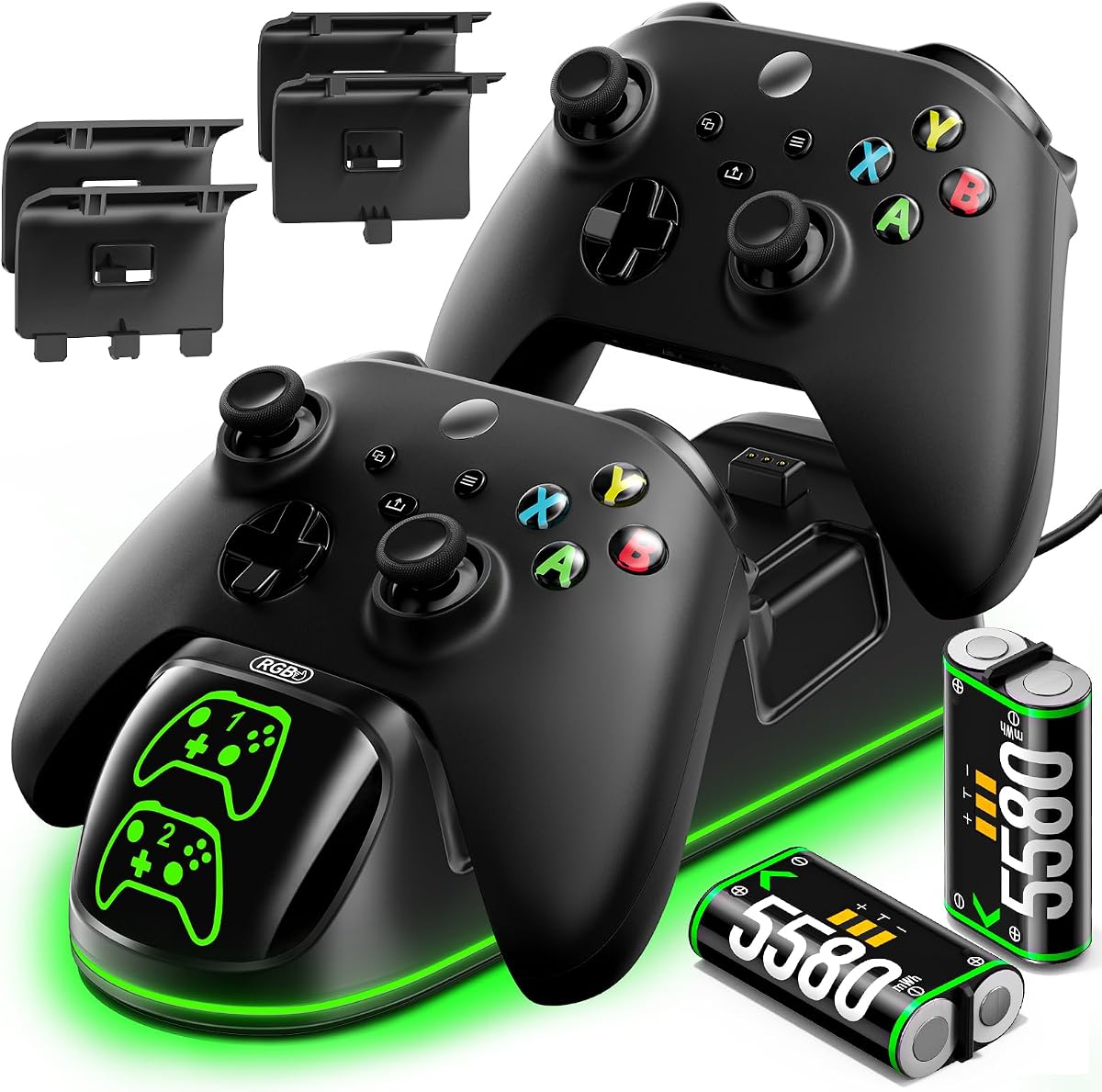
The OlVO XSX Controller Charger has a perfect 5.0 rating and offers fast charging in just 2.5 hours which is rare in this category. It supports two controllers at once with 5580mWh batteries that deliver 20 hours of play per charge.
We may earn a commission when you buy through this link, at no additional cost to you.
Its high capacity NiMH batteries can be recharged over 3000 times making it a durable choice for long term use. The included USB C cable ensures you can connect it easily to your Xbox or wall adapter for power.
While it does not support the Xbox Elite 2 or Xbox 360 consoles it is designed perfectly for Series X and One controllers. The installation is straightforward and the battery covers are included for different models.
Choose this dock if you want quick turnaround times between gaming sessions. It is perfect for active players who need their controllers ready fast without sacrificing battery life.
The charging dock fully charges both batteries in under 2.5 hours so you can get back to gaming quickly after a short break.
With up to 3000 recharge cycles these batteries are built to last years reducing the need for replacements and saving you money.
We may earn a commission when you buy through this link, at no additional cost to you.
The 8BitDo Charging Dock stands out for its magnetic secure charging system which makes docking your controller effortless and reliable. It is officially licensed by Xbox and features a seamless design that matches the look of your console.
We may earn a commission when you buy through this link, at no additional cost to you.
It includes a 1100mAh rechargeable battery pack and has LED indicators that show when the battery is full or charging. The dock also features light adjustment so you can control the brightness to fit your room.
While it only supports one controller at a time and the battery is smaller than some rivals the magnetic connection is very sturdy. It is great for players who want a premium looking dock.
This dock is best for those who value design and ease of use. If you want a stylish and easy to dock setup for your Xbox controller this is a top pick.
The magnetic charging system ensures your controller stays aligned and charging without slipping off which adds convenience and safety.
Adjust the LED light brightness to suit your gaming environment so you can see status without it being too bright at night.
We may earn a commission when you buy through this link, at no additional cost to you.
The Charger Station with 2x5520mWh features a unique robot helmet aesthetic that adds a superhero vibe to your gaming setup. It includes dual charging slots and 5520mWh batteries that offer 18 to 25 hours of play time.
We may earn a commission when you buy through this link, at no additional cost to you.
Its intelligent LED indicators have an on/off button so you can choose to have lights or keep them off during gameplay. The bottom compartment stores spare batteries neatly so you never lose them.
While the design is large and might not fit small desks it is very functional and protective. It is ideal for gamers who want a standout look and plenty of battery power for long sessions.
This dock is perfect for enthusiasts who want style and substance. If you want a charger that looks unique and offers great battery life this is a great pick.
The robot helmet inspired front design makes this charger stand out on your desk and adds fun to your gaming atmosphere.
The bottom battery compartment keeps spare batteries close at hand so you always have a charged pack ready for swapping.
We may earn a commission when you buy through this link, at no additional cost to you.
The Nyko Charging Station is a solid choice for charging two controllers at once and includes an extra USB port for other accessories. It comes with 1100mAh batteries that offer up to 15 hours of play time per charge.
We may earn a commission when you buy through this link, at no additional cost to you.
The drop and charge design makes it easy to place controllers for charging without dealing with cables. The cool green LED lights clearly show when charging is complete adding a stylish touch to your setup.
While the battery size is smaller than some rivals the convenience of dual slots and the extra port makes it useful. It is a good option if you want basic functionality with added USB connectivity.
This station is best for casual gamers who want to keep two controllers charged easily. If you need a simple dual dock with USB benefits this is a good choice.
The extra USB port allows you to charge other devices like headsets or phones so the dock does more than just charge controllers.
Simply place your controller on the base to start charging which reduces cable clutter and makes setup quick.
We may earn a commission when you buy through this link, at no additional cost to you.
The Controller Gear Pulse Red Stand is perfect if you have a Pulse Red Xbox controller and want a dock that matches perfectly. It is officially licensed and made from high quality materials that look premium on your desk.
We may earn a commission when you buy through this link, at no additional cost to you.
The magnetic contact system ensures a secure charge every time and the design allows for one handed navigation even while docked. This adds convenience if you need to access your dashboard quickly.
It only supports one controller and the color is limited to Pulse Red which might not fit every setup. However the build quality and design attention are excellent for dedicated Xbox fans.
This stand is ideal for gamers who want a seamless aesthetic with their controller. If you love the Pulse Red color and want a matching dock this is the best choice.
The stand is manufactured with the same material and color as your controller so it blends perfectly with your gaming setup.
The ergonomic design lets you navigate the dashboard with one hand while the controller charges which adds convenience.
We may earn a commission when you buy through this link, at no additional cost to you.
The Razer Universal Quick Stand offers premium build quality and a secure magnetic contact system that ensures your controller stays docked safely. It charges your controller in under 3 hours and works with almost all Xbox controllers.
We may earn a commission when you buy through this link, at no additional cost to you.
The one handed navigation feature makes it easy to use the controller while docked which is a nice touch for advanced players. It matches the striking colors of official Xbox controllers for a seamless look.
While the price is higher than many rivals and it only supports one controller the quality and features justify the cost. It is a top pick for those who want a high end accessory.
This stand is best for gamers who want a premium and durable docking solution. If you value quality and design and are willing to pay more this is the best option.
The durable materials and construction feel high quality on your desk and provide a stable base for your controller.
The stand shares the same striking colors as official Xbox controllers so it looks like part of the original console.
We may earn a commission when you buy through this link, at no additional cost to you.
The Controller Charger Station with RGB offers 9 customizable lighting modes to enhance your gaming atmosphere. It features dual 6200mWh batteries that provide 25 to 30 hours of consistent gameplay per charge.
We may earn a commission when you buy through this link, at no additional cost to you.
The RGB lights can be switched with a simple touch and include both single color and cycling modes to fit your style. The charging tech is safe and reliable preventing overcharge or short circuit damage.
While the lights might not be for everyone they can be turned off if you prefer a neutral look. The large capacity batteries and wide compatibility make it a strong performer for most Xbox users.
This dock is ideal for gamers who love RGB setups and want long battery life. If you want a charger that adds style and power this is a great pick.
Choose from 9 lighting modes to match your mood or setup and create an immersive gaming environment with your charger.
The charger automatically adjusts output power to prevent overcharging ensuring your controller and batteries stay safe during long sessions.
We may earn a commission when you buy through this link, at no additional cost to you.
Choosing the right charging station requires looking at battery capacity, number of slots, safety features and design fit to match your gaming needs.
Battery capacity determines how many hours you can play between charges. Higher capacity such as 6200mWh or 5280mWh provides longer playtime reducing how often you need to swap batteries.
Look for at least 5000mWh if you want extended sessions. Larger capacity means less interruptions and more freedom to game without stopping.
Dual slot chargers let you charge two controllers at once which is useful for households with multiple players. Single slot stands are more compact and cost less but only serve one controller.
Choose dual slots if you have more than one controller to keep ready. Single slots work well for solo gamers with limited desk space.
Some docks charge batteries in under 3 hours while others take 4 to 5 hours. Faster charging means less wait time when you need power quickly.
Prioritize docks with fast charge claims if you often play multiple sessions in one day. Quick turnaround keeps you in the game.
Safety features like overcharge protection and short circuit prevention protect your controllers and batteries from damage. Look for certified products that include these safeguards.
Ensure your dock has protection against overheating and current issues. This extends the lifespan of your equipment and keeps it safe.
Check that the dock supports your specific Xbox controller model. Most modern docks support Series X and One but some do not work with Elite 2 or third party controllers.
Verify compatibility before buying to avoid issues. Officially licensed docks usually offer the best fit and compatibility with all models.
The dock should match your setup style and not take up too much space. LED indicators should be clear but not too bright for night gaming.
Choose a design that fits your desk and gaming vibe. Sleek docks blend better while RGB models add flair.
A good warranty indicates the manufacturer stands behind their product. Look for at least a two year warranty to ensure support if issues arise.
Check the company support policies and warranty terms. Longer warranties provide peace of mind for expensive accessories.
Some docks come with extra battery covers or cables which can save you money and hassle. Others might require separate purchases for full setup.
Choose packages that include necessary covers for your controller models. Having extras helps you swap and store batteries easily.
Place your controller on the dock ensuring the contacts align properly with the charging pins. The LED indicators will show when charging starts or completes so you know the status easily.
For best battery health do not leave controllers on the dock for days without use. Most docks stop charging when full but removing controllers after full charge keeps batteries healthy over time.
Keep the dock in a cool and dry place to avoid overheating. Clean the charging contacts with a dry cloth occasionally to remove dust and ensure a good connection.
Yes most of the charging stations listed are compatible with Xbox Series X and S controllers. Always check the product specs to confirm support for your specific model before buying to ensure perfect fit.
Rechargeable battery packs can last for years if used correctly. Most models offer 2000 or more recharge cycles which translates to hundreds of hours of use before needing replacement.
Most modern docks have smart charging that stops when the battery is full so it is safe to leave controllers overnight. However for maximum battery life it is good to remove them once fully charged.
Many charging stations include rechargeable batteries in the package so you can start using them right away. Check the product description to confirm if batteries are included or sold separately.
Most docks include multiple battery covers for different controller models so you can fit them properly. If your controller is not listed in the compatibility check it might not fit.
Yes charging stations with safety certifications are safe for children. Always supervise young kids when they use the dock to prevent them from pulling cables or touching the contacts.
Most docks only charge Xbox controllers but some models include extra USB ports for charging other devices like phones. Check the specs to see if extra ports are available.
Use a dry and soft cloth to wipe the charging contacts on the dock and battery packs. Avoid water or liquids to prevent damage and ensure the connection stays strong.
We have reviewed ten top charging stations offering a variety of battery sizes and designs to suit every gamer. Whether you want fast charging or long playtime there is a dock here that meets your needs.
Prioritize battery capacity and safety features when choosing a dock. Dual slots and fast charging can save you time while good protection keeps your controllers safe.
Always check current prices and availability before buying. Prices may change and some docks might sell out so act quickly when you find the right match.