
BNC to HDMI Converter 480I NTSC
4.7Editor score
Affordable pricing point
Built for security cameras
Supports 1080P output
This guide compares the top ten coax to HDMI converter models for connecting legacy devices to modern screens with detailed specs and expert insights.
Connecting older devices with coaxial outputs to modern HDMI displays can be challenging without the right adapter. A high quality converter ensures stable signal transmission and clear video quality for your entertainment setup.
We analyzed ten top rated models based on compatibility, signal stability, ease of use, and build quality. Each product was evaluated to determine which offers the best performance for different user needs.
Each pick highlights key features and ideal use cases to help you make an informed decision. Please note that availability and pricing may change over time so check current listings before purchasing.
4.7Editor score

3.4Editor score

4.4Editor score
The following table provides a side by side comparison of all ten products reviewed in this guide. Use this to quickly identify which model matches your specific connectivity needs.

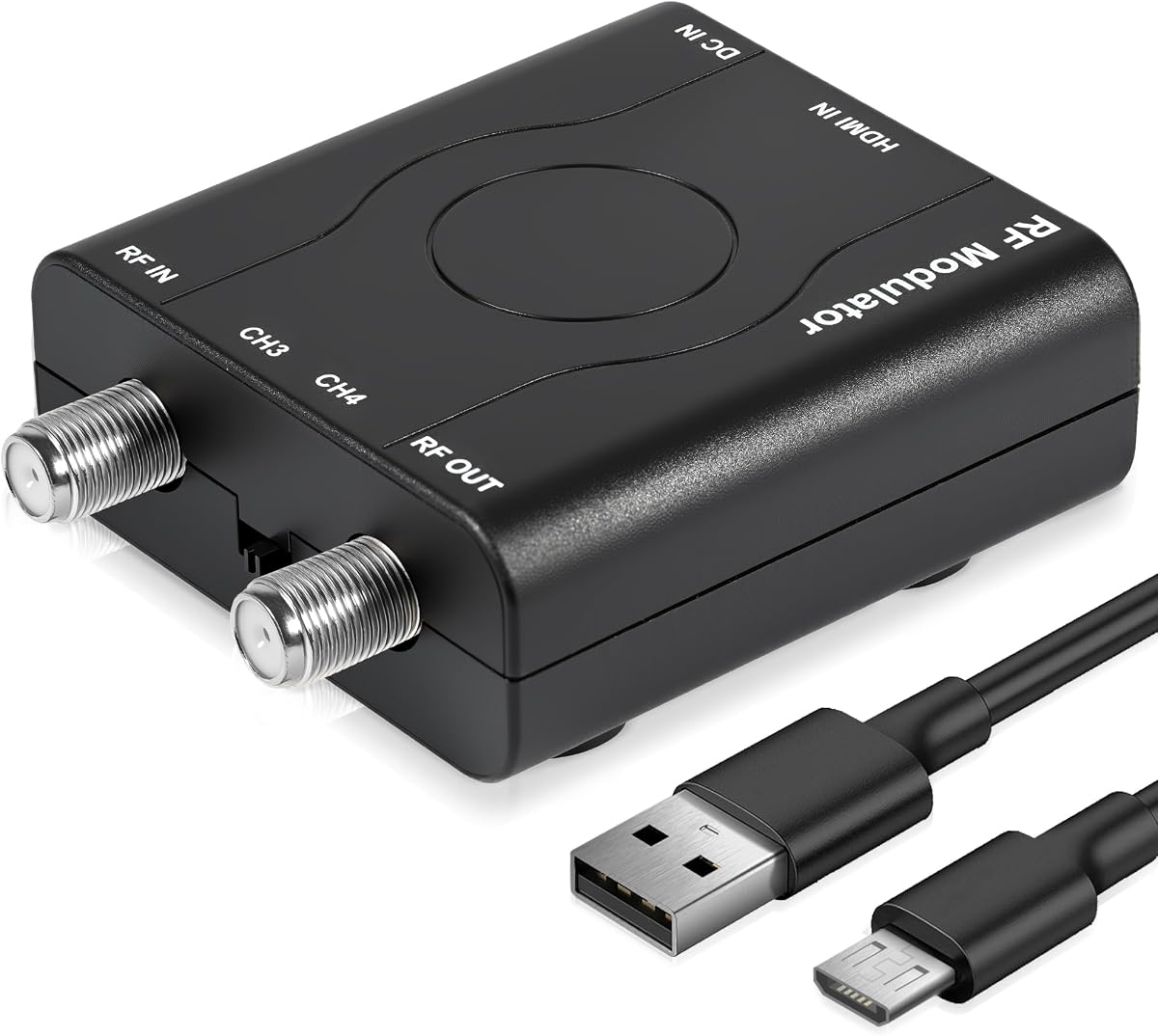


This HDMI to RF modulator is designed for users needing a simple way to connect modern devices to older TVs. It has a solid 4.3 rating indicating reliable performance. The included HDMI cable makes it ready to use out of the box.
We may earn a commission when you buy through this link, at no additional cost to you.
It supports a wide range of resolutions including 1080P input and converts them to NTSC RF output on CH3 or CH4. This is ideal for connecting game consoles like PS5 or Xbox to TVs without HDMI ports. The built-in PLL control ensures stable frequency output.
The main limitation is that it only works one way from HDMI to RF. It does not convert RF signals back to HDMI. Additionally Mac mini and laptops are not supported. These trade-offs are acceptable for users focused on retro setups.
This product is perfect for gamers and home theater users with older displays. It offers a hassle-free way to enjoy modern content on legacy screens. Consider this if you need a quick plug and play solution for RF input TVs.
The included 1.2M HDMI cable means you do not need to buy extra accessories. Just connect your device and power adapter to start viewing immediately.
PLL control technology maintains consistent VHF frequency output. This reduces signal interference and ensures a clear picture on your older TV.
We may earn a commission when you buy through this link, at no additional cost to you.
This RF demodulator is specifically built to bridge the gap between vintage gaming systems and modern HDMI displays. It has a 3.4 rating which reflects mixed user experiences. The standout feature is its extensive compatibility with older consoles like Atari and Magnavox.
We may earn a commission when you buy through this link, at no additional cost to you.
It converts analog VHF UHF signals from old devices to digital HDMI. The included remote allows you to control channels and power settings easily. It supports both NTSC and PAL formats making it versatile for international setups.
The lower rating suggests some users may face compatibility or stability issues. The interface might be confusing for first-time users. However for dedicated retro gamers the ability to play classic games on HDTVs is a significant benefit.
This converter is best for collectors and enthusiasts who own legacy systems. It allows you to display footage from VCRs and old game consoles clearly. If you need to connect multiple retro devices this model offers the widest range of support.
Works with Atari 2600 NES Sega Master System and more. It captures the original analog output and converts it for modern screens.
The remote lets you manage power and channel selection without touching the device. This is convenient when the converter is mounted behind a TV.
We may earn a commission when you buy through this link, at no additional cost to you.
This BNC to HDMI converter is an affordable solution for connecting security cameras to modern monitors. With a 4.7 rating it is highly regarded for performance. It is designed specifically for analog cameras using BNC connectors.
We may earn a commission when you buy through this link, at no additional cost to you.
It automatically detects PAL or NTSC signals and outputs up to 1080P. The 3D compensation technology optimizes motion and color for clearer footage. You can run it continuously for 24 hours without overheating issues.
Note that this converter is for BNC interfaces not RF coaxial ports. The ABS casing is lightweight but may show scratches over time. These are minor issues compared to the value it provides for security monitoring.
This product is ideal for small businesses or home security setups. It lets you view camera feeds on HDMI displays without expensive replacements. If you need a reliable budget-friendly option for CCTV this is a top choice.
The converter identifies whether the input is PAL or NTSC automatically. This simplifies setup as you do not need to configure formats manually.
Designed for 24-hour stability this device handles long surveillance sessions. Low heat generation ensures it runs reliably over time.
We may earn a commission when you buy through this link, at no additional cost to you.
The HDM61 modulator is crafted for reliable performance in home entertainment systems. It holds a 4.3 rating reflecting its stability. The key feature is compatibility with local CATV systems using VHF frequencies.
We may earn a commission when you buy through this link, at no additional cost to you.
It supports HDMI 1.4 and HDCP 1.4 ensuring secure high definition transmission. The PLL control manages frequencies precisely for clear CH3 CH4 output. The ABS construction makes it durable for daily use.
Users should note it does not support RF to HDMI conversion. The power adapter is required which limits portability compared to USB powered units. For fixed installations these are acceptable trade-offs.
This device is perfect for users needing to distribute HDMI to coax inputs. It works well with game consoles and laptops for viewing on older TVs. Choose this if you prioritize build quality and signal stability.
Designed to work seamlessly with community cable transmission systems. This ensures your signal fits local broadcast standards.
HDCP 1.4 compatibility allows streaming content to pass through securely. This is essential for protected video content from modern devices.
We may earn a commission when you buy through this link, at no additional cost to you.
This modulator is designed for stable signal distribution across multiple TVs. It has a perfect 5.0 rating indicating high user satisfaction. The kit includes everything needed for immediate setup.
We may earn a commission when you buy through this link, at no additional cost to you.
It supports a wide range of HDMI devices from streaming players to game consoles. The coax output allows you to share content on different rooms. Customer service is responsive with 18-hour response time.
The design is basic without advanced controls or remotes. It focuses purely on conversion functionality which is sufficient for most users. The perfect rating suggests it handles this core task reliably.
Ideal for hotels classrooms or homes needing to share video across rooms. If you need a simple reliable converter for content distribution this is a strong choice. The included accessories add value to the purchase.
This adapter allows you to send HDMI signals over existing coax cabling. It is useful for broadcasting to multiple displays in different locations.
The box includes HDMI cable power adapter and manual. You do not need to purchase extra accessories to get started.
We may earn a commission when you buy through this link, at no additional cost to you.
This HDM61 adapter is a compact solution for connecting HDMI to coax inputs. It maintains a perfect 5.0 rating for reliability. Its small size makes it easy to hide behind devices.
We may earn a commission when you buy through this link, at no additional cost to you.
It uses stable PLL processing to maintain consistent signal quality. The housing is durable and designed for long term daily use. It supports HDMI 1.4 and HDCP 1.4 for secure content playback.
It is a one-way converter meaning it cannot reverse the signal. Users looking for two-way conversion will need a different device. For simple setups this limitation does not affect usability.
Best for users needing a discreet and reliable adapter. It works well with older TVs in home offices or living rooms. If you want a simple plug and play device this model delivers.
The small form factor allows flexible placement near signal sources. You can tuck it behind a TV or laptop without blocking ports.
The molded ABS shell protects internal components from damage. It ensures steady performance even with frequent use.
We may earn a commission when you buy through this link, at no additional cost to you.
This modulator comes with a dedicated power cable ensuring stable operation. It has a 4.5 rating reflecting consistent performance. The USB power cable simplifies connection to compatible power sources.
We may earn a commission when you buy through this link, at no additional cost to you.
It supports HDMI 1.4 and HDCP 1.4 for reliable playback. The ABS construction is durable for daily use. You can connect it to PCs or game consoles easily.
Note that it only supports HDMI to RF direction. The manual is straightforward but lacks advanced troubleshooting. Most users find the setup intuitive without needing extra guides.
Great for users needing a reliable connection for DVRs or cameras. The power setup ensures stable signal transmission over time. If you prioritize ease of use this model is a solid choice.
The included power cable allows connection to standard USB adapters. This reduces the need for extra power bricks in your setup.
Built-in PLL control keeps VHF frequencies stable. This ensures consistent channel alignment on your TV.
We may earn a commission when you buy through this link, at no additional cost to you.
This converter offers a unique dual output capability for RF and RCA. It has a 4.2 rating showing good user satisfaction. The dual output allows simultaneous recording and viewing.
We may earn a commission when you buy through this link, at no additional cost to you.
You can connect an antenna to the F type input and output to a TV. The RCA port is useful for capture cards. This makes it versatile for recording content from gaming or streaming devices.
The setup involves more cables than single output units. The price is higher but the features justify the cost for power users. It is a versatile choice for content creators.
Best for users who need to record and display video simultaneously. The antenna input expands its use for cable box connections. If you need multifunctionality this model offers significant value.
Convert HDMI to both RCA and RF signals. This allows you to record content while watching it on another screen.
The F type input accepts antennas or cable boxes. This adds flexibility to your entertainment setup.
We may earn a commission when you buy through this link, at no additional cost to you.
This premium converter supports high resolution inputs up to 8MP. With a 4.4 rating it is highly trusted for surveillance. The metal housing ensures heat dissipation for stable performance.
We may earn a commission when you buy through this link, at no additional cost to you.
It works with TVI CVI and AHD formats. The loop output lets you view on HDMI while sending signals to a DVR. This is essential for advanced security monitoring.
The price is higher than basic models but the build quality is superior. It is designed for 24/7 operation which justifies the cost. If you need professional grade performance this is the top pick.
Ideal for warehouses or homes with high definition camera setups. It saves you from replacing entire camera systems. Choose this if you require durability and high resolution support.
Handles inputs up to 8MP for crystal clear pictures. Every detail remains sharp on modern monitors.
The metal casing dissipates heat efficiently. This keeps the device stable during continuous operation.
We may earn a commission when you buy through this link, at no additional cost to you.
This modulator is a reliable choice for converting HDMI to coax inputs. It has a perfect 5.0 rating indicating high performance. The PLL control ensures stable transmission of signals.
We may earn a commission when you buy through this link, at no additional cost to you.
It supports 1080P input and works with PCs and game consoles. The ABS construction makes it durable for daily use. It is an affordable option that does not compromise on quality.
It is a one-way converter which limits flexibility. However the core conversion tasks is reliable. For most users this simplicity is a benefit rather than a drawback.
Best for those needing a dependable connection for older TVs. It works well for gaming and video playback. If you want consistent performance without extra features this is a top choice.
The PLL technology maintains consistent frequency output. This reduces signal loss and ensures clear picture quality.
Works with PCs laptops and CCTV systems. It offers broad support for various HDMI-enabled devices.
We may earn a commission when you buy through this link, at no additional cost to you.
Selecting the right converter depends on your specific needs and devices. This guide covers key factors to help you narrow down your options.
Most converters support HDMI to RF but not RF to HDMI. Verify you need one-way or two-way conversion before purchasing. This determines compatibility with your existing devices.
Always confirm the signal direction matches your setup requirements.
Look for models supporting at least 1080P input for clear video. Lower resolution inputs may result in fuzzy displays. Higher resolutions ensure better quality on modern screens.
Choose a converter with high resolution support for best results.
Housing material impacts durability and heat management. Metal cases are more robust than plastic for continuous use. Consider how often the device will be used before selecting.
Invest in a model with a durable housing for longevity.
Ensure the converter supports your source devices like consoles or cameras. Check lists for specific brands or formats. Incompatibility can lead to signal loss or non-functional setups.
Verify device compatibility to avoid connection issues.
Some models offer dual outputs for RF and RCA. This is useful if you need to record and view simultaneously. Choose based on whether you need additional features.
Select connectors that match your specific needs.
Plug and play models without drivers save time. Check if cables and power adapters are included. Missing accessories can increase the total cost and setup complexity.
Opt for models with included accessories for convenience.
Look for converters with high user ratings and positive feedback. Established brands often provide better support and reliability. Read reviews to gauge real-world performance.
Choose reputable brands to ensure quality.
Higher cost models may offer better durability or features. Balance your budget with the features you truly need. Sometimes basic models suffice if you do not need extras.
Find a balance between cost and performance.
Begin by connecting the HDMI source to the converter input. Ensure the power cable is securely attached to a power source. Wait for the device to initialize before connecting to the TV.
Set your TV to the correct channel usually CH3 or CH4 for signal reception. Adjust the converter settings if remote controls are available. This ensures optimal signal transmission and display.
Keep the device in a well-ventilated area to prevent overheating. Avoid bending cables excessively to maintain connection integrity. Regularly check connections for wear and tear to avoid signal loss.
Yes most converters are designed to work with older CRT TVs. They output signals on CH3 or CH4 which these TVs can receive. Ensure the converter supports NTSC format for best compatibility.
Many converters come with HDMI and power cables included. Check the product listing to confirm what is included. If not extra cables may need to be purchased separately.
Most models support game consoles like Xbox and PlayStation. Verify compatibility with your specific console model. Some may require specific resolution settings for optimal performance.
Most converters only work in one direction from HDMI to RF. RF to HDMI conversion requires a different device called a demodulator. Ensure you select the correct type for your needs.
Most support up to 1080P input. Output resolution depends on the device's capabilities. Check specs to ensure it matches your display requirements.
No most converters are plug and play devices. They do not require software installation. Simply connect the cables and power to start using.
Some converters allow distribution via coax splitters. Check if the model supports multi-TV setups. You may need additional equipment for multiple displays.
The RF Demodulator Coax to HDMI stands out for vintage gaming setups. The BNC to HDMI Converter offers the best value for security applications. The Eyoyo model is a top choice for high resolution surveillance.
Consider your primary use case when selecting a model. Build quality and signal stability are critical factors for long-term use. Ensure the resolution matches your display needs.
Always check current availability and listings before purchasing. Prices and models may change over time. A reliable converter ensures your legacy devices work seamlessly with modern screens.