
NZXT H5 Flow
4.7Editor score
Ultra-fine mesh panels
Supports 360mm front radiator
Two pre-installed airflow fans
Compact ATX mid-tower design
Discover the top high airflow PC cases for 2026. We compare cooling performance, build quality, and features to help you choose the best chassis for your
Building a powerful gaming PC requires more than just top-tier components. The case you choose plays a critical role in how well those parts perform under load. High airflow PC cases are designed to maximize air movement, keeping temperatures low and ensuring stability during intense sessions.
We evaluated ten leading models based on fan configurations, mesh designs, and cooling potential. Each entry offers unique strengths for different build styles and budgets. Our analysis focuses on real-world thermal efficiency and ease of assembly for enthusiasts and professionals alike.
Every pick includes detailed insights on pros, cons, and ideal use cases. Prices and availability change frequently so verify details before purchasing. This guide helps you find the perfect balance of style, function, and airflow for your next custom computer build today.
4.7Editor score

4.8Editor score

4.8Editor score
This table provides a side-by-side view of the top ten high airflow PC cases available this month. Compare key specifications like fan count, radiator support, and form factor compatibility to find the right fit for your specific hardware needs.





The MONTECH AIR 903 MAX stands out as a top contender for builders prioritizing cooling. It offers a high-airflow mesh front panel and comes with four pre-installed fans to ensure immediate performance without extra costs. The chassis is spacious enough to handle demanding hardware configurations easily.
We may earn a commission when you buy through this link, at no additional cost to you.
This case excels in thermal management thanks to its extensive mesh design and fan configuration. You can mount radiators up to 360mm at the front or top providing ample room for liquid cooling setups. The included fans support PWM control for adjusting speeds based on your needs.
While the front filter is effective at keeping dust out it requires regular cleaning to maintain peak airflow. Cable routing can feel slightly tight in some areas but the provided channels help keep things organized. These minor issues do not significantly impact the overall build experience.
If you are looking for a versatile case that balances price and performance this is an excellent choice. It supports large GPUs and motherboards making it future-proof for upgrades. We highly recommend it for gamers and creators who need reliable cooling.
The mesh front and included fans work together to move air efficiently through the chassis. This design prevents heat buildup even during intensive gaming or rendering workloads.
With support for E-ATX boards and graphics cards up to 400mm this case accommodates high-end components. You will not outgrow it quickly when upgrading your system.
We may earn a commission when you buy through this link, at no additional cost to you.
The NZXT H5 Flow delivers exceptional value for those seeking high airflow without breaking the bank. It features ultra-fine mesh on all critical panels to maximize air intake and filtration. The compact design fits well in smaller desks while still supporting powerful components.
We may earn a commission when you buy through this link, at no additional cost to you.
Cooling performance is strong due to the perforated PSU shroud and mesh panels. It supports large radiators allowing you to install liquid cooling if desired. The pre-installed fans provide a solid starting point for noise and thermal control right out of the box.
Drive space is somewhat limited compared to larger cases which might be a drawback if you need extensive storage. RGB options are minimal so you may need to add your own for a more vibrant look. These trade-offs are acceptable given the competitive pricing.
This case is ideal for budget-conscious builders who still want effective cooling and a sleek design. It simplifies the build process with thoughtful cable management features. We suggest it for first-time builders or those upgrading from older systems.
Mesh panels on the top front and side ensure air reaches components quickly. This design is key to maintaining low temperatures in a compact footprint.
The black finish and clean lines suit modern setups without unnecessary clutter. It looks professional while hiding cables effectively behind the motherboard tray.
We may earn a commission when you buy through this link, at no additional cost to you.
The Cooler Master HAF II 500 is a powerhouse for enthusiasts who demand maximum cooling performance. Its oversized fans move an incredible amount of air through the case keeping components cool under heavy loads. The MasterRail system allows for versatile configurations tailored to your needs.
We may earn a commission when you buy through this link, at no additional cost to you.
Build quality is top-tier with durable materials and thoughtful design choices. The split-level cable management creates ample room for airflow and cleaner aesthetics. It also supports dual GPUs and large radiators making it suitable for extreme workstation or gaming setups.
The larger size means it takes up significant desk space which may not suit smaller rooms. The cost is higher than average but you get unique features like the massive fans and robust stand. These factors make it a niche but excellent premium choice.
If you have the space and budget this case offers unmatched cooling and flexibility. It is built for those who prioritize thermal performance above all else. We recommend it for high-end builds that push hardware to its limits.
The combination of 220mm and 180mm fans creates a unique thermal environment. This setup ensures even the hottest components stay within safe operating temperatures.
MasterRail supports various fan and radiator sizes easily. This adaptability makes it easy to modify your cooling plan as your needs evolve.
We may earn a commission when you buy through this link, at no additional cost to you.
The CORSAIR 4000D RS introduces a revolutionary FRAME system that lets you change parts as your needs grow. It comes with three pre-installed RS fans that deliver excellent airflow right away. The InfiniRail system offers unmatched flexibility for fan placement on the front and roof.
We may earn a commission when you buy through this link, at no additional cost to you.
This case supports modern motherboard standards like ASUS BTF and MSI Zero for cleaner looks. The 3D Y-Pattern airflow panel ensures cool air enters with minimal restriction. You can choose between clean lines or turbo cooled setups depending on your preference.
While the modular options are exciting they often require buying extra parts to realize their full potential. Assembly can be more involved than standard cases due to the rail system. These considerations are worth it for those who want a unique build.
We recommend this case for users who value customization and future adaptability. It blends style with function effectively for modern setups. It is a great choice if you want a chassis that can evolve with your system over time.
The FRAME system allows you to swap panels and trays for new looks or features. This flexibility keeps your PC fresh without replacing the entire case.
InfiniRail lets you slide fans to exact spots for optimal airflow. This control helps direct air precisely where it is needed most.
We may earn a commission when you buy through this link, at no additional cost to you.
The LIAN LI LANCOOL 216 combines impressive airflow with a focus on aesthetics and ease of use. It includes two large 160mm ARGB fans at the front providing strong intake and vibrant lighting. The mesh panels ensure heat dissipates quickly during intense use.
We may earn a commission when you buy through this link, at no additional cost to you.
Its modular I/O mount lets you adjust motherboard position for better cooling or cable management. The design includes convenient features like grooves for cables and a rear PCIe bracket for extra flexibility. This attention to detail makes building a breeze even for newcomers.
The size of the included fans might limit some radiator configurations slightly. Pricing is competitive but higher than basic models which may be a factor for strict budgets. However the overall build quality justifies the cost for most users.
This case is perfect for builders who want a balance of looks and cooling performance. It supports large hardware and keeps cables tidy effectively. We suggest it for gamers who value both style and function in their setup.
The 160mm fans move more air at lower speeds compared to standard 140mm units. This reduces noise while maintaining excellent thermal efficiency.
Modular I/O and ample clearance allow for diverse build configurations. You can optimize space for specific components without feeling constrained.
We may earn a commission when you buy through this link, at no additional cost to you.
The Antec Flux Pro is a full-tower option designed for serious cooling and large system builds. It ships with six PWM fans ensuring robust airflow throughout the chassis. The multi-directional vent design supports multiple radiator configurations simultaneously for extreme thermal performance.
We may earn a commission when you buy through this link, at no additional cost to you.
An innovative iShift PSU mount allows for a 90-degree orientation that aids airflow and cable management. It supports huge radiators including 420mm options allowing for custom water cooling loops. The case blends metal glass and wood for a unique high-quality look.
The size requires a dedicated desk space which might not fit all environments. Managing six fans can add complexity to cable setup and control. These are manageable trade-offs for those needing maximum cooling power and storage.
This case is ideal for workstation builds or enthusiasts with large components. It offers great value given the included fan count and advanced features. We recommend it if you need a roomy chassis with top-tier cooling potential.
The iShift mount changes standard PSU orientation to improve airflow paths. This unique feature helps reduce heat buildup in the lower section.
Support for simultaneous large radiators means you can cool multiple zones efficiently. This is essential for systems with high heat output.
We may earn a commission when you buy through this link, at no additional cost to you.
The CORSAIR 3500X RS offers a stunning panoramic view of your build while maintaining cooling efficiency. Its wraparound glass panels showcase your hardware beautifully without sacrificing airflow. The included RS120-R fans provide solid performance and vibrant lighting right out of the box.
We may earn a commission when you buy through this link, at no additional cost to you.
Despite the glass front the case supports up to ten 120mm fans ensuring ample cooling options. Removable panels make building and maintenance simple even after the system is assembled. It supports a wide range of motherboard sizes making it versatile for different builds.
Glass panels can show fingerprints more than metal and add to the overall weight of the chassis. It requires careful handling during installation to avoid damage. These factors are minor compared to the visual impact it provides.
If you want your PC to look like a showpiece this case is a strong candidate. It balances aesthetics and function well for modern gaming rigs. We suggest it for those who prioritize visual appeal alongside reliable cooling.
The panoramic glass design allows you to see every angle of your build. It turns your PC into a centerpiece that displays your components proudly.
With ten fan mounting points you can configure airflow exactly how you want. This ensures no part of the system overheats even under load.
We may earn a commission when you buy through this link, at no additional cost to you.
The Lian Li V100RX combines compact styling with impressive airflow and component support. It includes four pre-installed PWM fans for immediate cooling and customizable lighting. The integrated LED strip enhances the visual appeal without adding extra cables.
We may earn a commission when you buy through this link, at no additional cost to you.
Tool-less panels make it easy to access internal components for upgrades or cleaning. It supports back-connect motherboards for a cleaner cable-free look. With clearance for 420mm GPUs this case accommodates high-end hardware despite its size.
Dust filters can be a bit tight to reach for regular cleaning. Top radiator space is limited to specific sizes which restricts some liquid cooling setups. These minor drawbacks are outweighed by the overall design and performance.
This case is excellent for builders who want a modern look with solid airflow. It is versatile enough for many types of components and future upgrades. We recommend it for users seeking a balance of size and capability.
Panels can be removed without tools for easy access to internals. This simplifies the building process and keeps your system easy to maintain.
The design emphasizes clean lines and organized internals. It works well with back-connect boards for a truly tidy build.
We may earn a commission when you buy through this link, at no additional cost to you.
The NZXT H9 Flow features a dual-chamber design that separates components for better airflow. This layout keeps the PSU and drives isolated from main system heat improving performance. It includes pre-installed fans to ensure immediate cooling efficiency upon setup.
We may earn a commission when you buy through this link, at no additional cost to you.
Wraparound glass panels showcase your build beautifully while maintaining a clean look. The case supports large radiators and GPUs making it suitable for high-performance setups. Cable management tools make routing easy and keep the interior organized and tidy.
Filters can be removed which helps maintenance but may allow dust accumulation if ignored. Pricing reflects the quality and features but may be higher than basic options. Overall it is a strong choice for those who value design and cooling equally.
This case is ideal for users who want a streamlined build with great cooling. The dual-chamber design is a standout feature that improves thermals significantly. We suggest it for builders looking for a premium and organized experience.
Separating the PSU reduces heat interference with main components. This design helps maintain lower system temperatures under load.
Wide channels and straps simplify routing and keep cables hidden. This results in a cleaner build that looks professional from all angles.
We may earn a commission when you buy through this link, at no additional cost to you.
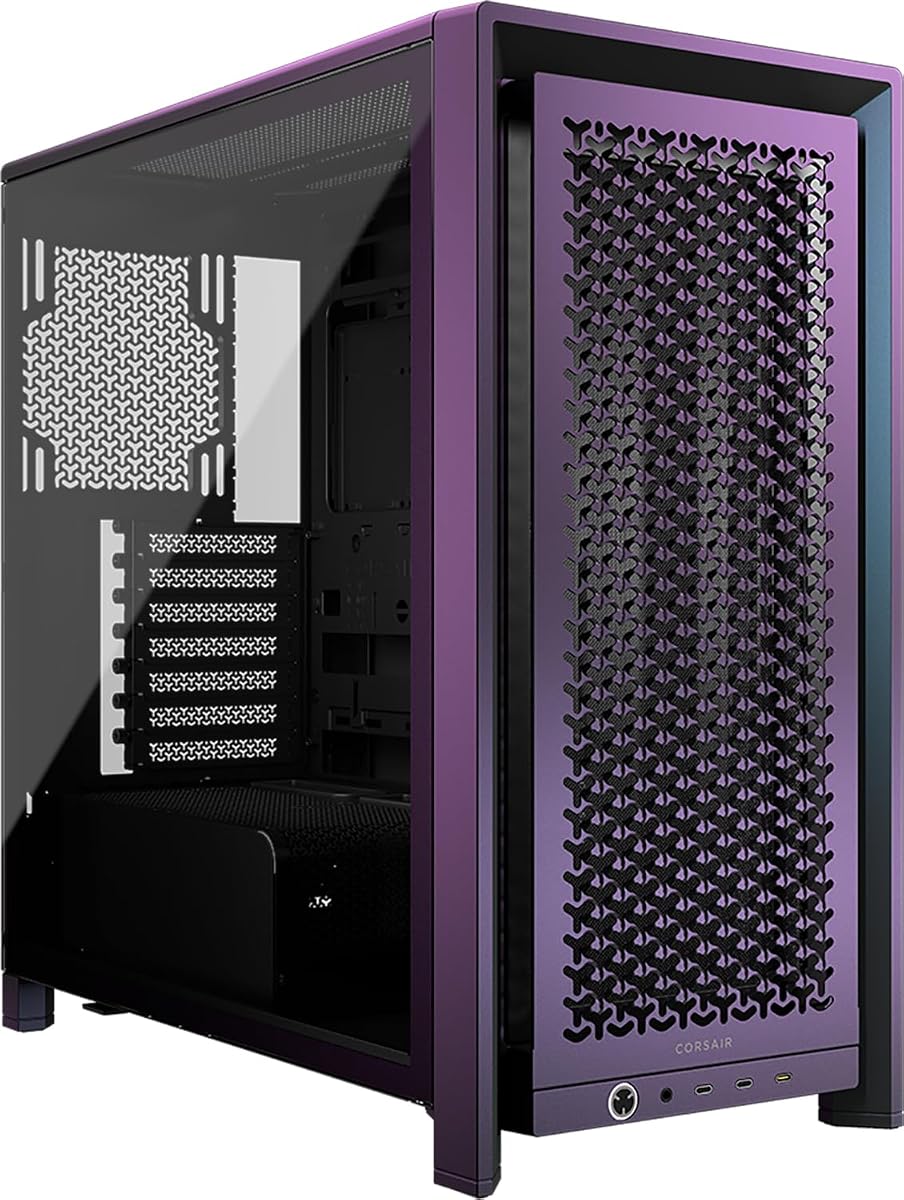
The CORSAIR Frame 4000D Vault Series is a limited edition case with a unique Galaxy finish. It uses the same modular FRAME system for customization as other models. The InfiniRail mounting ensures flexible fan placement for targeted airflow throughout the build.
We may earn a commission when you buy through this link, at no additional cost to you.
With support for dual 360mm radiators this case offers exceptional cooling potential. The 3D Y-Pattern airflow panel minimizes restrictions and moves air efficiently. It is numbered for collectors making it a special item for enthusiasts and fans.
Availability is limited to 1337 units per color which makes it harder to find. The price is higher than standard versions due to its exclusivity. These factors make it a niche choice for collectors and dedicated fans.
If you want a unique PC that stands out this case is a great option. It combines premium looks with the performance of the 4000D line. We recommend it for those who value exclusivity and high-quality design.
This series offers a rare finish that cannot be found elsewhere. It makes your build truly unique and collectible for PC enthusiasts.
Support for multiple large radiators allows for top-tier thermal management. You can build a system that runs cool even during extreme workloads.
We may earn a commission when you buy through this link, at no additional cost to you.
Selecting the right case is crucial for maintaining optimal performance and longevity of your components. This guide highlights key factors to consider when shopping for high airflow models.
Look for mesh panels on the front top and sides to maximize air intake. Perforated designs with large holes or dense mesh patterns allow more air to reach internal components effectively. Avoid solid or glass fronts unless you have dedicated fan mounts elsewhere to compensate for reduced intake.
Choosing cases with open panel designs ensures your system stays cool during demanding tasks. This is especially important for air-cooled builds relying on direct airflow.
Check how many fans come included and their mounting positions. High airflow cases often ship with three or more fans pre-installed for immediate cooling. Verify if the case supports additional fans or liquid radiators if you plan to upgrade your cooling later.
More fans usually mean better air movement but balance this with noise levels. PWM-controlled fans let you adjust speeds for a quiet or performance-focused setup.
Ensure the case can accommodate your graphics card length and CPU cooler height. High-end components often require generous clearance to fit without restrictions. Check dimensions for motherboard trays and storage drives to avoid compatibility issues during assembly.
Sufficient space also helps maintain better airflow by preventing bottlenecks. Always measure your parts before buying to confirm they will fit.
Effective cable management keeps air channels clear and reduces clutter inside the case. Look for wide channels cable straps and grommets that guide wires away from airflow paths. A tidy interior helps air move smoothly from intake to exhaust vents.
Good organization also makes future upgrades easier without disassembling everything. Prioritize cases that offer multiple tie-down points for secure routing.
High airflow cases need effective filters to keep dust from accumulating on fans and heatsinks. Mesh panels should have removable filters for easy cleaning to maintain performance. A well-designed filter system reduces maintenance time and protects your investment.
Without proper filtration dust buildup can restrict airflow and increase temperatures. Ensure filters are accessible and secure in their positions.
Durable materials like steel and aluminum provide stability and protect internal components. Tempered glass panels should be thick and secure to prevent breakage during transport. Solid construction also helps reduce noise and vibration from internal parts.
Quality build materials ensure your case lasts through multiple system upgrades. Feel the weight and check panel thickness to gauge overall durability.
Some cases allow swapping panels or mounting systems for future customization. Modular designs let you adapt to new technologies or aesthetic preferences over time. This flexibility adds value by extending the usability of the chassis for years.
Check if parts like I/O panels or trays can be upgraded. A modular case grows with your system needs.
Match the case size with your motherboard type to avoid wasted space or fit issues. Mid-towers support most ATX boards while smaller cases suit compact builds. Ensure it aligns with your desk space and overall setup goals.
The right form factor balances portability and expansion options. Consider future upgrades when selecting your size.
Start by installing components with cables organized away from airflow paths. Use the provided straps to route wires neatly along the sides of the tray. This practice ensures unobstructed air movement for optimal cooling performance.
Clean dust filters regularly using a soft brush or compressed air to maintain airflow. Check front and top filters every few months depending on your environment. Keeping filters clean prevents restricted air intake that could raise internal temperatures.
Monitor fan speeds and temperatures using your motherboard software. Adjust fan curves to balance noise and cooling based on your usage. This helps prolong component lifespan by avoiding unnecessary heat stress.
High airflow cases feature mesh panels and ample fan mounts to maximize air movement. They prioritize open designs over solid fronts to reduce resistance. This allows cool air to reach components faster and expel heat efficiently.
Most high airflow cases come with three or more pre-installed fans. Check the product details to see what is included before buying extras. Additional fans may be needed for specific cooling configurations like liquid setups.
Yes many models support large radiators at the front top or side. Check radiator limits in the specs to ensure compatibility with your system. Dual radiator support is available on some larger full-tower cases for extreme cooling.
Clean filters every one to three months depending on your room environment. If you have pets or live in a dusty area clean them more frequently. Regular cleaning prevents restricted airflow and component overheating.
Tempered glass is durable and safer than standard glass when handled properly. It resists breaking but still requires careful installation to avoid cracks. Follow manufacturer instructions to ensure panels are secure and aligned.
Noise depends on fan speed and quality rather than just the case. High airflow cases often use larger fans that move more air at lower RPMs. Look for PWM fans to balance noise with cooling performance.
We have reviewed ten top options ranging from budget to premium builds. Each case offers distinct strengths in cooling design and customization. Whether you prioritize airflow or aesthetics there is a fit for every builder.
Prioritize features like mesh panels and fan count to ensure your hardware runs cool. Consider component clearance and cable management to simplify your build process. These factors combine to create a stable and efficient system.
Prices and availability change so check current listings before finalizing your purchase. Always verify specs match your specific hardware needs. We hope this guide helps you build a powerful and reliable PC for years to come.