
Mouse Jiggler Mover Wiggler Undetectable Shaker
4.7Editor score
Compact Portable Design
Plug and Play Setup
Wide System Compatibility
Recognized as Standard Mouse
Discover the top laptop jiggler devices that keep your PC awake without software. We compare ten undetectable mouse movers for remote work and office use.
Keeping your computer active during long meetings or downloads is essential for modern workflows. A laptop jiggler simulates mouse movement to prevent sleep modes or away status on platforms like Teams and Zoom. These devices work silently in the background without disrupting your tasks.
We evaluated ten top-rated models based on undetectability, ease of use, and build quality. Each product was assessed for compatibility with major operating systems and ability to avoid IT security scans. Our comparison highlights both hardware-based spinners and plug-and-play USB movers.
Each pick includes key specifications, pros, cons, and detailed usage insights to help you choose wisely. Prices and availability may change, so verify current listings before purchasing. Use this guide to find a reliable solution for maintaining your active status seamlessly.
4.7Editor score

4.7Editor score
4.1Editor score
The following table provides a side-by-side overview of key specifications and features for all ten selected laptop jiggler devices. Review connection design type, connectivity options, and unique capabilities to find the model that fits your desk setup and workflow needs best.


The TECH8 USA Undetectable Mouse Mover Jiggler stands out as the top choice due to its patented 3D hologram design and robust feature set. It holds a 4.7 rating from users who appreciate its ability to keep computers active without software. This device is ideal for professionals who need a reliable solution for Teams or Zoom status.
We may earn a commission when you buy through this link, at no additional cost to you.
Key strengths include its ambient glow ring, which adds style to your desk while maintaining function. The three motion levels allow customization, and the auto shut-off timer ensures control over usage time. Users report that the large disc supports various mouse sizes, making it versatile for shared workspaces.
Some users note the disc size can be bulky on minimal desks, and the power button placement may require adjustment. These trade-offs are acceptable given the device's reliability and aesthetic appeal. The lack of software installation means no IT permissions are required, keeping your workflow smooth.
This jiggler is best for those who value design and need a robust hardware solution. If you want a device that blends into your setup while ensuring your status stays green, this is the recommended choice. Check current listings for availability and verify compatibility with your specific mouse type.
The 3D hologram disc and LED glow ring elevate desk aesthetics while serving a practical purpose.
No software means no IT flags; the device works physically to move your mouse cursor safely.
We may earn a commission when you buy through this link, at no additional cost to you.
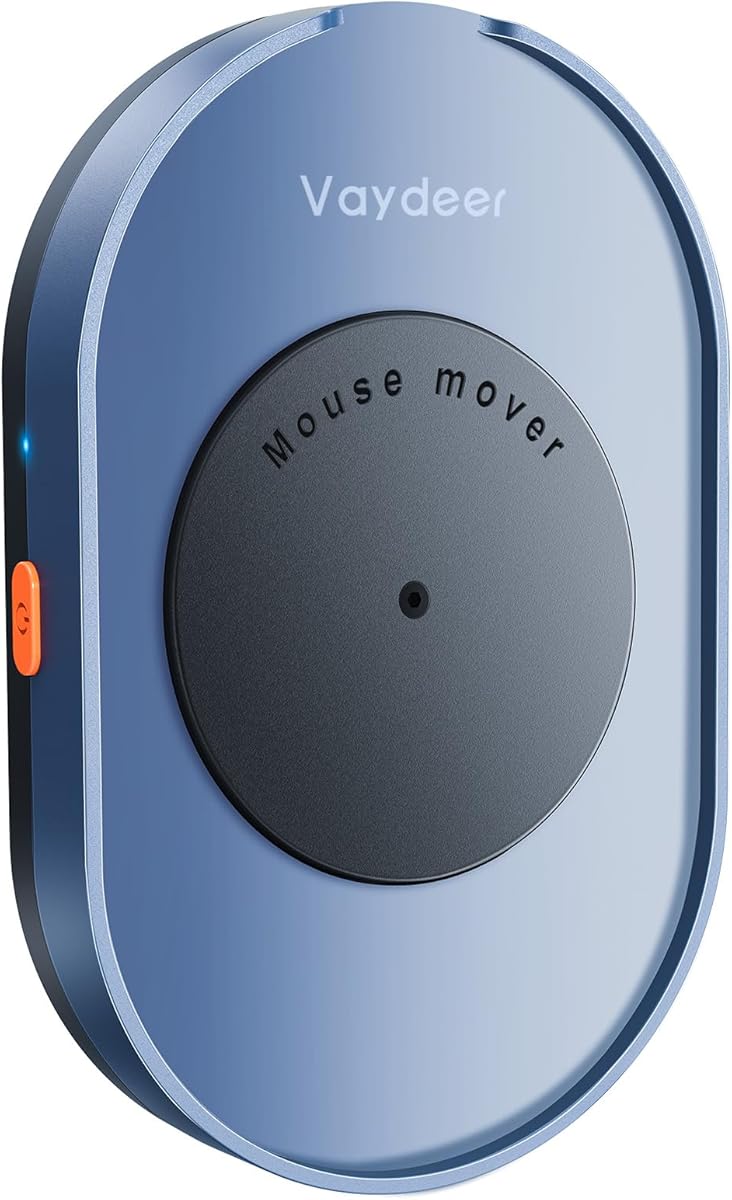
The Vaydeer Undetectable Mouse Jiggler is renowned for its ultra-silent motor, which produces less than 45dB of noise during operation. With a 4.5 rating, it is favored by users in quiet office environments. The ISO certification adds a layer of trust regarding its security and reliability for corporate use.
We may earn a commission when you buy through this link, at no additional cost to you.
A key strength is the on-off switch, eliminating the need to unplug and replug the device repeatedly. It can be powered via USB or external adapter, offering flexibility for different desk setups. Users report that the device is undetectable by IT scans, ensuring seamless use in restricted environments.
However, the sensor area must be aligned correctly with the mouse, or it may not function properly. Some users also find the external power setup slightly bulky compared to pure USB models. These minor issues are manageable given the device's primary focus on quiet, secure operation.
This model is ideal for offices where noise is a concern and IT policies are strict. If you prioritize silence and security over flashy design, this jiggler delivers consistent performance. Ensure your mouse sensor is positioned correctly on the spinning wheel before activating the device.
With noise levels under 45dB, this jiggler blends into the background without disturbing coworkers or calls.
Support for both USB and external power means you can use it even when USB ports are limited.
We may earn a commission when you buy through this link, at no additional cost to you.
The Mouse Jiggler Mover Wiggler Undetectable Shaker offers the best value for budget-conscious buyers seeking a functional solution. It holds a 4.7 rating due to its simplicity and effectiveness in keeping PCs awake. Users appreciate that it requires no software installation and works across multiple operating systems seamlessly.
We may earn a commission when you buy through this link, at no additional cost to you.
Its standout feature is its tiny size, making it perfect for laptops or shared desks where space is limited. The device is recognized as a standard USB mouse, which means it typically bypasses IT scrutiny effectively. Plug-and-play functionality ensures you can start using it immediately after connecting to your computer.
The basic design lacks additional features like LED indicators or adjustable timers, which might matter to power users. However, for simple tasks like keeping a download active or maintaining status in meetings, this device performs reliably. The trade-off is a lack of customization for movement patterns.
Choose this jiggler if you want a no-fuss, low-cost option that just works. It is particularly useful for travelers who need a portable solution for their laptop. Confirm it is compatible with your system, as Windows, Mac, and Linux are supported out of the box.
Priced under many competitors, this model brings essential mouse movement simulation to everyone without breaking the bank.
Its small footprint fits easily into a laptop bag, making it a great companion for remote workers.
We may earn a commission when you buy through this link, at no additional cost to you.
The WFB Mouse Jiggler Undetectable offers excellent value with a 2-pack, allowing you to set up multiple workstations or have a backup. Users rate it 4.5 stars for its ability to simulate slight movement without triggering visible cursor shifts. This is especially useful for users who want minimal disruption during active work.
We may earn a commission when you buy through this link, at no additional cost to you.
It simulates 1 to 2 pixel movements, which keeps applications active without distracting from content creation or meetings. The device supports Windows, Mac, and Android systems, making it versatile for hybrid work environments. Since it is recognized as a standard peripheral, it usually passes IT security checks without issues.
The lack of physical controls or a power button means it runs continuously once connected, which may be an issue for some. Additionally, the movement range is so slight that some users worry it may not keep all applications awake reliably. However, most reports indicate it works well for video calls and downloads.
This option is ideal for small teams or individuals managing multiple computers who want a budget-friendly backup. If you need discreet movement without software, this pack provides flexibility. Verify your operating system is supported before purchasing to ensure full compatibility with your workflow.
Buying a two-pack means you can keep multiple laptops awake or have a spare ready for travel needs.
Simple plug-and-play functionality ensures that you can get started without configuring any settings or drivers.
We may earn a commission when you buy through this link, at no additional cost to you.
The AUEDROT Mouse Jiggler Undetectable is tailored for modern laptops with USB-C ports, offering direct connectivity without adapters. With a 4.3 rating, users praise its two jiggle modes: slight pixel movement and random irregular motion. This flexibility allows you to choose how visible the movement should be based on your activity.
We may earn a commission when you buy through this link, at no additional cost to you.
Its switch button provides convenient control without unplugging, and the device is recognized as a trusted USB composite device. This recognition helps avoid security flags in corporate environments. The sleek black design fits well on most desks, and the plug-and-play nature means no drivers are required.
Some users note that it requires a USB-C port, which may limit use with older computers lacking this connector. The LED feedback is minimal, so you might not easily tell which mode is active at a glance. However, these are minor drawbacks for a device focused on simplicity and portability.
If you use a modern ultrabook or tablet with USB-C, this model is a strong choice for keeping your screen awake. The two modes offer enough variety to suit different tasks. Ensure your laptop has a free USB-C port before purchasing to avoid connectivity issues.
Designed for USB-C, this jiggler eliminates the need for dongles on newer devices.
Toggle between slight and random movements to suit your current task or privacy needs.
We may earn a commission when you buy through this link, at no additional cost to you.
The Yonktoo Mouse Jiggler Undetectable features an ultra-slim design that fits neatly into home office setups. With a 4.2 rating, it is appreciated for its silent motor and automatic start function. Users value the 1.5 meter cable, which provides flexibility in positioning the device on cluttered desks.
We may earn a commission when you buy through this link, at no additional cost to you.
It uses a rotating platform to move your physical mouse, ensuring compatibility with most optical mice. The auto-start feature works as soon as you plug it in, saving time and effort. The on-off switch allows for quick pauses without disconnecting the device permanently.
Some users find the cable length limiting if they need to route it around monitors or furniture. The platform size may not accommodate very large gaming mice comfortably. These issues are generally manageable for users with standard desktop configurations and standard-sized mice.
This jiggler is best for those who prioritize a clean, slim look on their desk. If you need a solution that keeps your mouse active with minimal noise, consider this model. Verify your mouse dimensions against the platform size to ensure a stable fit during use.
The slim design ensures that your jiggler does not obstruct other desk items or create clutter.
A longer cable provides more freedom to place the device where it best suits your ergonomic needs.
We may earn a commission when you buy through this link, at no additional cost to you.
The Meatanty Mouse Mover Undetectable stands out with its adjustable timer and visual LED display. Rated 4.5 stars, it allows users to set intervals from 5 to 60 seconds for mouse movement. This feature ensures precise control over how often the cursor moves, which can be tailored to specific meeting durations.
We may earn a commission when you buy through this link, at no additional cost to you.
It uses a random trajectory simulation that mimics human movement, making it highly undetectable by IT systems. The large turntable accommodates various mouse sizes, and the edge protection prevents accidental drops. The silent motor ensures that it does not disrupt quiet work environments during calls or focus time.
The device is slightly larger than other models, which might be a constraint for tight desk spaces. Proper alignment of the mouse on the turntable is critical to avoid errors during operation. However, the timer control and random movement capabilities make it a powerful tool for active status maintenance.
Choose this jiggler if you need detailed control over movement frequency and want a reliable hardware solution. It is ideal for long remote work sessions where customization matters. Check your desk space to ensure the device fits comfortably alongside your keyboard and monitor.
The LED display lets you track interval settings clearly, ensuring your movements match your workflow needs.
Random trajectories mimic natural mouse patterns, increasing the likelihood of avoiding detection by IT policies.
We may earn a commission when you buy through this link, at no additional cost to you.
The USB Mouse Mover with Switch Button features an aluminum alloy body, providing a durable and premium feel compared to plastic alternatives. With a 4.4 rating, it offers two jiggle modes: slight movement and random irregular motion. Users appreciate the sturdy build, which enhances longevity and stability on the desk.
We may earn a commission when you buy through this link, at no additional cost to you.
It supports both USB-A and USB-C via adapter, making it versatile for different computer generations. The switch button allows for easy toggling of modes without unplugging. The compact design ensures it does not clutter your workspace, and the plug-and-play nature simplifies setup significantly.
The metal body may feel cold or heavier than expected for some users, and the adapter may be sold separately in some cases. However, the build quality justifies the weight, and the versatility of connection options is a significant advantage. These minor points do not affect core functionality.
If you value build quality and versatility in connectivity, this model is a strong contender. It suits users who want a sturdy device that can handle daily use without wear. Verify whether the USB-C adapter is included in your region before purchasing to ensure compatibility.
The aluminum construction ensures that this jiggler withstands daily use and potential knocks better than plastic units.
Support for both legacy and modern ports means you can use this device on a wider range of computers.
We may earn a commission when you buy through this link, at no additional cost to you.
The TECKNET Mouse Jiggler Undetectable features a unique color LED indicator that provides visual feedback for its three modes. Rated 4.6 stars, it is praised for its compact design and one-button control, which simplifies operation. Users value the three auto movement modes, which allow fine-tuned control over cursor activity.
We may earn a commission when you buy through this link, at no additional cost to you.
It is recognized as a standard USB mouse device, ensuring it remains undetectable by IT scans. The sleek design makes it easy to slip into a laptop bag, supporting remote work on the go. The 18-month warranty offers additional peace of mind for reliability and support.
The LED indicator might be distracting in very dark environments if you prefer total invisibility. Cycling modes requires manual button presses, which can be slightly less convenient than an automatic timer. Despite this, the feedback helps you confirm which mode is active at any time.
If you need a portable solution with visual confirmation of settings, this model is a smart choice. The three modes provide enough variety for most users. Check if you prefer LED feedback or a completely dark operation before selecting this option for your setup.
The color LED ensures you always know which mode is running without guessing or checking settings.
The compact size allows you to carry it easily in a laptop bag for remote work anywhere.
We may earn a commission when you buy through this link, at no additional cost to you.
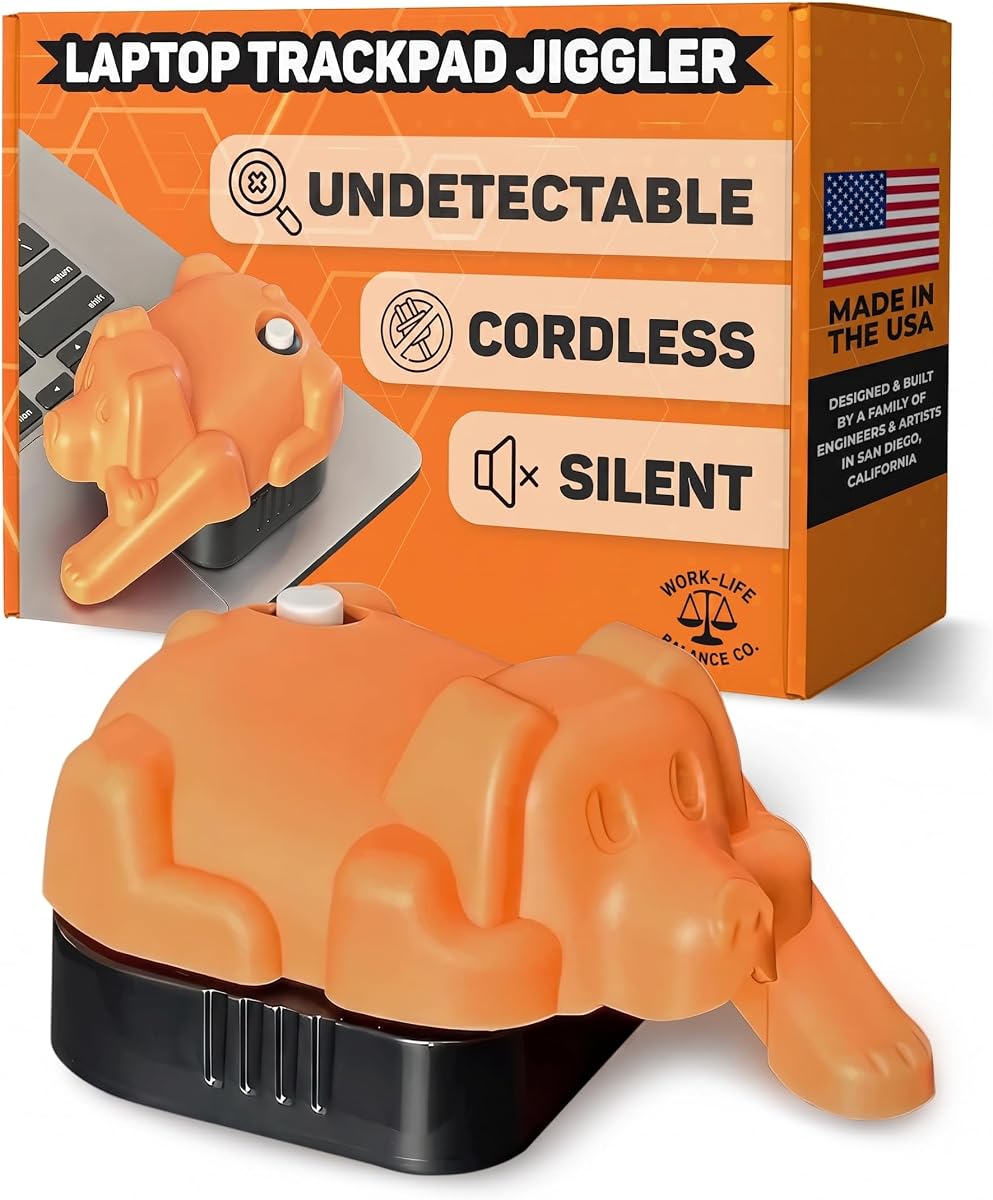
The Trackpad Mouse Jiggler Device offers a unique cordless solution that simulates movement on your laptop touchpad. With a 4.1 rating, it stands out for being completely independent of USB cables or Bluetooth. Users appreciate the long battery life, which can last up to six months on a single AA battery.
We may earn a commission when you buy through this link, at no additional cost to you.
Its ability to mimic fingertip movement means it works directly with your laptop's trackpad, keeping your screen active without an external mouse. This makes it ideal for laptops with limited ports or for users who prefer a clutter-free workspace. The silent low RPM motor ensures no noise disrupts your workflow.
To work properly, you may need to disable palm rejection features or increase touchpad sensitivity in your settings. The higher price point reflects the specialized technology, which may not fit all budgets. However, the freedom from cables makes it a premium choice for specific setups.
If you want a cable-free experience and use a laptop with a responsive touchpad, this model is a great fit. Ensure you configure your system settings for reliable performance before use. The battery efficiency means you rarely need to worry about power interruptions.
Battery power means you can place it anywhere on your laptop without worrying about cable length.
Designed to interact directly with trackpads, it offers a unique alternative to traditional mouse spinners.
We may earn a commission when you buy through this link, at no additional cost to you.
Selecting the right laptop jiggler requires balancing functionality, compatibility, and design. Use this guide to evaluate factors that impact performance and suitability for your work environment.
Ensure the device works with your operating system, whether Windows, Mac, or Linux. Most USB-based models are compatible across platforms, but specialized touchpad devices may require specific settings adjustments.
Check product listings for OS support before purchasing to avoid connectivity issues.
Some environments have strict IT policies that scan for unauthorized peripherals. Look for devices recognized as standard mice or with certifications like ISO to ensure they pass security checks.
Select models that are undetectable by hardware scans to maintain professional trust.
Decide between slight pixel movements for stealth or random patterns for more natural activity. Hardware spinners physically move your mouse, while USB simulators emulate signals digitally.
Match the movement style to your workflow needs for effective status maintenance.
Choose between USB-powered units, which rely on computer ports, and battery-powered models for full portability. Some devices include external adapters for additional flexibility during use.
For travel, consider cordless options to avoid reliance on USB availability.
If you work in a quiet office, opt for models with silent motors rated under 45dB. Noise can be distracting during calls or when working in shared spaces.
Verify decibel ratings in product descriptions to ensure a discreet operation.
Devices made with metal or sturdy materials tend to last longer than plastic units. Durability matters if you plan to use the jiggler daily or in high-traffic environments.
Premium materials also add a professional look to your desk setup.
Models with buttons or switches allow you to toggle movement without unplugging. Adjustable timers or modes offer customization to match different meeting durations or tasks.
Select controls that fit your preference for simplicity or advanced options.
Look for products with warranties ranging from 12 to 18 months to protect against defects. Customer support responsiveness can be critical if you encounter setup issues.
Prioritize brands known for reliable after-sales service.
Plug the device into a USB port or connect the adapter securely to start operation. For spinners, place your mouse on the rotating disc ensuring the sensor aligns with the spinning wheel.
Use switches or buttons to toggle modes or pause movement when needed. Adjust settings like timer or speed if your model offers these options before your session begins.
Keep the device clean and dry; wipe gently with a cloth to maintain performance. Store in a protected case during travel to prevent cable damage or component wear.
Laptop jigglers are generally legal for personal use on your own device. However, employer policies may restrict unauthorized hardware, so verify your company's IT rules before using one at work.
Most undetectable models are recognized as standard mice and bypass common scans. Choose devices with hardware certifications or standard USB profiles to minimize the risk of detection by IT software.
Most devices are plug-and-play and require no software installation. If drivers are needed, check the product specs and ensure you install them only from official sources to avoid security risks.
Traditional spinners work with physical mice, while specialized devices simulate touchpad movement. Check product descriptions to confirm which input method is supported by the jiggler.
The movement stops immediately, potentially allowing your screen to enter sleep mode. Replace batteries promptly to maintain continuous status, and choose models with battery life indicators if available.
Use the on/off switch or unplug the USB connection. Some models have pause buttons, which offer a convenient way to resume movement quickly without disconnecting the device.
The TECH8 USA model leads as the overall best choice with its unique design and reliable performance. For budget-conscious users, the Mouse Jiggler Mover Undetectable Shaker offers excellent value and simplicity.
Consider your specific needs: prioritize silent operation for shared offices, USB-C compatibility for modern laptops, or cordless options for mobility. Each product excels in different aspects depending on your work environment.
Prices and availability can change quickly, so verify current listings before purchasing. Use this guide to find the perfect balance of features, security, and convenience for your needs.