
Eyoyo 3.5 Portable Digital Video Magnifier
4.6Editor score
2X to 25X zoom range
8 adjustable color modes
AV output for larger display
Discover the top digital magnifier for low vision devices of October 2026. This guide compares features, zoom levels, and usability to help you choose.
Navigating daily tasks becomes challenging when vision declines. A reliable digital magnifier for low vision transforms how you read labels menus, and documents. These devices offer powerful zoom and high contrast modes tailored to specific visual needs.
We evaluated ten leading models based on screen size, magnification range, and ease of use. Our analysis focuses on portability, battery life, and additional features like text-to-speech or external display outputs. Each option aims to restore independence and reduce eye strain effectively.
This list highlights standout picks for various budgets and use cases. You will find detailed breakdowns of strengths, weaknesses, and ideal scenarios for each product. Prices and availability change frequently, so verify current listings before making a final purchase decision.
4.6Editor score

4.3Editor score
4.0Editor score
The following comparison table outlines key specifications for all ten reviewed models. Examine screen sizes, zoom capabilities, and unique features to identify which device aligns best with your specific visual requirements and daily activities.


The Eyoyo 3.5 Portable Digital Video Magnifier stands out as a top contender for those seeking a compact aid. With a 4.6 rating, it delivers reliable performance for reading tasks. Its standout quality lies in the 8 adjustable color modes that enhance text contrast significantly.
We may earn a commission when you buy through this link, at no additional cost to you.
This device supports magnification ranging from 2X to 25X, making it versatile for various text sizes. The ability to capture snapshots and lock the screen helps users review information at their own pace. Connectivity via AV output allows users to project content onto larger displays for shared viewing.
While the screen is smaller than some alternatives, its portability is a major trade-off that many users accept. The lack of detailed battery specifications might be a concern for extended field use. However, for home desktop or quick reading tasks, it performs exceptionally well.
This model is ideal for individuals needing a lightweight solution for grocery shopping or reading menus. It offers a balance of features and price that suits budget-conscious buyers. We recommend it for anyone prioritizing portability without sacrificing essential contrast features.
The eight color modes allow users to switch between combinations like black on white or yellow on blue to reduce glare.
Connecting to a television enables users to see magnified text on a larger scale, aiding group reading or detailed work.
We may earn a commission when you buy through this link, at no additional cost to you.
This 5-inch digital magnifier offers a substantial viewing area for low vision users. Its auto focus feature ensures sharp images without manual adjustment. While the rating is lower, the features like memory settings and high resolution provide significant value.
We may earn a commission when you buy through this link, at no additional cost to you.
The device includes simplified buttons to accommodate elderly users or children with amblyopia. It can memorize user habits to avoid repetitive adjustments. The screen resolution of 800 by 480 ensures text details remain crisp even at higher magnification levels.
Some users report difficulties with the button layout, which can be frustrating for those with limited dexterity. The overall rating reflects mixed experiences regarding build quality. Nevertheless, the high power magnification range makes it a strong candidate for specific needs.
It is best suited for users who need a large screen for reading books or detailed documents. The memory function adds convenience for regular users. Consider this model if screen size and resolution are your top priorities.
The auto focus mechanism automatically adjusts to ensure text remains sharp across different distances.
The device remembers preferred color modes and magnification levels to streamline the user experience.
We may earn a commission when you buy through this link, at no additional cost to you.
This device is designed with an ergonomic foldable handle that reduces strain during extended use. It features a high-resolution screen that restores colors accurately. The 4.3 rating suggests solid performance for reading books and documents effectively.
We may earn a commission when you buy through this link, at no additional cost to you.
The magnification range extends up to 32X, providing clarity for small text. The 26 color modes allow users to find a comfortable visual setting. The design prevents deformation when magnifying fonts, ensuring text remains readable.
The higher price reflects the quality of the screen and ergonomic build. Some users might find it slightly heavier than purely handheld models. However, the foldable handle allows for desktop use without needing a separate stand.
It is an excellent choice for users with macular degeneration who need sustained reading comfort. The handle design makes it easy to slide across pages smoothly. Consider this for daily home use or office environments.
The integrated handle allows for comfortable gripping and prevents hunching over the text.
Advanced processing ensures that text does not warp when zoomed in significantly.
We may earn a commission when you buy through this link, at no additional cost to you.
This model focuses on simplicity with reduced buttons to aid operation. It provides a 5-inch screen for clear viewing of text. The rating is average, but the features align well with basic low vision needs.
We may earn a commission when you buy through this link, at no additional cost to you.
The auto focus ensures sharp images without constant manual tweaking. Users can connect to a television for a larger display if needed. The color processing helps restore details that might otherwise be lost in low vision.
While effective for basic reading, it lacks some advanced customization found in other models. The build quality matches its price point. It serves as a reliable tool for specific tasks like reading menus.
Best suited for elderly users who prefer straightforward controls without complex menus. The simplified interface minimizes confusion during use. Consider this if ease of use is your primary requirement.
The removal of redundant buttons makes the device accessible for those with limited dexterity.
Connecting to a TV extends the viewing area for shared activities.
We may earn a commission when you buy through this link, at no additional cost to you.
The VEVOR magnifier boasts a unique dual lens system for near and far viewing. With 48X zoom, it is among the most powerful options available. However, the lower rating suggests some users find the features challenging to navigate.
We may earn a commission when you buy through this link, at no additional cost to you.
It includes AV and HDMI outputs for connecting to larger screens. The 13MP sensor captures high detail for images. The foldable stand allows for flexible positioning on surfaces.
While the zoom capability is impressive, the rating indicates issues with usability or build quality. The battery life might not support extended field use. However, the raw power makes it a strong candidate for extreme low vision cases.
It is best for users who need to view distant objects as well as close text. The dual lens system provides versatility that others lack. Consider this if maximum zoom is your top priority.
Switching between near and far lenses allows for diverse viewing scenarios.
Multiple connection types ensure compatibility with various displays.
We may earn a commission when you buy through this link, at no additional cost to you.
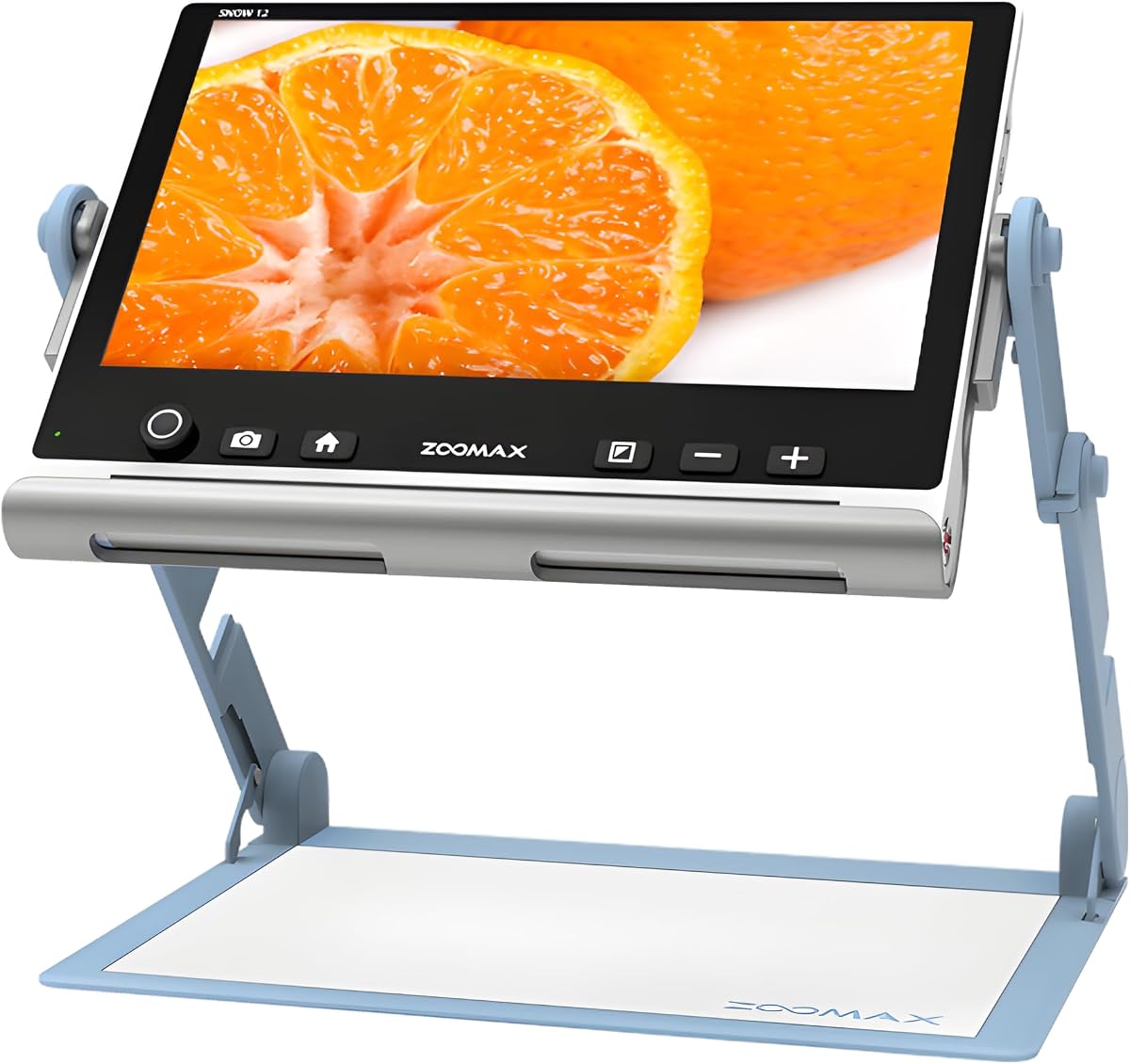
This device stands out with its large 12-inch HD screen and advanced OCR technology. The text-to-speech feature converts written words into audio. While expensive, it offers unique accessibility tools for advanced low vision users.
We may earn a commission when you buy through this link, at no additional cost to you.
The foldable stand allows for flexible positioning in different environments. It supports over 20 languages, making it versatile for multilingual users. The high quality camera ensures clear visuals for reading and writing tasks.
The cost reflects the premium technology and screen size. Portability is maintained through a lightweight design despite the large display. However, the size may be a factor for carrying around daily.
It is ideal for users who need audio feedback to read text. The OCR function provides independence in reading documents. Consider this for home or office use where a larger display is beneficial.
The OCR feature reads text aloud, supporting those who prefer auditory learning.
Support for multiple languages makes it useful for diverse households or travel.
We may earn a commission when you buy through this link, at no additional cost to you.
This model offers a solid 5-inch screen with a robust 4500mAh battery. The foldable handle ensures comfortable use during extended sessions. It provides reliable performance with a 4.0 rating for consistent quality.
We may earn a commission when you buy through this link, at no additional cost to you.
The battery life allows for over four hours of continuous operation. Users do not need to reset preferences each time due to memory storage. The screen brightness is adjustable for different lighting environments.
The zoom range is slightly lower than some competitors but sufficient for most text. The lack of advanced auto focus might be a trade-off. However, the battery performance makes it a strong choice for travel.
It is best for users who need a reliable device for long reading sessions. The memory function adds convenience for daily use. Consider this if battery life is a critical factor.
The high capacity battery supports extended use without frequent recharging.
The integrated handle design reduces wrist strain over time.
We may earn a commission when you buy through this link, at no additional cost to you.
This device offers a balanced set of features including a foldable handle. It provides a wide range of color modes for customization. The 4.0 rating indicates a reliable performer for various users.
We may earn a commission when you buy through this link, at no additional cost to you.
The 26 color modes allow precise adjustments to contrast and hue. The zoom range covers typical reading needs well. The design connects to a TV for larger visibility when required.
The build quality is functional but not premium. The lack of auto focus requires manual adjustment. However, the price point and features make it a good value option.
It is ideal for users needing a standard solution with high customization. The color modes help reduce eye strain. Consider this for a cost-effective option with decent features.
The 26 modes provide flexibility for various visual sensitivities.
The ability to connect to a TV enhances readability for shared tasks.
We may earn a commission when you buy through this link, at no additional cost to you.
This handheld device is known for its lightweight build and HD quality. It offers a high rating of 4.4, reflecting user satisfaction with its clarity. The design is simple and effective for quick reading tasks.
We may earn a commission when you buy through this link, at no additional cost to you.
The magnification levels are capped at 12X, which is less than others but sufficient for labels. It includes image capture to save important text. The lightweight design makes it easy to carry in a bag.
The zoom range is a limitation for small print like medical labels. The cost is higher than basic models. However, the build quality and portability are excellent for travel.
It is best for users needing a compact solution for on-the-go tasks. The included cloth ensures the lens stays clear. Consider this if portability is more important than extreme zoom.
The device fits easily into pockets or small bags for travel.
Taking photos of text allows for later review without holding the device.
We may earn a commission when you buy through this link, at no additional cost to you.
This model offers an impressive zoom range up to 48X with simplified controls. It supports memory settings to remember user preferences. The rating of 4.0 suggests it is a capable tool for low vision.
We may earn a commission when you buy through this link, at no additional cost to you.
The 48X zoom is useful for detailed inspection of labels. The simplified buttons reduce confusion for elderly users. It includes AV output for connecting to larger displays easily.
The battery life may require frequent recharging depending on usage. The device is not as portable as smaller handhelds. However, the zoom power is a significant advantage for detailed work.
It is ideal for users needing maximum zoom for fine print. The memory function aids daily convenience. Consider this if high magnification is your primary need.
The 48X zoom allows for extreme detail on small labels.
The simplified interface ensures easy navigation without complex menus.
We may earn a commission when you buy through this link, at no additional cost to you.
Selecting the right magnifier requires understanding specific visual needs and usage scenarios. This guide outlines the most critical factors to evaluate before purchasing.
Screen size determines how much text you can see at once. Larger screens like 12 inches reduce eye movement but add bulk. Resolution affects how sharp the text appears; 800×480 is standard for clarity.
Choose a screen that balances visibility with portability based on your daily activities.
Zoom capabilities typically range from 2X to 48X. Higher zoom is essential for very small text like medicine labels. However, extreme zoom can reduce the field of view significantly.
Ensure the device covers the zoom range needed for your specific reading tasks.
Different users respond to different color combinations. Black on white is standard, but yellow on blue can reduce glare. Look for devices with multiple preset modes to test comfort.
Select a model that offers a variety of modes to accommodate your visual sensitivity.
Comfort during extended use is crucial. Foldable handles or brackets allow for both handheld and desktop use. A good design prevents hunching and reduces wrist strain.
Prioritize devices with adjustable stands or ergonomic handles for better posture.
Battery capacity determines usage duration away from a power source. Models vary from 4 hours to longer depending on screen brightness. Consider if you need to carry spare batteries.
Choose a device with sufficient battery life for your typical outing or work session.
Optical Character Recognition (OCR) converts text to speech for audio feedback. This is useful for reading documents aloud. Not all budget models include this capability.
Opt for models with OCR if you prefer auditory assistance over visual reading.
Some devices allow connection to a TV via AV or HDMI cables. This expands the viewing area for shared activities. Check the input options match your available displays.
Ensure the device has the necessary outputs if you plan to use it with a television.
Prices range from under one hundred dollars to over a thousand. High-end models offer premium features like large screens and OCR. Basic models cover essential magnification needs.
Determine your budget and prioritize features that directly improve your daily reading tasks.
Begin by placing the device on a stable surface or holding it with the handle. Adjust the focus until the text appears sharp. Select a color mode that reduces eye strain for your eyes.
For extended reading sessions, use the foldable stand to avoid holding the device constantly. Save your preferred settings in the memory to avoid reconfiguration. Use the capture button to save important text for later review.
Clean the screen with the provided soft cloth to prevent scratches. Avoid exposing the device to extreme heat or moisture. Charge the battery fully before first use to maximize its lifespan and performance.
Digital magnifiers are versatile tools that assist with various conditions like macular degeneration and glaucoma. They provide adjustable contrast and zoom to suit different visual sensitivities. However, they do not cure eye diseases but offer functional aid.
Yes, most models can read books effectively. Larger screens allow you to see more text at once. For heavy reading, a desktop model with a stand is often more comfortable than a handheld one.
Devices with AV or HDMI outputs can connect to a television using standard cables. Plug the cable into the magnifier's output port and the TV's input port. Switch the TV input source to view the magnified display.
Handheld models are portable and easy to carry. Desktop models often have larger screens and better ergonomics for long use. Choose handheld for travel and desktop for stationary reading at home.
Battery life typically ranges from 3 to 6 hours depending on brightness settings. Some models have removable batteries for extended use. Check the specifications for exact capacity before purchasing.
Many models feature simplified buttons and memory functions to aid seniors. However, complex interfaces can be confusing. Look for devices explicitly labeled as simplified or easy to use for elderly users.
Yes, most devices support photo capture via SD or TF cards. You can take snapshots of documents to review later on a computer. This feature is useful for saving complex text or images.
Some magnifiers include color modes designed to enhance contrast for color blindness. High contrast settings like black on yellow can improve readability. Test different modes to find what works best for your vision.
This guide highlights ten reliable options for digital magnification. The Eyoyo 3.5 offers a compact solution while the Snow 12 provides advanced OCR features. Each device serves specific needs depending on your daily activities.
Prioritize factors like screen size and ergonomics when making your decision. A comfortable device ensures you can read for longer periods without fatigue. Match the magnification range to your specific visual challenges.
Prices and availability fluctuate frequently. Verify the current listings before purchasing to ensure you get the best deal. These tools can significantly enhance your quality of life by restoring reading independence.