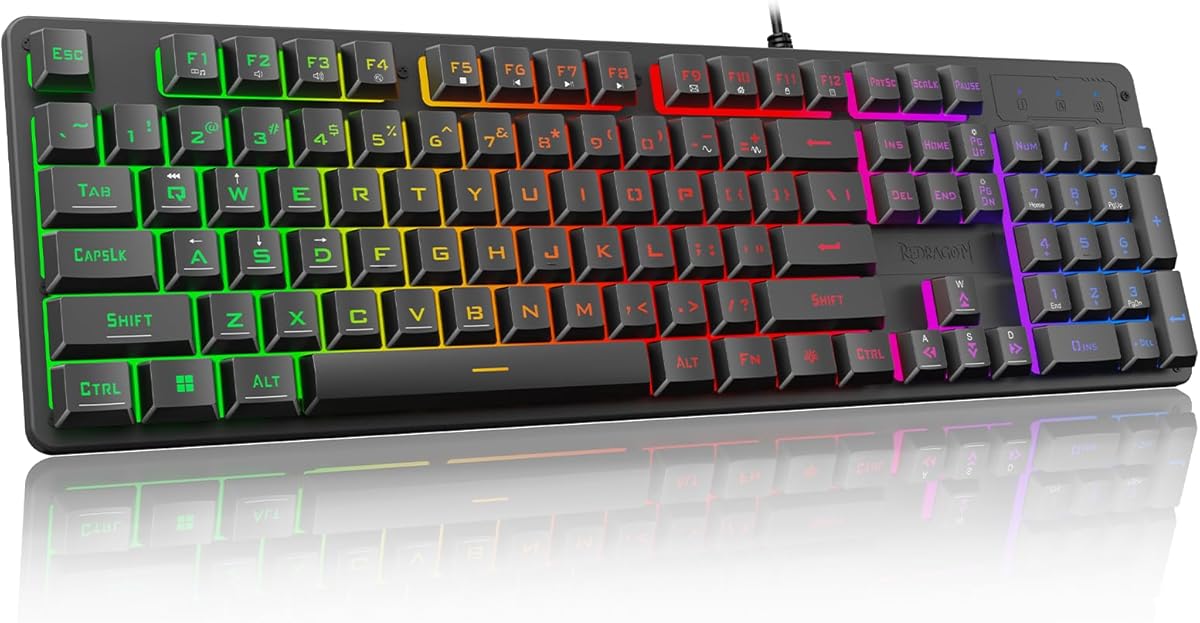
Redragon K521 Upgrade Rainbow LED Gaming Keyboard
4.4Editor score
Mechanical feeling keys
Anti-ghosting support
Affordable price point
Discover the top keyboards for Rainbow Six Siege ranked by speed durability and comfort for competitive tactical FPS gaming in October 2026.
Finding the right keyboard for Rainbow Six Siege can make a huge difference in your gameplay. Tactical shooters demand precision and speed so choosing a device with responsive switches and reliable anti-ghosting is essential for every serious operator.
We compared ten top-rated keyboards focusing on features like actuation distance switch type and build quality. Our analysis looks at real-world performance and user feedback to help you find the perfect match for your gaming setup.
Each pick below highlights key strengths and ideal use cases to streamline your decision. Prices and availability can change frequently so be sure to check current listings before making your final purchase for your battle station.
4.4Editor score

4.6Editor score

4.6Editor score
Here is a side-by-side comparison of the top ten keyboards evaluated for Rainbow Six Siege performance including their key specifications and unique strengths.


The Logitech G413 TKL SE stands out as a top contender for Rainbow Six Siege with its tactile mechanical switches and durable build. It offers a responsive typing experience that ensures your commands register quickly during intense firefights.
We may earn a commission when you buy through this link, at no additional cost to you.
Its PBT keycaps resist wear and provide a consistent feel over time which is crucial for long gaming sessions. The tenkeyless layout saves desk space giving you more room for mouse movement which is vital for aiming in tactical FPS games.
While it lacks the color versatility of RGB lighting it focuses on performance and reliability. The white LED backlighting is sufficient for visibility in low light environments without being distracting during gameplay.
This keyboard is ideal for players who prioritize solid construction and reliable mechanical switches without breaking the bank. It strikes a perfect balance between budget-friendly pricing and high-performance features.
The tactile switches provide a distinct bump that confirms each keystroke helping you maintain control during rapid key presses.
Built with a brushed aluminum top case this keyboard offers a robust backbone that resists flex and damage from daily use.
We may earn a commission when you buy through this link, at no additional cost to you.
The Redragon K521 offers an exceptional value for budget-conscious gamers looking for a reliable input device. Its mechanical feeling keys provide a satisfying tap that mimics real mechanical switches without the higher cost.
We may earn a commission when you buy through this link, at no additional cost to you.
With 19 key anti-ghosting you can ensure that your complex key combinations for skills and movement register accurately. The rainbow LED backlighting adds a vibrant touch to your setup that enhances the gaming atmosphere.
While it may not have the longevity of premium mechanical switches it performs well for casual and intermediate play. The inclusion of multimedia keys adds convenience allowing you to control audio without leaving the game.
This keyboard is perfect for those starting their gaming journey or needing a cost-effective upgrade. It delivers core features needed for competitive play at a fraction of the price of high-end models.
Priced significantly lower than competitors it provides essential gaming features like anti-ghosting and responsive keys without a steep investment.
The dazzling rainbow backlight effects create an immersive environment that fits well with a typical gamer's aesthetic preferences.
We may earn a commission when you buy through this link, at no additional cost to you.
The ASUS ROG Strix Scope II 96 delivers a premium experience with its unique 96 percent layout that balances functionality and space efficiency. It features hot-swappable switches allowing you to tailor the typing feel to your exact preferences.
We may earn a commission when you buy through this link, at no additional cost to you.
Tri-mode connectivity ensures you can connect via Bluetooth low-latency wireless or wired USB giving you flexibility for different devices and gaming setups. The battery life is robust ensuring uninterrupted sessions during intense ranked matches.
Its sound-dampening features provide a quiet typing experience which is great for streamers or shared spaces. The per-key RGB lighting allows for intricate customization to match your team colors or personal style.
This keyboard is best suited for enthusiasts who want top-tier features and customization options. It justifies its price with high-quality components and versatile performance capabilities.
Low-latency 2.4GHz wireless ensures your inputs are registered instantly without the need for a cable cluttering your desk.
Hot-swappable switches let you experiment with different mechanical types to find the perfect actuation and tactile feedback for FPS games.
We may earn a commission when you buy through this link, at no additional cost to you.
The Corsair K55 RGB PRO is a solid choice for players who prefer a quiet and comfortable typing experience. Its membrane switches are gentle on the fingers reducing fatigue during long play sessions.
We may earn a commission when you buy through this link, at no additional cost to you.
Six dedicated macro keys allow you to bind complex commands easily enhancing your tactical flexibility in-game. The IP42 spill resistant design offers peace of mind against accidental drinks which is common in intense gaming environments.
The detachable palm rest provides additional comfort for your wrists helping to maintain good posture. While it lacks the snap of mechanical switches it offers reliable performance for entry-level to mid-level competitive play.
This keyboard is ideal for users prioritizing comfort and durability over raw speed. It provides essential gaming features at an accessible price point with a focus on ergonomic design.
The textured detachable palm rest keeps your hands stable and reduces strain allowing you to focus on strategy rather than wrist pain.
Programmable macro keys help streamline your loadout management and communication commands for faster execution during critical moments.
We may earn a commission when you buy through this link, at no additional cost to you.
The SteelSeries Apex 3 focuses on silence and durability making it perfect for shared living spaces. Its whisper quiet switches ensure minimal noise while maintaining responsive input for critical gameplay actions.
We may earn a commission when you buy through this link, at no additional cost to you.
The IP32 water resistant coating protects against spills extending the lifespan of the device significantly. Ten-zone RGB illumination provides a vibrant look that adds flair to your gaming desk setup.
A premium magnetic wrist rest offers full palm support which helps prevent strain during marathon matches. The dedicated multimedia controls allow you to manage audio settings quickly without disrupting your game flow.
This keyboard is great for players who need a quiet and resilient device. It balances practical features with a solid aesthetic to suit various gaming environments.
Nearly silent keypresses ensure you can communicate clearly with teammates without keyboard noise interfering with your microphone.
Designed to withstand accidental spills this keyboard offers a practical solution for gamers who tend to have drinks near their setup.
We may earn a commission when you buy through this link, at no additional cost to you.
The Razer Ornata V3 combines the feel of mechanical switches with the speed of membrane technology. Its low-profile keys allow for a natural hand position reducing wrist strain during extended gameplay sessions.
We may earn a commission when you buy through this link, at no additional cost to you.
UV-coated keycaps ensure that legends remain visible and the surface resists wear over time. The mecha-membrane switches offer a satisfying click that enhances precision without the loud noise of traditional mechanical keyboards.
Dedicated media keys let you control brightness and volume instantly. The magnetic soft touch wrist rest snaps into place seamlessly providing comfort for long periods of use.
This keyboard is suited for players looking for a modern slim design with reliable performance. It offers a unique tactile experience that stands out from standard membrane boards.
Shorter travel distance and slimmer keys allow for faster movement and less fatigue during intensive tactical shooting matches.
UV coating on keycaps keeps them looking new longer resisting fade and wear from frequent daily use.
We may earn a commission when you buy through this link, at no additional cost to you.
The AULA F75 Pro brings wireless freedom to mechanical gaming with its hot-swappable base. You can swap switches easily to find the exact tactile feel you need for precise aiming and movement.
We may earn a commission when you buy through this link, at no additional cost to you.
Tri-mode connectivity including Bluetooth and 2.4GHz ensures you stay connected across multiple devices seamlessly. The pre-lubed switches provide a smooth experience that minimizes friction and sound for a cleaner feel.
Its 75 percent layout retains arrow keys while saving desk space which is a great balance for tactical FPS gaming. Side printed PBT keycaps offer a unique look and durable surface that resists shine.
This keyboard is perfect for enthusiasts who want custom features without high costs. It delivers strong performance and versatility for gamers who value flexibility.
Hot-swap support lets you try different mechanical switches without soldering making it easy to tweak your setup over time.
2.4GHz wireless delivers low latency comparable to wired connections ensuring no input lag during critical shots.
We may earn a commission when you buy through this link, at no additional cost to you.
The ASUS ROG Strix Scope II X is a full-size powerhouse designed for those who need every key available. Its wired USB-C connection ensures maximum stability and zero latency for competitive gaming.
We may earn a commission when you buy through this link, at no additional cost to you.
Hot swappable pre-lubed switches allow for easy customization to match your preferred actuation force. The aluminum top plate and PBT keycaps provide a weighty durable presence that feels premium on the desk.
All keys are fully macro programmable giving you deep control over your in-game commands and stream functions. This model includes a detachable wrist rest to maintain comfort during extended matches.
Ideal for players who prefer traditional layouts with modern custom features this keyboard offers robust performance. It is a reliable choice for serious competitive players.
A full-size layout with number pad provides maximum functionality for any game mechanic or macro combination you might need.
Wired connectivity ensures every input is registered instantly without the interference risks associated with wireless signals.
We may earn a commission when you buy through this link, at no additional cost to you.
The Razer BlackWidow V4 X features yellow linear switches that offer rapid-fire inputs with minimal resistance. The zero distance between actuation and reset points enhances speed for quick tapping and movement.
We may earn a commission when you buy through this link, at no additional cost to you.
Six dedicated macro keys expand your command arsenal allowing you to program complex sequences easily. The Chroma RGB lighting creates a stunning visual effect with over 16.8 million color options.
Built-in sound dampeners and lubricated stabilizers ensure a quiet satisfying typing experience. Double-shot ABS keycaps are durable enough to handle intense gaming without fading legends quickly.
This keyboard is perfect for gamers seeking smooth fast linear switches and rich lighting. It balances performance with aesthetics effectively for a competitive gaming setup.
Yellow switches provide a smooth travel path allowing for rapid repeated inputs which is beneficial for shooting and movement.
Dynamic lighting integrates with supported games enhancing immersion and providing visual feedback for gameplay events.
We may earn a commission when you buy through this link, at no additional cost to you.
The Aula WIN60 HE uses magnetic Hall Effect switches for ultra-fast response times up to 8000 Hz. This tech eliminates physical contact wear offering unmatched precision for high-stakes moments.
We may earn a commission when you buy through this link, at no additional cost to you.
Its rapid trigger mode allows key reset without full release enhancing speed for peeking and quick-stop shooting. The 60 percent compact design saves significant desk space allowing for larger mouse movement.
Adjustable actuation lets you set the point where keys register giving you full control over input sensitivity. A web-based driver makes customization simple without heavy software downloads.
This keyboard is ideal for competitive players wanting top speed and minimal footprint. It offers cutting-edge technology that can give you a real edge in FPS titles.
Hall Effect switches detect position electronically allowing for faster actuation than traditional mechanical contacts.
A 60 percent size reduces clutter on your desk giving your mouse more room to move for precise aiming.
We may earn a commission when you buy through this link, at no additional cost to you.
Choosing the right keyboard requires considering how different features impact your tactical gameplay efficiency and comfort during long sessions.
Switch type defines how a keyboard feels and reacts. Mechanical switches are popular for their speed and durability but membrane keys can offer quiet operation for shared spaces. Linear switches provide smooth travel ideal for fast movement while tactile switches offer feedback for precision.
Consider your preference for sound and actuation style before deciding on a specific switch mechanism.
Keyboard size impacts desk space and mouse movement area. Full-size layouts offer number pads but TKL or 60 percent models save space for larger mouse sweeps which is critical for aiming.
Choose a layout that balances necessary keys with room for free mouse movement.
Anti-ghosting ensures multiple keys register simultaneously which is vital for complex movement combos in shooters. N-Key Rollover guarantees that every key press is counted regardless of how many are pressed at once.
Look for keyboards that support at least 6-key rollover to avoid missed inputs during intense fights.
Connectivity affects stability and setup flexibility. Wired connections ensure zero latency while wireless offers freedom from cables with modern low-latency tech often matching wired speed for gaming needs.
Prioritize wired or high-speed wireless options to avoid input lag during competitive play.
Materials like aluminum top cases and PBT keycaps increase lifespan and reduce wear. Durability ensures your keyboard survives accidental spills or heavy use over years.
Invest in sturdy materials if you plan on long-term usage to avoid frequent replacements.
Comfort features like wrist rests and adjustable tilt positions prevent strain during long matches. Proper ergonomics help maintain focus without physical distraction from wrist pain or fatigue.
Select models with included palm rests or ergonomic designs to support extended play sessions.
Software support allows for macro programming lighting effects and key remapping. Customization can optimize your setup for specific in-game functions and visual preferences.
Ensure the keyboard has user-friendly software to take full advantage of its advanced features.
Polling rate determines how often the keyboard reports inputs to your PC. Higher rates like 1000Hz or 8000Hz reduce input lag ensuring your actions reflect instantly on screen.
Higher polling rates are beneficial for competitive gaming where every millisecond counts.
Regularly clean your keyboard using compressed air to remove dust and debris from under the keycaps. This prevents sticky keys and ensures smooth operation during gameplay.
Avoid eating or drinking near your keyboard to prevent spills that could damage internal electronics. If spills occur clean the area immediately and let it dry completely before use.
Adjust the keyboard angle and wrist rest position to maintain a neutral wrist posture. This reduces strain and helps you stay comfortable during long gaming sessions.
Yes mechanical keyboards often provide faster response times and more reliable inputs than membrane options. This can help with quick movement and precise aiming during tactical situations.
Linear switches are often preferred for their smooth travel and fast actuation which suits rapid movement. However tactile switches can offer feedback that helps ensure you register every key press.
Modern wireless keyboards with 2.4GHz connectivity have minimal latency comparable to wired models. For most players this difference is negligible but wired remains the safest option for pure speed.
Backlighting helps visibility in low light environments so you can find keys quickly without distraction. RGB features are mostly aesthetic but practical dim lighting can be useful during night gaming.
TKL or 75 percent layouts are ideal as they save desk space for wider mouse movements. Full-size boards are fine if you have plenty of desk space but prioritize mouse freedom.
Durability depends on the material not just the lighting. PBT keycaps are generally more resistant to wear and shine than ABS even with RGB lighting underneath.
Yes most gaming keyboards support Mac systems but you may need software adjustments for key mapping. Always check compatibility before purchasing to ensure full functionality.
Use a keyboard with a wrist rest and adjust your desk height so your forearms stay parallel to the floor. Regular breaks help too to keep your muscles relaxed.
We have reviewed ten top keyboards ranging from budget-friendly options to high-end custom models. Each picks offers distinct advantages for tactical gameplay depending on your needs and budget.
Prioritize features like fast actuation reliable anti-ghosting and comfortable ergonomics to improve your performance. Your personal preference for tactile or linear switches should guide your final choice.
Always check current prices and availability as market offerings change frequently. Select a model that balances performance and comfort to elevate your Siege experience.