EG Starts Kaby Intel CPU Delid & Relid
4.6Editor score
Safe and easy method
Compatible with Kaby Lake
Includes relid tool
This guide compares the top ten delidding kits for consoles and PCs, evaluating tools for precision, durability, and ease of use to help you choose the right
Delidding kits are specialized tools designed to remove the integrated heat spreader from processors or GPUs. They enable direct die cooling which can significantly reduce temperatures and improve performance in high-end systems.
We evaluated ten real products based on their build quality, compatibility, and ease of use. Our comparison focuses on tools that offer precision blades, ergonomic handles, and reliable performance for both enthusiasts and professionals.
Each pick highlights specific strengths like blade durability, compatibility with different sockets, and included accessories. Keep in mind that product availability and pricing may change over time so check current details before purchasing.
4.6Editor score

4.5Editor score

4.1Editor score
The following table provides a side-by-side comparison of all ten products including their key specifications and compatibility details to help you make an informed decision.


This tool is specifically engineered for delidding PlayStation 3 consoles to address overheating issues. It features a precision-engineered thin and durable blade for clean accurate delidding. The version 3 design includes a sharper more flexible blade for improved durability and longevity.
We may earn a commission when you buy through this link, at no additional cost to you.
The replaceable blade ensures long-term usability and consistent performance for users who need to maintain multiple consoles. The purpose-built tool reduces risks compared to improvised or makeshift alternatives that could damage the hardware. Its user-friendly design makes it suitable for both professionals and DIY enthusiasts.
While it offers great specificity for PS3 users it is not compatible with other devices which limits versatility. The blade requires careful handling to maintain its sharpness and effectiveness over time. These trade-offs are acceptable given its specialized role in console maintenance.
If you own a PlayStation 3 and need to address thermal throttling this tool is an excellent choice. It provides a safe reliable method to remove the integrated heat spreader without risking damage to the console. We recommend it for PS3 repair specialists.
This tool is designed specifically for PS3 consoles ensuring a perfect fit and safe operation during the delidding process.
The replaceable blade feature ensures that the tool remains effective over time reducing the need for frequent replacements.
We may earn a commission when you buy through this link, at no additional cost to you.
This tool is designed for removing the integrated heat spreader from Intel Skylake-X and Kaby Lake-X processors using socket 2066. It is made from aluminum and stainless steel with an anodised black color for a professional look. The dimensions are 145 x 95 x 20 mm for a robust feel.
We may earn a commission when you buy through this link, at no additional cost to you.
It turns a potentially dangerous DIY act into a routine and harmless process ensuring the CPU and components survive unscathed. However users must check if their CPU cooler can be set to a lower mounting height since the height decreases after delidding. Always proceed at your own risk.
The main drawback is that removal of the heat spreader invalidates the manufacturer's guarantee and warranty completely. It is also limited to a specific socket type which may not suit all users. These factors are acceptable for enthusiasts who prioritize thermal performance over warranty coverage.
For owners of high-end Intel processors this tool provides a reliable way to enable direct die cooling. It is built to last and ensures safety during the delidding process when used correctly. We recommend it for experienced users seeking maximum cooling efficiency.
Constructed from aluminum and stainless steel this tool offers durability and a premium aesthetic that fits any workshop.
Specifically designed for Skylake-X and Kaby Lake-X processors this tool ensures a precise fit during removal.
We may earn a commission when you buy through this link, at no additional cost to you.
This kit is specifically designed for removing power supply units scraping CPU adhesive and dismantling chips with surgical precision. It features ultra-thin 0.38mm blades smaller than solder points for seamless movement between chips and baseplates. The blades are made from SK5 steel with 550F heat tolerance.
We may earn a commission when you buy through this link, at no additional cost to you.
The ergonomic non-slip handle ensures safe operation and the burr-easy blades simplify cleaning with alcohol wipes. This kit is essential for circuit board repair and motherboard servicing tasks. It enhances BGA chip restoration efficiency with dual functionality.
While it offers versatility for various repair tasks it is not specifically optimized for CPU delidding which may require more specialized tools. The thin blades require a high level of skill to avoid damaging sensitive components. These trade-offs are acceptable for general electronics repair technicians.
If you need a versatile tool for micro-soldering and chip removal this kit provides excellent value. It offers precision and durability for professional-grade repairs on various PCB components. We recommend it for advanced repair technicians.
The ultra-thin blades allow for precise work on delicate components without causing damage during repair.
Professional-grade SK5 steel blades maintain sharpness and offer high heat tolerance for extended repair sessions.
We may earn a commission when you buy through this link, at no additional cost to you.
This tool is compatible with 12th and 13th Intel Core processors and developed by Roman der8auer Hartung. It is made from black and red anodized aluminum for durability and aesthetics. The tool removes the heat spreader to enable more efficient direct die cooling.
We may earn a commission when you buy through this link, at no additional cost to you.
Facilitating better heat dissipation it enhances the overall cooling efficiency of the CPU resulting in temperature reduction by 10 to 20 degrees Celsius. The installation is effortless making the delidding process straightforward and efficient for users. It is made in Germany ensuring high manufacturing standards.
While it offers excellent thermal benefits it is limited to specific Intel CPU generations which may not suit all users. The process still requires careful handling to avoid damaging the CPU die during removal. These trade-offs are acceptable for Intel users seeking peak performance.
For owners of 12th or 13th Gen Intel CPUs this tool provides a reliable and effective way to delid. It combines quality craftsmanship with proven performance improvements. We recommend it for enthusiasts wanting to maximize cooling efficiency.
The tool enables direct die cooling which typically results in a temperature reduction of 10 to 20 degrees Celsius.
Manufactured in Germany this tool meets high standards for durability and precision engineering.
We may earn a commission when you buy through this link, at no additional cost to you.
These scrapers are made from premium acrylic material ensuring durability and safe scraping of delicate CPU components without damaging dies or PCB. The narrow tip is designed to remove silicone adhesive and indium solder residue from delidded processors. They feature an ergonomic design for comfortable grip and control.
We may earn a commission when you buy through this link, at no additional cost to you.
Designed to reduce the risk of scratching or damaging the CPU package they are safe on surfaces when used carefully. These tools are ideal for anyone who removes CPU lids and needs a reliable tool to clean off adhesive and solder. A 3-pack is included for multiple uses.
While they are excellent for cleaning they do not perform the actual delidding process and must be used alongside a removal tool. They are specialized tools which may not be needed if you are not planning to delid. These limitations are acceptable given their specific purpose.
If you are planning to delid your CPU this scraper set is a perfect companion for cleaning residue safely. It ensures a clean surface for thermal paste application without risk of damage. We recommend it for anyone performing CPU maintenance.
The acrylic construction ensures that delicate CPU components are not damaged during the cleaning process.
The narrow tip allows for precise removal of adhesive and solder residue from small areas.
We may earn a commission when you buy through this link, at no additional cost to you.
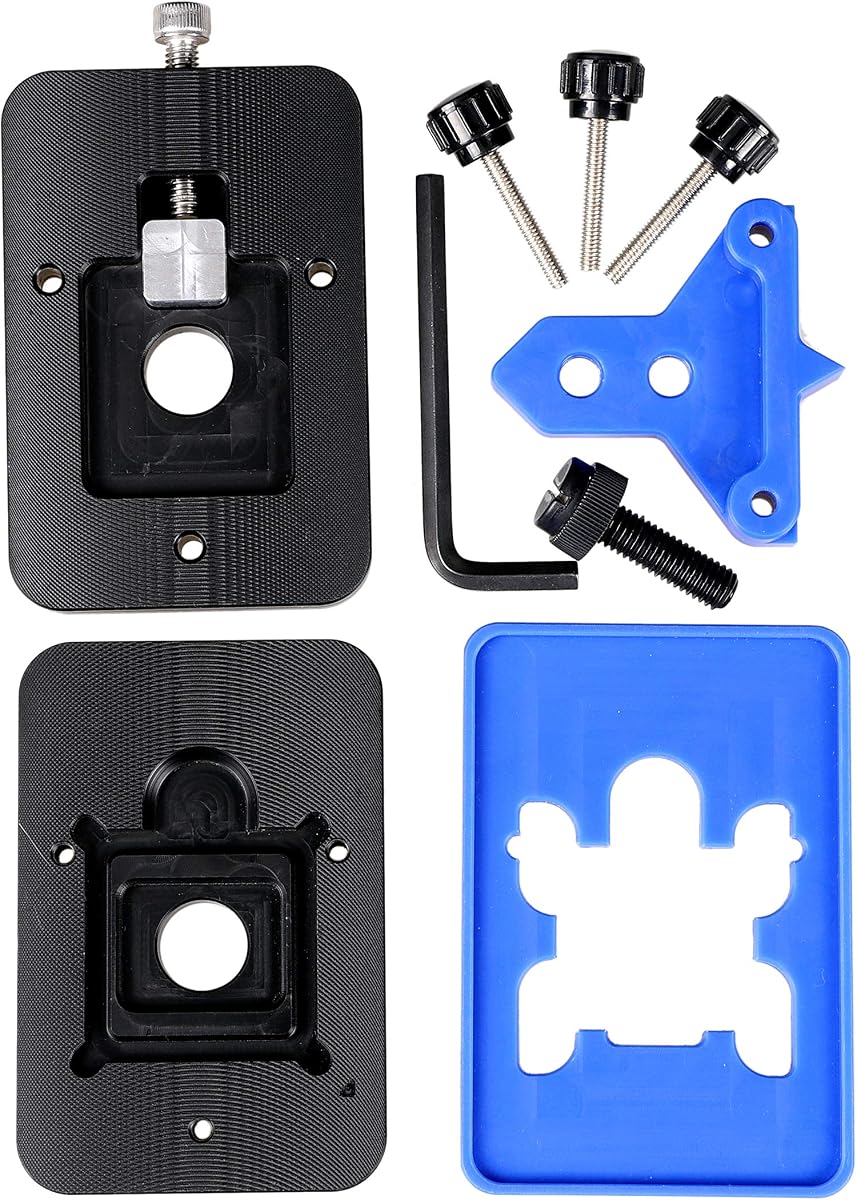
This tool offers the safest and easiest method to delid your Intel CPU with a design that supports multiple sockets. It is 100 percent compatible with Kaby lake and coffee lake processors ensuring broad coverage for Intel users. The tool also allows you to delid and relid your CPU for maximum overclocking potential.
We may earn a commission when you buy through this link, at no additional cost to you.
The relid tool fits LGA 1150 1151 and 1155 sockets providing a complete solution for users who want to restore the heat spreader. Users must ensure the square aluminum block is below the plastic plane to avoid damaging the CPU board. Careful positioning is essential for success.
While it offers a comprehensive solution for Intel CPUs it is not compatible with non-Intel processors or modern sockets beyond 1151. The process requires precision to avoid damage which may be challenging for beginners. These trade-offs are acceptable for Intel enthusiasts.
If you are an Intel user looking to delid and relid your CPU this tool provides a safe and effective solution. It supports a wide range of sockets and helps maximize overclocking potential. We recommend it for Intel CPU owners.
The included relid tool allows you to restore the heat spreader which is crucial for future resale or cooling.
Compatible with multiple sockets including 775 1150 and 1151 this tool covers many Intel CPUs.
We may earn a commission when you buy through this link, at no additional cost to you.
This comprehensive set is engineered for removing adhesive lifting chips cleaning solder pads and cutting through tough glue on circuit boards. It features ultra-thin razor-sharp blades crafted from high-grade steel for unmatched control. The sturdy metal handle provides perfect balance and comfort during intricate work.
We may earn a commission when you buy through this link, at no additional cost to you.
The 12-in-1 handle metal craft knife set includes fine-point tips and angled edges for various tasks from glue removal to chip installation. It is specifically effective for intricate tasks on Apple devices like delidding and refurbishing A8 A9 CPUs. The non-slip design ensures maximum control.
While it offers great versatility for repair technicians it is not specifically optimized for CPU delidding which may require specialized tools. The complexity of the set may be overwhelming for simple tasks. These trade-offs are acceptable for professional repair stations.
If you are a professional technician working on modern electronics this set provides an essential toolkit for delicate repairs. It combines versatility with precision to handle a wide range of tasks. We recommend it for advanced repair professionals.
The set includes multiple blades and tips allowing you to handle various stages of a repair project.
The sturdy metal handle reduces hand fatigue and ensures stability during precise movements.
We may earn a commission when you buy through this link, at no additional cost to you.
This tool is designed for PlayStation 3 Fat and Slim models with an RSX chip covered by an integrated heat spreader. It provides access to the thermal interface material between the RSX chip and IHS allowing users to perform maintenance or replacement of aged thermal paste. The tool is designed to assist with RSX IHS removal.
We may earn a commission when you buy through this link, at no additional cost to you.
It helps keep the working edge positioned away from the main board during the delidding process to reduce board contact. This tool is intended for the RSX GPU only and will not remove the CELL CPU IHS. It is important to use appropriate care and repair procedures.
While it is specialized for PS3 GPU maintenance it is not compatible with Super Slim models which do not use an RSX lid. It also cannot remove the CPU IHS which may be needed for full console repair. These limitations are acceptable given its specific role.
If you are repairing a PS3 Fat or Slim model and need to address GPU overheating this tool is ideal. It provides a safe method to access the GPU thermal interface. We recommend it for PS3 repair specialists.
This tool is designed specifically for PS3 Fat and Slim models ensuring a precise fit for RSX chip maintenance.
The design helps keep the working edge away from the main board reducing the risk of accidental damage.
We may earn a commission when you buy through this link, at no additional cost to you.
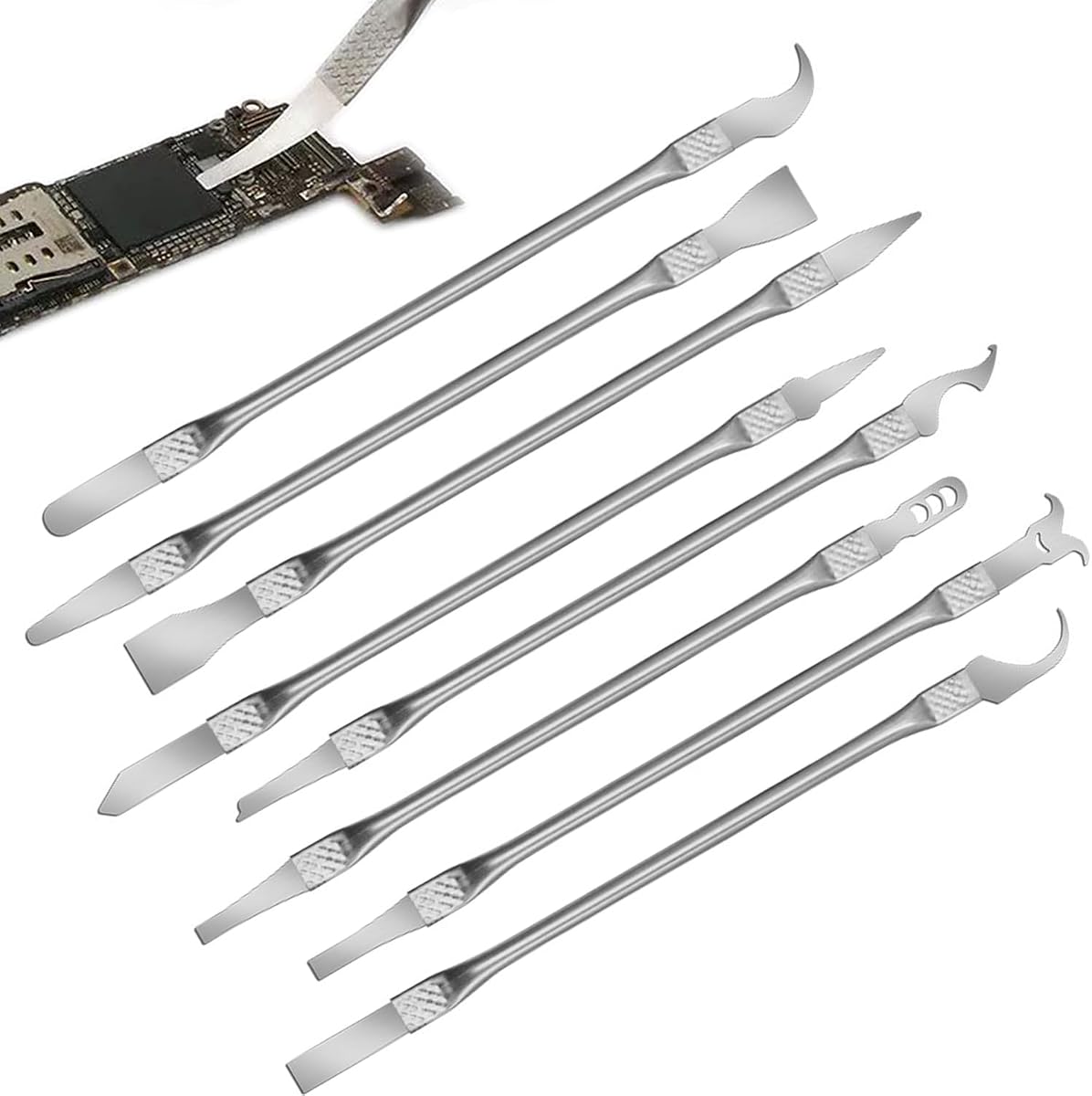
This versatile repair kit is perfect for safely removing BGA chips CPUs and other small components from smartphones and motherboards. The ultra-thin tools allow for easy maneuvering between chips and board without damage. It is made from high-quality alloy resistant to corrosion and bending ensuring longevity.
We may earn a commission when you buy through this link, at no additional cost to you.
The integrated blade and handle design eliminates the need for assembly making repairs quicker and more efficient. The ergonomic design ensures a comfortable grip reducing hand fatigue during extended use. It offers a time-saving solution for various repair tasks.
While it is versatile for multiple devices it is not specifically optimized for CPU delidding which may require more specialized tools. The tools are ultra-thin which requires careful handling to avoid damaging components. These trade-offs are acceptable for general repair work.
If you need a versatile and affordable kit for removing small components this set provides good value. It combines durability with ergonomic design to facilitate efficient repairs. We recommend it for hobbyists and technicians.
This kit supports a wide range of repair tasks from smartphone to computer component removal.
High-quality alloy material ensures the tools are resistant to corrosion and bending for long-term use.
We may earn a commission when you buy through this link, at no additional cost to you.
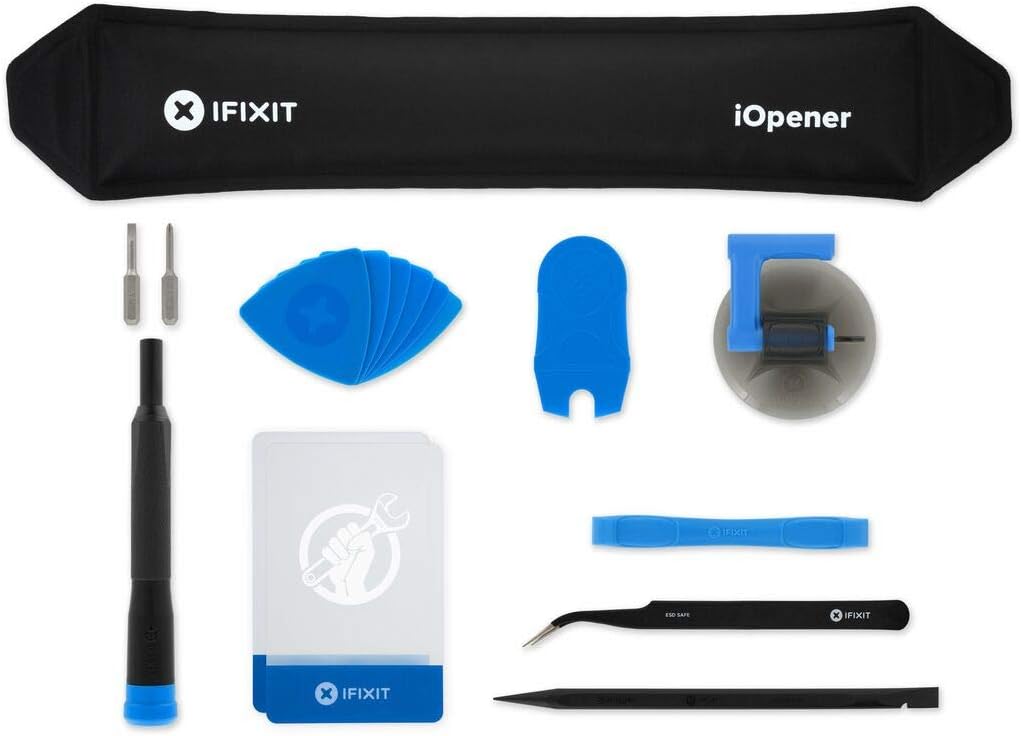
This separator is designed to apply heat directly and evenly to screens to loosen the adhesive for removal during DIY repair. It is made for iPad but also works with many tablets iPhones Android phones PC laptops or other electronics. The kit includes tools commonly used for repairs involving the iOpener.
We may earn a commission when you buy through this link, at no additional cost to you.
It is non-toxic and food-safe ensuring safety during use. The universal design allows it to be used on a wide range of devices making it a versatile addition to any repair toolkit. It provides a safe and reliable way to open devices.
While it is excellent for loosening adhesive it does not perform mechanical opening or delidding and must be used with other tools. It requires a heat source which may not be available in all settings. These trade-offs are acceptable for its specific purpose.
If you are performing device repairs that require adhesive removal this iOpener provides a safe and effective solution. It ensures even heat application to avoid damage to sensitive components. We recommend it for anyone doing DIY electronics repair.
The iOpener applies heat evenly to loosen adhesive without damaging the device components during disassembly.
Compatible with a wide range of devices this tool is versatile for various repair tasks.
We may earn a commission when you buy through this link, at no additional cost to you.
Choosing the right delidding kit depends on your specific hardware and repair goals. This guide outlines key factors to consider before making a purchase.
Ensure the tool supports your processor generation and socket type. Some tools are designed for Intel only while others work with specific consoles.
Check compatibility details carefully to avoid purchasing a tool that cannot fit your hardware.
Look for tools made from durable materials like aluminum or stainless steel. Quality construction ensures precision and longevity during use.
Higher quality materials reduce the risk of damaging sensitive components during the delidding process.
Ergonomic handles and intuitive designs make the delidding process safer and more efficient. Tools that are user-friendly reduce the chance of errors.
Prioritize kits that come with clear instructions or designed for hassle-free operation.
Some kits include scrapers or relid tools which add value and convenience. Check what extras are included before buying.
Accessories like scrapers help clean residue without requiring additional purchases.
Precision blades are crucial for safe removal of the heat spreader. Tools with thin sharp blades allow for controlled work.
Invest in tools that offer surgical precision to protect your expensive hardware.
Delidding will invalidate your CPU warranty. Consider this risk before using any tool on hardware still under warranty.
Only proceed if you are comfortable with the potential loss of manufacturer support.
Choose tools from reputable brands known for quality and safety. Established brands often provide better support and reliability.
Research user reviews and brand history to ensure confidence in your purchase.
Some tools are designed for CPUs while others target GPUs or mobile devices. Ensure the kit matches your intended repair task.
Using a CPU tool on a GPU may not work due to different heat spreader designs.
Always start by ensuring your processor is removed from the motherboard and placed on a clean static-safe surface. Secure the CPU in the delidding tool according to the manufacturer instructions.
Use the provided blade to carefully pry off the heat spreader applying even pressure around the edges. If needed use a heating pad to soften the adhesive before removal.
After delidding clean any residue from the die and package using a scraper and alcohol. Store tools in a dry place to prevent blade damage and ensure longevity.
Delidding is worth it if you need maximum cooling performance and have advanced hardware. It can lower temperatures significantly enabling better overclocking and stability.
Yes delidding will void the CPU manufacturer warranty. You lose official support so consider this risk carefully.
You need a delidding tool scraper and thermal paste. Some kits include all these items so check before purchasing.
Delidding is moderately difficult and requires a steady hand. Practice on old hardware first to avoid damaging your current CPU.
Yes you can relid using thermal glue and a new heat spreader. This restores the original look and may help resale value.
Most users see a 10 to 20 degree Celsius reduction. Exact results depend on your processor and cooling setup.
The delidding kits reviewed offer a range of options for different hardware and skill levels. Choose based on compatibility precision and included accessories to ensure success.
Prioritize safety and quality when selecting a tool. Investing in a reliable kit protects your hardware and improves results.
Always check current product availability and details before purchasing. Prices and stock can change over time.