
Eaton Tripp Lite BC450 450VA Small UPS 255W Battery Backup Surge Protector
4.2Editor score
450VA Small UPS Design
8 Wide-Spaced Outlets
Wall Mount Compatible
This guide compares the top battery backup for small office needs, covering capacity, outlets, and surge protection to ensure uninterrupted work and safety for
A reliable battery backup for small office setups ensures your critical devices stay online during power outages. These uninterruptible power supplies protect against data loss and hardware damage by providing clean, continuous energy when the grid fails.
We compared ten top-rated models based on capacity, outlet count, and protection features. Our analysis focuses on performance, ease of use, and value to help you find the best system for your specific workspace requirements today.
Each pick highlights key strengths and ideal use cases for your team. While we list current availability, prices fluctuate often so verify details on the product page before making your final purchase decision for your business.
4.2Editor score

4.5Editor score
4.9Editor score
This side-by-side comparison reviews every model selected for this guide. We evaluate their technical specifications, protective capabilities, and user-friendly features to help you make an informed decision for your office needs.


This model earns our top pick because it balances high capacity with smart features for professional environments. It holds a strong rating for reliability and includes a PFC Sinewave output that is essential for computers with Active PFC power supplies.
We may earn a commission when you buy through this link, at no additional cost to you.
The 1500VA capacity ensures your desktops and network gear stay running long enough to save work during an outage. Twelve outlets give you plenty of room to connect printers, scanners, and routers without needing extra surge strips.
While the cost is higher than basic models, the protection it offers justifies the investment for business equipment. The automatic voltage regulation corrects minor fluctuations before they reach your devices, which helps extend hardware life.
If your office depends on stable power for productivity, this system is the smart choice. It combines robust engineering with user-friendly monitoring to keep your small business running smoothly through any electrical issue.
Active PFC power supplies found in modern computers need a pure sine wave to operate correctly. This unit provides that specific waveform to prevent shutdowns or hardware damage during battery mode.
The color LCD panel shows battery health and load levels at a glance. This helps you plan maintenance before the battery fails unexpectedly and keeps your team informed about power status.
We may earn a commission when you buy through this link, at no additional cost to you.
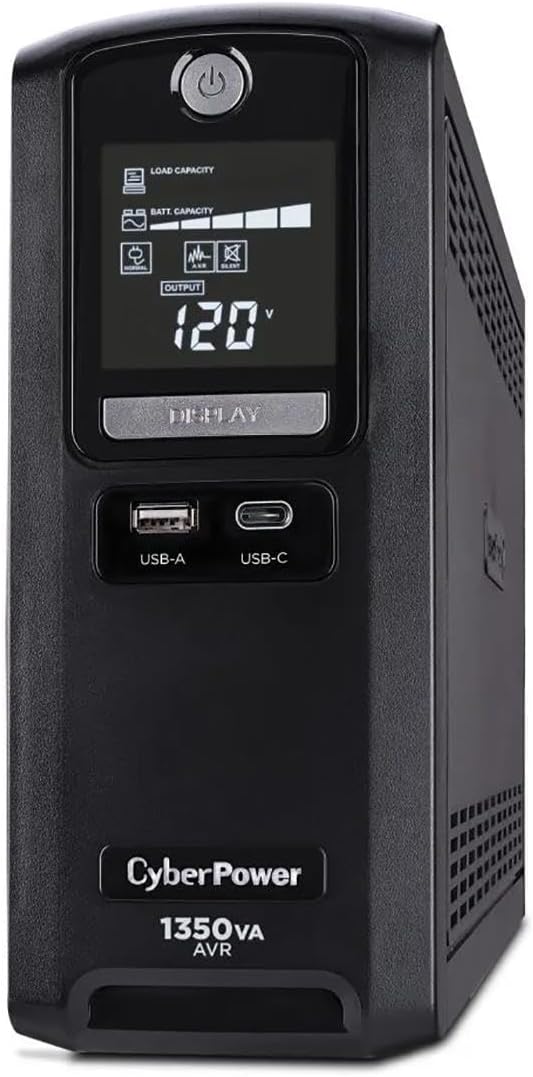
This unit offers similar capacity to the top pick but uses simulated sine wave technology which is cost-effective for standard electronics. It maintains a high rating for overall performance and includes the same intelligent display features as other premium CyberPower models.
We may earn a commission when you buy through this link, at no additional cost to you.
With twelve outlets, it handles multiple workstations and peripherals easily. The automatic voltage regulation helps correct minor fluctuations without draining the battery, which is great for areas with inconsistent grid power.
The trade-off is that active PFC power supplies might not work with the simulated sine wave output. For most office peripherals like monitors and routers, this difference is negligible and saves money compared to pure sine options.
This is an excellent mid-tier choice for offices that need high capacity without the premium price. It provides reliable backup time for safe shutdowns and keeps your core systems protected during sudden power drops.
The color LCD provides immediate information on battery condition and load levels. This helps users monitor the system health visually without needing to install separate software on their workstations.
AVR corrects minor power surges or sags before they reach your devices. This feature helps protect equipment from wear and tear caused by unstable electrical lines without switching to battery mode.
We may earn a commission when you buy through this link, at no additional cost to you.
This model focuses on energy efficiency with its built-in ECO mode feature. It is a solid option for small offices that want to save on electricity while still protecting devices from outages and surges.
We may earn a commission when you buy through this link, at no additional cost to you.
The ECO outlets automatically cut power to peripherals when your main computer is off or in sleep mode. This feature reduces wasted electricity and aligns with green office initiatives effectively.
While the capacity is lower than the 1500VA models, it is sufficient for single workstations and their accessories. The twelve outlets provide ample connectivity for printers and networking equipment.
Choose this if you want to balance cost with sustainability. It provides necessary protection for standard office setups while helping lower your overall energy usage and environmental footprint significantly.
When the connected computer turns off, the ECO outlets cut power to peripherals automatically. This feature eliminates standby power drain and lowers your monthly energy bill noticeably.
All twelve outlets include surge protection to safeguard your gear from voltage spikes. This ensures every connected device receives consistent safety against electrical events during storms or grid issues.
We may earn a commission when you buy through this link, at no additional cost to you.
This unit stands out with a slim profile that fits well in tight office cubicles. It delivers reliable protection for standard workstations and is rated well for general use in home office environments.
We may earn a commission when you buy through this link, at no additional cost to you.
The GreenPower design makes it energy efficient without compromising on backup performance. It provides enough runtime to safely shut down files and systems when a power outage occurs.
The lack of USB charging ports is a minor trade-off but keeps the unit simple and affordable. The nine outlets allow you to connect your PC, monitor, and necessary peripherals easily.
This is a practical choice for smaller desks or home setups where space is tight. It offers solid protection at a lower price point without sacrificing core backup reliability for daily use.
The slim design fits easily on crowded desks or under stands. This feature makes it ideal for small office environments where maximizing every inch of space is important for workflow.
High efficiency design reduces power consumption during normal operation. This helps lower your energy costs and keeps the unit running cool for longer battery life over time.
We may earn a commission when you buy through this link, at no additional cost to you.
This model offers advanced data line protection that is critical for networked offices. It combines high capacity with robust surge protection for internet lines ensuring both equipment and connectivity stay safe.
We may earn a commission when you buy through this link, at no additional cost to you.
The extended runtime allows for plenty of time to save work and shut down gracefully. Network and coax protection adds a layer of security that many standard units overlook completely.
While it costs more, the features justify the expense for businesses reliant on constant internet access. The high rating reflects strong reliability and performance in demanding office environments.
Select this if your office depends heavily on stable internet and large workloads. It provides a comprehensive backup solution that protects both your hardware and your data connectivity effectively.
This unit includes protection for network and coax lines against surges. This feature safeguards your router and modem ensuring your internet remains stable during electrical spikes.
At half load this system offers ample time for safe shutdown procedures. This feature is crucial for complex software systems that need more time to save data properly.
We may earn a commission when you buy through this link, at no additional cost to you.
This model is designed for offices that use telephone lines or modems alongside computers. The data line protection prevents damage from surges traveling through phone wires into your electronics.
We may earn a commission when you buy through this link, at no additional cost to you.
With twelve outlets it can support a desktop computer and multiple peripherals easily. The intelligent LCD provides clear status information so you always know the health of your backup system.
The automatic voltage regulation helps handle minor fluctuations without using battery power. This extends the life of the battery and keeps your devices running efficiently during brownouts.
Choose this if you need reliable power for networking gear and computers. It offers solid protection against both power outages and surges coming through data lines effectively.
Surges can travel through phone lines and damage connected electronics. This unit prevents that damage by filtering those spikes before they reach your devices.
The LCD panel gives you immediate details on power conditions. This helps you stay informed about battery levels and potential issues before they impact work.
We may earn a commission when you buy through this link, at no additional cost to you.
This is an excellent entry-level option for offices with basic power needs. It offers a compact design that protects your router and PC without taking up much space.
We may earn a commission when you buy through this link, at no additional cost to you.
The eight outlets provide enough room for essential devices. The wall mount capability helps you keep the unit off the floor which keeps cables organized.
While it has lower capacity than larger models, it is sufficient for keeping internet connections alive during short outages. The replaceable battery extends the life of the unit significantly.
Pick this for small home offices or remote workstations. It provides essential protection at a price that fits any budget easily.
Built-in mounting tabs allow easy wall installation. This feature keeps your floor space clear and cables organized for a tidy office environment.
The internal battery is easily replaceable when it ages. This feature saves you from buying a whole new unit and reduces long term costs.
We may earn a commission when you buy through this link, at no additional cost to you.
This is the smallest unit on our list and fits anywhere on a desk. It is perfect for protecting just a router or a single laptop and charger.
We may earn a commission when you buy through this link, at no additional cost to you.
The compact size makes it unobtrusive and easy to place. The auto restart feature means it is ready to go the moment power is restored without any manual intervention needed.
While the capacity is low, it serves well as a basic safeguard for critical small electronics. The LED indicators provide clear status without needing a complex display.
Choose this for minimal setups like a single workstation. It provides essential power backup without bulk or complexity for simple office needs.
Its tiny size fits easily under any device or desk. This ensures your workspace remains clutter free while still getting essential power protection.
The unit automatically restarts when main power returns. This saves time and ensures your devices come back online immediately after an outage.
We may earn a commission when you buy through this link, at no additional cost to you.
This model is designed for home offices and small workstations. It offers enough runtime to save work and keep your internet connection alive during short outages.
We may earn a commission when you buy through this link, at no additional cost to you.
The USB port allows you to charge phones even when the power is out. This feature is helpful for staying in contact or using mobile hotspots during a storm.
APC is a trusted brand known for reliability. The easy battery replacement process keeps costs down when the unit ages after years of use.
Select this for a balanced mix of protection and features. It is ideal for keeping your critical office gear safe and connected without needing advanced software features.
The built-in USB port works even during power outages. This lets you charge mobile devices to stay connected while the office grid is down.
APC is known for consistent performance in power backup. This reputation gives you confidence that your data and hardware are in safe hands.
We may earn a commission when you buy through this link, at no additional cost to you.
This unit is a simple standby backup that keeps basic devices safe. It is suitable for protecting a router and a desktop PC in a light office setup.
We may earn a commission when you buy through this link, at no additional cost to you.
The efficiency design reduces power consumption during normal use. The three year warranty gives you peace of mind regarding the longevity of the product.
While it lacks advanced features it covers the basics of power protection well. It is a cost effective solution for small offices that do not need high capacity.
Choose this for a no fuss backup solution. It keeps your essential gear running and protected without complicated setup or features you may not need.
This unit is designed for easy installation. You simply plug it in and connect your devices to start protection immediately.
GreenPower design helps reduce energy waste during normal operation. This keeps your running costs low while maintaining protection.
We may earn a commission when you buy through this link, at no additional cost to you.
Selecting the right battery backup requires considering several key factors to match your office needs. We break down the essential aspects to help you find the perfect unit.
The VA rating indicates the total power capacity of the unit. Ensure it matches or exceeds the total wattage of your devices to prevent overload and ensure enough runtime for a safe shutdown.
Look for a unit with enough capacity to keep your critical systems running for at least 10 to 15 minutes.
Modern computers with Active PFC power supplies need a pure sine wave output to work correctly. Simulated sine wave is fine for older or basic equipment but may cause issues with sensitive hardware.
Check if your equipment requires a pure sine wave output before buying to avoid compatibility problems.
Count the number of devices you need to protect including monitors and routers. Ensure the unit has enough outlets to cover everything without needing extra surge strips.
Select a unit that provides enough outlets for all your essential office gear.
AVR corrects minor voltage fluctuations without using battery power. This extends battery life and protects equipment from damage caused by brownouts.
Prioritize models with AVR to ensure stable power delivery.
Surge protection shields devices from voltage spikes. Some units also protect data lines like phone or network cables which is vital for internet connectivity.
Look for protection that covers all connected lines including network ports if needed.
Batteries degrade over time so check if the battery is user replaceable. A longer warranty period indicates better build quality and gives you more protection.
Choose a unit with a warranty that covers the battery and replacement service.
LCD panels and software provide visibility into battery health. This helps you plan maintenance and know when to replace the battery before it fails.
Select a system that offers clear monitoring features to stay informed.
Consider the physical footprint of the unit. Slim models save desk space while larger ones may offer more outlets but require more room.
Ensure the unit fits well in your office layout.
Place the unit on a flat surface near your devices and plug it into a wall outlet. Connect your computer and peripherals to the battery backup outlets labeled on the unit.
Keep the unit in a cool and dry place to prevent overheating. Avoid exposing it to direct sunlight or damp conditions to ensure optimal battery life.
Check the LCD status regularly and replace the battery every three to five years. Run self tests if your unit has this feature to ensure it works when needed.
Yes a battery backup protects against data loss and hardware damage caused by sudden power outages. It ensures your network and computers stay online long enough to save work safely during a crisis.
Runtime depends on your load but most units offer 5 to 15 minutes for standard desktops. Heavier loads will reduce this time so consider your usage when choosing capacity.
A surge protector guards against voltage spikes but does not provide power during an outage. A battery backup provides continuous power when the main electricity supply fails to keep devices running.
Yes many units are compatible with gaming consoles and provide protection against power fluctuations. Check the capacity to ensure it matches your console power requirements.
Most batteries need replacement every three to five years depending on usage. Regular self tests or low battery alarms can indicate when a replacement is due for optimal performance.
Always check the manufacturer guidelines before connecting to a generator. Some units may have specific requirements for generator power to prevent damage or warranty issues.
We have reviewed ten top models ranging from budget friendly options to high capacity systems. Each pick offers unique features to meet different office requirements effectively.
Prioritize capacity and waveform type to ensure your sensitive equipment stays safe. Choose a unit that matches your specific workload for reliable performance.
Verify current availability and pricing on the product pages before you buy. These units are essential for business continuity so act early to secure your systems.