
ASRock DeskMini X300
4.2Editor score
Ultra-Compact 1.92L Form Factor
Supports AMD AM4 Ryzen Processors
Triple Display Capability Included
Compare the top 10 Barebone Pcs with Amd for performance and value. This guide reviews specs, features, and ratings to help you choose the right system.
Barebone PCs with AMD processors offer a unique way to build a custom desktop without the constraints of pre-built systems. These kits provide the essential chassis, motherboard, and power supply while leaving RAM and storage for you to select. This flexibility ensures you get exactly the performance and capacity you need.
Our team analyzed ten leading models based on processor architecture, expansion options, and connectivity features. We focused on systems that balance power efficiency with robust build quality. Each entry in this list represents a strong candidate for different use cases ranging from gaming to server hosting.
Each product review highlights key strengths and potential limitations to help you make an informed decision. Please note that specifications and availability may vary by region and retailer. Always check current listings for the most accurate details before finalizing your purchase.
4.2Editor score

4.0Editor score

3.1Editor score
The following table provides a side-by-side comparison of the top ten models evaluated in this guide. It highlights core specifications and unique features to help you identify the system that best matches your specific needs and budget constraints.





The AOOSTAR MACO stands out as a top contender in the AMD barebone market. It scores high for its inclusion of the powerful AMD Ryzen 7 PRO 8845HS processor. This model promises excellent performance for gaming and professional tasks alike.
We may earn a commission when you buy through this link, at no additional cost to you.
Its standout feature is the OCuLink port which allows for external GPU connections with minimal latency. The dual USB4 ports also provide significant versatility for high-speed data transfer and multi-monitor setups. The cooling system uses a VC heat spreader which is efficient.
While it does not include RAM or storage the expandability is extensive with up to 128GB of RAM support. The only minor drawback is the need to purchase and install these components separately. This setup is ideal for users who want full control over their hardware.
We recommend this unit for enthusiasts and professionals who need a compact yet powerful workstation. It balances cutting-edge technology with robust build quality making it a reliable choice for demanding applications.
The Zen 4 architecture ensures rapid processing speeds for complex workloads including video editing and gaming.
With OCuLink and USB4 you can connect high-end peripherals without bottlenecking the system performance.
We may earn a commission when you buy through this link, at no additional cost to you.
The AOOSTAR GEM12+ builds on the success of the MACO by adding a vapor chamber cooling system. This enhances thermal management which is crucial for sustained high-load tasks. It also includes the same powerful Ryzen 7 PRO 8845HS processor.
We may earn a commission when you buy through this link, at no additional cost to you.
The OCuLink port here operates on an independent channel ensuring maximum bandwidth for external GPUs. It also supports four-screen 4K output which is a major plus for creative professionals. The BIOS modes allow users to tune performance and noise levels.
Energy efficiency is a key selling point with the VAT architecture saving power over standard systems. The dual cooling system helps keep noise levels low even under stress. However the OCuLink port requires a power cycle for connections.
This unit is an excellent choice for users who need robust cooling and extensive display capabilities. It is well-suited for gaming rigs or workstations that require multiple monitors for productivity.
The vapor chamber transfers heat quickly to the heat sink reducing temperatures under high load effectively.
Support for four 4K displays allows for expansive workspace setups without compromising visual quality.
We may earn a commission when you buy through this link, at no additional cost to you.
The AOOSTAR GEM12+ PRO adds a unique security feature with built-in fingerprint recognition. This simplifies access to your system without needing complex passwords. It retains the same strong processor and cooling architecture as the GEM12+ model.
We may earn a commission when you buy through this link, at no additional cost to you.
The fully customizable built-in display allows you to monitor system stats in real-time. This feature adds a layer of functionality for enthusiasts who want quick access to CPU and GPU data. The fingerprint unlock is a practical addition for daily use.
Power efficiency remains high with the VAT architecture reducing consumption by up to 20 percent. The vapor chamber cooling ensures stable performance during extended sessions. However the custom display feature requires specific software setup.
This model is best for users who prioritize security and system monitoring in a compact device. It is a solid choice for home offices where quick and secure access is required.
The fingerprint scanner provides instant and secure access to your system without typing passwords.
The built-in display lets you track system health and performance metrics directly from the case.
We may earn a commission when you buy through this link, at no additional cost to you.
The ASRock DeskMeet X300 offers a more traditional motherboard layout within a small form factor. Its standout feature is the full-size PCIe 3.0 x16 slot which allows for discrete GPU upgrades. This is rare in the mini PC category.
We may earn a commission when you buy through this link, at no additional cost to you.
It supports a wide range of AMD AM4 processors giving you flexibility in choosing your CPU. The included 500W power supply provides ample headroom for higher wattage components. This makes it a strong candidate for custom builds.
While the AM4 platform is older it remains cost-effective and compatible with a vast library of parts. The dual M.2 slots ensure you can have fast storage without using SATA connections. The USB Type-C port adds modern connectivity.
We recommend this unit for builders who want to customize every aspect of their system. It is ideal for those who need a discreet desktop that still supports dedicated graphics hardware.
The PCIe 3.0 x16 slot allows you to install a dedicated graphics card for enhanced performance.
Support for AM4 sockets means you can choose from a wide range of cost-effective Ryzen processors.
We may earn a commission when you buy through this link, at no additional cost to you.
The MINISFORUM X1 Lite-255 focuses on providing a wide array of connectivity options. It features five USB ports along with HDMI DP and USB4 outputs. This variety makes it easy to connect various peripherals without extra hubs.
We may earn a commission when you buy through this link, at no additional cost to you.
The triple display output allows for a multi-monitor setup which is essential for productivity. The OCuLink port provides an option for external graphics though it requires an adapter and power cycle. Wi-Fi 6e ensures stable wireless connections.
Power delivery is handled through a PD input which adds flexibility to how you power the device. The cooling system uses PCM phase-change material to manage heat effectively. This helps maintain performance during intensive tasks.
This model is ideal for users who need extensive port availability and wireless connectivity. It is a strong choice for mobile professionals who want to connect multiple devices on the go.
Five USB ports combined with HDMI and DP ensure you can connect all your devices easily.
Wi-Fi 6e support provides fast and reliable wireless connectivity for large file transfers.
We may earn a commission when you buy through this link, at no additional cost to you.
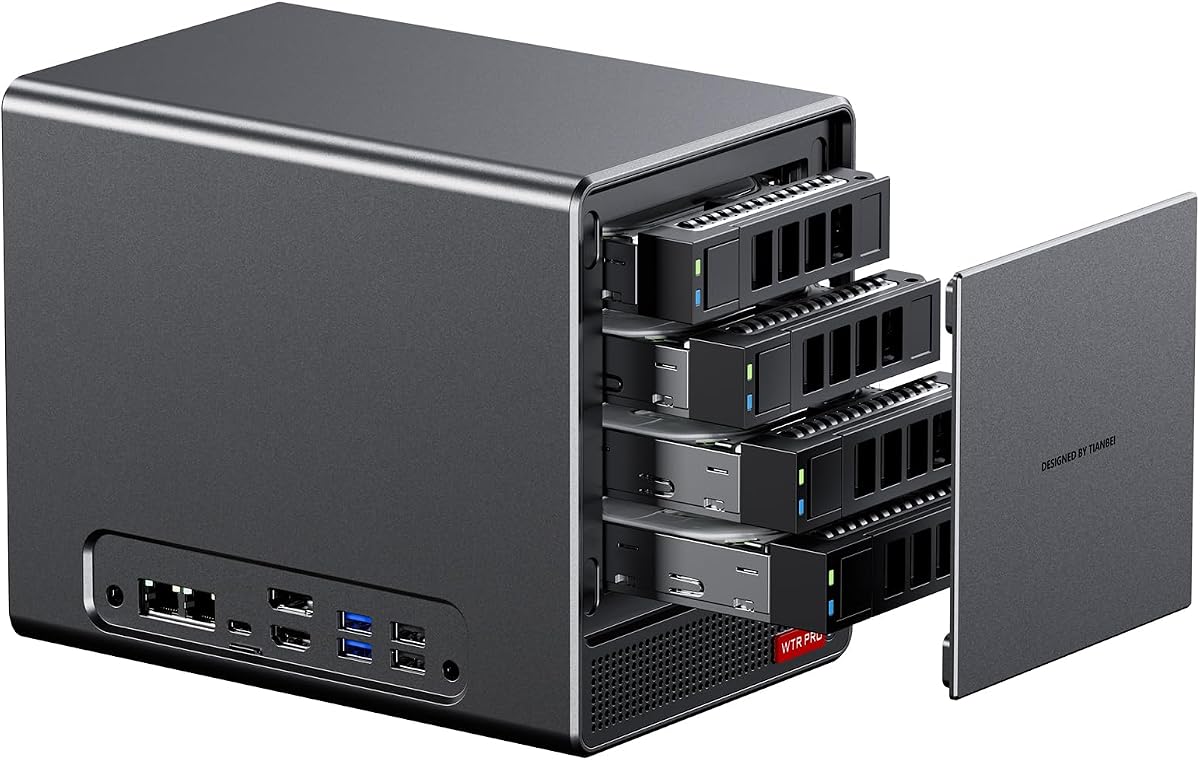
The AOOSTAR WTR PRO is designed with NAS functionality in mind offering four drive bays. This makes it a robust solution for home servers or data storage. The AMD Ryzen 7 5825U processor provides efficient performance for file serving tasks.
We may earn a commission when you buy through this link, at no additional cost to you.
Power consumption is low ranging from 15 to 25 watts which is ideal for 24/7 operation. The 12CM fan ensures silent operation so it can be placed in living areas without noise. It supports triple screen output for monitoring tasks.
The dual M.2 slots allow for fast caching or OS installation while the SATA bays handle bulk storage. Linux users may need to configure settings to avoid speed reductions on certain bays. Overall it is a practical server chassis.
This unit is best for users who need a compact and quiet home server. It is a great starting point for building a personal cloud or media server system.
Low power consumption makes this system ideal for always-on server applications without high energy costs.
The intelligent fan control ensures the system remains quiet even under heavy load conditions.
We may earn a commission when you buy through this link, at no additional cost to you.
The ASRock DeskMini X300 is a budget-friendly option that does not compromise on core features. At 1.92 liters it is incredibly compact fitting easily into any small desk space. It supports a wide range of AMD AM4 processors.
We may earn a commission when you buy through this link, at no additional cost to you.
Triple display support allows you to connect three monitors for multitasking or productivity. The 2.5G LAN port provides fast wired networking which is essential for data transfers. The small size makes it discreet and portable.
While it lacks modern features like DDR5 support it remains a powerful tool for specific tasks. The need for a separate Wi-Fi module is a minor inconvenience but keeps costs down. The build quality is reliable for the price.
We recommend this unit for users on a tight budget who still need a multi-monitor setup. It is perfect for office work or light home use where size and cost are critical factors.
At 1.92 liters this unit takes up minimal space on your desk or shelf.
The affordable price point allows you to allocate more budget towards high-performance components.
We may earn a commission when you buy through this link, at no additional cost to you.
The ASUS ExpertCenter PN54 introduces the new Ryzen AI 300 series processors with a dedicated NPU. This hardware is designed to accelerate AI tasks and machine learning workloads significantly. It represents a forward-looking approach to mini PC design.
We may earn a commission when you buy through this link, at no additional cost to you.
With Wi-Fi 7 connectivity this unit ensures you are ready for the next generation of wireless networks. The tool-less design makes it easy to upgrade components without tools. This is ideal for business environments where maintenance must be quick.
The XDNA2 NPU offers up to 50 TOPS of AI performance which is a significant leap. This allows for local AI processing which enhances privacy and speed. The chassis is sleek and built for durability over long periods.
This model is best for enterprises or power users who need cutting-edge AI capabilities. It is a premium investment that pays off in specialized computing tasks and future-ready connectivity.
The XDNA2 NPU provides dedicated hardware for running AI models locally on your device.
Wi-Fi 7 support ensures you can utilize the fastest wireless networks available today.
We may earn a commission when you buy through this link, at no additional cost to you.
The AOOSTAR WTR PRO 4+2 offers maximum storage flexibility with a total of six drive bays. This includes four SATA bays and two M.2 slots for high-speed caching. It is an excellent solution for large scale data storage.
We may earn a commission when you buy through this link, at no additional cost to you.
The dual 2.5G LAN ports provide redundant networking which is vital for reliable server performance. It supports triple 4K display output so you can manage storage tasks efficiently. The 12CM cooling fan keeps noise levels low.
Linux users should note the potential for SATA power management issues but these are solvable with simple rules. The low power consumption ensures it can run 24/7 without draining your electricity bill. The full metal shell adds durability.
This model is ideal for power users who need extensive storage in a compact chassis. It is a strong candidate for a home lab or professional file server where capacity is king.
With six drive bays you can store up to 96TB of data in this compact unit.
Dual 2.5G LAN ports ensure you have stable and fast network connections for data transfer.
We may earn a commission when you buy through this link, at no additional cost to you.
The ASUS ExpertCenter PN54-S1 focuses on an ultra-thin design at just 34mm thick. This makes it incredibly discreet for placement in tight spaces. It includes support for Wi-Fi 7 for future-ready wireless connectivity.
We may earn a commission when you buy through this link, at no additional cost to you.
The tool-free design allows for easy component upgrades without the need for special tools. The Radeon 740M graphics provide basic visual performance suitable for office tasks. It is designed for reliable 24/7 operation.
While the processor is not as powerful as other options it handles everyday computing well. The eco-conscious chassis adds a sustainable element to the build. The 3-year warranty provides peace of mind for buyers.
This model is best for users who prioritize size and simplicity over raw power. It is an excellent choice for digital signage or basic office workstations where space is limited.
At 34mm thick this unit fits into spaces where larger PCs simply cannot go.
Easy access to components makes upgrades and maintenance straightforward for any user.
We may earn a commission when you buy through this link, at no additional cost to you.
Choosing the right barebone PC involves evaluating several technical factors to ensure the system meets your specific needs.
The choice of CPU defines the overall performance of your system. Modern AMD Ryzen processors like the 8845HS offer high efficiency and integrated graphics. Older AM4 sockets provide cost-effective options for budget builds.
Consider your workload when selecting a CPU. High-performance chips are better for gaming or video editing while efficient ones suit office tasks.
Barebone systems vary significantly in how much you can upgrade them later. Look for units with full PCIe slots if you plan to add a dedicated GPU. M.2 NVMe slots are essential for fast storage options.
Verify the number of RAM slots available. Some units support up to 128GB which is crucial for heavy multitasking or virtualization work.
Ports play a major role in how you connect your peripherals. USB4 and Thunderbolt ports offer high-speed data transfer and charging. OCuLink ports provide a direct connection for external graphics cards.
Check for modern networking standards like Wi-Fi 6e or Wi-Fi 7. Dual LAN ports are useful for server applications requiring redundant network links.
Thermal management is critical in small form factor PCs to prevent throttling. Vapor chambers or large fans help dissipate heat effectively. Ensure the fan speed can be controlled to balance noise and cooling.
A well-designed cooling system ensures the hardware lasts longer. Look for models that maintain stability under sustained load without excessive noise.
Some barebone kits are designed specifically for storage with multiple drive bays. NAS units usually support SATA drives and M.2 slots for caching. Verify the maximum supported capacity per drive bay.
If you need speed prioritize units with multiple M.2 NVMe slots. This allows you to separate your OS from your bulk data storage effectively.
Check if the unit includes a power supply or uses external adapters. Internal PSUs are often more reliable but may limit internal space. Ensure the wattage is sufficient for your planned components.
Power delivery standards like USB-PD can offer flexibility in powering the device. This is useful for mobile setups where you want to use a laptop charger.
The chassis material impacts durability and heat dissipation. Aluminum cases are lighter and help cool components naturally. Recycled materials are becoming common and help reduce environmental impact.
A sturdy build ensures the system survives transport. Look for cases that protect internal components during shipping and daily handling.
Barebone kits require assembly which increases the chance of errors. A strong warranty protects your investment if something goes wrong. Check the duration of the manufacturer support offered.
Customer service availability is also important. Ensure the seller provides clear instructions or support channels for technical issues.
Start by installing your RAM and storage modules carefully. Use anti-static measures to protect sensitive components from damage. Follow the manual for slot alignment to ensure a secure fit.
Once assembled connect the power supply and peripherals. Boot up the system and install the operating system. Update all drivers to ensure optimal performance and stability.
Keep the unit in a well-ventilated area to aid cooling. Clean the dust filters regularly to prevent overheating. Avoid placing the unit in direct sunlight or hot environments.
A barebone PC comes without critical components like RAM and storage requiring you to install them. A standard mini PC is pre-assembled and ready to use. Barebone systems offer more customization options for the user.
Basic technical skills are helpful but assembly is generally straightforward. Most users can follow the manual to install RAM and drives. If unsure consult a professional for initial setup.
Yes many models support external GPUs via OCuLink or PCIe slots. The integrated graphics are capable of light gaming but dedicated cards boost performance. Check connectivity options before buying for gaming use.
Most modern units support up to 64GB or 128GB depending on slots. Check the specific model limits before purchasing memory modules. Higher RAM limits allow for more demanding multitasking scenarios.
Yes models with multiple drive bays are ideal for home servers. They support 24/7 operation and efficient power usage. Verify Linux compatibility if you plan to run server software.
Some kits use external adapters to save space or reduce cost. Others may assume you have a compatible power unit. Always check the package contents before purchasing a barebone system.
Most units are compatible with both Windows and Linux systems. Some come with a Windows license included while others are OS-agnostic. Check the manufacturer support page for specific OS requirements.
We have reviewed ten top models ranging from budget options to high-performance AI systems. The AOOSTAR MACO stands out for overall power and connectivity options. The ASRock DeskMini X300 offers a great entry point for custom builds.
Consider your primary use case when selecting a unit. Gamers should look for OCuLink support while server users need multiple drive bays. Efficiency and cooling are key factors for 24/7 operation.
Prices and availability change frequently so check current listings before buying. We hope this guide helps you find the perfect barebone system for your needs.