
Excel/Word/Power Point/Windows Mouse pad
4.7Editor score
Covers four major apps
Large practical size option
Waterproof easy clean top
Reinforced stitched edge design
Finding the right Excel Cheat Sheet Desk Pad can transform your daily workflow. These accessories combine practicality with design. They protect your desk while keeping essential shortcuts at hand. A good pad offers durability and clear printing for long-term use.
We compared ten leading products based on size, material quality, and shortcut coverage. Our analysis focuses on real-world utility for professionals and students. Each item was evaluated for ease of access and overall value. The results highlight the best options for various needs.
Every pick includes detailed specs and expert insights to guide your choice. You will see ratings and key features side by side. Prices and availability change frequently so check current listings before buying. This guide ensures you make an informed decision for your setup.
4.7Editor score

4.7Editor score

4.6Editor score
As an Amazon Associate we earn from qualifying purchases.
This table provides a side-by-side overview of all ten products. It highlights key specifications and features for quick comparison. Use this to find the right fit for your desk size and budget needs.


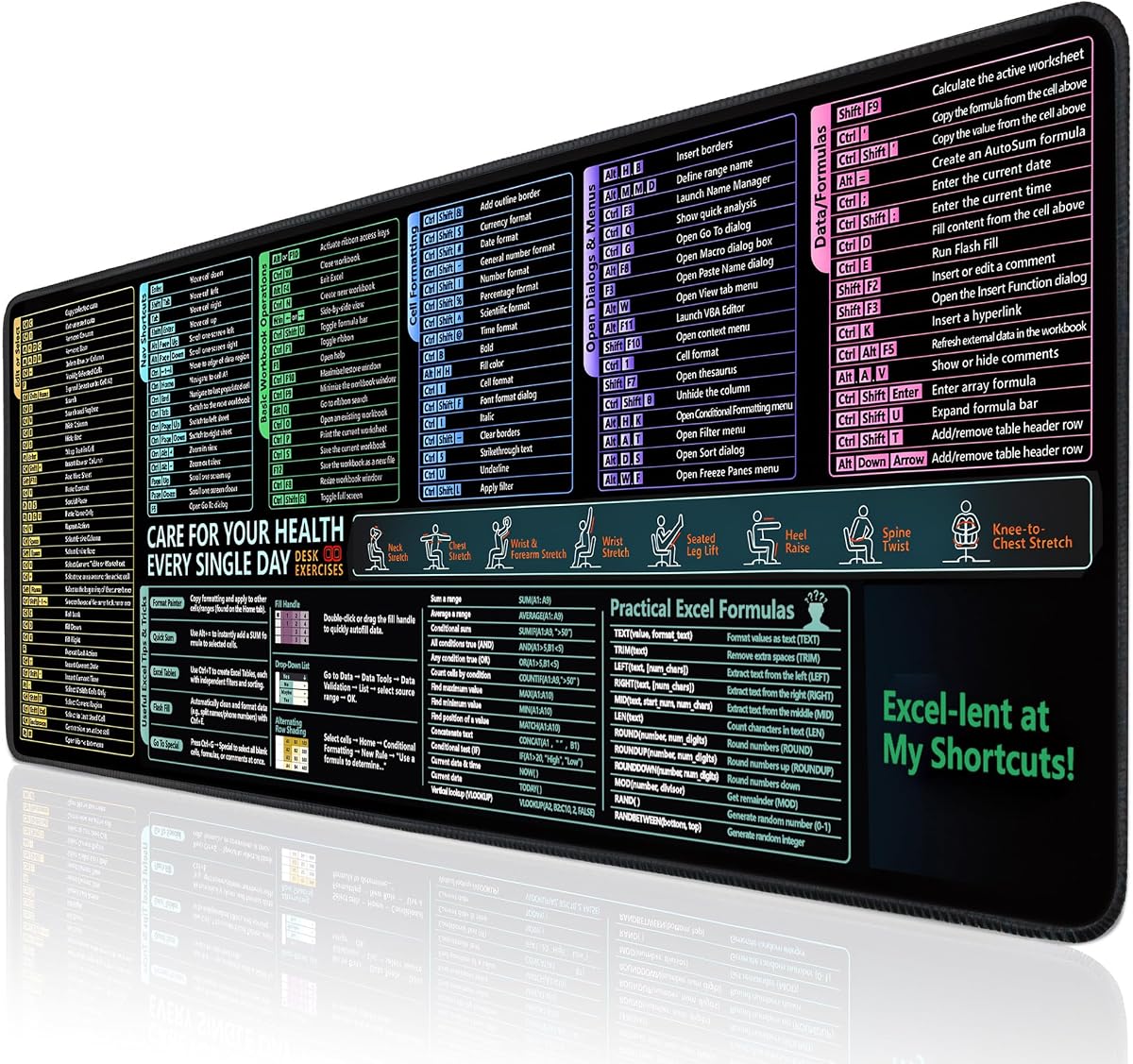


The Pixiecube Excel Cheat Sheet Desk Pad stands out as the top choice for professionals seeking efficiency. With a high 4.7 rating, it combines a large work surface with essential shortcuts. This pad helps users stay in flow by reducing search time for commands.
We may earn a commission when you buy through this link, at no additional cost to you.
Its organization is exceptional, grouping navigation, selection, and formatting keys logically. The inclusion of desk-exercise diagrams is a unique touch for physical health. Users appreciate the durable inks that keep the print vivid over time.
While the price is higher than basic options, the quality justifies the cost. The stitched edges prevent fraying, and the rubber base ensures stability. These features make it a reliable long-term investment for any desk.
If you spend hours daily in Excel, this pad is highly recommended. It offers comfort and utility in one package. Choosing this option means prioritizing both workflow and workspace health.
The desk-exercise diagrams provide quick stretches to relieve tension during long typing sessions.
UV-resistant inks ensure the shortcuts remain bright and readable despite repeated cleaning.
We may earn a commission when you buy through this link, at no additional cost to you.
This pad is an ideal budget-friendly option for students and casual users. It covers shortcuts for Excel, Word, PowerPoint, and Windows in one compact layout. The 4.7 rating confirms high user satisfaction with its utility.
We may earn a commission when you buy through this link, at no additional cost to you.
The print quality is clear, making it easy to find commands quickly. Its waterproof surface handles accidental spills well, which is great for home offices. The stitched edges ensure it holds up to daily use.
While it lacks the extra features of premium pads, it delivers on core needs. The size is sufficient for most setups without taking up too much space. It is a practical choice for those watching their budget.
Buy this if you need essential shortcuts without overspending. It is a reliable tool for basic productivity. The value it offers is hard to beat in this category.
Includes shortcuts for Microsoft Office suite plus general Windows controls for versatile use.
The waterproof top layer makes cleaning easy and extends the pad life.
We may earn a commission when you buy through this link, at no additional cost to you.
This XL pad offers a premium feel with its leather-like surface and large dimensions. It transforms your desk into a professional workspace while keeping formulas accessible. The 4.6 rating reflects its high-quality build and utility.
We may earn a commission when you buy through this link, at no additional cost to you.
The surface is robust and resists scratches and stains effectively. It serves well as a writing surface too, adding versatility to your setup. The anti-slip base keeps it firmly in place during intense work.
The only trade-off is the cost and size, which may not suit smaller desks. However, for professionals seeking elegance and function, it is worth the investment. The print remains clear and functional over time.
Choose this for a high-end office setup that prioritizes style. It elevates the look of your workstation. The durability ensures it remains a centerpiece for years.
Use as both a mouse pad and a writing pad for flexible desk use.
The leather-like texture adds a sophisticated touch to any office environment.
We may earn a commission when you buy through this link, at no additional cost to you.
This pad simplifies learning with nine categorized Excel modules. It is excellent for beginners needing structure. The 4.5 rating shows it meets expectations for utility and comfort.
We may earn a commission when you buy through this link, at no additional cost to you.
The layout includes meanings of functions, helping users understand rather than just copy. Waterproof cloth ensures easy maintenance. The double seam design aims to prevent fraying over time.
While it lacks extra flair, it focuses on core productivity. It is a solid pick for study environments. The price point makes it accessible for students.
Buy this if you want structured learning tools. It helps build confidence in spreadsheet work. A reliable helper for daily tasks.
Categorizes tips and functions to help users grasp Excel concepts faster.
Advanced inkjet technology ensures graphics are bright without traditional odors.
We may earn a commission when you buy through this link, at no additional cost to you.
This pad expands utility with twelve skill types including Word. It supports a wider range of tasks. The 4.6 rating indicates reliable performance for both work and gaming.
We may earn a commission when you buy through this link, at no additional cost to you.
The smooth fabric ensures lag-free mouse movement. It is practical for hybrid setups. The double seam technology ensures edges stay intact during heavy use.
It is straightforward and effective without extra frills. Good for those who want simple access to shortcuts. The value is strong for the features offered.
Choose this for mixed application support. It covers both Excel and Word needs efficiently. A practical tool for everyday use.
Includes shortcuts for both Excel and Word to assist in diverse document tasks.
Designed to serve effectively for both professional work and casual gaming.
We may earn a commission when you buy through this link, at no additional cost to you.
With a 4.8 rating, this pad excels in accuracy and stability. It serves well for both data entry and gaming. The smooth surface ensures precise cursor movement without lag.
We may earn a commission when you buy through this link, at no additional cost to you.
Thermal transfer printing keeps shortcuts vivid and legible. The stitched edges prevent curling, maintaining a flat surface. The base provides excellent grip on various desk types.
It balances performance and utility well. Great for users needing reliable tracking. The design is focused on function over style.
Buy this if smooth mouse control is your priority. It delivers consistent results daily. A top choice for demanding tasks.
The smooth surface ensures lag-free tracking for accurate work and gaming use.
Precision-stitched edges lock the shape to prevent curling over long-term use.
We may earn a commission when you buy through this link, at no additional cost to you.
Rated 4.9, this pad is a top contender for daily users. It includes color-coded hotkeys and stretch diagrams for health. The focus on ergonomics sets it apart from others.
We may earn a commission when you buy through this link, at no additional cost to you.
The surface is waterproof and stain-resistant. Cleaning is easy and quick. The print stays crisp even after months of use.
It balances comfort with practicality. Good for long work sessions where health matters. The price is reasonable for the features.
Choose this for ergonomic benefits and clear reference. It supports a healthy workflow. A smart pick for long hours.
Built-in diagrams help relieve wrist and neck strain from prolonged sitting.
Advanced printing ensures text stays legible even after repeated cleaning.
We may earn a commission when you buy through this link, at no additional cost to you.
This pad is perfect for smaller desks needing efficiency. It fits neatly without crowding space. The 4.6 rating shows users appreciate its practical design.
We may earn a commission when you buy through this link, at no additional cost to you.
The surface resists spills and wipes clean easily. It covers essential shortcuts for frequent tasks. The rubber backing prevents sliding on smooth surfaces.
It is simple and effective. Ideal for home offices with limited space. The price makes it accessible for many.
Buy this if space is a priority. It delivers core features well. A good fit for compact setups.
The 27-inch width fits well on smaller desks without crowding essentials.
Wipes clean easily when exposed to coffee or dust spills.
We may earn a commission when you buy through this link, at no additional cost to you.
This pad offers a unique machine-washable feature. It is convenient for messy workspaces. The 4.8 rating highlights user satisfaction with its utility.
We may earn a commission when you buy through this link, at no additional cost to you.
The lycra surface is smooth and comfortable. It allows easy transport due to flexibility. The stitching protects edges from wear.
It balances large size with practicality. Great for those who need to move it often. The washable trait is a standout feature.
Choose this for maintenance convenience. It keeps your workspace clean. A smart pick for busy users.
Can be thrown in the washing machine for thorough cleaning when needed.
Rolls up easily for transport or storage due to flexible rubber base.
We may earn a commission when you buy through this link, at no additional cost to you.
This pad is designed for travelers and mobile workers. It fits in bags easily while keeping shortcuts handy. The 4.8 rating confirms reliability for portable use.
We may earn a commission when you buy through this link, at no additional cost to you.
The surface ensures precise mouse movement. It covers Excel, Word, and Windows keys. The design supports productivity on the go.
It is not for large desks but great for cafes. The quality matches larger options. Practical for students moving between locations.
Choose this for portability. It offers convenience without losing utility. A perfect travel companion.
Compact size fits in laptop cases for easy travel between offices.
Covers essentials for Excel, Word, PowerPoint, and Windows in one guide.
We may earn a commission when you buy through this link, at no additional cost to you.
Choosing the right Excel Cheat Sheet Desk Pad involves considering size, content, and material. Each factor impacts daily usability and comfort. We break down key aspects to simplify your decision.
Desk pads range from 27 inches to 35+ inches in width. XL sizes fit keyboards and mice together comfortably. Compact options save space for small setups.
Measure your desk before buying. Ensure the pad leaves room for monitors and notebooks. Match the size to your workspace layout.
Some pads focus only on Excel while others include Word or PowerPoint. Check if the layout is grouped logically. Look for formulas alongside keys.
A clear organization helps you find commands fast. Avoid cluttered designs that obscure important data. Choose based on your software needs.
Fabric tops offer smooth movement while leather-like surfaces add style. Waterproof layers protect against spills. Stitched edges prevent fraying over time.
Invest in quality materials that resist wear. Check for reinforced seams. Durable pads save money by lasting longer.
Micro-weave fabrics provide precise tracking for mice. Smooth textures feel comfortable for long typing. Avoid overly rough surfaces that cause friction.
Test the surface if possible. A good glide improves efficiency. Comfort during extended use matters too.
Non-slip rubber bases keep the pad stationary. Heavy-duty rubber prevents shifting during typing. Flat surfaces avoid curling edges.
Stability is crucial for accuracy. Check if the base grips your desk surface well. Prevents accidents and maintains position.
UV-resistant inks ensure shortcuts remain visible. High-contrast text avoids eye strain. Clear fonts are easier to read quickly.
Avoid prints that fade or blur. Good visibility reduces search time. Invest in quality printing tech.
Some pads include exercise diagrams for breaks. Padded surfaces can offer wrist support. Consider pads that promote movement.
Health features reduce long-term strain. Look for built-in guides or extra padding. Prioritize setups that support well-being.
Prices vary from budget-friendly to premium levels. Consider longevity and features when comparing. Cheap pads may save money short-term.
Invest more for better materials. Value comes from daily use. Balance cost with functionality.
Place the pad under your keyboard and mouse for optimal access. Align shortcut sections with your hand position. Ensure the base grips the desk securely.
Clean spills immediately with a damp cloth. Avoid soaking the surface or scrubbing hard. For washable pads, follow manufacturer instructions for washing.
Avoid direct sunlight to prevent fading. Rotate the pad occasionally to ensure even wear. Store flat if not in use for long periods.
It keeps essential commands visible without switching windows. This reduces time spent searching for shortcuts. You stay focused on your work longer.
Most models feature waterproof or water-resistant surfaces. Spills can be wiped away easily. Always check specific product details for confirmation.
Measure your available space before buying. XL pads fit full setups while compact ones suit small desks. Ensure room for monitors.
Many dual as gaming mouse pads. Smooth surfaces allow accurate tracking. Look for non-slip bases to prevent movement during play.
Use a damp cloth to wipe spills. Let it air dry completely. Washable models can be machine washed for deep cleaning.
Most printed pads have fixed shortcuts. They reflect common commands but may miss new updates. Check product descriptions for specific versions.
High-quality inks resist fading and blurring. Thermal or UV-resistant printing lasts longer. Always check warranty for print claims.
Yes, most XL pads support mechanical keyboards. They provide space for key travel. Ensure the pad covers the keyboard area fully.
We have covered ten top-rated options from premium XL pads to budget-friendly picks. Each offers unique features for different needs.
Prioritize size and shortcut layout based on your daily work. Durability and material quality matter for long-term use.
Check current listings before buying as prices change. This guide ensures you find the right tool for efficiency and desk protection.