
ASUS Prime X470-Pro
4.6Editor score
5-Way Optimization with Auto-Tuning
Patent-pending SafeSlot Protection
Industry-leading 8-channel HD Audio
This comprehensive guide compares the top AMD Ryzen Gen 2 X470 motherboards for performance, connectivity, and value to help you build the perfect AM4 system
Choosing the right motherboard is critical for any AMD Ryzen build. The X470 chipset offers robust features for second-gen Ryzen processors including support for multi-GPU setups and advanced overclocking capabilities.
We have analyzed ten top-rated models based on VRM quality, connectivity options, and user feedback. This list includes both X470 and compatible B550 options that support Ryzen 2 and 3rd gen CPUs effectively.
Each pick highlights key strengths like cooling, WiFi, or PCIe lanes. Prices fluctuate frequently so always verify current listings before purchasing to ensure you get the best value for your specific needs.
4.6Editor score

4.3Editor score

4.4Editor score
Here is a side-by-side comparison of all ten selected motherboards highlighting their core specifications and key features to help you make an informed decision quickly.


The Asus ROG Strix B550-F Gaming WiFi II is a powerful motherboard designed for users who want cutting edge connectivity on the AM4 platform. With a 4.6 star rating it stands out for its PCIe 4.0 readiness and advanced networking features like WiFi 6E.
We may earn a commission when you buy through this link, at no additional cost to you.
This board delivers on power and speed. Its 12+2 teamed power stages ensure stable power delivery for high core count Ryzen 5000 processors. The inclusion of a 2.5Gb LAN port alongside WiFi 6E makes it ideal for modern gaming rigs needing low latency connections.
Trade-offs include a higher price tag compared to standard B450 boards. However for users planning long term builds this extra cost is justified by the future proof PCIe 4.0 lanes and superior onboard networking capabilities.
If you prioritize speed and connectivity this is the top choice. It is perfect for gamers and content creators who need reliable high speed data transfer and wireless performance in a single package.
The PCIe 4.0 support ensures your GPU and SSDs run at maximum speeds without bottlenecks.
The 12+2 power stages provide the necessary voltage stability for heavy overclocking tasks.
We may earn a commission when you buy through this link, at no additional cost to you.
The GIGABYTE X470 AORUS Gaming 7 WIFI is our top pick for dedicated X470 enthusiasts. It features a robust 10+2 Phase IR Digital PWM Design that handles thermal loads well. Users praise its solid build quality and comprehensive audio features.
We may earn a commission when you buy through this link, at no additional cost to you.
This board shines in cooling and audio. The Fins-Array Heatsink keeps temperatures low even under stress. The ESS 9018 DAC provides high fidelity sound for gaming which is rare on standard motherboards.
It lacks modern PCIe 4.0 support which limits future storage speeds. However for current Ryzen 2nd gen users the stability and thermal performance make up for the older connectivity standards.
Best for builders needing reliable thermal performance. This board is recommended if you value stable power delivery and high quality audio over the latest PCIe standards.
The Fins-Array Heatsink is designed to dissipate heat efficiently from the VRM area.
The ESS 9018 DAC ensures studio grade sound quality for your gaming sessions.
We may earn a commission when you buy through this link, at no additional cost to you.
The ASUS Prime X470-Pro offers excellent value for money while retaining critical features needed for Ryzen 2 builds. With a high rating of 4.6 it is known for stability and ease of use. Its 5-Way Optimization makes setup simple for beginners.
We may earn a commission when you buy through this link, at no additional cost to you.
This board focuses on core functionality without unnecessary costs. The SafeSlot technology ensures your GPU stays securely in place. The Realtek S1220A codec delivers warm full sound that satisfies most users.
It has fewer connectivity options like M.2 slots compared to high end models. But for standard gaming rigs the balance of performance and price is hard to beat in this category.
Best for budget conscious builders who need reliability. This board is a solid foundation for a mid range AM4 system without breaking the bank.
The 5-Way Optimization automates fan and power settings for optimal performance.
SafeSlot features a metal frame to anchor heavy graphics cards firmly.
We may earn a commission when you buy through this link, at no additional cost to you.
The GIGABYTE X470 AORUS ULTRA GAMING is designed for power users needing robust power delivery. It features an 8+3 Phase Hybrid Digital PWM Design that ensures stable voltage even during heavy loads. The Ultra Durable Design adds longevity.
We may earn a commission when you buy through this link, at no additional cost to you.
Its main strength is multi GPU support. It allows for 2-Way CrossFire or SLI which is useful for specific workstation tasks. The front USB Type C adds convenience for modern cases.
The price is higher than basic options which might not suit budget builds. However for those needing specific GPU capabilities the investment is warranted for the performance stability.
Best for enthusiasts needing multi GPU support. This board is ideal if you need reliable power for heavy tasks and value durable construction.
Support for CrossFire and SLI allows for expanded graphics performance options.
The Ultra Durable Design ensures the board withstands long term daily use.
We may earn a commission when you buy through this link, at no additional cost to you.
The GIGABYTE B550M K is a compact Micro-ATX board ideal for smaller cases. It supports Ryzen 5000 series processors out of the box which is a major advantage. The Digital 3+3 VRM Design ensures basic stability.
We may earn a commission when you buy through this link, at no additional cost to you.
This board focuses on essential connectivity. It offers dual M.2 slots with one running at PCIe 4.0 speeds for fast storage. The Advanced Thermal Armor helps manage heat in smaller chassis.
Overclocking is limited due to the simpler VRM design. But for non-overclocked builds this board provides excellent value and modern features at a low price point.
Best for small form factor builds. This board is recommended if you need PCIe 4.0 storage in a compact case without paying for extra features.
The Micro-ATX layout fits into smaller cases while keeping performance high.
Dual M.2 slots allow for high speed NVMe storage installations.
We may earn a commission when you buy through this link, at no additional cost to you.
The ASUS Prime B550-PLUS AC-HES is a well rounded ATX board. It features a comprehensive cooling system that keeps VRMs stable. Users appreciate the 5X Protection III features that protect against electrical issues.
We may earn a commission when you buy through this link, at no additional cost to you.
This board offers a balance of features and price. The dual M.2 slots support high speed storage and the front USB Type C adds utility for modern cases. Memory performance is boosted by OptiMem layout.
It uses WiFi 5 which is slower than newer standards. But for wired gaming setups this is negligible and the overall build quality remains strong for most users.
Best for balanced home builds. This board is a solid choice if you want reliable protection and modern connectivity without high end gaming features.
The 5X Protection III ensures your system stays safe from power surges.
ASUS OptiMem layout allows for higher frequency RAM stability.
We may earn a commission when you buy through this link, at no additional cost to you.
The GIGABYTE B550 Gaming X V2 delivers strong midrange performance. It features a Digital Twin 10+3 Power Phase that provides excellent power stability. The Q-Flash Plus allows BIOS updates without installing CPU hardware.
We may earn a commission when you buy through this link, at no additional cost to you.
This board excels in connectivity and power. The Dual M.2 slots support fast storage and the Advanced VRM Heatsink keeps temperatures low. The Integrated I/O Shield simplifies the build process for beginners.
It lacks onboard WiFi which requires a USB adapter for wireless. But for those who use Ethernet the build quality and power delivery are superior for the price.
Best for wired gaming builds. This board is ideal if you want strong power delivery and fast storage without paying for unnecessary wireless features.
Q-Flash Plus lets you update BIOS without needing a CPU installed.
The Integrated I/O Shield saves time during installation.
We may earn a commission when you buy through this link, at no additional cost to you.
The ASUS Prime B550M-A WiFi II is an excellent Micro-ATX option. It combines compact size with high speed WiFi 6 connectivity. The 4.5 star rating reflects its stable performance and modern features.
We may earn a commission when you buy through this link, at no additional cost to you.
This board stands out for its wireless capabilities. WiFi 6 ensures low latency for online gaming. The HDMI 2.1 support allows for 4K output which is useful for workstation users.
Expansion is limited due to the small form factor. But for a compact gaming rig the combination of speed and wireless connectivity is perfect.
Best for compact WiFi builds. This board is recommended if you need small size and fast wireless without sacrificing core performance.
WiFi 6 offers faster speeds and better range than previous standards.
HDMI 2.1 supports higher refresh rates for 4K displays.
We may earn a commission when you buy through this link, at no additional cost to you.
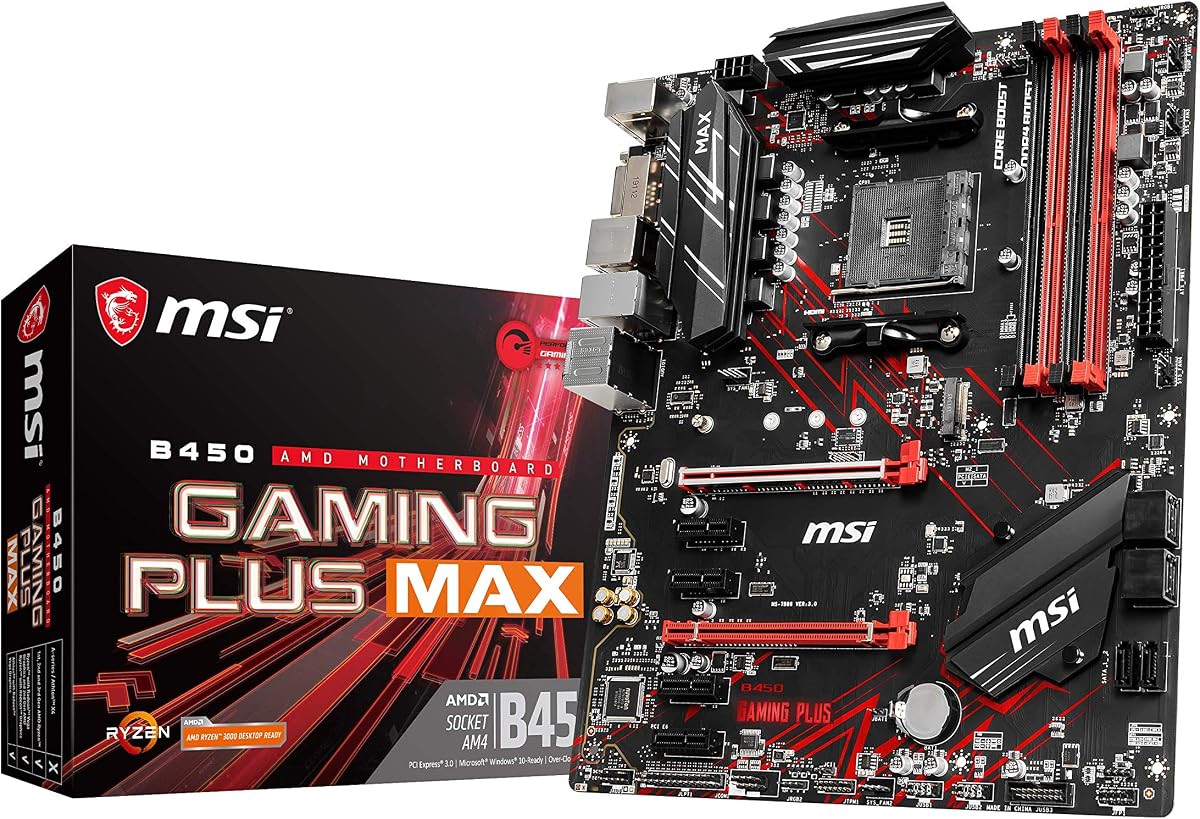
The MSI Performance Gaming B450 Gaming Plus Max is a budget friendly option. It supports multiple Ryzen generations ensuring flexibility for upgraders. Its high rating shows solid reliability for everyday tasks.
We may earn a commission when you buy through this link, at no additional cost to you.
This board delivers core features well. Turbo M.2 offers fast storage access and DDR4 Boost ensures stable memory speeds. The Audio Boost feature provides decent sound for casual gaming.
It lacks modern PCIe 4.0 support which limits future storage speeds. But for those on a strict budget the value and stability are hard to ignore.
Best for entry level builds. This board is a solid choice if you need a reliable platform for Ryzen 2 or 3rd gen without extra cost.
Turbo M.2 ensures your SSD runs at optimal read write speeds.
DDR4 Boost delivers pure signals for better memory performance.
We may earn a commission when you buy through this link, at no additional cost to you.
The MSI Performance Gaming B450 Gaming Plus Max offers a strong alternative for budget builds. It supports Storemi technology to optimize storage performance using system RAM. Its high rating reflects consistent performance.
We may earn a commission when you buy through this link, at no additional cost to you.
This board focuses on essential gaming features. CrossFire support allows for dual GPU setups which is useful for specific rendering tasks. The Turbo M.2 slot ensures your boot drive runs fast.
It lacks modern WiFi or PCIe 4.0 support. But for a dedicated wired gaming system the stability and low price make it a viable choice.
Best for value focused gamers. This board is recommended if you need a reliable base for Ryzen 2 or 3rd gen without paying for unused features.
Storemi technology uses system RAM to speed up your SSD.
CrossFire support allows for adding a second graphics card for power.
We may earn a commission when you buy through this link, at no additional cost to you.
Selecting the right motherboard requires balancing budget, features, and CPU compatibility. This guide breaks down the key factors to consider before buying.
The X470 chipset supports dual GPU setups and offers robust connectivity options like M.2 slots. Ensure the board has enough USB ports for your peripherals.
Check if you need PCIe 4.0 for next gen storage. X470 lacks this so consider B550 if speed is a priority.
Power delivery is critical for stable overclocking. Look for boards with at least 8 phases to handle Ryzen 7 or 9 processors safely.
A robust VRM ensures your CPU receives clean power under heavy loads which extends hardware life.
Many modern boards come with integrated WiFi. If you prefer cables ensure you have a gigabit ethernet port at a minimum.
Consider if you need 2.5Gb LAN for faster local network transfers especially if you use high speed storage.
Standard ATX boards offer more slots while Micro-ATX save space. Choose based on your case size and expansion needs.
A smaller board limits expansion so plan for GPU and card needs before selecting the form factor.
Audio codecs vary between boards. High end models include DACs for better sound quality which is ideal for audiophiles.
Check the HDMI or DisplayPort versions if you plan to use the iGPU for troubleshooting or secondary display.
Look for BIOS Flashback features that allow updates without a CPU. This is vital if you buy a new CPU later.
A user friendly BIOS interface helps you adjust settings like fan curves and overclocking easily.
RGB headers allow you to sync lighting across components. If you build a visible case check for addressable Gen 2 support.
Decide if you prefer a plain look or a flashy RGB aesthetic before purchasing to avoid extra costs.
Prices vary significantly. A budget board may lack WiFi but still deliver great performance for gaming.
Assess which features you actually use to avoid paying for premium extras that you do not need.
Always handle the motherboard by the edges to avoid static damage. Use an anti-static wrist strap when installing components.
Keep your BIOS updated to the latest version for better CPU compatibility and security patches.
Ensure proper airflow in your case to keep VRM heatsinks cool during heavy gaming sessions.
Yes the X470 chipset supports Ryzen 3000 series with a BIOS update. Some models also support Ryzen 5000 series for future proofing.
Yes B550 boards are required for PCIe 4.0 storage support. X470 boards are limited to PCIe 3.0 speeds for storage.
Yes many X470 boards support Ryzen 5000 after a BIOS update. Always check manufacturer compatibility lists before buying.
BIOS Flashback lets you update firmware using a USB drive without a CPU installed. It is useful for new CPU compatibility.
No WiFi is not standard on all X470 boards. Look for models with 'WiFi' in the title if you need wireless connectivity.
Most X470 boards offer two M.2 slots. If you need more storage check models with additional headers or add-on cards.
We have reviewed ten top choices ranging from budget friendly picks to premium options. The GIGABYTE X470 AORUS Gaming 7 WIFI stands out for its robust power delivery.
Prioritize your specific needs like WiFi or PCIe 4.0 before buying. A balanced selection ensures you get the right features for your build.
Always check current prices as they fluctuate frequently. Verify the latest specs on the retailer site before making your final decision.