
External PC Power Button Wireless Remote
4.5Editor score
Wireless remote control
50 feet range
No software required
Finding the right external PC power button can transform how you interact with your desktop computer. Whether your case is hidden under a desk or in a tight corner, an external switch brings control to your fingertips.
We compared ten highly rated products based on compatibility, cable length, ease of installation, and extra features like USB hubs or wireless remotes. Each option offers unique benefits for different user needs and setup constraints.
Every pick below highlights key specs, pros, cons, and real-world use cases. Note that prices and availability change frequently, so check current listings before making your final decision for your specific build requirements.
4.5Editor score

4.6Editor score

4.3Editor score
As an Amazon Associate we earn from qualifying purchases.
The following table provides a side-by-side comparison of all ten selected external power buttons. Review the key specifications and features to quickly identify which model aligns best with your specific desktop setup needs.

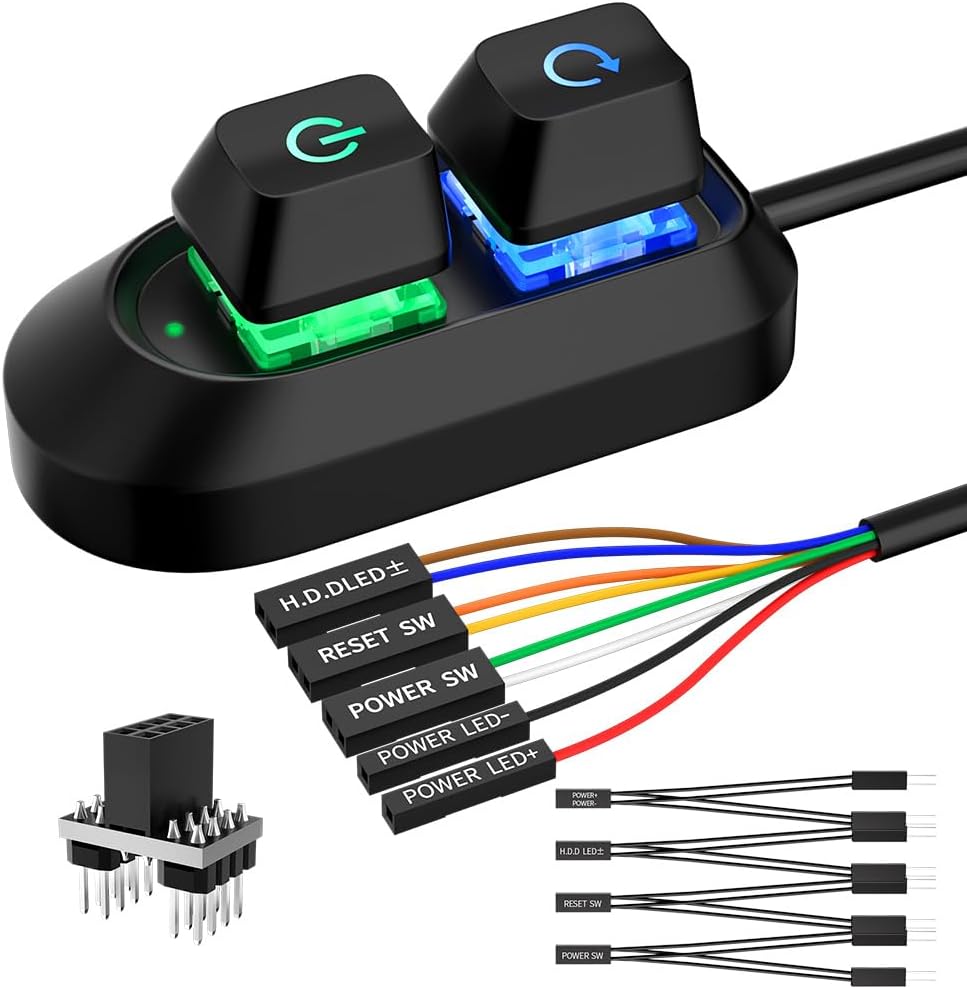




This external PC power button stands out with its impressive 118-inch cable, making it ideal for setups where the tower is far from your desk. It holds a solid 4.6 rating and offers dual switch capabilities via a splitter board.
We may earn a commission when you buy through this link, at no additional cost to you.
The standard 4-pin connector ensures compatibility with 90% of ATX motherboards. Installation is straightforward with included 3M adhesive stickers, allowing you to place the switch on any flat surface without drilling.
While the long cable provides flexibility, it can be slightly bulky for tight cable management. However, the included splitter allows you to keep your original chassis button functional alongside the new external one.
Anyone needing remote control access to a PC under a desk or in a rack will find this the best choice. Its balance of reach and functionality makes it our top recommendation for most users.
The 118-inch cable allows placement virtually anywhere in a room, perfect for hidden PCs or industrial setups.
Use the included splitter to operate both the new external button and the original case button simultaneously.
We may earn a commission when you buy through this link, at no additional cost to you.
This model offers a comprehensive set of features at a competitive price point. With a 2-meter cable and included reset switch functionality, it covers the basics well for most standard desktop configurations.
We may earn a commission when you buy through this link, at no additional cost to you.
The inclusion of an HDD LED support adds a nice touch for visual feedback on disk activity. The splitter cable ensures you can integrate it without losing the original front panel functionality.
While it lacks the extreme length of other options, the 2-meter range is sufficient for under-desk placements. It is a reliable choice for users who want more than just power control.
Ideal for home users and computer labs where cost and functionality balance is key. It provides all necessary connections without unnecessary complexity or high cost.
Built-in reset switch allows easy system restarts without needing to open the case or use software commands.
The HDD LED lights up during disk activity, providing useful status information for monitoring system performance.
We may earn a commission when you buy through this link, at no additional cost to you.
Custom builds often require flexible component placement. This button accommodates unique chassis designs with its extensive cable length, allowing power control from virtually any location within the room.
We may earn a commission when you buy through this link, at no additional cost to you.
The adapter 4-pin connector matches standard headers, making it easy to integrate into custom wiring setups. It is specifically recommended for water-cooled chassis and bare board machines.
While the length offers freedom, proper cable management is essential to avoid clutter. The adhesive mount ensures stability even on angled or textured surfaces common in custom cases.
Recommended for enthusiasts and DIY builders who prioritize aesthetics and custom layouts. Its adaptability makes it a top contender for specialized workstation configurations.
Designed to work with open-air test benches and bareboard setups where traditional case buttons are absent.
The adhesive stickers allow mounting on desks, panels, or walls, giving you total control over placement.
We may earn a commission when you buy through this link, at no additional cost to you.
If aesthetics are a priority, this OwlTree option stands out with its exquisite acrylic construction. It boasts the highest rating in our selection at 4.8 stars, reflecting high user satisfaction.
We may earn a commission when you buy through this link, at no additional cost to you.
The design is concise and practical, fitting well with modern desk setups. It includes essential features like boot, restart, and HDD indicator lights to provide full control.
While the 1.6-meter cable is shorter than some alternatives, it is sufficient for most standard desk configurations. The build quality justifies the slight difference in length.
Choose this if you want a switch that looks as good as it performs. It is perfect for clean, minimalist builds where visual appeal matters.
Users consistently praise the build quality and ease of use, resulting in an outstanding 4.8 star rating.
The acrylic material provides a premium look that complements high-end desktop environments perfectly.
We may earn a commission when you buy through this link, at no additional cost to you.
This switch adds a touch of visual flair with its 7-color breathing LED effect. It brings style to functional components without needing complex software or configuration settings.
We may earn a commission when you buy through this link, at no additional cost to you.
The safe low-voltage design ensures consistent performance without risking your system. It is a reliable choice for under-desk mounts where a clean glow enhances the setup.
While the RGB is limited to a breathing pattern, it adds a modern feel to the build. The 2-meter cable provides ample length for routing behind a standing desk.
Gaming setups benefit greatly from this feature. It is an excellent choice for users who want visual customization in their power control hardware.
The LED effect activates immediately upon connection, requiring no additional software or BIOS settings to function.
Engineered to operate safely within standard ATX power specifications to protect your motherboard from damage.
We may earn a commission when you buy through this link, at no additional cost to you.
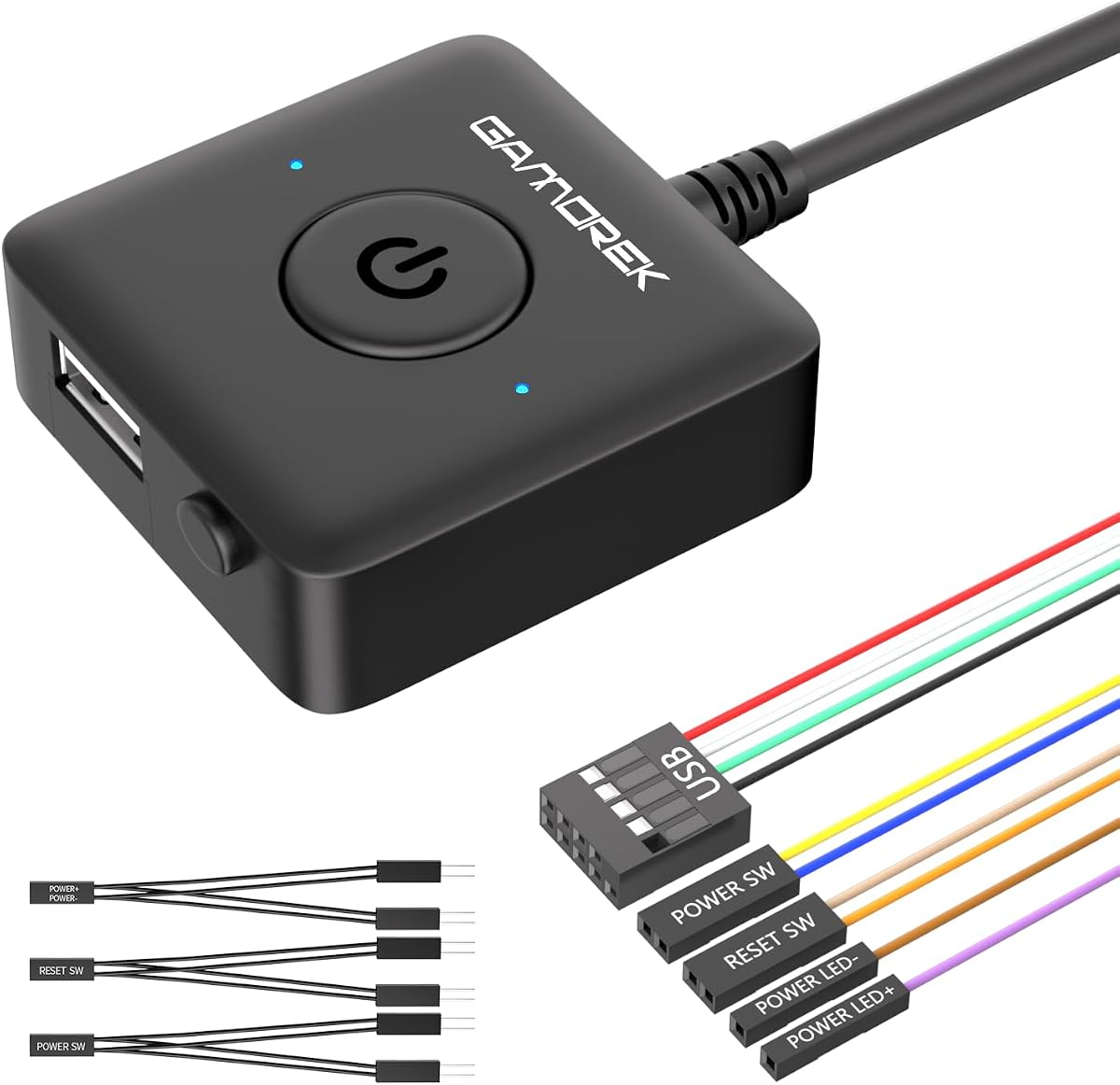
This model offers distinct utility by including USB functionality. It connects to a 9-pin USB 2.0 header to extend easy-access USB ports, perfect for flash drives or keyboards.
We may earn a commission when you buy through this link, at no additional cost to you.
The included PCI bracket helps keep desktop builds organized by allowing secure mounting. It combines power control with connectivity expansion for a multi-functional solution.
With a high 4.7 rating, users appreciate the added convenience. It solves the issue of hard-to-reach rear USB ports by bringing them to your desk.
Ideal for users who need quick access to peripherals. This switch is particularly useful for test benches where frequent device swapping is common.
Connects to motherboard USB headers to provide front-facing USB access for flash drives, card readers, and mice.
The bracket enables secure installation in ATX and MATX cases, preventing the switch from sitting loosely.
We may earn a commission when you buy through this link, at no additional cost to you.
This premium option combines power control with a 4-port USB 3.0 hub. It delivers high-speed data transfer rates, making it a valuable tool for professional workstations and industrial use.
We may earn a commission when you buy through this link, at no additional cost to you.
The design is compact yet functional, saving desk space by combining multiple needs. It is plug-and-play, meaning no drivers or software are needed to operate the USB ports.
The 1.2-meter cable is shorter than others, but acceptable for desk-mounted hubs. It provides convenience for connecting high-speed peripherals like external SSDs.
Best for professionals who need reliable USB access. It is a top premium choice for setups where data speed and port availability are critical.
Supports data transfer rates up to 5Gbps for fast file transfers and responsive peripheral connections.
Combines power switch and USB hub in one device, reducing cable clutter and saving valuable desk space.
We may earn a commission when you buy through this link, at no additional cost to you.
Weighing only 1 ounce, this is the most portable switch available. Its compact 2.1cm size makes it ideal for tight spaces where a larger button would be intrusive.
We may earn a commission when you buy through this link, at no additional cost to you.
The 2-meter cable ensures good range despite the small button size. It comes with clear instructions to simplify installation even for less experienced builders.
While minimal in design, it performs its primary function reliably. The strong adhesive plate ensures the small unit stays securely in place.
Perfect for minimalists or portable setups where size matters. It delivers high performance in the smallest possible footprint.
At just 1 ounce, this switch is virtually unnoticeable, perfect for delicate or temporary builds.
Measuring just 2.1cm x 2.1cm, it fits easily in tight spots without interfering with other components.
We may earn a commission when you buy through this link, at no additional cost to you.
This option features a premium aluminum construction that ensures long-term durability. It is built to withstand frequent use in busy environments like computer labs and gaming lounges.
We may earn a commission when you buy through this link, at no additional cost to you.
It includes a full suite of features like RESET and HDD LEDs. The included splitter board ensures compatibility with existing chassis controls without removing the original button.
The weight is slightly higher than plastic versions, adding to the premium feel. This robust build protects against accidental drops or wear over time.
Choose this for industrial or heavy-use scenarios. Its durability makes it a smart long-term investment for demanding setups.
Aluminum housing resists wear and tear, making it suitable for commercial and high-frequency use environments.
Includes headers for power, reset, and hard drive indicators for comprehensive system control on one unit.
We may earn a commission when you buy through this link, at no additional cost to you.
This unique option allows full control via a wireless remote. The PCIe receiver board connects directly to your motherboard, enabling a true cable-free power experience.
We may earn a commission when you buy through this link, at no additional cost to you.
The 50-foot range allows you to control your PC from across the room. You can short press to power on or long press to safely shutdown your system.
Installation requires an available PCIe slot and a BIOS setting change. This might be a hurdle for some, but the freedom it offers is unmatched.
Best for users wanting ultimate convenience. It is the ultimate solution for media centers or remote-controlled workstation setups.
Eliminates the need for long cables by using a wireless remote to control your PC from anywhere in the room.
Uses short presses to turn on and long presses for shutdown, mimicking modern mobile device functionality.
We may earn a commission when you buy through this link, at no additional cost to you.
Selecting the right switch requires understanding your physical setup and specific needs. This guide breaks down the key factors to consider before buying.
Cable length dictates how far you can place the button from the PC case. Options range from 1.2 meters to 118 inches. Measure your distance accurately to ensure the chosen switch can reach your desired location comfortably.
Always choose a cable length that exceeds your measured distance to allow for routing and cable management.
Most switches use standard 4-pin connectors compatible with ATX headers. Ensure your motherboard has the necessary pins for power and optional LEDs. If your motherboard is custom, verify pin layout before purchasing.
Check your motherboard manual to confirm JFP1 or front panel header pinouts for successful installation.
Some switches offer extra features like reset buttons, HDD LEDs, or USB ports. Consider if you need these functions or just simple power control. More features mean better utility but potentially higher cost.
Prioritize essential functions like reset if you frequently restart your system without accessing the OS.
Mounting options include adhesive stickers or PCI brackets. Adhesive stickers work on flat surfaces like desks, while brackets suit case installations. Ensure your chosen method matches your intended location.
Strong 3M adhesive ensures the switch stays in place even on textured desk surfaces.
Materials vary from plastic to acrylic and aluminum. Metal builds offer better durability, while plastic is lighter. Consider where the switch will be placed to decide on the best material for your needs.
Choose aluminum for heavy-use environments and plastic for lightweight desk setups.
LED lights provide visual feedback on system status. Power LEDs confirm boot status, while HDD LEDs show disk activity. RGB options add customization but require compatible power connections.
Ensure your motherboard headers support LED outputs if you want visual indicators.
Splitter boards allow you to keep the original front panel button working. This is useful if you want dual control options. Check if the product includes a splitter to avoid extra purchases.
Look for included 1-to-2 splitters to maintain original functionality alongside your new switch.
Wireless models use PCIe receivers for true cable-free operation. They offer maximum range but require internal installation. Only choose this if you have an available slot and are comfortable with internal setup.
Wireless options are best for media centers where cable routing is impossible or undesirable.
First, shut down your PC and unplug it from the power source before beginning installation. Locate the JFP1 or front panel header pins on your motherboard to identify where to connect the switch.
Connect the wires to the corresponding headers, ensuring polarity matches for LEDs. Secure the button in place using the adhesive sticker or bracket provided. Plug the PC back in and test the button to confirm functionality.
For maintenance, avoid exposing the switch to water or excessive force. Regularly check that the adhesive or bracket is secure and that cables are not pinched to ensure long-term reliable operation.
Yes, an external button can replace the original if the original is damaged. You simply route the wires from the new switch to the motherboard headers. However, most users prefer using a splitter to keep both functional.
No, most external buttons work via hardware connections and do not require software. Wireless models might need BIOS settings but generally operate plug-and-play without complex configurations.
If the adhesive fails, the switch may become loose. Use a stronger double-sided adhesive or a bracket mount to secure it firmly. Ensure the surface is clean before re-applying adhesive for better hold.
No, these switches are designed for desktop motherboard headers. Laptops do not have standard 4-pin front panel connectors, making external buttons incompatible with portable devices.
Reaches vary from 1.2 meters to over 118 inches. Check the product specifications for exact cable length. If you need more, you may use extension cables depending on the model.
Yes, pressing the power button is safe as long as you avoid rapid repeated pressing. Most switches are designed for standard power-on and power-off cycles. Avoid holding it down excessively unless shutting down.
No, most switches connect directly to motherboard headers. Only wireless models require a PCIe slot for the receiver board. Wired models only need access to the front panel pins.
Check the connection polarity on the motherboard headers. Ensure the LED pins are connected correctly as per the manual. Incorrect polarity will prevent the LEDs from lighting up even if power works.
We reviewed ten top external power buttons ranging from budget-friendly wired options to premium wireless models. Each choice offers unique benefits tailored to different setup challenges and user preferences.
Prioritize cable length and compatibility when choosing. Ensure the switch fits your physical needs and motherboard setup. A well-matched button significantly improves daily access to your computer.
Prices and availability are subject to change. Always verify current listings and specifications before purchasing. With the right button, you gain the control and convenience your desktop setup deserves.