
Dell SE2426HG
4.7Editor score
240Hz Refresh Rate
0.5ms Response Time
FreeSync Premium Support
Finding the right 24 inch G Sync monitor is crucial for gamers who demand smooth visuals without screen tearing. These displays combine high refresh rates with adaptive sync technology to ensure every frame renders precisely when your graphics card outputs it. Whether you compete in esports or enjoy immersive single-player campaigns, this specific size offers a perfect balance of desk space and pixel density.
We evaluated ten leading models based on their panel technology, refresh rates, and compatibility with NVIDIA G Sync and AMD FreeSync. Our analysis focuses on real-world performance metrics like response time and color gamut coverage alongside practical features such as ergonomic stands and connectivity ports. Each product was selected for its ability to deliver a tear-free experience across various budget points and use cases.
Each pick highlights specific strengths such as ultra-fast refresh rates or vibrant color reproduction to help you match a monitor to your needs. We detail the pros and cons of every option so you can make an informed decision without visiting multiple retailer pages. Please note that availability and model variations may change over time so always verify current specifications before purchasing.
4.7Editor score

4.5Editor score

4.4Editor score
As an Amazon Associate we earn from qualifying purchases.
The following table provides a side-by-side comparison of all ten selected monitors highlighting their key specifications and standout features for quick reference.


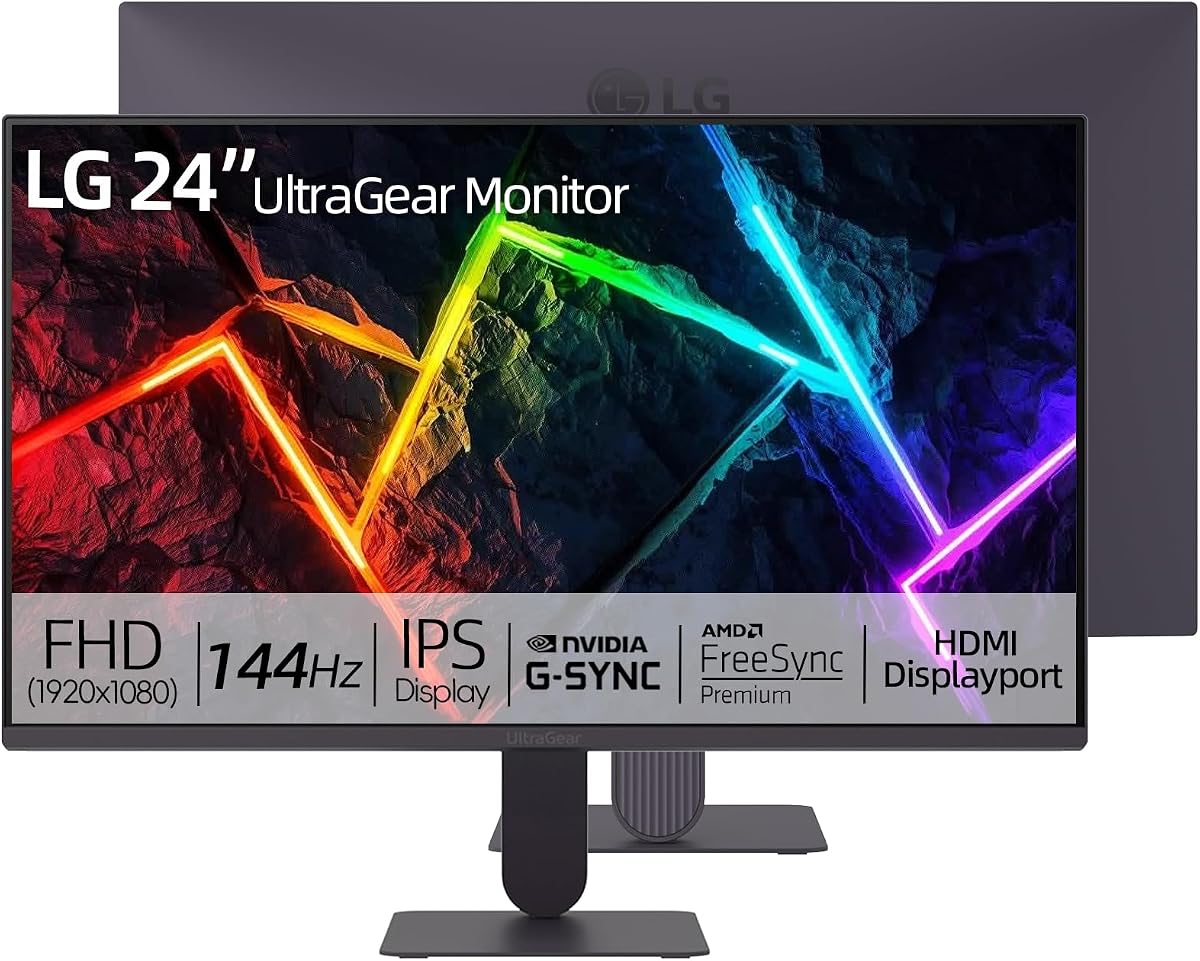


The LG 24G411A-B stands out as a compelling choice for gamers seeking a balanced 24 inch G Sync monitor. With a 4.5 rating from users it delivers solid performance across competitive and casual gaming scenarios. Its IPS panel ensures rich colors while the adaptive sync features keep visuals smooth during intense action.
We may earn a commission when you buy through this link, at no additional cost to you.
This monitor excels with its 144Hz overclocked refresh rate and 1ms motion blur reduction which significantly sharpens fast moving visuals. The inclusion of both NVIDIA G Sync Compatible and AMD FreeSync technology means it pairs well with various graphics cards. HDR10 support and 99% sRGB coverage add depth and vibrancy to games and media consumption.
While the stand lacks height adjustment which limits ergonomic customization the slim bezel design minimizes distractions. The Dynamic Action Sync feature helps reduce input lag ensuring your commands register quickly. These trade-offs are acceptable given the price point and the overall fluidity of the gaming experience it provides.
Competitive players and general gamers alike will appreciate the reliable tear-free performance and vivid image quality. If you want a monitor that handles high refresh rates without breaking the bank this model is highly recommended. It offers a great entry point into G Sync compatible displays with strong visual fidelity.
The combination of 144Hz refresh and IPS technology ensures fluid motion and accurate color reproduction for immersive gameplay.
Support for both G Sync and FreeSync allows compatibility with a wide range of NVIDIA and AMD graphics solutions.
We may earn a commission when you buy through this link, at no additional cost to you.
The Dell SE2426HG offers exceptional value for gamers prioritizing refresh rate and response time on a budget. With a high user rating it provides a smooth gaming experience thanks to its 240Hz refresh rate and 0.5ms response time. This makes it ideal for fast-paced shooters where every millisecond counts.
We may earn a commission when you buy through this link, at no additional cost to you.
Its Fast IPS panel delivers excellent color accuracy and wide viewing angles which is rare at this price point. FreeSync Premium and HDMI VRR ensure that gameplay remains smooth and tear-free without needing expensive NVIDIA hardware. The TüV Rheinland 3-Star certification indicates a focus on eye comfort during long gaming sessions.
The stand is tilt only which restricts positioning flexibility compared to more expensive models. However the performance metrics and color quality easily outweigh this limitation for most users. It remains a strong candidate for those seeking high speed visuals without overspending on unnecessary features.
Budget-conscious competitive gamers will find this monitor delivers premium performance features at an affordable price. The 240Hz refresh rate provides a tangible advantage in esports titles. If you need a reliable display for competitive play this model is a top choice for value.
The 240Hz refresh rate and 0.5ms response time deliver ultra-smooth motion that is critical for competitive gaming.
TüV certification ensures reduced blue light exposure helping to minimize eye strain during extended use.
We may earn a commission when you buy through this link, at no additional cost to you.
The ASUS TUF VG249QML5A is a premium option designed for serious gamers who demand the best performance. It boasts a 240Hz refresh rate and an incredibly fast 0.3ms minimum response time ensuring minimal motion blur. The height adjustable stand adds ergonomic flexibility which is crucial for long sessions.
We may earn a commission when you buy through this link, at no additional cost to you.
ASUS Extreme Low Motion Blur Sync technology allows you to enable motion blur reduction alongside adaptive sync. This unique feature provides sharper visuals in high frame rate games without sacrificing the benefits of G Sync compatibility. The 99% sRGB coverage ensures accurate colors for both gaming and content creation.
The main trade-off is the higher cost compared to other monitors in this guide. Additionally some users may experience minor lag in the OSD menu system. However the build quality and warranty coverage justify the investment for those seeking top-tier competitive performance and reliability.
Enthusiasts and professionals who need precision and versatility will appreciate this monitor's feature set. The inclusion of a three-month Adobe subscription adds extra value for creatives. If you want the fastest response times available in a 24 inch G Sync monitor this is the one to choose.
This technology enables motion blur reduction while maintaining variable refresh rate for crisp visuals without tearing.
The included Adobe Creative Cloud subscription offers additional value for users who also create content.
We may earn a commission when you buy through this link, at no additional cost to you.
The LG 24G414B-B offers a robust gaming experience with a mix of performance and ergonomic features. Its 144Hz refresh rate and 1ms MBR provide smooth visuals that keep up with most modern games. The height adjustable stand sets it apart from similar budget options offering better comfort.
We may earn a commission when you buy through this link, at no additional cost to you.
Integrated stereo speakers and a headphone jack provide convenient audio solutions without needing external hardware. This is useful for quick gaming sessions or media consumption. The G Sync Compatible feature ensures smooth gameplay when paired with NVIDIA graphics cards while AMD users can utilize FreeSync.
While 144Hz is now standard for gaming monitors the inclusion of height adjustment is a nice touch. HDR10 support is present but may not deliver dramatic improvements over SDR content. Overall this monitor balances cost and features effectively for a wide range of users.
Users looking for an ergonomic monitor without overspending should consider this model. The added convenience of built-in audio and adjustable height makes it practical for daily use. It is a solid choice for those who value usability alongside gaming performance.
The height adjustable stand allows users to position the screen at the optimal level for neck comfort.
Built-in stereo speakers offer a quick solution for sound without requiring extra desk space.
We may earn a commission when you buy through this link, at no additional cost to you.
This ASUS TUF Gaming monitor pushes the boundaries of speed with a 200Hz refresh rate and 0.3ms response time. It is designed for users who want competitive advantage without moving to higher resolutions. The anti-glare matte finish helps reduce reflections in bright rooms.
We may earn a commission when you buy through this link, at no additional cost to you.
Its compatibility extends beyond Windows PCs to Mac and Linux systems making it versatile for different workflows. The 99% sRGB color gamut ensures vivid and consistent visuals across media. G Sync and FreeSync Premium support guarantees smooth performance regardless of your graphics card brand.
The lack of extensive rating data makes some performance aspects hard to verify but specs look promising. The stand offers only tilt adjustment which might require a separate mount for full ergonomic flexibility. These factors should be weighed against the impressive refresh rate.
Tech-savvy gamers and hybrid workers will benefit from the high refresh rate and broad system compatibility. The anti-glare finish is a practical touch for various lighting conditions. If you prioritize speed and versatility this monitor is a strong contender in the market.
200Hz refresh rate combined with 0.3ms response time ensures extremely smooth and sharp motion.
Support for multiple operating systems like Mac and Linux increases its utility across different devices.
We may earn a commission when you buy through this link, at no additional cost to you.
With a 4.9 rating this LG monitor is one of the highest rated options in this roundup. It delivers a visually stunning experience with its 144Hz overclocked refresh rate and 99% sRGB coverage. The high satisfaction among users suggests consistent quality and reliability.
We may earn a commission when you buy through this link, at no additional cost to you.
The ultra-slim bezel design creates an immersive viewing experience that draws you into the game. G Sync Compatible and FreeSync features ensure that gameplay remains fluid without stuttering or tearing. Tilt adjustment allows for basic positioning but VESA mounting offers more flexibility.
The absence of built-in speakers is a minor drawback but many gamers prefer external audio setups anyway. The focus on visual performance and build quality is evident in the design. This model is a safe choice for those prioritizing display quality.
Highly rated monitors like this one are often the result of consistent manufacturing and solid features. If you want peace of mind and excellent visual performance this monitor is a top choice. It is particularly well suited for players who value color accuracy and smooth motion.
Slim bezels and a wide color gamut create a vibrant and immersive gaming environment.
A 4.9 rating indicates that most buyers are pleased with the performance and build quality.
We may earn a commission when you buy through this link, at no additional cost to you.
Achieving a perfect 5.0 rating this LG model impresses with its combination of gaming features and build quality. The 144Hz overclocked refresh rate provides smooth visuals that keep up with fast action. Gaming tools like Black Stabilizer and Crosshair give players an edge.
We may earn a commission when you buy through this link, at no additional cost to you.
The 99% sRGB color coverage ensures that images look vibrant and true to life. G Sync Compatible and FreeSync technologies work seamlessly to eliminate screen tearing during intense gameplay. The slim design and tilt adjustable stand fit well in most setups.
While stand ergonomics are basic the overall performance and user satisfaction ratings suggest a great experience. The specialized gaming tools are useful additions for FPS players seeking accuracy. It represents a strong value for gamers wanting reliability.
Users looking for a highly rated monitor with useful gaming enhancements should look closely at this model. The consistent positive feedback indicates a well-engineered product. It is an excellent choice for those who value visual performance and practical gaming features.
Black Stabilizer and Crosshair features provide visual aids that improve performance in competitive shooters.
99% sRGB coverage ensures accurate and vivid colors for both gaming and creative work.
We may earn a commission when you buy through this link, at no additional cost to you.
This ASUS monitor brings 200Hz refresh rate and 0.3ms response time to competitive gaming. It ensures ultra-smooth gameplay with minimal input delay which is essential for fast-paced titles. The inclusion of eye care technologies helps reduce strain during long sessions.
We may earn a commission when you buy through this link, at no additional cost to you.
With 99% sRGB coverage the display offers vibrant and accurate colors that enrich the visual experience. Multiple connection ports including HDMI 2.0 and DisplayPort 1.4 make it compatible with various devices. ELMB Sync technology further minimizes ghosting during high frame rate gaming.
Availability and user ratings may vary so checking current listings is advisable before buying. The tilt only stand might require an aftermarket solution for full height adjustment. Despite this the performance specs are compelling for those seeking speed.
Gamers who prioritize refresh rate and response time will find this monitor well suited for esports. The added eye comfort features are a thoughtful touch for daily use. It is a strong contender for those building a competitive gaming setup.
200Hz refresh and 0.3ms response time create a smooth and responsive experience for competitive play.
Low blue light and flicker-free technologies help protect eyes during extended usage.
We may earn a commission when you buy through this link, at no additional cost to you.
This model earns another perfect 5.0 rating in our roundup for its balanced feature set and performance. The 144Hz refresh rate ensures fluid motion while 99% sRGB delivers vivid visuals. It serves well for gaming and multitasking thanks to screen partitioning options.
We may earn a commission when you buy through this link, at no additional cost to you.
Gaming grade tools like Black Stabilizer and Crosshair assist improve visibility and accuracy in games. The slim bezel design reduces distractions and creates a cleaner look on the desk. G Sync Compatible and FreeSync support provide a seamless gaming experience across GPU brands.
While the stand lacks height adjustment the tilt feature and VESA mounting provide some flexibility. The focus on user satisfaction is clear in the high rating. It is a versatile choice for gamers who also use their PC for work.
If you want a monitor that performs well in both gaming and productivity scenarios this is a great pick. The consistent positive feedback suggests it is reliable and well built. Consider this for a setup that requires adaptability.
Screen partitioning and customizable layouts help boost efficiency when using the monitor for work.
Specialized tools enhance visibility and accuracy in gaming scenarios.
We may earn a commission when you buy through this link, at no additional cost to you.
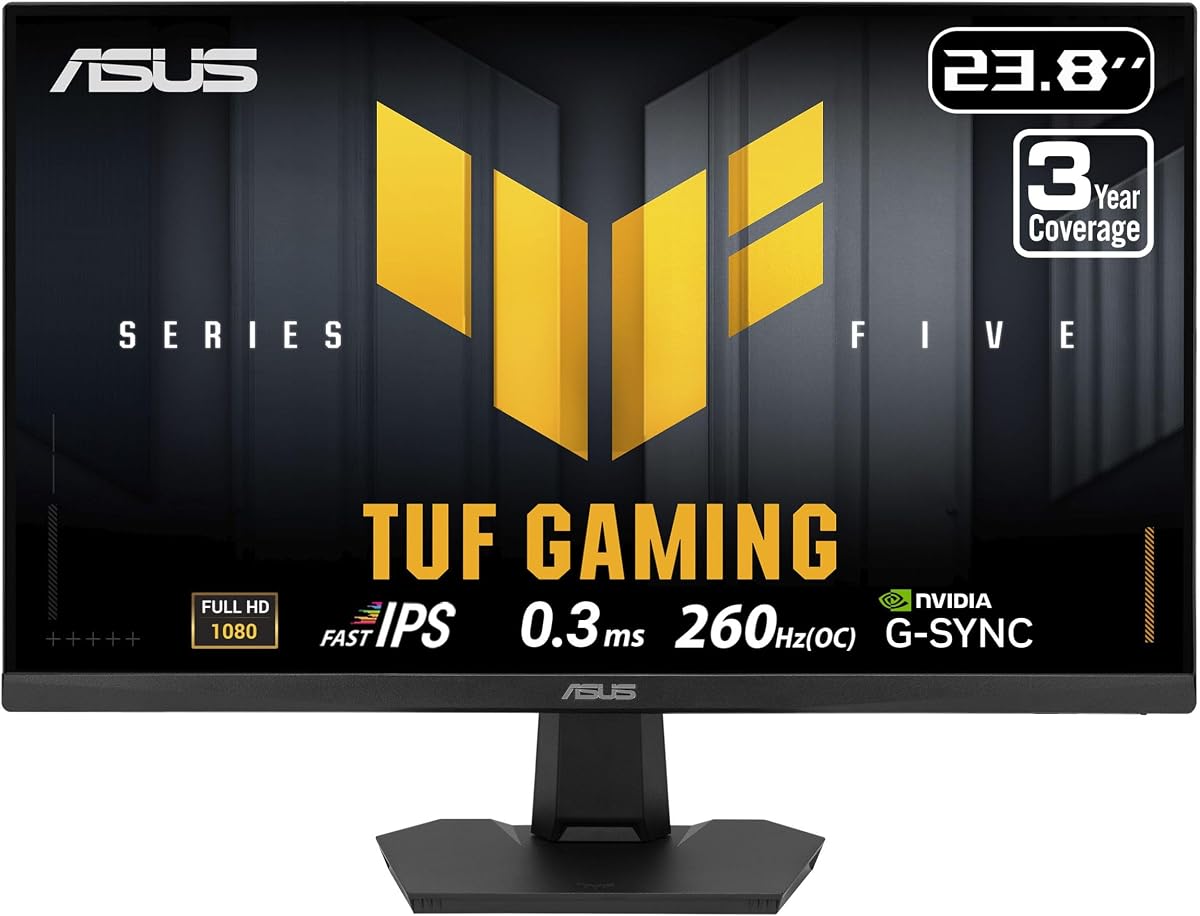
The ASUS TUF VG249QM5F leads the pack with a blazing 260Hz refresh rate for extreme smoothness. It is designed for competitive gamers who want the fastest possible response. ELMB Sync ensures clear motion and low latency without tearing.
We may earn a commission when you buy through this link, at no additional cost to you.
AI gaming features like Shadow Boost and GamePlus enhance the visual experience and gameplay utility. Built-in 2W stereo speakers offer convenience for sound while the comprehensive warranty provides long-term reliability. The 99% sRGB coverage delivers vibrant visuals for games.
The main limitations are the basic stand and potential availability constraints compared to other models. However the performance specs are unmatched in this list for pure refresh rate. It is a strong choice for enthusiasts chasing speed.
If you prioritize raw speed and high frame rates this monitor stands out as a top performer. The warranty and bonus software add value to the purchase. Consider this for a dedicated competitive gaming setup.
260Hz refresh rate offers the smoothest possible visual experience for competitive gaming.
AI tools like Shadow Boost enhance gameplay visibility and utility.
We may earn a commission when you buy through this link, at no additional cost to you.
Selecting the right monitor involves balancing performance metrics and practical features to fit your specific needs.
The refresh rate determines how many times per second the image updates on the screen. Higher rates like 144Hz or 240Hz provide smoother motion and reduce blur which is critical for fast-paced gaming. Look for native high refresh rates rather than relying on overclocking which may affect stability.
Prioritize a refresh rate that matches your GPU capabilities to avoid wasted performance or visual stuttering.
Response time measures how quickly a pixel changes color impacting motion clarity. Lower response times in the 0.3ms to 1ms range minimize ghosting and blur in action scenes. A faster response ensures that moving objects stay sharp and detailed.
Aim for monitors with low response times to maintain visual accuracy during competitive play.
Adaptive sync technologies like G Sync and FreeSync synchronize the monitor with the graphics card to eliminate tearing. NVIDIA G Sync is more expensive while AMD FreeSync offers a cost-effective alternative. G Sync Compatible is a middle ground validated by NVIDIA for broader compatibility.
Ensure the monitor supports the sync technology compatible with your graphics card for tear-free gameplay.
IPS panels offer wide viewing angles and accurate colors which are ideal for gaming and creative work. VA panels provide better contrast but can suffer from slow response times. TN panels are fast but lack color fidelity and viewing angles.
IPS panels are generally recommended for their balance of color accuracy and speed.
An ergonomic stand with height and tilt adjustment helps maintain a comfortable viewing posture. Proper positioning reduces strain on your neck and back during long sessions. Monitors with VESA mount compatibility allow you to use third-party arms for greater flexibility.
Invest in ergonomic features or VESA mounts to protect your posture during extended use.
Check the available ports to ensure compatibility with your PC and peripherals. HDMI and DisplayPort are standard with DisplayPort often supporting higher refresh rates. Multiple ports are useful if you plan to connect a console or other devices.
Verify that the monitor includes the necessary ports for your preferred connection setup.
Color gamut coverage like 99% sRGB ensures that images appear vibrant and true to life. This is important for gaming immersion and content creation tasks. HDR support can add depth to visuals though true HDR depends on peak brightness.
Look for high sRGB coverage and HDR support to enhance visual quality.
Features like Black Stabilizer and Crosshair assist help players spot enemies in dark areas or aim accurately. These tools can provide a competitive edge in shooter games. Check if the monitor offers such enhancements if you play FPS titles.
Consider specialized gaming tools if you play competitive shooters and need extra visibility.
To set up your monitor properly connect it using the recommended cable such as DisplayPort 1.4 for high refresh rates. Ensure your graphics card drivers are updated to support adaptive sync features like G Sync Compatible. Navigate the on-screen menu to enable these features and calibrate brightness to your room lighting.
Clean the screen gently with a soft microfiber cloth to avoid scratches or smudges. Avoid using harsh chemicals that might damage the panel coating. Keep the stand stable and avoid placing heavy objects on the monitor to prevent physical damage.
Adjust the tilt and height to align the center of the screen with your eye level for comfort. Enable any eye-care modes like low blue light if you game for extended periods. Regularly check for firmware updates from the manufacturer to maintain performance and stability.
NVIDIA G Sync Compatible is a subset of FreeSync technology that has been validated by NVIDIA. It allows FreeSync monitors to work with NVIDIA graphics cards without the proprietary G Sync module. This ensures adaptive sync functionality and tear-free gaming across both AMD and NVIDIA platforms.
Yes to achieve high refresh rates like 240Hz or 260Hz you typically need a DisplayPort 1.4 cable. HDMI 2.0 or higher cables may support lower refresh rates depending on the bandwidth. Always check the manual for the minimum cable requirements.
First ensure your monitor supports G Sync Compatible or has G Sync built in. Then open the NVIDIA Control Panel and navigate to Set up G Sync. Check the box for Enable G Sync and select your display model to activate the feature.
144Hz provides a significant improvement over 60Hz for competitive gaming with smooth motion. However higher rates like 240Hz offer even greater fluidity which can help in fast-paced shooters. Ultimately the GPU must be powerful enough to push these higher frame rates.
Response time indicates how quickly pixels change color with lower values reducing ghosting and motion blur. A 0.3ms response is faster than 1ms providing sharper images during rapid movement. This difference is more noticeable in high refresh rate competitive scenarios.
Yes if the monitor supports AMD FreeSync or FreeSync Premium you can use it with AMD cards seamlessly. NVIDIA G Sync Compatible monitors also work with AMD cards since they use the FreeSync protocol. Ensure the feature is enabled in your graphics driver settings.
24 inch monitors often allow higher refresh rates due to lower pixel counts compared to larger sizes. This makes them ideal for competitive gaming where speed is prioritized over immersion. Larger monitors may have slightly slower response times due to panel size.
Built-in speakers offer convenience for basic audio needs without extra hardware. However their sound quality is usually limited and external speakers are preferred for gaming. They are useful for quick setups but rarely replace dedicated audio solutions.
We have highlighted the top models ranging from the balanced LG 24G411A-B to the ultra-fast ASUS TUF VG249QM5F. Each option brings unique strengths in speed color and ergonomics to suit different budgets and preferences. Whether you choose the Dell SE2426HG for value or the ASUS TUF VG249QML5A for premium features there is a fit for everyone.
Prioritize refresh rate and response time if competitive performance is your main goal. For creative work or immersion consider color accuracy and ergonomics. A reliable 24 inch G Sync monitor can transform your setup by delivering smooth and vivid visuals.
Please remember that availability and specifications can change so verify details on the retailer site before purchasing. We hope this guide helps you find the perfect monitor to elevate your gaming experience.