
CENMATE Aluminum 8 Bay Hard Drive Enclosure
4.3Editor score
Supports 2.5 and 3.5 inch drives
Tool-free hot swappable design
Dual 2.9 inch cooling fans
Compare the top 8 bay hardware RAID enclosures for massive storage. This guide reviews speed, reliability, and features to help you choose the right array.
Finding reliable external storage is critical for professionals managing large media libraries or enterprise data. An 8 bay hardware RAID enclosure offers the capacity and redundancy needed to keep your projects secure and accessible without compromising on speed or efficiency.
We have evaluated ten leading models based on connectivity, drive compatibility, cooling solutions, and RAID flexibility. Each product was analyzed against real-world usage scenarios to ensure our recommendations meet the demands of creative studios and IT administrators alike.
Each review highlights key specifications, pros, and cons to help you make an informed decision. Prices and availability change frequently, so please check the current listings for the most up to date information before purchasing your storage solution.
4.3Editor score

5.0Editor score

3.9Editor score
This comparison table provides a side-by-side look at the ten featured enclosures. Review the specifications to find the unit that matches your specific storage capacity and interface requirements.
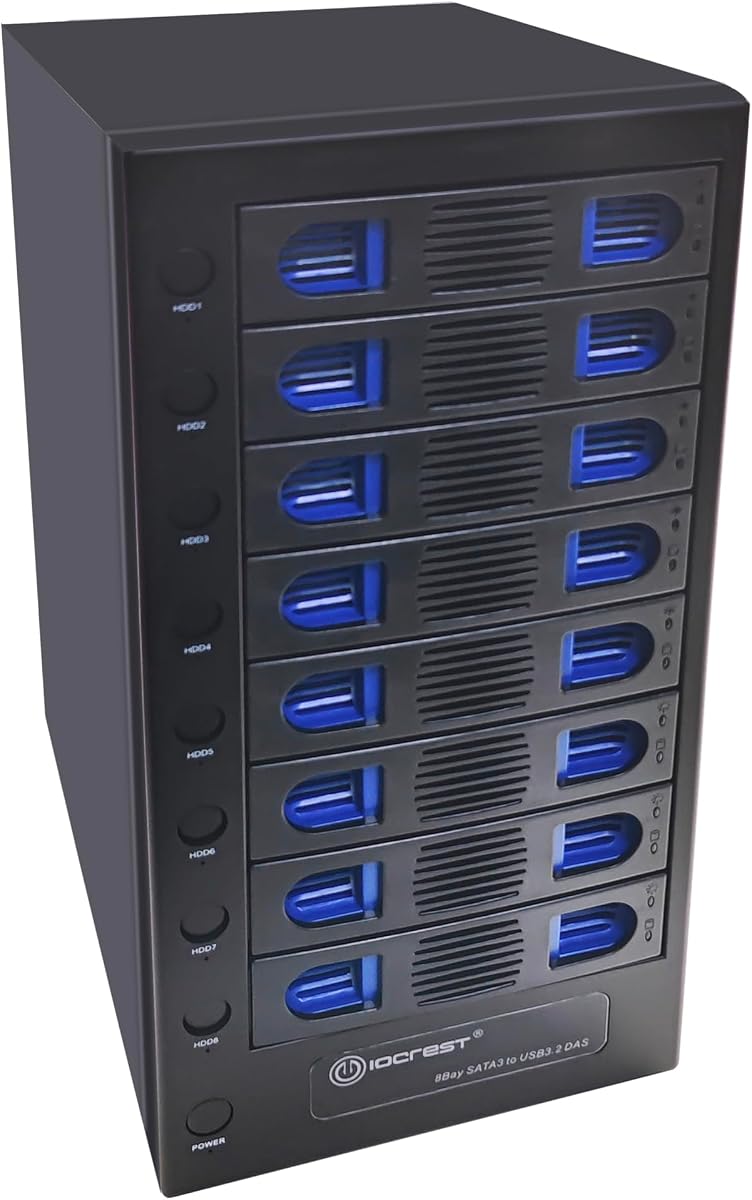


The CENMATE Aluminum 8 Bay RAID Enclosure offers a compelling solution for users needing high capacity storage without breaking the bank. With a rating of 3.8 stars it shows reliable performance for personal and enterprise use cases.
We may earn a commission when you buy through this link, at no additional cost to you.
Its standout feature is the support for up to 160TB of total capacity using standard SATA drives. The enclosure includes two 2.9 inch cooling fans to keep drives safe during operation and offers eight distinct RAID modes for flexibility.
Users should note that switching RAID modes requires a specific hardware reset process which can be tricky for beginners. Additionally the fan noise may be noticeable in quiet office environments so consider this if you are sensitive to sound.
This enclosure is best for budget-conscious users who need raw storage space and basic redundancy. It balances cost and functionality well making it a strong starting point for building a large external array.
Supports up to 160TB total capacity allowing for massive file storage needs.
Dual 2.9 inch fans ensure drives stay cool during prolonged high-load operations.
We may earn a commission when you buy through this link, at no additional cost to you.
The SanDisk Professional G-RAID Shuttle stands out as a top-tier option for professionals working with heavy video files. With a perfect 5.0 rating it delivers exceptional speed and reliability right out of the box.
We may earn a commission when you buy through this link, at no additional cost to you.
It achieves read speeds up to 1900MB/s and write speeds up to 2000MB/s using Thunderbolt 3. The eight removable Ultrastar hard drives offer enhanced reliability for mission critical footage and the unit provides 85W USB-C power delivery to charge your MacBook.
The primary trade-off is the significant cost which places it out of reach for casual users. However for studio environments where downtime is unacceptable the investment pays off in performance and data security.
Choose this if you need top speed and removable drives for fieldwork. It simplifies workflows for editors and offers a premium build quality that matches its high performance credentials.
Offers read and write speeds up to 1900MB/s and 2000MB/s respectively.
Provides up to 85W USB-C Power Delivery to charge laptops while working.
We may earn a commission when you buy through this link, at no additional cost to you.
The CENMATE Aluminum 8 Bay DAS is an ideal choice for those who want simple direct attached storage without RAID configuration. It holds a 4.3 rating indicating strong user satisfaction with its simplicity and reliability.
We may earn a commission when you buy through this link, at no additional cost to you.
This enclosure supports hot swapping allowing you to replace drives without powering off. It connects via USB 3.0 and includes dual cooling fans. You can also daisy chain up to three devices for a total of 480TB storage expansion.
The lack of hardware RAID means data protection must be managed by your computer software. This is acceptable for backup storage but not for critical live data. The noise level is similar to its RAID counterpart so consider your workspace environment.
Buy this if you need straightforward expansion and cost effective storage. It removes the headache of RAID settings while providing high capacity and easy maintenance for everyday use.
DAS configuration avoids RAID complexity for direct storage access.
Daisy chain support allows scaling up to 480TB with three devices.
We may earn a commission when you buy through this link, at no additional cost to you.
The OWC ThunderBay 8 provides excellent Thunderbolt 3 connectivity for users needing fast data transfers without internal PC modification. It has a rating of 3.9 reflecting solid utility for creative professionals.
We may earn a commission when you buy through this link, at no additional cost to you.
It supports up to 1152TB when daisy chaining six units. The universal bays accept both 2.5 and 3.5 inch drives and the thumb screw trays make swapping quick. A Thunderbolt cable is included for immediate use.
It lacks built-in hardware RAID so you rely on software for redundancy. This makes it simpler but less robust for critical data. The pricing is higher than USB enclosures but justified by the high bandwidth.
Choose this for Mac or Windows users prioritizing Thunderbolt speed. It offers a flexible solution for growing storage needs and easy drive management.
Daisy chain up to six units for massive combined storage potential.
Thumb screw release trays enable quick drive swaps without tools.
We may earn a commission when you buy through this link, at no additional cost to you.
The CENMATE Aluminum 8 Bay 10Gbps enclosure upgrades connectivity for faster file handling compared to standard USB 3.0. With a 4.1 rating it is reliable for those needing speed without Thunderbolt costs.
We may earn a commission when you buy through this link, at no additional cost to you.
It features USB 3.2 Gen 2 allowing up to 10Gbps transfers. Hot swapping is supported for ease of maintenance and you can daisy chain up to three units for 480TB total storage. Dual fans ensure drives stay cool.
The absence of hardware RAID limits redundancy options but speeds are impressive. Noise levels are typical for active cooling systems. This unit fits well for media servers and rapid file transfers.
Select this if you need faster USB speeds and easy drive management. It offers a practical balance between cost and performance for modern storage workflows.
USB 3.2 Gen 2 interface provides up to 10Gbps data transfer speeds.
Allows replacing hard drives without powering off the device for efficiency.
We may earn a commission when you buy through this link, at no additional cost to you.
This 8 Bay Tool Less Tray Hot Swap enclosure distinguishes itself with smart fan control and individual drive switches. It holds a 4.3 rating for its robust build and functional features for home and business use.
We may earn a commission when you buy through this link, at no additional cost to you.
It features a thermal sensor that adjusts fan speed automatically or manually to balance noise and cooling. Independent switches let you power off drives individually. The steel housing dissipates heat efficiently and supports high-capacity drives.
Lack of RAID support limits its use to direct storage. The 10Gbps USB-C interface ensures fast data transfers. This model is great for users who need control over drive power and cooling.
Choose this for environments where drive management flexibility is key. It offers strong cooling and durable construction for reliable long term storage.
Built-in thermal sensor supports auto manual fan speed modes.
Independent switches allow drives to be powered off individually.
We may earn a commission when you buy through this link, at no additional cost to you.
The OWC ThunderBay Flex 8 offers a unique combination of storage and PCIe expansion. With a 3.7 rating it appeals to advanced users needing versatility in one device for high-end computing workflows.
We may earn a commission when you buy through this link, at no additional cost to you.
Top bays support U.2 NVMe drives for extreme speed. A PCIe x16 connector allows adding capture cards or network interfaces. Front USB-C and USB-A ports plus card readers simplify accessory connections.
It is pricier than basic enclosures and requires more technical knowledge to utilize all features. SoftRAID software adds value for Mac users needing management tools. This is a multi-purpose dock rather than just storage.
Select this if you need storage and interface expansion together. It is best for professionals managing complex hardware setups and demanding media tasks.
Top four bays utilize U.2 SSDs for emerging industry standards.
PCIe x16 connector allows I/O or storage card expansion.
We may earn a commission when you buy through this link, at no additional cost to you.
The QNAP TL-D810TC4-US is designed for expanding QNAP NAS systems seamlessly. With a 4.0 rating it offers reliable expansion and easy management for users within the QNAP ecosystem.
We may earn a commission when you buy through this link, at no additional cost to you.
It uses USB 3.2 Gen 2 Type-C for fast file access. You can monitor drive health and manage JBOD configurations via the free QNAP utility. It supports standard SATA drives in a sturdy desktop tower.
Without QNAP software its features are less distinct but it remains a solid DAS unit. The focus on health monitoring helps prevent data loss. It fits well into professional backup or media archiving workflows.
Choose this if you use QNAP NAS for centralized storage. It provides easy scalability and monitoring tools that streamline management tasks effectively.
Monitor drive health and manage JBOD using free QNAP utility.
Provides plug-and-play storage expansion for QNAP NAS systems.
We may earn a commission when you buy through this link, at no additional cost to you.
This 8 Bay Mini ITX NAS Case serves as a chassis for building a custom NAS server. With a 4.0 rating it is praised for its flexibility and cooling design for DIY enthusiasts.
We may earn a commission when you buy through this link, at no additional cost to you.
It features dual independent air channels to separate drive heat from motherboard heat. Three silent fans maintain low noise even under load. The chassis supports Mini ITX and Micro ATX boards making it highly adaptable.
It requires you to supply motherboard power supply and drives. This increases initial effort but allows for custom specs. Indicator lights on each bay help monitor drive status easily.
Select this if you want to build a tailored server solution. It offers excellent airflow and durability for long term home or small business use.
Dual independent air channels keep drives and motherboard separate.
Wide support for Mini ITX and Micro ATX motherboards.
We may earn a commission when you buy through this link, at no additional cost to you.
The ICY DOCK MB998SK-B is designed for internal installation in a 5.25 inch bay. With a 5.0 rating it is highly regarded for its secure and compact design for servers or desktops.
We may earn a commission when you buy through this link, at no additional cost to you.
It uses full metal construction to house 2.5 inch SATA or SAS drives. Locking trays prevent accidental removal. This cage maximizes space in compact systems while maintaining secure access to drives.
Its internal nature requires available drive bays. This limits it to desktops and servers rather than external use. However for internal storage density it is unmatched.
Choose this for secure internal SSD storage in servers. It offers durability and security for 2.5 inch drives in tight spaces.
Locking trays ensure drives are secure and not easily removed.
Compatible with both SATA and single channel SAS drives.
We may earn a commission when you buy through this link, at no additional cost to you.
Selecting the right 8 bay hardware RAID enclosure involves balancing speed capacity and features with your specific workflow needs. Understanding key factors ensures your storage investment protects your data efficiently.
The interface you choose determines data transfer speeds significantly. USB 3.0 offers 5Gbps which is decent for general storage but USB 3.2 Gen 2 doubles this to 10Gbps. Thunderbolt 3 and 4 provide 40Gbps making them ideal for 4K or 8K video editing.
Choose USB for budget and universal compatibility. Opt for Thunderbolt if you need maximum speed for media production.
Hardware RAID enclosures allow you to configure drive arrays directly on the device. This includes modes like RAID 0 for speed or RAID 5 for redundancy. Software RAID relies on your computer to manage arrays which can consume CPU resources.
Pick hardware RAID for independence and faster array performance. Use software RAID if you need custom configurations across multiple systems.
Each enclosure has a maximum total capacity based on supported drive sizes. Some units support up to 160TB while others scale to 480TB or more with daisy chaining. Always verify the maximum supported drive size per bay.
Ensure the total capacity meets your current and future storage needs. Consider future-proofing by choosing models that accept high capacity drives.
Eight drives generate significant heat which can damage hardware over time. Look for enclosures with built-in fans or thermal sensors. Active cooling is essential for long-term reliability especially in warm environments.
Prioritize models with smart fans that adjust speed based on temperature. Silent cooling is also important if noise is a concern in your workspace.
Most enclosures support 2.5 inch and 3.5 inch SATA drives. Some support SAS for enterprise servers or NVMe for high speed SSDs. Confirm the drive types your project requires before buying.
Choose SATA for broad affordability. Select SAS or NVMe if you need higher performance and have the budget.
Hot swapping allows you to replace drives without powering down the system. This feature is critical for minimizing downtime in always-on setups. Check if tool-free trays are included for convenience.
Invest in hot swappable designs for business or server environments. It simplifies maintenance and keeps your workflow uninterrupted.
Material matters for durability and heat dissipation. Aluminum and steel housings are more robust than plastic. For field use consider portable designs that fit easily into carrying cases.
Select sturdy metal cases for desk or rack use. Look for compact portable builds if you transport your drives regularly.
Prices range widely from a few hundred to several thousand dollars. High cost often reflects speed and enterprise features. Determine which features are essential versus nice to have for your scenario.
Balance performance needs with financial constraints. Sometimes a mid-range unit offers the best overall value for typical use cases.
Always initialize drives properly before storing data. Connect the enclosure to your computer and follow setup instructions to configure your desired RAID mode if applicable.
Regularly check drive health using built-in utilities or third-party software. This helps detect failing drives early so you can replace them before losing data.
Keep the enclosure in a well-ventilated area to prevent overheating. Clean dust filters occasionally and avoid blocking the intake vents to ensure fans work efficiently.
Yes most models listed support Mac OS and Windows. Check specific compatibility for OS version requirements to ensure seamless integration with your system.
Most enclosures accept both 2.5 inch and 3.5 inch drives simultaneously. However mixing capacities may affect RAID performance depending on configuration settings.
Switching RAID modes often reformats drives so data will be lost. Always backup important data before changing modes to avoid accidental deletion.
Use indicator lights on the enclosure or software tools to check status. Most devices show light patterns indicating healthy or failing drive states.
USB and Thunderbolt cables typically work best under 3 meters. Longer cables may reduce signal quality so use high-quality certified cables for best results.
Most listed enclosures are DAS not NAS meaning they lack network features. QNAP models support NAS expansion but others require host computer management.
These ten 8 bay hardware RAID enclosures provide diverse options for every budget and performance need. The SanDisk G-RAID Shuttle leads in speed while the CENMATE models offer great value for general use.
Prioritize interface speed and cooling when making your final decision. Consider your future storage capacity to ensure the enclosure remains useful as your needs grow.
Prices and models change often so check current listings before buying. Selecting the right unit ensures your data stays secure and accessible for years to come.