
HP x900w USB 3.0
4.5Editor score
Compact lightweight design
USB 3.0 interface
Backward compatible with USB 2.0
This guide compares the top flash drives for HP laptops, evaluating speed, capacity, durability, and compatibility to help you choose the right storage
Finding the right flash drive for your HP laptop is essential for efficient data management and seamless file transfers. Modern laptops often lack extensive storage, making portable solutions vital for students, professionals, and creative users alike.
We analyzed ten top-rated drives based on speed, build quality, compatibility with USB ports, and user feedback. Each pick offers unique benefits, from high-speed USB 3.0 performance to dual-interface designs for broader device support.
Every product review highlights key specs, pros, cons, and ideal use cases. Note that prices and availability fluctuate frequently, so verify current details before purchasing to ensure you get the best value today.
4.5Editor score

4.6Editor score

4.3Editor score
This side-by-side comparison breaks down the top ten flash drives suitable for HP laptops. We highlight key specs like capacity, speed, and connector type to help you quickly identify the best fit for your workflow.


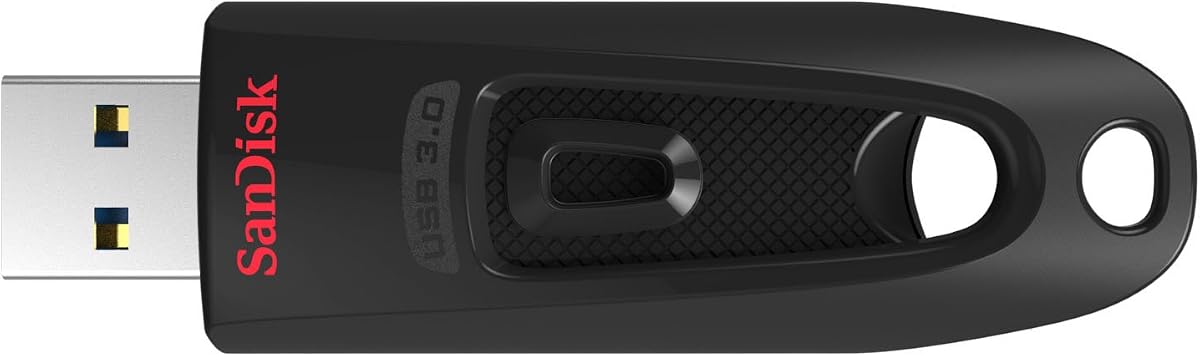

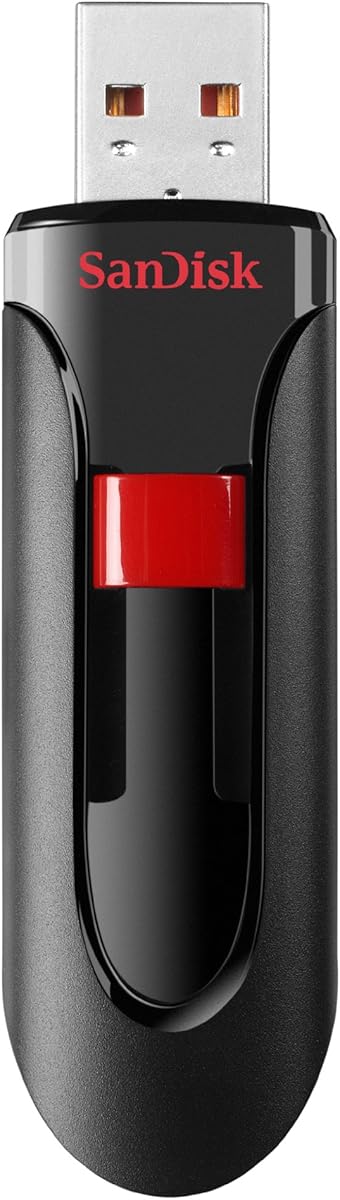

The SANDISK 128GB Ultra Flair stands out as a top performer for HP laptop users needing rapid data access. With a 4.6-star rating, it promises read speeds up to 150MB/s, making it ideal for transferring large media files effortlessly.
We may earn a commission when you buy through this link, at no additional cost to you.
Its sleek metal casing not only looks professional but also offers durability for daily carry. The included SecureAccess software adds a layer of security with 128-bit AES encryption, ensuring your sensitive business or personal files remain private during transport.
While the performance is impressive, users should note it requires a USB 3.0 port for peak speeds and lacks a USB-C option. Additionally, Mac users need to download extra software for password protection, which might be a minor inconvenience.
For anyone prioritizing speed and build quality on a standard USB-A HP laptop, this drive is a fantastic choice. It balances high performance with reliable security features, making it a versatile tool for work and creative projects.
Move full-length movies in under 30 seconds thanks to optimized USB 3.0 technology that outperforms standard USB 2.0 drives significantly.
Keep your private data safe with password protection features that support multiple operating systems including Windows and Mac OS X.
We may earn a commission when you buy through this link, at no additional cost to you.
The Lexar D40E 256GB is a robust solution for modern HP laptops that feature USB-C ports alongside traditional USB-A slots. Its dual connector design eliminates the need for extra dongles, simplifying your workflow when moving data between devices.
We may earn a commission when you buy through this link, at no additional cost to you.
With a massive 256GB capacity, this drive handles large datasets, video projects, or extensive media libraries with ease. The 360-degree swivel design protects the connectors from damage without losing caps, ensuring long-term durability during travel or daily use.
While it offers excellent versatility, actual transfer speeds can vary depending on your specific host device and USB port configuration. The price point is higher than single-interface options, but the convenience of universal connectivity often justifies the extra investment.
If you work across multiple devices including Macs, tablets, and PCs, this drive is an invaluable asset. Its secure software solution and warranty coverage add peace of mind for professionals who rely on portable storage for critical files.
Plug and play functionality ensures seamless operation with smartphones, tablets, Macs, and laptops without requiring any additional software installation.
The metal enclosure withstands temperatures from 0 to 50 degrees Celsius and provides lightweight protection for your important data on the go.
We may earn a commission when you buy through this link, at no additional cost to you.
The HP x900w USB 3.0 Flash Drive is an excellent budget-friendly option specifically designed to complement HP laptops. It offers rapid transfer speeds through its USB 3.0 port, making it a practical choice for everyday file sharing and storage needs.
We may earn a commission when you buy through this link, at no additional cost to you.
Weighing almost nothing and fitting easily in a pocket or purse, this drive prioritizes convenience without sacrificing performance. The backward compatibility ensures it works even with older USB 2.0 ports, providing flexibility for various devices in home or office settings.
While 64GB may seem modest compared to higher capacity drives, it is sufficient for documents, photos, and moderate media files. The build quality is functional but basic, focusing on cost-efficiency rather than premium materials or advanced security features.
For students or casual users who need a reliable, branded storage solution without breaking the bank, this drive is a strong contender. It delivers essential speed and portability, making it a go-to choice for budget-conscious HP laptop owners.
Designed to work effortlessly with your HP laptop USB 3.0 ports for reliable file sharing and rapid data transfers on demand.
The compact and lightweight design allows you to carry it anywhere, ensuring your important files are always within reach.
We may earn a commission when you buy through this link, at no additional cost to you.
The JOIOT 128GB USB C Flash Drive offers versatile connectivity for HP laptops and mobile devices alike. With dual connectors, it bridges the gap between modern USB-C smartphones and traditional USB-A computer ports without requiring adapters.
We may earn a commission when you buy through this link, at no additional cost to you.
Its read speeds of up to 130MB/s ensure that transferring high-resolution photos, videos, and heavy files happens quickly. The drive supports Windows, Linux, Android, and Mac OS, making it a universal tool for mixed-device environments in work or home.
While write speeds are lower than read speeds, performance remains reliable for typical backup tasks. The plastic enclosure offers heat dissipation but may feel less premium compared to metal options available in this category of portable storage.
If you frequently share files between your HP laptop and modern Android or iPhone devices, this drive is highly practical. It provides immediate access to large capacity storage without the clutter of extra cables or dongles.
Works seamlessly with Android phones, iPhone 15 series, iPads, Macs, and USB-A computers for instant data access across platforms.
Optimized USB 3.0 technology backs up your files at speeds ten times faster than standard USB 2.0 flash drives.
We may earn a commission when you buy through this link, at no additional cost to you.
The PNY 256GB Attaché X delivers massive storage capacity in a portable form factor ideal for large files. With read speeds up to 130MB/s, it handles everyday data storage and transfers efficiently for users who need more space than standard drives offer.
We may earn a commission when you buy through this link, at no additional cost to you.
Its sturdy yet lightweight design makes it comfortable to carry in a bag or pocket. The modern sliding collar cap protects the connector from damage, adding durability while maintaining a sleek aesthetic suitable for professional environments.
While the sliding mechanism is convenient, it may experience wear after extensive use over several years. The absence of built-in security software means users might need to rely on OS-level encryption for sensitive files during transport or storage.
For those needing ample room for movies, video projects, or backups on an HP laptop, this drive is a solid choice. Its speed and capacity combination make it suitable for professionals and students who deal with large datasets regularly.
Transfer large files such as movies, videos, photos, music, and documents with ease thanks to high 256GB capacity.
Enjoy advanced read speeds up to 130MB/s which are up to 10x faster than standard USB 2.0 flash drives.
We may earn a commission when you buy through this link, at no additional cost to you.
This 2-Pack of 128GB USB C Flash Drives offers exceptional value for users needing multiple storage devices. Each drive features both USB-A and Type-C connectors, ensuring compatibility with a wide range of laptops, tablets, and smartphones without adapters.
We may earn a commission when you buy through this link, at no additional cost to you.
Ideal for students or families, having two drives allows for separate backup systems or sharing files between different users. The plug-and-play functionality means no drivers or software are needed to start transferring files instantly upon connection to your device.
Performance relies on USB 2.0 technology, which is slower than USB 3.0 options found elsewhere. For large video files or heavy data sets, transfers may take longer, though it remains sufficient for documents and standard media storage tasks.
If you prioritize quantity and convenience over raw speed, this bundle is a smart investment. It provides double the storage capacity and backup options in a single purchase, making it practical for general daily use.
Includes two 128GB flash drives providing double the storage capacity and backup options for your digital needs.
Works seamlessly with USB A and USB C devices ensuring reliable file transfers across smartphones computers and laptops.
We may earn a commission when you buy through this link, at no additional cost to you.
The SANDISK 256GB Ultra provides a reliable and fast storage solution for HP laptop users who prefer traditional USB-A ports. With read speeds up to 130MB/s, it ensures quick access to large files and efficient data transfers without compatibility issues.
We may earn a commission when you buy through this link, at no additional cost to you.
Its secure file encryption and password protection help keep personal and business data safe during transit. The drive is backward compatible with USB 2.0 ports, offering flexibility even if you connect to older computers or peripheral devices.
The compact design fits easily into a bag or pocket, making it portable for daily use. While it lacks a USB-C connector, the performance and capacity balance well for those working primarily with standard laptop USB ports.
For users who need substantial storage and value brand reputation, this drive is a strong contender. It combines speed, security, and capacity to meet the needs of students, professionals, and casual users alike.
Keep private files safe with secure file encryption and password protection features included in the drive.
Transfer speeds up to 10x faster than standard USB 2.0 drives offer quick access to your stored content.
We may earn a commission when you buy through this link, at no additional cost to you.
The SANDISK 16GB Cruzer Blade is a classic, ultra-compact drive perfect for carrying essential documents and small files. Its simple design makes it easy to slip into a pocket, ensuring you always have a backup option for small critical data.
We may earn a commission when you buy through this link, at no additional cost to you.
With SecureAccess software included, you can password protect private files to maintain privacy across different computers. This feature adds value for users handling sensitive information on shared or public machines where security is a priority.
Transfer speeds follow USB 2.0 standards which are slower than USB 3.0 options but acceptable for small file sizes. The small storage limit means it is not suitable for large media libraries or extensive project backups.
If you need a cheap, reliable drive for occasional use or distributing small software packages, this is an ideal choice. It balances basic performance with security features at an accessible price point for general consumers.
Protect your private files with included SanDisk SecureAccess software using 128-bit AES encryption technology.
Ultra-compact and portable contoured styling allows you to carry your files between computers with ease.
We may earn a commission when you buy through this link, at no additional cost to you.
The SANDISK 128GB Cruzer Glide features a convenient retractable design that keeps the USB connector safe without losing caps. With a high 4.7-star rating, it is recognized for reliability and consistent performance in storing photos, videos, and other files.
We may earn a commission when you buy through this link, at no additional cost to you.
It includes SanDisk SecureAccess software with 128-bit AES encryption to ensure your private files remain protected during transfers. The 2-year limited manufacturer warranty provides added confidence in the durability and longevity of the product for everyday use.
While transfer speeds are not as high as USB 3.0 drives, the reliability and build quality make it a solid choice for general data storage. The retractable mechanism simplifies carrying by eliminating loose caps that can get misplaced during travel.
For users seeking a balance of security, storage, and ease of use on a standard HP laptop, this drive fits the bill. It offers enough capacity for essential files while protecting them with encryption features and reliable hardware.
Secure file encryption and password protection help keep private files safe while reliable storage ensures you can move images with confidence.
Retractable design keeps the connector safe from damage while the 2-year limited manufacturer warranty supports long-term use.
We may earn a commission when you buy through this link, at no additional cost to you.
The SANDISK 32GB Ultra 3.0 delivers solid USB 3.0 performance at a budget-friendly price point. With access to photos and files up to 4 times faster than USB 2.0 drives, it ensures efficient transfers for small to medium-sized storage needs.
We may earn a commission when you buy through this link, at no additional cost to you.
It comes with SanDisk SecureAccess software to keep private files private, adding security without extra cost. The 5-year limited warranty is one of the longest in the category, reflecting confidence in the durability and reliability of the drive.
While 32GB is smaller than other options, it remains sufficient for documents, presentations, and moderate media backups. The slightly lower read speed compared to newer models is still adequate for general users not requiring high-speed throughput.
For budget-conscious buyers who want USB 3.0 speed and long-term warranty support on an HP laptop, this is a great value. It combines essential features like security and speed with affordable pricing for everyday storage tasks.
Fast performance speeds up to 80 MB/sec make accessing hi-res photos and HD videos significantly faster than USB 2.0 drives.
Backed by a 5-year limited warranty ensuring reliable performance and protection for your files over the long term.
We may earn a commission when you buy through this link, at no additional cost to you.
Selecting the right flash drive for your HP laptop involves considering capacity, speed, compatibility, and durability. This guide breaks down the essential factors to help you make an informed decision.
Capacity determines how many files you can store on the drive. For documents and photos, 32GB to 64GB is often sufficient. If you work with large videos or datasets, consider 128GB or 256GB options to avoid frequent file management.
Choose a capacity that matches your typical file sizes and frequency of use to balance cost and convenience effectively.
USB 3.0 or USB 3.2 Gen 1 interfaces offer significantly faster transfer speeds than USB 2.0. Look for read speeds over 100MB/s for efficient workflows, especially when transferring large files between your HP laptop and other devices.
Prioritize drives with USB 3.0 or higher if speed is critical for your daily tasks to reduce wait times during transfers.
Modern HP laptops may feature USB-A, USB-C, or both. Ensure the drive matches your laptop's ports or offers dual connectors for flexibility. Dual-interface drives eliminate the need for adapters and simplify cross-device data sharing.
Select a connector type compatible with your primary devices to ensure seamless connectivity without additional hardware.
A sturdy enclosure protects your data from physical damage and environmental factors. Metal casings offer better protection against heat and impacts compared to plastic, while retractable designs keep connectors safe from dust and wear.
Invest in a durable design if you frequently carry the drive in a bag or pocket for daily use.
Protect sensitive files with drives that include hardware encryption or software-based password protection. Many brands offer SecureAccess tools to encrypt data with AES standards, ensuring privacy during transport or when using public computers.
Look for encryption options if you handle confidential business or personal data on portable storage devices.
A warranty coverage provides peace of mind for hardware failures. Drives with 3 to 5-year limited warranties reflect higher quality standards and manufacturer confidence in long-term reliability.
Choose brands with strong warranty policies to protect your investment and ensure replacement options if issues arise.
Most drives work with Windows and macOS out of the box, but check for specific software requirements for features like password protection. Cross-platform support ensures you can use the drive across different systems without formatting issues.
Verify compatibility with your current operating system to avoid software hurdles during setup or usage.
Balance the drive's features with your budget. Higher capacities and faster speeds increase cost, but affordable options exist for basic storage needs. Consider 2-pack bundles for cost-effective solutions if multiple drives are needed.
Compare features against price to ensure you pay only for the capabilities that match your specific use case.
Insert the flash drive into your HP laptop's USB port securely. Wait for the system to recognize the device before accessing files to prevent data corruption. If prompted, install necessary drivers or security software included with the drive.
Safely eject the drive before removal by using the operating system's eject option. This prevents data loss and hardware damage. Store the drive in a protective case or dry place away from extreme heat, moisture, or direct sunlight to maintain longevity.
Regularly back up important files to avoid data loss from drive failure. Clean the USB connectors gently with a dry cloth if they accumulate dust. Keep firmware or software updates current to ensure compatibility with future system changes.
The fastest drives typically feature USB 3.0 or USB 3.2 interfaces with read speeds exceeding 100MB/s. Models like the SANDISK 128GB Ultra Flair offer up to 150MB/s read speeds which are ideal for transferring large files quickly without excessive wait times.
If your HP laptop has only USB-C ports then a USB-C or dual-interface drive is necessary. Many modern HP models support both USB-A and USB-C making dual drives more versatile as they work across devices without adapters or additional hardware.
For basic documents and photos 32GB or 64GB is usually sufficient. If you store videos large project files choose 128GB or 256GB options. Assess your typical file sizes and frequency of backup needs to select the right capacity.
Yes if you choose drives with built-in encryption and password protection. Many drives offer AES encryption software to secure files during transport. Avoid storing critical sensitive data on unprotected drives and always use strong passwords if encryption is available.
Most flash drives work with both Windows and macOS without additional drivers. Some security software may require extra setup on Mac. Always check product compatibility notes to ensure smooth operation across different operating systems.
Try plugging the drive into a different USB port or restarting your laptop. Check Device Manager to ensure drivers are installed and updated. If the issue persists test the drive on another computer to rule out hardware or port issues.
Eject the drive safely before removal to prevent data corruption. Store it in a protective case away from heat and moisture. Avoid frequent plug and unplug cycles and keep the connectors clean from dust and debris to ensure durability.
Dual drives offer greater flexibility by supporting both USB-A and USB-C devices. They are ideal if you switch between older and newer computers or mobile devices. Single port drives are cheaper but lack universal compatibility without adapters.
We explored ten top flash drives tailored for HP laptop users focusing on speed, capacity, and versatility. The SANDISK 128GB Ultra Flair leads as Editor's Choice for its exceptional speed and durable design while the HP x900w offers great value for budget needs.
Prioritize your specific requirements when selecting a drive whether it is massive storage like the Lexar D40E or universal connectivity with dual-port models. Balancing speed security and price ensures you find a solution that fits your workflow and device ecosystem.
Remember that prices and availability can change quickly so verify current deals before purchasing. This guide provides a solid foundation to choose a reliable storage tool that enhances your HP laptop experience with efficient data management.