
SCRIB3D P1 3D Printing Pen with Display
4.4Editor score
Adjustable speed control
Includes starter PLA filament
Step-by-step project guide
Discover the top 3D printing pens for kids in October 2026. Our guide compares safety, ease of use, and creativity features to help you choose the perfect
3D printing pens offer a unique way for children to bring their drawings to life in three dimensions. These devices heat up plastic filament and extrude it slowly, allowing kids to build structures, art pieces, and functional objects by hand. They are excellent for fostering creativity and spatial thinking skills.
We evaluated ten popular models based on safety features, ease of operation, and included accessories. Our comparison focuses on pens suitable for children aged six and older, ensuring no burn risks and intuitive controls. We also considered the variety of colors and projects included in each kit to maximize play value.
Each product review highlights specific strengths and potential limitations to help you make an informed decision. Prices and availability can change frequently on retail platforms, so we recommend verifying the current offer before purchasing. This guide aims to simplify your search for the best creative tool for your child.
4.4Editor score
4.4Editor score
4.5Editor score
This table provides a side-by-side overview of the top ten models. It highlights key specifications such as filament type, safety features, and included accessories to help you quickly compare options.


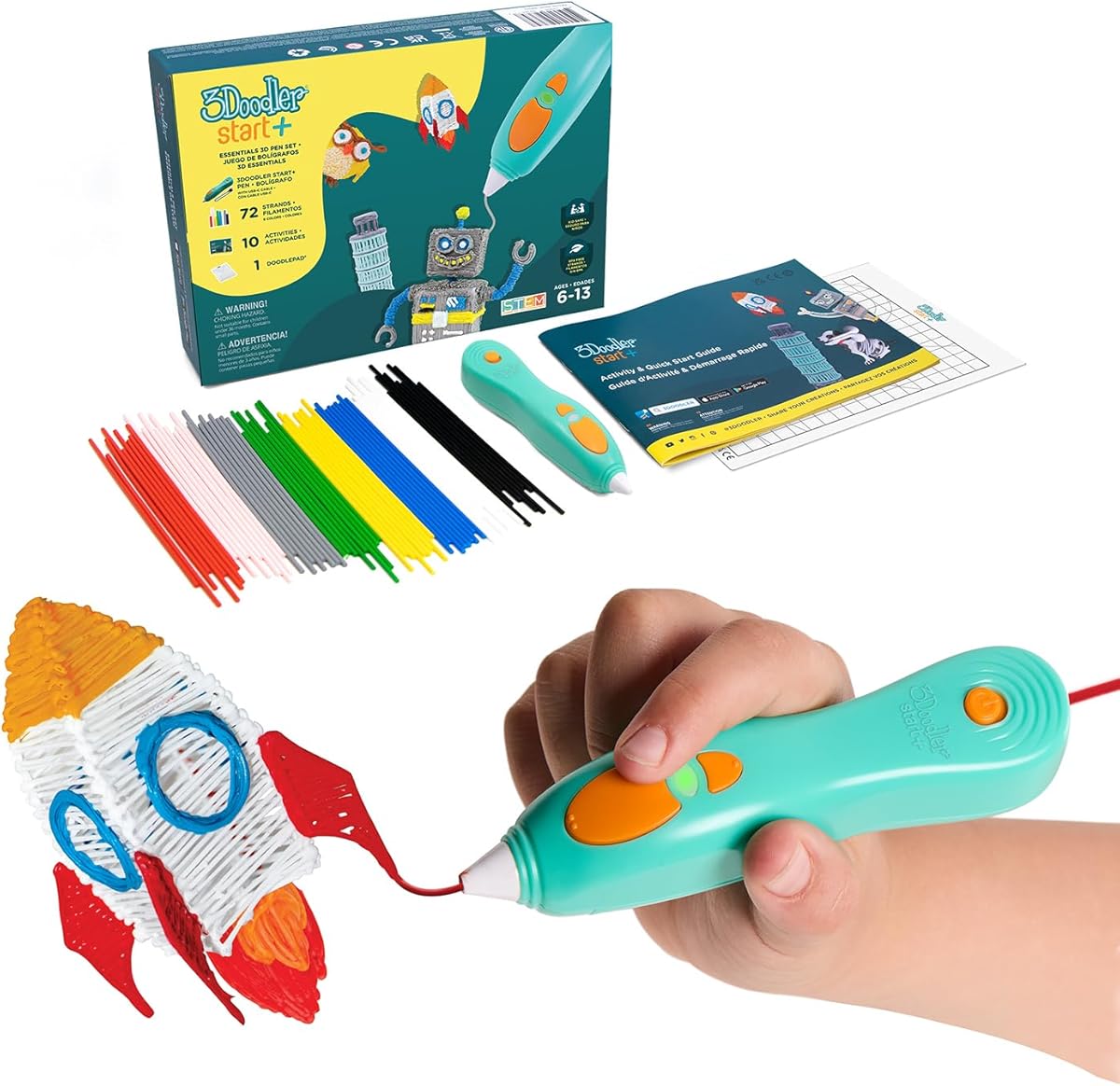
The 3Doodler Start+ Essentials set is designed specifically with child safety in mind. Unlike traditional 3D pens, this device has no hot parts, allowing kids to touch the nozzle safely without burn risks. It is highly rated for its ability to foster creativity while ensuring a secure environment for young artists.
We may earn a commission when you buy through this link, at no additional cost to you.
This kit includes a significant amount of materials to keep children engaged. With 72 strands of mixed-color plastic and 10 new stencils, the possibilities for projects are vast. The pen charges 50% faster than previous models and features an added safety stand-by mode to prevent accidental heating.
While it requires specific 3Doodler Start filaments which can be a limitation, the safety benefits outweigh this for many parents. The included activity guide and DoodlePad help structure play time effectively. This makes it an excellent educational tool that connects play to STEM concepts.
We recommend this pen for families prioritizing safety and ease of use for younger children. It encourages hours of screen-free play and learning. The robust warranty policy and recyclable packaging further add to its value as a responsible choice for parents.
The pen and plastic are cool to the touch, eliminating the need for constant adult supervision during use.
The included stencils and guide provide structure for beginners to quickly create recognizable shapes and models.
We may earn a commission when you buy through this link, at no additional cost to you.
The SCRIB3D P1 offers an excellent balance of affordability and functionality. It includes a stepless speed function that allows users to control the flow of plastic precisely. This is particularly useful for detailed projects or faster infill work, making it a versatile tool for various skill levels.
We may earn a commission when you buy through this link, at no additional cost to you.
Safety features include an auto sleep function that activates after minutes of inactivity to conserve energy and reduce risk. The pen uses standard PLA plastic which is easy to work with and generally safe once cooled. The included stencil book and project guide help beginners get started immediately.
A trade-off is that the nozzle does get hot during operation, requiring careful handling by younger children. However, the adjustable temperature settings allow for tuning based on the filament type. The 1 year guarantee provides additional peace of mind for purchasers.
This pen is ideal for families looking for an entry-level 3D printing experience without overspending. It supports creativity and spatial thinking skills effectively. The combination of included accessories and adjustable controls makes it a strong contender in the budget category.
The stepless slider allows for smooth transitions between slow detailed lines and faster structural fills.
Plug and play setup means children can start creating quickly after a short warm-up period.
We may earn a commission when you buy through this link, at no additional cost to you.
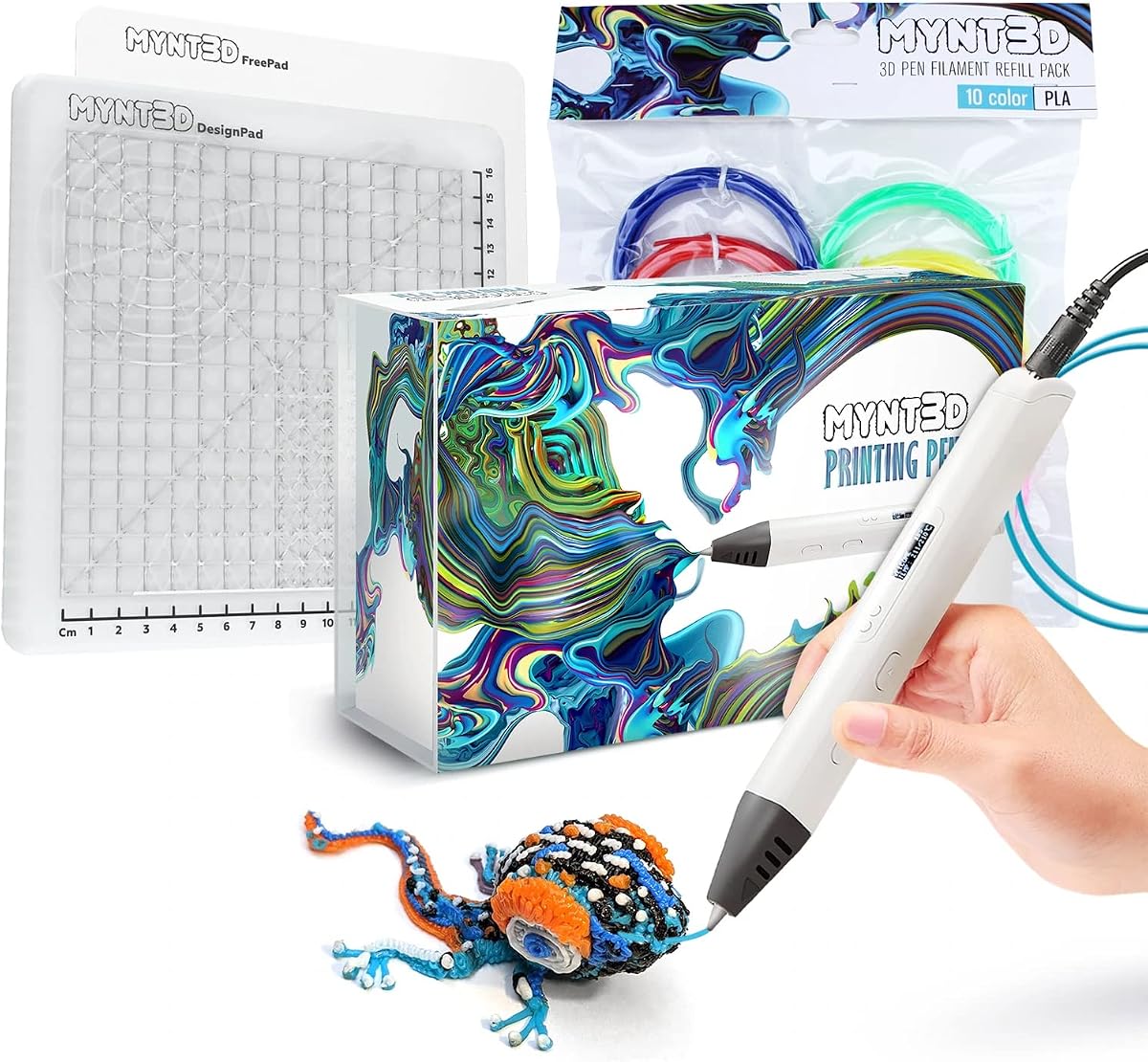
This bundle combines the MYNT3D Pro pen with a substantial amount of accessories to support professional-level creation. The stepless speed control and discrete temperature adjustability provide a high degree of control over the extrusion process. This makes it suitable for complex engineering projects or detailed art pieces.
We may earn a commission when you buy through this link, at no additional cost to you.
The kit includes 10 colors of vacuum sealed PLA filament which ensures quality and consistency. The DesignPad mat with channels helps create perfect geometric shapes while the FreePad allows for tracing and pattern creation. These tools significantly enhance the creative potential of the pen.
The sealed nozzle design reduces clogging issues which are common in other models. However, the price is higher than standard kits. The 1 year warranty and unlimited customer service access add value to this purchase ensuring support is available when needed.
We recommend this kit for older kids or teens who are serious about 3D design. It supports advanced skills and allows for experimentation with different materials. The included materials are sufficient to start creating immediately without buying more supplies.
Users can fine-tune both speed and temperature for optimal flow with different filament types.
The silicone mats provide structured surfaces to improve accuracy and ease of use during projects.
We may earn a commission when you buy through this link, at no additional cost to you.
The MYNT3D Professional Pen features a large OLED display that lets users monitor temperature in real time. This allows for precise fine-tuning of the material flow which is essential for different artistic effects. The temperature range spans from 140 to 230 degrees Celsius offering wide compatibility.
We may earn a commission when you buy through this link, at no additional cost to you.
Adjustable feed settings let you regulate speed and flow independently. This control is vital for maintaining consistent line thickness and avoiding blobs. The ergonomic pen design ensures comfort during long sessions of creation. It comes with 3 colors of PLA and an A/C adapter to start.
Due to the high temperature capability this pen is better suited for older children or adults. It requires careful handling to avoid burns. However the precision it offers makes it a powerful tool for those ready to move beyond basic models.
This device is recommended for artists who value control over their medium. The display provides immediate feedback on the pen state. It is a robust option for those who want to explore a variety of filament types and effects.
The OLED screen keeps temperature visible so users can react quickly to any changes during drawing.
Adjustable feed and temperature allow for unique textures and structures that are hard to achieve with standard pens.
We may earn a commission when you buy through this link, at no additional cost to you.
The MYNT3D Super features an ultrasonic sealed nozzle that provides market leading durability and resistance to clogging. This design ensures that the pen remains functional even after heavy use. It is compatible with both PLA and ABS filaments offering versatility for different project types.
We may earn a commission when you buy through this link, at no additional cost to you.
The slim ergonomic touch pen fits comfortably in the hand allowing for detailed work. A stepless speed slider lets you regulate flow precisely. It heats up quickly to minimize waiting time. The kit includes 3 colors of filament to begin creating immediately.
Using ABS requires proper ventilation due to fumes so this is better for well ventilated areas or adult supervision. The lack of a display screen means users must rely on indicators for heat status. However the performance is reliable for most hobbyist needs.
We suggest this pen for users who need a durable tool for frequent use. The nozzle longevity reduces maintenance costs over time. It is a solid choice for those exploring materials beyond standard PLA.
The sealed nozzle technology minimizes interruptions caused by clogging which keeps the creative flow going.
Compatibility with ABS allows for stronger and more heat resistant finished objects compared to PLA.
We may earn a commission when you buy through this link, at no additional cost to you.
The SCRIB3D Advanced is designed to help users make accurate and creative 3D models. It features a large LCD screen that helps monitor heat and ensures correct settings are used. The soft touch surface and ergonomic design make it comfortable for extended use.
We may earn a commission when you buy through this link, at no additional cost to you.
With 8 different speed options users can regulate flow for optimal control of line thickness. The kit includes 5 colors of PLA plastic which is a generous amount. The included guide helps beginners understand how to load filament and start projects smoothly.
Safety features include anti clogging and intuitive controls to prevent mistakes. The nozzle does get warm so care is advised during use. The 1 year guarantee and responsive service team provide support if any issues arise.
This pen is recommended for teens or older children ready for more control. The LCD display gives visibility into the pen state which reduces trial and error. It bridges the gap between toy pens and professional tools.
The LCD screen displays heat levels so users know when the pen is ready to extrude.
The soft touch surface reduces hand fatigue during long creative sessions.
We may earn a commission when you buy through this link, at no additional cost to you.
This bundle offers everything needed to create like a pro with the MYNT3D Super Pen. The included DesignPad and FreePad enhance precision and allow for tracing favorite patterns. The 10 color PLA refills ensure a variety of options for diverse projects.
We may earn a commission when you buy through this link, at no additional cost to you.
The pen itself features stepless speed control and temperature adjustability for ABS or PLA. The replaceable sealed nozzle design prevents clogs and extends the life of the pen. This makes it a robust choice for frequent users.
While the price is higher than basic kits the included accessories add significant value. The mat is essential for accurate work which improves the quality of output. Unlimited customer service access is also available for troubleshooting.
We recommend this for users who want a complete creative station. The mats and extra filament mean less time setting up and more time creating. It is a comprehensive solution for serious hobbyists.
The bundle includes all accessories required for tracing and creating complex designs immediately.
Replaceable parts ensure the pen remains usable for years even with heavy usage.
We may earn a commission when you buy through this link, at no additional cost to you.
The 3Doodler Flow is designed for teens and adults who want a reliable tool for repairs or DIY. It is compatible with PLA ABS and wood filaments expanding the range of possible projects. The integrated LCD provides real-time temperature monitoring for smooth operation.
We may earn a commission when you buy through this link, at no additional cost to you.
It is lightweight and compact so you can take it on the go. The setup is simple with no complicated software required. The pen heats up quickly and extrudes plastic that hardens almost instantly. This allows for rapid prototyping or decoration.
While it is easy to use the nozzle does get hot and requires careful handling. The included 8 color spools offer variety for creative work. It is an excellent resource for learning technical skills while being enjoyable.
We recommend this for older kids who need a versatile tool for both hobby and practical tasks. The ability to use wood filament adds a unique tactile dimension. It is a robust choice for those ready for a challenge.
Support for wood filament allows for unique textures not found in standard plastic pens.
The light weight design makes it easy to carry for creative projects anywhere.
We may earn a commission when you buy through this link, at no additional cost to you.
This bundle adds a flexible silicone mat to the P1 pen to improve tracing and practice. The mat features built-in shapes and patterns that guide designs for consistent results. It is easy to wipe clean and handles repeated use effectively.
We may earn a commission when you buy through this link, at no additional cost to you.
The P1 pen included has a display for temperature and speed control. The mat is designed to work seamlessly with the pen for better workflow. It supports consistent work and keeps the workspace clean during creative sessions.
The setup is beginner friendly with starter filament included. However the main value comes from the mat which is useful for practice. The heat resistant surface ensures safety during use.
We recommend this for users who want to improve their precision. The mat reduces mess and helps with alignment. It is a practical addition for those who value structure in their work.
The mat is easy to clean and keeps plastic off tables which reduces maintenance.
Built-in patterns on the mat help children learn proportions and alignment.
We may earn a commission when you buy through this link, at no additional cost to you.
This bundle provides over 1250 feet of additional plastic filament alongside the Start+ pen. It ensures that children have enough material for extensive projects without frequent refills. The pen remains cool to the touch making it safe for younger users.
We may earn a commission when you buy through this link, at no additional cost to you.
The included app offers templates and step-by-step instructions which enhance the learning experience. The bundle includes the pen DoodlePad stencils and activity guide. It is designed to encourage STEM learning through play.
While the price is high the amount of filament is substantial. This means better long-term value for families who want to support ongoing creativity. The pen is compatible with the full ecosystem of 3Doodler apps.
We recommend this for parents planning long-term creative projects. The large filament supply means no interruptions in play. It is the most generous bundle for sustained engagement.
The large volume of plastic allows for months of uninterrupted creative play.
Access to free app templates expands the learning possibilities beyond physical tools.
We may earn a commission when you buy through this link, at no additional cost to you.
Choosing a 3D pen requires considering safety, ease of use, and the type of projects your child wants to create. Below are key factors to help guide your decision.
Safety is the most critical factor when selecting a pen for children. Look for pens that have no hot parts or cool touch nozzles to prevent burns. Some models like the 3Doodler Start are designed specifically with this in mind.
Ensure the pen is appropriate for your child's age. Models marked for ages 6+ generally have stricter safety standards. Always supervise younger children during use regardless of the safety features.
Check which filament types the pen supports. Some pens use proprietary plastics which can be more expensive to replace. Others support standard PLA which is widely available and affordable.
PLA is generally safer and easier to use than ABS. If your child wants to create durable items ABS might be an option but requires ventilation. Decide on compatibility before buying.
Look for pens with simple controls. Features like auto sleep functions and one-button loading make the process less frustrating for beginners. Adjustable speed helps fine tune results.
Pens with displays allow users to monitor heat status easily. This reduces guesswork and ensures better results. A user-friendly interface keeps children engaged.
Many kits come with stencils project guides and mats. These items help children get started quickly and reduce the learning curve. Consider if the bundle has enough material to last.
A good accessory set adds value to the pen. DoodlePads and stencils allow for structured projects which are helpful for younger users. Verify what is included before purchasing.
The durability of the pen is important for regular use. Pens with clog-resistant nozzles are preferred to avoid interruptions. Check the warranty coverage for peace of mind.
Higher quality pens often have better motors and ergonomic designs. This ensures comfort during long sessions. Invest in a model that fits the hand well.
Adjustable temperature allows for different effects and filament types. However for younger kids a fixed safe temperature might be safer. Look for intuitive controls.
Digital displays help maintain consistent heat. This ensures smooth extrusion without jams. Consider how much control your child needs versus safety.
Ensure the kit supports the type of art your child enjoys. Some pens are better for 3D structures while others focus on flat drawings. Check the included guide for ideas.
Versatility in project types keeps interest high. A pen that can do both 3D and 2D art is often more useful. Look for kits that offer diverse projects.
Compare the price against the included materials. A cheaper pen might lack accessories or require expensive refills. Calculate the long term cost of ownership.
Bundles with extra filament often offer better value. Ensure you are paying for useful features and not just branding. Balance cost with quality.
To start using a 3D pen plug it in and wait for the heating light to turn off. This indicates the pen is ready to extrude. Insert a strand of filament into the back until it feeds through.
When creating keep the pen moving steadily to avoid blobs. Lift the pen when changing direction to separate layers. Practice on the included mat before moving to freehand designs.
To turn off the pen press the reverse button to retract the filament. Allow the pen to cool before storing. Clean the nozzle periodically to prevent clogs and ensure smooth operation.
Many modern pens are designed with safety in mind and feature cool touch nozzles. Always check the age recommendation and supervise young children. Models like the 3Doodler Start+ are specifically built to avoid burn risks.
PLA filament is the most common and safest for kids. It melts at a lower temperature and is non-toxic. Always check your pen's manual to ensure compatibility with the filament type you choose.
Clogs can happen if the pen is left on or filament is pulled. Pens with sealed nozzles are more resistant to clogging. Retract filament before turning off the pen to prevent this issue.
Yes some pens are strong enough for simple household repairs. Using ABS filament can make items more durable. Always ensure the repair is safe and does not involve heat or pressure sensitive areas.
Use a soft cloth to wipe the pen when cool. For nozzle cleaning use the included tool or a toothpick gently. Avoid water on the electronic components to prevent damage.
Most safety guidelines suggest ages 6 and older. Pens designed for younger kids have stricter temperature controls. Always read the manufacturer's age rating before purchasing.
We have reviewed ten top options ranging from safe beginner kits to advanced bundles. The 3Doodler Start+ offers the best safety for young kids while the MYNT3D Pro serves advanced users.
Prioritize safety and ease of use when choosing for children. Look for pens with good filament support and helpful accessories to maximize play value.
Prices change frequently on retail platforms. Verify the current offers and availability before making your final purchase decision.