
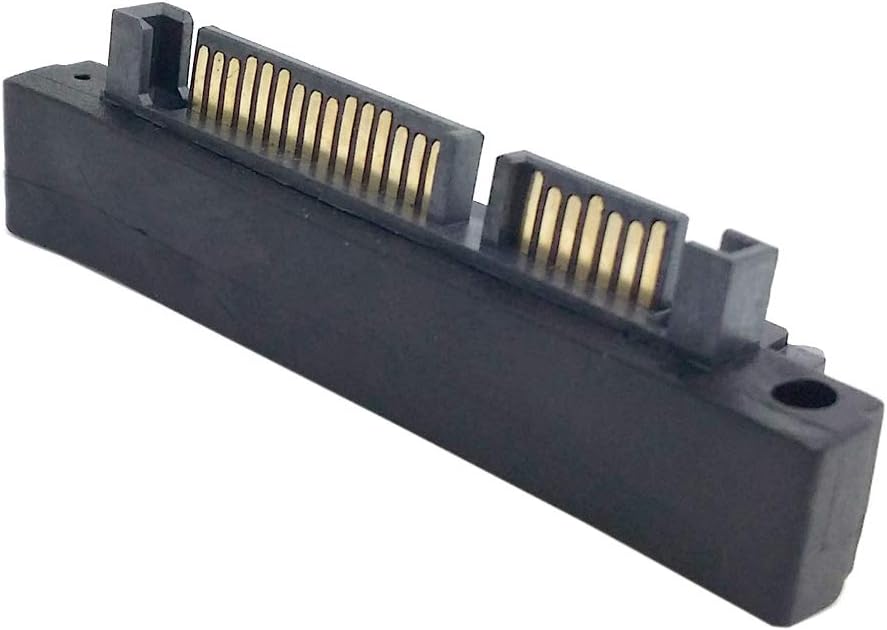
chenyang SATA Male to SATA Female 90 Degree UP Angled Gender Changer Connector
4.4Editor score
Compact angled design
Data and power support
Affordable single unit
Finding the right connection for your storage drives can be challenging when case space is limited. A 90 Degree SATA Adapter helps route cables efficiently, reducing strain on ports and improving overall airflow inside your computer chassis.
We evaluated ten top-rated adapters based on build quality, compatibility, and user feedback. Each product was analyzed for its ability to maintain data integrity while solving common installation issues in modern desktop systems and servers.
Our detailed reviews highlight the strengths and weaknesses of every option. While prices may fluctuate over time, the core features and performance characteristics remain consistent. Use this guide to find the perfect fit for your specific hardware needs.
4.4Editor score

4.6Editor score

5.0Editor score
As an Amazon Associate we earn from qualifying purchases.
Below is a side-by-side comparison of the top ten adapters available in the market. This table helps you quickly identify which model fits your specific motherboard and drive configuration needs.




This adapter is our top pick for users needing reliable direction changes in tight PC cases. It holds a strong 4.6 rating from satisfied users who appreciate its straightforward design and robust performance.
We may earn a commission when you buy through this link, at no additional cost to you.
It fully complies with SATA III specifications, ensuring data transfer speeds up to 6 Gbit/s are maintained without degradation. The 2-Pack packaging makes it a practical choice for systems with multiple drives requiring routing adjustments.
The vertical interface design faces inward, which is specifically useful when elbow cables would otherwise interfere with other components. However, it only handles data, so separate power connections remain necessary for the drive.
If you need a proven solution to reduce cable strain and improve airflow, this is the ideal choice. It balances performance, quantity, and design to solve common installation problems effectively.
By redirecting the cable 90 degrees, you prevent sharp bends that could damage internal wires over time. This keeps the interior of your case cleaner and safer for hardware.
The adapter works seamlessly with standard motherboards and host controllers. It supports backward compatibility with SATA I and II, ensuring it fits older systems as well as modern ones.
We may earn a commission when you buy through this link, at no additional cost to you.
This adapter offers a unique dual female configuration that allows one source port to connect to two drives. It is a fantastic tool for users needing extra flexibility without replacing motherboard hardware.
We may earn a commission when you buy through this link, at no additional cost to you.
Built to handle 6 Gbit/s transfers, it maintains high performance standards. The 2-Pack format ensures you have spares or enough adapters for complex multi-drive setups found in home servers or workstations.
The right-angle design helps in tight spaces where vertical plugs might block nearby components. Users should check their case layout carefully to ensure the dual split fits their specific cabling needs.
Ideal for RAID configurations or simple storage expansions, this adapter maximizes motherboard potential. It provides a cost-effective way to grow your storage capacity significantly.
The split connector design allows you to utilize a single SATA header for two drives. This is particularly useful when motherboard headers are scarce or occupied.
Designed with low profile constraints in mind, it fits into narrow slots. This ensures it does not protrude and cause obstruction in densely packed computer cases.
We may earn a commission when you buy through this link, at no additional cost to you.
This adapter is a budget-friendly choice that handles both power and data transmission effectively. It offers a practical solution for changing direction without breaking the bank.
We may earn a commission when you buy through this link, at no additional cost to you.
The connector supports 5V/12V power and 6Gbps data, ensuring full functionality for your drives. The angled design allows for better aesthetics by hiding bulky cables from view in tight spaces.
While it is a single unit, it works well for quick fixes or single-drive installations. The build quality is solid enough for daily use, though it may not be as robust as premium options.
If you need a simple, cheap fix to manage cables in your desktop, this is a great starting point. It balances cost and performance well for general consumers.
By redirecting the connector, cables are less likely to hang visibly inside the case. This helps maintain a clean build aesthetic that enthusiasts often desire.
It passes through power signals without issue, unlike data-only variants. This makes it a versatile all-in-one solution for standard storage connections.
We may earn a commission when you buy through this link, at no additional cost to you.
This adapter is designed specifically for down-oriented connections where space below the port is constrained. It supports full power and data transfer for both 2.5 and 3.5 inch disks.
We may earn a commission when you buy through this link, at no additional cost to you.
The 22Pin configuration ensures compatibility with standard SATA interfaces. By angling the connector down, it prevents interference with components located below the motherboard or drive bay area.
The extension format helps maintain a clean line between the source and the drive. It is a reliable choice for users facing specific orientation challenges in their chassis.
For installations requiring a downward bend to avoid hardware conflicts, this adapter is highly effective. It provides a stable connection that supports full performance speeds.
The downward angle is crucial when there is no room below the port. This prevents cable pinching and ensures safe operation for internal components.
It works with both 2.5 and 3.5 inch drives, making it versatile for different storage types. This flexibility makes it a useful tool for mixed storage environments.
We may earn a commission when you buy through this link, at no additional cost to you.
This is a straightforward adapter that focuses on doing the basics well. It features a standard right-angle design that fits most desktop setups without complications.
We may earn a commission when you buy through this link, at no additional cost to you.
The black color blends well with standard SATA cables, maintaining a uniform look. It has a strong reputation for reliability, which is why it holds a high rating among users.
While it lacks advanced features like dual ports or specific power handling, it serves its purpose effectively for standard data transfers. It is a go-to for general repairs.
If you need a quick replacement for a bent cable or a standard direction change, this is a safe choice. It ensures your system connects properly without overcomplicating the setup.
It adheres to standard SATA 22Pin specifications for universal compatibility. This ensures it will fit and work with most modern drives and motherboards.
The black finish helps hide the adapter visually inside the case. This is a small detail that builds enthusiasts appreciate for clean builds.
We may earn a commission when you buy through this link, at no additional cost to you.
This pack provides both up and down angled adapters in one box. It is specifically designed to address limited height issues on motherboards where vertical cables fail.
We may earn a commission when you buy through this link, at no additional cost to you.
Users appreciate the convenience of getting both orientations. This flexibility makes it a versatile option for different motherboard layouts and installation scenarios.
The 7Pin focus ensures compatibility with data connections. While it does not handle power, it is highly effective for routing data cables in constrained chassis environments.
If your motherboard has tight spaces around ports, this kit offers practical solutions. It allows you to choose the best angle for your specific case constraints.
Having both up and down options saves time and effort. You can quickly swap between them to find the perfect fit without ordering extra parts.
It is tailored for mainboard SATA ports, ensuring a snug fit. This reduces the risk of accidental disconnection due to cable stress.
We may earn a commission when you buy through this link, at no additional cost to you.
This down angled adapter offers a practical solution for routing cables in tight spaces. It supports power and data, making it suitable for standard drive connections.
We may earn a commission when you buy through this link, at no additional cost to you.
Users find it helpful for aesthetically pleasing wiring inside their cases. The down angle prevents cables from interfering with components below the drive bay.
As a single unit, it is a cost-effective choice for those who only need one specific angle. It provides reliable connectivity for both SSD and HDD devices.
If you need a simple fix for downward cable routing, this is a reliable option. It balances affordability with functional design for everyday desktop use.
The down angle helps guide cables towards the PSU or away from the top. This reduces visible clutter and improves internal airflow management.
It passes through both power and data signals seamlessly. This makes it a convenient choice for users needing a complete connection solution.
We may earn a commission when you buy through this link, at no additional cost to you.
This adapter is a top-tier choice known for its exceptional build quality and gold-plated contacts. It holds a perfect 5.0 rating, reflecting user trust in its durability and performance.
We may earn a commission when you buy through this link, at no additional cost to you.
The high-speed data transfer support ensures optimal performance for modern SSDs. Its robust construction guarantees reliable signal transmission over many years of use.
As an RoHS compliant product, it meets environmental standards. While it is a single unit, its quality justifies the investment for critical storage connections.
If you want the best possible signal integrity and longevity, this is the model to choose. It stands out as the most reliable option for high-end desktop builds.
Gold plating on contacts reduces oxidation and improves conductivity. This ensures consistent performance even after long-term use.
RoHS compliance means it adheres to strict environmental safety standards. This is a mark of quality and responsible manufacturing practices.
We may earn a commission when you buy through this link, at no additional cost to you.
This value pack offers four adapters, including two up and two down orientations. It is ideal for bulk needs or for users who want spares for future upgrades.
We may earn a commission when you buy through this link, at no additional cost to you.
The compact design and light weight make storage and transport easy. It is plug and play, requiring no tools or complex steps to get started.
While no rating data is available yet, the specification suggests standard performance levels. The material is designed for good electrical properties and insulation.
If you run multiple builds or need flexibility, this is an excellent bulk option. It ensures you always have an adapter ready when you need it.
Having four units means you can use them across multiple systems. This is ideal for IT admins or enthusiasts with many projects.
The plug-and-play nature makes it accessible to any user. No soldering or technical knowledge is required to use it effectively.
We may earn a commission when you buy through this link, at no additional cost to you.
This adapter is designed for motherboard port extension with a downward bend. It supports 6Gbps speeds, ensuring high-performance data transfer for modern SSDs.
We may earn a commission when you buy through this link, at no additional cost to you.
The 2pcs package adds value for users needing multiple fixes. It helps solve installation issues in limited height chassis where vertical cables fail.
By extending the port, it allows cables to route away from tight areas. This reduces strain and improves the overall safety of the connection.
If you need a reliable extension for your motherboard ports, this is a solid choice. It combines speed and design to improve your system's internal layout.
The extension design moves the connector slightly away from the board. This makes it easier to plug in and out without bending the port.
It supports 6Gbps speeds, ensuring no speed bottleneck occurs. This is essential for maintaining fast data rates on SSDs.
We may earn a commission when you buy through this link, at no additional cost to you.
Choosing the right adapter requires careful attention to direction, compatibility, and build quality. This guide helps you understand the key factors that influence performance and fit.
The direction of the 90-degree bend is critical. Determine if your port needs to bend up or down to avoid obstruction.
Choose an adapter that matches your chassis layout to prevent interference with other components.
Some adapters only handle data (7-pin), while others handle both power and data (22-pin).
Verify your needs to ensure the adapter supports the required connections for your drive.
Ensure the adapter supports SATA III speeds of 6Gbps for modern SSDs.
Check for backward compatibility with SATA I or II if you have older drives.
Look for gold-plated contacts to prevent corrosion and ensure reliable signal transmission.
High-quality plastic casing protects internal wiring from stress and damage.
Multi-packs offer better value if you need adapters for multiple drives.
Single units are cost-effective for quick fixes on a single device.
In low-profile cases, a slim adapter is essential to avoid touching nearby parts.
Measure the space around your port to confirm the adapter fits comfortably.
Choose brands with positive user feedback to ensure reliability.
Reputable manufacturers often offer better quality control and durability.
A good adapter should help reduce cable strain and improve airflow.
Select designs that allow neat routing to maintain a clean interior.
Turn off your computer and unplug it from the power source. This ensures safety when working with internal hardware.
Locate the SATA port on your motherboard or drive. Align the adapter with the port and gently push until it clicks into place.
Check the cable routing to ensure there is no stress on the connection. Verify all connections are secure before powering up the system.
No, these adapters are passive components that work with existing SATA settings. Your BIOS will detect the drive as if it were directly connected.
Not if you choose a SATA III compliant adapter. Most top models support 6Gbps speeds to match standard performance requirements.
Yes, standard adapters work with both 2.5 and 3.5 inch SSDs and HDDs. They support the universal SATA interface used by both types.
Data-only adapters do not need power but are for data lines. Full 22-pin adapters pass power from the cable so no extra connection is needed.
Check if your port is angled differently. Sometimes removing nearby screws or brackets creates enough space for the adapter to fit.
Use a soft dry cloth to wipe off dust. Do not use liquids as they may damage the plastic casing or internal wiring.
Our top picks like the CERRXIAN 90 Degree Adapter and the Right Angle Premium Adapter offer the best balance of features. They ensure reliable connectivity for any desktop build.
Prioritize direction and build quality when selecting your model. A high-quality adapter prevents future data issues and keeps your cables organized.
Always check current availability to secure the right fit for your needs. Prices may vary, but the core performance of these models remains consistent.