
Thrustmaster T-Flight Hotas X
4.4Editor score
Detachable throttle for flexibility
High precision joystick resistance
Plug and play setup ready
This guide compares the top 10 airplane controllers for PC including throttles, yokes, and flight sticks to help you choose the perfect simulation hardware.
Flight simulation enthusiasts know that realistic controls transform a casual game into an immersive cockpit experience. Choosing the right airplane controller for PC ensures precision, comfort, and longevity during long flying sessions.
We evaluated ten leading products based on build quality, customization options, sensor accuracy, and compatibility with major flight simulators. Our analysis focuses on real-world usability and pilot feedback to highlight the most reliable setups available today.
Each pick below details specific strengths and ideal use cases so you can match a controller to your preferred aircraft type. Keep in mind that product prices and availability fluctuate frequently on retailer platforms.
4.4Editor score

4.0Editor score
4.6Editor score
This side by side comparison highlights the key specifications and unique selling points of each controller to help you quickly identify the best fit for your simulation needs and budget constraints.





The Logitech G X56 H.O.T.A.S stands out as a premier flight simulator controller designed for users demanding precision and realism. Its military grade build and extensive programmable features make it ideal for complex combat and civil aviation simulations.
We may earn a commission when you buy through this link, at no additional cost to you.
This system features over 189 programmable controls across two units allowing pilots to map critical functions without reaching for a keyboard. Hall effect sensors on the axes ensure smooth input without physical contact wear while adjustable spring force lets you tailor stick tension.
While the software customization offers immense power it can be initially daunting for casual users. The large physical footprint also requires a dedicated desk space which may not suit smaller workstations.
Enthusiasts who prioritize realism and full cockpit replication will find this unit an excellent investment for serious flight simulation setups.
Hall effect sensors provide non-contact axis detection which significantly extends the lifespan of the joystick during intensive use.
The layout places controls within easy reach allowing pilots to maintain focus on the sky rather than searching for buttons.
We may earn a commission when you buy through this link, at no additional cost to you.
The Logitech G PRO Flight Yoke System offers a traditional aviation experience that closely mimics actual commercial aircraft controls. It is engineered to help both new and experienced pilots build essential muscle memory through realistic tactile feedback.
We may earn a commission when you buy through this link, at no additional cost to you.
Featuring a stainless steel shaft this yoke provides robust and accurate control over virtual aircraft movement. The included throttle quadrant and desk clamps ensure a stable setup that remains secure during aggressive maneuvers.
Users should note that full functionality often requires downloading optional software for specific simulators. The PS2 connection for the throttle might also require adapters on newer PC setups.
This system is highly recommended for pilots focusing on civil aviation who want an authentic yoke-based control interface.
The stainless steel construction ensures durability and provides a professional feel that matches high-end professional aviation equipment.
Consistent resistance and range of motion help pilots develop accurate reflexes that transfer well to real flight training.
We may earn a commission when you buy through this link, at no additional cost to you.
The Thrustmaster T-Flight Hotas X delivers impressive performance at an accessible price point making it a top choice for beginners. It combines a comfortable grip with essential controls needed for most flight simulation titles.
We may earn a commission when you buy through this link, at no additional cost to you.
Its detachable throttle allows users to customize their desk layout according to available space. The joystick features an adjustable resistance dial so you can fine tune the tension to your personal preference quickly.
While the build materials are primarily plastic they remain durable enough for regular use. The limited axes might restrict advanced users who require nuanced control over multiple flight surfaces.
For gamers seeking an affordable entry into flight sims without sacrificing core functionality this controller is an outstanding starting point.
The wide hand rest and natural throttle position reduce fatigue allowing for longer and more immersive flying sessions.
Preconfigured controls mean you can start flying immediately without complex installation or driver configuration steps.
We may earn a commission when you buy through this link, at no additional cost to you.
The Logitech G Saitek X52 Pro introduces an LCD multi-function display that simplifies command management during flight. This feature allows users to see all programmed actions directly on the controller reducing reliance on secondary monitors.
We may earn a commission when you buy through this link, at no additional cost to you.
The progressive throttle with detents provides clear feedback for afterburner and idle settings enhancing realism. Five adjustable handle positions ensure a comfortable grip regardless of hand size or preference.
However the controller relies on older software protocols that may require specific system configurations. Some users find the price point high compared to newer models offering similar specs.
It remains a solid option for users who value visual feedback on their controls and want a proven reliable system for military simulation.
The built-in screen displays mapped commands clearly helping pilots verify settings without interrupting their view of the cockpit.
Multiple handle positions allow customization to reduce wrist strain during extended simulation periods.
We may earn a commission when you buy through this link, at no additional cost to you.
The PXN 2113PRO adds a vibration feature often missing in budget flight sticks enhancing immersion in action-oriented simulations. It is compatible with a variety of titles including World of Warplanes and Microsoft Flight Simulator.
We may earn a commission when you buy through this link, at no additional cost to you.
Four suction cups at the base help secure the unit to smooth tables preventing slippage during intense use. The 8-way hat switch allows for easy camera navigation and weapon selection.
Users must ensure vibration is enabled in the driver settings to experience the full effect. The joystick is restricted to PC platforms limiting cross-platform flexibility.
This model is suitable for casual gamers who want tactile feedback without investing in a high-end controller.
Vibration feedback alerts pilots to events such as engine stalling or weapon fire adding a sensory layer to gameplay.
Optimized for Windows systems this controller ensures reliable performance on most standard PC gaming setups.
We may earn a commission when you buy through this link, at no additional cost to you.
The Logitech G X52 Flight Control System utilizes magnetic sensors to provide enhanced longevity and accuracy. This non-contact technology prevents wear over time ensuring consistent performance throughout the device's lifespan.
We may earn a commission when you buy through this link, at no additional cost to you.
With over 282 programmable commands users can manage complex flight scenarios without external inputs. The built-in LCD display includes a clock useful for timing flight plans or mission objectives.
The 3D twist feature with rudder lock adds versatility for those who own separate pedal sets. However the software may need manual installation on newer operating systems.
Flight enthusiasts looking for durable precision controls will appreciate the engineering behind this reliable and feature-rich system.
Magnetic sensors eliminate physical friction on axes reducing mechanical wear and maintaining calibration over years of use.
The extensive command capacity supports complex profiles allowing detailed control without switching back to keyboard input.
We may earn a commission when you buy through this link, at no additional cost to you.
The Thrustmaster TCA Yoke Boeing Edition brings an officially licensed Boeing 787 cockpit experience to home flight simulators. Its pendulum mechanism replicates the authentic feel of airliner control systems.
We may earn a commission when you buy through this link, at no additional cost to you.
Constructed with a 100 percent metal internal structure this yoke ensures durability and balanced weight for professional feel. The throttle quadrant controls altitude and heading using iconic Boeing autopilot functions.
Installation requires desk clamps which are included but add to the setup complexity. The premium price reflects the high build quality and official licensing agreements.
This pack is ideal for pilots who want the most authentic commercial aviation experience available on the consumer market.
The 1:1 scale replica captures the precise movement and resistance of real commercial aircraft controls for unmatched realism.
The integrated quadrant allows management of critical flight parameters without needing to navigate software menus.
We may earn a commission when you buy through this link, at no additional cost to you.
The Thrustmaster TCA Sidestick Airbus Edition offers an officially licensed Airbus A320 sidestick for precise flight control. Magnetic sensors ensure accuracy while eliminating potentiometer wear for long-term reliability.
We may earn a commission when you buy through this link, at no additional cost to you.
It includes an integrated throttle axis with a unique thrust reverser mechanism which simplifies cockpit setup. Rudder control is handled through a rotating handle providing intuitive input without extra pedals.
While this unit excels in space-saving design it may not suit pilots preferring traditional yokes. The focus on Airbus systems limits flexibility for other aircraft types.
Fans of commercial aviation who want a realistic sidestick experience will find this controller an essential component of their cockpit.
Drift-free magnetic sensors maintain perfect calibration over time ensuring consistent input accuracy without drift.
The integrated throttle and rudder allow a complete control solution in one compact unit saving valuable desk space.
We may earn a commission when you buy through this link, at no additional cost to you.
The Turtle Beach VelocityOne Flightstick is designed for universal use across Xbox and PC providing flexibility for multi-platform gamers. Its OLED display offers quick access to flight management settings.
We may earn a commission when you buy through this link, at no additional cost to you.
A unique touchpad navigation sensor allows for cursor control without leaving the stick enabling easier menu navigation. Customizable throttle levers and ambient lighting add to the immersive setup.
While the touchpad is innovative it may require initial configuration to feel natural. Users might find the stick standard compared to dedicated HOTAS systems.
This controller is perfect for players who switch between console and PC and want a single reliable flight solution.
Supporting both Xbox and PC this device allows seamless switching between different gaming ecosystems.
The OLED screen displays critical data keeping pilots informed without cluttering the main view.
We may earn a commission when you buy through this link, at no additional cost to you.
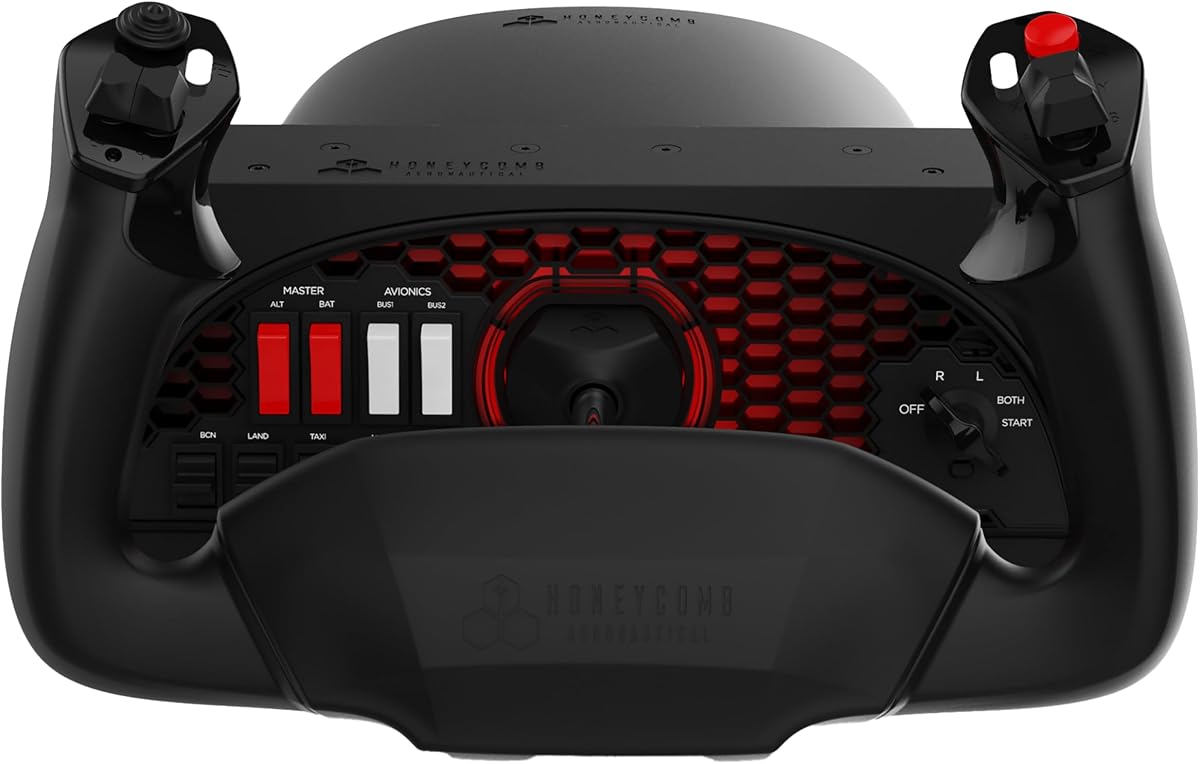
The Honeycomb Alpha Flight Controls delivers a premium yoke experience with robust metal construction and precise responsiveness. It features a self-centering mechanism with minimal deadzone for effortless accurate maneuvers.
We may earn a commission when you buy through this link, at no additional cost to you.
An integrated switch panel includes essential aviation switches like main alternator and avionics controls. The dual mounting solution offers flexibility for secure clamping or micro-suction pads.
The weight and premium pricing might deter casual users. However the build quality justifies the cost for those seeking professional grade reliability.
Pilots looking for a durable realistic yoke with built-in switching will find this unit a top-tier investment.
The steel shaft and durable materials ensure long-lasting performance matching professional aviation hardware standards.
Essential cockpit switches are built-in allowing full system management without external accessories.
We may earn a commission when you buy through this link, at no additional cost to you.
Selecting the right controller requires evaluating build materials, control types, and software compatibility to match your specific simulation goals.
Yokes are best for commercial aircraft while joysticks suit fighter jets. Consider which aircraft you fly most often.
Choose based on realism needs and desk space availability to ensure a comfortable workflow.
Metal shafts and robust clamps provide better stability and durability than plastic alternatives. Check for solid internal structures.
Investing in higher quality materials ensures your controller withstands years of regular use.
Magnetic or Hall effect sensors offer better accuracy and longevity compared to traditional potentiometers. Look for non-contact systems.
Superior sensor tech maintains calibration over time reducing drift and maintenance needs.
More programmable buttons allow for detailed cockpit control without keyboard reliance. Ensure the software supports your sim.
High button counts are essential for complex missions where every function matters.
Verify that the controller supports your specific operating system and simulator software. Cross-platform units offer more flexibility.
Compatible drivers prevent setup issues and ensure full feature access during flight.
Comfortable grips and adjustable resistance reduce fatigue during long flights. Test the feel if possible.
Proper ergonomics prevent strain and keep focus on the simulation for extended periods.
Prices range from entry-level sticks to high-end yokes. Determine how much you are willing to invest.
Balance cost with features to find a unit that meets your needs without overspending.
Full yokes require significant desk space while compact sticks fit smaller setups. Consider your available area.
Ensure your desk can support the weight and dimensions of the selected controller securely.
Begin by connecting the controller to a USB port and installing any required drivers. Restart your computer to ensure proper recognition.
Calibrate the controls using your flight simulator software settings. Adjust sensitivity and axis ranges to match your preference.
Regularly clean the buttons and sticks with a dry cloth to remove dust. Store in a cool dry place when not in use.
Most PC-specific controllers do not work with Xbox consoles. However some universal models like Turtle Beach VelocityOne support both platforms. Check product specs for Xbox compatibility.
Use the Windows Game Controllers settings or your flight simulator software to calibrate. Adjust axes and test buttons to ensure accurate response before flying.
Many HOTAS units include an integrated throttle for convenience. Separate throttles offer more realism and space for additional controls if needed.
A yoke mimics commercial aircraft wheels for pitch and roll. A joystick is used for fighter jets and offers more freedom of movement.
Most flight controllers are fully compatible with VR environments. Ensure your headset software supports the controller for immersive tracking.
Magnetic sensors often last longer than potentiometers. Proper care and avoiding excessive force can extend the life of any controller.
Many controllers offer plug and play functionality. However advanced features and customization typically require proprietary software installation.
Some models include vibration or force feedback. Check product details as many flight sticks omit this feature for precision and clarity.
We reviewed ten top controllers ranging from budget sticks to premium yokes. The Logitech G X56 and Honeycomb Alpha offer excellent value for enthusiasts.
Prioritize sensor accuracy and build quality to ensure a realistic experience. Match the controller type to your preferred aircraft for best results.
Prices and availability can change so check current listings before purchasing. Choosing the right setup will enhance your flight simulation enjoyment.