
ASUS Prime AP201 Micro-ATX PC Case
4.7Editor score
Mesh panels for airflow
Compact 33L footprint
Tool-free side panels
This guide compares the top ten ASUS PC Case options for performance and value across mid tower and full tower designs for any build.
Selecting the right chassis is critical for any computer build because it protects components while managing airflow and aesthetics. ASUS offers a diverse range of cases tailored to different form factors and cooling needs for enthusiasts and professionals alike.
We evaluated each model based on airflow design, build quality, expansion capabilities, and user feedback to ensure you find a reliable enclosure. Our analysis covers everything from compact micro ATX options to massive full tower systems supporting high end hardware configurations.
Each pick highlights specific strengths and ideal use cases so you can match a case to your exact requirements without guesswork. Keep in mind that availability and offers fluctuate so always verify current details before finalizing your purchase decision today.
4.7Editor score

4.8Editor score

4.6Editor score
The following table provides a side by side overview of all ten models allowing you to quickly compare key specifications and design features to identify the right fit for your specific hardware needs.


This model stands out as a top choice for builders needing space and cooling performance. With a 4.8 rating users praise its robust build and ability to handle high end components without thermal issues.
We may earn a commission when you buy through this link, at no additional cost to you.
The chassis supports EATX motherboards and includes multiple fan mounting points including pre-installed RGB fans. Liquid cooling is easy with support for 360mm radiators and pre-drilled holes for pumps.
Some users note the weight makes moving it difficult and the price is higher than basic options. However the durability and cooling headroom make these trade-offs acceptable for serious builds.
Ideal for enthusiasts wanting a reliable full tower that looks great and performs well. It balances aesthetics and function effectively making it a strong recommendation for most users.
The inclusion of multiple fan mounts and radiator support ensures heat is expelled efficiently from the chassis.
Thick metal panels and tempered glass provide durability while showcasing your internal hardware beautifully.
We may earn a commission when you buy through this link, at no additional cost to you.
The AP201 offers exceptional value for builders seeking a compact yet high performing case. Users appreciate its smart design that maximizes cooling in a small footprint without compromising on build quality.
We may earn a commission when you buy through this link, at no additional cost to you.
Precision-machined mesh panels enhance airflow significantly while supporting large radiators up to 360mm. The tool-free side panels make installation and maintenance straightforward for any skill level.
The limited space means it may not fit EATX boards or oversized graphics cards but it is perfect for standard builds. Most users find the balance of size and performance is exactly what they needed.
Recommended for budget conscious buyers or those needing a small form factor system. It delivers premium features at a price point that is hard to beat in this category.
Over 57000 precision holes in the mesh ensure maximum airflow to keep components cool under load.
Despite a small 33L footprint it supports long GPUs and large power supplies comfortably.
We may earn a commission when you buy through this link, at no additional cost to you.
This case represents the pinnacle of design and functionality for high-end gaming setups. With a 4.6 rating it appeals to users who want a premium look without sacrificing serious cooling performance.
We may earn a commission when you buy through this link, at no additional cost to you.
The diecast aluminum frame provides unmatched durability and includes practical features like a storage drawer and card holder. Cooling is aggressive with support for two 420mm radiators and an open structure.
The price tag is steep and the weight makes it difficult to move once assembled. However the unique features and build quality justify the cost for dedicated enthusiasts and professionals.
Best for builders wanting a statement piece that offers top-tier cooling and convenience features. It is an investment in aesthetics and performance that stands out in any room.
Semi-open structure supports massive 420mm radiators for extreme thermal management of high-end parts.
Features like a storage drawer and integrated GPU holder simplify the build process significantly.
We may earn a commission when you buy through this link, at no additional cost to you.
The GT502 Horizon delivers a unique view of your build with tempered glass on both front and side. Its 4.5 rating highlights strong cooling performance thanks to a dual-chamber design that separates CPU and GPU heat.
We may earn a commission when you buy through this link, at no additional cost to you.
Independent cooling zones ensure each component stays cool without recirculating hot air. The high-speed USB Type-C port on the front panel supports fast data transfer for peripherals.
The all-glass design is stunning but can show dust and fingerprints more easily. Cable management requires patience due to the layout but the modular panels help simplify rework.
Ideal for users prioritizing visual impact alongside solid thermal performance. It offers a great balance of features for mid-tower enthusiasts who value aesthetics.
Split design ensures the GPU and CPU have independent airflow paths for optimal cooling.
Front USB-C port offers 10 Gbps speeds for high bandwidth peripherals and storage.
We may earn a commission when you buy through this link, at no additional cost to you.
This model shines for users with motherboards featuring hidden connectors making for a truly clean build. The 4.1 rating reflects solid performance though some users note it is heavier than expected.
We may earn a commission when you buy through this link, at no additional cost to you.
Designed for clean aesthetics the case supports large GPUs and radiators while hiding cables effectively. The panoramic glass view showcases components beautifully when the system is running.
The lower rating suggests there are minor build quality quirks but the value remains strong. Most users find the ease of cable management worth any small compromises in other areas.
Recommended for those prioritizing a clutter-free internal look and modern features. It is a strong option for mid-range builds needing good cooling and a clean aesthetic.
Built to optimize cable management for motherboards with hidden connector technology.
An 8 degree angled base improves airflow and widens the viewing angle.
We may earn a commission when you buy through this link, at no additional cost to you.
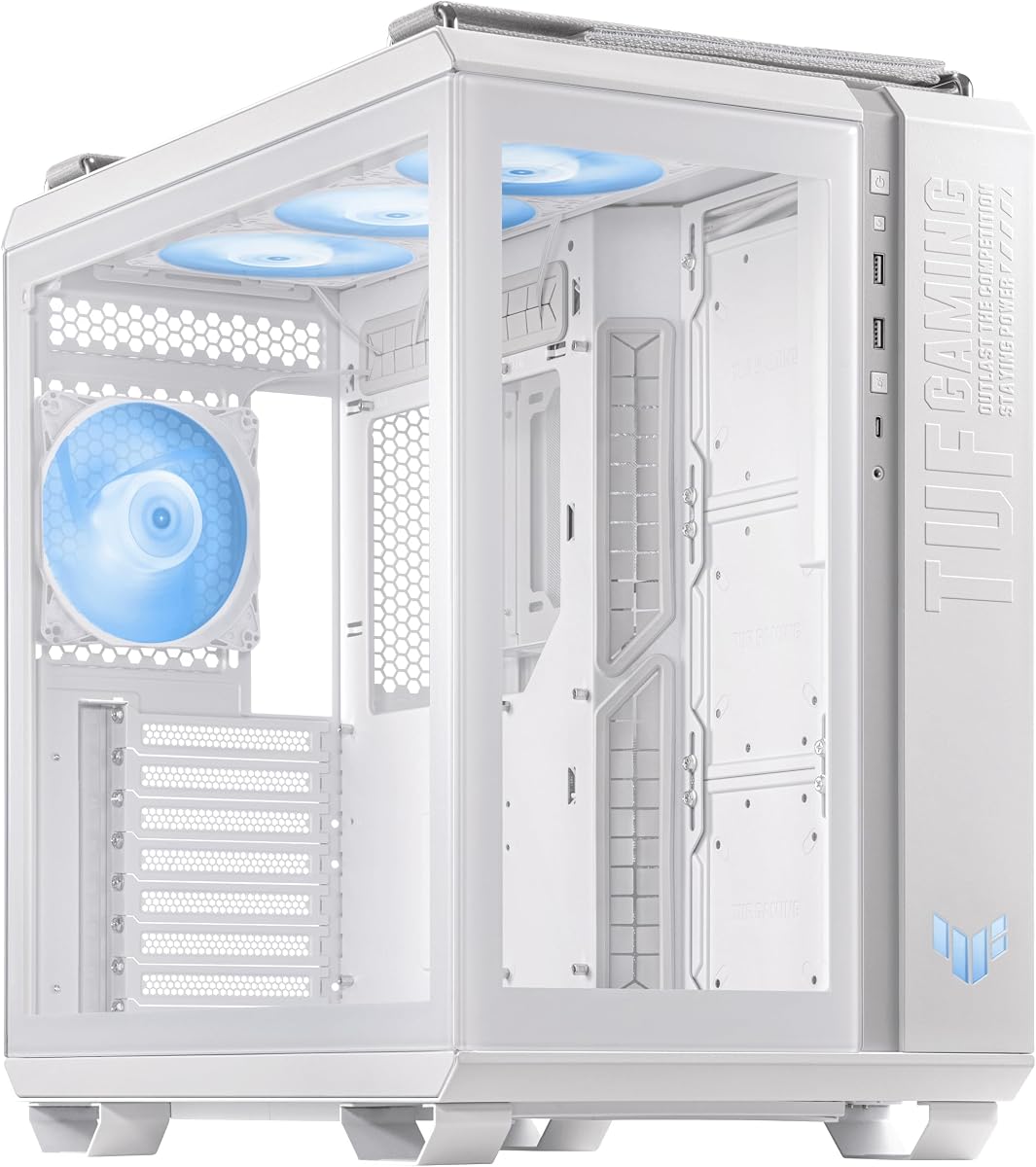
A striking alternative to the standard black version this white edition matches premium components beautifully. It maintains the same high quality construction and cooling capabilities as the original with a fresh look.
We may earn a commission when you buy through this link, at no additional cost to you.
Fans and panels are optimized for airflow and sync well with RGB motherboards. The ergonomic handles make transporting this full tower case safer and easier than most competitors.
White surfaces attract dust more visibly requiring more frequent cleaning to keep the look fresh. Despite this most users feel the aesthetic upgrade is worth the extra maintenance effort.
Perfect for builders wanting a cohesive white theme without sacrificing performance. It is a top choice for those who prioritize style alongside robust hardware support.
Fans and lighting sync with motherboard controllers for a unified visual experience.
Ergonomic woven cotton handles enable safe transport of the full tower chassis.
We may earn a commission when you buy through this link, at no additional cost to you.
This compact case punches above its weight with excellent airflow and a honeycomb front panel that maximizes intake. A 4.6 rating confirms users are happy with the cooling and ease of use.
We may earn a commission when you buy through this link, at no additional cost to you.
It includes an integrated RGB controller hub and supports 360mm radiators for strong thermal performance. The headphone hanger and USB ports add daily convenience to the design.
The RGB controller may add wiring complexity for simple setups but offers customization for enthusiasts. The size is a limit for very large components but fits standard builds perfectly.
Great for gamers needing a small case with high cooling performance and RGB options. It balances size and function well for mid-range and budget gaming rigs.
Built-in controller simplifies lighting setup with a dedicated front panel button.
Perforated panel design aids airflow to keep components cool during gaming.
We may earn a commission when you buy through this link, at no additional cost to you.
Modularity defines this case allowing easy removal of panels for installation and maintenance. The dual chamber layout ensures CPU and GPU operate in independent cooling zones for better performance.
We may earn a commission when you buy through this link, at no additional cost to you.
The white finish and ARGB fans create an appealing aesthetic while the USB-C port supports modern data speeds. Users praise the tool-free design which simplifies building and cleaning.
Tempered glass panels require care during handling and may crack if mishandled. However the convenience of modularity and strong airflow make it a popular choice for many.
Ideal for builders who value easy access and modern features. It delivers a clean look with practical design elements that improve the building experience.
Most panels are removable to simplify hardware installation and cable management.
Dual chamber housing forms independent zones for CPU and graphics card thermal efficiency.
We may earn a commission when you buy through this link, at no additional cost to you.
With a 4.9 rating this case is a favorite for its value and performance balance. Users appreciate the panoramic view and support for large cooling components without a high price tag.
We may earn a commission when you buy through this link, at no additional cost to you.
The angled base improves airflow and viewing angles while supporting hidden connector motherboards. ARGB fans provide lighting without extra cost making it a complete package.
Basic features may lack some premium conveniences but the core performance is strong. Most buyers find it exceeds expectations for the price point in a crowded market.
A top pick for cost conscious builders seeking modern design and features. It proves you do not need to spend a lot to get a great build.
Tempered glass on front and sides provides an unobstructed view of components.
8 degree angled base improves airflow efficiency for better thermal performance.
We may earn a commission when you buy through this link, at no additional cost to you.
This variant focuses on modern connectivity and cooling with fast USB-C transfer speeds on the front. A 4.6 rating indicates satisfaction with its dual chamber design and ease of access.
We may earn a commission when you buy through this link, at no additional cost to you.
Independent cooling zones keep CPU and GPU temperatures low even under heavy loads. The white finish and ARGB fans suit current aesthetic trends for gaming builds.
Users suggest adding extra fans for maximum airflow and note cable space is limited behind the tray. These are minor issues given the overall quality and price.
Recommended for users needing high-speed ports and strong cooling. It is a solid choice for white builds prioritizing modern specs and design.
USB 32 Gen 2 Type-C port enables transfer speeds up to 10 Gbps.
Internals divide into two chambers configuring independent cooling zones for CPU and GPU.
We may earn a commission when you buy through this link, at no additional cost to you.
Choosing the right ASUS PC case involves evaluating form factor, airflow design, and compatibility with your components to ensure long-term reliability.
The form factor of the case determines which motherboards and components it will support. Ensure the case matches your motherboard size such as ATX or EATX to avoid compatibility issues during assembly.
Always verify the internal dimensions to confirm your graphics card and power supply will fit without obstruction.
Proper airflow is essential for maintaining optimal temperatures during intensive tasks. Look for cases with mesh panels or multiple fan mounts to facilitate effective air circulation throughout the chassis.
Support for large radiators is crucial if you plan to use liquid cooling solutions for maximum thermal performance.
Sturdy construction ensures the case withstands transport and daily use without compromising component safety. Steel or aluminum panels combined with tempered glass provide durability while showcasing your build.
A robust build also minimizes vibrations and noise generated by internal components during operation.
Effective cable management keeps the interior clean and improves airflow efficiency. Look for ample space behind the motherboard tray and cutouts that allow cables to pass through cleanly.
Hidden connector support on motherboards further simplifies achieving a tidy look inside the case.
Tool-free panels and mounting systems simplify assembly and maintenance significantly. Features like snap-on side panels or screwless drives reduce the time and frustration associated with building.
Prioritize cases with quick-release mechanisms to make upgrading components easier in the future.
Modern front panel ports offer convenience for peripheral access and data transfer. A USB Type-C port with high-speed transfer capabilities ensures compatibility with current devices.
Check the number of USB ports available to ensure you have enough connections for your daily workflow.
Lighting and design elements contribute to the overall look of your system. Ensure the case supports RGB sync if you want lighting that matches your motherboard and components.
Choose a style such as panoramic glass or mesh fronts that fits your room setup and personal preference.
Verify the number of expansion slots to accommodate multiple GPUs or other add-in cards. Vertical GPU mounting options can also enhance airflow and visual appeal.
Storage drive bays and compatibility with larger cooling solutions are also important considerations for future upgradability.
Before installing hardware carefully read the manual to understand panel removal and mounting points. Use the provided tools or tool-free mechanisms to open the chassis without damaging the glass or frame.
Place your case in a well ventilated area away from direct sunlight and dust sources. Avoid placing it directly on carpet which can restrict airflow from the bottom intake fans.
Clean dust filters and fans regularly using compressed air to maintain optimal thermal performance. Check screws and panels periodically to ensure everything remains secure during transport or use.
Many ASUS cases including the GT501 and ROG Hyperion support EATX motherboards. Check the product specs for motherboard size compatibility to ensure your board fits correctly.
Yes most models support various radiator sizes up to 360mm or even 420mm. Verify the mounting locations on the front or top to ensure proper fit.
Many newer models feature tool-free side panels for easy access. However some older or specific models may still use screws so check the specs.
Check the maximum GPU length listed in the specifications. Most cases support up to 360mm or 380mm which covers most high-end cards.
Most cases come with pre-installed RGB or PWM fans. Some models may require additional fan purchases for full cooling setups.
A dual-chamber design creates independent cooling zones for the CPU and GPU. This improves airflow and reduces heat recirculation for better overall performance.
Yes several models offer white editions including the GT501 White and GT502 Horizon ARGB White. These suit white-themed builds perfectly.
Many models include USB 3.0 or 3.2 ports along with USB Type-C. Check the product details for specific speeds and connector types.
The top picks highlight the GT501 for versatility the AP201 for budget and the ROG Hyperion for premium builds. Each model offers unique strengths suited to different user needs and preferences.
Prioritize airflow and form factor compatibility to ensure your components stay cool and fit securely. Balancing features with your specific use case will lead to the best long-term satisfaction.
Always verify current availability and deals before buying as stock fluctuates often. This guide ensures you have the right information to make an informed decision today.