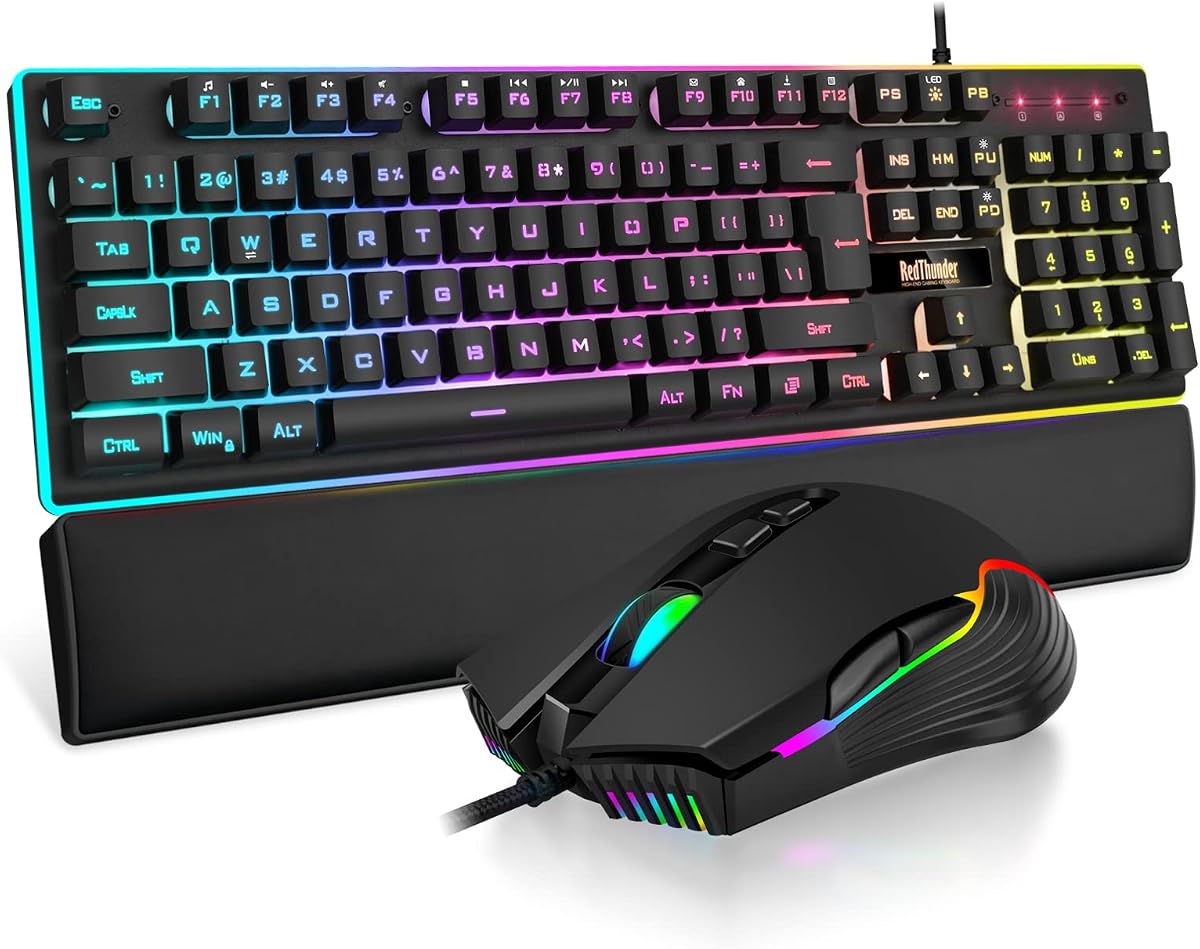
RedThunder K10 Wired
4.4Editor score
Mechanical feel anti-ghosting
7200 DPI high precision mouse
Soft leather wrist rest included
Discover the top 10 Baldurs Gate 3 Keyboard and Mouse options for 2026, comparing features, performance, and value for every type of gamer and budget.
Playing Baldurs Gate 3 requires precise control and reliable peripherals to navigate its complex combat and storytelling mechanics. A good keyboard and mouse combo ensures your commands register instantly, allowing you to focus on strategy rather than technical glitches during intense dungeon crawls.
We evaluated ten popular keyboard and mouse combinations based on durability, responsiveness, ergonomics, and overall value. Each product was analyzed for its compatibility with gaming setups, backlighting options, and ability to handle the demands of long RPG sessions without causing fatigue.
Every pick in this list highlights specific strengths, whether you need budget-friendly reliability or advanced macro capabilities. Note that prices and availability can change frequently, so verify the current listings before making your final purchase decision to ensure you get the best deal.
4.4Editor score

3.9Editor score
This comprehensive table allows you to quickly compare the key specifications and features of all ten recommended gaming sets side by side for easier decision making.


This comprehensive gaming set delivers exceptional value for players looking to enhance their Baldurs Gate 3 setup without overspending. While it does not feature mechanical switches, the membrane keys provide a satisfying tactile response suitable for extended use. The inclusion of macro recording capability is a standout feature that allows for complex action binding in RPGs.
We may earn a commission when you buy through this link, at no additional cost to you.
The RGB lighting system offers significant customization with six vibrant modes for the keyboard and ten effects for the mouse. You can download intuitive software to tailor colors and patterns to your preference, creating an immersive atmosphere. The anti-ghosting technology ensures that every key press is registered accurately, even during intense combat sequences where multiple commands are issued simultaneously.
While the keys are not mechanical, they remain remarkably quiet and comfortable for long sessions, making them ideal for shared spaces. The ergonomic wrist rest included in the package helps reduce fatigue, which is crucial when navigating through long dungeon crawls. The only trade-off is the need to download software for full customization, but this is a minor inconvenience for the features provided.
This combo is perfect for first-time gamers, students, or anyone seeking a reliable upgrade from basic office peripherals. It offers everything needed for gaming, work, or study in one durable package. If you want a feature-rich set that balances performance and cost effectively, this Redragon bundle is a top recommendation.
The five dedicated macro keys allow you to record complex command sequences, giving you a competitive edge in managing inventory or spells quickly.
Designed for marathon sessions, the soft-touch keys and ergonomic wrist rest reduce fatigue so you can focus on your adventure.
We may earn a commission when you buy through this link, at no additional cost to you.
The RedThunder K10 Wired offers a premium mechanical feel at an accessible price point, making it a strong contender for budget-conscious gamers. The 26 anti-ghosting keys ensure that your movements are registered accurately during fast-paced action. The keyboard features a built-in steel plate that adds durability and stability, preventing the unit from shifting during intense gameplay.
We may earn a commission when you buy through this link, at no additional cost to you.
This combo includes a high-precision optical mouse capable of reaching 7200 DPI with a scan rate of 12000fps. The adjustable sensitivity allows you to switch between quick turning and precise aiming seamlessly. The package also includes a soft leather wrist rest filled with memory foam, providing extra comfort and relaxation during long periods of play.
While it lacks wireless connectivity, the wired design ensures zero lag and constant power, which is critical for competitive play. The ABS keycaps are well-made and resistant to wear, ensuring the letters never fade over time. The main limitation is the lack of advanced software customization compared to higher-end models, but the hardware performance speaks for itself.
This set is ideal for gamers who prioritize tactile feedback and durability without breaking the bank. It works well with major PC brands and offers a complete solution with the included wrist rest. If you want a reliable, high-performance set that mimics mechanical switches, this RedThunder combo is an excellent choice.
The mouse handles up to 400IPS tracking speed and 40G acceleration, ensuring smooth cursor movement even during rapid swipes.
The keyboard base features a built-in steel plate that resists falling and adds a solid feel to every keystroke.
We may earn a commission when you buy through this link, at no additional cost to you.
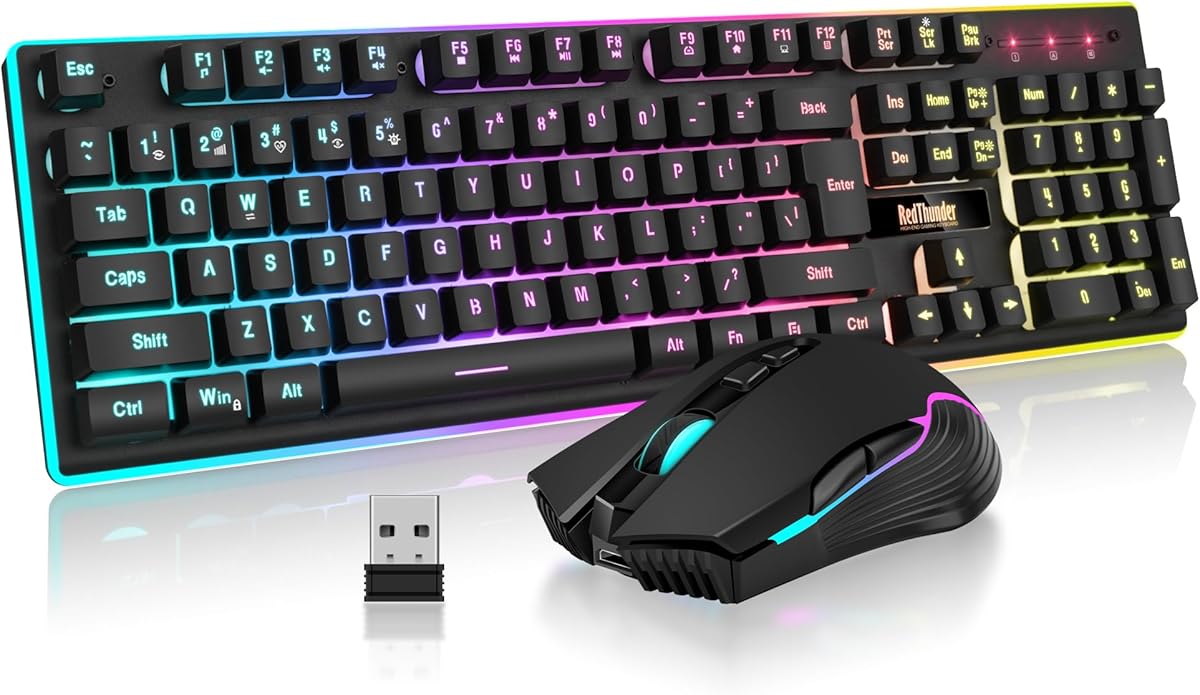
If you prefer a clutter-free setup, the RedThunder K10 Wireless delivers the same mechanical feel as its wired counterpart with the convenience of a wireless connection. The keyboard is equipped with a robust 3000mAh battery, while the mouse holds an 800mAh battery, allowing for hours of continuous use with lighting on. The 2.4G transmission ensures a stable connection suitable for intense gaming battles.
We may earn a commission when you buy through this link, at no additional cost to you.
The keyboard features three groups of rainbow backlight effects with breathing modes and adjustable brightness levels. While the mouse light only activates during charging, the keyboard lighting creates a vibrant atmosphere. The design focuses on durability with a thick metal cover that never deforms and keys rated for 10 million keystrokes, ensuring longevity over a decade.
Setup is incredibly simple with a shared USB receiver that handles both devices, reducing port usage. The energy-saving features automatically put the devices to sleep after two minutes of inactivity, preserving battery life. However, the mouse scroll wheel light only works during charging, which is a minor limitation compared to the overall wireless flexibility offered.
This wireless combination is perfect for gamers who want the responsiveness of mechanical keys without the restriction of cables. It is compatible with multiple Windows versions and works well with major gaming PCs. For those seeking a clean desk setup with high performance, this RedThunder wireless set is a reliable and premium option.
With smart energy-saving functions and large batteries, you can play for 8 hours continuously with the backlight enabled.
No drivers are needed; simply insert the USB receiver and turn on the devices to start playing immediately.
We may earn a commission when you buy through this link, at no additional cost to you.
The Rii Gaming RK108 is designed for versatility, working seamlessly across a vast range of operating systems including Windows, Mac, Android, and even Raspberry Pi. The ergonomic design helps release your hand from fatigue, while the professional mechanical feeling provides a cool and responsive experience. The keyboard is backlit with three bright LEDs to ensure visibility in dark environments.
We may earn a commission when you buy through this link, at no additional cost to you.
Durability is a key focus here, with the keyboard keys rated for 5 million clicks and the mouse keys for 3 million clicks. The laser-carved characters remain clear over time, and the non-slip design ensures stability during use. You can adjust the mouse to four different DPI levels, allowing you to switch between precise cursor control and fast movement effortlessly.
While the mouse DPI is lower than high-end gaming peripherals, it is sufficient for most casual and moderate gaming needs. The lack of required drivers means you can plug it into any supported device and start using it immediately. The main trade-off is the simpler lighting system compared to RGB models, but this keeps the price competitive.
This set is ideal for users who need a reliable and portable solution that works on various devices from TVs to laptops. The professional customer service adds peace of mind to your purchase. If you need a keyboard and mouse that works everywhere and feels good to type on, the Rii RK108 is a solid contender.
Supports Windows, Mac, Android TV boxes, and Raspberry Pi, making it a versatile choice for media centers and laptops.
Engineered for longevity with millions of clicks rated on both keyboard and mouse keys for extended daily use.
We may earn a commission when you buy through this link, at no additional cost to you.
The K1 RGB Wired keyboard stands out with its vibrant LED backlight system that offers eight colors and five distinct light modes. The double-shot injection molding process ensures that the letters never fade and transmit light clearly, making it easy to see keys in the dark. The floating keycaps are removable and provide a good feel for the hand, enhancing the overall typing experience.
We may earn a commission when you buy through this link, at no additional cost to you.
The mouse included in this set offers six speed levels up to 3200 DPI, which can be adjusted to match different scenarios. Its high-speed transmission technology ensures accurate movement, essential for navigating game menus quickly. The keyboard features a waterproof USB cable and gold-plated interface to ensure stable data transmission and resistance to wear and tear.
Since there is no software required, all adjustments are made directly on the keyboard using function keys to cycle through effects and brightness. This simplicity is great for users who want immediate functionality without configuration. The only downside is the mouse lacks programmable buttons, but it performs well for standard gaming tasks.
This combo is perfect for those who prioritize visual appeal and ease of use in a gaming setup. It works with major operating systems and provides a modern look to any desk. If you want a keyboard with fantastic lighting and reliable performance at a budget price, the K1 RGB is a great pick.
Use function keys to cycle through lighting effects, adjust brightness, change speed, and turn lights on or off instantly.
Treated with ABS engineering plastic to prevent wear and tear, ensuring the keyboard remains in good condition for years.
We may earn a commission when you buy through this link, at no additional cost to you.
Designed with larger characters than usual, this keyboard makes typing accessible for those who have trouble seeing standard keys. The high-contrast keys and command keys in larger bold fonts help seniors and visually impaired users navigate the setup effortlessly. The adjustable 7-color backlighting allows you to choose your favorite setting to enhance visibility in dim conditions.
We may earn a commission when you buy through this link, at no additional cost to you.
The ergonomic design includes foldable feet at the back to reduce hand fatigue during long hours of play or work. The non-slip pads on the bottom enhance stability, and the included wrist rest supports your hands in a comfortable typing position. The keys are silent and low-profile, reducing typing noise which is great for shared spaces.
While it lacks advanced gaming macros, the reliability and comfort it offers are unmatched for general use. The USB connection requires no drivers, making it easy to set up and start using immediately. The mouse is standard optical but matches the keyboard's practical design, ensuring a cohesive experience for typing and navigation.
This set is ideal for students, office workers, or anyone needing clear visibility without sacrificing comfort. It works well with Windows and other systems, providing a reliable solution for daily tasks. If you need a keyboard that is easy to see and gentle on your hands, this Large Print combo is an excellent choice.
Large bold characters and adjustable backlighting make it easy to see keys in any lighting condition.
Foldable stand and wrist rest help keep your hands in a comfortable position to reduce strain during use.
We may earn a commission when you buy through this link, at no additional cost to you.
The BlueFinger RGB set offers a complete solution by including a high-quality mouse pad alongside the keyboard and mouse. The keyboard features a rainbow backlit design where all letters glow and never fade, creating an immersive gaming environment. The built-in steel plate adds durability and prevents the keyboard from falling, ensuring a stable typing surface.
We may earn a commission when you buy through this link, at no additional cost to you.
The 19 non-conflict keys allow you to press or hold multiple keys simultaneously without interference, which is essential for gaming commands. The mouse is ergonomically designed with quality ABS construction and offers four different LED breathing light changes. You can adjust the DPI to four levels to suit your preference for precision or speed.
While the mouse pad is not a large gaming mat, it provides smooth surface support for your wrist and movements. The keyboard and mouse are braided for durability and designed to work with various operating systems including Windows and Mac. The only trade-off is the standard DPI range, which is adequate for most general gaming needs.
This set is perfect for users who want a ready-to-use gaming station with necessary accessories included. It is compatible with major consoles and PCs, making it a versatile choice for different setups. If you need a complete set with a mouse pad and solid performance, the BlueFinger RGB is a practical option.
The included mouse pad provides large space for movement and support, saving you from buying extra accessories.
With 19 non-conflict keys, you can execute complex commands without the issue of key ghosting.
We may earn a commission when you buy through this link, at no additional cost to you.
This keyboard is designed for those who need quiet typing, featuring low-profile keys that reduce noise significantly. The keys are printed 3 times larger than standard, making them easy to read for seniors and visually impaired users. It is slim, compact, and spill-resistant, which adds to its durability and ease of cleaning in daily environments.
We may earn a commission when you buy through this link, at no additional cost to you.
The integrated wrist rest provides ergonomic support to relieve fatigue during extended use on PCs and Macs. The mouse includes dynamic RGB lighting that can be turned off and features a 4-level adjustable DPI setting for precision. Multimedia hotkeys allow you to quickly adjust audio and volume, which is convenient for media consumption and productivity.
While multimedia keys have limited support on Mac, the keyboard works seamlessly with Windows and other systems. The adjustable tilt legs and durable construction ensure it withstands up to 10 million keystrokes. The main limitation is the specific Mac compatibility, but for Windows users, it offers a robust and quiet solution.
This combo is ideal for offices or home setups where noise reduction is a priority. The large print keys and quiet function make it suitable for long work sessions. If you need a reliable and silent keyboard that is easy to read, this set is a top recommendation.
Silent low-profile keys reduce typing noise, letting you concentrate on work without distractions.
The slim compact design is spill-resistant to protect your setup and ensure reliability in daily use.
We may earn a commission when you buy through this link, at no additional cost to you.
The SABLUTE keyboard features 4X larger characters, making typing easier and more accurate for a wide range of users. The integrated palm rest and foldable stand provide a comfortable 7-degree typing angle that helps reduce wrist fatigue during long sessions. The keyboard supports backlighting with seven colors and four lighting modes to suit different environments.
We may earn a commission when you buy through this link, at no additional cost to you.
The ergonomic mouse features an anti-slip base and built-in backlighting for low-light visibility. It connects via a 5.2-foot USB cable, ensuring a stable connection without the need for charging or batteries. The setup is plug and play, compatible with Windows, Mac, and ChromeOS without requiring any driver installations.
While it lacks wireless capabilities, the wired design ensures reliability and consistent performance for work and study. The comfortable grip on the mouse reduces misclicks and strain on your hand during daily use. The main limitation is the standard lighting options, but the focus on ergonomics and readability makes up for this.
This set is perfect for students and families looking for a thoughtful and practical gift. The large print keys and adjustable backlighting make it ideal for shared family use. If you need a comfortable and visible keyboard set for daily tasks, the SABLUTE combo is a solid choice.
The integrated palm rest and stand help reduce fatigue, making it easier to type for long periods.
Four times larger characters make identifying keys quick and easy for all users.
We may earn a commission when you buy through this link, at no additional cost to you.
This wireless combo offers a quiet typing experience with keys designed to reduce noise, making them ideal for office or shared environments. The 2.4G wireless connection maintains a stable link up to 10 meters, allowing you to type from a distance. The keyboard is rechargeable via USB-C, saving you the hassle of replacing disposable batteries.
We may earn a commission when you buy through this link, at no additional cost to you.
The ergonomic mouse follows the natural curve of your hand, with a thumb rest for stable control and three DPI settings. The keyboard includes a phone holder and a wrist rest with adjustable tilt legs for comfortable positioning during long workdays. It features nine RGB backlit effects and three lighting modes to personalize your workspace style.
The mouse noise is reduced significantly, allowing you to work without worrying about annoying others. While the wireless range is standard, it is sufficient for most desk setups. The only trade-off is the standard mouse resolution, but it performs well for general navigation and typing tasks.
This set is perfect for professionals who need a clean workspace and silent peripherals for focus. The phone holder adds extra utility for multitasking. If you want a rechargeable, quiet, and ergonomic wireless set, the VEILZOR combo is an excellent choice for daily use.
The silent keys reduce noise and optimize responsiveness, so you feel but do not hear every keystroke.
Reliable 2.4G connection allows you to work without being tethered to your laptop or desktop.
We may earn a commission when you buy through this link, at no additional cost to you.
Selecting the right peripherals for Baldurs Gate 3 involves considering several factors to ensure you can navigate combat and exploration comfortably.
Wired connections offer zero latency and constant power, which is ideal for competitive play. Wireless connections provide flexibility and a cleaner desk setup but require battery management or charging.
Mechanical switches offer tactile feedback and durability, while membrane switches are quieter and more affordable. For Baldurs Gate 3, either works well depending on your budget and noise tolerance.
Look for wrist rests and adjustable stands to reduce fatigue during long sessions. Comfort is crucial to prevent strain when playing for extended periods.
LED or RGB backlighting helps visibility in dark rooms. Choose a set with adjustable brightness to suit your environment.
Check the keystroke life ratings and build materials. Steel plates and quality plastics ensure the device lasts longer.
Ensure the keyboard and mouse work with your operating system. Most sets work with Windows, but check Mac or Linux support if needed.
Sets range from basic affordable options to premium feature-rich sets. Determine your budget and prioritize features that matter most.
Advanced customization may require software. Ensure you are comfortable installing drivers to unlock all features.
To get the most out of your set, ensure the USB ports are clean and secure before plugging in. For wireless models, charge fully before first use to establish the best connection.
Most of the listed keyboards work primarily with PCs. While some may work with consoles like PS4 or Xbox depending on the system settings, they are optimized for computer use.
Yes, most models in this list include buttons to adjust DPI levels. This allows you to switch between precise aiming and quick movement easily.
Basic functions work plug-and-play without software. However, advanced RGB or macro features may require downloading specific drivers from the manufacturer.
RGB allows for a wide range of color combinations and effects. LED typically refers to single or multi-color lighting with fewer customization options.
Wireless models with rechargeable batteries can last weeks or hours depending on usage and backlight settings. Always check the specific battery specs before purchase.
Mechanical keyboards tend to be louder due to their switches. Membrane and low-profile keys are generally quieter and better for shared spaces.
Absolutely. Most gaming keyboards are designed for both gaming and general typing. The keys are durable and comfortable for daily use.
Check the USB connection and try a different port. If using wireless, ensure the batteries are charged. Resetting the connection may also help.
We reviewed ten versatile sets suitable for various needs and budgets. The Redragon S101-3 PRO stands out as a top value choice with excellent customization options for RPG play.
When choosing a set, prioritize ergonomics and connection stability to ensure comfortable gameplay. Whether you prefer wireless freedom or wired reliability, there is a pick that fits your specific requirements.
Remember to check current prices and availability as deals change frequently. Investing in the right peripherals can significantly enhance your gaming experience in Baldurs Gate 3.