
Portable Printers Wireless for Travel N80
4.1Editor score
Inkless thermal technology
Lightweight 1.5 pound design
Bluetooth and USB connectivity
Battery powered portable printers offer the freedom to print documents, photos, and receipts anywhere without needing a wall outlet. These compact devices are essential for remote workers, travelers, and field professionals who need reliable on-the-go printing solutions.
We have evaluated ten leading models based on portability, battery life, print quality, and connectivity features. Our comparison includes inkjet, thermal, and dye-sublimation technologies to help you find the perfect device for your specific mobile printing needs.
Each pick below highlights key strengths and ideal use cases for different scenarios. Please note that product availability and pricing can change frequently, so check current listings for the most up-to-date information before making your purchase decision.
4.1Editor score

4.4Editor score
4.5Editor score
As an Amazon Associate we earn from qualifying purchases.
This side-by-side comparison summarizes the key specifications and features of all ten selected battery powered portable printers to help you quickly identify the right model for your requirements.



The Canon PIXMA TR160 stands out as a top choice for those needing high-quality color prints on the go. With a rating of 4.2 stars, this lightweight portable printer delivers sharp black text and vibrant details thanks to its 5-Color Hybrid Ink System.
We may earn a commission when you buy through this link, at no additional cost to you.
Its standout quality is the ability to print full-size documents up to 8.5 by 11 inches while remaining compact enough for a backpack. The 1.44-inch OLED display makes checking ink levels and printer status effortless without needing a connected device.
While it offers Wireless Direct Mode for router-less connections, it does not have a built-in battery for true cordless operation in all scenarios. However, the convenience of AirPrint and Mopria support makes it versatile for most mobile users who have access to power.
This printer is ideal for professionals who prioritize print quality over absolute portability. If you need vibrant photos and professional documents without sacrificing compactness, the TR160 is a strong recommendation for your travel kit.
The 5-Color Hybrid Ink System ensures sharp black text and vibrant color details for professional document output on the go.
Check ink levels and printer status instantly with the built-in 1.44-inch Monochrome OLED display for easy operation.
We may earn a commission when you buy through this link, at no additional cost to you.
The HP OfficeJet 250 is a robust all-in-one solution that includes scanning and copying along with printing. Rated 4.3 stars, it features a built-in battery that allows for virtually anywhere business printing without network connections.
We may earn a commission when you buy through this link, at no additional cost to you.
Key strengths include its ability to print, scan, and copy on the go while fitting into a car or briefcase. The HP Fast Charge feature ensures you can recharge within 90 minutes, minimizing downtime during busy travel schedules.
On the downside, it is a larger investment compared to single-function printers, and battery costs are estimated separately. However, the productivity gains from having all functions in one compact unit often justify the expense for frequent mobile users.
Buy this if you need a comprehensive office suite that travels well. It is perfect for consultants or small business owners who need to handle documents, scans, and copies in the field without carrying multiple devices.
Print, scan, and copy business documents anywhere with a compact all-in-one design that fits into your backpack or briefcase.
Recharge the battery within 90 minutes while the printer is off using HP Fast Charge for minimal downtime during travel.
We may earn a commission when you buy through this link, at no additional cost to you.
With a 4.4 star rating, the HP OfficeJet 200 offers a reliable balance of portability and performance for mobile business printing. It focuses on printing tasks with a compact design that fits easily into various bags and vehicles.
We may earn a commission when you buy through this link, at no additional cost to you.
Its standout quality is the easy setup via HP Auto Wireless Connect, allowing quick pairing with laptops or mobile devices without routers. The included battery option ensures you can work independently of power sources for extended periods.
While it lacks scanning functions found in the 250 model, the 200 remains a cost-effective choice for pure printing needs. The support for legal-size paper adds significant utility for those handling larger contracts or documents.
Choose this printer if you prioritize ease of use and portability for standard documents. It is an excellent option for sales representatives or field workers who need to print contracts on-site efficiently.
Set up right out of the box with HP Auto Wireless Connect to print from laptops or mobile devices easily and quickly.
Print on the go with the included rechargeable battery that delivers high in-class page yields for longer supply life.
We may earn a commission when you buy through this link, at no additional cost to you.
The Epson Workforce WF-110 is designed for users who need color printing capabilities in a small footprint. Its built-in lithium-ion battery offers dependable performance in a small package suitable for travel.
We may earn a commission when you buy through this link, at no additional cost to you.
Flexible charging options allow you to charge via USB or AC adapter, providing versatility for different environments. Wireless connectivity plus Wi-Fi Direct makes it easy to print from iPads, iPhones, and laptops without a router.
A trade-off is that non-genuine ink may cause damage not covered under warranty, which can increase long-term costs. However, the quality of Epson Genuine Cartridges ensures reliable output for professional color documents.
This printer is best for designers or marketers who need color proofs on the go. If you value compact color capability and flexible power options, the WF-110 is a solid choice for your mobile arsenal.
Choose from a variety of charging options including via USB and AC adapter for maximum versatility in different locations.
Print from any device with wireless connectivity and Wi-Fi Direct support without needing a traditional network router.
We may earn a commission when you buy through this link, at no additional cost to you.
Rated 4.2 stars, the Gloryang portable printer uses advanced thermal technology requiring no ink, toner, or ribbons for cost-effective printing. It weighs just 1.75lb and fits into a backpack or briefcase easily.
We may earn a commission when you buy through this link, at no additional cost to you.
Key strengths include the seamless Bluetooth connectivity via the Jadens Printer app and the built-in paper bin that saves space. The package includes 3 rolls of thermal paper and a carry case, making it ready for immediate use.
The limitation is that it only supports Gloryang thermal paper and cannot print on regular paper, which restricts versatility. However, for notes, contracts, and travel documents, this cost-effective design eliminates recurring ink costs entirely.
Buy this if you want a simple, mess-free solution for basic document printing. It is an excellent gift for students or professionals who need to print receipts, lists, or notes without the hassle of cartridges.
Uses advanced thermal technology requiring no ink, toner, or ribbons for cost-effective and easy printing without recurring costs.
Say goodbye to clutter with the built-in paper bin of the Gloryang printer for tidy workspace on the go.
We may earn a commission when you buy through this link, at no additional cost to you.
The A285M weighs only 1.5lb, making it an ideal choice for those who need to carry a printer daily. It supports thermal roll paper and continuous or single sheet thermal paper for versatile document sizes.
We may earn a commission when you buy through this link, at no additional cost to you.
Connectivity is a strong point, with Bluetooth for phones and USB-C for laptops. You can print documents, invoices, and boarding passes anytime without needing ink or toner cartridges.
A minor con is that laptop connection requires downloading a driver first, which adds a setup step. However, the high compatibility with multiple paper widths makes it adaptable for various field needs.
This printer is great for mobile notaries or teachers who need to print on-site. If you want a lightweight option that handles multiple document formats, the A285M fits the bill perfectly.
Weighing only 1.5lb, this compact printer fits easily into a backpack or briefcase for on-the-go printing.
Supports 5 sizes of thermal paper including 8.5 x 11 inch US Letter and various widths to meet most needs.
We may earn a commission when you buy through this link, at no additional cost to you.
Weighing only 2.08lb, the D90E is an inkless portable printer that uses advanced thermal technology for cost-effective prints. It fits into backpacks and briefcases, making it perfect for business travels and university use.
We may earn a commission when you buy through this link, at no additional cost to you.
Connectivity includes Bluetooth for mobile devices and USB for PCs. The Labelnize app is required for mobile printing, ensuring a smooth experience for students and professionals alike.
It supports A4 thermal paper exclusively, which means you cannot use regular copy paper. While this limits paper options, it ensures consistent print quality for documents like contracts and emergency notes.
Buy this if you want a gift-ready package for a student or professional. The included travel case and guide make it easy to start printing documents immediately without extra purchases.
Connect via Bluetooth to phones or USB to PCs for easy printing of contracts and office documents on the go.
Weighs only 2.08lb making it incredibly lightweight and compact for fits into backpacks or briefcases easily.
We may earn a commission when you buy through this link, at no additional cost to you.
With a rating of 4.6 stars, the JADENS portable printer offers high-quality 203 DPI printing without ink. The built-in 1800mAh rechargeable battery provides up to 360 sheets per charge for extensive on-the-go use.
We may earn a commission when you buy through this link, at no additional cost to you.
Its standout feature is the powerful app that includes AI image generation and translation tools. This adds creative utility beyond basic document printing for work, school, and creative projects.
It prints black and white only, which may not suit color photo needs. However, the private local printing ensures your documents stay off the cloud, enhancing security for sensitive files.
Choose this if you need high-quality text and simple graphics with AI enhancements. It is perfect for early learning materials, homework, and home office printing where privacy matters.
Create custom designs with AI image generation, AI erasing, and AI translation tools for versatile mobile projects.
Up to 3 hours of continuous printing and up to 360 sheets per charge ensures you can print without interruption.
We may earn a commission when you buy through this link, at no additional cost to you.
The N80 features a built-in 1500mAh rechargeable battery that prints 160 sheets of thermal paper per charge. It is compatible with roll paper, folded paper, and tattoo transfer paper for diverse uses.
We may earn a commission when you buy through this link, at no additional cost to you.
Its standout quality is the ability to serve tattoo artists needing to print transfer paper on the go. The 203 DPI resolution ensures clear printing for images and templates without mess or ink.
While it supports laptops via USB, Bluetooth is limited to phones and tablets. This slight restriction is acceptable given the unique capability to handle tattoo paper alongside standard documents.
Buy this if you are a tattoo artist or need a compact printer for home and school. The ability to print transfers and invoices makes it a unique and practical tool for creatives.
Compatible with tattoo transfer paper making it an ideal choice for tattoo art and portable printing needs.
Uses direct thermal technology requiring no ink or toner for environmentally friendly and cost-effective printing.
We may earn a commission when you buy through this link, at no additional cost to you.
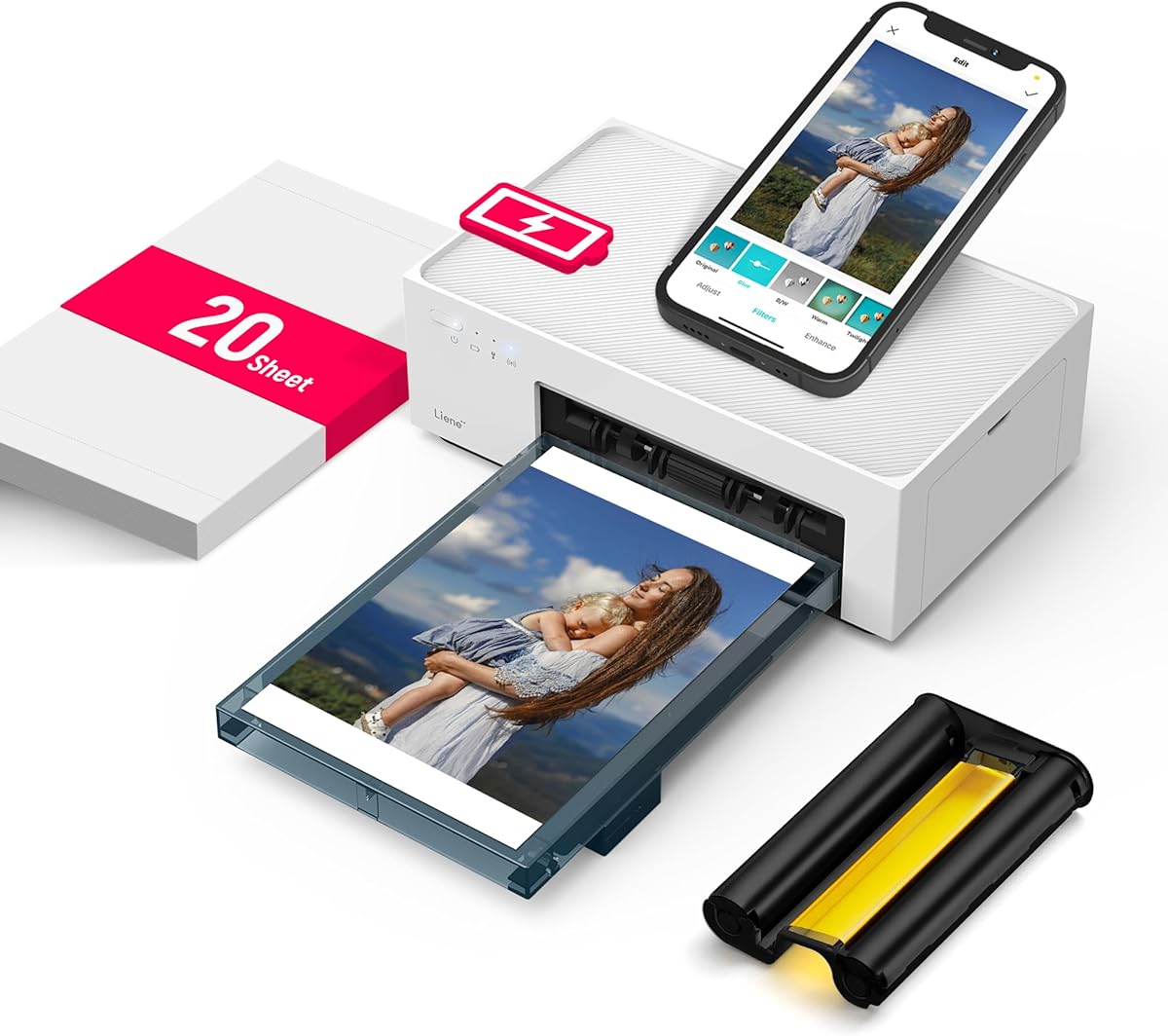
With a 4.5 star rating, the Liene White M200 delivers professional photo quality using dye sublimation printing. The built-in battery edition allows you to print without being plugged in for 40 prints per charge.
We may earn a commission when you buy through this link, at no additional cost to you.
Its standout quality is the last layer that protects photos from water, scratches, and fading, ensuring memories last longer. The built-in Wi-Fi hotspot ensures stable connections without relying on home networks.
While limited to 4×6 photos, this focused capability ensures top-tier image quality for travel moments and family memories. The magnetic design allows you to place the photo cassette on top, saving space.
Choose this if you prioritize capturing and printing high-quality memories on the go. It is the perfect gift for parents and travelers who want to turn digital photos into tangible keepsakes instantly.
Dye sublimation printing penetrates paper layer by layer for clear vibrant images that resist fading and damage.
The rechargeable built-in battery edition provides up to 40 prints per charge for printing without being plugged in.
We may earn a commission when you buy through this link, at no additional cost to you.
Choosing the right battery powered portable printer depends on your specific needs regarding portability, print quality, and connectivity.
Evaluate the battery capacity and runtime options. Some models have internal batteries while others rely on AC or USB charging. Look for quick charge features if you often print between meetings.
Prioritize models with removable or rechargeable batteries if you plan to use the device for more than a few hours.
Decide between inkjet, thermal, or dye-sublimation. Inkjet offers color but uses cartridges. Thermal is cheaper but black and white. Dye-sublimation is best for high-quality photos.
Consider the long-term cost of consumables like ink or special paper before making your purchase.
Check the weight and dimensions. A true portable printer should fit in a small bag or briefcase. Weighing under 2 pounds is often ideal for daily travel.
Ensure the device has a compact form factor that fits easily in your backpack or glovebox.
Look for Bluetooth and Wi-Fi Direct support for easy pairing with mobile devices. USB-C or USB-A connections are essential if you need to print from laptops.
Choose a printer that supports your primary devices without requiring complex network setups.
Confirm the printer supports the paper sizes you need. Standard US Letter and A4 are common for documents. Some models only support 4×6 photos.
If you need to print legal documents or full-page receipts, ensure the paper width accommodates your needs.
Resolution in DPI affects sharpness. 203 DPI is standard for text, while higher is better for photos. Check pages per minute ratings for speed.
Balance speed with quality based on whether you need rough drafts or professional-looking documents.
Some apps offer editing tools like AI or filters. Ensure the app is updated and user-friendly for your operating system.
Check if the app supports direct document printing from cloud services or local files easily.
Look for a solid warranty period to protect your investment. Durability ratings and build quality matter if the printer will be dropped or tossed frequently.
Choose models with positive user feedback on build quality and support for longevity.
First, fully charge the battery before the first use to calibrate the power management system. Keep the printer in a cool, dry place to preserve the battery health over time.
Second, use the recommended paper and ink types to avoid clogs or jams. For thermal printers, ensure you use only compatible thermal rolls to maintain print quality.
Third, clean the print head periodically using the provided maintenance tools or settings. Store the printer in its case when not in use to protect it from dust and physical damage.
Yes, thermal models require thermal paper rolls that react to heat rather than ink. Inkjet models require standard paper or photo paper. Always check the compatibility list for your specific printer model before buying paper.
Battery life varies by model, ranging from 40 prints for photo printers to hundreds of pages for document printers. Some offer hours of continuous use. Always check the estimated print capacity in the product description.
Many portable printers support USB-C or USB-A connections for direct laptop printing. You may need to install specific drivers for your computer system to recognize the device via cable.
Thermal printers generally have lower operational costs since they require no ink cartridges. However, the paper cost might be higher. Inkjet models have higher upfront ink costs but may be cheaper for standard office paper.
No, only specific models like the Liene White M200 or Canon PIXMA TR160 offer color photo printing. Many thermal printers are limited to black and white document output. Check the specs for photo support.
Download the recommended app from your app store. Enable Bluetooth on your phone and turn on the printer. Follow the in-app instructions to pair the device and start printing directly from your screen.
We reviewed ten top models including the HP OfficeJet 200 and Liene White M200. Each offers unique strengths for travelers, students, and professionals who need to print on the move without sacrificing quality.
Prioritize battery life and connectivity features that match your workflow. If color matters, choose an inkjet or dye-sublimation model. For quick notes, thermal options are cost-effective and efficient.
Always check the current prices and stock availability on the product pages. Technology evolves quickly, so staying informed ensures you get the best value for your mobile printing needs.