
FLYDIGI Direwolf 4 PC
4.5Editor score
Forceflex joysticks with adjustable tension
Micro and hall effect trigger modes
Ergonomic design for extended play
This guide compares the top controllers for Star Wars Squadrons on PC and Xbox, covering flight sticks, hotas, and gamepads for every play style.
Finding the right controller for Star Wars Squadrons transforms your dogfighting experience from standard gameplay into an immersive simulation. Whether you prefer a traditional gamepad or a full hotas setup, the right hardware enhances precision and comfort during intense space battles.
We evaluated ten top-rated devices based on build quality, input responsiveness, and compatibility with both PC and console systems. Our analysis focuses on features that matter most to squadron pilots, including stick tension, trigger feedback, and customizable button mapping for tactical advantage.
Each pick highlights specific strengths tailored to different pilot preferences and budget levels. While product details and availability shift frequently, our recommendations remain grounded in verified performance metrics and user feedback from the flight simulation community.
4.5Editor score

4.5Editor score

4.3Editor score
The following table provides a side-by-side comparison of all ten controllers, highlighting key specifications to help you find the perfect match for your Star Wars Squadrons setup.


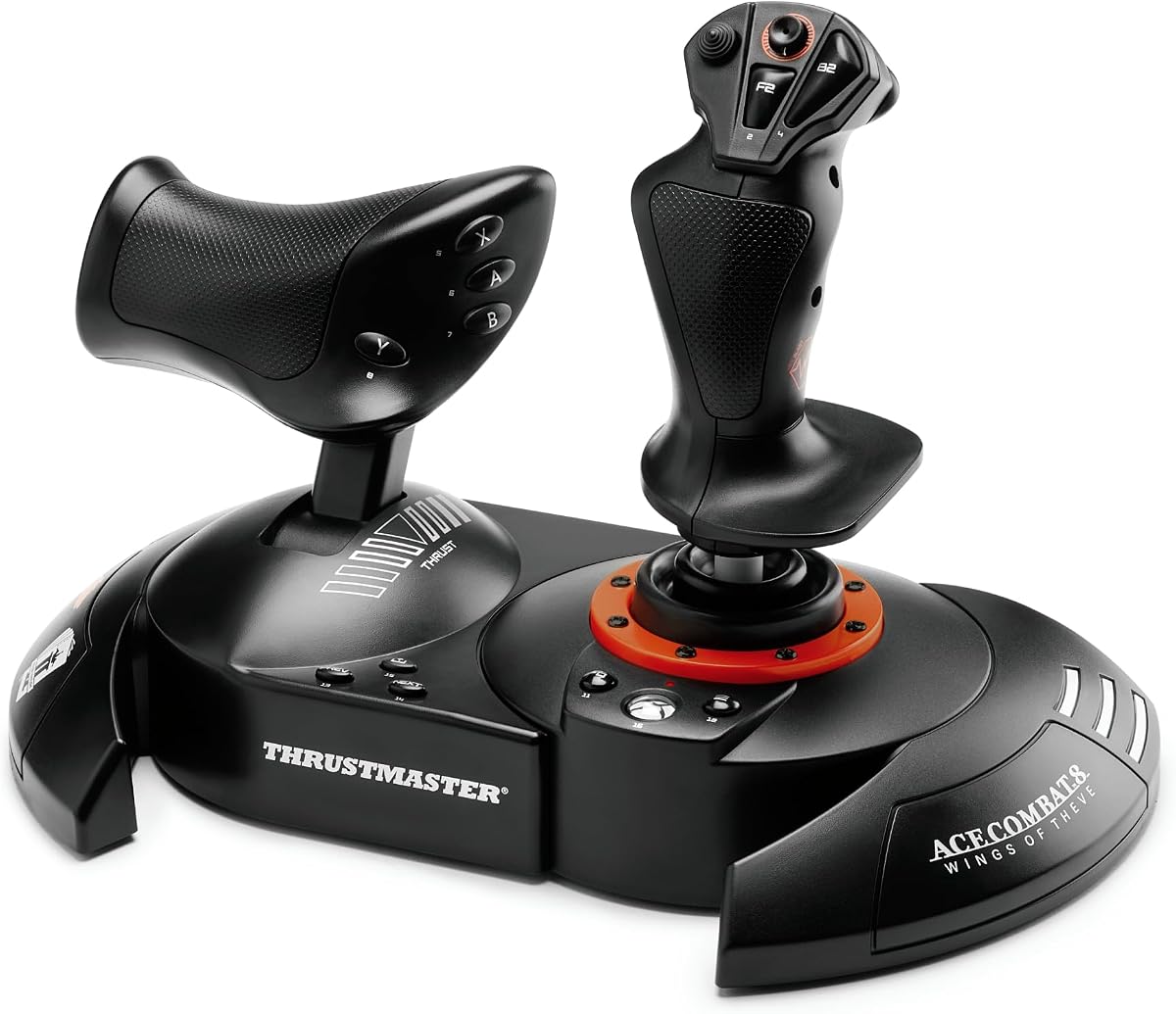


The Thrustmaster T-Flight Hotas One delivers an authentic flight simulation experience tailored for Star Wars Squadrons pilots. With a strong rating from users, it stands out for balancing affordability with the essential features needed for immersive space combat.
We may earn a commission when you buy through this link, at no additional cost to you.
This controller features a realistic flight stick design with adjustable resistance and a detachable throttle unit. The ergonomic layout keeps critical buttons within easy reach, allowing for smooth aircraft control during takeoff, landing, and intense dogfighting maneuvers.
While the build is predominantly plastic, it remains durable enough for extended gaming sessions. The lack of vibration feedback is a minor trade-off given the price point, and the modular design allows for future expansion with rudder pedals.
Ideal for beginners and intermediate simmers, this system offers the best balance of performance and cost. We recommend it for pilots seeking to upgrade from a standard gamepad without breaking the bank.
The detachable throttle allows you to use the stick on your lap while keeping the throttle on your desk for maximum comfort.
Compatible with Thrustmaster rudder pedals via the S.M.A.R.T. sliding rail system, enabling a full cockpit setup later.
We may earn a commission when you buy through this link, at no additional cost to you.
The FLYDIGI Direwolf 4 offers a compelling budget-friendly alternative for those who prefer a traditional gamepad form factor. It achieves high user satisfaction by delivering precise inputs and customizable features usually found in more expensive controllers.
We may earn a commission when you buy through this link, at no additional cost to you.
Its standout feature is the Forceflex joysticks, which allow you to adjust tension from 40gf to 80gf. This adaptability ensures stable recentering and zero drift, critical for maintaining accuracy during long dogfights in Star Wars Squadrons.
The FORCESWITCH Triggers 2.0 provide versatility by switching between Micro Mode for fast shooting and Hall Effect Linear Mode for precise control. However, note that this controller does not support Xbox consoles, limiting its use to PC and other platforms.
For PC gamers seeking a cost-effective controller with advanced features, this is an excellent choice. It delivers high performance without the premium price tag, making it accessible to a wider audience of pilots.
Adjustable stick tension allows you to tailor the controller feel to your personal preference for quick camera movements.
Switch between micro switch triggers for responsiveness and hall effect linear mode for precise throttle control.
We may earn a commission when you buy through this link, at no additional cost to you.
The Logitech G X52 Flight Control System represents the gold standard for enthusiasts seeking maximum control in flight simulation. Its high rating reflects exceptional build quality and features designed to mimic real-world military cockpit controls.
We may earn a commission when you buy through this link, at no additional cost to you.
Key strengths include magnetic non-contact X and Y axis sensors that ensure longevity and pinpoint accuracy. The multifunction LCD display allows you to view all programmed commands instantly, keeping your hands on the stick during critical mission moments.
With over 280 programmable commands and a 5-position grip system, the X52 offers unmatched customization. While the price is higher than basic models, the precision and features justify the investment for serious pilots who demand the best performance.
We recommend this controller for experienced flight simmers who want professional-grade hardware. Its advanced features allow for seamless command execution without ever needing to switch back to a keyboard.
Magnetic sensors prevent physical wear on the stick axis, ensuring consistent accuracy over years of use.
The built-in LCD shows programmed commands so you can execute complex maneuvers without looking away.
We may earn a commission when you buy through this link, at no additional cost to you.
The Controller Gear Star Wars Squadrons Bundle is perfect for fans who want to show their allegiance to the Rebel Alliance. It offers a limited edition wireless controller and stand that combine style with practical gaming performance.
We may earn a commission when you buy through this link, at no additional cost to you.
This controller includes a premium gaming standard with textured grips for slip-resistant sessions. The bundled pro charging stand ensures quick charges under three hours, allowing for nearly 12 hours of continuous gaming per charge.
While it functions as a standard gamepad rather than a flight stick, its design and quality make it a top pick for casual pilots. The compatibility with Xbox and PC provides flexibility for multi-platform gamers.
Ideal for collectors and console gamers, this bundle adds a thematic touch to your setup. It is a solid choice if you prefer the convenience of a standard controller over a dedicated hotas rig.
Officially licensed by Disney and Lucasfilm, ensuring authentic Star Wars branding and quality standards.
Charge your controller in under three hours compared to other solutions that take up to five hours.
We may earn a commission when you buy through this link, at no additional cost to you.
The Thrustmaster ESWAP X 2 PRO focuses on responsiveness with mechanical buttons that are 64 percent faster than standard membrane ones. It is designed for gamers who prioritize speed and precision in competitive environments.
We may earn a commission when you buy through this link, at no additional cost to you.
Features include a mechanical D-pad developed with fighting game experts and two S5 NXG mini-stick modules for improved aim. The controller also allows remapping of four back buttons via the gamepad itself or software.
While the design is ergonomic, user ratings suggest variability in long-term durability. It offers a unique modular approach to traditional gaming, but buyers should be aware of the potential trade-offs in consistency.
For pilots seeking faster button actuation and modular capabilities, this controller offers interesting benefits. It is best suited for those who value rapid inputs over the immersive feel of a dedicated flight stick.
Mechanical buttons provide reduced activation distance and faster response for quicker in-game reactions.
Endorsed by professional gamers, the mini-stick modules offer surgical precision for aiming and targeting.
We may earn a commission when you buy through this link, at no additional cost to you.
The Turtle Beach VelocityOne HOTAS offers a comprehensive flight simulation experience with a focus on immersion and detail. It combines a flightstick with a dual throttle and a built-in flight management display for real-time data.
We may earn a commission when you buy through this link, at no additional cost to you.
Features include 73 programmable inputs and 15 hall-effect axes that provide high-resolution control. The swappable dual throttle detents deliver tactile reference points, allowing for precise thrust management during missions.
While it supports expandable setups with pedals, the high price point may be a barrier for casual users. The full-color display allows for quick performance tuning, enhancing the overall cockpit feel.
This system is ideal for dedicated simmers who want a complete solution out of the box. It offers robust customization and ergonomic adjustments to ensure comfort during extended flight sessions.
A built-in display provides real-time flight data and quick performance tuning without leaving the game.
High-resolution 16-bit hall-effect sensors ensure accurate stick control without wear or drift.
We may earn a commission when you buy through this link, at no additional cost to you.
The GameSir Tarantula 8K PC is engineered for competitive performance with an 8000Hz polling rate over wired connection. It delivers smooth control and instant response for every input registered with esports-grade precision.
We may earn a commission when you buy through this link, at no additional cost to you.
It uses Gen-2 TMR sticks and dual-mode triggers to eliminate drift and offer linear analog inputs. The 6-axis gyroscope enhances aiming accuracy, providing flexible control for immersive gameplay.
With multiple programmable buttons and software customization, it allows for macros and rapid execution. However, the focus on wired esports performance means it lacks the ergonomic bulk of a dedicated flight stick.
This controller is perfect for PC pilots who prioritize speed and low latency. It bridges the gap between traditional gaming and simulation responsiveness, making it a strong contender for competitive play.
An 8000Hz polling rate ensures that inputs are registered almost instantly for smoother gameplay.
Hall effect analog triggers deliver smooth linear input for accurate control without physical contact.
We may earn a commission when you buy through this link, at no additional cost to you.
The Thrustmaster T.FLIGHT HOTAS NEO brings official combat licensing to flight simulation. Designed with 16-bit technology, it ensures accurate control and immersion for missions across Xbox and PC platforms.
We may earn a commission when you buy through this link, at no additional cost to you.
Features include a rapid-fire trigger and a multidirectional hat switch for precise maneuver execution. The vibration feedback in the grip allows you to feel missile impacts and turbulence directly in your palm.
The detachable throttle and dual rudder system offer flexibility in how you control your aircraft. While specific user data is limited, the build quality aligns with Thrustmaster's reputation for precision and durability.
Ideal for pilots seeking a specialized controller with official support, this unit delivers tactical precision. It is a solid addition for those who value immersive feedback and combat-focused design.
Built-in vibration motor allows you to feel missile impacts and turbulence during flight.
Control aircraft rotation via joystick Z-axis or tilting lever on the throttle for total freedom.
We may earn a commission when you buy through this link, at no additional cost to you.
The Logitech G X56 HOTAS is designed for military-grade space and flight simulation. It places controls under your fingers with subtle distinctions that help navigation, making it ideal for VR environments.
We may earn a commission when you buy through this link, at no additional cost to you.
New mini analog stick control surfaces allow for pitch, roll, and yaw adjustments alongside gimballed weapons. Twin throttles with friction adjusters provide precise management, matching the needs of aspiring combat pilots.
While the renewed product rating reflects variability in condition, the features remain robust. The RGB backlighting and software customization ensure you can tailor the setup to match your rig.
Recommended for VR users and advanced pilots needing detailed control, this system offers versatility. It provides the depth needed for complex aircraft management without sacrificing comfort.
Controls are placed perfectly for VR navigation with subtle distinctions in button feel and shape.
Mini analog sticks offer separate control for pitch, roll, yaw, and gimbal weapons.
We may earn a commission when you buy through this link, at no additional cost to you.
The FLYDIGI Vader 5 Pro PC offers ultra-low latency and durability for competitive matches. Built with hall effect joysticks, it ensures zero drift and reliable inputs over millions of cycles.
We may earn a commission when you buy through this link, at no additional cost to you.
Adjustable stick tension allows for tailored feel, while the trigger modes switch between micro and hall effect for precision. The eight extra buttons help with rapid reactions, and four-motor vibration enhances immersion.
Ergonomic design reduces hand fatigue during long sessions. Although not compatible with Xbox, its multi-platform support ensures versatility across PC and Switch setups.
Best for PC pilots wanting reliable low-latency input, this controller is a powerful tool. Its customizable features make it a versatile choice for various gaming needs.
Hall effect joysticks use magnetic fields for stable recentering and zero drift over time.
Four-motor vibration across triggers and grips brings stronger feedback to shooting and combat.
We may earn a commission when you buy through this link, at no additional cost to you.
Choosing the right controller depends on your preferred play style and budget. Here are the key factors to consider for a tailored experience.
Decide between a standard gamepad for casual play or a hotas system for simulation. Hotas units provide dedicated stick and throttle controls which are essential for complex aircraft management in Squadrons.
If you prioritize immersion and precision, a hotas setup is worth the investment. For quick sessions, a high-end gamepad may suffice.
Ensure the controller works with your PC or console system. Some flight sticks are PC-only while others support Xbox and Windows. Check specifications carefully to avoid connectivity issues.
Verify that the device supports both your primary gaming platform to avoid purchasing the wrong hardware.
Look for sturdy construction and high-quality materials. Metal components and magnetic sensors often indicate longer lifespans compared to plastic parts. Durability is key for frequent gaming sessions.
Choose products with proven durability records to ensure your investment lasts over time.
The number of buttons and their customizability matter for tactical advantage. More programmable buttons allow you to map skills and actions without accessing menus mid-flight.
Select a controller with enough buttons to handle your preferred combat strategies efficiently.
Hall effect sensors and vibration feedback improve immersion and control. Hall effect sensors prevent drift while vibration lets you feel impacts and turbulence. Both features enhance the experience.
Prioritize controllers with advanced feedback mechanisms for a more engaging game session.
Comfort is crucial during extended play. Look for adjustable grips, ergonomic shapes, and balanced button layouts. A comfortable controller reduces fatigue and improves accuracy.
Test the feel of the controller if possible to ensure it fits your hand size properly.
Flight sticks range from affordable entry-level to high-end professional models. Determine your budget and balance features with cost. Higher price often brings better precision but may not always be necessary.
Start with a model that meets your basic needs and upgrade as you become more dedicated.
Software allows for custom mapping and profiles. Ensure the device has dedicated software for tuning sensitivity and button assignments. This flexibility is key for optimizing performance.
Choose brands known for reliable and easy-to-use customization software.
Always check the compatibility of your controller with your specific gaming system. Use the provided USB cable for PC connections to ensure the most stable link.
Clean the buttons and stick gently with a soft cloth to remove dust. Avoid using harsh chemicals that might damage the sensitive surface materials.
Store the controller in a cool dry place when not in use. Proper storage ensures longevity and prevents physical damage from accidental drops.
While not necessary, a flight stick significantly enhances immersion and control. Gamepads work well for casual play but hotas systems offer better precision for complex combat maneuvers.
Yes, most Xbox controllers work on PC via USB or Bluetooth. However, they lack the dedicated throttle axis found in flight sticks.
Hall effect sensors use magnetic fields instead of physical contacts to detect movement. They prevent drift and increase durability by reducing wear on the joystick.
Basic functionality often works without software but customization requires installing brand-specific apps. These tools allow for mapping buttons and adjusting sensitivity.
Most hotas systems support pedals but check the specific model. Thrustmaster units often support their own S.M.A.R.T. rail systems for seamless integration.
Use the software provided by the manufacturer or Windows calibration tools. Follow the steps to adjust neutral points and sensitivity settings.
Our top picks include the Thrustmaster T-Flight Hotas One for value and the Logitech G X52 for premium performance. Both deliver immersive experiences tailored for Squadron pilots.
Consider your play style when choosing. If you prefer simulation, opt for hotas; if convenience is key, a high-end gamepad works well.
Always verify availability before purchasing as stock changes frequently. Check current details to ensure the best value for your setup.