
Cooling Station and Stand for PS5/Slim/Pro
4.5Editor score
Automatic fan speed adjustment
Honeycomb RGB lighting modes
Compatible with Edge controllers
This guide compares the top cooling stands for PS5 consoles, evaluating features like fan speed, controller charging, and compatibility to help you choose the
Keeping your PlayStation 5 cool during intense gaming sessions is crucial for performance and longevity. A quality cooling stand helps dissipate heat efficiently while offering added convenience like controller charging and storage. Finding the right accessory requires understanding compatibility and features that match your setup needs.
We have analyzed the top-rated cooling stands available in the market to provide you with a comprehensive comparison. Each product was evaluated based on cooling efficiency, build quality, additional features like USB hubs, and user feedback. This list covers vertical and horizontal options suitable for all PS5 models including Slim and Pro versions.
Every pick below highlights specific strengths such as fast charging speeds, adjustable fan settings, or aesthetic design elements. Remember that product availability and pricing can change over time so always check the latest details before purchasing. We aim to help you make an informed decision for your gaming environment.
4.5Editor score
4.4Editor score

4.3Editor score
This side-by-side comparison outlines the key specifications and unique features of each selected cooling stand to help you find the perfect match for your console setup.


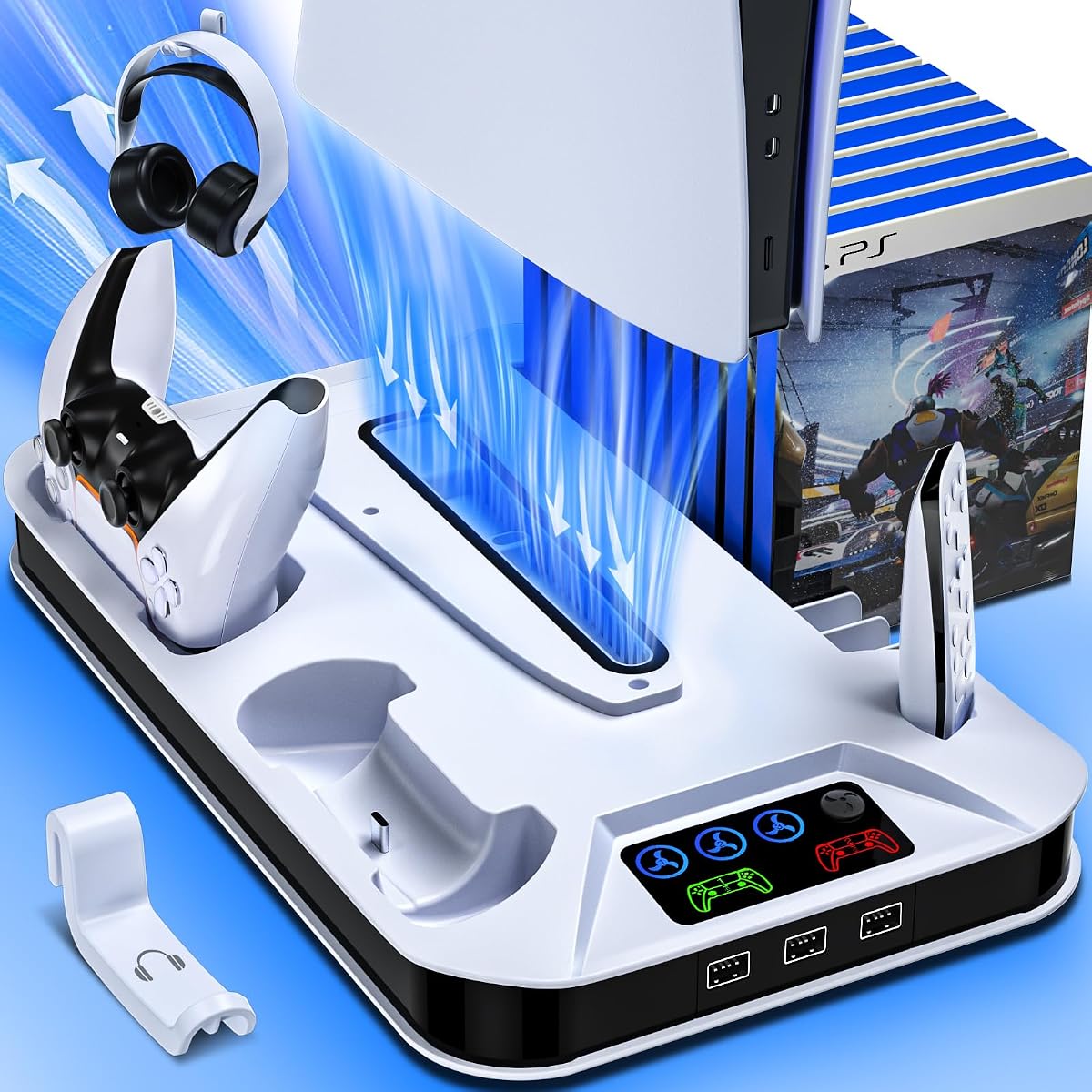
This cooling station ranks first for its robust feature set and reliable performance across all PS5 models. It features a high-efficiency turbo fan with three adjustable speeds to keep your console cool during long gaming sessions. The built-in charging dock allows you to charge two controllers simultaneously in just three hours which is ideal for keeping your setup ready.
We may earn a commission when you buy through this link, at no additional cost to you.
The unit includes three extra USB hubs that let you charge headsets and other devices without clogging the console ports. LED indicators clearly show fan speeds and charging status so you always know when devices are fully charged. A safety screw locks the console in place ensuring stability and preventing accidental knocks on your desk.
While it does not support the Edge controller which might limit some users its core cooling and charging functions are excellent. The design requires removing a panel adapter for Slim models which adds a small step to setup but ensures a perfect fit. Overall it offers great value for those prioritizing functionality and organization.
This stand is perfect for gamers who want an all-in-one solution to manage heat and power needs. It keeps your gaming area tidy by organizing controllers headsets and media remotes in one place. If you need a reliable way to extend your console life and keep accessories charged this is a top recommendation.
The turbo fan effectively dissipates hot air from the bottom of the console preventing overheating during intense play.
Extra USB ports and slots for headsets and remotes help keep your gaming desk clutter free and organized.
We may earn a commission when you buy through this link, at no additional cost to you.
This horizontal stand offers a versatile alternative to vertical cooling by keeping your console flat which many users prefer for stability. It features a scalable design that fits all PS5 models including the Pro and Slim versions with ease. The dual controller charging dock supports both original and Edge controllers making it a great choice for premium accessory owners.
We may earn a commission when you buy through this link, at no additional cost to you.
Installation is straightforward with no complex tools required as you simply place the EVA foams and secure the screws. The cooling fan has three adjustable speed settings allowing you to manage noise and cooling power based on your current gaming session. LED indicators provide instant feedback on charging status so you never get caught with empty batteries.
Because it holds the console horizontally it might take up more width on your desk compared to vertical options. However the improved stability and broader controller compatibility often outweigh this drawback for many setups. The design eliminates the need for separate charging stations which helps streamline your entertainment area significantly.
Choose this stand if you want a stable horizontal base that also charges your controllers and cools your console efficiently. It is particularly useful if you own an Edge controller or plan to upgrade to a PS5 Pro in the future. The ease of setup and comprehensive feature set make it a strong contender in this category.
The push design dock ensures a secure fit for both standard DualSense and the unique Edge controller design.
No special tools are needed to install this stand making it accessible for all users regardless of technical skill.
We may earn a commission when you buy through this link, at no additional cost to you.
This budget friendly option delivers excellent value by combining essential cooling and charging features with stylish lighting effects. The automatic fan speed adjustment uses a temperature sensor to switch between low medium and high speeds based on console heat. This ensures efficient cooling without needing manual intervention during your gaming sessions.
We may earn a commission when you buy through this link, at no additional cost to you.
The honeycomb RGB lighting system offers nine different modes including single color and breathing effects to enhance your setup. It charges two controllers simultaneously in just two and a half hours which is among the fastest in this category. A memory function remembers your last fan speed and lighting settings for convenience after power cycles.
While it may not have the premium feel of more expensive stands it performs reliably for everyday gaming needs. The design is straightforward and focuses on functionality without unnecessary complexity. It is a great entry point for those who want effective cooling and aesthetic flair without spending too much money.
Consider this stand if you want a cost effective solution that still offers smart cooling features and customization. The fast charging and auto fan control make it practical for regular use while the RGB lights add a personal touch. It proves that you do not need to spend a lot to get a quality cooling station.
Built-in temperature probes adjust fan speed automatically to maintain optimal console temperatures during play.
Multiple RGB modes allow you to match your lighting to your room decor or personal gaming style easily.
We may earn a commission when you buy through this link, at no additional cost to you.
This cooling station stands out for its focus on quiet operation and safety features that protect your expensive accessories. It uses a low noise turbo fan to improve air circulation without adding distraction to your immersive gaming experience. The intelligent circuit protective chip stops charging at 80 percent to prevent battery degradation over time.
We may earn a commission when you buy through this link, at no additional cost to you.
It includes a dedicated headset holder and a media remote slot to keep all your essential items within easy reach. The unit fits all standard Slim and Pro console versions with a safety screw ensuring the console remains stable on any surface. LED indicators provide clear visual feedback on both fan speed and controller charging status.
While it does not support the Edge controller it covers all standard DualSense needs with reliable fast charging. The design is clean and minimal matching well with the PS5 aesthetic without being overly flashy. It is a practical choice for users who prioritize a tidy desk and long term device safety.
Choose this model if you value quiet cooling and protective features for your controllers. The dedicated slots for headsets and remotes help maintain an organized setup efficiently. It is a solid all-rounder that balances performance protection and organization for a great price point.
Smart chips prevent overcharging by stopping charge at 80 percent to extend controller battery lifespan.
Low noise turbo fans provide effective cooling without distracting from your audio and gameplay experience.
We may earn a commission when you buy through this link, at no additional cost to you.
This stand is designed to be versatile enough to handle various PS5 models and controller types without issue. The enlarged turbo fan offers three distinct adjustable speeds ensuring your console stays cool under heavy load. It is fully compatible with both original and Edge controllers which makes it a flexible choice for mixed setups.
We may earn a commission when you buy through this link, at no additional cost to you.
The bottom of the stand has a built-in cable compatible with various power sources giving you installation flexibility. A smart chip prevents overcharging by stopping charge at 80 percent to help maintain battery health over time. The memory function allows you to remember your preferred fan mode even after a system restart.
It includes three USB ports on the side for charging multiple devices alongside your controllers easily. The safety screw ensures your console is firmly fastened to the base preventing scratches and accidental slips. This model offers a balanced mix of features suitable for gamers who need reliable performance and compatibility.
Opt for this stand if you want a flexible option that supports Edge controllers and offers good cooling. The power options and memory features add convenience for daily use without complexity. It is a reliable choice for those who value adaptability and solid build quality.
Built-in cables support multiple power inputs including USB hubs for versatile placement on your desk.
Full support for Edge controllers ensures no user is left behind regardless of their accessory choices.
We may earn a commission when you buy through this link, at no additional cost to you.
This station features an intelligent design that allows you to switch between manual and automatic fan modes easily. It uses a built-in temperature probe to adjust fan speed based on console heat ensuring efficient cooling without your input. The automatic mode divides speeds into low medium and high based on precise temperature thresholds.
We may earn a commission when you buy through this link, at no additional cost to you.
You can also manually control the fan using a switch button that offers five modes including off and auto. The movable USB charging port allows you to adjust the connection angle for a stable fit with different controllers. RGB lighting effects add a fun visual layer with nine modes and brightness control via long press.
It supports 2.5 hour fast charging for both standard and edge controllers to get you back in the game quickly. LED indicators clearly show charging status and fan speed at a glance so you are always informed. The memory function saves your preferred settings making every session consistent and comfortable.
Choose this stand if you want smart temperature management and customizable lighting to match your mood. The movable port and auto modes provide a high level of convenience for regular users. It is a great pick for those who value intelligent features and visual flair.
Built-in probes detect console temperature and adjust fan speed automatically to keep your system cool.
Nine RGB effects and brightness control allow you to create the perfect atmosphere for your gaming setup.
We may earn a commission when you buy through this link, at no additional cost to you.
This premium horizontal option is built to adapt to all current PS5 models including the new Pro version with ease. The scalable structure ensures a perfect fit whether you have the original Slim or Pro disc digital editions. It integrates a dual controller charging dock with an up-and-down push design for a secure fit with any controller.
We may earn a commission when you buy through this link, at no additional cost to you.
The high-performance turbo fan has three adjustable speeds so you can tailor cooling power to your gaming demands. It requires no tools to set up meaning you can start organizing your space in minutes. The console powers directly from your system via the included cable to keep controllers charged even in standby mode.
You might need to adjust settings to ensure power is supplied to USB ports in rest mode for charging to work. The design consolidates your setup into one unit freeing up valuable space on your desk or shelf. It offers a clean modern look that complements a premium gaming environment well.
Select this stand if you want a robust horizontal solution that grows with your console upgrades. The seamless integration of charging and cooling ensures a clutter free experience. It is the ideal choice for users who prioritize design and long term compatibility.
Scalable design ensures compatibility with Pro Slim and standard models so your stand stays useful.
Direct power from console keeps controllers charged and ready without needing separate power adapters.
We may earn a commission when you buy through this link, at no additional cost to you.
This station is designed to act as a comprehensive organizer for your gaming accessories while keeping your console cool. It supports cooling down hot air effectively for both Digital and Disc versions of the console. The dedicated storage for game cards holds up to fourteen cards keeping your favorite titles within easy reach.
We may earn a commission when you buy through this link, at no additional cost to you.
You can choose to be powered by a wall outlet or the front port of the console for fast charge mode. The attached LED indicators clearly show charging status with red for charging and green for fully charged or standby. A safety screw connects the console securely to the base to prevent wobble on your desk.
While it stops charging at 70 percent this helps protect battery health but may require more frequent charging cycles. The design includes a headset stand and media remote slot to keep everything organized in one place. It is an efficient option for users who want to manage their entire gaming library neatly.
Choose this model if you have a large collection of games and accessories that need managing. The dual charging speeds and safety screw provide reliable performance daily. It is a practical choice for those who value organization and tidy aesthetics in their setup.
Built-in slots hold up to fourteen game cards keeping your library organized and accessible easily.
Type-C cable allows power from wall or console for versatile charging and cooling needs.
We may earn a commission when you buy through this link, at no additional cost to you.
This stand focuses on providing a quiet cooling experience that does not interfere with your game audio. It features three adjustable silent fan speeds with color LEDs to indicate the selected speed clearly. The charging system is protected against overcharging and overheating to ensure your controllers are charged safely at all times.
We may earn a commission when you buy through this link, at no additional cost to you.
The RGB ring lighting creates an immersive atmosphere with vibrant colors and modes to enhance your session. It includes USB A hubs for powering additional devices like lights or speakers alongside your controllers. The high quality materials ensure the stand is durable enough for daily use without wobbling or shaking.
The package includes both disc and digital panels to ensure a perfect fit regardless of your console version. A screw is included to prevent accidental knocks and keep your console firmly in place on any surface. This model is great for users who prioritize silence and style over automatic temperature features.
Opt for this stand if you need a quiet solution that still offers colorful lighting and safe charging. The build quality and included panels make it ready to use straight out of the box. It is a solid pick for those who value a noise free gaming environment.
Silent fan technology ensures efficient cooling without adding distracting noise to your experience.
Overcharge and overheating protection keep your controller batteries safe during nightly charging sessions.
We may earn a commission when you buy through this link, at no additional cost to you.
This cooling station emphasizes a clean look with concealed built-in cables that reduce visual clutter on your desk. It features a powerful adjustable turbo fan that dissipates heat efficiently to prevent your console from overheating. The unit includes multiple USB ports and a Type-C port to charge a wide range of devices.
We may earn a commission when you buy through this link, at no additional cost to you.
LED indicators show charging status with red for charging and blue for fully charged or standby. The integrated smart chip safeguards against overcharging and short circuits to protect your controllers and other accessories. A 24-month worry-free warranty adds peace of mind for long term use with your system.
The design harmonizes well with the PS5 aesthetic for a unified look that matches your console. It provides a sturdy base that withstands daily use without shaking or damaging your products over time. This model is great for those who want a reliable hub without complex features.
Choose this stand if you want a tidy desk with plenty of charging ports for all your gear. The warranty and smart protection ensure you are covered for the long haul. It is a great final option for those seeking reliability and a clean appearance.
Concealed cables help keep your setup looking neat and professional without visible wires.
Smart chips and long warranty provide peace of mind for your accessories and console health.
We may earn a commission when you buy through this link, at no additional cost to you.
Choosing the right cooling stand involves considering compatibility cooling features and extra functions like charging and storage. This guide breaks down the key factors to help you find the best match.
Ensure the stand supports your specific PS5 model whether it is the original Slim or Pro version. Some stands come with adapters or scalable designs to fit different sizes without issue. Always check the product description to confirm it lists your console type clearly.
Look for compatibility with all PS5 models to avoid fit issues later.
Look for adjustable fan speeds so you can balance noise and cooling power based on usage. Turbo fans are generally more effective at dissipating heat from the bottom of the console. Check if the unit has an automatic mode that adjusts speed based on temperature readings.
Choose a fan with multiple settings for better control over cooling and noise.
A good stand should charge at least two controllers simultaneously to keep you in the game. Fast charging speeds like 2.5 hours are ideal for reducing downtime between sessions. Also check if the dock supports Edge controllers if you own one for broader utility.
Select a unit with fast dual charging to ensure your controllers are always ready.
Additional USB hubs allow you to charge headsets cameras and other devices without using console ports. A stand with multiple ports helps keep your cables organized and reduces clutter on your desk. This is a useful feature if you have many gaming accessories to manage.
Prioritize stands with extra USB hubs for versatile device charging options.
Consider how the stand organizes your gear including headsets remotes and game cards. A vertical stand saves space while a horizontal one offers stability depending on your room layout. Look for features like safety screws to secure your console against accidental knocks or slips.
Choose a design that organizes your gear and fits your available space.
High quality materials ensure the stand is durable and stable over long periods of use. Plastic stands should feel sturdy and not wobble when you interact with your console. A well built stand protects your console and prevents damage from instability.
Pick a unit with sturdy materials for long term stability and safety.
Some stands feature RGB lighting or LED indicators that add visual flair to your setup. This can enhance the gaming atmosphere and help you see charging status at a glance. Ensure the lighting can be turned off if you prefer a minimalist look.
Consider lighting features that match your personal gaming style.
A good stand should be easy to install without requiring complex tools or lengthy instructions. Look for models with clear assembly steps and included accessories like screws or foams. This ensures you can start using your cooling system immediately after purchase.
Choose a stand that offers a tool-free or simple assembly process.
Start by placing the stand on a flat stable surface away from direct sunlight or heat sources to ensure it functions correctly. Connect the power cable to a USB port on the console or a wall adapter to turn on the cooling fan. Check that the LED indicators light up to confirm power is flowing to the unit.
Position your console on the stand and secure it with the included safety screw to prevent accidental movement. Place your controllers in the charging docks ensuring they are seated properly for optimal charging speed. You can adjust the fan speed or lighting settings to suit your environment during gaming sessions.
Keep the fan vents clear of dust by cleaning them periodically with a soft brush or cloth to maintain efficiency. Avoid overloading the USB ports with too many devices to prevent power issues. If you stop using the stand for a while unplug it to save energy and protect the electronics.
Yes cooling stands help manage heat by using fans to dissipate warm air from the console. They are especially useful during long gaming sessions when the PS5 may get hot. Keeping temperatures in check can prevent performance throttling and extend the life of your console.
Many of the recommended stands are designed to be compatible with the PS5 Pro model. Look for scalable designs or explicit mentions of Pro compatibility in the product details. This ensures you will get a perfect fit without needing extra adapters or modifications.
Some stands do support Edge controllers but not all models are designed for this. Always check the product description to confirm Edge controller support before purchasing. Standard DualSense controllers are universally supported across almost all cooling stands.
Fan noise varies by model but many modern stands offer low noise or silent modes for quiet operation. Adjustable speeds allow you to lower the fan when full power is not needed. Check user reviews to get a sense of noise levels for specific units.
Most stands include USB hubs that let you charge headsets cameras or other accessories. This feature helps keep your setup organized by reducing the need for separate chargers. Verify the number and type of ports to ensure they match your needs.
If your console remains hot ensure the stand is placed in a well ventilated area away from walls. Clean any dust from the console vents to improve airflow. If issues persist consider checking the internal cooling of the console for maintenance needs.
Yes stands with smart protection chips are safe for overnight charging as they stop at a specific battery level. This prevents overcharging and potential damage to the battery cells. Always check for overcharge protection features when choosing a unit.
Use a soft brush or microfiber cloth to remove dust from the fan vents gently. Avoid using liquids or aerosols directly on the fan to prevent electrical damage. Regular cleaning helps maintain fan efficiency and reduces the risk of overheating.
We have covered ten top picks that range from budget friendly to premium options with unique features like RGB lighting and auto cooling. The PS5/Slim/Pro Cooling Station stands out as the best overall choice for its balanced performance and rich feature set. Whether you prefer vertical or horizontal setups there is something for everyone on this list.
Prioritize cooling performance and compatibility with your specific console model to ensure you get the right fit for your setup. If you need extra charging ports look for models with multiple USB hubs to manage all your accessories easily. The right stand can make a big difference in maintaining a tidy gaming area.
Remember to check the latest product details and availability before making your final purchase decision as offerings change over time. We hope this guide helps you select the perfect cooling stand for your PS5 console. Happy gaming and enjoy a cooler more organized system setup.