
Hercules DJControl Inpulse 200 MK3
4.6Editor score
Beginner friendly layout
Includes Serato DJ Lite
Ultra portable compact size
Discover the top Dj Controller for Serato options for 2026. This guide compares features, performance, and compatibility to help you choose the perfect gear
Choosing the right Dj Controller for Serato is essential for any aspiring or professional DJ looking to unlock the full potential of their mixing software. These devices bridge the gap between digital files and physical control, offering tactile feedback for scratching, looping, and effects. With so many options available, finding a model that balances build quality, features, and budget can be challenging without expert guidance.
To create this comprehensive list, we analyzed real user feedback, professional reviews, and technical specifications across the most popular models on the market. We focused on compatibility with Serato DJ Lite and Pro, build durability, jog wheel quality, and the availability of essential features like performance pads and built-in audio interfaces. Our goal is to provide an unbiased comparison that helps you make an informed decision based on your specific needs.
Each pick in this guide highlights a unique strength, whether it is affordability for beginners, advanced features for pros, or specific layouts for scratch DJs. We include detailed pros and cons, specifications, and buying advice to ensure you understand what you are getting. Please note that product availability and pricing can change frequently, so always check the current status on the retailer's site before purchasing your new gear.
4.6Editor score

4.6Editor score

4.6Editor score
This side-by-side comparison breaks down the key specifications and features of the top ten controllers to help you quickly identify the best fit for your setup and skill level.




The Pioneer DJ DDJ-FLX4 stands out as the top choice for beginners and intermediate users seeking a reliable Dj Controller for Serato. With a 4.6 rating, it offers a user-friendly layout that mimics professional gear, making it easy to transition to larger setups later. Its standout feature is the Smart Fader, which automates complex mixing tasks like volume and BPM alignment with a single movement.
We may earn a commission when you buy through this link, at no additional cost to you.
This controller excels in versatility, supporting multiple devices including iPhone, iPad, and Android via Bluetooth or USB. The 16 performance pads provide ample room for hot cues, beat jumps, and sampling, giving you creative freedom without cluttering the interface. For those who enjoy live streaming, the ability to mix from Apple Music and Tidal directly from the controller adds significant value.
While it lacks a built-in screen for waveform visualization, the simplicity of the design ensures you focus on the music rather than navigating menus. The only real trade-off is the 2-channel limit, which might feel restrictive for advanced 4-deck mixing, but for most users, this is a manageable constraint. The price point reflects its high value and robust feature set.
If you are starting your DJ journey or need a portable solution for gigs, the DDJ-FLX4 is the ideal investment. It balances affordability with professional-grade features, ensuring you grow with the controller rather than outgrowing it quickly. Its compatibility and ease of use make it the definitive recommendation for Serato users in 2026.
The Smart Fader automatically adjusts volume and BPM, allowing you to blend tracks effortlessly without manual beatmatching skills.
Connect to phones or tablets via Bluetooth, enabling seamless streaming and mixing on the go without needing a laptop.
We may earn a commission when you buy through this link, at no additional cost to you.
The Hercules DJControl Inpulse 200 MK3 is the ultimate budget-friendly Dj Controller for Serato for those just starting out. With a 4.6 rating, it delivers exceptional value by including DJ Academy tutorials and a layout designed to teach skills step by step. Its Beatmatch Guide LEDs help you learn to align tracks manually without relying solely on sync, building a stronger foundation for your skills.
We may earn a commission when you buy through this link, at no additional cost to you.
Despite its lower cost, this controller does not skimp on modern features like stem separation, allowing you to isolate vocals and instrumentals for creative remixes on the fly. The compact design fits easily into a backpack, making it perfect for dorm rooms, small parties, or travel. It supports streaming from major platforms, ensuring you have access to millions of tracks without filling your hard drive.
The trade-off for the price is in the build quality; it feels lighter and less rugged than premium models, which may not withstand heavy touring. Additionally, the performance pads are fewer in number compared to higher-end controllers, limiting complex sampling workflows. However, for a first controller, the educational tools and functionality far outweigh these minor drawbacks.
This model is perfect for students or hobbyists who want to try DJing without a significant financial commitment. Its focus on learning and portability makes it an excellent entry point that grows with you as your skills develop. We recommend it highly for anyone seeking a high-quality start in the world of Serato mixing.
The integrated DJ Academy tutorials guide you through mixing techniques, ensuring you learn effectively right out of the box.
Break tracks into isolated stems to create unique mashups and live remixes that keep your sets fresh and engaging.
We may earn a commission when you buy through this link, at no additional cost to you.
The Hercules DJControl Inpulse 500 offers a robust mid-range option for Dj Controller for Serato users who need more tactile control than entry-level models. With a 4.6 rating, it features large jog wheels with touch detection for precise scratching and beatmatching. The 16 backlit RGB pads provide excellent visual feedback for cues and loops, enhancing your performance presence on stage.
We may earn a commission when you buy through this link, at no additional cost to you.
This controller includes a built-in audio interface, allowing for professional sound output without external hardware. The filter and FX area is designed for smooth transitions between tracks, giving you the tools to craft dynamic mixes. It is also designed with retractable feet to protect it from spills, showing attention to detail for users in live environments.
Some users may find that software support is slightly less comprehensive than Pioneer or Numark options, though it remains fully functional with Serato. The weight is higher than portable models, which might be a consideration for frequent travelers. However, the tactile feedback and build quality justify the added heft for stationary setups and serious practice.
If you are looking for a reliable workhorse that balances price and performance, the Inpulse 500 is a strong candidate. It offers enough features to support both learning and semi-professional use, making it a smart upgrade from beginner gear. Its versatility makes it suitable for bedroom studios and small venue gigs alike.
Large jog wheels with touch detection allow for natural scratching and precise track navigation during live performances.
Built-in audio output ensures high-quality sound without needing external mixers, simplifying your setup process.
We may earn a commission when you buy through this link, at no additional cost to you.
The Pioneer DJ DDJ-REV1 is designed specifically for scratch DJs and open-format performers looking for a dedicated Dj Controller for Serato. With a 4.5 rating, it features an open, battle-style layout that mirrors classic turntable setups, making it intuitive for those transitioning from vinyl. The tall pitch faders are a standout feature, providing the precision needed for complex scratch routines and beat juggling.
We may earn a commission when you buy through this link, at no additional cost to you.
This controller is compact and affordable, making it an excellent entry point for hip-hop and battle-oriented DJs. It unlocks Serato DJ Lite for free, ensuring you can start performing immediately after unboxing. The tracking scratch feature simplifies triggering routines, helping you build confidence quickly without needing complex configurations or external hardware.
The main limitation is its 2-channel design, which might restrict multi-track mixing but aligns well with its battle focus. Without a built-in screen, you will rely on your computer screen for waveforms, which is standard for this style. However, the tactile experience and specialized layout make it a superior choice for scratch enthusiasts over generic controllers.
If your passion lies in hip-hop or battle DJing, the DDJ-REV1 is the best value option to develop your skills. It prioritizes the feel and flow of performance over unnecessary features, delivering a focused tool for serious practice and gigs. We highly recommend it for anyone wanting to master scratch techniques with Serato.
The open mixer-style design mimics classic turntables, providing the familiar layout essential for scratch and battle DJs.
Long pitch faders offer precise control for beatmatching and scratch movements, essential for high-level performance.
We may earn a commission when you buy through this link, at no additional cost to you.
The Numark Mixtrack Platinum FX distinguishes itself with high-resolution color displays on its 6-inch capacitive touch jog wheels, offering a unique Dj Controller for Serato experience. With a 4.6 rating, it provides visual cues for BPM and pitch directly on the controller, reducing reliance on your computer screen. This visual feedback is particularly helpful for quick track identification and precise cue placement during live sets.
We may earn a commission when you buy through this link, at no additional cost to you.
Supporting 4 decks of control, this controller offers significant versatility for mixing and layering tracks. The dual paddle triggers and dedicated instant loop controls make it easy to launch FX and loops quickly, enhancing your creativity. It also includes a built-in 24-bit audio interface, ensuring professional sound quality for both output and monitoring.
The controller is relatively heavy and bulky compared to travel-friendly models, which may not suit frequent travelers. Some users report that while the hardware is excellent, the software experience can be less polished than competitors. Despite this, the tactile features and visual aids make it a powerful tool for those who prioritize on-controller feedback.
For DJs who want a more immersive visual experience without upgrading to a massive console, the Platinum FX is an excellent choice. It balances high-end features with a manageable form factor, making it suitable for mobile DJs and home studios alike. We recommend it for users who value visual cues in their workflow.
Color displays on the jog wheels show BPM and pitch, giving you instant visual feedback during your mixes.
Six quick-launch FX with dual triggers allow for dynamic sound manipulation and creativity during live performances.
We may earn a commission when you buy through this link, at no additional cost to you.
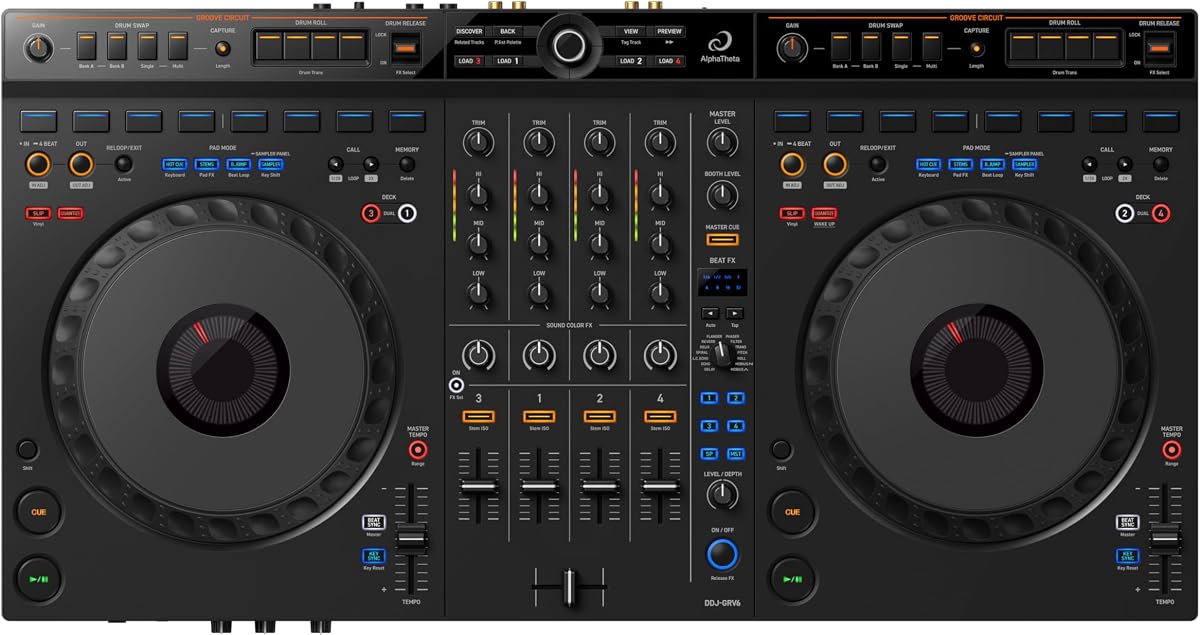
The AlphaTheta DDJ-GRV6 is built to mimic the club-standard layout of the CDJ-3000, making it a top-tier Dj Controller for Serato for aspiring professional DJs. With a 3.7 rating, it offers a stepping stone to the booth with large jog wheels and a rotary selector for easy browsing. The Groove Circuit feature allows you to swap drum parts for loops, adding a creative remix element to live performances.
We may earn a commission when you buy through this link, at no additional cost to you.
This controller is designed to build muscle memory that transfers directly to professional CDJ setups, ensuring a smooth transition when you move to club decks. In Serato DJ Pro, it supports Stems FX, isolating vocals and drums for dynamic track manipulation. The 8 pads above the jog wheels provide expressive, hands-on control for triggers and effects.
While the features are impressive, the user rating suggests potential connectivity or software issues for some users. The price point is higher than entry-level options, reflecting its professional positioning. However, for those aiming for a club career, the familiar layout and specialized features offer significant value over generic controllers.
If you are serious about transitioning to professional setups, the DDJ-GRV6 is the best training tool available. Its focus on club workflow ensures that the skills you learn now will be directly applicable in the future. We recommend it for DJs who prioritize industry-standard layout compatibility.
Swap drum parts for loops in real time to create unique remixes on the fly during your sets.
The CDJ-inspired design helps you learn club-standard workflow, making it easier to adapt to professional booths.
We may earn a commission when you buy through this link, at no additional cost to you.
The Pioneer DJ DDJ-FLX10 is the ultimate professional Dj Controller for Serato, designed for serious hobbyists and mobile DJs who demand the best. With a 4.6 rating, it features Track Separation, splitting songs into vocals, drums, and instruments for live mashups with no prep. The large multicolor on-jog displays show waveforms and artwork, keeping your visual feedback rich and detailed.
We may earn a commission when you buy through this link, at no additional cost to you.
This controller mimics a CDJ and DJM booth setup, ensuring that the workflow translates directly to professional clubs. The built-in DMX output allows you to run lights from the controller, streamlining your mobile DJ setup by removing the need for separate lighting gear. It works seamlessly with Serato DJ Pro, offering deep control for expressive performances.
The main drawbacks are the high price and the need for a powerful laptop to handle the processing requirements for track separation. While it is an investment, the features provided are unmatched in the current market. It represents the pinnacle of open-format controller technology, combining audio and visual control into one unit.
If you are a pro DJ who needs a future-proof tool that integrates everything into one box, the FLX10 is the clear choice. It allows for complex live remixes and offers a complete club experience at home or in the booth. We recommend it only for those ready to commit to a high-end workflow.
Split tracks into stems on the fly for instant mashups and remixes without pre-processing files.
Built-in DMX output allows you to control stage lights directly from the controller, simplifying your setup.
We may earn a commission when you buy through this link, at no additional cost to you.
The Numark Mixtrack Pro FX is a reliable mid-range Dj Controller for Serato that balances affordability with powerful features. With a 4.6 rating, it features large 6-inch capacitive touch jog wheels that emulate an authentic turntable feel for scratching and beatmatching. This tactile experience is crucial for developing proper DJ skills and provides a satisfying physical response during use.
We may earn a commission when you buy through this link, at no additional cost to you.
Six quick-launch FX with dual paddle triggers allow for dynamic sound manipulation, while dedicated instant loop controls keep the flow of your set uninterrupted. It includes a built-in 24-bit audio interface and microphone input, ensuring you have everything you need for a complete setup. The plug-and-play connectivity for Mac and Windows makes it easy to start mixing right away.
The controller lacks screen displays on the jog wheels, which means you rely on your laptop for visual feedback. It is also limited to 2 decks, which may restrict complex multi-layering setups. However, for most mobile DJs and home enthusiasts, these limitations are minimal compared to the value it provides.
If you want a cost-effective controller that still offers professional-grade touch and FX controls, the Pro FX is an excellent option. It is perfect for mobile DJs who need a robust tool without spending premium prices. We recommend it for users who prioritize touch feel and ease of use.
Large touch wheels offer an authentic turntable feel, improving your scratching and beatmatching precision.
Six quick-launch effects triggered by paddles add variety and excitement to your mixes without slowing down workflow.
We may earn a commission when you buy through this link, at no additional cost to you.
The Hercules Inpulse 300 MK2 is designed for those who want to master DJing techniques with a Dj Controller for Serato. With a 4.5 rating, it features built-in light guides that help you manually beatmatch by showing exactly when tracks are aligned. This is a fantastic educational tool that encourages learning over simply pressing a sync button.
We may earn a commission when you buy through this link, at no additional cost to you.
It supports streaming from major services, giving you access to an endless library without needing to store files locally. The high-performance design ensures smooth operation during mixes, and the full-featured layout provides access to all the necessary controls for a professional experience. It is a great step up from the 200 model with more tactile options.
The only downside is that it remains a 2-deck controller, which might limit you if you plan to do complex 4-deck mixing. The price is also higher than the entry-level options, but the added features justify the cost for serious learners. It offers a balanced mix of guidance and flexibility.
If you are ready to move beyond basics but still want guided support, this model is ideal. It helps you build real skills while offering the features you need for live performance. We recommend it for intermediate DJs who value manual control and education.
Built-in lights show you exactly when tracks are aligned, helping you learn to beatmatch manually.
Connect directly to streaming services to access millions of tracks without filling up your computer storage.
We may earn a commission when you buy through this link, at no additional cost to you.
The Pioneer DJ DDJ-REV7 is a flagship battle controller that offers true motorized platters, providing an authentic vinyl feel unmatched by other Dj Controller for Serato options. With a 4.3 rating, it is designed for touring turntablists who demand uncompromising scratch performance. The Magvel Fader Pro delivers the durability and precision required for heavy battle-style cutting and scratching.
We may earn a commission when you buy through this link, at no additional cost to you.
On-jog color displays show waveforms and BPM, keeping your routines tight without looking away from the decks. It ships with Serato DJ Pro, ensuring you have the full power of the software to support deep pad and FX control. This controller is built for serious competition-ready sets and professional scratch DJs.
The motorized platters add significant weight and cost, making it a substantial investment. It is not a portable unit and is best suited for studio or venue setups where mobility is not a primary concern. However, for scratch purists, the tactile feedback is worth the premium price.
If your focus is scratch performance and you want the closest thing to vinyl in a digital format, the REV7 is the top choice. It is a niche tool for pros who need the best possible hardware for their craft. We recommend it exclusively for serious turntablists.
Motorized jog wheels give the authentic feel of vinyl for uncompromising scratch performance.
The pro-grade crossfader delivers the durability and precise cut feel that battle DJs demand.
We may earn a commission when you buy through this link, at no additional cost to you.
Choosing the right controller involves more than just comparing specs. Consider your skill level, performance needs, and budget to find the best match.
Ensure the controller is fully compatible with Serato DJ Lite or Pro. Some controllers only work with specific versions, which might limit your ability to upgrade later.
Always check the software bundle that comes with the controller to confirm it meets your needs.
Most beginners start with 2-deck controllers, which are sufficient for mixing and learning. Advanced users might need 4-deck options for complex layering and effects.
Consider your future needs; a 4-deck controller gives you room to grow without buying a new unit later.
Jog wheels are essential for scratching and beatmatching. Capacitive touch wheels offer a smooth experience, while motorized wheels provide vinyl-like resistance.
Choose a feel that matches your style; scratch DJs prefer heavier, motorized wheels, while casual mixers may prefer lightweight touch pads.
Performance pads allow you to trigger cues, loops, and samples. Look for controllers with enough pads for your workflow, ideally 8 or more per deck.
Ensure the pads are sensitive and responsive to avoid missed cues during live sets.
A built-in audio interface eliminates the need for an external mixer, simplifying your setup. Check for quality inputs and outputs to ensure clear sound.
This feature is crucial for mobile DJs who need a compact and all-in-one solution for gigs.
If you plan to travel to gigs or events, consider the weight and size of the controller. Some models are lightweight and fit in backpacks, while others are bulky.
Portable designs are great for practicing and small events but may sacrifice tactile control.
Look for unique features like stem separation, groove circuits, or DMX lighting control. These can add creativity to your mixes but may increase the cost.
Prioritize features that enhance your specific style of DJing rather than buying for the sake of having them.
Since you will be handling the controller frequently, durability is key. Metal parts and sturdy construction ensure longevity, especially for mobile DJs.
A robust build protects your investment and ensures the controller withstands the rigors of live performance.
Start by installing the required drivers and software updates to ensure compatibility. Connect the controller via USB to your computer and power it on. Launch Serato and verify that the controller is recognized in the audio settings.
Familiarize yourself with the layout by practicing basic mixing techniques. Use the jog wheels to match beats and the faders to blend tracks smoothly. Experiment with the performance pads to trigger cues and loops during your practice sessions.
To care for your controller, keep it away from liquids and dust. Use a cover when not in use to protect the buttons and faders. Regularly check for firmware updates from the manufacturer to ensure optimal performance and compatibility.
While you can use Serato with a keyboard and mouse, a Dj Controller provides essential tactile control for scratching, beatmatching, and cueing. It makes the experience intuitive and professional. Without one, the learning curve is significantly steeper.
Serato DJ Lite is a free, entry-level software included with many controllers, offering basic features. Serato DJ Pro is a paid upgrade with advanced tools like expanded cue points, stems, and performance effects. Choose based on your skill level and needs.
Most modern controllers are cross-platform and work with both Mac and Windows. Always check the system requirements on the manufacturer's website before buying to ensure full compatibility with your operating system.
Yes, most controllers require a laptop or computer to run the software. Some newer models support standalone use with an app, but this is less common. Ensure your device meets the minimum system requirements.
Performance pads allow you to trigger hot cues, loops, and samples. They let you add creative elements to your sets without touching the computer. They are essential for live improvisation and dynamic mixing.
Visit the manufacturer's website and download the latest firmware update tool for your specific model. Follow the instructions carefully to update the device. Keeping firmware current ensures compatibility with new software versions.
Many controllers have a built-in microphone input. Check the specs to ensure your model includes this feature. This allows you to MC during sets without needing an extra mixer or interface.
If you are a professional or plan to perform regularly, a premium controller offers better build quality and advanced features. For hobbyists, a budget model is often sufficient to learn and enjoy the basics of mixing.
Choosing the right Dj Controller for Serato depends on your skill level and performance goals. Whether you need a budget-friendly tool for learning or a premium beast for professional gigs, our list covers the best options available.
Prioritize compatibility, build quality, and features that match your style. A controller with the right jog wheels and pads can make learning easier and performances more dynamic.
Prices and availability change frequently, so always verify current deals before buying. Investing in the right gear early will save you money and frustration as your skills develop.