
MINISFORUM MS-S1 MAX Mini AI Workstation PC
4.5Editor score
Unified memory architecture for large models
Cluster design for distributed computing
Compact desktop form factor
This guide compares the top Dual GPU AI Setup options for local model inference and training, highlighting performance features and scalability for developers.
Finding the right Dual GPU AI Setup is crucial for developers who need powerful local inference without relying on cloud services. These systems combine high compute with massive memory to run large language models efficiently on your own hardware.
We evaluated ten distinct configurations ranging from compact mini workstations to enterprise-grade server racks. Each entry was assessed on its ability to handle parallel tasks, memory bandwidth, and software compatibility with popular frameworks.
Every pick below highlights unique strengths for different workload types and budget tiers. Note that availability and specific pricing can fluctuate rapidly in this fast-moving hardware market so verify current details before ordering.
4.5Editor score

5.0Editor score

5.0Editor score
The following table provides a side by side look at the key specifications and capabilities of each system to help you decide which hardware best fits your specific AI development needs.


This unique graphics card combines two Arc Pro B60 GPUs into a single unit to deliver massive memory and compute power. It stands out for its ability to run 70B class quantized models entirely on a single card without needing complex multi card setups.
We may earn a commission when you buy through this link, at no additional cost to you.
The 48GB VRAM capacity is a major advantage for large language model inference. Each GPU operates at 2400 MHz with 20 Xe cores providing a combined total of 394 TOPS. This architecture is purpose built for high concurrency inference and multi turn dialogues.
One trade-off is the specific motherboard requirement for full bandwidth. It uses a PCIe 5.0 x8 plus PCIe 5.0 x8 interface which needs bifurcation support on standard consumer platforms. However this significantly lowers the total system cost for local LLM deployment.
This setup is ideal for developers who need robust local inference capabilities without enterprise budgets. The native support for open source models and ISV applications makes it a versatile choice for various AI workloads and tasks.
The 48GB VRAM allows you to run large models like DeepSeek-R1:70B or QwQ-32B entirely on this single card.
Each chip is separately recognized by the system for flexible task assignment across different AI workloads.
We may earn a commission when you buy through this link, at no additional cost to you.
The APC MES2X is a ready to use workstation designed for demanding AI tasks. It features a powerful AMD Ryzen 9 9950X processor paired with dual RTX PRO 6000 Blackwell GPUs to handle intensive computing needs efficiently.
We may earn a commission when you buy through this link, at no additional cost to you.
With 256GB of DDR5 RAM and an 8TB NVMe SSD in RAID this system provides ample memory and storage for large datasets. The 360mm liquid cooler ensures the hardware stays cool under heavy loads during extended training sessions.
While it comes fully tested and preloaded with Windows 11 Pro the price is significant compared to building a custom system. However the custom build and professional cable management offer convenience for users who prefer a turnkey solution.
This workstation is best suited for professionals who need reliable high performance hardware without the hassle of assembly. The combination of top tier components makes it a strong candidate for enterprise level AI development and deployment.
The 360mm liquid cooler maintains stable temperatures for sustained AI workloads and long inference tasks.
An 8TB NVMe SSD RAID boot drive ensures fast data access and minimal bottlenecks for your projects.
We may earn a commission when you buy through this link, at no additional cost to you.
This workstation leverages the latest NVIDIA GeForce RTX 5090 GPUs to deliver cutting edge performance for AI tasks. The 64GB GDDR7 memory per GPU provides exceptional bandwidth for handling large models and complex computations.
We may earn a commission when you buy through this link, at no additional cost to you.
The system is built with a robust full tower chassis and features a 360mm liquid cooler on the processor to manage heat effectively. With 256GB of DDR5 memory it supports heavy multitasking and large scale data analysis workflows.
While the power supply is a substantial 1600W to match the GPU demands this ensures stable operation under full load. The inclusion of 15 USB ports and Wi-Fi 7 connectivity adds significant value for peripheral expansion and networking.
Ideal for advanced researchers and enterprises this setup offers the raw power needed for training massive models locally. The US-based support and warranty provide peace of mind for critical operations that require reliability and uptime.
Two RTX 5090 GPUs with 64GB GDDR7 memory offer unmatched speed for generative AI and deep learning.
Multiple USB ports and Wi-Fi 7 ensure seamless connectivity for all your development tools and peripherals.
We may earn a commission when you buy through this link, at no additional cost to you.
The NVIDIA DGX Spark brings supercomputer performance directly to your desk in a compact energy efficient design. It features the Grace Blackwell architecture which delivers up to 1 petaFLOP of AI performance for local model fine tuning and analytics.
We may earn a commission when you buy through this link, at no additional cost to you.
With 128GB of unified memory per unit this system allows you to experiment with large models up to 200 billion parameters directly on your desktop. The seamless integration of the NVIDIA AI software stack ensures you can develop locally and deploy anywhere.
While it is an investment this device offers exceptional ROI for increased productivity by augmenting laptop or cloud resources. It enables rapid testing validation and iteration in a secure high-performance setting without needing a traditional server room.
This setup is perfect for innovators and researchers who need enterprise capabilities in a personal workspace. The ability to run complex models locally accelerates time to solution and reduces reliance on external cloud services.
The 128GB unified memory lets CPU and GPU access data without bottlenecks for faster model execution.
Seamless integration of the NVIDIA AI software stack supports the entire development lifecycle from build to deploy.
We may earn a commission when you buy through this link, at no additional cost to you.
This 4U rackmount server is designed for high density GPU clusters and extreme compute workloads. Equipped with two AMD EPYC 9005 processors it features up to 192 Zen 5c cores and supports up to eight powerful GPUs including RTX PRO 6000 Blackwell.
We may earn a commission when you buy through this link, at no additional cost to you.
The system supports a maximum TDP of 500 watts per socket and includes advanced management software for IT control. It also features ASUS-exclusive toolless design which allows for streamlined maintenance and maximum efficiency in data center environments.
With support for up to 15 total NICs including high-bandwidth 200GbE options connectivity is optimized for reduced latency. The hardware-level Root-of-Trust solution ensures enhanced security and control which is critical for enterprise deployments.
Ideal for organizations building private cloud infrastructure this server offers unparalleled scalability and performance. It handles vast storage expansion with hot-swap M.2 or U.2 drives ensuring you can grow your capacity as needed.
Capable of housing eight 600W NVIDIA GPUs this server delivers massive parallel processing power for training.
ASUS Control Center IT management software and toolless design simplify daily operations and maintenance tasks.
We may earn a commission when you buy through this link, at no additional cost to you.
Designed specifically for PIX4Dsurvey this workstation combines a powerful Threadripper 9970X with an RTX 5090 32GB GPU. It is built to handle complex mapping and surveying tasks alongside general AI workflows with robust performance and stability.
We may earn a commission when you buy through this link, at no additional cost to you.
The system includes 128GB of ECC Reg DDR5 memory to ensure data integrity during long processing sessions. Networking is handled by onboard 10GbE LAN and WiFi 7 providing fast connections for large data transfers and cloud syncing.
While focused on specific applications the hardware capabilities make it a strong choice for general AI development too. The 1600W Platinum PSU and 360mm liquid cooler keep the system running efficiently even under heavy computational loads.
This unit is best for professionals in mapping or surveying who also need strong local AI capabilities. It offers a balanced mix of specialized optimization and general high-performance computing power for demanding tasks.
128GB ECC Reg DDR5 ensures data integrity for critical calculations and long processing sessions.
Onboard 10GbE LAN and WiFi 7 support fast data transfers and efficient cloud connectivity.
We may earn a commission when you buy through this link, at no additional cost to you.
This workstation unlocks unprecedented machine learning capabilities with a 192 core AMD EPYC 9965 processor. It is designed for training massive local LLMs and handling complex neural networks effortlessly without the latency of cloud services.
We may earn a commission when you buy through this link, at no additional cost to you.
Equipped with 768GB of DDR5 ECC memory and three RTX PRO 6000 GPUs it provides the raw power needed for data science pipelines. The 2x4TB Gen5 NVMe SSDs eliminate storage bottlenecks allowing you to ingest and manipulate datasets in real time.
While it requires a 240V outlet for maximum capabilities it delivers mission critical uptime with a 2800W Titanium PSU. Every unit is assembled in the USA and undergoes rigorous stress testing to ensure peak reliability for home or office use.
Ideal for engineering and data science professionals this system offers a turnkey enterprise server infrastructure. The 3-year hardware warranty and lifetime technical support add significant value for long term operational confidence.
The 192 core processor delivers unmatched multi-threaded processing for training large models locally.
Gen5 NVMe SSDs allow you to ingest and parse massive datasets in real time without bottlenecks.
We may earn a commission when you buy through this link, at no additional cost to you.
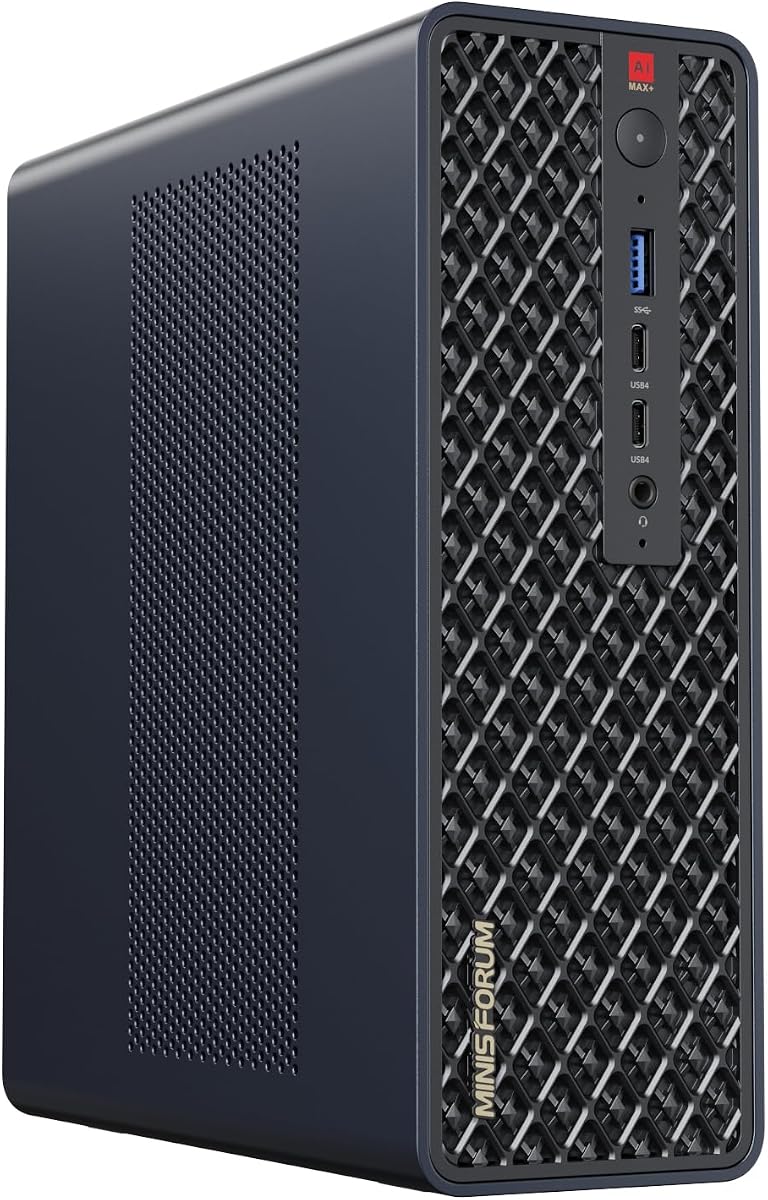
The MS-S1 MAX features a powerful AMD Ryzen AI Max+ 395 APU that integrates CPU GPU and NPU for parallel computing. It is ideal for running local LLMs multimodal models and computationally intensive tasks in a tiny form factor.
We may earn a commission when you buy through this link, at no additional cost to you.
With up to 128GB of LPDDR5x unified memory this system eliminates traditional VRAM bottlenecks for smoother data transfer. The total system output reaches 126 TOPS enabling powerful AI workflows without the footprint of a traditional tower.
Two units can be configured as a dual-unit cluster to run large 235B models locally achieving high output speeds. The slide-out design facilitates upgrades and maintenance while the aerospace-grade aluminum chassis ensures stable cooling under load.
This setup is perfect for developers needing affordable yet powerful local inference in a small space. It adapts easily to personal studio or rack-mount enterprise environments offering flexibility and performance at a lower cost point.
The 128GB LPDDR5x unified memory allows CPU and GPU to access a shared high-bandwidth pool with low latency.
Two units can be cascaded into a distributed cluster for high-efficiency AI computing center capabilities.
We may earn a commission when you buy through this link, at no additional cost to you.
This Max-Q Edition GPU delivers cutting edge Blackwell architecture performance while capping power consumption at 300 Watts. It packs a massive 96GB of next-gen GDDR7 ECC memory to eliminate VRAM bottlenecks and host heavy open-source LLMs locally.
We may earn a commission when you buy through this link, at no additional cost to you.
The 512-bit bus width and 1,792 GB/s memory bandwidth ensure zero-lag multi-stream editing and real-time encoding. It supports real-time 3D environments and complex visual effects with ease making it a monster for agentic workflows and data science.
While it is just a component its efficient thermal management makes multi-GPU desktop scaling perfectly viable for research labs. The 3-year manufacturer warranty protects your build against defects and performance failures ensuring stable operation for years.
Best for developers needing high performance without the bulk of server hardware this card bridges the gap between calculation and creativity. It fits seamlessly into standard desktops enabling teams to scale intelligence rapidly without cloud latency.
The Max-Q Edition delivers up to 3,511 TOPS while capping max power at a modest 300 Watts.
Blisteringly fast memory bandwidth guarantees zero-lag multi-stream editing and real-time encoding for broadcast.
We may earn a commission when you buy through this link, at no additional cost to you.
This mini PC comes with an AMD Ryzen AI Max+ 395 processor and Radeon 8060S Graphics for ultra-high frame rate experiences. It supports five video outputs at once including HDMI and USB4 V2 which provide a wider field of view for multi-monitor setups.
We may earn a commission when you buy through this link, at no additional cost to you.
The 128GB LPDDR5 memory and 2TB SSD ensure fast performance and storage for media files and code. Dual 10GbE LAN ports greatly increase network speed and expand functions for software routers and firewall configurations.
Despite its small size it integrates phase change cooling technology with a glacier cooling system for superior heat management. It guarantees stable operation even at a power consumption of 130W ensuring consistent performance output while maintaining quiet operation.
Ideal for fields requiring high-performance computing in a small footprint this workstation handles CAD engineering and animation production. It is used in securities trading digital signage and post-production for movies and television efficiently.
Five video outputs support multiple monitors at once for a larger field of view and improved efficiency.
Two 10G LAN ports for wired connection and Wi-Fi 7 for wireless connection increase network speed greatly.
We may earn a commission when you buy through this link, at no additional cost to you.
Selecting the right hardware requires evaluating several critical factors that influence performance and workflow efficiency.
Video RAM or VRAM is the most critical factor for running large language models locally. You need enough memory to load the model weights entirely into the GPU to avoid reliance on slower system RAM. Look for setups that offer 48GB or more when targeting 70B+ parameter models efficiently.
Prioritize systems with high VRAM totals or unified memory pools to ensure seamless data access without bottlenecks.
Compute power determines how fast your model can process information. Look for systems with high TOPS ratings or core counts that match your workload requirements. Dual GPUs provide parallel processing which speeds up training and inference significantly compared to single cards.
Ensure the system has enough raw horsepower to handle concurrent tasks and complex neural networks efficiently.
System RAM is essential for preprocessing data and managing large datasets before they reach the GPU. Aim for at least 128GB of DDR5 or DDR6 RAM to support heavy multitasking and large context windows. Faster memory speeds help reduce latency during data transfer between CPU and GPU.
Choose setups with ECC memory if data integrity is critical for your scientific or enterprise applications.
Fast storage is necessary to load models and datasets quickly without slowing down your GPU. NVMe SSDs in RAID configurations provide the bandwidth needed to feed data to multiple GPUs simultaneously. Look for at least 2TB of high-speed storage to accommodate large model libraries and datasets.
Prioritize Gen5 NVMe drives for maximum throughput to keep your AI pipelines running without delays.
Hardware must work smoothly with your preferred frameworks like PyTorch and TensorFlow to avoid frustration. Ensure the GPU drivers support the specific versions of libraries you use for training and inference. Open source model support is also vital if you plan to run various custom models.
Check for native support of your tools to ensure a hassle-free development and deployment process.
Dual GPU setups generate significant heat that can throttle performance if not managed properly. Look for systems with liquid cooling or robust airflow designs to maintain stable temperatures during long sessions. Ensure the power supply is rated high enough to support peak loads without crashing.
Invest in high-efficiency cooling and sufficient wattage to guarantee stable operation under heavy loads.
Consider where you will place your system as dual GPU setups range from mini PCs to full rack servers. Compact units save space but may limit expansion while towers offer better airflow and upgradeability. Think about your physical workspace and future needs before finalizing your choice.
Select a form factor that balances physical footprint with necessary performance and expansion capabilities.
Future needs may require more storage or additional GPUs so check for available slots and connectivity options. Ensure the system supports PCIe bifurcation or extra M.2 slots for future growth. Networking capabilities like 10GbE are also important for moving large datasets efficiently.
Opt for systems with flexible expansion options to adapt to evolving project requirements over time.
Start by installing the latest GPU drivers and frameworks like PyTorch or vLLM to ensure compatibility with your hardware. Check that your system recognizes both GPUs correctly in the device manager or terminal output.
Optimize your inference pipeline by utilizing multi-processing features in your AI frameworks to leverage both cards simultaneously. Monitor temperatures using tools like HWInfo to ensure cooling systems are performing correctly.
Regularly update your operating system and drivers to maintain security and performance. Clean dust filters and ensure airflow paths remain clear to prevent thermal throttling during extended AI workloads.
Yes if the total VRAM capacity is sufficient to load the model weights. For 70B+ models you generally need at least 48GB of VRAM combined or access to unified memory pools. Check your specific model quantization levels to estimate exact memory requirements.
A dual-GPU setup specifically refers to two graphics cards working in tandem for parallel processing. Multi-GPU can refer to two or more cards but usually implies more extensive configurations like four cards in enterprise servers.
Yes many consumer motherboards require PCIe bifurcation support to split lanes effectively for two cards. Enterprise servers handle this more seamlessly. Check your motherboard specs to ensure proper lane configuration before building.
GPUs are significantly faster for parallel tasks like matrix multiplication used in AI. While modern NPUs help GPUs provide much higher throughput for LLM inference. A dual GPU setup offers the best balance of speed and efficiency locally.
Ensure your PSU has enough wattage for peak loads. Look for power monitoring tools in your OS to track usage. Proper cooling is also vital to prevent throttling which can reduce efficiency over time.
Liquid cooling is highly recommended for dense workloads to maintain stable temperatures. Air cooling works if airflow is managed well but liquid systems handle heat better for long inference or training sessions.
The top picks like the WEELIAO MAXSUN Arc Pro and NVIDIA DGX Spark offer distinct advantages for local model inference and training. Whether you need budget-friendly cluster capabilities or enterprise-grade power there is an option for every developer.
Prioritize VRAM capacity and cooling solutions when making your final decision. These factors directly impact your ability to run large models smoothly and consistently without hardware limitations.
Remember to verify current availability and compatibility details before purchasing since specifications can vary. Investing in the right setup today will save you time and resources in your future AI projects.