
Cable Matters Punch Down Tool
4.3Editor score
Removable 110 blade
Adjustable impact settings
Wide keystone compatibility
This guide compares the top rated ethernet punch down tools for professionals and DIY users based on features, durability, and performance.
Finding the right ethernet punch down tool is essential for anyone installing network cabling. A good tool ensures reliable connections and saves time during termination projects.
We analyzed ten top rated products to help you choose the best option. Our review covers features, durability, and user feedback from real-world installations.
Each pick highlights specific strengths for different needs. Please note that prices can change frequently so check current listings before purchasing your next tool.
4.3Editor score

4.8Editor score

4.7Editor score
The following table offers a side-by-side comparison of all ten products reviewed in this guide to help you make an informed decision quickly.


The Klein Tools VDV427-300 stands out as the top rated option with a 4.8 rating. It delivers reliable CAT cable connections through its robust impact punchdown design.
We may earn a commission when you buy through this link, at no additional cost to you.
Its metal injection molding blade ensures enhanced durability for long-lasting performance. The cushioned handle and non-slip grip provide comfortable operation even during extended use.
While it is priced higher than budget models the durability justifies the cost. The adjustable force settings allow customization based on specific cable types and applications.
Professionals seeking a reliable tool for frequent installations should prioritize this model. It offers optimal network performance through precise and reliable connections every single time.
The MIM blade provides significant strength against wear compared to standard steel blades used in cheaper models.
Cushioning reduces hand fatigue during repetitive termination tasks making it ideal for large scale installations.
We may earn a commission when you buy through this link, at no additional cost to you.
This tool offers efficient cable termination at a very accessible price point. It is designed for structured cabling installations and Ethernet wiring projects effectively.
We may earn a commission when you buy through this link, at no additional cost to you.
The removable 110 blade uses a twist-and-lock design for quick changes and secure retention. Adjustable settings allow fine-tuning of force for precise terminations.
Some users might find the build less premium than high-end brands. However for it meets basic needs for both professional and DIY network setups well.
Budget-conscious DIYers will find this tool provides excellent value for money. It ensures stable and consistent punchdowns for standard network cables.
The twist-and-lock mechanism prevents blade loosening during use which is critical for consistent performance.
Supports Cat 5 through Cat 8 cables making it versatile for various upgrading needs.
We may earn a commission when you buy through this link, at no additional cost to you.
Fluke Networks offers a premium option with a lifetime warranty backing this impact punchdown tool. It features a soft touch rubber handle for better grip.
We may earn a commission when you buy through this link, at no additional cost to you.
Automatic spring handle choice allows selecting low impact for thinner wires and high for thicker ones. This reduces user decision time during installation.
The high price tag limits it to professional environments where tools are used frequently. Casual users may not need this level of reliability or durability.
Network technicians who value longevity and warranty support should consider this investment. It reduces hand fatigue significantly compared to standard tools.
This warranty ensures long-term investment security and is rare in the industry for handheld tools.
The spring handle automatically adjusts to wire gauge which simplifies the termination process.
We may earn a commission when you buy through this link, at no additional cost to you.
TRENDnet provides a reliable tool that supports both 110 and Krone standards effectively. It is compliant with NDAA and TAA regulations for government customers.
We may earn a commission when you buy through this link, at no additional cost to you.
Precision blades are convenient interchangeable and reversible between standards. A twist and lock holder provides fast easy blade changes during installations.
The compliance features make it suitable for public sector projects. Other users may not need these specific certifications but benefit from the quality.
Installers requiring regulatory compliance or Krone standards will appreciate this choice. It ensures precise and reliable connections consistently.
Meeting NDAA and TAA standards ensures eligibility for government contracts in the US and Canada.
The reversible blades allow quick switching between 110 and Krone blocks without needing multiple tools.
We may earn a commission when you buy through this link, at no additional cost to you.
This tool efficiently cuts and terminates cables into patch panels or keystone jacks. It includes both 110 and 66 blades for broader application.
We may earn a commission when you buy through this link, at no additional cost to you.
Features a removable blade with twist and lock sockets that can be securely stored within the tool body. This enhances usability and safety during transport.
The dual blade option covers common standards found in older and newer installations. Adjusting force settings helps accommodate different cable termination needs precisely.
Installers working with mixed legacy and modern systems will find this practical. It offers reliable performance for Ethernet wiring projects.
Including both 110 and 66 blades eliminates the need to purchase separate tools for different block types.
Storing the blade inside prevents loss and protects the cutting edge when not in use.
We may earn a commission when you buy through this link, at no additional cost to you.
VCELINK offers a multi-function punch down tool with a double cutter head design. Cutting excess cables while punching down saves steps during installation.
We may earn a commission when you buy through this link, at no additional cost to you.
The package includes a mini wire stripper and wirepuller for added convenience. Adjustable impact-force settings accommodate various cable termination applications.
While it has some limitations in build quality it offers good value for small projects. The included accessories reduce the need for extra tools.
DIYers needing a complete solution for simple projects will like this option. It provides decent performance for standard network keystone jacks.
The built-in wirepuller and included stripper simplify the overall cabling process significantly.
Providing 18 months of customer assistance offers peace of mind for new users.
We may earn a commission when you buy through this link, at no additional cost to you.
This speed tool allows you to punch down and cut 8 wires in one smooth operation. It is up to 8 times faster than traditional punch-down tools.
We may earn a commission when you buy through this link, at no additional cost to you.
You can easily terminate ethernet keystone jacks directly on patch panels and wall plates with one hand. This eliminates the need for a separate punch-down stand.
The specific design works only with VCE's C265 series keystone jacks which are slim. Users must ensure compatibility with their specific keystone type before buying.
Installers using VCE jacks will find this saves significant time. It reduces repetitive movements and speeds up the termination process.
The single-action mechanism significantly reduces the physical effort and time required per connection.
Terminating directly on panels without a stand makes installation easier in tight spaces.
We may earn a commission when you buy through this link, at no additional cost to you.
This tool is compatible only with Rapink CAT6 90 degree speed termination keystone jacks. It combines punching down and cutting excess wires at once.
We may earn a commission when you buy through this link, at no additional cost to you.
The design prevents finger injuries when keystone rolls out under traditional tools. It also reduces repetitive crimping which lessens hand fatigue during long jobs.
The specific brand limitation restricts its use to those investing in Rapink hardware. However for the efficiency gain is significant for large wall plate installs.
Installers prioritizing speed and safety with specific keystone models will value this. It offers nearly 100% success rate on terminations.
The housing keeps jacks in place to prevent accidental slips that can cause cuts.
Reducing install time 8 times over regular tools helps complete projects much faster.
We may earn a commission when you buy through this link, at no additional cost to you.
This set includes all necessary tools to strip crimp and punch down modular cables. It features Klein's exclusive DuraBlade precision cutting edge.
We may earn a commission when you buy through this link, at no additional cost to you.
The radial stripper automatically adjusts to different cable diameters to protect conductors. All tools are stored in a convenient zippered bag for organized transport.
While it includes coax tools it provides a comprehensive solution for network installs. The included data plugs offer compatibility and convenience for connections.
Users wanting a complete kit for various cable types will appreciate this. It ensures reliable and efficient cable termination with quality tools.
Having everything needed in one pouch simplifies procurement and transport for job sites.
The DuraBlade edge ensures clean wire cuts that prevent signal loss and interference.
We may earn a commission when you buy through this link, at no additional cost to you.
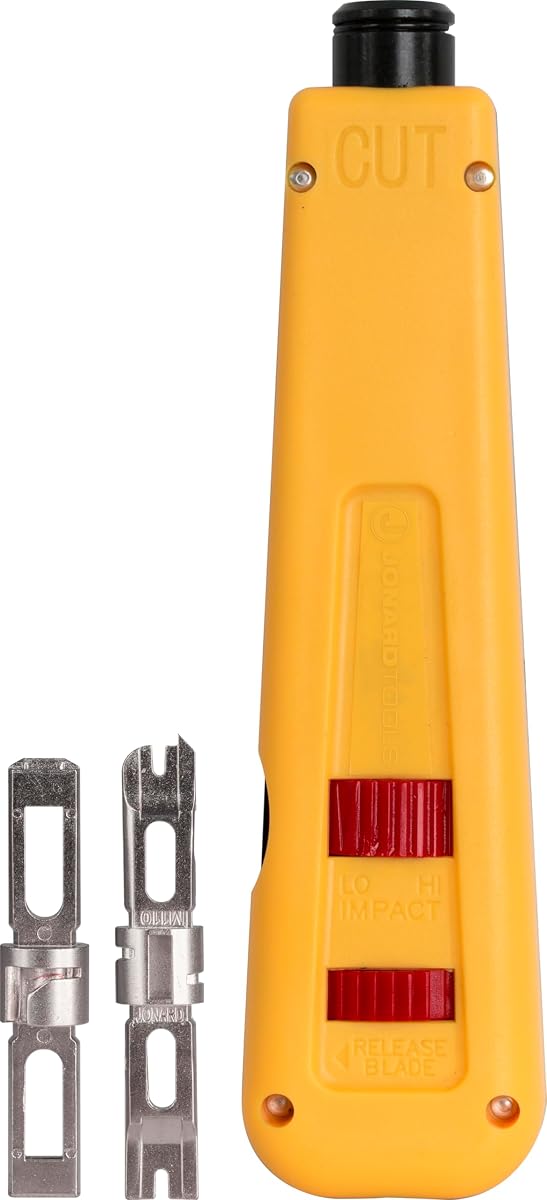
Jonard Tools offers a manual punchdown tool with color coded body for ease of use. It includes both 66 and 110 blades for versatile use.
We may earn a commission when you buy through this link, at no additional cost to you.
The chassis stores a combination hook/spudger and has an enlarged blade storage compartment. Hardened alloy steel blades are nickel plated to ensure long life.
While it lacks advanced features it provides reliable durability for repeated installations. The color coding helps distinguish cut side from non-cut side quickly.
Installers needing a solid standard tool for daily tasks will find this effective. It supports all EPB-series blades and similar brands.
Testing up to 100,000 cycles ensures the tool lasts even in high volume environments.
The color coded body and stored hook provide practical usability benefits on job sites.
We may earn a commission when you buy through this link, at no additional cost to you.
Selecting the right punch down tool depends on several factors including blade type, durability, and budget considerations for your installation needs.
The most critical feature is the blade type which determines what panels or jacks the tool can terminate. Standard tools use 110 blades which fit most modern keystone jacks and patch panels. Some models also include 66 blades which are used in older telephone systems or specific legacy installations. Always verify your existing hardware requirements before purchasing to avoid compatibility issues.
Choose a tool with interchangeable blades if you expect to work with multiple panel standards.
Adjustable impact settings allow you to control how hard the tool presses the wire into the jack. Low force settings are necessary for thinner wires like 24 gauge to prevent damage. High force settings ensure a solid connection for thicker wires like 22 gauge. Automatic selection features simplify this process but adjustable settings offer more control.
Select a model with adjustable force for versatility across different cable types.
Installation often involves repetitive actions that can lead to hand fatigue over time. Tools with cushioned handles and non-slip grips reduce strain on your hands and wrists. Consider the weight of the tool as heavier models may tire your hand more during extended use. The design of the trigger mechanism also affects how quickly and smoothly you can operate it.
Prioritize models with ergonomic handles for long-term comfort during frequent use.
Professional use requires a tool that can withstand thousands of cycles without breaking. Look for features like metal injection molding (MIM) blades which are significantly more durable than standard plastic parts. High-quality tools often list the number of cycles they have been tested for such as 100,000 cycles. Investing in a durable tool saves money in the long run by reducing replacement frequency.
Check for durable construction materials like hardened steel for long-term reliability.
Many modern tools come with extra features like built-in hooks spudgers or wire cutters. Some include a small wire stripper or a storage compartment for spare blades. These additions can eliminate the need to carry multiple separate tools in your bag. Consider if these conveniences justify the potential increase in price compared to a basic model.
Extra accessories like hooks and storage can streamline your workflow significantly.
Punch down tools range from very affordable options to premium professional models. Budget tools offer basic functionality but may wear out faster under heavy use. Premium tools often come with warranties that cover defects or wear over time. Consider the cost of replacement blades as well since some models use proprietary blades that cost more.
Balance initial cost with warranty coverage and long-term replacement expenses for value.
Certain environments require specific certifications or specialized tools for optimal efficiency. For example some government projects require tools that are NDAA or TAA compliant. Other tools are designed for specific keystone brands like VCE or Rapink which allow for faster single-action termination. Ensure the tool you choose matches your specific industry or hardware requirements.
Verify compliance certifications and specific brand compatibility before purchasing for niche needs.
If you travel frequently to job sites consider how easily the tool stores in your kit. Models with built-in blade storage prevent the loss of spare blades during transport. A compact design is essential if you work in tight spaces where large tools are difficult to maneuver. Some kits include a dedicated pouch to keep all components organized.
Look for tools with internal storage or dedicated cases to maintain organization and safety.
Before starting your installation ensure you have the correct blade installed for your specific keystone or patch panel. Insert the blade into the holder and twist it until it locks securely to prevent it from coming loose during impact. Verify that the blade orientation matches the cut side requirement for the panel you are working on.
When terminating a wire place the cable into the slot and apply steady pressure until you hear a click. The tool should automatically cut the excess wire as it punches down the conductor. If your model has adjustable settings choose low force for thinner wires and high force for thicker wires to ensure a solid connection.
Maintain your tool by wiping down the blade and handle after every job to remove dust and debris. Inspect the cutting edge regularly for signs of dullness which can cause poor connections or damage the cable. Replace blades when they show wear and store the tool in a dry place to prevent rust and corrosion over time.
The main difference lies in the blade design and the wiring blocks they fit. 110 blocks are standard for modern Ethernet networks and keystone jacks. 66 blocks are older and typically used for telephone wiring or legacy installations. Ensure your tool matches the specific block type you are installing.
Most modern punch down tools include a blade that cuts the excess wire automatically as you press down. This saves time and ensures a consistent trim length. Check your tool specifications to confirm it has this built-in cutting feature before buying.
Blades should be replaced when they become dull or start damaging the cable jacket during termination. With proper care a blade can last for thousands of cycles. Inspect the cutting edge visually to determine if a replacement is necessary to maintain connection quality.
Adjustable impact force allows you to control the pressure the tool applies when seating the wire. Low force prevents damage to thin wires while high force ensures a strong connection in thicker cables. This setting is vital for preventing signal loss caused by loose or over-punched connections.
Most universal tools work with all Ethernet categories from Cat 5 to Cat 8. Some specialized tools may be optimized for the tighter twists in Cat 6A but standard tools usually suffice. Compatibility depends more on the keystone jack design than the specific cable category.
A hook or spudger is used to remove old wires from jacks or clean debris from the slots. This helps keep your workspace tidy and ensures that new wires sit properly in the connectors. Having these accessories built into the tool saves space in your toolkit.
Choosing the right punch down tool is a key decision for network installation success. Our top picks cover a range of budgets from the affordable Cable Matters tool to the durable Klein Tools model.
Prioritize ergonomics and blade durability if you plan to use the tool frequently. For specialized needs ensure you check compatibility with your specific keystone brand or regulatory requirements.
Prices for tools can fluctuate so verify current listings before making a purchase. Investing in a quality tool now ensures reliable connections and less frustration during future installations.