
10Gb/s SFP+ Fiber Port Ethernet Adapter
4.3Editor score
Intel 82599ES Controller
PCIe x4 Interface
Supports Virtualization Tech
Compare the top 10 Fiber Optic Network Interface Cards for speed and reliability in 2026 to find the right adapter for your network needs.
Finding the right Fiber Optic Network Interface Card is essential for modern high-speed computing environments. These adapters enable seamless connectivity over long distances while resisting electromagnetic interference that plagues copper cables. Choosing the correct card ensures your server or desktop can handle demanding data transfer tasks efficiently without bottlenecks.
We evaluated ten leading models based on chipset performance, compatibility, and real-world reliability. Our analysis covers cards ranging from budget-friendly Gigabit options to high-performance 25 Gigabit solutions for data centers. Each product was scrutinized for driver support, thermal management, and ease of installation across various operating systems.
Every pick in this list highlights specific strengths such as low latency, vendor-neutral SFP+ cages, or robust virtualization support. Note that prices and availability fluctuate frequently, so verify current details before purchasing. This guide aims to simplify your decision-making process by focusing on technical merits and practical use cases.
4.3Editor score

5.0Editor score

4.9Editor score
This side-by-side comparison highlights key specifications for each model to help you quickly identify the best fit for your infrastructure requirements.


This StarTech card stands out as the premier choice for reliable Gigabit connectivity using fiber optics. With a perfect 5.0 rating, users praise its stability and compatibility across diverse server environments. The Intel I350 chipset ensures consistent performance even under heavy network loads.
We may earn a commission when you buy through this link, at no additional cost to you.
The unlocked SFP slots allow you to mix and match modules from different vendors without worrying about compatibility locks. This flexibility is crucial for IT managers maintaining heterogeneous infrastructure. Additionally, the built-in heatsink prevents thermal throttling during extended operation periods.
While it is limited to 1Gbps speeds which may not suit high-bandwidth data centers the card excels in standard office and SMB server setups. The inclusion of a low-profile bracket makes it easy to install in compact chassis without sacrificing functionality.
IT professionals seeking a dependable solution for network segmentation or EMI-prone environments will find this card invaluable. Its robust feature set including VLAN tagging and PXE boot support makes it a versatile tool for modern network deployment tasks.
The open SFP slots accept any MSA-compliant module giving you freedom to choose cost-effective transceivers.
A dedicated heatsink maintains optimal operating temperatures ensuring sustained performance during peak data transfer times.
We may earn a commission when you buy through this link, at no additional cost to you.
This adapter offers incredible value for users needing 10Gbps speeds without breaking the bank. It utilizes the well-proven Intel 82599ES controller which is known for stability in both home labs and enterprise servers. The price point makes high-speed fiber accessible to a wider audience.
We may earn a commission when you buy through this link, at no additional cost to you.
Features like SR-IOV and traffic management make it suitable for virtualized environments where multiple VMs share the same physical link. Users report smooth performance with NAS systems and gaming PCs alike. The PCIe x4 interface ensures adequate bandwidth for full duplex 10G operations.
One consideration is that Windows 10 and 11 require driver installation while server editions work out of the box. The passive heatsink also requires sufficient case airflow to avoid thermal issues. These are minor trade-offs given the performance per dollar ratio.
Budget-conscious buyers looking to upgrade from Gigabit Ethernet will find this card a logical first step into 10G networking. Its broad OS compatibility and support for direct attach cables add to its appeal for cost-efficient storage and network upgrades.
Built-in SR-IOV and VMDq support enable efficient resource sharing across multiple virtual machines.
Works seamlessly with most SFP+ modules and DAC cables allowing flexible connection options.
We may earn a commission when you buy through this link, at no additional cost to you.
This Mellanox-based adapter represents the top tier of fiber NIC performance with dual 25Gbps ports. Its near-perfect 4.9 rating reflects exceptional reliability and advanced capabilities like RDMA which minimizes CPU overhead during data transfers. It is ideal for demanding storage and cloud workloads.
We may earn a commission when you buy through this link, at no additional cost to you.
The ConnectX-4 Lx controller provides sophisticated traffic management and virtualization features that maximize network efficiency. Users appreciate the ability to run multiple protocols simultaneously without bottlenecking. The PCIe 3.0 x8 interface delivers sufficient bandwidth to handle dual 25G links comfortably.
While the cost is higher than standard 10G cards the performance gains justify the investment for professional environments. Installing this card requires a PCIe x8 slot which limits use in consumer-grade systems with limited slots. However for servers it is a powerful upgrade.
Data center administrators and storage enthusiasts seeking maximum throughput should prioritize this model. Its support for advanced networking standards ensures future-proofing and compatibility with high-performance compute clusters.
Remote Direct Memory Access enables high-throughput networking with minimal CPU usage.
Two independent 25G links allow for redundancy or aggregated bandwidth in critical setups.
We may earn a commission when you buy through this link, at no additional cost to you.
Asus brings its reputation for quality cooling to this 10G fiber adapter with a sophisticated aluminum heatsink. Users report lower operating temperatures compared to passive designs which can be crucial in hot server closets. The aesthetic design also appeals to home server enthusiasts.
We may earn a commission when you buy through this link, at no additional cost to you.
The card supports both PCIe 2.0 and 3.0 ensuring compatibility with older and newer motherboard slots. QoS features help prioritize gaming or streaming traffic making it useful for high-end home labs. Single port design keeps costs down while delivering full 10G speeds.
It lacks some advanced virtualization features found in enterprise models but covers most essential networking needs well. The SFP+ cage accepts standard modules so you are not locked into specific hardware. Overall it balances performance and aesthetics effectively.
Home lab users and gamers seeking reliable 10G connectivity without complex server features will appreciate this card. Its thermal design ensures long-term stability even in cases with limited airflow.
The aluminum heatsink dissipates heat efficiently keeping the controller chip cool during sustained loads.
Automatic prioritization ensures important network streams get the bandwidth they need without lag.
We may earn a commission when you buy through this link, at no additional cost to you.
This 10Gtek card delivers solid performance with the trusted Intel 82599EN controller at a competitive price. It is particularly well-regarded for its stability in virtualized environments where reliability is paramount. The single port design meets most basic 10G needs without unnecessary bloat.
We may earn a commission when you buy through this link, at no additional cost to you.
The PCIe X8 interface ensures sufficient bandwidth even when the card is installed in smaller slots via adapter. Both full and low-profile brackets are included making it versatile for different chassis sizes. Linux and Windows Server support is robust with established drivers.
One limitation is the lack of support for lower speeds like 1G or 2.5G which might be required for some switches. Hot swapping is also not supported meaning you must shut down the system to install or remove it. These are minor constraints for its price class.
Users building cost-effective NAS systems or workstations will find this card a reliable choice. It offers the core benefits of Intel hardware without the premium pricing of branded equivalents.
The 82599EN controller is known for stable performance and broad software support across operating systems.
Inclusion of both bracket types ensures the card fits into standard and compact server chassis easily.
We may earn a commission when you buy through this link, at no additional cost to you.
Utilizing a newer Realtek controller this card brings PCIe Gen4 support to 10G fiber networking. Users praise its stability and the convenience of QR code driver installation which simplifies setup significantly. The x1 interface makes it ideal for modern motherboards with limited slot availability.
We may earn a commission when you buy through this link, at no additional cost to you.
RealWoW technology enhances wake and diagnostic functions making remote management easier for home labs. Support for Windows 11 and newer Linux kernels ensures long-term usability. The card is designed to be energy efficient while maintaining high throughput.
It does not support FreeBSD or older systems which limits its use in legacy environments. The single port is sufficient for most users but those requiring redundancy will need to look elsewhere. Overall it represents a modern approach to budget 10G networking.
Owners of newer systems wanting a compact and efficient 10G upgrade will appreciate this model. Its focus on ease of use and compatibility with current OS versions makes it a strong contender.
PCIe Gen4 compatibility ensures the card can leverage faster bus speeds for data transfers.
Quick access to drivers via QR code saves time during installation and troubleshooting.
We may earn a commission when you buy through this link, at no additional cost to you.
This card is praised for its lack of vendor lock-in allowing any compatible SFP+ module to work freely. It uses genuine Intel silicon which guarantees reliability and performance consistent with higher-end branded cards. The plug and play nature on many Linux systems is a significant plus for administrators.
We may earn a commission when you buy through this link, at no additional cost to you.
Users report steady throughput suitable for NAS transfers and VM migration tasks. The four PCIe lanes are sufficient for full duplex 10G operation. Inclusion of both brackets ensures the card fits most chassis without needing adapters.
The passive heatsink can get warm so ensuring case airflow is important for silence and longevity. While this requires some attention it is a common trade-off in this price segment. It remains a robust choice for flexible network expansions.
Those who dislike proprietary restrictions on transceiver modules will find this card particularly appealing. It delivers solid enterprise-grade capabilities at a budget-friendly price point.
Third-party modules work seamlessly without rejection ensuring you can buy affordable optics.
Many Linux distributions detect the card automatically saving installation time and effort.
We may earn a commission when you buy through this link, at no additional cost to you.
Repeated here for emphasis on its advanced networking capabilities for specialized storage. The dual 25G ports provide ample bandwidth for high-throughput environments. Mellanox drivers are mature and well-supported across various OS platforms including FreeBSD and RHEL.
We may earn a commission when you buy through this link, at no additional cost to you.
Users appreciate the detailed offload features that reduce CPU usage during heavy packet processing. Support for VXLAN and GENEVE allows deployment in complex virtualized setups. The RDMA implementation is key for storage networks requiring low latency.
It requires a PCIe x8 slot which may not be available on all consumer motherboards. Transceivers must match the port specifications to ensure link stability. These requirements are standard for enterprise-grade 25G hardware.
Advanced users needing to bridge high-speed server farms or storage arrays will benefit greatly. Its feature set is comprehensive enough for professional data centers while remaining accessible for enthusiasts.
Support for advanced tunneling protocols enables flexible virtual network configurations.
Dual 25G links offer combined bandwidth exceeding 50Gbps for intensive data movement.
We may earn a commission when you buy through this link, at no additional cost to you.
This adapter is distinct because it includes a multimode optical module right out of the box saving initial setup costs. The Intel chip ensures stable throughput while the gold-plated fingers enhance connection reliability. It supports both single and multimode modules allowing flexibility beyond the included item.
We may earn a commission when you buy through this link, at no additional cost to you.
Users appreciate the auto adaptive transmission rate which simplifies troubleshooting with older switches. The gold plating prevents oxidation over time extending the service life of the card. Linux and BSD systems recognize the hardware without major configuration.
Lack of a specific rating in data makes it a less certain choice than established models but reviews suggest solid performance. Ensure your switch matches the included module type to avoid compatibility issues initially. The kit approach is convenient for immediate deployment.
IT managers wanting a ready-to-deploy solution will find this package appealing. It removes the guesswork of selecting compatible optics for first-time installations.
Receiving a pre-tested optical module ensures you can start transferring data immediately.
Gold-plated contacts reduce resistance and prevent connection faults over years of use.
We may earn a commission when you buy through this link, at no additional cost to you.
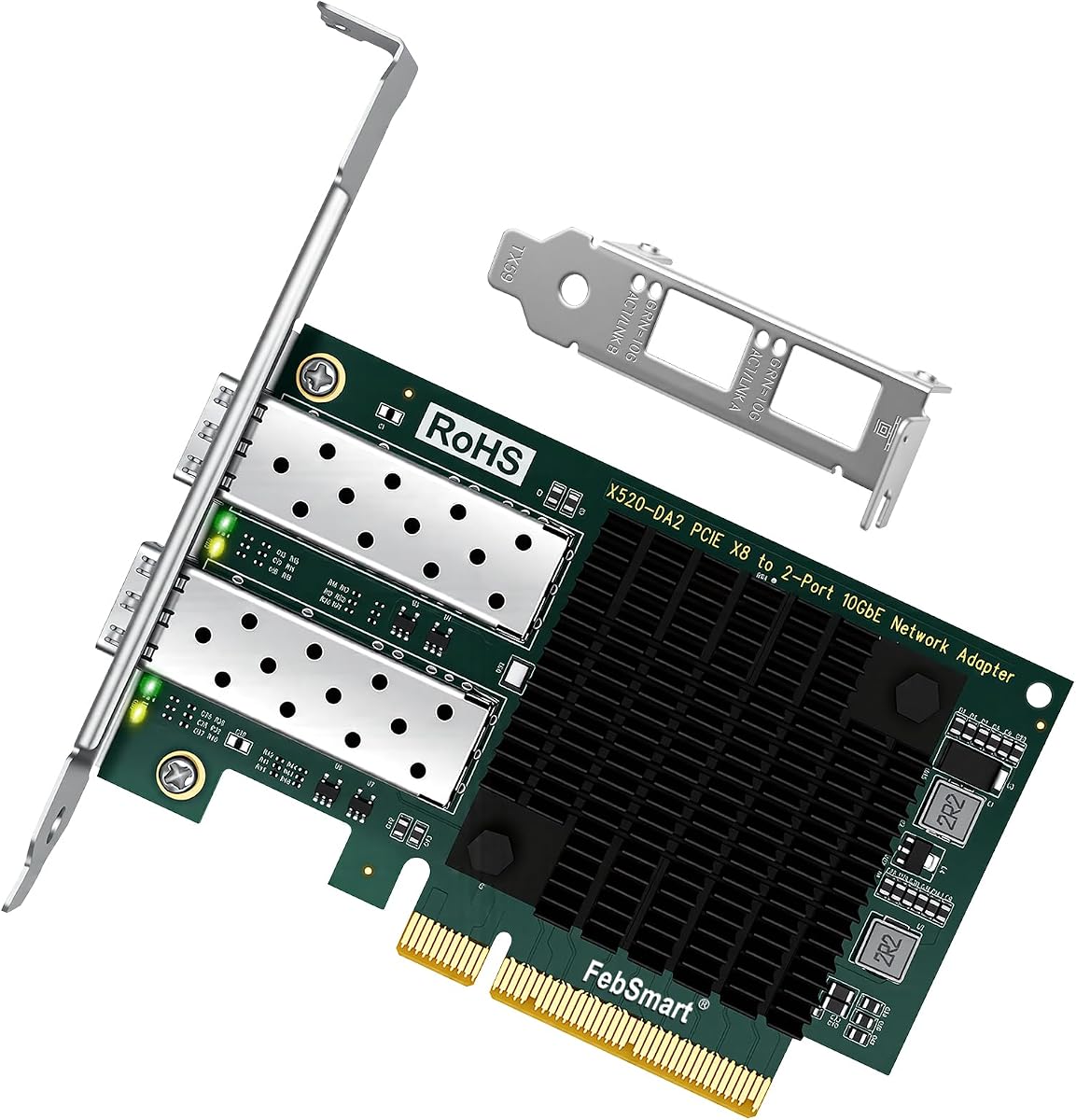
This model offers dual 10G ports for redundancy or link aggregation at a competitive price. The Intel 82599ES controller delivers reliable performance for both storage and network tasks. Users report excellent stability in virtualization environments with proper driver installation.
We may earn a commission when you buy through this link, at no additional cost to you.
Dual ports allow for failover configurations which are critical for 24/7 server uptime. The PCIe x8 interface ensures no bottlenecks during maximum throughput usage. Support for direct attach copper makes short-range connections cost-effective.
Windows 10/11 requires driver installation which is a common step for enterprise-grade adapters. The card fits standard and low-profile cases with included brackets. Overall it balances performance features and price well for multi-port needs.
Server builders needing redundant connections or aggregated bandwidth should consider this card. Its robust feature set ensures it handles demanding workloads without issues.
Two independent ports allow for failover setups that keep networks online even if one link fails.
Bonding the two 10G ports can effectively double available bandwidth for high-traffic tasks.
We may earn a commission when you buy through this link, at no additional cost to you.
Selecting the right network card requires evaluating your specific infrastructure needs and performance requirements carefully.
The chipset determines the raw speed and efficiency of data processing. Intel controllers like the 82599ES offer stability for general use while Mellanox chips provide advanced RDMA features for high-performance computing. Always verify that the chipset supports your target speeds whether 1G 10G or 25G.
Look for a chipset that aligns with your workload intensity to avoid bottlenecks during peak times.
Decide between SFP SFP+ or SFP28 based on your switch capabilities. SFP+ handles 10Gbps while SFP28 supports 25Gbps or higher. A card with an open SFP cage allows vendor flexibility saving money on transceivers later.
Ensure the card speed matches or exceeds your switch ports to prevent unnecessary speed limitations.
PCIe x1 cards fit more slots but offer less bandwidth than PCIe x4 or x8 variants. For 10G applications x1 is usually sufficient but 25G links benefit from x8 interfaces. Check your motherboard manual to confirm available lanes and slot sizes before buying.
Verify physical slot availability and PCIe generation support to guarantee smooth installation and operation.
Driver availability varies significantly between consumer and enterprise operating systems. Windows Server often has built-in drivers while desktop Windows may require separate installation. Linux support is generally strong for Intel chips but check kernel versions for newer hardware.
Confirm that drivers exist for your specific OS version to avoid compatibility issues after purchase.
If you run virtual machines features like SR-IOV and VMDq improve performance by allowing direct hardware access. These offloads reduce CPU load and enable efficient network sharing across VMs. Cards with these features are essential for virtualized storage or computing environments.
Prioritize cards with virtualization support if your setup involves multiple concurrent virtual machine instances.
High-speed cards generate significant heat which can throttle performance without proper cooling. Passive heatsinks work well if your case has good airflow but compact builds may need active cooling or specific chassis clearance. Check reviews for thermal performance notes to ensure reliability.
Ensure your chassis airflow can dissipate heat effectively to maintain stable long-term operation.
Cards with vendor locks reject third-party transceivers forcing you to buy expensive branded optics. Vendor neutral cards accept any MSA-compliant module giving you freedom to choose cost-effective solutions. Verify whether the card comes with modules or if they must be purchased separately.
Choose vendor-neutral hardware to save money on cables and transceivers over time.
Reliable support ensures you can resolve issues quickly if the card fails or needs driver help. Brands offering multi-year warranties and accessible technical support provide peace of mind for critical infrastructure. Check return policies if you are unsure about compatibility before finalizing your purchase.
Select a seller with a solid warranty to protect your investment against hardware defects.
Begin by powering down your computer and disconnecting the power cable to prevent static discharge. Locate an available PCIe slot on your motherboard that matches the card interface such as x1 x4 or x8. Align the card gently with the slot and press down firmly until the retention clip locks it in place.
Connect the fiber optic or DAC cable to the SFP port ensuring the connector clicks securely. For fiber cables avoid sharp bends to prevent signal loss inside the glass core. Once physical installation is complete power on the system and check that the card is detected in device manager.
Install necessary drivers from the manufacturer website if the operating system does not load them automatically. Use link aggregation or failover settings if you have multiple ports to maximize uptime. Regularly inspect the SFP cage for dust and clean it with compressed air to maintain performance.
Yes most cards require SFP or SFP+ transceivers paired with LC fiber cables. You can use singlemode or multimode fibers depending on distance and your switch requirements. Alternatively direct attach copper DAC cables work for short-range connections without needing separate optics.
Ideally yes but some enterprise switches may check for authorized transceivers. Using a vendor-neutral NIC gives you flexibility to bypass these checks with third-party optics. Always verify compatibility with your specific switch model before purchasing modules.
SFP+ supports speeds up to 10Gbps while SFP28 supports 25Gbps. Although they are physically compatible SFP28 cards enable faster data rates. Ensure your switch and cables match the card standard to achieve the advertised speed.
No a PCIe 2.0 x1 provides 5Gbps per lane which is enough for single-direction 10G traffic. Full duplex 10G requires two lanes but most cards handle this efficiently even in x1 slots. Only very high throughput tasks might benefit from x4 or x8 interfaces.
Many models including Realtek and Intel options support wake-on-LAN via firmware settings. You must enable this in the BIOS and network adapter settings for it to function reliably. Check specific product documentation to confirm this feature is present.
Transceivers typically last many years if kept in proper temperature conditions without physical damage. Heat and dust are the main enemies so regular cleaning and airflow help extend their lifespan. Replacing a failed module is usually cheaper than buying a new network card.
Our top picks highlight the StarTech card for reliable Gigabit use the budget 10G adapter for value and the Mellanox 25G card for high performance. Each serves distinct needs ensuring there is a suitable option for any server or desktop setup. Prioritize chipset stability and OS compatibility for smooth operation.
Focus on vendor neutrality and thermal management to ensure your card adapts to future upgrades. Features like SR-IOV and QoS can greatly enhance virtual environments while heatsink designs preserve longevity. Balancing these factors will lead to a successful network expansion.
Prices and stock fluctuate regularly so verify current listings before purchasing. Always double-check motherboard slot compatibility and switch requirements to avoid unexpected costs. Your network infrastructure deserves reliable components to maximize efficiency and uptime.