
SAMSUNG BAR Plus 3.1 USB Flash Drive
4.7Editor score
Rugged metal casing protects data
Fast 300MB/s read speeds
Waterproof and shockproof design
Discover the top flash drives for Tesla sentry mode and dashcam recording. This guide compares speed, capacity, durability, and compatibility to help you
Finding the right flash drive for your Tesla is crucial for reliable sentry mode and dashcam functionality. You need a drive that handles constant writing without failing or overheating while parked in varying conditions.
We compared ten highly rated USB drives based on read and write speeds, storage capacity, physical durability, and real-world compatibility with Tesla vehicles. Our analysis focuses on models known for stability during extended recording sessions.
Each pick highlights specific strengths like rugged build quality, fast transfer rates, or compact design. Keep in mind that retail prices fluctuate frequently, so verify current costs before purchasing to ensure you get the best deal available today.
4.7Editor score

4.1Editor score

4.5Editor score
This side-by-side comparison evaluates all ten selected drives across key performance metrics and physical attributes to help you make an informed decision for your Tesla's storage needs.
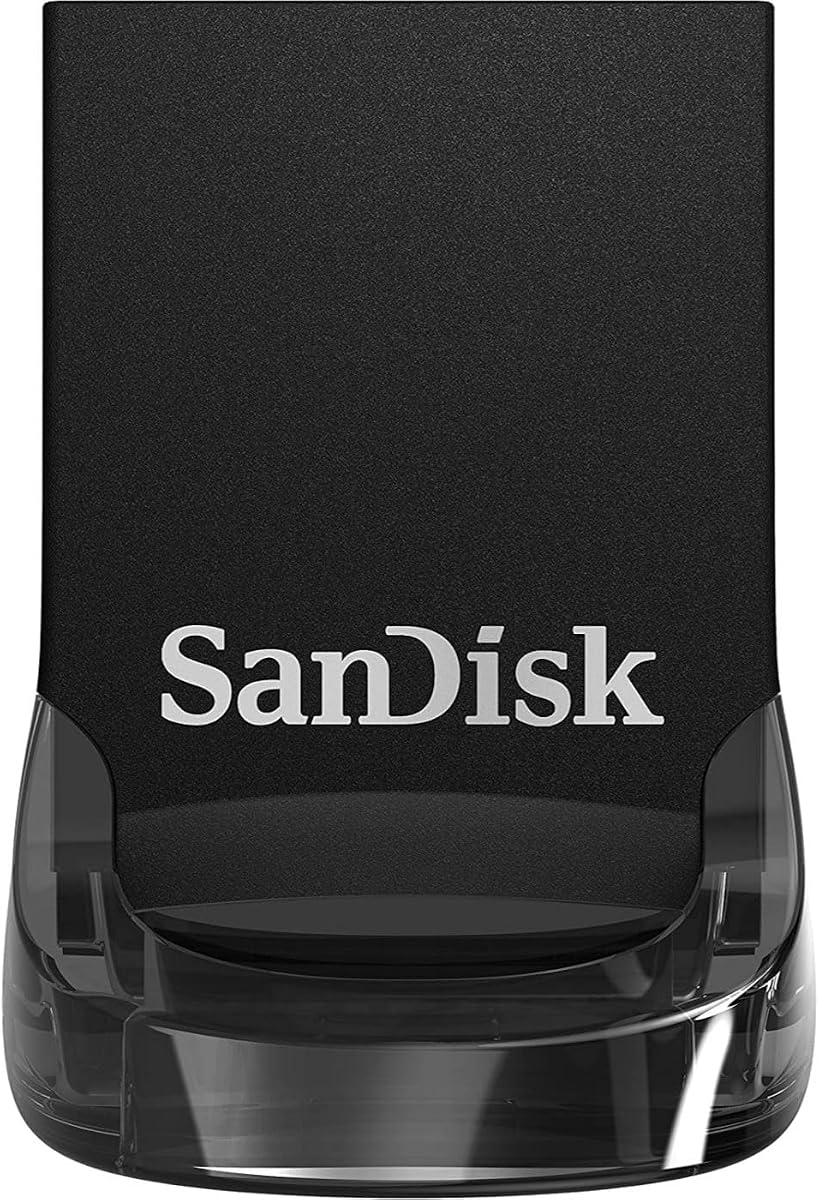


This Samsung drive ranks highly for its rugged build and fast performance. It receives a 4.7 rating for its ability to handle demanding environments while delivering quick data access speeds.
We may earn a commission when you buy through this link, at no additional cost to you.
The metal casing provides exceptional protection against physical shock and environmental factors like water and temperature extremes. With read speeds up to 300MB/s, transferring large video files is efficient and reliable for daily use.
While the write speeds are not explicitly detailed, the read performance ensures smooth playback of stored media. The 128GB capacity is sufficient for most users but may fill up quickly with continuous 4K recording.
Ideal for Tesla owners needing a dependable drive for sentry mode, this model balances durability with speed. Its integrated keyring also ensures you do not misplace it when plugging it into your vehicle.
The rugged metal body protects against shocks, water, and temperature extremes, ensuring your data remains safe in harsh conditions.
With read speeds up to 300MB/s, you can quickly access and transfer large files without waiting for slow processing times.
We may earn a commission when you buy through this link, at no additional cost to you.
This drive is tailored specifically for Tesla sentry mode and dashcam use. It holds a 4.1 rating for its practical design and ability to function reliably in vehicle systems.
We may earn a commission when you buy through this link, at no additional cost to you.
Manufactured with precision zinc alloy, the body offers resistance against wear and rust while providing good heat dissipation. The unique rotating cover protects the interface and prevents loss during storage.
The 128GB capacity is standard for this purpose, though users must manually clean files once full. Resetting may be necessary after prolonged use to maintain optimal performance levels.
A cost-effective choice for Tesla owners, this drive prioritizes stability over raw speed. Its design ensures it stays connected without issues during both driving and parking scenarios.
Built specifically for Tesla dashcam and sentry mode, this drive ensures seamless integration and consistent recording performance.
Zinc alloy construction provides resistance to physical damage and corrosion while aiding in heat dissipation during long sessions.
We may earn a commission when you buy through this link, at no additional cost to you.
This portable SSD offers an impressive 1TB capacity with blazing fast transfer speeds. It earns a 4.5 rating for its performance capabilities and versatility across various devices.
We may earn a commission when you buy through this link, at no additional cost to you.
Equipped with SLC Cache technology, it delivers read speeds up to 1050MB/s making it exceptionally fast for large file transfers. The dual interface supports both USB-A and USB-C connections for universal access.
The high cost may be a consideration but the massive storage justifies it for extensive media libraries. Pre-formatting as exFAT ensures easy plug-and-play functionality across different operating systems immediately.
Perfect for users needing extensive space without sacrificing speed, this SSD handles high-resolution video effortlessly. Its lightweight design makes it easy to carry while providing premium performance for demanding tasks.
With 1TB of capacity, you can store thousands of photos or hours of 4K video without worrying about running out of room.
Up to 1050MB/s read speeds ensure that transferring large files happens almost instantly saving you valuable time during data management.
We may earn a commission when you buy through this link, at no additional cost to you.
This drive offers substantial storage in a very compact form factor. It maintains a 4.4 rating for its balance of capacity and portability in small spaces.
We may earn a commission when you buy through this link, at no additional cost to you.
The ultra-fast transfer speeds of up to 400MB/s allow quick access to large files like high-resolution photos or movies. Its compact design makes it ideal for car audio systems or laptops where space is limited.
While it lacks physical casing protection, the plug-and-stay design ensures it remains securely connected. Password protection adds a layer of security for sensitive data stored on the drive.
Suitable for those needing significant space without bulk, this drive is efficient and reliable. It is a great choice for modern digital needs where speed and storage capacity are critical priorities.
The plug-and-stay design adds storage instantly to laptops or car audio systems without adding bulk to your device setup.
Get ample space for high-resolution media at a great value with up to 512GB storage for all your files and videos.
We may earn a commission when you buy through this link, at no additional cost to you.
This compact drive is designed to stay plugged in without taking up space. It holds a 4.6 rating for its practical micro design and reliable performance in small environments.
We may earn a commission when you buy through this link, at no additional cost to you.
With read speeds up to 200MB/s, it handles large files efficiently and is backwards compatible with older USB 2.0 ports. The low profile design ensures it does not protrude significantly from devices.
The lack of a cap leaves the connector exposed to dust which may affect longevity in dirty environments. However, for stationary setups like car audio, it remains a convenient and durable choice.
Best suited for users needing a drive that stays put without bulk, this model is reliable. Its speed and compatibility make it a solid option for general storage needs across various devices.
The micro-sized design allows the drive to remain connected to host devices for maximum convenience without inserting or removing it.
Enjoy amazing performance with read speeds up to 200MB/s making it ideal for large files and demanding applications on your device.
We may earn a commission when you buy through this link, at no additional cost to you.
This drive combines style with performance offering a sleek metal design and fast transfer speeds. It earns a 4.5 rating for its premium build quality and efficient file handling.
We may earn a commission when you buy through this link, at no additional cost to you.
The full cast metal design is not just stylish but also durable. With speeds up to 400MB/s transferring full-length movies takes less than thirty seconds which is extremely convenient for quick data access.
While more expensive than plastic alternatives the metal body adds robustness. The included password protection software offers 128-bit AES encryption for enhanced security of your personal documents and files.
Perfect for users who value aesthetics along with functionality this drive is a strong choice. It provides enough space for high-resolution photos and music while maintaining a polished professional look.
Save your files in style with an elegant full cast metal design that looks sophisticated on any desk or device.
Ultra-fast transfer speeds up to 400MB/s mean you can transfer full-length movies in less than thirty seconds efficiently.
We may earn a commission when you buy through this link, at no additional cost to you.
This drive features both USB-A and USB-C connectors for versatile device compatibility. It holds a 4.3 rating for its practical dual-interface design and compact form factor.
We may earn a commission when you buy through this link, at no additional cost to you.
The 360 degree swivel design allows easy switching between connectors without losing caps. It weighs only 26g and withstands temperatures from 0 to 50 degrees making it durable for everyday travel.
Transfer speeds are moderate at 100MB/s which is suitable for general files but not high-speed video. However the universal compatibility with phones tablets and Macs adds significant value for multi-device users.
Ideal for those needing a simple way to transfer between old and new devices this drive offers simplicity. Its lightweight design and dual connectors make it a convenient tool for diverse computing environments.
Features USB Type-A and Type-C connectors in a slim form factor for easy compatibility across smartphones and laptops.
The 360 degree swivel design allows easy switching between connectors without the hassle of losing a protective cap.
We may earn a commission when you buy through this link, at no additional cost to you.
This solid state dual drive provides exceptional speed and flexibility for data transfers. It receives a 4.6 rating for its robust performance and durable construction.
We may earn a commission when you buy through this link, at no additional cost to you.
With read speeds up to 400MB/s and write speeds up to 360MB/s it transfers files four times faster than standard USB 3.0 drives. The durable metal housing protects the connectors and internal components effectively.
The included Lexar App supports photo backup for iOS and Android adding extra utility. However it does not support iCloud content backup which may be a limitation for some ecosystem users.
Suitable for those needing high-speed transfers in a portable package this drive is efficient. Its dual connectors ensure compatibility across a wide range of devices making it a versatile tool for modern users.
Up to 400MB/s read speeds provide file transfers four times faster than USB 3.0 for rapid data management and access.
A durable metal housing offers exceptional durability and protects the USB-A and USB-C connectors from physical damage.
We may earn a commission when you buy through this link, at no additional cost to you.
This sleek drive supports modern USB-C devices with impressive transfer capabilities. It holds a 4.5 rating for its reliable performance and stylish design.
We may earn a commission when you buy through this link, at no additional cost to you.
The reversible plug allows seamless insertion every time without checking orientation. With read speeds up to 400MB/s you can transfer 4GB files in just eleven seconds which is incredibly efficient for large data.
Built to withstand tough conditions it is waterproof shockproof and magnetproof. This durability ensures your valuable data stays secure regardless of the terrain or environment you encounter daily.
Perfect for users with newer devices requiring USB-C this drive combines speed with durability. Its compact size makes it easy to carry while maintaining enough space for thousands of photos or videos.
Featuring a reversible plug the Type-C inserts into your devices seamlessly every time without needing to check orientation.
Files stay secure no matter the terrain with a waterproof shockproof and magnetproof body backed by a five-year warranty.
We may earn a commission when you buy through this link, at no additional cost to you.
This drive offers a seamless fit with a key ring for loss prevention. It is a 4.7 rating for its compact design and reliable performance in various environments.
We may earn a commission when you buy through this link, at no additional cost to you.
The unnoticeable fitting design ensures it does not obstruct other ports. With read speeds up to 300MB/s it handles large files quickly while remaining compact on laptops or car audio systems.
Built to last it is water shock and temperature proof. The integrated keyring adds a practical feature to keep your drive secure and easy to find when needed for storage access.
Ideal for users needing a low-profile drive with ample space this model is efficient. Its durability and speed make it a robust choice for storing important documents and media files securely.
The exceptionally compact design is designed with a key ring to prevent loss making it ideal for car audio and laptops.
Shockproof waterproof and temperature proof this drive ensures reliability and data protection through various conditions over time.
We may earn a commission when you buy through this link, at no additional cost to you.
Choosing the right storage for your Tesla involves several factors beyond just capacity. You must consider speed, durability, and compatibility to ensure reliable sentry mode and dashcam performance.
Capacity determines how much footage your sentry mode can store before looping. Tesla recommends drives with at least 128GB but 256GB or higher offers longer retention times without frequent overwriting.
Choose a capacity that aligns with your storage needs and how often you review or save critical clips manually.
Fast write speeds are essential for continuous recording without lag or dropped frames. Look for drives with sustained write speeds to ensure smooth operation during long parking sessions.
Higher read speeds also help when transferring saved clips to a computer quickly for analysis or sharing with authorities.
Vehicles experience temperature extremes and vibrations which can damage fragile electronics. Drives with metal casings or rugged designs withstand heat cold and physical shock better than plastic models.
Select a drive with proven protection features like waterproofing or shock resistance to extend its lifespan in a car environment.
Ensure the drive matches your Tesla's USB ports which are typically Type-A or Type-C depending on the model year. Using adapters can introduce connection issues or slow performance.
A drive with the correct connector ensures seamless plug-and-play functionality without needing extra dongles or converters.
Standard consumer drives may wear out quickly due to constant writing cycles. High endurance or industrial grade drives are designed for continuous recording tasks and last longer.
Consider the drive's expected lifespan based on write cycles to avoid frequent replacements or data loss during important incidents.
Tesla typically requires drives formatted in exFAT or FAT32 for compatibility. Most drives come pre-formatted but you may need to reformat them upon setup to ensure proper function.
Check the manufacturer guidelines to ensure the drive supports the correct file system without needing complex manual adjustments.
A good warranty protects your investment against early failures or defects. Many brands offer up to five years of limited warranty for their flash memory products.
Choose a brand with reliable customer support in case you encounter technical issues or need assistance with formatting and setup.
Established brands often provide more consistent quality control and firmware updates. Trusted manufacturers are less likely to have compatibility issues with specific vehicle systems.
Prioritize brands with a track record of reliability in automotive or high-performance storage applications to ensure long-term satisfaction.
When you receive your new drive format it in exFAT using your computer before inserting it into the vehicle. This ensures the Tesla system recognizes it correctly and can write data without errors.
Insert the drive into one of the front USB ports located between the center console seats. Ensure it is pushed in firmly so the connection remains stable during driving and parking modes.
Regularly back up any critical footage to avoid losing important videos when the loop overwrites old files. You can use a card reader or connect the drive directly to a computer for data retrieval.
Most Tesla owners recommend a minimum of 128GB for Sentry Mode. However, drives with 256GB or 512GB offer longer storage retention before overwriting occurs, which is helpful for frequent use or extended parking times.
Yes, Tesla vehicles typically require the drive to be formatted as exFAT. Many drives come pre-formatted but you may need to reformat it using your computer's disk utility tool to ensure compatibility.
High-quality drives can last several years but frequent writing cycles may wear them out. If you notice recording errors or slow performance, consider replacing the drive to maintain reliable dashcam functionality.
You will need an adapter to use a Type-C drive in a Type-A port. It is usually better to use a native Type-A drive to avoid connection issues or reduced performance caused by additional hardware.
This often happens when the drive is full or the file system becomes corrupt. Formatting the drive or checking for firmware updates on your Tesla may resolve the issue quickly and effectively.
Yes, some brands offer drives tailored for Tesla's dashcam features with optimized stability. However, standard high-performance drives also work well as long as they meet the capacity and speed requirements.
Insert a USB card reader into the drive slot on the vehicle then copy the video folders to your computer. You can also connect the drive directly to a laptop using a USB-A port.
Yes, extreme heat or cold can damage standard drives. Choose drives with rugged metal casings and temperature tolerance ratings to ensure they survive summer and winter conditions inside your vehicle.
The top picks in this guide offer reliable performance for sentry mode and dashcam needs. Whether you prioritize speed capacity or rugged durability there is a suitable option for every Tesla owner.
Focus on drives with consistent write speeds and protective features to ensure your footage is always captured. High endurance and trusted brands provide the peace of mind necessary for vehicle security.
Prices and availability change frequently so verify current details before purchasing. Choose a drive that fits your budget while meeting the technical requirements for your specific Tesla model.