
RedThunder One Handed
4.4Editor score
35 anti-ghosting keys
RGB backlit modes
Portable ergonomic design
This expert guide compares the top gaming keypads for performance, comfort, and customization to help you find the perfect one-handed keyboard for your setup.
Gaming keypads offer a streamlined approach to control by consolidating essential commands into a compact layout. They enhance efficiency for MMOs, MOBAs, and FPS titles while freeing up desk space for mouse movement. Choosing the right model depends on your switch preference, connectivity needs, and ergonomic requirements for long sessions.
We evaluated ten leading keypads based on build quality, switch technology, macro capabilities, and customization options. Our analysis considers Hall Effect magnetic switches, traditional mechanical or mecha-membrane options, and wireless connectivity features. Each product was assessed for its ability to deliver precise inputs and comfortable typing experiences during intense gameplay.
Each pick highlights unique strengths such as rapid trigger tech, customizable actuation, or ergonomic designs tailored for specific hand sizes. Detailed reviews cover pros, cons, and ideal use cases to guide your decision. Keep in mind that stock levels and pricing may fluctuate, so verify current availability before purchasing your next gaming peripheral.
4.4Editor score

4.2Editor score

4.3Editor score
This side-by-side comparison highlights key specifications and unique features across all ten models to help you identify the best fit for your gaming style.




The Keychron C0 HE stands out as the top performer for competitive gamers seeking precision. With its Hall Effect magnetic switches and 8K polling rate, it delivers ultra-fast response times that edge out traditional mechanical alternatives. This makes it ideal for fast-paced titles where every millisecond counts during intense matches.
We may earn a commission when you buy through this link, at no additional cost to you.
Key strengths include the Rapid Trigger technology that allows instant key reset upon lift-off for smoother movement control. The web-based configurator eliminates the need for bulky software while providing deep customization options for actuation and RGB lighting. This flexibility appeals to power users who want tailored setups without technical barriers.
While the price is higher than budget options, the performance benefits justify the investment for serious players. The lack of wireless connectivity might limit desk placement options but ensures stable latency. These trade-offs are acceptable given the superior responsiveness and build quality offered in this competitive package.
Buyers prioritizing FPS performance will find this keypad unmatched in its class. It bridges the gap between gaming keyboards and compact keypads effectively. We recommend it for gamers who demand professional-grade input precision and prefer streamlined setups over bulky peripherals.
Adjustable actuation from 0.01mm precision allows fine-tuning to match personal key press preferences perfectly.
Content creators can leverage macros for streaming shortcuts and timeline controls efficiently during production workflows.
We may earn a commission when you buy through this link, at no additional cost to you.
The RedThunder One Handed offers exceptional value for gamers seeking essential keypad features without high costs. Its 35 anti-ghosting keys ensure reliable input registration during complex key combinations. The ergonomic wrist rest adds comfort for extended sessions while maintaining a small desk footprint.
We may earn a commission when you buy through this link, at no additional cost to you.
Key strengths include the macro recording capability that lets users save repetitive command sequences quickly. The RGB lighting provides visual appeal with multiple color choices though lacks dynamic effects. This model balances functionality and price well for casual or entry-level gamers exploring one-handed controls.
Trade-offs include limited software customization compared to premium models. The RGB effects are simpler and do not sync with games. These limitations are acceptable given the low price point, making it an ideal first choice for those testing the keypad concept.
We recommend this for budget-conscious gamers needing basic macros and portability. It excels as a secondary device or for travel gaming scenarios. Prioritize this if cost savings matter more than advanced customization features for your setup.
No drivers required means you can plug in and start gaming immediately without installing extra software.
The compact size makes it perfect for LAN parties or small desks where space is at a premium.
We may earn a commission when you buy through this link, at no additional cost to you.
The AZERON Cyborg II represents the pinnacle of premium gaming keypads with its unique Hall Effect thumbstick design. This analog control replaces traditional WASD keys allowing 360-degree movement in compatible games. The 30 programmable keys offer immense flexibility for complex gameplay strategies and macros.
We may earn a commission when you buy through this link, at no additional cost to you.
Its standout feature is the ergonomic adjustability that ensures a perfect fit for various hand sizes. The thumbstick eliminates drift issues common with standard joysticks and supports calibration for precise dead zones. This level of control is unmatched by standard keypad alternatives on the market today.
The high price reflects the specialized engineering and customization potential it provides to users. Initial setup involves time-consuming calibration but yields significant long-term benefits for comfort. These trade-offs are worth it for gamers who prioritize ergonomics and analog precision over traditional input methods.
Recommend this for dedicated gamers willing to invest in top-tier comfort and control. It shines in RPG and simulation titles where movement nuance matters. Choose it if you value bespoke ergonomics and analog stick integration above all else.
Hall Effect technology provides drift-free precision that traditional sticks cannot match during intense gaming sessions.
Adjustable parts allow you to mold the keypad to your hand ensuring comfort during marathon gaming marathons.
We may earn a commission when you buy through this link, at no additional cost to you.
The Redragon K585 delivers a robust tactical layout with 42 keys designed for complex MMO and MOBA rotations. Its swappable switches allow users to tailor the feel without soldering which is rare at this price point. The USB pass-through port adds convenience for mouse connectivity.
We may earn a commission when you buy through this link, at no additional cost to you.
Key features include seven macro keys that support instant combos across multiple profiles. The software enables deep customization of lighting and bindings though it may overwhelm beginners. This model suits gamers who value tactile mechanical switches and extensive macro capabilities over compactness.
Drawbacks include the larger footprint which might clutter smaller desks. The software setup requires patience to configure all features correctly. These issues are minor compared to the versatility and control it offers for dedicated role-playing game enthusiasts.
Recommend for MMO players needing extensive keybinds and macros. It bridges the gap between full keyboards and compact pads well. Choose if you prioritize mechanical feel and programmable depth in your gaming setup.
42 keys provide ample room for all abilities reducing reliance on main keyboard during heated battles.
Swap switches easily to change feel from linear to tactile without technical expertise or extra tools.
We may earn a commission when you buy through this link, at no additional cost to you.
The Redragon K585 PRO brings wireless freedom to the successful K585 design retaining all essential tactical features. Users gain untethered placement options powered by a robust battery lasting up to twenty hours. Swappable switches remain for customization convenience alongside macro support.
We may earn a commission when you buy through this link, at no additional cost to you.
It maintains the strong build and feature set of its wired counterpart while adding convenience. The software allows deep customization of macros and lighting effects. This model suits gamers who prefer clean desks without sacrificing the tactile mechanical experience of the original.
Trade-offs include potential Bluetooth latency differences compared to wired modes. Regular charging is required though battery life is impressive. These are acceptable compromises for users valuing a clutter-free setup and flexible positioning around their workspace.
Recommend for gamers prioritizing desk aesthetics and wireless convenience. It performs well for MOBA and RPG titles requiring extensive bindings. Choose if you want the K585 experience without the cable management headaches.
Position your keypad anywhere on the desk without cable constraints for optimized comfort during sessions.
Battery life supports extended play periods without interruption ensuring you stay focused on the game.
We may earn a commission when you buy through this link, at no additional cost to you.
The Razer Tartarus V2 combines ergonomic comfort with immersive gaming features through Chroma lighting sync. Its mecha-membrane switches offer a hybrid feel that balances durability with soft cushioning. The 8-way thumbpad allows intuitive movement controls especially beneficial for console-style gameplay habits.
We may earn a commission when you buy through this link, at no additional cost to you.
It integrates seamlessly with Razer hardware and popular games for visual feedback during matches. Fully programmable macros simplify complex command sequences reducing mental load. This model suits gamers invested in the Razer ecosystem who prioritize visual immersion and tactile comfort.
Limitations include reliance on proprietary software for full functionality. The membrane switches may not satisfy enthusiasts seeking true mechanical feedback. These trade-offs are minor for users valuing ecosystem synergy and ergonomic design over raw mechanical precision.
Recommend for gamers seeking immersive visuals and ergonomic comfort. It works best if you already own Razer peripherals for sync. Choose if visual integration and thumbpad controls align with your play style preferences.
Sync lighting with in-game events to enhance atmosphere during key moments without manual adjustments.
Directional thumbpad replaces mouse movement for smoother navigation in simulation and strategy games.
We may earn a commission when you buy through this link, at no additional cost to you.
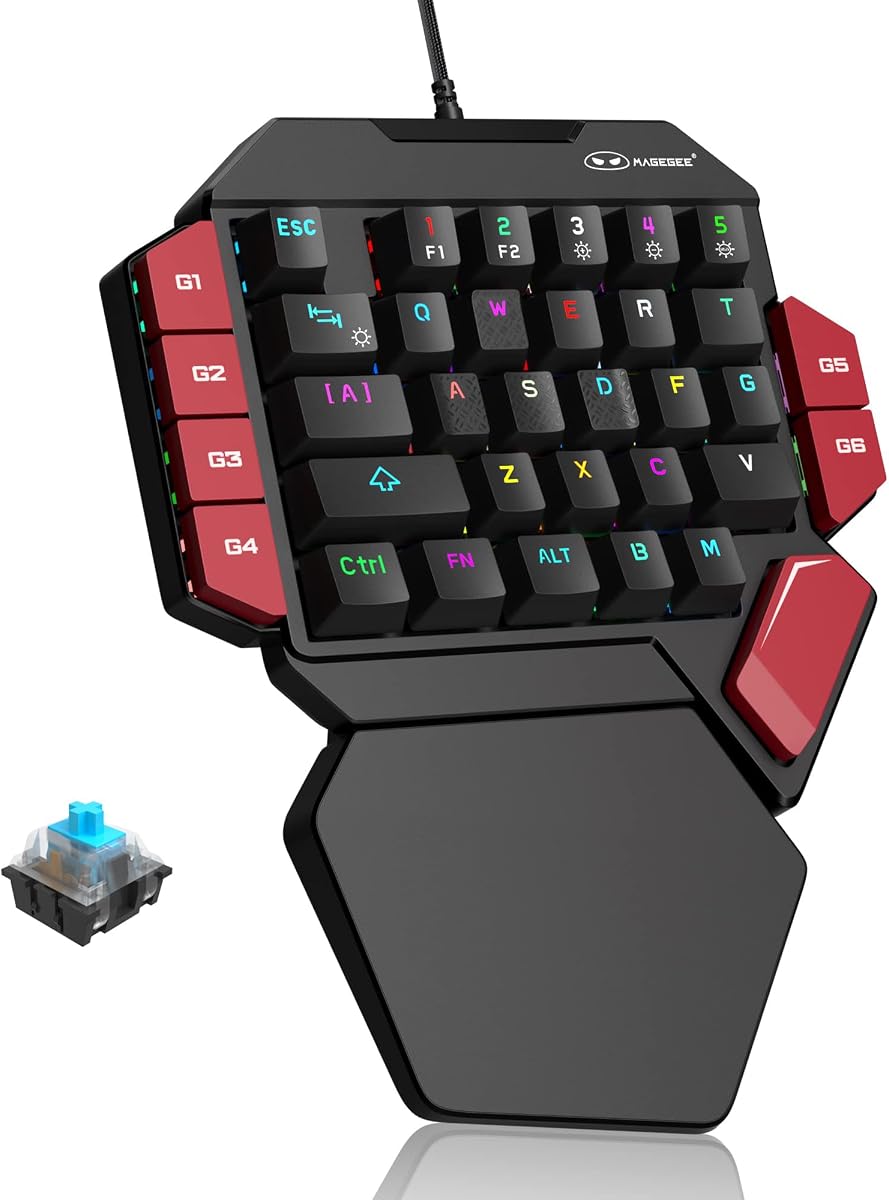
The MageGee One Handed offers genuine mechanical switches with clear tactile clicks in a compact design. Its 35 keys provide ample space for essential bindings while keeping the desk footprint small. The blue switches deliver satisfying feedback preferred by typing enthusiasts and gamers.
We may earn a commission when you buy through this link, at no additional cost to you.
Key features include macro recording directly on the device without needing external software. RGB lighting offers multiple modes for visual appeal though options are basic. This model suits users who want authentic mechanical feel without paying premium prices for advanced customization.
Drawbacks include the loud click noise which may disturb others in quiet environments. Limited software means less customization for lighting or profiles. These are acceptable trade-offs for budget-conscious buyers seeking reliable mechanical inputs and straightforward operation.
Recommend for mechanical fans needing a simple compact keypad. It excels as a cost-effective solution for basic gaming needs. Choose if tactile feedback and budget constraints rank higher than advanced programmability.
Blue switches provide distinct clicks ensuring every press is felt clearly during critical game moments.
Record macros directly on keys using simple FN combos for quick custom commands without software.
We may earn a commission when you buy through this link, at no additional cost to you.
The AJAZZ AK029 maximizes space efficiency with a 29-key layout ideal for low-sensitivity mouse play. It utilizes Hall Effect switches for zero debounce delay and precise actuation control. The aluminum build ensures stability while the web driver simplifies customization significantly.
We may earn a commission when you buy through this link, at no additional cost to you.
Features include 8KHz polling for tournament-grade performance and rapid trigger support for instant resets. This model suits FPS gamers needing clean desks and fast response without complex software setups. It balances high-end tech with accessibility for all skill levels effectively.
Trade-offs include fewer keys limiting complex macro options for RPGs. Initial actuation adjustment takes patience but pays off. These are acceptable given the competitive edge gained in shooters and streamlined desk aesthetics.
Recommend for FPS players prioritizing speed and desk space. It delivers pro features without bulk or complicated driver requirements. Choose if minimalism and performance are your primary setup goals.
Hall Effect tech ensures every tap registers instantly without physical contact friction for faster play.
High polling rate and rapid trigger work together to minimize input lag during frantic gameplay.
We may earn a commission when you buy through this link, at no additional cost to you.
This variant of the Tartarus V2 emphasizes immersive gaming through advanced RGB synchronization with titles. The mecha-membrane keys provide a comfortable cushioned feel for long sessions. Thirty-two programmable keys allow flexible command mapping for complex gameplay scenarios effectively.
We may earn a commission when you buy through this link, at no additional cost to you.
It supports Razer Synapse for advanced profile management and lighting control. The thumbpad offers additional control options for enhanced movement. This model suits users invested in the Razer ecosystem wanting cohesive hardware integration.
Limitations include reliance on software for full functionality which may be restrictive. Pricing varies significantly across regions affecting value perception. These trade-offs are minor for gamers prioritizing visual immersion and comfortable inputs during extended play.
Recommend for fans wanting visual sync with game events. It fits best if you already use Razer gear for setup cohesion. Choose if immersive lighting and comfort drive your decision making.
Sync lighting effects with in-game events for enhanced immersion without interrupting gameplay flow.
Cushioned keys and wrist support reduce fatigue allowing longer play sessions without hand strain.
We may earn a commission when you buy through this link, at no additional cost to you.
The Redragon RM104 offers versatility with a multifunction knob and tri-mode wireless connectivity. It supports Bluetooth 2.4GHz and USB-C for flexible device switching. The 4000mAh battery ensures long usage without frequent recharging for convenience.
We may earn a commission when you buy through this link, at no additional cost to you.
Key strengths include audio control via the smart knob which is unique in this category. Software support enables macro creation and customization for various apps. This model suits users needing multi-device support and multimedia control alongside basic gaming functions.
Trade-offs include larger size not fitting compact one-handed setups perfectly. It is more versatile than specialized gaming keypads. These are acceptable for users seeking general utility over narrow gaming-focused performance.
Recommend for multimedia creators needing device switching. It works well for casual gaming plus daily tasks. Choose if versatility and knob convenience are more important than specialized gaming precision.
Adjust volume and mute quickly with the multifunction knob without leaving your game or stream.
Switch between PC Mac and mobile instantly with tri-mode wireless for seamless workflow integration.
We may earn a commission when you buy through this link, at no additional cost to you.
Selecting the right gaming keypad involves evaluating switch type, key count, and connectivity features based on your primary games.
Switches determine tactile feedback and response speed. Hall Effect magnetic switches offer rapid trigger and adjustable actuation which is ideal for competitive FPS titles. Traditional mechanical switches provide durable tactile clicks while mecha-membrane hybrids prioritize comfort for long sessions.
Prioritize Hall Effect for performance and mechanical for feedback depending on your preference.
Key count ranges from twenty-nine to forty-two keys affecting command complexity. More keys support extensive macro usage for MMORPGs while fewer keys maximize desk space for mouse movement. Layouts vary from tactical grids to ergonomic designs to fit hand shapes better.
Choose higher counts for strategy games and compact layouts for shooters to balance comfort and space.
Connectivity options include wired USB wireless Bluetooth and hybrid modes. Wired ensures stable latency while wireless declutters the desk. Dual mode models allow flexible switching between devices for multi-platform gamers requiring versatility.
Select wired for competitive play and wireless for convenience and desk aesthetics.
Macro capabilities range from simple onboard recording to complex software-based sequences. Some models allow multiple profiles and key remapping essential for MOBAs and RPGs. Others offer quick access keys for instant ability rotation during combat.
Ensure the model supports your required macro depth to avoid in-game limitations.
Ergonomic features include wrist rests adjustable angles and thumbpads for posture support. Comfort reduces fatigue during long sessions ensuring consistent performance. Some models offer modular parts to customize fit for specific hand sizes.
Prioritize comfort features to prevent strain and maintain precision over time.
Software determines how easily you can map keys and set lighting effects. Some require heavy installation while others use web-based configurers for simplicity. Advanced users may want profile management for different games.
Look for intuitive software that matches your technical comfort level for best usability.
Build materials impact longevity and stability. Aluminum reinforced frames resist flex while PBT keycaps resist wear. Gasket mounts offer cushioned keystrokes for premium feel without sacrificing responsiveness.
Check material specs to ensure durability matches your usage intensity.
Budget ranges from affordable entry-level models to high-end specialized units. Price correlates with features like wireless connectivity and Hall Effect switches. Balancing cost with necessary features ensures value without overspending.
Align spending with your gaming style to maximize utility within your financial limits.
Begin by connecting the keypad via USB or Bluetooth depending on your model. Install any required software to access macro configuration and lighting controls fully. This initial setup ensures all features work as expected for your gameplay.
Clean the surface regularly with a soft dry cloth to avoid debris accumulation. Do not use harsh chemicals that might damage the switches or RGB lights. Proper maintenance extends the device lifespan and keeps inputs responsive over time.
Store the device in a dry environment away from direct sunlight when not in use. Avoid placing heavy objects on it to prevent structural damage to the keys. Following these care tips keeps your gaming keypad reliable for years.
Yes most modern gaming keypads support macOS through standard USB or Bluetooth protocols. Some software tools may be Windows exclusive so verify compatibility before buying. Always check device specifications for cross-platform support.
Absolutely keypads are versatile enough for creative workflows like video editing. Macros can streamline repetitive commands in software like OBS or Adobe Suite. Many models work seamlessly across gaming and productivity applications.
Hall Effect switches typically last longer than mechanical ones often exceeding 50 million keypresses. They avoid physical contact wear reducing failure risk. Expect many years of consistent performance with proper care.
Modern 2.4GHz wireless tech adds minimal latency often below 1ms which is imperceptible. Bluetooth may vary slightly but remains suitable for non-competitive play. Wired options remain best for pure esports requirements.
Compact keypads reduce reach distance making them ideal for smaller hands. Ergonomic designs often include adjustable thumbpads to improve comfort. Look for models with lower profiles to minimize strain during use.
Some keypads allow onboard macro recording directly via key combinations. Look for devices with dedicated macro keys and onboard memory. This method bypasses software requirements for quick custom setup.
Thumbpads offer 360-degree analog movement in compatible games for smoother control. They mimic console controller movement for better immersion in certain genres. This is preferred for strategy and simulation titles.
Typically a keypad saves 40 to 60 percent of the keyboard footprint allowing more mouse space. This clearance supports lower sensitivity aiming setups effectively. Ideal for gamers needing extra room for fluid mouse movement.
We have reviewed ten standout models ranging from budget-friendly to premium specialized options. The Keychron C0 HE leads performance with Rapid Trigger and magnetic switches while the RedThunder offers unmatched value for entry-level buyers. AZERON stands out for ergonomic customization suited to dedicated gamers.
Prioritize switch technology and ergonomics based on your primary games to maximize comfort and precision. Wireless connectivity and macro depth are secondary factors to consider depending on your needs. Each model offers unique strengths to match diverse gaming setups and preferences.
Prices and availability fluctuate regularly so verify current stock before finalizing your purchase. Investing in the right keypad enhances control efficiency and desk space significantly. Use this guide to make an informed choice tailored to your play style today.