
Razer DeathAdder Essential
4.5Editor score
6400 DPI optical sensor
5 programmable buttons
Durable mechanical switches
Discover the top gaming mouse for Diablo 4 in October 2026. We compare sensors, buttons, ergonomics, and features to help you find the perfect gear.
Choosing the right gaming mouse for Diablo 4 can significantly enhance your gameplay experience. A quality mouse offers precision tracking, comfortable ergonomics, and customizable buttons essential for navigating complex skill trees and executing combos efficiently during intense raids.
We evaluated ten top-rated gaming mice based on sensor accuracy, button programmability, build quality, and ergonomic design. Each product was analyzed for its suitability in high-intensity action RPG scenarios where reaction time and comfort matter most for long gaming sessions.
Each pick highlights specific strengths tailored to different playstyles and budget ranges. Please note that product availability and pricing may change over time, so checking current listings ensures you get the most accurate and up-to-date information before purchasing your next gaming peripheral.
4.5Editor score

4.6Editor score

4.2Editor score
This side-by-side comparison highlights key specifications and features across all ten selected gaming mice to help you quickly identify the best fit for your specific needs and preferences in Diablo 4.





The Logitech G502 Hero stands out as a top contender for Diablo 4 players seeking precision and control. With a HERO gaming sensor capable of 25600 DPI, this mouse delivers exceptional accuracy essential for targeting skills and enemies in fast-paced combat scenarios.
We may earn a commission when you buy through this link, at no additional cost to you.
Its 11 programmable buttons allow for extensive customization enabling you to map skills and macros directly to the mouse for quicker access during intense raid encounters. The dual mode hyper-fast scroll wheel adds versatility for navigating menus or scrolling through item inventories effortlessly.
While the mouse features adjustable weights to match your grip preference, some users may find it heavier than ultra-light gaming mice. The mechanical switch button tensioning provides a crisp click feel though it may take time to adapt if you prefer softer switches.
For players who value a balance of performance and versatility the G502 Hero is an excellent choice. Its robust features and comfortable shape make it suitable for long gaming sessions ensuring you maintain accuracy and comfort throughout your adventures in Sanctuary.
The HERO sensor ensures zero smoothing or acceleration which is critical for precise aiming and skill execution in Diablo 4.
Logitech Gaming Software allows you to tailor button functions and lighting effects to match your unique playstyle and preferences.
We may earn a commission when you buy through this link, at no additional cost to you.
The Razer DeathAdder Essential offers exceptional value for gamers on a budget who still demand reliable performance. Its ergonomic design ensures comfort during extended play sessions making it ideal for those who prefer a classic right-handed mouse shape for Diablo 4.
We may earn a commission when you buy through this link, at no additional cost to you.
With 6400 DPI optical sensor this mouse provides accurate tracking suitable for both casual and competitive gaming. The ridged rubberized scroll wheel enhances control allowing for precise adjustments when navigating skill trees or adjusting camera settings during gameplay.
While it lacks advanced features like RGB lighting or extensive button programmability the DeathAdder Essential focuses on core functionality and durability. The mechanical switches are rated for up to 10 million clicks ensuring longevity even with heavy daily use and rapid button presses.
For players seeking a no frills yet reliable gaming mouse the DeathAdder Essential is a smart choice. It delivers essential features without unnecessary complexity allowing you to focus on gameplay rather than configuring complex settings or software.
The contoured shape supports natural hand positioning reducing strain and fatigue during long Diablo 4 sessions.
The 6400 DPI sensor offers sufficient precision for most players ensuring smooth cursor movement without jitter.
We may earn a commission when you buy through this link, at no additional cost to you.
The Razer Naga V3 Pro is a premium wireless mouse designed for versatility and performance in complex gaming scenarios like Diablo 4. Its swappable side plates allow you to customize the button layout to suit different game genres or playstyles seamlessly.
We may earn a commission when you buy through this link, at no additional cost to you.
Equipped with the Focus Pro 50K Optical Sensor this mouse delivers next level precision with up to 50000 DPI and 90G acceleration. The optical mouse switches provide crisp feedback with over 100 million click durability ensuring reliability during intense combat sessions.
Wireless HyperSpeed technology offers low latency gameplay comparable to wired options giving you freedom of movement without compromising responsiveness. The battery life supports up to 155 hours on HyperSpeed Wireless allowing extended use between charges for uninterrupted gaming.
For gamers who want top tier features and wireless convenience the Naga V3 Pro is an investment worth considering. Its adaptability through swappable plates and advanced software customization makes it a powerful tool for optimizing your Diablo 4 experience.
Changing side plates lets you switch between MMO and FPS layouts instantly adapting to your current game needs.
HyperSpeed Wireless ensures lag-free performance ideal for competitive play where every millisecond matters.
We may earn a commission when you buy through this link, at no additional cost to you.
The Corsair NIGHTSWORD RGB stands out with its innovative smart tunable weight system that automatically detects the center of gravity in real time. This feature allows you to fine-tune balance between 119g and 141g ensuring the mouse feels perfect in your hand.
We may earn a commission when you buy through this link, at no additional cost to you.
Featuring a custom Pixart PMW3391 sensor with 18000 DPI this mouse offers total sensitivity customization and ultra-accurate tracking. The ten fully programmable buttons provide ample room for macros and key remaps which is beneficial for executing complex combos in Diablo 4.
Professional comfort is achieved through a contoured shape that naturally fits your hand with high performance rubber grips inspired by pro sports equipment. While the weight system is advanced it may require some experimentation to find your ideal configuration.
Players who prioritize balance and tactile feedback will appreciate the NIGHTSWORD RGB's design. Its robust features and ergonomic focus make it a strong choice for those looking to optimize their mouse performance without sacrificing comfort during long gaming sessions.
The automatic gravity detection ensures consistent feel regardless of how you hold or move the mouse.
Native 18000 DPI resolution gives you control to adjust sensitivity in precise 1 DPI steps.
We may earn a commission when you buy through this link, at no additional cost to you.
The Logitech G305 Lightspeed is an ideal wireless gaming mouse for Diablo 4 players who value portability and convenience. Its ultra-fast LIGHTSPEED wireless technology delivers lag-free performance with a 1 ms report rate ensuring competitive level responsiveness during gameplay.
We may earn a commission when you buy through this link, at no additional cost to you.
Powered by a single AA battery this mouse boasts an incredible 250 hours of continuous gameplay on a single charge. Endurance mode extends battery life up to 9 months allowing you to game for long periods without worrying about frequent battery replacements.
The compact and lightweight design makes it easy to carry in a laptop bag or case making it perfect for on the go gaming. However the limited number of programmable buttons may restrict customization compared to larger gaming mice with more features.
For players who want a reliable and portable wireless solution the G305 Lightspeed is a fantastic option. Its efficiency and performance make it a strong contender for those who prioritize battery life and ease of use over extensive button customization.
Endurance mode optimizes battery usage so you can enjoy extended play sessions without interruption.
LIGHTSPEED technology ensures reliable connectivity with minimal latency suitable for competitive gaming.
We may earn a commission when you buy through this link, at no additional cost to you.
The Corsair Scimitar RGB Elite is designed specifically for MMO and MOBA gamers who need extensive button access for complex macros. With 17 fully programmable buttons this mouse provides ideal functionality for performing frequent actions and executing intricate command sequences efficiently.
We may earn a commission when you buy through this link, at no additional cost to you.
The patented key slider control system allows you to reposition the 12 side buttons to comfortably fit your grip ensuring maximum comfort during long gaming sessions. This feature is particularly useful for players who need quick access to multiple skills without adjusting hand position.
Equipped with a native 18000 DPI optical sensor the mouse offers highly accurate and customizable tracking essential for precision gameplay. Ultra-durable construction with 50 million click rated Omron switches ensures the mouse can withstand heavy usage without losing performance over time.
Players who rely heavily on macro commands and frequent skill usage will benefit greatly from the Scimitar RGB Elite. Its unique layout and customization options make it a standout choice for optimizing efficiency in Diablo 4 and other action RPGs.
The key slider system adapts to your hand size ensuring comfortable and accessible button placement.
Braided cable and sturdy components ensure the mouse withstands the wear of extended gaming hours.
We may earn a commission when you buy through this link, at no additional cost to you.
The UtechSmart Venus Pro Wireless offers a comprehensive set of features tailored for MMO gaming and Diablo 4. With 16 fully programmable buttons this mouse allows you to improve your gaming skills by executing complex macro coding and key configurations effectively.
We may earn a commission when you buy through this link, at no additional cost to you.
Dual modes with ultra-speed wireless technology ensure stable and fast data transmission with a 10-meter reception boundary. Whether using the 2.4 GHz wireless receiver or wired transmission you get professional-level performance without latency concerns during intense gameplay.
The rechargeable battery provides up to 70 hours of wireless mode usage with auto sleep and low power modes extending battery life. A 16000 DPI optical sensor allows for precise tracking with 1000 Hz polling rate ensuring your movements are registered accurately.
Players seeking wireless flexibility without compromising on button count will find the Venus Pro appealing. Its ergonomic design reduces wrist fatigue while the robust feature set supports efficient macro execution and responsive control in demanding game environments.
Advanced wireless technology prevents signal drops ensuring consistent performance during critical moments.
Multiple button mappings let you condense complex actions into single clicks improving reaction times.
We may earn a commission when you buy through this link, at no additional cost to you.
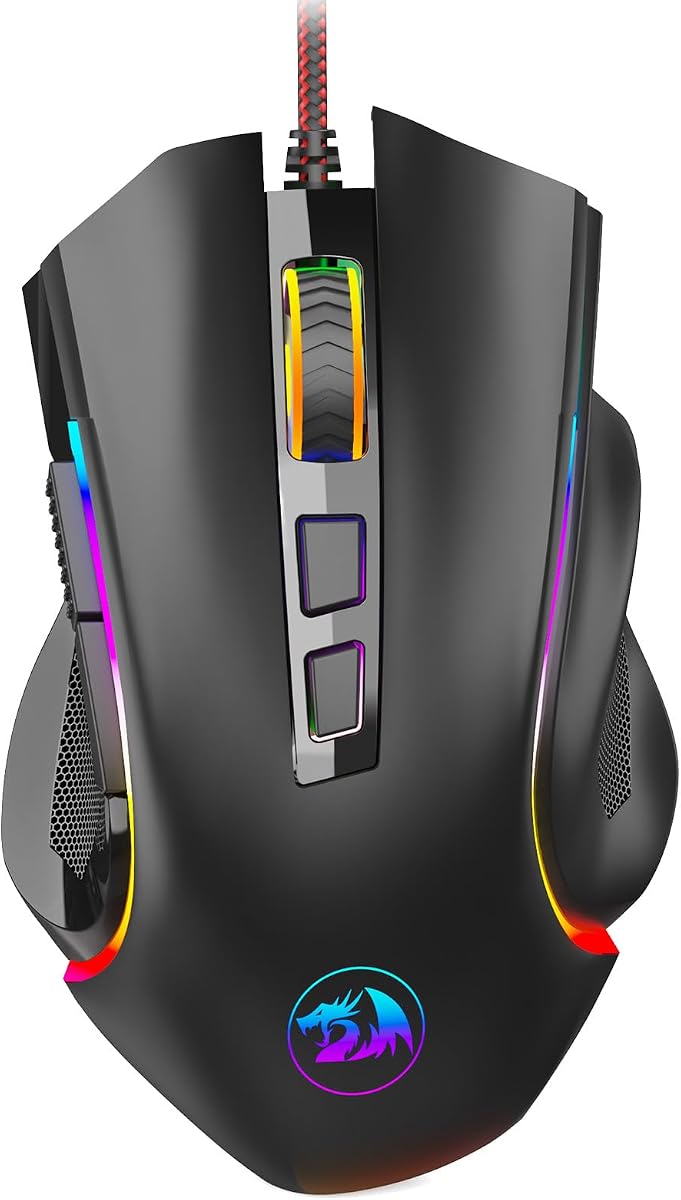
The Redragon M901K is an impressive budget-friendly option for gamers seeking extensive button programmability. With 19 macro programmable buttons you can remap functions through macro editing to meet your specific usage habits under different conditions seamlessly.
We may earn a commission when you buy through this link, at no additional cost to you.
Equipped with 5 memory profiles this mouse saves your settings for different scenarios allowing quick switching with one click. Adjustable DPI ranging from 100 to 12400 ensures flexibility for both precise aiming and fast scrolling in Diablo 4 environments.
The mouse features 12 side buttons designed for comfortable thumb access and includes eight removable 2.4 gram weights for personalized balance tuning. RGB lighting adds an immersive gaming experience with 16.8 million color combinations and multiple lighting modes available.
Players looking for an affordable MMO mouse with robust customization options will appreciate the M901K. Its feature set allows efficient gameplay control and the ergonomic design supports comfortable extended use without breaking the bank.
With 19 buttons you can map almost any in-game function reducing reliance on keyboard shortcuts.
Adjustable weights help you find the perfect balance for your grip style improving comfort and control.
We may earn a commission when you buy through this link, at no additional cost to you.
The Redragon M602 offers a reliable and ergonomic gaming mouse suitable for players who prioritize comfort and simplicity. With 9 programmable buttons it provides enough customization for most gaming needs without overwhelming complexity in software or setup.
We may earn a commission when you buy through this link, at no additional cost to you.
An ergonomic shape designed to fit various hand sizes ensures comfort during extended gaming sessions. The 7200 adjustable DPI sensor allows for smooth and consistent tracking suitable for daily work or gaming in Diablo 4.
RGB backlighting adds style with seven modes and effects allowing you to switch light modes by clicking or using software. The durable construction has a positive sharing rate making it a trustworthy choice for budget conscious gamers.
Players who want a straightforward and comfortable mouse will find the M602 appealing. Its balanced features and ergonomic focus make it a practical choice for everyday gaming without sacrificing essential performance or comfort.
Dedicated finger positions help reduce hand fatigue during long play sessions.
DPI settings allow you to switch between fast movement and precise targeting easily.
We may earn a commission when you buy through this link, at no additional cost to you.
The Razer Basilisk V3 is an ergonomic gaming mouse favored by millions worldwide for its perfect form factor and button positioning. With 11 programmable buttons you can assign macros and secondary functions for quick access to essential actions like push-to-talk or pings.
We may earn a commission when you buy through this link, at no additional cost to you.
The HyperScroll tilt wheel allows free-spinning for fast scrolling or tactile mode for precision ideal for cycling through weapons or skills in Diablo 4. Optical mouse switches provide crisp responsive execution with zero unintended misclicks and a blistering 0.2ms actuation speed.
The Focus Plus 26K DPI optical sensor tracks movement flawlessly with zero smoothing ensuring pixel-precise accuracy. Chroma RGB lighting with 11 zones reacts dynamically with games adding an immersive visual experience to your setup.
Players seeking a blend of comfort speed and accurate tracking will find the Basilisk V3 a powerful tool. Its advanced features and ergonomic design make it suitable for long gaming sessions and responsive performance in any game genre.
Tilt functions and dual modes give you versatile navigation options for any game interface.
Optical switches reduce latency and prevent double clicks for reliable button performance.
We may earn a commission when you buy through this link, at no additional cost to you.
Selecting the right gaming mouse requires understanding several key factors that influence performance and comfort during gameplay.
Sensor accuracy determines how precisely the mouse tracks your movements. High DPI sensors with zero smoothing or acceleration are essential for precise targeting and skill execution in Diablo 4.
Look for a sensor that offers high DPI range and consistent tracking to ensure your cursor moves exactly as intended during combat.
Programmable buttons allow you to assign skills macros and key functions directly to the mouse. More buttons provide greater flexibility but may increase learning time and weight.
Choose a mouse with enough buttons to meet your needs without overwhelming you with unnecessary complexity.
Comfort is crucial for long gaming sessions. The mouse should fit your hand size and grip style naturally to reduce fatigue and prevent injury over time.
Consider the shape size and weight distribution to find a mouse that feels comfortable for extended play sessions.
Wired mice provide zero latency and consistent performance but limit movement range. Wireless mice offer freedom but require battery management and must ensure low latency technology.
Choose based on your preference for convenience versus guaranteed responsiveness depending on your gaming environment.
Durability ensures the mouse withstands daily use and intense gaming sessions without failures. Look for durable switches and sturdy materials that maintain performance over time.
Check product ratings and construction materials to ensure your mouse lasts for years of consistent use.
Adjustable weight systems allow you to personalize the mouse balance and feel to match your grip preference and play style accurately.
Opt for mice with adjustable weights if you want to fine-tune the mouse performance to your exact preferences.
RGB lighting adds aesthetic appeal but is optional for performance. Software allows button mapping profile management and customization of sensor settings.
Ensure the software is intuitive and provides sufficient customization without requiring excessive setup time.
Budget affects available features and build quality. Higher priced mice often offer more buttons better sensors and advanced features but budget models can still provide excellent performance.
Determine which features are essential for your needs to find a mouse that balances performance and cost effectively.
Proper setup begins with installing the manufacturer software to configure button mappings and DPI settings tailored to your gameplay style.
Keep the mouse and mousepad clean by regularly wiping them with a soft cloth to maintain tracking accuracy and prevent debris buildup.
Avoid excessive force on buttons and cables to prolong the lifespan of the switches and connections ensuring reliable performance over time.
Most Diablo 4 players prefer DPI settings between 800 and 1600 for balanced precision and speed. Adjust according to your monitor size and personal comfort level to optimize aiming and navigation.
Modern wireless gaming mice use advanced low latency technology that performs as reliably as wired options. Choose reputable brands with proven wireless tech to ensure responsive gameplay without compromise.
Use the mouse software to assign specific key commands or macros to buttons then configure in game keybinds to match. Test the setup to ensure skills trigger correctly during gameplay.
Ideal weight varies by preference and grip style but many gamers prefer between 80g and 120g for a balance of speed and control. Adjustable weights help you find your perfect setup.
Most gaming mice require manufacturer software for advanced customization of buttons DPI and lighting. Some mice offer onboard memory to save settings without needing constant software access.
Regular cleaning every few weeks helps maintain performance and hygiene. Use a soft cloth and mild cleaner to remove dust and grime from surfaces and sensors.
Yes many gaming mice are comfortable and functional for everyday computing tasks. Look for ergonomic designs and adjustable DPI to switch seamlessly between gaming and productivity.
Heavier mice can improve stability for some users but may reduce speed. Find the right balance by testing different weights and grip styles to see what suits your playstyle best.
The top picks highlighted in this guide offer excellent options tailored to different preferences and needs for Diablo 4 players.
Prioritize features like sensor accuracy button programmability and ergonomics to ensure your mouse supports your unique playstyle and comfort during extended gaming sessions.
Remember to check current availability and pricing before making your purchase to ensure you secure the best value and latest model updates.