
MINISFORUM M1-1390 Mini PC
4.5Editor score
Intel Core i9-13900HX CPU
32GB DDR4 RAM Included
Compact White and Silver Design
This guide compares the top ten Intel Core i9 Mini PC models for performance, connectivity, and reliability to help you choose the right compact desktop for
The world of compact computing has evolved dramatically with powerful processors fitting into tiny chassis. An Intel Core i9 Mini PC delivers flagship performance while saving valuable desk space for modern workstations.
We evaluated ten top models based on processor speed, memory capacity, storage options, and thermal management. Each system offers unique advantages for professionals, gamers, and creators seeking efficiency.
Each selection highlights key strengths and ideal use cases to guide your decision. Note that availability and offers may change, so verify current stock before purchasing your next compact machine.
4.5Editor score

4.5Editor score
4.6Editor score
The following table provides a side-by-side comparison of all ten models featuring Intel Core i9 processors. Review the specifications to understand memory configurations, storage limits, and display capabilities for each unit.


The KAMRUI Hyper H2 stands out as the top pick for those needing the latest silicon in a tiny box. It features the 14th Gen Intel Core i9-14900HX processor which offers incredible multi-threaded performance. With a 32GB DDR4 RAM rating, this unit handles demanding tasks with ease.
We may earn a commission when you buy through this link, at no additional cost to you.
Its standout quality is the raw processing power combined with an advanced cooling system. The dual copper heat pipes and centrifugal fan ensure the CPU stays cool during heavy loads. This allows for sustained performance without throttling which is rare in this size class. The triple 4K display support makes it a productivity powerhouse for multi-monitor setups.
While the DDR4 RAM is a slight trade-off compared to DDR5 models, the 32GB capacity is sufficient for most professional workflows. The single 2.5G LAN port might be limiting for advanced networking setups but covers standard office needs well. The compact 5.04 inch square design fits anywhere without sacrificing airflow efficiency.
This system is ideal for video editors and developers who need speed without the bulk of a tower. The VESA mount allows it to disappear behind your screen keeping your desk clean. We highly recommend this model for anyone seeking the best balance of raw power and compact form factor.
The i9-14900HX provides up to 5.8GHz turbo boost ensuring fast compilation and rendering times.
Connect three 4K displays simultaneously via HDMI DP and USB-C to maximize your workspace efficiency.
We may earn a commission when you buy through this link, at no additional cost to you.
The MINISFORUM M1-1390 offers flagship performance at a fraction of the cost of similar desktops. It packs the Intel Core i9-13900HX processor with 24 cores and 32 threads into a tiny white and silver chassis. The inclusion of 32GB DDR4 RAM and 1TB SSD ensures it is ready to use right out of the box.
We may earn a commission when you buy through this link, at no additional cost to you.
Its best feature is the balance between performance and price. Users get top-tier multi-core performance for rendering and multitasking without paying a premium. The triple display output via HDMI DP and USB-C makes it versatile for workstations needing multiple screens. The design is sleek and fits well in modern home offices.
The use of DDR4 RAM keeps costs down but limits maximum bandwidth compared to DDR5 alternatives. The housing is primarily plastic which feels light but functional. Storage expansion is supported via dual slots allowing up to 8TB total capacity for large media libraries.
This model is perfect for budget-conscious professionals or power users building a second machine. It handles office work creative tasks and light gaming efficiently. We recommend it as the best value option for those who need i9 power without breaking the bank.
Get 24 cores and 32 threads at a price point that undercuts most competing mini PCs.
Dual M.2 slots support up to 4TB each allowing massive storage for files and projects.
We may earn a commission when you buy through this link, at no additional cost to you.
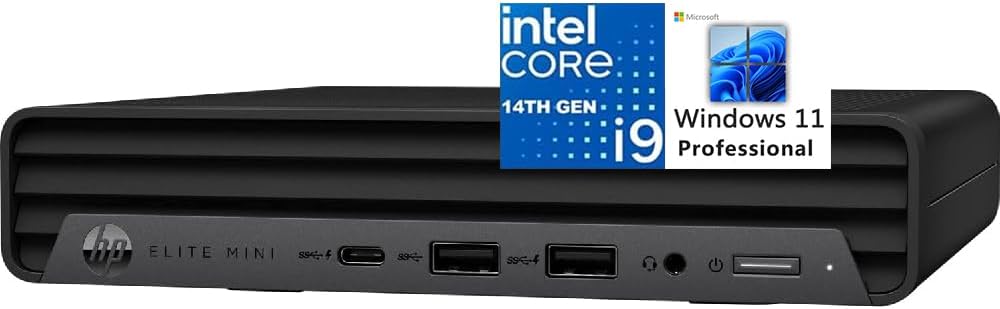
The HP Elite Mini 800 G9 represents the pinnacle of business-grade mini computing. It features the Intel Core i9-14900T processor designed for efficiency and high performance. Coming with Windows 11 Pro and 16GB DDR5 RAM it is a ready-to-deploy solution for enterprise environments. The chassis is built to last with a focus on durability and stability.
We may earn a commission when you buy through this link, at no additional cost to you.
Its main strength is the enterprise quality and silent operation. The cooling system is engineered to stay quiet even under load making it suitable for sound sensitive environments. The 16GB DDR5 RAM provides faster data access than DDR4 models enhancing overall system responsiveness. Triple 4K display support ensures professional visual output.
The main downside is the higher price compared to consumer brands. It also offers less internal expandability for storage compared to enthusiast models. The 16GB RAM is fixed in many configurations though the SSD can be upgraded by skilled users. Build materials feel robust and professional.
This unit is ideal for corporate offices or high-end workstations where reliability is paramount. It ensures secure computing with managed features and enterprise support. We recommend it for businesses needing a reliable and powerful mini PC that looks professional on a desk.
Built with robust materials and designed for continuous operation in business environments.
Optimized cooling keeps noise levels low even during intensive computing tasks.
We may earn a commission when you buy through this link, at no additional cost to you.
The Beelink GTi13 is a standout for users who need high-speed connectivity options. It features the Intel Core i9-13900HK processor and 32GB DDR5 RAM which offers faster speeds than DDR4. The Thunderbolt 4 port is a major highlight allowing for external GPUs and fast data transfer at 40Gbps. This makes it very versatile for advanced workflows.
We may earn a commission when you buy through this link, at no additional cost to you.
Its standout feature is the innovative inclusion of a fingerprint sensor and AI voice interaction chip. These additions provide security and convenience without needing extra peripherals. The dual 2.5G LAN ports support link aggregation for better network performance. The cooling system uses a dust-proof design to maintain performance over time.
The i9-13900HK has fewer cores than the HX series which may limit extreme multi-threaded tasks. However for most users the 14 cores are sufficient. The docking station requirement for some features like additional PCIe slots might add to the cost. The chassis feels premium and the design is modern.
This model is best for creative professionals who need Thunderbolt capabilities in a small form. It handles video editing and virtual machines well. We recommend it for users who prioritize connectivity speeds and modern smart features over raw core counts.
Connect external drives or GPUs with 40Gbps transfer rates for fast workflows.
Built-in fingerprint sensor and AI chip add convenience and security to your setup.
We may earn a commission when you buy through this link, at no additional cost to you.
The MINISFORUM NAB9S offers a unique advantage with its quad screen display support. It is powered by the Intel Core i9-13900HK processor which delivers robust multi-tasking capabilities. The system includes 16GB DDR4 RAM and a 500GB SSD to get you started quickly. Dual HDMI and USB-C ports allow for four independent 4K displays which is rare in mini PCs.
We may earn a commission when you buy through this link, at no additional cost to you.
Its key strength is the extensive connectivity and screen support. This makes it ideal for monitoring or trading setups where multiple views are essential. The dual 2.5G Ethernet ports provide flexible networking options. The cooling system is optimized with active SSD cooling and dual airflow channels to maintain performance.
The 16GB RAM limit might be tight for heavy virtualization or massive data loads. The 500GB storage is also modest compared to 1TB models. However the tool-free top cover allows for easy upgrades to memory and storage. The build quality remains solid despite the compact size.
This system is tailored for traders and professionals needing multiple monitors. It delivers the visual real estate without the bulk of multiple systems. We recommend it for users who prioritize display count and flexible connectivity options above raw storage capacity.
Connect up to four 4K displays for a multi-monitor workspace without clutter.
Tool-free access to memory and storage slots simplifies future upgrades.
We may earn a commission when you buy through this link, at no additional cost to you.
The MINISFORUM MS-01 is designed as a true mini workstation with enterprise grade networking. It features the Intel Core i9-13900H processor and 32GB DDR5 RAM for heavy computation. The 2x 10Gbps SFP+ ports are rare in consumer devices and allow for extremely fast network connections. A standard PCIe x16 slot enables the installation of dedicated GPUs for graphics intensive tasks.
We may earn a commission when you buy through this link, at no additional cost to you.
Its standout quality is the network and expansion capabilities. The ability to add an external graphics card transforms this into a rendering machine. The vPro support ensures security and remote management features for businesses. Storage is flexible with support for up to three M.2 SSDs including U.2 options.
The chassis is slightly larger than standard mini PCs due to the expansion slot. This can impact portability but increases cooling capacity. The setup requires more technical knowledge to configure the network ports and expansion. It is not a simple plug and play device for casual users.
This unit is perfect for homelab enthusiasts and businesses needing server-like performance. It handles virtualization and heavy network traffic effortlessly. We recommend it for advanced users who need expansion slots and 10GbE networking in a compact form.
10Gbps SFP+ ports ensure ultra-fast data transfer speeds for server tasks.
Install dedicated graphics cards via the PCIe slot for high-end visual work.
We may earn a commission when you buy through this link, at no additional cost to you.
The GEEKOM IT13 MAX introduces the new Intel Ultra 9 185H processor with a dedicated NPU. This hardware is designed to accelerate AI tasks locally without needing cloud processing. It comes with 16GB DDR5 RAM and a 1TB SSD ensuring fast startup and responsive performance. The IceBlast 3.0 cooling system keeps the unit whisper quiet even under load.
We may earn a commission when you buy through this link, at no additional cost to you.
Its main advantage is the focus on AI capabilities for productivity. You can run local models and image processing efficiently which protects data privacy. The unit supports Linux and Windows making it versatile for developers. The 3-year warranty provides peace of mind for long-term business use.
The 16GB RAM limit is a constraint for heavy memory tasks. The new platform may require driver updates for older software. However the raw CPU performance is strong and the NPU adds unique value. The build quality is solid with rigorous testing standards.
This model is ideal for developers and creatives working with AI tools. It offers a quiet and stable environment for 24/7 workflows. We recommend it for users who want to experiment with local AI processing in a small package.
The dedicated NPU handles AI workloads locally for faster and more private results.
IceBlast 3.0 cooling ensures minimal noise for focused work environments.
We may earn a commission when you buy through this link, at no additional cost to you.
The MINISFORUM MS-01 Barebone version offers a blank slate for custom configurations. It features the powerful Intel Core i9-13900H processor but includes no RAM or storage. This allows you to choose exactly the memory and SSDs you need for your budget. The chassis supports a PCIe x16 slot for dedicated graphics cards and networking upgrades.
We may earn a commission when you buy through this link, at no additional cost to you.
Its key benefit is the complete control over components. You can install 16GB or 64GB of RAM depending on your needs. The dual 10G SFP+ ports provide enterprise networking capabilities. The absence of an OS allows you to install a preferred Linux or Windows version without restrictions.
The downside is that assembly and OS installation require technical skills. You must source your own components which can take time. The lack of included parts means the base price is low but total cost depends on upgrades. It is not suitable for those wanting a ready-to-run box.
This model is best for enthusiasts and IT specialists who value flexibility. It allows for building a highly tailored mini workstation. We recommend it for users who know their hardware needs and want to optimize every dollar.
Choose your own memory and storage to match specific workload requirements.
Add dedicated graphics cards or specialized network adapters easily.
We may earn a commission when you buy through this link, at no additional cost to you.
The GEEKOM XT13 Pro stands out with its massive 2TB storage included. It runs on the Intel Core i9-13900H processor and 32GB of RAM which ensures smooth multitasking. This configuration is ready for large file storage and heavy creative work without immediate upgrades. The unit also includes a comprehensive 3-year warranty with local repair support.
We may earn a commission when you buy through this link, at no additional cost to you.
Its main strength is the generous storage capacity and warranty. 2TB allows you to store huge video libraries or datasets locally. The 32GB RAM handles virtual machines and editing apps well. Support is a key focus with a dedicated technical team and lifetime guidance provided.
The price is higher due to the large storage and warranty inclusions. The chassis is standard compared to more exotic designs. However the reliability and service support offer significant value. The Wi-Fi 6E ensures fast wireless connectivity.
This system is ideal for creators who need space and peace of mind. It removes the need for external drives for most users. We recommend it for professionals who prioritize storage capacity and strong after-sales support.
2TB SSD allows local storage for massive video and photo libraries.
3-year warranty and local repair teams ensure long-term reliability and service.
We may earn a commission when you buy through this link, at no additional cost to you.
The GEEKOM GT13 MAX is a professional tool designed for AI and visual work. It features the Intel Ultra 9 185H processor with an NPU for local AI processing. The Intel Arc graphics with 8 Xe cores provide decent gaming and rendering capabilities. The chassis is made of reinforced ABS to resist scratches and impacts.
We may earn a commission when you buy through this link, at no additional cost to you.
Its key feature is the integration of NPU and GPU for professional workflows. It supports up to four displays and Wi-Fi 7 for connectivity. The 16GB DDR5 memory handles moderate workloads well. The warranty and certification to international standards ensure safety and reliability.
The 16GB RAM limit is a trade-off for the lower price point. The SSD is 1TB which is standard but not massive. However the build quality is durable and the design is rugged. It is a robust choice for office environments.
This model is best for businesses deploying AI tools in the office. It offers a balance of modern features and ruggedness. We recommend it for users who need a reliable and secure AI-ready mini PC.
NPU allows for running local AI models and automation tasks efficiently.
Reinforced ABS housing ensures longevity in busy office environments.
We may earn a commission when you buy through this link, at no additional cost to you.
Selecting the right Intel Core i9 Mini PC requires evaluating several critical factors. This guide outlines the key aspects to consider before making your purchase.
Intel Core i9 Mini PCs come with different processor series like HX HK or standard H. The HX series offers the highest core counts and performance suitable for heavy rendering. The HK series balances performance and power efficiency ideal for mixed workloads.
Choose the HX series if you need raw speed and the HK series for general professional use.
Look for at least 32GB of DDR5 memory for future-proofing. DDR5 offers faster data transfer rates which improves system responsiveness. If you run virtual machines or heavy editing keep the RAM upgradable in mind.
Prioritize models with 32GB RAM to ensure smooth multitasking and longevity.
Storage speed and size are crucial for workflow efficiency. A 1TB PCIe 4.0 SSD is a good baseline for most users. Check if the unit supports dual slots for expansion if you need massive storage.
Opt for 1TB or more storage to avoid immediate external drive purchases.
Ports determine how you connect to the world. Thunderbolt 4 allows for fast data transfer and external displays. Multiple HDMI or DP ports enable multi-monitor setups essential for productivity.
Ensure the unit has enough video outputs to match your display setup needs.
Fast internet is vital for modern work. Look for 2.5G LAN ports to support high-speed broadband. Wi-Fi 6E or 7 provides low latency and high bandwidth for wireless tasks.
Select models with Ethernet upgrades if you require stable and fast wired connections.
Heat dissipation is the biggest challenge in mini PCs. Systems with dual fans or copper pipes maintain performance under load. A good cooling system prevents throttling during intense usage.
Choose units with active cooling designs to ensure sustained performance.
Some models come with Windows 11 Pro while others are barebone. Having an OS included saves setup time and ensures driver compatibility. Business users may prefer Pro for security features.
Decide if you need a pre-installed OS or prefer to install your own.
Reliability is key for professional tools. Look for brands offering at least a 3-year warranty. Local technical support ensures quick resolution if hardware issues arise.
Prioritize vendors with strong support networks to protect your investment.
To maximize performance place the unit in a well-ventilated area with at least four inches of clearance around it. This prevents heat buildup that can lead to throttling. Keep the vents free from dust to maintain optimal airflow.
Use high quality cables for HDMI or DisplayPort to ensure stable video signals. Connect peripherals via USB hubs if you have many devices. This keeps the ports on the PC free for essential tasks.
Regularly update your system drivers through the manufacturer app. Updating the BIOS occasionally can improve thermal performance. Keep the chassis clean with a soft cloth to maintain its aesthetic.
Yes many models support AAA gaming via integrated graphics or external GPUs. The MS-01 model even has a PCIe slot for dedicated cards. Integrated graphics handle light games well but heavy gaming may need an external solution.
Most models support up to 64GB or 96GB of DDR4 or DDR5 RAM. Check the specific manual for maximum limits. Some units like the MS-01 offer extensive expandability for high memory needs.
Yes most units feature tool-free access to M.2 slots for SSD upgrades. Some support multiple slots allowing for massive storage expansion. Always check compatibility for SSD size like 2280 or 22110.
Absolutely many support up to three or four 4K displays simultaneously. HDMI DP and USB-C ports allow for flexible setups. This is ideal for trading or multitasking workflows.
Not all models include an OS so check the listing carefully. Business units often come with Pro but barebone versions do not. You may need to purchase a license or install Linux.
High performance units generate heat but good cooling systems manage it. Advanced models use copper pipes and dual fans to maintain temperatures. Keep the unit ventilated to prevent overheating.
Only specific workstation models have PCIe slots for external graphics cards. The MS-01 is an example that supports this. Most consumer models rely on integrated graphics or external dock solutions.
The KAMRUI Hyper H2 and MINISFORUM M1-1390 offer the best balance of power and value for most users. They deliver flagship performance in a compact size. The HP Mini PC Desktop remains the top choice for business environments.
Prioritize your specific needs like storage expansion or networking speed when making a decision. Ensure the chosen model has enough RAM and cooling for your intended tasks. A well-matched system will serve you well for years.
Always check current pricing and availability before purchasing. Models may sell out quickly due to demand. Verify warranty terms and support options to ensure long term reliability.