
SABRENT 74 in 1
4.0Editor score
Supports 74 card types
Includes USB 2.0 port
3.5 inch internal bay
This guide compares the best internal media card readers for desktop PCs based on compatibility, speed, bay size, and ease of installation for creators.
Internal media card readers provide convenient front panel access for transferring photos and files without reaching behind your tower. They support various card formats and offer high speed connections for efficient workflow management.
We evaluated ten top models based on their card compatibility, transfer speeds, and build quality. Our list covers both 3.5 inch and 5.25 inch bay options to fit different desktop cases and needs.
Each pick highlights key features and potential drawbacks to help you choose the right unit. Note that prices and availability fluctuate frequently so check current listings before purchasing any item.
4.0Editor score

4.5Editor score

5.0Editor score
The following table presents a side-by-side comparison of all ten selected internal media card readers. It highlights their key specifications to help you quickly identify which model fits your specific desktop setup and workflow requirements.


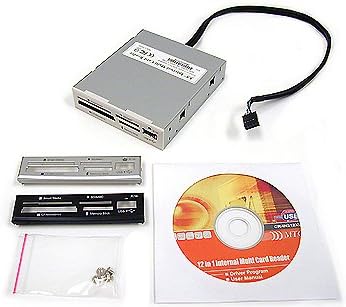
The SABRENT 74 in 1 is an ideal choice for users needing broad card support without breaking the bank. It holds a solid rating for its price point and covers a vast range of memory card types.
We may earn a commission when you buy through this link, at no additional cost to you.
This unit supports 74 different memory card formats including SD, CompactFlash, MemoryStick, and more. It also adds a USB 2.0 port for extra device connectivity which adds value to the simple internal design.
The main trade-off is the lack of USB 3.0 speeds which limits transfer rates for large modern files. Additionally the plastic casing is basic compared to higher end metal models but it fits standard bays well.
Budget conscious buyers and those working with older cards should consider this reader first. It offers the most versatile format support at an entry level price making it a practical addition to any desktop.
With support for 74 card types this reader handles almost any legacy or modern card you might encounter in your workflow.
The included USB 2.0 port provides extra convenience for plugging in flash drives or other USB devices directly at the front.
We may earn a commission when you buy through this link, at no additional cost to you.
The StarTech Internal Card Reader stands out for its professional grade features and high-speed capabilities. It earns top marks for its USB 3.0 UHS-II support which ensures rapid data transfers for large media files.
We may earn a commission when you buy through this link, at no additional cost to you.
This reader allows simultaneous access to four different card slots which greatly improves workflow efficiency. The build is TAA compliant and backed by a two-year warranty making it reliable for business and creative environments.
While the price is higher than budget models the performance justifies the cost for professionals. The requirement for a 20-pin motherboard header means installation is slightly more involved than plug-and-play options.
Users prioritizing speed and reliability should choose this model for their desktop workstation. It balances performance features with professional support making it the best all-around option in this category.
Copy files between four different card types at once without swapping cards manually to save valuable time during transfers.
USB 3.0 UHS-II compatibility ensures that high-resolution video and RAW photo files move quickly without bottlenecks.
We may earn a commission when you buy through this link, at no additional cost to you.
The Vantec Link USB 3.0 achieves a perfect rating due to its exceptional technical capabilities and broad compatibility. It is designed for users who need to handle large capacity cards and high-speed transfers regularly.
We may earn a commission when you buy through this link, at no additional cost to you.
Supporting CompactFlash cards up to 144PB and SD cards up to 2TB makes this reader future-proof for evolving storage needs. The quad data access feature for MemoryStick PRO-HG Duo further enhances speed for specific Sony workflows.
Its premium status comes with requirements like a 20-pin header connection which adds installation complexity. However the performance and capacity support are unmatched in the internal reader market for demanding professional use.
Power users and videographers needing maximum capacity and speed should invest in this model. It represents the peak of internal card reader technology with features tailored for high-end production workflows.
Handles massive SD and CF cards ensuring your reader will not become obsolete as storage capacities continue to grow.
MemoryStick PRO-HG Duo quad data access doubles transfer efficiency for Sony cameras using these specific card types.
We may earn a commission when you buy through this link, at no additional cost to you.
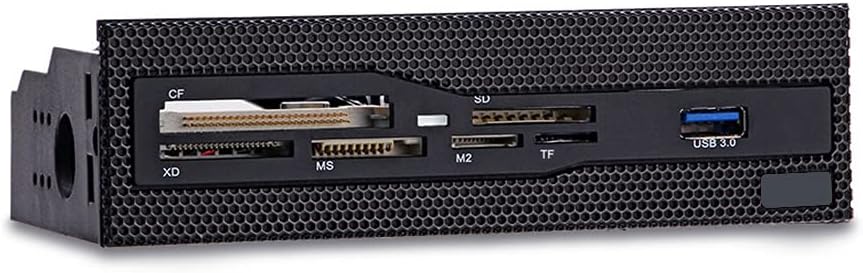
This 5.25 inch internal card reader offers a balanced mix of speed and slot variety for users with larger drive bays. It features USB 3.0 speeds to facilitate faster file transfers compared to older USB 2.0 models.
We may earn a commission when you buy through this link, at no additional cost to you.
The unit includes six card slots supporting common formats like CF XD MS and TF which covers most standard use cases. The copper-plated card slots ensure stable connections and reduce resistance during data transmission for better reliability.
It is designed to fit neatly into a 5.25 inch drive bay with a grid panel that integrates well with mesh cases. Users with smaller cases may not be able to install this specific dashboard style unit comfortably.
Those seeking a clean front panel solution with good speed should consider this model. It is a practical choice for PC builders who want quick access without compromising on transfer rates.
Copper-plated card slots provide better conductivity and stability ensuring fewer read errors during intensive data transfers.
The grid panel design allows this unit to blend seamlessly with modern mesh front cases for a cohesive look.
We may earn a commission when you buy through this link, at no additional cost to you.
This media dashboard combines a card reader with USB hub and audio features for a comprehensive front panel upgrade. It is designed to reduce cable clutter behind your PC while providing front access to audio and data.
We may earn a commission when you buy through this link, at no additional cost to you.
It supports USB 3.0 at 5Gbps and includes an eSATA port for external drive connectivity. The card reader handles formats like TF M2 SD and MS which covers most common memory cards used by hobbyists and creators.
The main drawbacks are the lower rating suggesting potential quality control issues and the complexity of connecting multiple cables. This requires careful planning during PC build to ensure all ports work correctly.
Tech enthusiasts wanting an all-in-one front panel solution might find value here despite the complexity. It is best for those who prioritize front access variety over simple card reading.
Front audio jacks eliminate the need to reach behind your case for headphones or microphone connections during use.
The eSATA port adds support for high-speed external storage drives directly through the front panel of your case.
We may earn a commission when you buy through this link, at no additional cost to you.
The TCC-QL5E dashboard offers extensive connectivity options with multiple USB ports and a card reader in one unit. It is suitable for users who need numerous front-facing connections for peripherals and storage devices.
We may earn a commission when you buy through this link, at no additional cost to you.
Features include six USB 2.0 ports plus eSATA SATA audio connections which makes it a versatile hub for a workspace setup. The card reader supports SD MMC CF MS TF and M2 cards for standard memory needs.
Installation may be complicated due to the number of cables required for the audio SATA and power connections. The lack of customer ratings makes it harder to judge long term reliability compared to other models.
Users needing a high-port dashboard panel with card reading capabilities should consider this model. It is best for those who want a comprehensive front I/O solution for complex desktop setups.
Six USB 2.0 ports allow connecting multiple peripherals like cameras and hubs directly to the front of your PC.
Built-in LED indicators show power status and hard disk read/write activity so you can monitor data access easily.
We may earn a commission when you buy through this link, at no additional cost to you.
Sony offers this internal reader for those who prefer a trusted brand for their desktop storage accessories. It supports 17 card formats which covers most common Sony and general memory cards used in older cameras.
We may earn a commission when you buy through this link, at no additional cost to you.
The unit includes drive letter recognition software to ensure it is detected correctly by your system. It comes with both black and ivory faceplates allowing it to match different PC case aesthetics effectively.
While reliable this model lacks modern USB 3.0 speeds which limits it for large video files. It is best suited for general photo transfers rather than high throughput professional workflows.
Owners of Sony equipment or legacy card types may find this reader a convenient and compatible choice. It is a straightforward option for those who value brand consistency over cutting edge speed.
Choose between black or ivory faceplates to match the aesthetic of your desktop PC case seamlessly.
Included drive letter recognition software ensures smooth system detection and reduces configuration issues for users.
We may earn a commission when you buy through this link, at no additional cost to you.
This generic internal card reader is designed for systems with smaller 2.5 inch drive bays where standard models may not fit. It offers a reliable flash card reading solution with minimal fuss or complex configuration.
We may earn a commission when you buy through this link, at no additional cost to you.
The unit is available with black silver or white bezels to match your PC build style. It emphasizes high quality construction to ensure durability over time despite the generic branding.
Because the product description is brief it is unclear which specific card formats are supported beyond internal flash cards. This might require checking additional documentation before purchase to ensure compatibility.
Users needing a compact card reader for smaller bays can rely on this unit for standard tasks. It is a practical solution for cases with limited space for internal drive bay installations.
Designed for 2.5 inch drive bays this reader fits in cases where larger standard 3.5 inch units cannot be installed.
Available in three bezel colors this reader allows you to match the internal look of your desktop PC build.
We may earn a commission when you buy through this link, at no additional cost to you.
The Akasa internal card reader provides six dedicated ports for various memory cards along with an additional USB port for devices. This layout simplifies data transfer from multiple card types without needing adapters.
We may earn a commission when you buy through this link, at no additional cost to you.
Two LEDs indicate power status and card insertion to provide visual feedback during use. It is available in black or white panels to fit different case colors and styles effectively.
This model does not specify USB 3.0 speeds which suggests it uses USB 2.0 for transfers. This limits file movement speed for large video archives compared to newer high-speed readers.
Those wanting clear port indicators and dedicated slots should find this unit convenient. It is best for casual users who do not require high-speed bulk data transfer capabilities.
Six dedicated slots let you keep multiple cards inserted and accessible without swapping them out constantly.
LED indicators show when the device is powered and when data is being accessed for user friendly operation.
We may earn a commission when you buy through this link, at no additional cost to you.
This MTG card reader supports 22 different card formats with a focus on broad compatibility for older storage types. Its metal case provides durability and fits standard 3.5 inch drive bays for easy desktop installation.
We may earn a commission when you buy through this link, at no additional cost to you.
The device supports hot swappable and plug and play functionality which makes it easy to use without installing drivers. It allows four slots to be used simultaneously for exchanging data between different card types.
While it supports many card formats it is limited to USB 2.0 speeds which are slow for modern high capacity cards. This makes it better suited for occasional use or older devices than for high-speed workflows.
Users needing support for legacy card types like SmartMedia or IBM Micro Drive might find this reader useful. It is a practical tool for archival access and older camera systems.
A metal case ensures physical durability and helps dissipate heat during extended use of the card reader.
Four slots can be used simultaneously to exchange data between different cards without removing any from the reader.
We may earn a commission when you buy through this link, at no additional cost to you.
Selecting the right internal card reader depends on your specific card formats and performance needs. This guide outlines key factors to consider before making a final purchase decision.
Check that the reader supports the specific memory card types you use such as SD CF or MemoryStick. Some models support dozens of formats while others focus on modern types only.
Always verify the card types list matches your current and future storage needs to avoid incompatibility issues.
Measure your desktop case front panel to determine if you have a 3.5 inch or 5.25 inch bay available. Some units are designed for smaller 2.5 inch internal spaces.
Matching the bay size ensures a neat fit without requiring extra brackets or case modifications.
Look for USB 3.0 or UHS-II support if you transfer large video files frequently. Older USB 2.0 models will bottleneck speeds for modern high-capacity cards.
Higher USB speeds reduce wait times significantly when moving hundreds of photos or gigabytes of data.
Some readers require a 20-pin motherboard header connection while others use simpler power cables. Consider your comfort level with internal PC assembly before choosing.
Choose a model with clear instructions and included cables to minimize installation headaches during setup.
Many internal readers include extra USB 2.0 or 3.0 ports for external devices. This can reduce the need for additional hubs and consolidate your front panel connections.
If you need front access to flash drives or phones look for a reader with extra built-in USB ports.
Metal or high-quality plastic casings protect the internal electronics and improve durability over time. Cheap plastic may crack under frequent card insertions or pressure.
Invest in a well-built unit if you plan to swap cards daily or use it in a high-traffic environment.
Professional models often come with longer warranties and technical support options. This is valuable for business users who need reliability and quick troubleshooting.
Check the warranty duration and support options to ensure you are protected if the unit fails.
Most modern readers work with Windows and macOS without drivers but older legacy models might require software installation. Verify that your system is supported before purchase.
Confirm OS support to ensure seamless integration and avoid driver conflicts after installation.
Ensure your computer is powered off before installing any internal hardware. Open your case and locate the empty 3.5 or 5.25 inch drive bay. Connect the SATA or USB power and data cables to the motherboard and card reader.
Once installed power on your system and insert your memory card into the appropriate slot. The card should mount as a drive in your file explorer allowing you to copy files directly.
Always eject cards safely using the operating system before removing them to prevent data corruption. Keep the slots clean and avoid forcing cards if they do not slide in smoothly.
Most modern internal card readers are plug and play and do not require manual driver installation. They rely on standard drivers built into your operating system. If you use a legacy model you may need to install specific software included with the unit.
Yes but speeds will be limited to USB 2.0 maximums which may slow transfers of large files. SDXC cards work but you lose the speed benefits of USB 3.0 or UHS support. For best performance use a USB 3.0 reader.
The difference lies in the size of the drive bay they fit inside your PC case. 3.5 inch units fit smaller bays while 5.25 inch units fit larger bays often used for optical drives. Choose based on your available space.
Yes installing an internal card reader requires opening your PC case to connect power and data cables internally. External USB readers are alternatives if you prefer not to open your desktop.
Many internal card readers support macOS but it is important to verify the OS compatibility in the product details. Most modern models work without extra drivers on macOS systems.
Ensure the card is inserted fully into the slot and check that the internal cables are connected to the motherboard. Sometimes cleaning the card contacts or trying a different slot resolves recognition issues.
Not all internal readers include extra USB ports so check the product specs before purchasing. Some units focus solely on card slots while others include extra USB ports for added versatility.
Some older readers may have limits such as 64GB or 128GB while newer models support up to 2TB or more. Check the specs for maximum supported capacity to avoid compatibility issues.
We highlighted the SABRENT 74 in 1 for budget users and the StarTech and Vantec readers for performance needs. These top picks cover a range of bays and card types to suit most desktop setups.
Prioritize USB 3.0 speed if you work with large video files and ensure your case has the correct bay size for installation. Compatibility with your specific card types is the most critical factor to verify.
Prices fluctuate frequently so check current listings before purchasing to get the best value. We hope this guide helps you choose the right internal reader to streamline your workflow.