
2 in 2 Out USB 3.0 Switch
4.6Editor score
Affordable price point
LED status indicator
Aluminum alloy shell
This guide compares the top 10 keyboard and mouse switch for 2 computers to help you share peripherals efficiently between two desktops or laptops.
Managing two computers often means wrestling with tangled cables and constantly plugging and unplugging peripherals. A reliable keyboard and mouse switch for 2 computers simplifies this workflow by allowing seamless sharing of input devices across systems.
We evaluated ten highly rated USB and KVM switch solutions based on data transfer speeds, port configurations, build quality, and ease of use. Each product was analyzed for compatibility with major operating systems and real-world performance stability.
Below you will find detailed reviews and comparisons to help you select the right device for your setup. Please note that product availability and pricing can change frequently, so check current details before purchasing.
4.6Editor score

4.1Editor score

4.3Editor score
The following table provides a side-by-side comparison of all ten products reviewed in this guide. Use this to quickly assess port counts, data speeds, and key features before diving into the detailed reviews.



The UGREEN USB 3.0 Switch offers a robust solution for users needing to share multiple peripherals between two computers. With a 2-in-4-out configuration, it supports keyboards, mice, printers, and cameras simultaneously. Its versatility makes it a strong contender for dual-PC setups requiring extensive connectivity.
We may earn a commission when you buy through this link, at no additional cost to you.
This switch excels in supporting both USB-C and USB-A devices, which is rare in this category. The inclusion of two USB 3.0 cables ensures you can start using it immediately. The dual switching modes allow flexibility depending on your desk layout and workflow preferences.
However, users should note this is not a KVM switch and does not support video transmission. Additionally, high-power devices may require an external power supply to avoid disconnection. These limitations are acceptable given the high port count and versatility offered.
Ideal for office environments or power users who need to share multiple devices like scanners and cameras alongside input peripherals. If you require more than two ports and value USB-C support, this model is a top recommendation.
The mix of USB-C and USB-A ports allows connection to modern and legacy devices without extra adapters.
Choose between a physical button or a remote controller to match your workspace organization needs.
We may earn a commission when you buy through this link, at no additional cost to you.
The BENFEI USB 3.0 Switch provides excellent value for users seeking a reliable 2-in-4-out sharing solution. It supports standard peripherals like keyboards and mice with 5Gbps transfer speeds. The included warranty adds peace of mind for long-term use.
We may earn a commission when you buy through this link, at no additional cost to you.
Its LED indicator clearly shows which computer is active, reducing confusion during switching. The device is driver-free and compatible with Windows, Mac, and Linux systems. This plug-and-play functionality simplifies setup for non-technical users.
However, the power adapter is not included, which may be an issue for high-power devices. The need for specific USB A to A cables also means older setups might require adapters. These minor drawbacks do not significantly impact overall performance.
Best suited for budget-conscious buyers who need basic sharing capabilities without extra frills. If you prioritize cost-effectiveness and warranty coverage, this switch is a practical choice for home or office use.
The LED indicator ensures you always know which system controls your peripherals at any given time.
An 18-month unconditional warranty provides assurance against defects and ensures customer support is accessible.
We may earn a commission when you buy through this link, at no additional cost to you.
This 2-in-2-out USB switch is designed specifically for users who need to share exactly one keyboard and mouse between two computers. Its high rating reflects strong reliability and user satisfaction. The aluminum alloy shell ensures durability and effective heat dissipation.
We may earn a commission when you buy through this link, at no additional cost to you.
The one-button switch with LED indicator provides an intuitive user experience. Setup is straightforward with included USB 3.0 cables, making it ready to use out of the box. Compatibility with Windows, Mac, and Linux ensures broad usability.
While limited to two ports, this simplicity reduces clutter and potential points of failure. The lack of video support is expected for this type of USB-only switch. For core input device sharing, this model excels in performance and build quality.
Ideal for individuals with a dual-PC desk setup who do not need to share printers or other devices. If you want a compact, high-rated solution focused solely on input peripherals, this switch is highly recommended.
The aluminum alloy housing protects internal components and keeps the device cool during extended use.
A single button click toggles between computers, streamlining workflow without technical complexity.
We may earn a commission when you buy through this link, at no additional cost to you.
The UGREEN 2-in-2-out USB switch is a reliable choice for sharing keyboards, mice, and printers between two systems. Its focus on simplicity makes it ideal for users who need basic peripheral sharing without complexity. The included cables ensure immediate usability.
We may earn a commission when you buy through this link, at no additional cost to you.
It supports 5Gbps transfer speeds, which is beneficial for file sharing and printer data. The plug-and-play feature eliminates the need for software installation, saving time and technical effort. LED indicators provide clear status feedback during use.
While it does not support video transmission, this limitation is acceptable for USB-only sharing needs. The two-port design keeps the setup clean but may not suit users with many devices. For core input and printer sharing, it performs well.
Recommended for office users who need to share a printer alongside input devices between two workstations. If you prioritize ease of use and reliable brand support, this model is a solid option for your setup.
Seamlessly share a single printer between two computers without installing network sharing software.
USB 3.0 speeds ensure quick file transfers and efficient printing operations across connected systems.
We may earn a commission when you buy through this link, at no additional cost to you.
The Hearvo USB 3.0 HDMI KVM Switch stands out by combining video and peripheral sharing into one device. It allows two computers to share a single monitor along with keyboard and mouse, reducing desk clutter significantly. The 4K support ensures crisp visuals for both systems.
We may earn a commission when you buy through this link, at no additional cost to you.
Its wired remote switch offers convenience for switching between systems without reaching behind your desk. The device is plug-and-play with no additional power supply required, simplifying setup. This makes it ideal for users wanting a complete KVM experience.
While it is more expensive than USB-only switches, the added video functionality justifies the cost for many users. The limitation to one monitor may not suit dual-screen setups. For single-monitor dual-PC configurations, this is a comprehensive solution.
Best for users who want to share a monitor and peripherals simultaneously without multiple cables. If you prioritize a clean workspace and high-resolution output, this KVM switch is a premium choice worth considering.
Integrates video and USB switching into one unit, eliminating the need for separate devices.
4K at 60Hz ensures smooth and detailed visuals for both connected computers without lag.
We may earn a commission when you buy through this link, at no additional cost to you.
This UGREEN USB Switch Selector provides reliable sharing for devices using USB 2.0 standards. With four output ports, it supports keyboards, mice, and printers simultaneously. Its high rating indicates solid performance and user satisfaction over time.
We may earn a commission when you buy through this link, at no additional cost to you.
The separate micro USB female port allows optional power supply for high-power devices like hard drives. This feature enhances stability when using multiple devices at once. The included cables make setup immediate and hassle-free.
While USB 2.0 is slower than USB 3.0, it is sufficient for most peripherals like keyboards and mice. The lack of an included power adapter may require an additional purchase. For users prioritizing reliability, this model delivers consistent results.
Ideal for legacy systems or users who do not need high-speed data transfers. If you want a trusted brand with strong customer feedback, this switch is a dependable choice for your two-computer setup.
A dedicated power port ensures stable operation even with multiple high-draw peripherals connected.
High user ratings reflect long-term performance and consistent function in daily office environments.
We may earn a commission when you buy through this link, at no additional cost to you.
The UGREEN USB 3.0 Switch Selector is a versatile device for sharing multiple peripherals between two computers. Its four ports support a variety of devices, from input to storage. The USB-C power port ensures stable performance for demanding hardware.
We may earn a commission when you buy through this link, at no additional cost to you.
It offers 5Gbps data transfer speeds, ideal for fast file sharing. The driver-free setup simplifies installation across Windows, Mac, and Linux systems. Included cables ensure you can start using it immediately without extra purchases.
While it does not support video transmission, this is expected for USB-only switches. High-power devices may require an external power adapter, which is not included. These limitations are minor compared to the functionality provided.
Suitable for home offices or workstations needing to share printers and storage alongside keyboards and mice. If you prioritize speed and port availability, this model offers a strong balance of performance and usability.
The USB-C power port provides reliable power delivery for high-draw devices like external hard drives.
USB 3.0 speeds enable quick file transfers and smooth operation for bandwidth-heavy peripherals.
We may earn a commission when you buy through this link, at no additional cost to you.
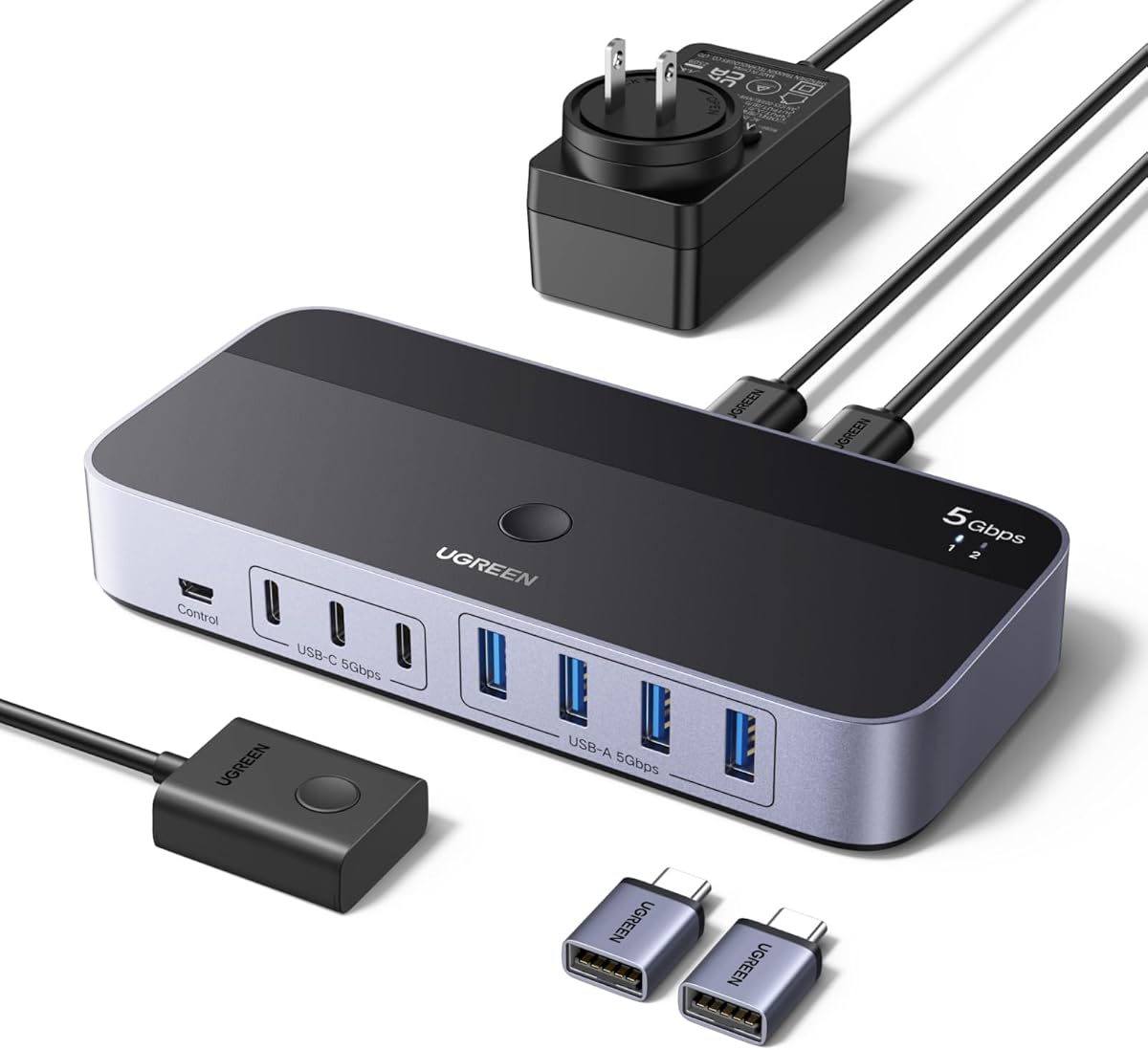
This UGREEN 2-in-7-Out switch offers extensive connectivity with a mix of USB-A and USB-C ports. It supports up to seven devices simultaneously, making it ideal for power users with many peripherals. The included power adapter ensures stable operation for high-draw devices.
We may earn a commission when you buy through this link, at no additional cost to you.
The controller allows remote switching, keeping your desk tidy and accessible. Compatibility with Windows, Mac, and Linux ensures broad usability across different environments. The included USB-C adapter simplifies setup for newer laptops.
While larger than standard switches, the extra ports justify the space on a busy desk. The higher price reflects the increased functionality and included accessories. For complex setups, this model provides unmatched versatility.
Best for users with multiple external drives, cameras, and input devices needing to be shared. If you prioritize maximum connectivity and convenience, this switch is a premium solution for advanced workflows.
Supports both USB-A and USB-C devices, eliminating the need for additional adapters in mixed setups.
The included power adapter guarantees stable performance for all connected devices without interruptions.
We may earn a commission when you buy through this link, at no additional cost to you.
This USB Switch 2-in-2-out is a straightforward solution for sharing basic input devices between two computers. Its compact design and included cables make setup quick and easy. The external controller ensures your desktop remains organized and tidy.
We may earn a commission when you buy through this link, at no additional cost to you.
It draws power directly from the computer's USB port, eliminating the need for an AC adapter. This simplifies the setup process and reduces cable clutter. The LED indicator provides clear feedback on which system is active.
While it lacks support for high-power devices, it is sufficient for standard keyboards and mice. The USB 2.0 standard may be slower than 3.0 but remains adequate for most peripherals. For basic needs, this model offers simplicity and value.
Ideal for users who want a no-fuss solution for sharing input devices without extra complexity. If you prioritize ease of setup and a tidy workspace, this switch is a practical choice for home or office use.
Powered directly from USB ports, removing the need for an extra power supply or AC adapter.
An external controller keeps the switch out of sight while maintaining easy access for toggling.
We may earn a commission when you buy through this link, at no additional cost to you.
The UGREEN 2-in-7-Out USB 3.2 Switch is a high-performance device for users requiring fast data transfer and extensive connectivity. With 10Gbps speeds, it handles large file transfers efficiently. Its seven ports support a wide array of peripherals simultaneously.
We may earn a commission when you buy through this link, at no additional cost to you.
It includes a power adapter for stable performance and a USB-C adapter for mixed setups. The controller option adds convenience for quick switching between systems. This model is ideal for power users with demanding workflows.
While the price is higher than standard switches, the speed and port count justify the investment. The larger size may require more desk space. For users prioritizing performance, this switch offers unmatched capability.
Best for professionals who need to share multiple high-speed devices like external SSDs and monitors. If you value speed and maximum connectivity, this model is a top-tier choice for your dual-PC setup.
USB 3.2 Gen 2 speeds enable rapid file transfers and efficient handling of bandwidth-heavy tasks.
Includes power adapter and USB-C adapter, ensuring immediate setup without extra accessory purchases.
We may earn a commission when you buy through this link, at no additional cost to you.
Selecting the right switch depends on your specific setup requirements and budget. Consider the following factors to ensure compatibility and performance.
Determine how many devices you need to share between computers. Basic models offer two ports for keyboard and mouse, while advanced ones support additional devices like printers and scanners.
Choose a port count that meets your current needs without unnecessary excess.
USB 3.0 and 3.2 switches offer faster data transfer speeds suitable for external drives. USB 2.0 models are sufficient for basic input devices but may be slower for file transfers.
Prioritize USB 3.0 or higher if you plan to share storage devices or high-bandwidth peripherals.
KVM switches allow sharing of a monitor along with USB devices, whereas USB-only switches share peripherals only. Decide if you need video transmission based on your desk setup.
Opt for a KVM switch if you want to reduce monitor clutter and share a single display.
Some switches require external power to handle high-draw devices like external hard drives. Others draw power directly from the computer. Check device specifications for power needs.
Ensure the switch can support the power requirements of your connected devices to avoid disconnections.
Most switches are compatible with Windows, macOS, and Linux systems, but always verify this before purchasing. Plug-and-play functionality is common but not universal across all models.
Confirm compatibility with your specific operating systems to avoid driver issues during setup.
Switching can be done via physical buttons on the device or remote controllers. Remote controllers provide convenience if the switch is placed out of reach.
Choose a mechanism that aligns with your desk layout and accessibility preferences.
Durable materials like aluminum alloy improve longevity and heat dissipation. Warranty periods vary, with some offering 18 months for added peace of mind.
Invest in a well-built switch with a solid warranty to ensure long-term reliability.
Prices vary based on features, port count, and brand reputation. Basic USB 2.0 models are affordable, while KVM or 3.2 switches cost more.
Balance your feature requirements with your budget to find the best value solution.
Connect the switch to both computers using the provided USB cables, ensuring the direction is correct as indicated by the manual. Plug your peripherals into the output ports on the switch rather than directly into the computers.
Use the switch button or remote controller to toggle between systems. Ensure the LED indicator clearly shows which computer is currently active. Avoid hot-swapping devices without proper configuration to prevent disconnections.
Keep the switch in a well-ventilated area to prevent overheating. Avoid exposing it to liquids or excessive dust. Clean the ports regularly with compressed air to maintain optimal contact and performance.
Most USB switches support wireless dongles for keyboards and mice. You would connect the wireless receiver to the switch rather than directly to the computer. This allows both computers to use the same wireless peripherals seamlessly.
Most modern switches are plug-and-play and do not require drivers. They work automatically with Windows, macOS, and Linux systems. Always check product specifications to confirm driver-free operation before purchasing.
A KVM switch allows sharing a monitor along with keyboard and mouse, whereas a USB switch only shares peripherals. Choose KVM if you need to share video output. USB switches are simpler and more affordable for input devices only.
The models in this guide support two computers only. If you need to share between more systems, look for multi-port KVM switches that specifically support three or more computers. These are less common and typically more expensive.
Yes, many modern switches support USB-C connections. You may need a USB-C to USB-A adapter if your switch lacks native USB-C ports. Verify product specifications for compatibility with specific laptop models.
Yes, these switches are designed for continuous operation. They consume very little power and do not require being powered off. However, ensure it is not overheated by proper ventilation and placement away from heat sources.
Most USB 3.0 switches support external drives, but high-power drives may require an external power supply. Check if the switch provides sufficient power for your drive to avoid disconnection issues during data transfers.
Ensure the switch is connected to both computers and powered. Check that the USB cables are securely inserted. If the issue persists, try connecting to a different USB port or check for power supply requirements if applicable.
We reviewed ten reliable solutions for sharing keyboard and mouse between two computers. The UGREEN 2-in-2-out switch stands out for its solid build and high customer ratings. Budget options like the 2-in-2-out switch offer great value for basic needs.
Consider your specific requirements such as port count and power needs when selecting a device. High-end models provide more ports and faster speeds, while basic ones are sufficient for standard input devices.
Prices and availability may change over time. Check current listings before making your decision to ensure the best deal for your setup. Investing in a quality switch improves workflow efficiency between computers.