
YBING Keyboard Case for Samsung Galaxy Tab A11 Plus & Galaxy Tab A9 Plus
4.5Editor score
7-Color Rainbow Backlight
360 Degree Rotatable Stand
Detachable Rechargeable Keyboard
This guide compares the top 10 keyboards for Samsung A11 tablets to help you find the best case with trackpad and long battery life for your device.
Finding the right keyboard for your Samsung A11 tablet can transform it into a productive workstation. A good case offers protection, typing comfort, and essential features like trackpads or mouse support for seamless navigation.
We compared ten highly rated options based on compatibility, build quality, battery life, and typing experience. Each product was selected for its ability to pair perfectly with the Galaxy Tab A11 and A9 Plus models.
Every pick highlights unique strengths, from detachable designs to colorful backlights. Note that availability and pricing may change over time, so verify current details before making your final purchase decision for your tablet.
4.5Editor score

4.3Editor score

4.6Editor score
The following table provides a side-by-side comparison of all ten keyboard cases to help you quickly identify the best fit for your specific needs and workflow preferences.



The Dexnor keyboard case stands out as the top choice for productivity. Rated highly for its ultra-light design, it transforms your tablet into a laptop without adding bulk. The built-in trackpad offers precise control for navigation and editing tasks.
We may earn a commission when you buy through this link, at no additional cost to you.
Its ergonomic 120-degree viewing angle ensures comfort during long work sessions. The keyboard supports multi-finger gestures and features a full row of shortcuts for easy access to brightness and volume controls. Charging takes only three hours for extended use.
While it does not elevate the screen like a floating case, the magnetic support provides stable typing on desks or laps. The lack of a back fold means it stays in place. This trade-off ensures a secure connection without compromising portability.
Ideal for students and professionals needing reliable on-the-go productivity. The balance of weight, battery life, and features makes it a smart investment. We recommend it for anyone seeking a seamless laptop-like experience with their Galaxy Tab.
The trackpad supports multi-finger gestures for smooth navigation, reducing reliance on touch screens during complex editing tasks or web browsing.
With up to 720 hours of standby time and adjustable backlight settings, you can work longer between charges while saving power when not typing.
We may earn a commission when you buy through this link, at no additional cost to you.
TUNKARMOR offers a versatile solution with its detachable magnetic keyboard. You can easily move or remove the keyboard depending on your workflow needs. The case supports three viewing angles for optimal positioning during reading or typing tasks.
We may earn a commission when you buy through this link, at no additional cost to you.
The honeycomb grid inner layer protects your tablet from overheating and physical damage. This design increases the device lifespan significantly. Auto sleep/wake functionality ensures battery savings whenever you close the lid to store the tablet.
While it lacks a built-in trackpad, the detachable nature allows for flexible use. The S Pen holder keeps your stylus secure. Note that the pen itself is not included. The black finish adds a sleek look to the device.
Perfect for users who prefer flexibility over integrated trackpads. The protection and angle adjustments make it suitable for both work and entertainment. We recommend it for those prioritizing tablet safety and versatile positioning options.
The detachable magnetic keyboard lets you position it however you like, offering freedom to work comfortably in various settings without a fixed setup.
Full edge coverage with honeycomb cushioning guards against drops and heat, ensuring your tablet stays safe and performs well over long periods of daily use.
We may earn a commission when you buy through this link, at no additional cost to you.
This case stands out by including both a trackpad and a rechargeable Bluetooth mouse. The multi-touch trackpad handles gestures smoothly while the mouse offers precise cursor control. It supports multiple operating systems for broad compatibility.
We may earn a commission when you buy through this link, at no additional cost to you.
The keyboard features a vibrant 7-color rainbow backlight with multiple modes. This adds visual appeal and helps visibility in low-light environments. Charging is quick via Type-C for hassle-free daily use and long sessions.
The non-slip grooves allow you to adjust viewing angles for writing or drawing. However, managing two peripheral devices requires some setup. The pencil holder ensures your stylus stays organized. It offers a comprehensive workstation experience.
Great for users who want dual input options. The mouse and trackpad combo improves workflow efficiency. We recommend it for professionals needing precision control and those who appreciate customizable lighting features.
Having both a trackpad and Bluetooth mouse gives you the best of both worlds, allowing for quick gestures and precise selections without switching devices constantly.
The rainbow backlight modes let you switch between constant, breathing, or off states, providing both functional visibility and stylish ambiance for your typing environment.
We may earn a commission when you buy through this link, at no additional cost to you.
Soke provides a sleek wireless solution with a detachable Bluetooth keyboard. The 10-meter range allows you to use the keyboard from a distance comfortably. The black finish matches well with the tablet's design aesthetic.
We may earn a commission when you buy through this link, at no additional cost to you.
You can switch between seven backlight colors to suit your mood or environment. The auto sleep/wake function helps preserve battery life by detecting usage status. Two non-slip grooves keep the tablet steady at stable angles.
The keyboard supports iOS, Windows, and Android systems, making it versatile. Charging takes about three to four hours. The Pen holder is handy but the pen is not included. It offers solid protection against daily wear.
Ideal for users who want color customization and system flexibility. The wireless range and protection make it practical for various settings. We recommend it for those needing reliable cross-platform support and stylish lighting.
With support for three major operating systems, you can switch devices easily, making this keyboard case a versatile choice if you use multiple tech ecosystems.
The non-slip grooves secure the tablet at specific angles, ensuring a steady typing position without needing external props or balancing the device yourself.
We may earn a commission when you buy through this link, at no additional cost to you.
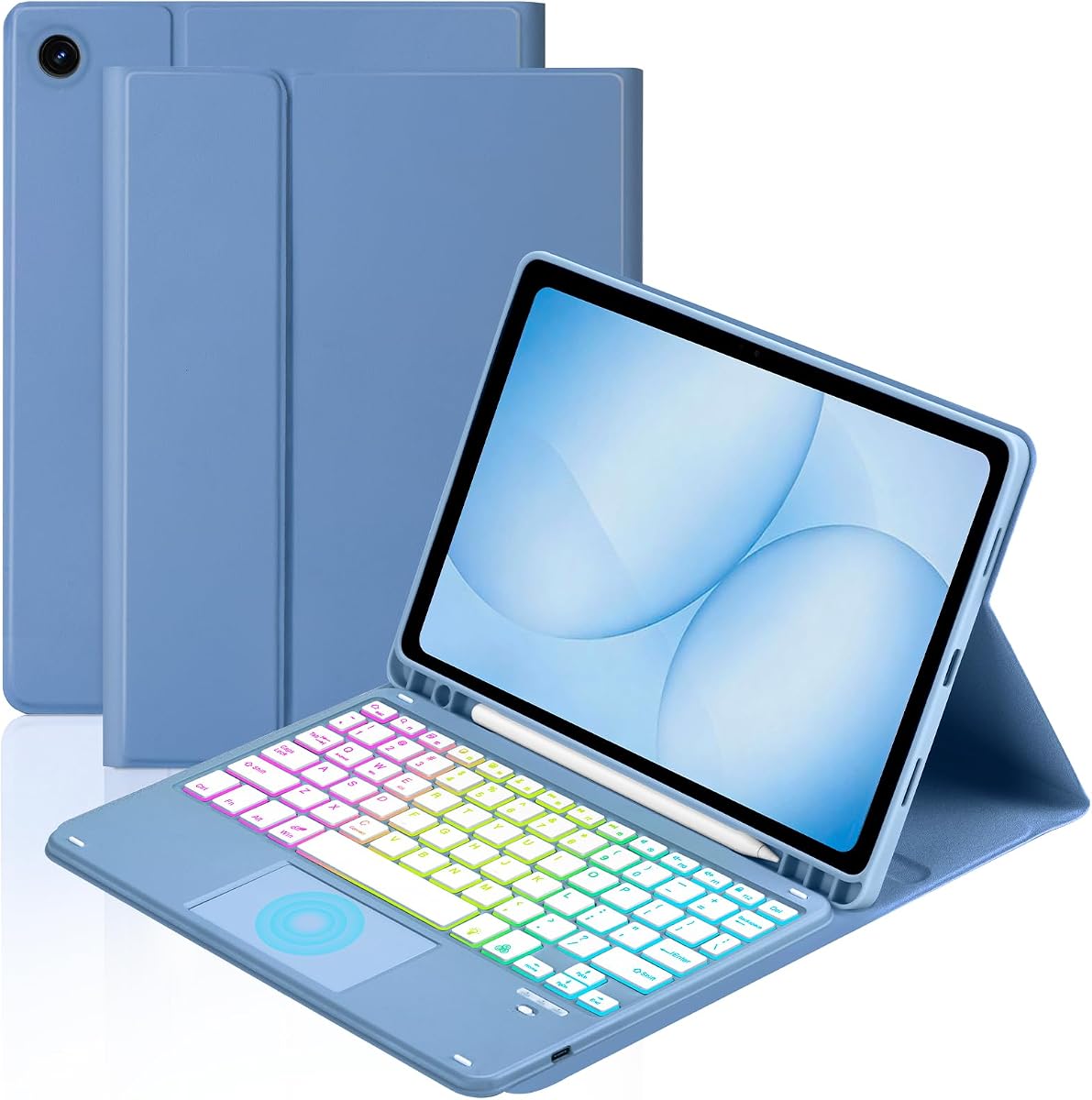
YBING offers exceptional value with its versatile and affordable design. The 360-degree rotation allows horizontal or vertical tablet placement for various tasks. Its rainbow backlight adds a touch of style and visibility in dim conditions.
We may earn a commission when you buy through this link, at no additional cost to you.
With sixteen built-in magnets, the keyboard stays securely attached. The case protects against scratches and falls. You can adjust angles easily for reading or drawing. It charges via Type-C for reliable power.
The backlight drains battery faster when on, limiting usage time. It fits portrait mode best when using the first two stand slots. However, the magnetic design keeps it stable during use. It is a solid budget option.
Best for students and casual users seeking affordability. The rotation and lighting features provide premium-like experiences at a lower cost. We recommend it for those looking for practical features without overspending.
The 360-degree rotation means you can position your tablet horizontally or vertically, giving you flexibility for everything from video watching to document editing.
Powerful built-in magnets ensure the keyboard stays firmly in place, preventing movement or slipping while you type or adjust your viewing position.
We may earn a commission when you buy through this link, at no additional cost to you.
Harvopu delivers precision with a 3-Level DPI wireless mouse included. This allows instant switching between sensitivities for different tasks like browsing or editing. The keyboard features vibrant colors for visibility in dark settings.
We may earn a commission when you buy through this link, at no additional cost to you.
Its battery life is marathon-ready, providing up to 180 hours of use per charge. The case resists stains and wipes clean easily. This makes it practical for daily use and travel. It guards against bumps and scratches effectively.
The detachable keyboard offers flexibility when not needed. However, the mouse adds some bulk to the setup. Sleep mode activates to save power when inactive. It is ideal for work and browsing.
Great for users who prioritize cursor precision. The battery and durability are standout features. We recommend it for professionals needing accuracy and long sessions without frequent recharging concerns.
The adjustable DPI settings let you fine-tune mouse sensitivity, ensuring smooth navigation and precise clicks whether you are editing graphics or just browsing the web.
The stain-resistant case material means accidental spills can be wiped away quickly, keeping your setup looking fresh and new without complicated cleaning routines.
We may earn a commission when you buy through this link, at no additional cost to you.
TiMOVO features a power-saving mode with seven vibrant backlight colors. The colors make typing easy and fun in any lighting condition. It offers three adjustable angles for a comfortable viewing and typing experience.
We may earn a commission when you buy through this link, at no additional cost to you.
The battery lasts over 90 hours on a full charge. Auto sleep mode activates after ten minutes of inactivity. The anti-slide design protects against scratches and bumps. It is detachable for convenient carrying on the go.
The disconnect feature requires pressing a key to reconnect, which is minor but worth noting. The black finish fits modern aesthetics. This case ensures your tablet stays safe while providing long power life.
Ideal for users who value lighting and battery longevity. The multi-angle support enhances usability. We recommend it for those needing reliable power and easy adjustment for different tasks.
Seven color options let you switch the mood or improve visibility, making typing more enjoyable whether you are in a bright room or a dim space.
With long battery life and multiple angles, you can work for extended periods without interruption or strain, making it suitable for travel or all-day use.
We may earn a commission when you buy through this link, at no additional cost to you.
MePadKey provides a smart touchpad with robust multi-touch support. You can use up to four fingers for gestures like scrolling and screenshots. The rainbow backlight improves typing visibility and adds visual style.
We may earn a commission when you buy through this link, at no additional cost to you.
The keyboard has shortcut keys for quick access to functions like copy and paste. Magnetic adsorption keeps it secure. Two anti-slip grooves allow angle adjustments. It supports detachable convenience when you need to carry the tablet alone.
Note that no mouse or pen is included. However, the trackpad covers most navigation needs. The battery charges in 2-3 hours for regular use. It ensures your device is protected against daily wear.
Great for users who prefer touchpad navigation. The gesture support enhances efficiency. We recommend it for those seeking a responsive and visually appealing keyboard solution.
Multi-finger support lets you scroll, zoom, and switch apps with simple swipes, making navigation faster and more intuitive than tapping on the screen.
The rainbow backlight modes let you personalize your device, ensuring you can type comfortably in any lighting while adding a bit of flair to your setup.
We may earn a commission when you buy through this link, at no additional cost to you.
This variant offers similar features with a focus on 360-degree rotation. The protective case rotates to suit your favorite angle easily. The touchpad supports multi-finger gestures for efficient navigation.
We may earn a commission when you buy through this link, at no additional cost to you.
It includes shortcut keys for faster workflow. The rainbow backlight and breathing modes are easy to switch. The pen holder ensures your stylus stays secure. It fits multiple systems with easy switching.
Sleep mode disconnects after inactivity. You can wake it up quickly by pressing a key. This is minor. The design balances protection and function. It is ideal for entertainment and productivity.
Best for users who need versatile angles and touch controls. The rotation adds flexibility for different viewing preferences. We recommend it for those who value style and ease of use.
The 360-degree rotation lets you flip your tablet easily, making it simple to switch between landscape typing and portrait reading modes instantly.
Shortcut keys and customizable lighting combine to make your workflow faster and your device look great, giving you both function and form in one package.
We may earn a commission when you buy through this link, at no additional cost to you.
Supveco offers premium protection with a honeycomb grid pattern that reduces overheating. The flexible silicone and TPU cover shield against shocks and scratches. It increases the tablet lifespan significantly with superior build quality.
We may earn a commission when you buy through this link, at no additional cost to you.
It features auto sleep/wake to save battery. The keyboard supports three systems via shortcut switching. Backlit keys make typing easy in low light. The pencil holder keeps your stylus secure and accessible.
Charging takes 3.5 hours to fill the battery. The indicator light reminds you when power is low. The magnetic design allows easy keyboard repositioning. It ensures your device stays safe and stylish.
Ideal for users who prioritize quality and protection. The multi-system compatibility adds flexibility. We recommend it for anyone wanting a durable and efficient typing solution for long-term use.
The honeycomb grid absorbs shock and heat, protecting your tablet from internal and external damage while keeping it cool during extended sessions.
With simple shortcut keys, you can switch between operating systems without hassle, making this a versatile choice for users who work across different platforms.
We may earn a commission when you buy through this link, at no additional cost to you.
Selecting the right keyboard case involves evaluating key factors like compatibility, input methods, battery life, and protection to ensure it meets your specific needs.
Always verify the model number before purchasing. The Samsung Galaxy Tab A11+ and A9+ use specific model codes such as SM-X230, SM-X236B, SM-X210, and SM-X216B. Cases designed for one model may not fit others.
Check your tablet settings to confirm the exact model number. This ensures the keyboard fits properly and aligns with ports and sensors.
Decide between a keyboard-only option, a keyboard with a trackpad, or one that includes a mouse. Trackpads offer laptop-like precision while mice provide distinct cursor control for detailed work.
Choose based on your typical tasks. Trackpads are great for multitasking while mice help with design or editing work.
Battery performance varies widely between models. Some keyboards offer hours of use on a single charge while others last days or weeks. Backlight usage significantly impacts overall battery drain.
Look for models with efficient power-saving modes. Check charging times and battery capacity to ensure it matches your daily workflow needs.
Backlit keys are essential for typing in low-light environments. Options range from single-color to rainbow lighting. Some allow adjusting brightness or switching modes to suit preferences.
Consider whether you need customizable lighting or simple illumination. Adjustable brightness helps save power when needed.
Keyboard cases vary in how they attach to the tablet. Magnetic designs offer quick detachment while some have fixed connections. Rotatable stands allow flexible positioning for various angles.
Determine if you need a removable keyboard or a fixed setup. Rotation options improve comfort during different activities.
Lightweight and slim cases are easier to carry daily. Consider the total weight when adding the keyboard and stand to your tablet. Foldable designs save space when stored.
Balance protection with weight. Ultra-light cases are better for travel while heavier ones offer more durability.
Many cases include a holder for your stylus. This keeps your pen secure and accessible. However, note that pens are usually sold separately.
If you use a stylus regularly, look for a case with a dedicated holder. This prevents loss and ensures your tool is ready to use.
Full coverage cases protect against scratches, drops, and daily wear. Some use materials like honeycomb cushioning to prevent overheating and damage. Anti-slip grooves add stability.
Choose a case that offers 360-degree protection if you are often on the move. This ensures your investment remains safe.
To get started, ensure your tablet is fully charged and match the model number on the case. Power on the keyboard via USB-C or its switch if applicable.
Connect the keyboard to your tablet through the magnetic interface or Bluetooth. For Bluetooth keyboards, navigate to your tablet's settings and select the keyboard from the available devices list.
Care for your keyboard by avoiding direct sunlight and moisture. Clean keys gently with a soft cloth and store it in a cool dry place to preserve battery health.
These keyboards are designed specifically for the Galaxy Tab A11+ and A9+ 11-inch models. Always check the model number starting with SM-X in your tablet settings to ensure a perfect fit before buying.
Most cases listed are exclusive to the A11+ and A9+ series. Some support other systems like Windows or iOS but the physical fit is specific to these Samsung models.
Most keyboards use a USB-C cable included with the case. Connect it to a power source and charge until the indicator light shows full. Typical charging takes around two to three hours.
Yes, most keyboards are detachable. You can remove them magnetically or via Bluetooth to use separately. The case protects the tablet while the keyboard stays attached or detached as needed.
Some models include a built-in multi-touch trackpad while others do not. Check the product specifications to confirm if a trackpad is included before purchasing based on your needs.
Battery life varies by model and usage. Some keyboards last up to 720 hours in standby or 180 hours of active use. Checkbacks product details for exact estimates.
No, the S Pen or stylus is typically not included with these cases. Most models offer a holder slot to store your pen securely when not in use.
If using Bluetooth, ensure the keyboard is charged and within range. For magnetic cases, check alignment. Reconnect through tablet settings or press any key to wake it up.
This guide reviewed ten top options for transforming your Samsung A11 tablet into a versatile workspace. From budget-friendly choices to premium picks with advanced trackpads each model offers unique benefits tailored to different users.
Consider your priorities like battery life, backlight features, or mouse support when making your final selection. Whether you value portability or extensive protection these cases provide reliable performance for daily tasks.
Remember to check current availability and pricing before purchasing. Select the model that best fits your workflow and ensures long-term satisfaction with your tablet experience.